---
title: Authentication node reference
description: The Data Store Decision node checks that the credentials provided during authentication match the ones stored in the configured data store for the realm.
component: auth-node-ref
version: 7.4
page_id: auth-node-ref::overview
canonical_url: https://docs.pingidentity.com/auth-node-ref/latest/overview.html
llms_txt: https://docs.pingidentity.com/auth-node-ref/llms.txt
docs_for_agents: https://developer.pingidentity.com/build-with-ai/docs-for-agents.md
superseded_by: https://docs.pingidentity.com/auth-node-ref/latest/overview.html
section_ids:
basic_nodes: Basic nodes
auth-node-data-store-decision: Data Store Decision node
compatibility: Compatibility
inputs: Inputs
dependencies: Dependencies
configuration: Configuration
outputs: Outputs
outcomes: Outcomes
errors: Errors
troubleshooting: Troubleshooting
examples: Examples
datastore-decision-example1: "Example 1: Simple username and password collector nodes with Data Store Decision node"
datastore-decision-example2: "Example 2: Grant the user several attempts to enter their credentials correctly"
additional_information: Additional information
auth-node-kerberos: Kerberos node
compatibility_2: Compatibility
outcomes_2: Outcomes
properties: Properties
example: Example
auth-node-ldap-decision: LDAP Decision node
compatibility_3: Compatibility
inputs_2: Inputs
prerequisites: Prerequisites
configuration_2: Configuration
outcomes_3: Outcomes
auth-node-password-collector: Password Collector node
compatibility_4: Compatibility
outcomes_4: Outcomes
properties_2: Properties
auth-node-username-collector: Username Collector node
compatibility_5: Compatibility
outcomes_5: Outcomes
properties_3: Properties
auth-node-zero-page-login-collector: Zero Page Login Collector node
compatibility_6: Compatibility
compatibility_7: Compatibility
inputs_3: Inputs
dependencies_2: Dependencies
configuration_3: Configuration
properties_4: Properties
outputs_2: Outputs
outcomes_6: Outcomes
errors_2: Errors
node-zero-page-login-example: Example
multi_factor_nodes: Multi-factor nodes
auth-node-get-authenticator-app: Get Authenticator App node
compatibility_8: Compatibility
outcomes_7: Outcomes
properties_5: Properties
auth-node-hotp-generator: HOTP Generator node
compatibility_9: Compatibility
outcomes_8: Outcomes
properties_6: Properties
figure-trees-hotp-example: Example
auth-node-mfa-registration-options: MFA Registration Options node
compatibility_10: Compatibility
outcomes_9: Outcomes
properties_7: Properties
example_2: Example
auth-node-oath-device-storage: OATH Device Storage node
compatibility_11: Compatibility
authenticators: Authenticators
outcomes_10: Outcomes
properties_8: Properties
auth-node-oath-registration: OATH Registration node
compatibility_12: Compatibility
authenticators_2: Authenticators
outcomes_11: Outcomes
properties_9: Properties
auth-node-oath-token-verifier: OATH Token Verifier node
compatibility_13: Compatibility
authenticators_3: Authenticators
outcomes_12: Outcomes
properties_10: Properties
authn-mfa-oath-tree-example: Example
auth-node-opt-out-multi-factor: Opt-out Multi-Factor Authentication node
compatibility_14: Compatibility
outcomes_13: Outcomes
properties_11: Properties
auth-node-otp-collector-decision: OTP Collector Decision node
compatibility_15: Compatibility
outcomes_14: Outcomes
properties_12: Properties
auth-node-otp-email-sender: OTP Email Sender node
compatibility_16: Compatibility
outcomes_15: Outcomes
properties_13: Properties
auth-node-otp-sms-sender: OTP SMS Sender node
compatibility_17: Compatibility
outcomes_16: Outcomes
properties_14: Properties
auth-node-push-registration: Push Registration node
compatibility_18: Compatibility
authenticators_4: Authenticators
outcomes_17: Outcomes
properties_15: Properties
example_3: Example
auth-node-push-result-verifier: Push Result Verifier node
compatibility_19: Compatibility
authenticators_5: Authenticators
outcomes_18: Outcomes
properties_16: Properties
auth-node-push-sender: Push Sender node
compatibility_20: Compatibility
authenticators_6: Authenticators
outcomes_19: Outcomes
properties_17: Properties
push-sender-example: Example
respond-to-push: Respond to push notifications
auth-node-push-wait: Push Wait node
compatibility_21: Compatibility
authenticators_7: Authenticators
outcomes_20: Outcomes
push-wait-properties: Properties
example_4: Example
auth-node-recovery-code-collector-decision: Recovery Code Collector Decision node
compatibility_22: Compatibility
outcomes_21: Outcomes
properties_18: Properties
auth-node-recovery-code-display: Recovery Code Display node
compatibility_23: Compatibility
outcomes_22: Outcomes
properties_19: Properties
example_5: Example
auth-node-webauthn-auth: WebAuthn Authentication node
compatibility_24: Compatibility
outcomes_23: Outcomes
properties_20: Properties
example_6: Example
auth-node-webauthn-device-storage: WebAuthn Device Storage node
compatibility_25: Compatibility
outcomes_24: Outcomes
properties_21: Properties
auth-node-webauthn-registration: WebAuthn Registration node
compatibility_26: Compatibility
outcomes_25: Outcomes
properties_22: Properties
example_7: Example
risk_management_nodes: Risk management nodes
auth-node-account-active-decision: Account Active Decision node
compatibility_27: Compatibility
outcomes_26: Outcomes
properties_23: Properties
auth-node-account-lockout: Account Lockout node
compatibility_28: Compatibility
outcomes_27: Outcomes
properties_24: Properties
example_8: Example
auth-node-auth-level-decision: Auth Level Decision node
compatibility_29: Compatibility
outcomes_28: Outcomes
properties_25: Properties
auth-node-captcha: CAPTCHA node
compatibility_30: Compatibility
outcomes_29: Outcomes
properties_26: Properties
example_9: Example
auth-node-legacy-captcha: Legacy CAPTCHA node
compatibility_31: Compatibility
outcomes_30: Outcomes
properties_27: Properties
auth-node-modify-auth-level: Modify Auth Level node
compatibility_32: Compatibility
outcomes_31: Outcomes
properties_28: Properties
behavioral_nodes: Behavioral nodes
auth-node-increment-login-count: Increment Login Count node
compatibility_33: Compatibility
properties_29: Properties
auth-node-login-count-decision: Login Count Decision node
compatibility_34: Compatibility
properties_30: Properties
contextual_nodes: Contextual nodes
auth-node-certificate-collector: Certificate Collector node
compatibility_35: Compatibility
outcomes_32: Outcomes
properties_31: Properties
auth-node-certificate-user-extractor: Certificate User Extractor node
compatibility_36: Compatibility
outcomes_33: Outcomes
properties_32: Properties
auth-node-certificate-validation: Certificate Validation node
compatibility_37: Compatibility
outcomes_34: Outcomes
properties_33: Properties
example_10: Example
auth-node-cookie-presence-decision: Cookie Presence Decision node
compatibility_38: Compatibility
outcomes_35: Outcomes
properties_34: Properties
auth-node-device-geofencing: Device Geofencing node
compatibility_39: Compatibility
outcomes_36: Outcomes
properties_35: Properties
auth-node-device-profile-location-match: Device Location Match node
compatibility_40: Compatibility
outcomes_37: Outcomes
properties_36: Properties
auth-node-device-profile-match: Device Match node
compatibility_41: Compatibility
outcomes_38: Outcomes
properties_37: Properties
auth-node-device-profile-collector: Device Profile Collector node
compatibility_42: Compatibility
outcomes_39: Outcomes
properties_38: Properties
outputs_3: Outputs
auth-node-device-profile-save: Device Profile Save node
compatibility_43: Compatibility
outcomes_40: Outcomes
properties_39: Properties
auth-node-device-tampering-verification: Device Tampering Verification node
compatibility_44: Compatibility
outcomes_41: Outcomes
properties_40: Properties
auth-node-persistent-cookie-decision: Persistent Cookie Decision node
compatibility_45: Compatibility
outcomes_42: Outcomes
properties_41: Properties
example_11: Example
auth-node-set-custom-cookie: Set Custom Cookie node
compatibility_46: Compatibility
inputs_4: Inputs
dependencies_3: Dependencies
configuration_4: Configuration
outcomes_43: Outcomes
example_12: Example
auth-node-set-persistent-cookie: Set Persistent Cookie node
compatibility_47: Compatibility
dependencies_4: Dependencies
configuration_5: Configuration
outcomes_44: Outcomes
federation_nodes: Federation nodes
auth-node-oauth2: OAuth 2.0 node
compatibility_48: Compatibility
outcomes_45: Outcomes
properties_42: Properties
auth-node-oidc: OpenID Connect node
compatibility_49: Compatibility
outcomes_46: Outcomes
properties_43: Properties
auth-node-provision-dynamic-account: Provision Dynamic Account node
compatibility_50: Compatibility
outcomes_47: Outcomes
properties_44: Properties
example_13: Example
auth-node-provision-IDM-account: Provision IDM Account node
compatibility_51: Compatibility
outcomes_48: Outcomes
properties_45: Properties
example_14: Example
auth-node-saml2: SAML2 Authentication node
compatibility_52: Compatibility
outcomes_49: Outcomes
properties_46: Properties
auth-node-social-facebook: Social Facebook node
compatibility_53: Compatibility
outcomes_50: Outcomes
properties_47: Properties
example_15: Example
auth-node-social-google: Social Google node
compatibility_54: Compatibility
outcomes_51: Outcomes
properties_48: Properties
example_16: Example
auth-node-social-ignore-profile: Social Ignore Profile node
compatibility_55: Compatibility
outcomes_52: Outcomes
properties_49: Properties
auth-node-social-provider-handler: Social Provider Handler node
compatibility_56: Compatibility
inputs_5: Inputs
dependencies_5: Dependencies
configuration_6: Configuration
outputs_4: Outputs
outcomes_53: Outcomes
example_17: Example
auth-node-write-federation-information: Write Federation Information node
compatibility_57: Compatibility
outcomes_54: Outcomes
properties_50: Properties
identity_management_nodes: Identity management nodes
auth-node-accept-terms-and-conditions: Accept Terms and Conditions node
compatibility_58: Compatibility
outcomes_55: Outcomes
properties_51: Properties
example_18: Example
auth-node-attribute-collector: Attribute Collector node
compatibility_59: Compatibility
outcomes_56: Outcomes
properties_52: Properties
auth-node-attribute-present-decision: Attribute Present Decision node
compatibility_60: Compatibility
outcomes_57: Outcomes
properties_53: Properties
auth-node-attribute-value-decision: Attribute Value Decision node
compatibility_61: Compatibility
properties_54: Properties
auth-node-consent-collector: Consent Collector node
compatibility_62: Compatibility
properties_55: Properties
auth-node-create-object: Create Object node
compatibility_63: Compatibility
properties_56: Properties
auth-node-create-password: Create Password node
compatibility_64: Compatibility
outcomes_58: Outcomes
properties_57: Properties
example_19: Example
auth-node-display-username: Display Username node
compatibility_65: Compatibility
properties_58: Properties
auth-node-identify-existing-user: Identify Existing User node
compatibility_66: Compatibility
properties_59: Properties
example_20: Example
auth-node-kba-decision: KBA Decision node
compatibility_67: Compatibility
outcomes_59: Outcomes
properties_60: Properties
auth-node-kba-definition: KBA Definition node
compatibility_68: Compatibility
properties_61: Properties
auth-node-kba-verification: KBA Verification node
compatibility_69: Compatibility
properties_62: Properties
auth-node-passthrough-authentication: Pass-through Authentication node
compatibility_70: Compatibility
connectors_that_support_pass_through_authentication: Connectors that support pass-through authentication
outcomes_60: Outcomes
properties_63: Properties
example_21: Example
auth-node-patch-object: Patch Object node
compatibility_71: Compatibility
properties_64: Properties
auth-node-platform-password: Platform Password node
compatibility_72: Compatibility
outcomes_61: Outcomes
properties_65: Properties
auth-node-platform-username: Platform Username node
compatibility_73: Compatibility
outcomes_62: Outcomes
properties_66: Properties
auth-node-profile-completeness-decision: Profile Completeness Decision node
compatibility_74: Compatibility
outcomes_63: Outcomes
properties_67: Properties
auth-node-query-filter-decision: Query Filter Decision node
compatibility_75: Compatibility
outcomes_64: Outcomes
properties_68: Properties
auth-node-required-attributes-present: Required Attributes Present node
compatibility_76: Compatibility
outcomes_65: Outcomes
properties_69: Properties
auth-node-select-identity-provider: Select Identity Provider node
compatibility_77: Compatibility
outcomes_66: Outcomes
properties_70: Properties
auth-node-terms-and-conditions-decision: Terms and Conditions Decision node
compatibility_78: Compatibility
outcomes_67: Outcomes
properties_71: Properties
auth-node-time-since-decision: Time Since Decision node
compatibility_79: Compatibility
outcomes_68: Outcomes
properties_72: Properties
utility_nodes: Utility nodes
auth-node-agent-data-store-decision: Agent Data Store Decision node
compatibility_80: Compatibility
outcomes_69: Outcomes
properties_73: Properties
auth-node-anonymous-session-upgrade: Anonymous Session Upgrade node
compatibility_81: Compatibility
outcomes_70: Outcomes
properties_74: Properties
example_22: Example
auth-node-anonymous-user-mapping: Anonymous User Mapping node
compatibility_82: Compatibility
outcomes_71: Outcomes
properties_75: Properties
example_23: Example
auth-node-choice-collector: Choice Collector node
compatibility_83: Compatibility
outcomes_72: Outcomes
properties_76: Properties
auth-node-config-provider: Configuration Provider node
compatibility_84: Compatibility
inputs_6: Inputs
dependencies_6: Dependencies
configuration_7: Configuration
outputs_5: Outputs
outcomes_73: Outcomes
errors_3: Errors
examples_2: Examples
auth-node-email-suspend: Email Suspend node
compatibility_85: Compatibility
inputs_7: Inputs
email-suspend-dependencies: Dependencies
configuration_8: Configuration
outputs_6: Outputs
outcomes_74: Outcomes
errors_4: Errors
examples_3: Examples
forgotten_username: Forgotten username
before_you_start: Before you start
the_journey: The journey
try_the_journey: Try the journey
registration: Registration
auth-node-email-template: Email Template node
compatibility_86: Compatibility
inputs_8: Inputs
email-template-dependencies: Dependencies
configuration_9: Configuration
outputs_7: Outputs
outcomes_75: Outcomes
errors_5: Errors
email-template-examples: Examples
auth-node-failure-url: Failure URL node
compatibility_87: Compatibility
outcomes_76: Outcomes
properties_77: Properties
auth-node-get-session-data: Get Session Data node
compatibility_88: Compatibility
outcomes_77: Outcomes
properties_78: Properties
example_24: Example
auth-node-inner-tree-evaluator: Inner Tree Evaluator node
compatibility_89: Compatibility
outcomes_78: Outcomes
properties_79: Properties
auth-node-message: Message node
compatibility_90: Compatibility
inputs_9: Inputs
dependencies_7: Dependencies
configuration_10: Configuration
outputs_8: Outputs
outcomes_79: Outcomes
errors_6: Errors
examples_4: Examples
auth-node-meter: Meter node
compatibility_91: Compatibility
outcomes_80: Outcomes
properties_80: Properties
auth-node-page: Page node
compatibility_92: Compatibility
outcomes_81: Outcomes
properties_81: Properties
example_25: Example
auth-node-polling-wait: Polling Wait node
compatibility_93: Compatibility
outcomes_82: Outcomes
properties_82: Properties
auth-node-register-logout-webhook: Register Logout Webhook node
compatibility_94: Compatibility
outcomes_83: Outcomes
properties_83: Properties
auth-node-remove-session-properties: Remove Session Properties node
compatibility_95: Compatibility
outcomes_84: Outcomes
properties_84: Properties
auth-node-retry-limit-decision: Retry Limit Decision node
compatibility_96: Compatibility
outcomes_85: Outcomes
properties_85: Properties
example_26: Example
auth-node-scripted-decision: Scripted Decision node
compatibility_97: Compatibility
inputs_10: Inputs
dependencies_8: Dependencies
configuration_11: Configuration
outputs_9: Outputs
outcomes_86: Outcomes
errors_7: Errors
examples_5: Examples
auth-node-set-session-properties: Set Session Properties node
compatibility_98: Compatibility
dependencies_9: Dependencies
configuration_12: Configuration
outcomes_87: Outcomes
auth-node-state-metadata: State Metadata node
compatibility_99: Compatibility
outcomes_88: Outcomes
properties_86: Properties
auth-node-success-url: Success URL node
compatibility_100: Compatibility
properties_87: Properties
auth-node-timer-start: Timer Start node
compatibility_101: Compatibility
outcomes_89: Outcomes
properties_88: Properties
auth-node-timer-stop: Timer Stop node
compatibility_102: Compatibility
outcomes_90: Outcomes
properties_89: Properties
thing_nodes: Thing nodes
auth-node-authenticate-thing: Authenticate Thing node
compatibility_103: Compatibility
outcomes_91: Outcomes
properties_90: Properties
examples_6: Examples
auth-node-register-thing: Register Thing node
compatibility_104: Compatibility
outcomes_92: Outcomes
properties_91: Properties
uncategorized_nodes: Uncategorized nodes
auth-node-debug: Debug node
compatibility_105: Compatibility
outcomes_93: Outcomes
properties_92: Properties
---
# Authentication node reference
## Basic nodes
### Data Store Decision node
The Data Store Decision node checks that the credentials provided during authentication match the ones stored in the configured data store for the realm.
#### Compatibility
| Product | Compatible? |
| ------------------------------------------ | --------------------- |
| PingOne Advanced Identity Cloud | [icon: check, set=fa] |
| ForgeRock Access Management (self-managed) | [icon: check, set=fa] |
| Ping Identity Platform (self-managed) | [icon: check, set=fa] |
#### Inputs
This node requires the `realm`, `username`, and `password` properties in the incoming node state.
You can implement the following nodes as inputs to the Data Store Decision node:
* Input nodes
* [Username Collector node](am-only/username-collector.html) (standalone AM) or [Platform Username node](platform-username.html) (Ping Identity Platform deployment)
* [Password Collector node](am-only/password-collector.html) (standalone AM) or [Platform Password node](platform-password.html) (Ping Identity Platform deployment)
* [Zero Page Login Collector node](zero-page-login-collector.html)
#### Dependencies
The Data Store Decision node is a basic node used in many types of authentication application types, such as basic, push, OAuth 2.0, and social provider authentication applications.
#### Configuration
This node has no configurable properties.
#### Outputs
This node copies shared and transient state into the outgoing node state.
#### Outcomes
Returns a boolean outcome:
* `True`
The credentials match those found in the data store.
* `False`
The credentials do *not* match those found in the data store.
#### Errors
The following Data Store Decision node warnings and errors can appear in the logs:
* Warnings
* "invalid password error"
* "invalid username error"
* Errors
* "Exception in data store decision node"
##### Troubleshooting
Review any errors and warnings this node logged.
* If this node logged a warning, fix the credentials and try again.
* If this node logged an error, review the log messages for the transaction to find the reason for the exception.
#### Examples
##### Example 1: Simple username and password collector nodes with Data Store Decision node
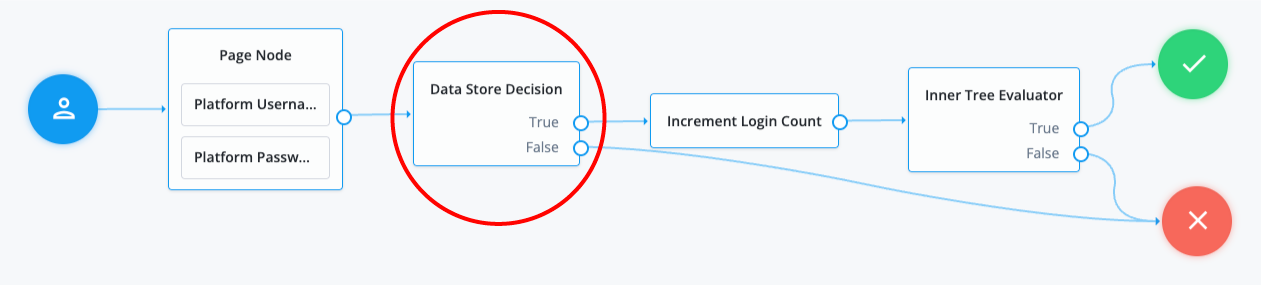
This example illustrates a simple login process. The journey involves a [Page node](page.html) that contains two embedded nodes: [Platform Username node](platform-username.html) and [Platform Password node](platform-password.html). To enhance user experience, the Page node lets users input their username and password on a single page, instead of splitting them across two different pages.
The Data Store Decision node has two outcomes: `True` or `False`. When the outcome is `True`, it triggers a [Login Count Decision node](login-count-decision.html). The [Increment Login Count node](increment-login-count.html) then moves to an [Inner Tree Evaluator node](inner-tree-evaluator.html), which performs additional login processes. The `False` outcome connects directly to a failure node, indicating a failed state where the username and/or password provided by the user did not match the information stored in the data store.
##### Example 2: Grant the user several attempts to enter their credentials correctly
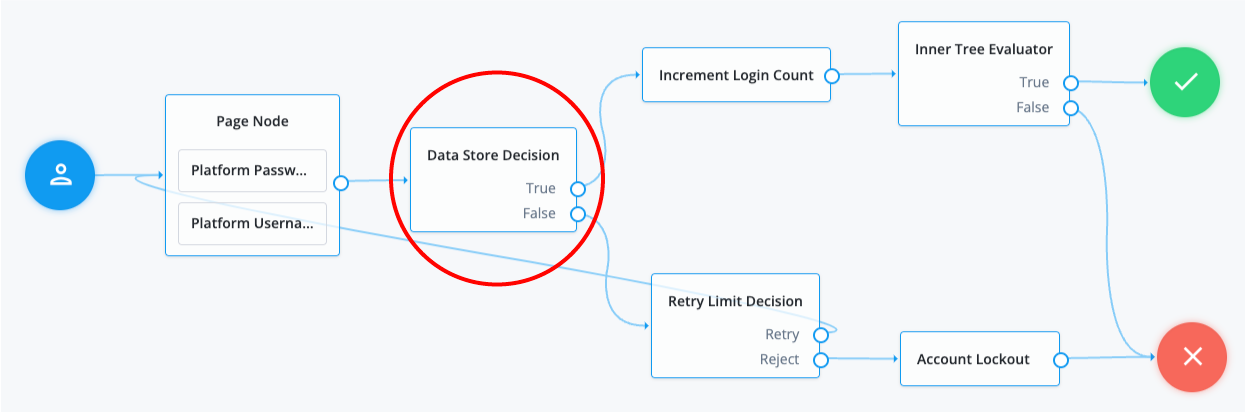
In the following example, when an authentication attempt fails at the Data Store Decision node, you can direct it to a [Retry Limit Decision node](retry-limit-decision.html). The [Retry Limit Decision node](retry-limit-decision.html) determines the number of retries allowed and either retries the login attempt or rejects it. If the journey rejects the login attempt after reaching the configured limit, for example three attempts, the operation results in an account lockout.
#### Additional information
The following are alternate nodes that you can use in your journeys depending on your specific use cases:
* The [LDAP Decision node](ldap-decision.html) supports LDAP Behera Password Policies with separate outcomes for accounts that are locked and passwords that have expired.
### Kerberos node
Enables desktop single sign-on such that a user who has already authenticated with a Kerberos Key Distribution Center can authenticate to AM without having to provide the login information again.
To achieve this, the user presents a Kerberos token to AM through the Simple and Protected GSS-API Negotiation Mechanism (SPNEGO) protocol.
End users may need to set up Integrated Windows Authentication in Microsoft Edge to benefit from single sign-on when logged on to a Windows desktop.
#### Compatibility
| Product | Compatible? |
| ------------------------------------------ | --------------------- |
| PingOne Advanced Identity Cloud | [icon: times, set=fa] |
| ForgeRock Access Management (self-managed) | [icon: check, set=fa] |
| Ping Identity Platform (self-managed) | [icon: check, set=fa] |
#### Outcomes
* `True`
* `False`
Evaluation continues along the `True` path if Windows Desktop SSO is successful; otherwise, evaluation continues along the `False` path.
#### Properties
| Property | Usage |
| --------------------------------- | ----------------------------------------------------------------------------------------------------------------------------------------------------------------------------------------------------------------------------------------------------------------------------------------------------------------------------------------------------------------------------------------------------------------------------------------------------------------------------------------------------------------------------------------- |
| Service Principal | Specifies the Kerberos principal for authentication in the format `HTTP/AM-DOMAIN@AD-DOMAIN`, where *AM-DOMAIN* corresponds to the host and domain names of the AM instance, and *AD-DOMAIN* is the domain name of the Kerberos realm (the FQDN of the Active Directory domain). *AD-DOMAIN* can differ from the domain name for AM.In multi-instance AM deployments, configure *AM-DOMAIN* as the FQDN or IP address of the load balancer in front of the AM instances.For example, `HTTP/AM-LB.example.com@KERBEROSREALM.INTERNAL.COM`. |
| Key Tab File Path | Specifies the full, absolute path of the keytab file for the specified Service Principal.
You generate the keytab file using the Windows ktpass utility; for example:
C:\\> ktpass -out fileName.keytab -princ HTTP/openam.example.com\@AD_DOMAIN.COM -pass +rdnPass -maxPass 256 -mapuser amKerberos\@frdpcloud.com -crypto AES256-SHA1 -ptype KRB5_NT_PRINCIPAL -kvno 0 |
| Kerberos Realm | Specifies the name of the Kerberos (Active Directory) realm used for authentication.Must be specified in ALL CAPS. |
| Kerberos Server Name | Specifies the fully qualified domain name, or IP address of the Kerberos (Active Directory) server. |
| Trusted Kerberos realms | Specifies a list of trusted Kerberos realms for user Kerberos tickets. If realms are configured, then Kerberos tickets are only accepted if the realm part of the user principal name of the user's Kerberos ticket matches a realm from the list.Each trusted Kerberos realm must be specified in all caps. |
| Return Principal with Domain Name | When enabled, AM returns the fully qualified name of the authenticated user rather than just the username. |
| Lookup User In Realm | Validates the user against the configured data stores. If the user from the Kerberos token is not found, evaluation continues along the `False` path.This search uses the `Alias Search Attribute Name` from the core realm attributes. Find more information about this property in [User profile](https://docs.pingidentity.com/pingam/7.4/am-authentication/authn-core-settings.html#authn-core-user-profile). |
| Is Initiator | When enabled (`true`), specifies that the node is using *initiator* credentials, which is the default.When disabled (`false`), specifies that the node is using *acceptor* credentials. |
#### Example
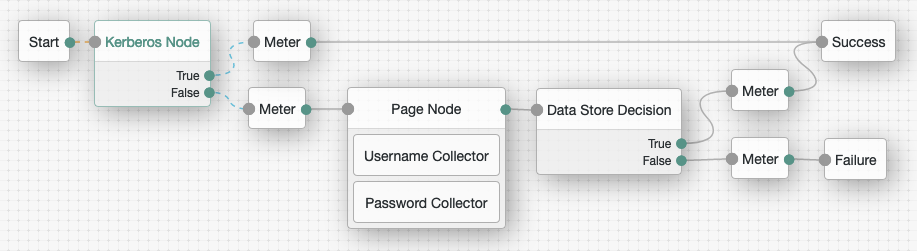
This flow attempts to authenticate the user with Windows Desktop SSO. If unsuccessful, AM requests the username and password for login. Meter nodes are used to track metrics for the various paths through the flow:
### LDAP Decision node
The LDAP Decision node verifies that the provided username and password exist in the specified LDAP user data store. The node also checks whether the associated user account has expired or is locked out.
#### Compatibility
| Product | Compatible? |
| ------------------------------------------ | --------------------- |
| PingOne Advanced Identity Cloud | [icon: check, set=fa] |
| ForgeRock Access Management (self-managed) | [icon: check, set=fa] |
| Ping Identity Platform (self-managed) | [icon: check, set=fa] |
#### Inputs
The node reads the `username` and `password` fields from the node state.
The journey can provide these credentials in a number of ways, for example, with a combination of the [Username Collector node](am-only/username-collector.html) and [Password Collector node](am-only/password-collector.html) (standalone AM), [Platform Username node](platform-username.html) and [Platform Password node](platform-password.html) (Ping Identity Platform deployment), or by using the [Zero Page Login Collector node](zero-page-login-collector.html).
#### Prerequisites
None
#### Configuration
| Property | Usage |
| --------------------------------------------------------------------- | ---------------------------------------------------------------------------------------------------------------------------------------------------------------------------------------------------------------------------------------------------------------------------------------------------------------------------------------------------------------------------------------------------------------------------------------------------------------------------------------------------------------------------------------------------------------------------------------------------------------------------------------------------------------------------------------------------------------------------------------------------------------------------------------------------------------------------------------------------------------------------------------------- |
| Primary LDAP Server *(required)* | Specify one or more primary directory servers. Specify each directory server in the following format: `host:port`.For example, `directory_services.example.com:389`. |
| Secondary LDAP Server | Specify one or more secondary directory servers. Specify each directory server in the following format: `host:port`.The journey uses the secondary servers when none of the primary servers are available.For example, `directory_services_backup.example.com:389`. |
| DN to Start User Search *(required)* | Specify the DN from which to start the user search. More specific DNs, such as `ou=sales,dc=example,dc=com`, result in better search performance.If multiple entries with the same attribute values exist in the directory server, make sure this property is specific enough to return only one entry. |
| Bind User DN, Bind User Password | The credentials used to connect to the LDAP user data store. |
| Attribute Used to Retrieve User Profile *(required)* | The attribute used to retrieve a user profile from the directory server.The user search will have already happened, as specified by the Attributes Used to Search for a User to be Authenticated and User Search Filter properties. |
| Attributes Used to Search for a User to be Authenticated *(required)* | The attributes the node uses to match the credentials provided by the user to an entry in the directory server.For example, a value of `uid` forms the search filter `uid=user`. If you specify multiple values, such as `uid` and `cn`, the node forms a complex search filter `(\|(uid=user)(cn=user))`.Multiple attribute values let the user authenticate with any one of the values. For example, if you set both `uid` and `mail`, then Barbara Jensen can authenticate with either `bjensen` or `bjensen@example.com`. If you are using account lockout and you set multiple attribute values here, you must add those attributes to the Alias Search Attribute Name property in the User profile. |
| User Search Filter | A filter to append to user searches.For example, if your search attribute is `mail` and you set User Search Filter to `(objectClass=inetOrgPerson)`, the node uses `(&(mail=address)(objectClass=inetOrgPerson))` as the resulting search filter. In this example, *address* is the mail address provided by the user. |
| Search Scope | The extent of the search for users in the directory server:- `OBJECT`: The search extends only to the entry specified by the DN to Start User Search.
- `ONELEVEL`: The search extends to the entries that are direct children of the DN to Start User Search.
- `SUBTREE`: The search extends to the DN to Start User Search and every entry under it.Default: `SUBTREE` |
| LDAP Connection Mode | Specifies whether to use SSL or StartTLS to connect to the directory server. The node must be able to trust the certificates used.Possible values: `LDAP`, `LDAPS`, and `StartTLS`Default: `LDAP` |
| mTLS Enabled | Enables mTLS (mutual TLS) between AM and the directory server.This setting applies to *all* configured LDAP servers; that is, AM uses mTLS to authenticate to all LDAP servers configured for this node.When mTLS is enabled, AM ignores the values for Bind User DN and Bind User Password.If you enable this property, you must:- Set the LDAP Connection Mode to `LDAPS`.
- Provide an mTLS Secret Label.Default: Disabled |
| mTLS Secret Label | Label used to create a secret ID for mapping to the mTLS certificate in the secret store. AM uses this label to create a specific secret ID for this node. The secret ID takes the form `am.authentication.nodes.ldap.decision.mtls.label.cert` , where `label` is the value of mTLS Secret Label. The label can only contain alphanumeric characters (`a-z`, `A-Z`, `0-9`) and periods (`.`). It can't start or end with a period. All LDAP servers configured for this node share the same secret label.For more security, you should rotate certificates periodically. When you rotate a certificate, update the corresponding mapping in the realm secret store configuration to reflect this label. When you rotate a certificate, AM closes any existing connections using the old certificate. A new connection is selected from the connection pool and no server restart is required. |
| Return User DN to DataStore | When enabled, the node returns the DN rather than the User ID. From the DN value, AM uses the RDN to search for the user profile. For example, if a returned DN value is `uid=demo,ou=people,dc=openam,dc=example,dc=org`, AM uses `uid=demo` to search the directory server.Default: Enabled |
| User Creation Attributes | This list lets you map (external) attribute names from the LDAP directory server to (internal) attribute names used by AM. |
| Minimum Password Length | The minimum acceptable password length.Default: `8` |
| LDAP Behera Password Policy Support | When enabled, support interoperability with servers that implement the Internet-Draft, [Password Policy for LDAP Directories](https://datatracker.ietf.org/doc/html/draft-behera-ldap-password-policy-09).Default: Enabled |
| Trust All Server Certificates | When enabled, the server blindly trusts server certificates, including self-signed test certificates.Default: Disabled |
| LDAP Connection Heartbeat Interval | Specifies how often AM should send a heartbeat request to the directory server to ensure that the connection doesn't remain idle.Some network administrators configure firewalls and load balancers to drop connections that are idle for too long. Set the units for the interval in the `LDAP Connection Heartbeat Time Unit` property. Setting this property to 0 does not disable the heartbeat (keepalive) or load balancer availability checks. Disabling these features can only be configured at the global level.Default: `10` |
| LDAP Connection Heartbeat Time Unit | The time unit for the `LDAP Connection Heartbeat Interval`.Default: `seconds` |
| LDAP Operations Timeout | The timeout, in seconds, that AM should wait for a response from the directory server.Default: `0` (means no timeout) |
| Use mixed case for password change messages | Specifies whether the server returns password change messages in mixed (sentence) case or transforms them to uppercase.By default, the server transforms password reset and password change messages to uppercase. Enable this setting to return messages in sentence case.Default: Disabled |
#### Outcomes
* `True`
The provided credentials match those found in the LDAP user data store.
* `False`
The provided credentials don't match those found in the LDAP user data store.
* `Locked`
The profile associated with the provided credentials is locked.
* `Cancelled`
The user must change their password. When the journey prompts the user to change their password, the user cancels the password change.
* `Expired`
The profile is found, but the password has expired.
| | |
| - | ----------------------------------------------------------------------------------------------------------------------------------------------------------------------------------------------------------------------------------------------------------------------------------------------------------------------------------------------------------------------------------------------------- |
| | The LDAP Decision node *requires* specific user attributes in the LDAP user data store. These required attributes are present by default in ForgeRock Directory Services. If you are using an alternative identity store, you might need to [modify your LDAP schema](https://docs.pingidentity.com/pingam/7.4/installation/prepare-identity-repository.html#prepare-idrepo-schema) to use this node. |
### Password Collector node
Prompts the user to enter their password.
The captured password is transient, persisting only until the authentication flow reaches the next node requiring user interaction.
#### Compatibility
| Product | Compatible? |
| ------------------------------------------ | --------------------- |
| PingOne Advanced Identity Cloud | [icon: times, set=fa] |
| ForgeRock Access Management (self-managed) | [icon: check, set=fa] |
| Ping Identity Platform (self-managed) | [icon: times, set=fa] |
#### Outcomes
Single outcome path.
Evaluation continues after capturing the password.
#### Properties
This node has no configurable properties.
### Username Collector node
Prompts the user to enter their username.
#### Compatibility
| Product | Compatible? |
| ------------------------------------------ | --------------------- |
| PingOne Advanced Identity Cloud | [icon: times, set=fa] |
| ForgeRock Access Management (self-managed) | [icon: check, set=fa] |
| Ping Identity Platform (self-managed) | [icon: times, set=fa] |
#### Outcomes
Single outcome path.
Evaluation continues after capturing the username.
#### Properties
This node has no configurable properties.
### Zero Page Login Collector node
The Zero Page Login Collector node verifies the presence of specific HTTP username and password headers in the incoming authentication request. If the headers exist, the node uses their corresponding values as the provided username and password.
The Zero Page Login Collector node is commonly used to:
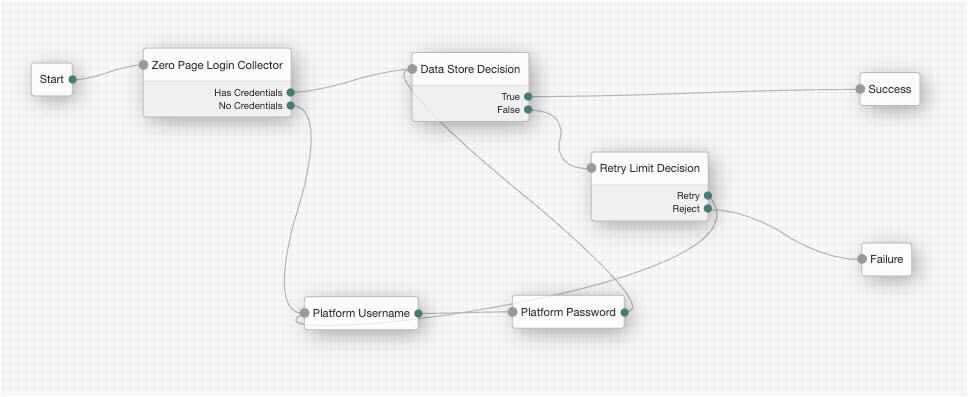
* Connect the `Has Credentials` outcome connector to the input of a [Data Store Decision node](data-store-decision.html).
* Connect the `No Credentials` outcome connector to the input of a [Username Collector node](am-only/username-collector.html) followed by a [Password Collector node](am-only/password-collector.html) (standalone AM) or a [Platform Username node](platform-username.html) followed by a [Platform Password node](platform-password.html) (Ping Identity Platform deployment), and then into the same [Data Store Decision node](data-store-decision.html). For an example of this layout, refer to the default `Example` authentication tree provided in AM.
The password collected by this node remains in the node state only until the journey reaches the next node that requires user interaction.
#### Compatibility
| Product | Compatible? |
| ------------------------------------------ | --------------------- |
| PingOne Advanced Identity Cloud | [icon: check, set=fa] |
| ForgeRock Access Management (self-managed) | [icon: check, set=fa] |
| Ping Identity Platform (self-managed) | [icon: check, set=fa] |
#### Compatibility
| Product | Compatible? |
| ------------------------------------------ | --------------------- |
| PingOne Advanced Identity Cloud | [icon: check, set=fa] |
| ForgeRock Access Management (self-managed) | [icon: check, set=fa] |
| Ping Identity Platform (self-managed) | [icon: check, set=fa] |
#### Inputs
* HTTP username header
* HTTP password header
* An allowlist of referrers if `Allow Without Referer` property is disabled. When you set the `Allow Without Referer` property to `false`, the request *must* contain a referrer from the allowlist; otherwise, the journey ends in a failure.
#### Dependencies
None.
#### Configuration
##### Properties
| Property | Usage |
| --------------------- | -------------------------------------------------------------------------------------------------------------------------------------------------------------------------------------------------------------------------------------------------------------------------------------------------------------------------------------------------------------------- |
| Username Header name | Enter the name of the header that contains the username value.Default: X-OpenAM-Username |
| Password Header name | Enter the name of the header that contains the password value.Default: X-OpenAM-Password |
| Allow without referer | If enabled, the node accepts incoming requests that do not contain a `Referer` HTTP header. If a `Referer` HTTP header is present, the value is not checked.If disabled, a `Referer` HTTP header must be present in the incoming request, and the value must appear in the Referer allowlist property.Default: `Enabled` |
| Referer Whitelist | Specify a list of URLs allowed in the `Referer` HTTP header of incoming requests. An incoming request containing a `Referer` HTTP header value not specified in the allowlist causes evaluation to continue along the `No Credentials` outcome path.
You must disable the Allow Without Referer property for the referer allowlist property to take effect. |
#### Outputs
The collected credentials from the headers.
#### Outcomes
* `Has Credentials`
* `No Credentials`
Evaluation continues along the `Has Credentials` outcome path if the specified headers are available in the request, or the `No Credentials` path if the specified headers are not present.
#### Errors
* If more than one header value exists for username and/or password, the node returns the following error message
"Expecting only one header value for username and/or password but size is {}."
* If the node can't decode the header values, the node returns the following error message
"Could not decode username or password header."
#### Example
## Multi-factor nodes
### Get Authenticator App node
Displays information to obtain an authenticator application from the Apple App Store or the Google Play Store.
Use the following variables to customize the message:
* `{{appleLink}}`
* `{{appleLabel}}`
* `{{googleLink}}`
* `{{googleLabel}}`
You can also include HTML elements, for example:
```
Apple: {{appleLabel}}
```
#### Compatibility
| Product | Compatible? |
| ------------------------------------------ | --------------------- |
| PingOne Advanced Identity Cloud | [icon: check, set=fa] |
| ForgeRock Access Management (self-managed) | [icon: check, set=fa] |
| Ping Identity Platform (self-managed) | [icon: check, set=fa] |
#### Outcomes
Single outcome path.
#### Properties
| Property | Usage |
| ----------------------------- | ------------------------------------------------------------------------------------------------------------------------------------------------------------------------------------------------------------------------------------------------------------- |
| Get App Authenticator Message | Localized title for the node. The key is the language, such as `en` or `fr`, and the value is the message to display.Default: `Get the app from the {{appleLink}} or on {{googleLink}}.` |
| Continue Label | Localized text to use on the Continue button. The key is the language, such as `en` or `fr`, and the value is the message to display. |
| Apple App Store URL | Specifies the URL to download your authenticator application from the Apple App Store. The default value points to the ForgeRock Authenticator application for iOS.Default: `https://itunes.apple.com/app/forgerock-authenticator/id1038442926` |
| Google Play URL | Specifies the URL to download your authenticator application from the Google Play Store. The default value points to the ForgeRock Authenticator application for Android.Default: `https://play.google.com/store/apps/details?id=com.forgerock.authenticator` |
### HOTP Generator node
Creates a string of random digits of the specified length for use as a one-time password.
Passwords are stored in the `oneTimePassword` transient node state property.
Use this node with these nodes to add one-time password verification as an additional factor:
* [OTP Email Sender node](otp-email-sender.html)
* [OTP SMS Sender node](otp-sms-sender.html)
* [OTP Collector Decision node](otp-collector-decision.html)
#### Compatibility
| Product | Compatible? |
| ------------------------------------------ | --------------------- |
| PingOne Advanced Identity Cloud | [icon: check, set=fa] |
| ForgeRock Access Management (self-managed) | [icon: check, set=fa] |
| Ping Identity Platform (self-managed) | [icon: check, set=fa] |
#### Outcomes
Single outcome path.
#### Properties
| Property | Usage |
| ------------------------ | ---------------------------------------------------------------- |
| One-time password length | Specify the number of digits in the one-time password.Default: 8 |
#### Example
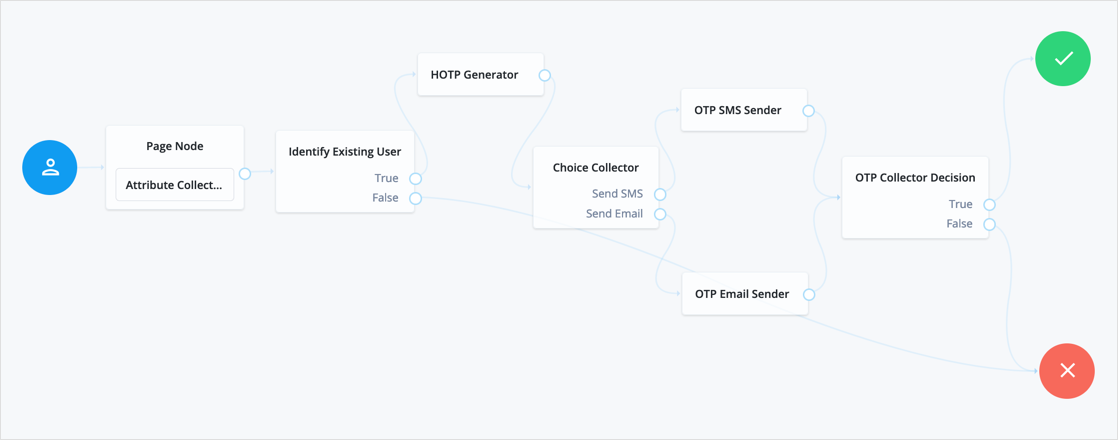
The following example uses an HOTP generator as part of multi-factor authentication:
### MFA Registration Options node
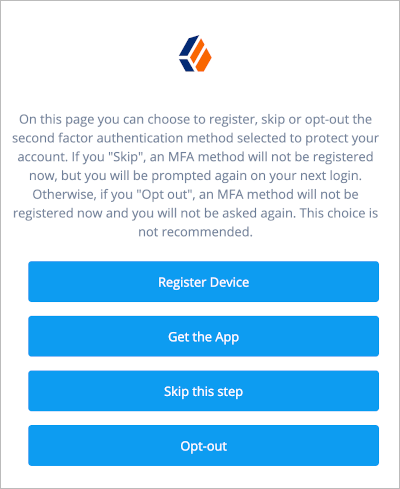
Lets the user register a multi-factor authentication device or skip the registration process.
The node requires the username of the identity to update and the type of MFA device. For example, you can use a [Username Collector node](am-only/username-collector.html) (standalone AM) or [Platform Username node](platform-username.html) (Ping Identity Platform deployment) and a [Push Sender node](push-sender.html) earlier in the flow to obtain these.
#### Compatibility
| Product | Compatible? |
| ------------------------------------------ | --------------------- |
| PingOne Advanced Identity Cloud | [icon: check, set=fa] |
| ForgeRock Access Management (self-managed) | [icon: check, set=fa] |
| Ping Identity Platform (self-managed) | [icon: check, set=fa] |
#### Outcomes
* `Register`
* `Get App` (configurable)
* `Skip` (configurable)
* `Opt-out` (configurable)
Evaluation continues along the outcome the user selects.
#### Properties
| Property | Usage |
| ----------------------------- | --------------------------------------------------------------------------------------------------------------------------------------------------------------------------------------------------------------------------------------------------------------------------------------------------------------------------------------------------------------------------------------------------------------------------------- |
| Remove 'skip' option | If checked, users can no longer skip the node and must interact with it. |
| Display Get Authenticator App | If enabled, display the Get the App button. |
| Message | Localized text to use as the title of the screen.The key is the language, such as `en` or `fr`, and the value is the message to display. |
| Register Device | Localized text to use on the Register Device button.The key is the language, such as `en` or `fr`, and the value is the message to display. |
| Get Authenticator App | Localized text to use on the Get Authenticator App button.The key is the language, such as `en` or `fr`, and the value is the message to display. |
| Skip this Step | Localized text to use on the Skip this Step button.The button and the outcome only appear if the Remove 'skip' option is not enabled.The key is the language, such as `en` or `fr`, and the value is the message to display. |
| Opt-out | Localized text to use on the Opt-Out button.The button and the outcome only appear if the Remove 'skip' option is not enabled.Note that this node does not change the user's profile. Connect the Opt-out outcome to an [Opt-out Multi-Factor Authentication node](opt-out-multi-factor.html) to persist the option in the user's profile.The key is the language, such as `en` or `fr`, and the value is the message to display. |
#### Example
Refer to the [Push authentication example journey](push-sender.html#push-sender-example) for how to use the MFA Registration Options node in a journey handling push devices.
### OATH Device Storage node
Stores devices in the user profile added to the shared node state by the [OATH Registration node](oath-registration.html) when its Store device data in shared state is enabled.
#### Compatibility
| Product | Compatible? |
| ------------------------------------------ | --------------------- |
| PingOne Advanced Identity Cloud | [icon: check, set=fa] |
| ForgeRock Access Management (self-managed) | [icon: check, set=fa] |
| Ping Identity Platform (self-managed) | [icon: check, set=fa] |
##### Authenticators
The OATH-related nodes can integrate with the following authenticator apps:
* The [ForgeRock Authenticator](https://docs.pingidentity.com/sdks/latest) app for Android and iOS.
* Third-party authenticator apps that support the following open standards:
* [RFC 4226](https://tools.ietf.org/html/rfc4226): HMAC-Based One-Time Password (HOTP)
* [RFC 6238](https://tools.ietf.org/html/rfc6238): Time-Based One-Time Password (TOTP)
#### Outcomes
* `Success`
* `Failure`
#### Properties
This node has no configurable properties.
### OATH Registration node
Lets the user register a device for OATH-based multi-factor authentication (MFA).
Based on the node settings, the user device displays a QR code that includes all the details required for registration. If registration is successful, the node stores the device data, and recovery codes (if enabled), and sets the `skippable` attribute to prevent repeat registration at next login.
| | |
| - | ------------------------------------------------------------------------------------------------------------------------------------------------------------------------------------------------------ |
| | You can use the [Combined MFA Registration node](combined-mfa-registration.html) to register a device for use with both push notifications and one-time password (OATH) verification in a single step. |
The node requires the credentials of the user; for example, by using a sequence of the following nodes earlier in the authentication journey:
* [Username Collector node](am-only/username-collector.html) (standalone AM) or [Platform Username node](platform-username.html) (Ping Identity Platform deployment)
* [Password Collector node](am-only/password-collector.html) (standalone AM) or [Platform Password node](platform-password.html) (Ping Identity Platform deployment)
* [Data Store Decision node](data-store-decision.html)
Connect the OATH Registration node's `Success` outcome path to the [OATH Token Verifier node](oath-token-verifier.html) to continue with OTP verification.
Refer to the [OATH Token Verifier node example](oath-token-verifier.html#authn-mfa-oath-tree-example) that demonstrates how use to use other MFA nodes to create a complete OATH authentication journey.
#### Compatibility
| Product | Compatible? |
| ------------------------------------------ | --------------------- |
| PingOne Advanced Identity Cloud | [icon: check, set=fa] |
| ForgeRock Access Management (self-managed) | [icon: check, set=fa] |
| Ping Identity Platform (self-managed) | [icon: check, set=fa] |
##### Authenticators
The OATH-related nodes can integrate with the following authenticator apps:
* The [ForgeRock Authenticator](https://docs.pingidentity.com/sdks/latest) app for Android and iOS.
* Third-party authenticator apps that support the following open standards:
* [RFC 4226](https://tools.ietf.org/html/rfc4226): HMAC-Based One-Time Password (HOTP)
* [RFC 6238](https://tools.ietf.org/html/rfc6238): Time-Based One-Time Password (TOTP)
#### Outcomes
* `Success`
* `Failure`
If registration is successful and the device details are stored, evaluation continues along the `Success` outcome path.
If AM encounters an issue during the registration process or the user fails to complete registration, evaluation proceeds along the `Failure` path.
#### Properties
| Property | Usage |
| --------------------------------- | ----------------------------------------------------------------------------------------------------------------------------------------------------------------------------------------------------------------------------------------------------------------------------------------------------------------------------------------------------------------------------------------------------------------------------------------------------------------------------------------------------------------------------------------------------------------------------------------------------------------------------------------------------------------------------------------------------------------------------------------------------------------------------------------------------------------------------------------------------------------------------------------------- |
| Issuer | Specify an identifier to appear on the user's device, such as a company name, a website, or an AM realm.The authenticator application displays the value. |
| Account Name | Define the profile attribute to display as the username in the authenticator application.If not specified, or if the specified profile attribute is empty, their username is used. |
| Background Color | The background color in hex notation that displays behind the issuer's logo within the authenticator application. |
| Logo Image URL | The location of an image to download and display as the issuer's logo within the authenticator application. The ForgeRock Authenticator supports logos in JPEG and PNG format only. The application resizes your logo automatically but a maximum image size of one MByte (or 1024 X 1024 pixels) is recommended. |
| Generate Recovery Codes | If enabled, recovery codes are generated and stored in the successful outcome's transient state.Use the [Recovery Code Display node](recovery-code-display.html) to display the codes to the user for safekeeping. |
| One Time Password Length | The length of the generated OTP in digits.This value must be at least 6, and compatible with the hardware/software OTP generators you expect end users to use. For example, Google and ForgeRock authenticators support values of 6 and 8 respectively. |
| Minimum Secret Key Length | Number of hexadecimal characters allowed for the Secret Key. |
| OATH Algorithm | Specify the algorithm your device uses to generate the OTP:- HOTP
HOTP uses a counter value that is incremented every time a new OTP is generated.
- TOTP (default)
TOTP generates a new OTP every few seconds as specified by the `TOTP Time Step Interval` value.If this is set to HOTP, set the same value in the [OATH Token Verifier node](oath-token-verifier.html). |
| TOTP Time Step Interval | The length of time that an OTP is valid in seconds.For example, if the time step interval is 30 seconds, a new OTP is generated every 30 seconds and is valid for 30 seconds only.The default value is 30. |
| TOTP Hash Algorithm | The HMAC hash algorithm used to generate the OTP codes. AM supports SHA1, SHA256, and SHA512. |
| HOTP Checksum Digit | This adds a digit to the end of the OTP generated to be used as a checksum to verify the OTP was generated correctly. This is in addition to the actual password length. Only set this if the user devices support it. |
| HOTP Truncation Offset | This is an option used by the HOTP algorithm that not all devices support. Leave the default value of -1 unless you know user devices use an offset. |
| QR code message | The message with instructions to scan the QR code to register the device.Click Add. Enter the message locale in the `Key` field; for example, `en-gb`. Enter the message to display to the user in the `Value` field. |
| Store device data in shared state | If enabled, the device data isn't stored in the user profile on successful completion of the node. Instead, the node adds the device data as a base64-encoded string to the `oathDeviceProfile` property in the shared node state. This string is decoded as an unescaped plain string representation of a JSON object. For example:In the shared node state:```none
oathDeviceProfile="eyAidXVpZCI6ICJhNDhiMjUyMS0xYzliLTRiYTct...ja0RyaWZ0U2Vjb25kcyI6IDAgfQ"
```Decoded value:```json
{
"uuid": "a48b2521-1c9b-4ba7-a45c-8dd855c7397c",
"recoveryCodes": [],
"sharedSecret": "0CF9910A24CAF84E81CEBA71C2086DE4",
"deviceName": "OATH Device",
"lastLogin": 0,
"counter": 0,
"checksumDigit": false,
"truncationOffset": -1,
"clockDriftSeconds": 0
}
```Use the [OATH Device Storage node](oath-device-storage.html) to store the device data in the user profile instead. |
### OATH Token Verifier node
Requests and verifies a one-time password (OTP) generated by a device such as a mobile phone.
The default configuration is time-based OTP (TOTP), but the node also supports HMAC (HOTP).
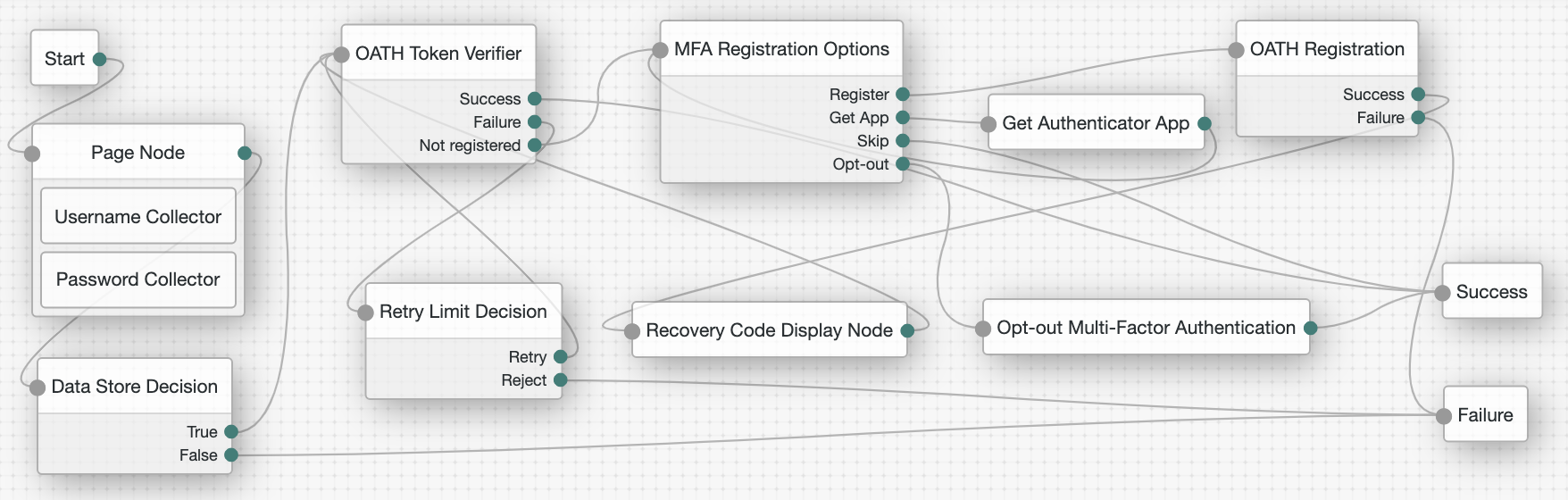
The node requires that the user credentials are authenticated, and that the user has previously registered a device using the [OATH Registration node](oath-registration.html). These two nodes work together to provide all the capabilities of a secure OATH authentication journey.
You can also use them with other MFA nodes such as the following to extend these capabilities:
* [Get Authenticator App node](get-authenticator-app.html)
* [MFA Registration Options node](mfa-registration-options.html)
* [Opt-out Multi-Factor Authentication node](opt-out-multi-factor.html)
| | |
| - | --------------------------------------------------------------------------------------------------------------------------------------------------------------------- |
| | You can use the OATH nodes in conjunction with the ForgeRock Authenticator application to register your phone, receive notifications, or generate one-time passwords. |
#### Compatibility
| Product | Compatible? |
| ------------------------------------------ | --------------------- |
| PingOne Advanced Identity Cloud | [icon: check, set=fa] |
| ForgeRock Access Management (self-managed) | [icon: check, set=fa] |
| Ping Identity Platform (self-managed) | [icon: check, set=fa] |
##### Authenticators
The OATH-related nodes can integrate with the following authenticator apps:
* The [ForgeRock Authenticator](https://docs.pingidentity.com/sdks/latest) app for Android and iOS.
* Third-party authenticator apps that support the following open standards:
* [RFC 4226](https://tools.ietf.org/html/rfc4226): HMAC-Based One-Time Password (HOTP)
* [RFC 6238](https://tools.ietf.org/html/rfc6238): Time-Based One-Time Password (TOTP)
#### Outcomes
Evaluation continues along one of the following outcome paths:
* `Success`
There is a registered device and the token code is verified.
* `Failure`
The user is not authenticated, or the collected token code cannot be verified.
* `Not registered`
There is no registered device for the user.
#### Properties
| Property | Usage |
| -------------------------------- | ----------------------------------------------------------------------------------------------------------------------------------------------------------------------------------------------------------------------------------------------------------------------------------------------------------------------------------------------------------------------------------------------------------------------------------------------------------------------------------- |
| OATH Algorithm | Specify the algorithm your device uses to generate the OTP:- HOTP
HOTP uses a counter value that is incremented every time a new OTP is generated.
- TOTP (default)
TOTP generates a new OTP every few seconds as specified by the `TOTP Time Step Interval` value.If this is set to HOTP, you need to set the same value in the [OATH Registration node](oath-registration.html). |
| HOTP Window Size | This property sets the window that the OTP device and the server counter can be out of sync.For example, if the window size is 100 and the server's last successful login was at counter value 2, the server accepts an OTP that is generated between counter 3 and 102.The default value is 100. |
| TOTP Time Step Interval | The length of time that an OTP is valid, in seconds.For example, if the time step interval is 30 seconds, a new OTP is generated every 30 seconds, and is valid for 30 seconds only.The default value is 30. |
| TOTP Time Steps | This is the number of time step intervals that the OTP is permitted to be out of sync. This applies to codes that are generated before or after the current code.For example, with a time step of 1, the server permits either the previous, the current, or the next code.The default value is 2. |
| TOTP Hash Algorithm | The HMAC hash algorithm to be used to generate the OTP codes. ForgeRock Authenticator (OATH) supports SHA1, SHA256, and SHA512. |
| TOTP Maximum Allowed Clock Drift | Number of time steps a client can be out of sync with the server before manual resynchronization is required.For example, with 3 allowed drifts and a time step interval of 30 seconds, the server allows codes from up to 90 seconds from the current time to be treated as the current time step.The drift for a user's device is calculated each time they enter a new code. If the drift exceeds this value, the user's authentication code is rejected.The default value is 5. |
| Allow recovery codes | Specify whether to allow users to use one of the recovery codes to proceed with the login. |
#### Example
### Opt-out Multi-Factor Authentication node
Sets the `skippable` attribute in the user's profile, which lets them skip MFA.
The node requires the username of the identity to update, and the type of MFA device. For example, you can use a [Username Collector node](am-only/username-collector.html) (standalone AM) or [Platform Username node](platform-username.html) (Ping Identity Platform deployment) and a [Push Sender node](push-sender.html) earlier in the flow to obtain these.
#### Compatibility
| Product | Compatible? |
| ------------------------------------------ | --------------------- |
| PingOne Advanced Identity Cloud | [icon: check, set=fa] |
| ForgeRock Access Management (self-managed) | [icon: check, set=fa] |
| Ping Identity Platform (self-managed) | [icon: check, set=fa] |
#### Outcomes
Evaluation continues along the single outcome path after setting the MFA device as `skippable` in the user's profile.
#### Properties
This node has no configurable properties.
### OTP Collector Decision node
Requests and verifies one-time passwords.
#### Compatibility
| Product | Compatible? |
| ------------------------------------------ | --------------------- |
| PingOne Advanced Identity Cloud | [icon: check, set=fa] |
| ForgeRock Access Management (self-managed) | [icon: check, set=fa] |
| Ping Identity Platform (self-managed) | [icon: check, set=fa] |
#### Outcomes
* `True`
* `False`
Evaluation continues along the `True` outcome path if the one-time password is valid; otherwise, evaluation continues along the `False` outcome path.
#### Properties
| Property | Usage |
| --------------------------------- | ------------------------------------------------------------------------------------------- |
| One Time Password Validity Length | Specify the length of time, in minutes, that a one-time password remains valid.Default: `5` |
### OTP Email Sender node
Sends an email containing a generated one-time password to the user.
Send mail requests time out after 10 seconds.
| | |
| - | ---------------------------------------------------------------------------------------------------------------------------------------------------------------------------------------------------------------------------------------------------------------------------------------------------------------------------------------------------------------------------------------------------------------------------------------------------------------------------------------------------------------------------------------------------------------------------------------------------------------------------------------------------------------------------------------------------------------------------------------------------------------------------------------------------------------------------------------------------------------------------------------------------------------------------------------------------------------------------------------------------------------------------------------------------------------------------------------------------------------------------------------------------------- |
| | You can change the timeout in the following advanced AM server properties:* `org.forgerock.openam.smtp.system.connect.timeout`
* `org.forgerock.openam.smtp.system.socket.read.timeout`
* `org.forgerock.openam.smtp.system.socket.write.timeout`> **Collapse: How Do I Configure Advanced Server Properties?**
>
> * To configure advanced server properties for all the instances of the AM environment, go to Configure > Server Defaults > Advanced in the AM admin UI.
>
> * To configure advanced server properties for a particular instance, go to Deployment > Servers > *Server Name* > Advanced.
>
> * To configure advanced server properties for a particular instance, go to Deployment > Servers > *Server Name* > Advanced.
>
> If the property you want to add or edit is already configured, click on the pencil ([icon: pencil-alt, set=fa]) button to edit it. When you are finished, click on the tick ([icon: check, set=fa]) button.
>
> Save your changes.For more information, refer to [Advanced Properties](https://docs.pingidentity.com/pingam/7.4/reference/deployment-configuration-reference.html#smtp-connect-timeout). |
#### Compatibility
| Product | Compatible? |
| ------------------------------------------ | --------------------- |
| PingOne Advanced Identity Cloud | [icon: check, set=fa] |
| ForgeRock Access Management (self-managed) | [icon: check, set=fa] |
| Ping Identity Platform (self-managed) | [icon: check, set=fa] |
#### Outcomes
Single outcome path.
#### Properties
| Property | Usage |
| ----------------------------------- | ----------------------------------------------------------------------------------------------------------------------------------------------------------------------------------------------------------------------------------------------------- |
| Mail Server Host Name *(required)* | Specifies the hostname of the SMTP email server. |
| Mail Server Host Port | Specifies the outgoing mail server port.Common ports are 25, 465 for SSL/TLS, or 587 for StartTLS. |
| Mail Server Authentication Username | Specifies the username AM uses to connect to the mail server. |
| Mail Server Authentication Password | Specifies the password AM uses to connect to the mail server. |
| Email From Address *(required)* | Specifies the email address from which the one-time password will appear to have been sent. |
| Email Attribute Name | Specifies the user's profile attribute containing the email address to which to email the OTP.Default: `mail` |
| The subject of the email | Click Add to add a new email subject. Enter the locale, such as `en-uk`, in the KEY field and the subject in the VALUE field. Repeat these steps for each locale that you support. |
| The content of the email | Click Add to add the content of the email. Enter the locale, such as `en-uk`, in the KEY field and the email content in the VALUE field. Repeat these steps for each locale that you support. |
| Mail Server Secure Connection | Specifies how to connect to the mail server.If a secure method is specified, AM must trust the server certificate of the mail server.The possible values for this property are:- `NON SSL/TLS`
- `SSL/TLS`
- `Start TLS`Default: `SSL/TLS` |
| Gateway Implementation Class | Specifies the class the node uses to send SMS and email messages. A custom class must implement the `com.sun.identity.authentication.modules.hotp.SMSGateway` interface.Default: `com.sun.identity.authentication.modules.hotp.DefaultSMSGatewayImpl` |
### OTP SMS Sender node
Uses an email-to-SMS gateway provider to send an SMS message containing a generated one-time password to the user.
The node sends an email to an address formed by joining the following values together:
* The user's telephone number, obtained by querying a specified profile attribute, for example, `telephoneNumber`.
* The `@` character.
* The email-to-SMS gateway domain, obtained by querying the profile attribute specified by the Mobile Carrier Attribute Name property.
For example, if configured to use the *TextMagic* email-to-SMS service, the node might send an email through the specified SMTP server to the address: `18005550187@textmagic.com`.
#### Compatibility
| Product | Compatible? |
| ------------------------------------------ | --------------------- |
| PingOne Advanced Identity Cloud | [icon: check, set=fa] |
| ForgeRock Access Management (self-managed) | [icon: check, set=fa] |
| Ping Identity Platform (self-managed) | [icon: check, set=fa] |
#### Outcomes
Single outcome path.
#### Properties
| Property | Usage |
| ----------------------------------- | ----------------------------------------------------------------------------------------------------------------------------------------------------------------------------------------------------------------------------------------------------- |
| Mail Server Host Name *(required)* | Specifies the hostname of the SMTP email server. |
| Mail Server Host Port | Specifies the outgoing mail server port.Common ports are 25, 465 for SSL/TLS, or 587 for StartTLS. |
| Mail Server Authentication Username | Specifies the username AM uses to connect to the mail server. |
| Mail Server Authentication Password | Specifies the password AM uses to connect to the mail server. |
| Email From Address *(required)* | Specifies the email address from which the one-time password will appear to have been sent. |
| Mobile Phone Number Attribute Name | Specifies the user's profile attribute containing the mobile phone number to which to send the SMS containing the OTP.Default: `telephoneNumber` |
| Mobile Carrier Attribute Name | Specifies the user's profile attribute containing the mobile carrier domain used as the email to SMS gateway. |
| The subject of the message | Click Add to add a new message subject. Enter the locale, such as `en-uk`, in the KEY field and the subject in the VALUE field. Repeat these steps for each locale that you support. |
| The content of the message | Click Add to add the content of the message. Enter the locale, such as `en-uk`, in the KEY field and the email content in the VALUE field. Repeat these steps for each locale that you support. |
| Mail Server Secure Connection | Specifies how to connect to the mail server.If a secure method is specified, AM must trust the server certificate of the mail server.The possible values for this property are:- `NON SSL/TLS`
- `SSL/TLS`
- `Start TLS`Default: `SSL/TLS` |
| Gateway Implementation Class | Specifies the class the node uses to send SMS and email messages. A custom class must implement the `com.sun.identity.authentication.modules.hotp.SMSGateway` interface.Default: `com.sun.identity.authentication.modules.hotp.DefaultSMSGatewayImpl` |
### Push Registration node
Provides a way to register a device, such as a mobile phone for multi-factor authentication using push notifications.
Find more information in [MFA: Push authentication](https://docs.pingidentity.com/pingam/7.4/am-authentication/authn-mfa-about-push.html).
The node requires the username of the identity to update; for example, by using a [Username Collector node](am-only/username-collector.html) (standalone AM) or [Platform Username node](platform-username.html) (Ping Identity Platform deployment).
| | |
| - | ------------------------------------------------------------------------------------------------------------------------------------------------------------------------------------------------------ |
| | You can use the [Combined MFA Registration node](combined-mfa-registration.html) to register a device for use with both push notifications and one-time password (OATH) verification in a single step. |
You must also configure the *Push Notification Service*.
For information on provisioning the credentials required by the Push Notification Service, refer to [How To Configure Service Credentials (Push Auth, Docker) in Backstage](https://backstage.forgerock.com/knowledge/backstagehelp/article/a92326771) in the *ForgeRock Knowledge Base*.
For detailed information about the available properties, refer to [Push Notification Service](https://docs.pingidentity.com/pingam/7.4/reference/global-services-configuration.html#global-pushnotification).
#### Compatibility
| Product | Compatible? |
| ------------------------------------------ | --------------------- |
| PingOne Advanced Identity Cloud | [icon: check, set=fa] |
| ForgeRock Access Management (self-managed) | [icon: check, set=fa] |
| Ping Identity Platform (self-managed) | [icon: check, set=fa] |
##### Authenticators
The push-related nodes integrate with the [ForgeRock Authenticator](https://docs.pingidentity.com/sdks/latest) app for Android and iOS.
Third-party authenticator apps are not compatible with ForgeRock's push notification functionality.
#### Outcomes
* `Success`
* `Failure`
* `Time Out`
If the user successfully registers their authenticator, evaluation continues along the `Success` outcome path.
If the node does not receive a response from the user's device within the time specified in the node configuration, evaluation continues along the `Time Out` outcome path.
If AM encounters an issue when attempting to register using a device, evaluation continues along the `Failure` outcome path.
#### Properties
| Property | Usage |
| ----------------------------- | ------------------------------------------------------------------------------------------------------------------------------------------------------------------------------------------------------------------------------------------------------------------------------------------------------------------------------------------------------------------------------------------------------------------------------------------------------------------------------------------------------------ |
| Issuer | Specify an identifier so that the user knows which service their account relates to.The value is displayed by the authenticator application: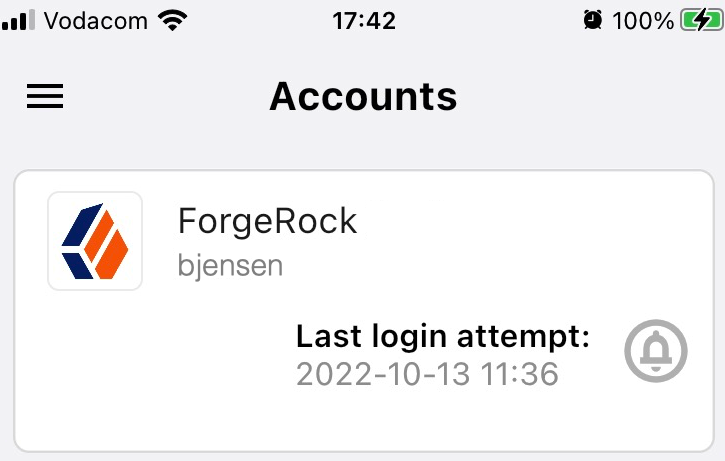For example, `Example Inc.` or the name of your application. |
| Account Name | Specifies the profile attribute to display as the username in the authenticator application.If not specified, or if the specified profile attribute is empty, their username is used. |
| Registration Response Timeout | Specify the number of seconds to wait for a response from the authenticator.If the specified time is reached, evaluation continues along the `Time Out` outcome path. |
| Background Color | Specifies the background color, in hex notation, to display behind the issuer's logo within the ForgeRock Authenticator application. |
| Logo Image URL | Specifies the location of an image to download and display as the issuer's logo in the ForgeRock Authenticator application. |
| Generate Recovery Codes | Specify whether push-specific recovery codes should be generated. If enabled, recovery codes are generated and stored in transient state if registration was successful.Use the [Recovery Code Display node](recovery-code-display.html) to display the codes to the user for safe keeping.
Generating recovery codes overwrites all existing push-specific recovery codes.
Only the most recent set of recovery codes can be used for authentication if a device has been lost or stolen. |
| QR code message | The message with instructions to scan the QR code to register the device.Click Add. Enter the message locale in the Key field; for example, `en-gb`. Enter the message to display to the user in the Value field. |
#### Example
Refer to the [Push authentication example journey](push-sender.html#push-sender-example) for how to use the Push Registration node in a journey handling push devices.
### Push Result Verifier node
Works with the [Push Sender node](push-sender.html) to validate the user's response to a previously sent push notification message.
| | |
| - | ------------------------------------------------------------------------------------------------------------------------------------------------------------------------------------------------------------------------------------------------------------------------------------------------------------------------------------------------- |
| | If the push message contained any additional information, for example, if it was a registration request, the values are stored in the `nodeState` object on the `pushContent` key.For information on creating or customizing authentication nodes, refer to [Node development](https://docs.pingidentity.com/pingam/7.4/auth-nodes/preface.html). |
#### Compatibility
| Product | Compatible? |
| ------------------------------------------ | --------------------- |
| PingOne Advanced Identity Cloud | [icon: check, set=fa] |
| ForgeRock Access Management (self-managed) | [icon: check, set=fa] |
| Ping Identity Platform (self-managed) | [icon: check, set=fa] |
##### Authenticators
The push-related nodes integrate with the [ForgeRock Authenticator](https://docs.pingidentity.com/sdks/latest) app for Android and iOS.
Third-party authenticator apps are not compatible with ForgeRock's push notification functionality.
#### Outcomes
* `Success`
* `Failure`
* `Expired`
* `Waiting`
Evaluation continues along the `Success` outcome path if the push notification was approved by the user.
Evaluation continues along the `Failure` outcome path if the push notification was rejected by the user.
If no response to the push notification was received within the Message Timeout value specified in the [Push Sender node](push-sender.html), evaluation continues along the `Expired` outcome path.
If no response to the push notification has been received yet, evaluation continues along the `Waiting` outcome path.
#### Properties
This node has no configurable properties.
### Push Sender node
Sends push notification messages to a device for multi-factor authentication.
Configure the AM Push Notification Service for the realm before using this node. For information on the properties used by the service, refer to [Push Notification Service](https://docs.pingidentity.com/pingam/7.4/reference/global-services-configuration.html#global-pushnotification).
For information on provisioning the credentials used by the service, refer to [How To Configure Service Credentials (Push Auth, Docker) in Backstage](https://backstage.forgerock.com/knowledge/backstagehelp/article/a92326771) in the *ForgeRock Knowledge Base*.
To determine whether the user has a registered device, the flow must have included the username in the shared state, for example, by using a [Username Collector node](am-only/username-collector.html) (standalone AM) or [Platform Username node](platform-username.html) (Ping Identity Platform deployment).
#### Compatibility
| Product | Compatible? |
| ------------------------------------------ | --------------------- |
| PingOne Advanced Identity Cloud | [icon: check, set=fa] |
| ForgeRock Access Management (self-managed) | [icon: check, set=fa] |
| Ping Identity Platform (self-managed) | [icon: check, set=fa] |
##### Authenticators
The push-related nodes integrate with the [ForgeRock Authenticator](https://docs.pingidentity.com/sdks/latest) app for Android and iOS.
Third-party authenticator apps are not compatible with ForgeRock's push notification functionality.
#### Outcomes
* `Sent`
* `Not Registered`
* `Skipped`
* `Failure`
Evaluation continues along the `Sent` outcome path if the push notification was successfully sent to the handling service.
If the user doesn't have a registered device, evaluation continues along the `Not Registered` outcome path.
If the user chooses to skip push authentication, evaluation continues along the `Skipped` outcome path.
The node displays the `Failure` outcome only if you enable the Capture failure configuration option. In this case, evaluation proceeds along the `Failure` path if there is an error during execution of the node.
#### Properties
| Property | Usage |
| -------------------------- | -------------------------------------------------------------------------------------------------------------------------------------------------------------------------------------------------------------------------------------------------------------------------------------------------------------------------------------------------------------------------------------------------------------------------------------------------------------------------------------------------------------------------------------------------------------------------------------------------------------------------------------------------------------------------------------------------------------------------------------------------------------------------------------------------------------------------------------------------------------------------------------------------------------------------- |
| Message Timeout | Specifies the number of milliseconds the push notification message will remain valid. The [Push Result Verifier node](push-result-verifier.html) rejects responses to push messages that have timed out. |
| User Message | Specifies the optional message to send to the user.You can provide the message in multiple languages by specifying the locale in the `KEY` field; for example, `en-US`.The locale selected for display is based on the user's locale settings in their browser.Messages provided in the node override the defaults provided by AM. For information about customizing and translating the default messages, refer to [Internationalization](https://docs.pingidentity.com/pingam/7.4/auth-nodes/i18n-nodes.html).The following variables can be used in the `VALUE` field:- `{{user}}`
Replaced with the username value of the account registered in the ForgeRock Authenticator application, for example *Demo*.
- `{{issuer}}`
Replaced with the issuer value of the account registered in the ForgeRock Authenticator application, for example, *ForgeRock*.Example: `Login attempt from {{user}} at {{issuer}}.` |
| Remove 'skip' option | Enable this option in the node to make the push authentication mandatory.When disabled, the user can skip the push authentication requested by the node, and evaluation continues along the `Skipped` outcome path.Default: Disabled
Nodes in authentication trees aren't affected by the Two Factor Authentication Mandatory property (at Realms > Realm Name > Authentication > Settings > General). This property applies only to modules within authentication chains. |
| Share Context info | If enabled, context data such as `remoteIp`, `userAgent`, and `location` are included in the notification payload.For example:```json
{
"location": {
"latitude": 49.2208569,
"longitude": -123.1174431
},
"userAgent": "Mozilla/5.0 (Macintosh; Intel Mac OS X 10_15_7) AppleWebKit/537.36 (KHTML, like Gecko) Chrome/100.0.4896.127 Safari/537.36",
"remoteIp": "9.9.9.9"
}
```The ForgeRock Authenticator displays this additional information to the user to help verify that the request is genuine and initiated by them.Figure 1. Context information in the ForgeRock AuthenticatorFor the location attribute to be set, the flow must contain a [Device Profile Collector node](device-profile-collector.html) with Collect Device Location enabled. |
| Custom Payload Attributes | Specify shared state objects to be included in the message payload sent to the client. The size of the payload must not exceed 3 Kb or a `NodeProcessException` is thrown.To add a custom attribute, enter the shared state object name in the text field and click Add. Repeat for each object you want to include in the payload. |
| Push Type | Select the type of the push authentication the user must perform on their device to continue the journey.Possible values are:- `Tap to Accept` (default)
Requires the user to tap to accept.
- `Display Challenge Code`
Requires the user to select one of three numbers displayed on their device. This selected number must match the code displayed in the browser for the request to be verified.
- `Use Biometrics to Accept`
Requires the user's biometric authentication to process the notification.The actions the user performs vary depending on the selected option. Refer to [Respond to push notifications](#respond-to-push). |
| Capture failure (optional) | If enabled, and the node fails to send the Push Notification, the journey skips the node. The journey stores the reason for the failure in the `PushAuthFailureReason` key in the shared state for use by subsequent nodes in the journey.Possible failure reasons include `MISSING_USERNAME`, `SENDER_ALREADY_USED`, `CTS_ERROR`, and `TRANSMISSION_FAILURE`. |
#### Example
The following example shows one possible implementation of multi-factor push authentication:
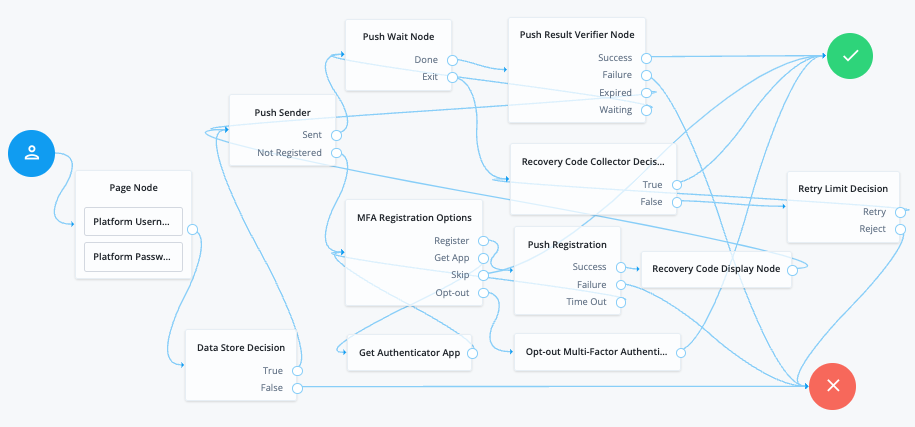
> **Collapse: Node connections**
>
> **List of node connections**
>
> | Source node | Outcome path | Target node |
> | -------------------------------------------------------------------------------------------------------------------------------------------------------------- | -------------- | ----------------------------------- |
> | Page Node containing:Username Collector and Password Collector (standalone AM) or Platform Username and Platform Password (Ping Identity Platform deployment). | → | Data Store Decision |
> | Data Store Decision | True | Push Sender |
> | | False | Failure |
> | Push Sender | Sent | Push Wait |
> | | Not Registered | MFA Registration Options |
> | Push Wait | Done | Push Result Verifier |
> | | Exit | Recovery Code Collector Decision |
> | Push Result Verifier | Success | Success |
> | | Failure | Failure |
> | | Expired | Push Sender |
> | | Waiting | Push Wait |
> | MFA Registration Options | Register | Push Registration |
> | | Get App | Get Authenticator App |
> | | Skip | Success |
> | | Opt-out | Opt-out Multi-Factor Authentication |
> | Recovery Code Collector Decision | True | Success |
> | | False | Retry Limit Decision |
> | Push Registration | Success | Recovery Code Display Node |
> | | Failure | Failure |
> | | Time Out | MFA Registration Options |
> | Get Authenticator App | → | MFA Registration Options |
> | Opt-out Multi-Factor Authentication | → | Success |
> | Retry Limit Decision | Retry | Recovery Code Collector Decision |
> | | Reject | Failure |
> | Recovery Code Display Node | → | Push Sender |
After verifying the user's credentials, evaluation continues to the [Push Sender node](push-sender.html).
**If the *user has a registered device*:**
1. AM sends a push to their registered device.
2. The [Push Wait node](push-wait.html) pauses authentication for 5 seconds, during which time the user can respond to the push notification on their device; for example, by using the ForgeRock Authenticator application.
* If the user responds positively, they are authenticated successfully and logged in.
* If the user responds negatively, they are not authenticated successfully and do not receive a session.
* If the push notification expires, AM sends a new push notification.
| | |
| - | ----------------------------------------------------------------------------------------------------------------- |
| | Use a [Retry Limit Decision node](retry-limit-decision.html) to constrain the number of times a new code is sent. |
* If the user has not yet responded, the flow loops back a step and the [Push Wait node](push-wait.html) pauses authentication for another 5 seconds.
If the user exits the [Push Wait node](push-wait.html), they can enter a recovery code in order to authenticate.
For this situation, configure the Exit Message property in the [Push Wait node](push-wait.html) with a message, such as `Lost phone? Use a recovery code`.
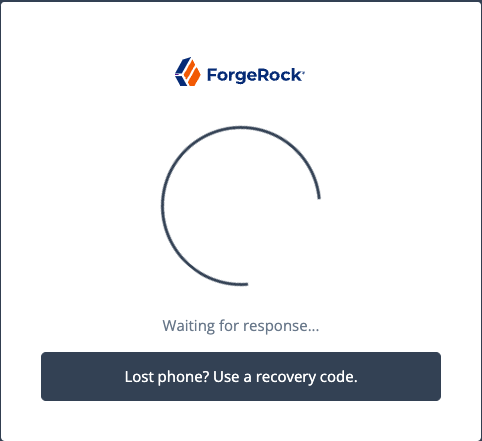
A [Retry Limit Decision node](retry-limit-decision.html) allows three attempts at entering a recovery code before failing the authentication.
**If the user *does not have a registered device*:**
1. The [MFA Registration Options node](mfa-registration-options.html) presents the user with the following options:
* Register Device
The flow continues to the [Push Registration node](push-registration.html), which displays the QR code that should be scanned with a suitable authenticator application.
* Get the App
The flow continues to the [Get Authenticator App node](get-authenticator-app.html), which displays the links needed to obtain a suitable application, such as the ForgeRock Authenticator.
* Skip this step
Displayed only if the node configuration lets the user skip. In this example, skipping is linked to the `Success` outcome. Alternatively, an [Inner Tree Evaluator node](inner-tree-evaluator.html) could have been used for authentication.
* Opt-out
Displayed only if the node configuration allows the user to skip or opt out. Evaluation continues to the [Opt-out Multi-Factor Authentication node](opt-out-multi-factor.html), which updates the user's profile to skip MFA with push in the future. In this example, after updating the profile the flow continues to the Success node.
2. The user registers the device with the [Push Registration node](push-registration.html).
After registration, the recovery codes are displayed to the user for safekeeping, and evaluation continues with the [Push Sender node](push-sender.html) to start push notification.
| | |
| - | ----------------------------------------------------------------------------------------------------------------------------------------------------------------------------------------------------------------------------------- |
| | To manage push devices, the user must log in using either the device or a recovery code.For more information, refer to [Manage devices for MFA](https://docs.pingidentity.com/pingam/7.4/am-authentication/authn-mfa-devices.html). |
#### Respond to push notifications
The default Push Type setting is `Tap to Accept`. This requires the user to tap to either `Accept` or `Reject` in the ForgeRock Authenticator.
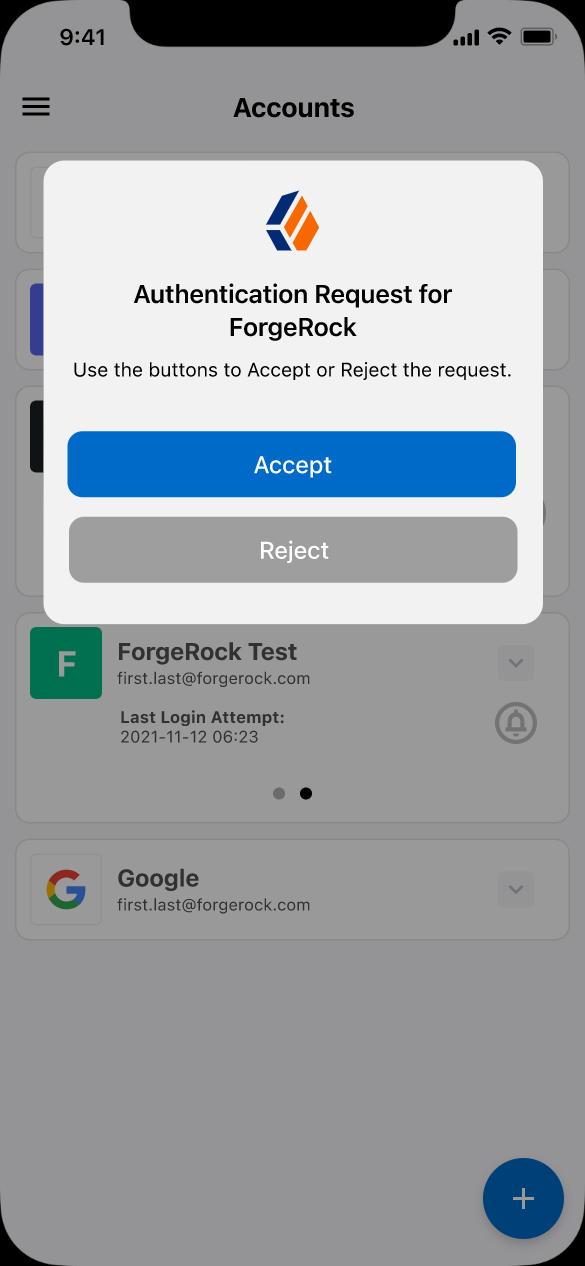Figure 2. Tap to Accept (Default)
Research shows that users might accept a push authentication without fully checking if it is legitimate. To reduce the chances of a user accepting a malicious push authentication attempt, you can configure two additional push types:
* `Display Challenge Code`
Requires the user to select one of three numbers displayed on their device. This selected number must match the code displayed in the browser for the request to be verified.
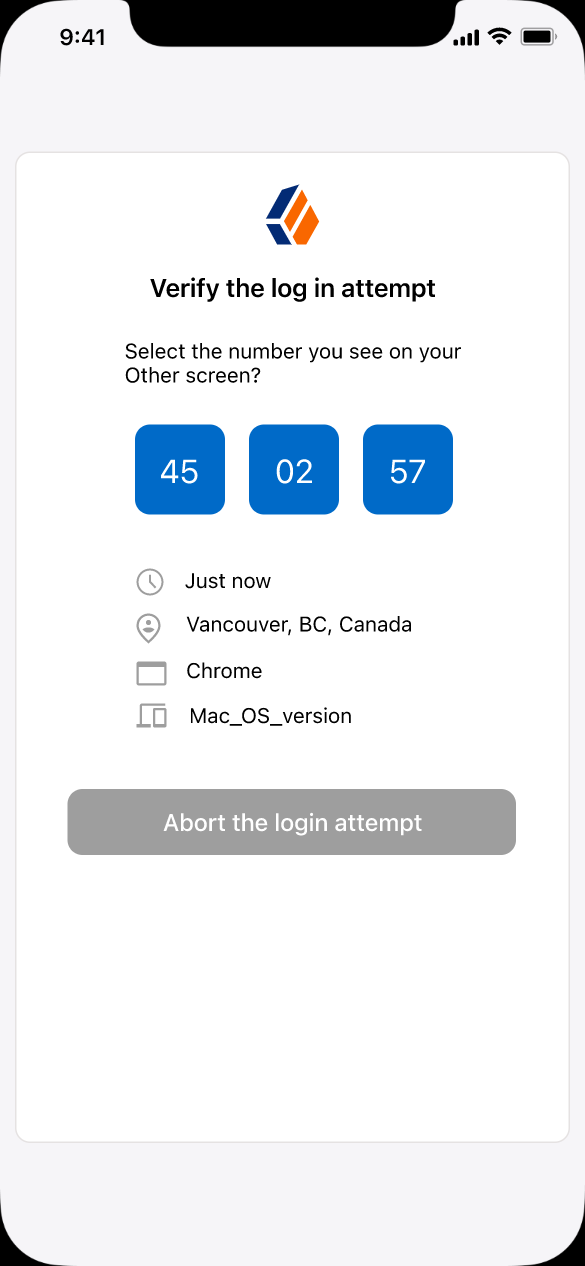Figure 3. Challenge code
* `Use Biometrics to Accept`
Requires the user's biometric authentication to process the notification, after tapping `Accept` or `Reject`.
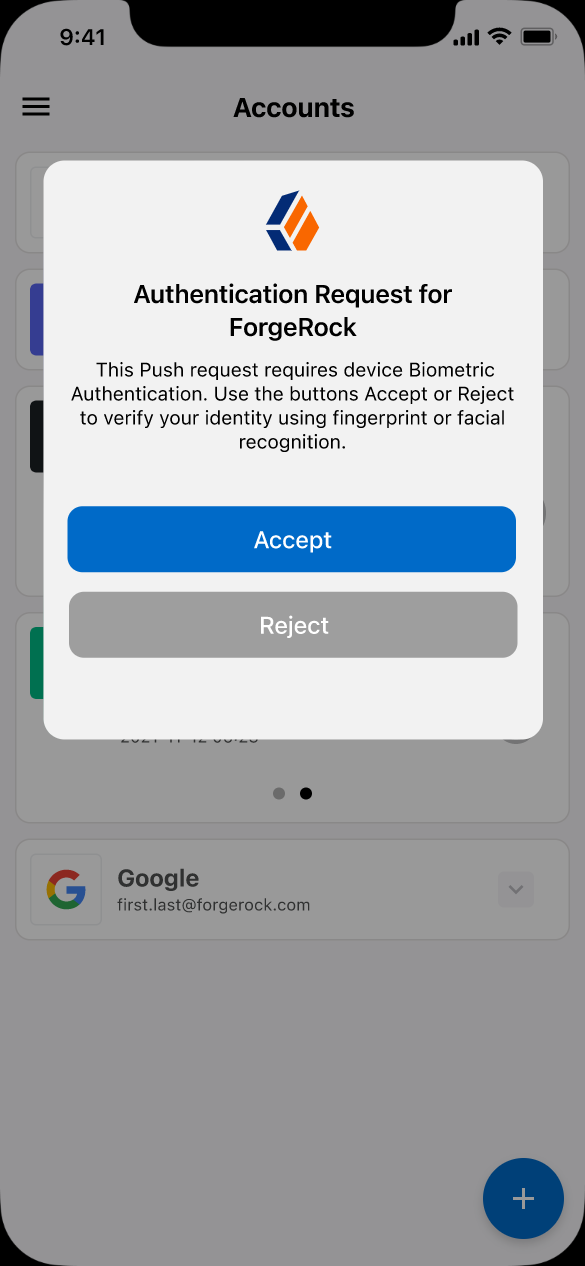Figure 4. Biometric authentication required
### Push Wait node
Pauses the authentication for the specified number of seconds during the processing of a push authentication request.
When push authentication involves a number selection challenge, where the push type of the [Push Sender node](push-sender.html) is set to `Display Challenge Code`, the node displays the code challenge for the user to complete. Connect this node to a [Push Result Verifier node](push-result-verifier.html) to check the result of the code challenge.
Both nodes' waiting times and the messages are configurable.
The message displayed on the exit button can be configured using the `Exit Message` property.
To provide localized versions of the waiting, push challenge, and exit messages in multiple languages, configure the [message properties](#push-wait-properties) to specify the locale in the `KEY` field (for example, `en-US`) and the message in the `VALUE` field. The locale selected for display is based on the user's locale settings in their browser.
Messages provided in the node override the defaults provided by AM.
For information about customizing and translating the default messages, refer to [Internationalization](https://docs.pingidentity.com/pingam/7.4/auth-nodes/i18n-nodes.html).
#### Compatibility
| Product | Compatible? |
| ------------------------------------------ | --------------------- |
| PingOne Advanced Identity Cloud | [icon: check, set=fa] |
| ForgeRock Access Management (self-managed) | [icon: check, set=fa] |
| Ping Identity Platform (self-managed) | [icon: check, set=fa] |
##### Authenticators
The push-related nodes integrate with the [ForgeRock Authenticator](https://docs.pingidentity.com/sdks/latest) app for Android and iOS.
Third-party authenticator apps are not compatible with ForgeRock's push notification functionality.
#### Outcomes
* `Done`
* `Exit`
Evaluation continues along the `Done` outcome path after the wait time has passed. Evaluation continues along the `Exit` outcome path if the user clicks the exit button.
#### Properties
| Property | Usage |
| ---------------------- | ------------------------------------------------------------------------------------------------------------------------------------------------------------------------------------------------------------------------------------------------------------------------------------------------------------------- |
| Seconds To Wait | Specify the number of seconds to pause authentication.Default: `5` |
| Waiting Message | Customize the message to display to the user. To include the remaining seconds in the message, use the `{{time}}` variable.Click Add to enter a KEY and VALUE for a localized message and + to save. Repeat for each supported language.Default: `Waiting for response…` |
| Push Challenge Message | Customize the message containing the challenge code. To include the number challenge, use the `{{challenge}}` variable.Click Add to enter a KEY and VALUE for a localized message and + to save. Repeat for each supported language.Default: `Tap the number [{{challenge}}] on the Push Notification to continue.` |
| Exit Message | Customize the message to display to the user when they choose to exit the node before the wait period has elapsed. The message is displayed as a link.Click Add to enter a KEY and VALUE for a localized message and + to save. Repeat for each supported language.Default: `Cancel` |
#### Example
Refer to the [Push authentication example journey](push-sender.html#push-sender-example) for how to use the Push Wait node in a journey handling push devices.
### Recovery Code Collector Decision node
Lets users authenticate with a recovery code provided when registering a device for multi-factor authentication.
Use this node for a flow that includes push notifications or one-time passwords. When the user loses their registered device, they can use a recovery code as an alternative method for authentication. For more information on viewing the recovery codes when registering a device, refer to [Register the ForgeRock Authenticator for multi-factor authentication](https://docs.pingidentity.com/pingam/7.4/am-authentication/authn-mfa-download-app.html#authn-mfa-register-device).
#### Compatibility
| Product | Compatible? |
| ------------------------------------------ | --------------------- |
| PingOne Advanced Identity Cloud | [icon: check, set=fa] |
| ForgeRock Access Management (self-managed) | [icon: check, set=fa] |
| Ping Identity Platform (self-managed) | [icon: check, set=fa] |
#### Outcomes
* `True`
* `False`
Evaluation continues along the `True` outcome path if the provided recovery code matches one belonging to the user. To determine whether the provided code belongs to the user, the shared state must include the username. You can obtain this using a [Username Collector node](am-only/username-collector.html) (standalone AM) or [Platform Username node](platform-username.html) (Ping Identity Platform deployment).
If the recovery code does not match, or a username has not been acquired, evaluation continues along the `False` outcome path.
#### Properties
| Property | Usage |
| ------------------ | --------------------------------------------------------------------------------------- |
| Recovery Code Type | Specify the type of recovery code the user will submit for verification.Default: `OATH` |
### Recovery Code Display node
Retrieves generated recovery codes from the transient state and presents them to the user, for safe-keeping. The codes can be used to authenticate if a registered device is lost or stolen.
Use this node with the [WebAuthn Registration node](webauthn-registration.html), the [OATH Registration node](oath-registration.html) or the [Push Registration node](push-registration.html).
Generated recovery codes are inserted into transient state when evaluation continues along the `Success` outcome path of the MFA nodes configured to generate recovery codes. Connect this node to the `Success` outcome path to display the codes.
If no recovery codes are available in transient state, evaluation continues along the only outcome path, and nothing is displayed to the user.
| | |
| - | ------------------------------------------------------------------------------------------------------------------------------------------------------------------------------- |
| | Generated recovery codes cannot be retrieved from the user's profile—they are one-way encrypted.This node is the one and only opportunity to view and save the recovery codes. |
#### Compatibility
| Product | Compatible? |
| ------------------------------------------ | --------------------- |
| PingOne Advanced Identity Cloud | [icon: check, set=fa] |
| ForgeRock Access Management (self-managed) | [icon: check, set=fa] |
| Ping Identity Platform (self-managed) | [icon: check, set=fa] |
#### Outcomes
Single outcome path.
#### Properties
This node has no configurable properties.
#### Example
The following shows example output of this node:
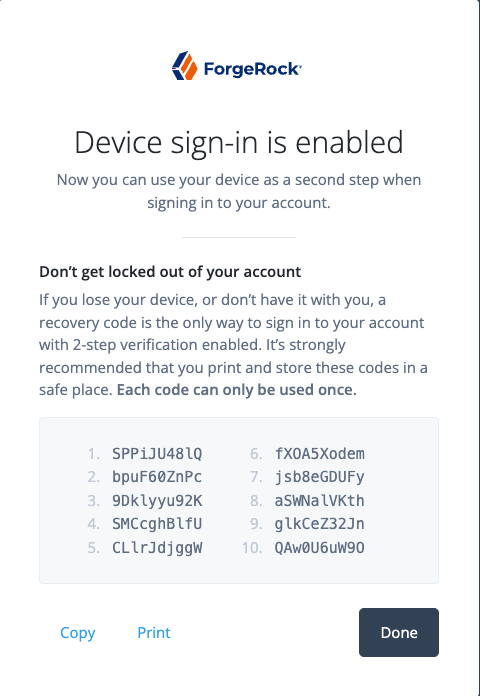
### WebAuthn Authentication node
Lets users on supported clients use a registered FIDO device during authentication.
To determine whether the user has a registered device, the node reads the `username` from the shared state. Implement a [Username Collector node](am-only/username-collector.html) (standalone AM) or [Platform Username node](platform-username.html) (Ping Identity Platform deployment) earlier in the journey.
#### Compatibility
| Product | Compatible? |
| ------------------------------------------ | --------------------- |
| PingOne Advanced Identity Cloud | [icon: check, set=fa] |
| ForgeRock Access Management (self-managed) | [icon: check, set=fa] |
| Ping Identity Platform (self-managed) | [icon: check, set=fa] |
#### Outcomes
* `Unsupported`
If the user's client doesn't support web authentication, evaluation continues along the `Unsupported` outcome path. For example, clients connected over the HTTP protocol rather than HTTPS do not support WebAuthn; however, HTTPS may not be required when testing locally, on `http://localhost`. For more information, refer to [Is origin potentially trustworthy?](https://w3c.github.io/webappsec-secure-contexts/#potentially-trustworthy-origin).
* `No Device Registered`
If the user does not have a registered device, evaluation continues along the `No Device Registered` outcome path.
| | |
| - | ------------------------------------------------------------------------------------------------------------------------------------------------------------------------------------------------------------------------------------------------------------------------------------------------------------------------------------------------------------------------------------------------------------------------------------------------------------------------------------------------------------------------------------------------------------------------------------------------------------------------------------------------------------------------------------------------------------------------------------------------------------------------------------------------------------------------------------------------------------------------------------------------ |
| | * Username enumeration risk
When WebAuthn is the only authentication method, routing the `No Device Registered` outcome to a visually distinct path, such as password login or device registration, allows attackers to identify valid usernames.
When the node processes the request, it performs a username-to-device lookup *before* issuing any WebAuthn challenge or triggering any browser interaction. This means that a difference in response reveals whether a passkey exists for the user.
This risk is noted in [§14.6.2 of the W3C WebAuthn Level 2 specification](https://www.w3.org/TR/webauthn-2/#sctn-username-enumeration).
* Mitigation
Design your journey to route `No Device Registered` to the same generic failure handling as the `Failure` outcome. This ensures the UI, response, and timing of the journey all remain indistinguishable to an attacker. |
* `Success`
If the user successfully authenticates with a device of the type determined by the User verification requirement property, evaluation continues along the `Success` outcome path.
* `Failure`
If AM encounters an issue when attempting to authenticate using the device, evaluation continues along the `Failure` outcome path. For example, AM could not verify that the response from the authenticator was appropriate for the specific instance of the authentication ceremony.
* `Client Error`
If the user's client encounters an issue when attempting to authenticate using the device, for example, if the timeout was reached, evaluation continues along the `Client Error` outcome path. This outcome is used whenever the client throws a `DOMException`, as required by the [Web Authentication: An API for accessing Public Key Credentials Level 1](https://www.w3.org/TR/webauthn/) specification.
| | |
| - | -------------------------------------------------------------------------------------------------------------------------------------------------------------------------------------------------------- |
| | If a client error occurs, the error type and description are added to a property named `WebAuthenticationDOMException` in the shared state. This property can be read by other nodes later, if required. |
* `Recovery Code` (configurable)
If Allow recovery code is enabled, AM provides the user the option to enter a recovery code rather than authenticate using a device. Evaluation continues along the `Recovery Code` outcome path if the users chooses to enter a recovery code. To accept and verify the recovery code, ensure the outcome path leads to a [Recovery Code Collector Decision node](recovery-code-collector-decision.html).
#### Properties
| Property | Usage |
| ------------------------------ | ------------------------------------------------------------------------------------------------------------------------------------------------------------------------------------------------------------------------------------------------------------------------------------------------------------------------------------------------------------------------------------------------------------------------------------------------------------------------------------------------------------------------------------------------------------------------------------------------------------------------------------------------------------------------------------------------------------------------------------------------------------------------------------------------------------------------------------------------- |
| Relying party identifier | Specifies the domain used as the [relying party identifier](https://www.w3.org/TR/webauthn/#relying-party-identifier) during web authentication. If not specified, AM uses the domain name of the instance, for example, `am.example.com`.Specify an alternative domain if your AM instances are behind a load balancer, for example. |
| Origin domains | Specifies a list of fully qualified URLs to accept as the origin of incoming requests.If left empty, AM accepts any incoming domain. |
| User verification requirement | Specifies the required level of [user verification](https://www.w3.org/TR/webauthn/#user-verification).The available options are:- `REQUIRED`
The authenticator used must verify the identity of the user, for example, by using biometrics. Authenticators that do not verify the identity of the user should not be activated for authentication.
- `PREFERRED`
Use of an authenticator that verifies the identity of the user is preferred, but if none are available any authenticator is accepted.
- `DISCOURAGED`
Use of an authenticator that verifies the identity of the user is not required. Authenticators that do not verify the identity of the user should be preferred. |
| Allow recovery codes | Specify whether to allow the user to enter one of their recovery codes instead of performing an authentication gesture.Enabling this options adds a `Recovery Code` outcome path to the node. This outcome path should lead to a [Recovery Code Collector Decision node](recovery-code-collector-decision.html) to collect and verify the recovery code. |
| Timeout | Specify the number of seconds to wait for a response from an authenticator.If the specified time is reached, evaluation continues along the `Client error` outcome path, and a relevant message is stored in the `WebAuthenticationDOMException` property of the shared state. |
| Username from device | Specifies whether AM requests that the device provides the username.When enabled, if the device is unable to store or provide usernames, the node fails and evaluation continues along the `Failure` path.For information on using this property for usernameless authentication with ForgeRock Go, refer to [Configure usernameless authentication with ForgeRock Go](https://docs.pingidentity.com/pingam/7.4/am-authentication/authn-mfa-webauthn.html#webauthn-usernameless-with-forgerock-go). |
| Return challenge as JavaScript | Choose how the node should return its challenge for consumption by your front-end user interface:- Ping SDK client apps:
If your authentication user interface is built with the Ping SDKs, you should either deselect this option or use SDK for JavaScript 4.9.0 or later.
When not enabled, the node returns the challenge and associated data in a metadata callback.
Ping SDK client apps that might not be able to execute JavaScript use the information from the callback to interact with WebAuthn APIs on AM's behalf.
- Access Management User UI:
You should only enable this option if you are using the Access Management User UI to authenticate users.
Enabling this option causes the node to return its challenge as a fully encapsulated client-side JavaScript that interacts directly with the WebAuthn API. |
#### Example
This example shows one possible implementation of the flow for authenticating with WebAuthn devices:
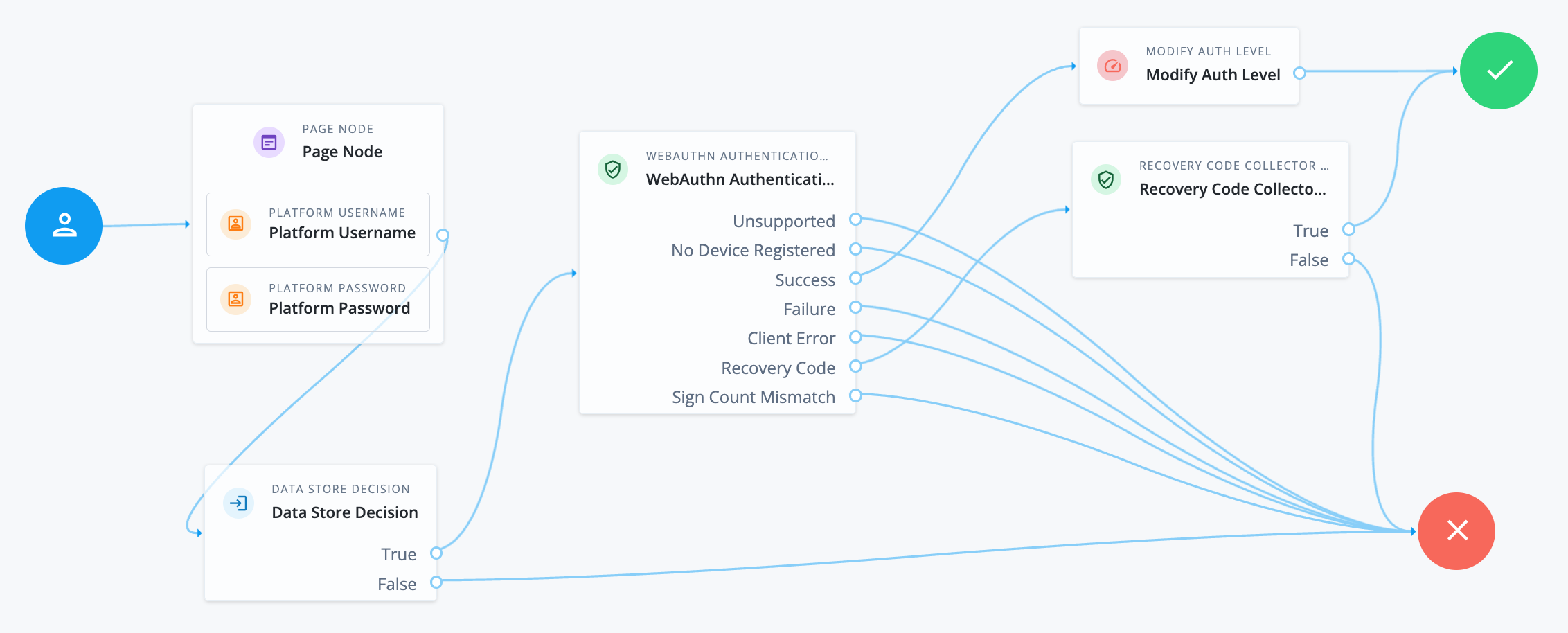
After verifying the users credentials against the configured data store, evaluation continues to the WebAuthn Authentication node.
If the user's client does not support WebAuthn, authentication fails and the user does not get a session. A more user-friendly approach would be to set a success URL to redirect the user to a page explaining the benefits of multi-factor authentication, and then proceeding to the `Success` node.
If there are no registered WebAuthn devices present in the user's profile, the failure URL is set, pointing to a flow that lets the user register a device. This stage could also be an [Inner Tree Evaluator node](inner-tree-evaluator.html).
If the user's client does support WebAuthn, and the connection is secured with TLS, the user is prompted to complete an [authorization gesture](https://www.w3.org/TR/webauthn/#authorization-gesture), for example, scanning a fingerprint, or entering a PIN:
The user's browser may present a consent pop-up to allow access to the authenticators available on the client. When consent has been granted, the browser activates the relevant authenticators, ready for authentication.
| | |
| - | ------------------------------------------------------------------------------------------------------------------------------------------------ |
| | The relying party details configured in the node are often included in the consent message to help the user verify the entity requesting access. |
The authenticators the client activates for authentication depends on the value of the properties in the node. For example, if the User verification requirement property is set to `REQUIRED`, the client **SHOULD** only activate authenticators which verify the identity of the user. For extra protection, AM **WILL** verify the response from an authenticator matches the criteria configured for the node, and will reject—with the `Failure` outcome—an authentication attempt by an inappropriate authenticator type.
When the user completes an [authorization gesture](https://www.w3.org/TR/webauthn/#authorization-gesture), for example, by scanning a fingerprint or entering a PIN, evaluation continues along the `Success` outcome path. In this example, their authentication level is increased by ten to signify the stronger authentication that has occurred, and the user is taken to their profile page.
If the user clicks the `Use Recovery Code` button, evaluation continues to the [Recovery Code Collector Decision node](recovery-code-collector-decision.html), ready to accept the recovery code. If verified, the user is taken to their profile page.
Any problems encountered during authentication lead to the `Failure`, `Client Error`, or `Sign Count Mismatch` outcomes, resulting in an authentication failure.
### WebAuthn Device Storage node
Writes information about FIDO2 devices to a user's profile. The user can subsequently authenticate using the device.
Use this node to store the device data the [WebAuthn Registration node](webauthn-registration.html) places into the transient node state when its Store device data in transient state property is enabled.
#### Compatibility
| Product | Compatible? |
| ------------------------------------------ | --------------------- |
| PingOne Advanced Identity Cloud | [icon: check, set=fa] |
| ForgeRock Access Management (self-managed) | [icon: check, set=fa] |
| Ping Identity Platform (self-managed) | [icon: check, set=fa] |
#### Outcomes
* `Success`
* `Failure`
* `Exceed Device Limit`
If AM encounters an issue when attempting to save the device data to the user's profile; for example, the user was not identified earlier, then evaluation continues along the `Failure` outcome path.
If the Maximum Saved Devices property is set to an integer greater than zero, and registering a new device would take the number of devices above the specified threshold, then evaluation continues down the `Exceed Device Limit` outcome path. In this case, you may need to instruct your users to log in with an existing device in order to remove one or more of their registered devices.
If the node successfully stores the device data to the user's profile, evaluation continues along the `Success` outcome path.
#### Properties
| Property | Usage |
| ----------------------- | ------------------------------------------------------------------------------------------------------------------------------------------------------------------------------------------------------------------------------------------------------------------------------------------------------------------------------------------------------------------------------------------------------------------------------------------------------------------------------------------------------------------------------------------------- |
| Generate recovery codes | Specify whether WebAuthn device recovery codes should be generated.If enabled, recovery codes are generated and stored in the transient node state, and stored alongside the device profile.Use the [Recovery Code Display node](recovery-code-display.html) to display the codes to the user for safe keeping.
Generating recovery codes overwrites all existing WebAuthn device recovery codes for the device.
Only the most recent set of recovery codes can be used for authentication if a device has been lost or stolen. |
| Maximum Saved Devices | Specify the maximum number of WebAuthn devices to save in a user's profile.Set this property to `0` if you do not want to limit the number of devices.When this property is greater than zero, the `Exceed Device Limit` outcome path becomes available. |
### WebAuthn Registration node
Lets users of supported clients register FIDO2 devices for use during authentication.
AM interacts with FIDO2/WebAuthn capable browsers, such as `Chrome`, `Firefox` and `Microsoft Edge`. These browsers interact with CTAP2 authenticators, including U2F and FIDO2 Security Keys, and platforms, such as Windows Hello or Apple Touch ID.
#### Compatibility
| Product | Compatible? |
| ------------------------------------------ | --------------------- |
| PingOne Advanced Identity Cloud | [icon: check, set=fa] |
| ForgeRock Access Management (self-managed) | [icon: check, set=fa] |
| Ping Identity Platform (self-managed) | [icon: check, set=fa] |
#### Outcomes
* `Unsupported`
* `Success`
* `Failure`
* `Client Error`
* `Exceed Device Limit`
If the user's client does not support WebAuthn, evaluation continues along the `Unsupported` outcome path. For example, clients connected over the HTTP protocol rather than HTTPS do not support WebAuthn.
If AM encounters an issue when attempting to register using a device, evaluation continues along the `Failure` outcome path. For example, AM could not verify the response from the authenticator was appropriate for the specific instance of the authentication ceremony.
If the user's client encounters an issue when attempting to register using a device, for example, if the timeout was reached, then evaluation continues along the `Client Error` outcome path. This outcome is used whenever the client throws a `DOMException`, as required by the [Web Authentication: An API for accessing Public Key Credentials Level 1](https://www.w3.org/TR/webauthn/) specification.
| | |
| - | -------------------------------------------------------------------------------------------------------------------------------------------------------------------------------------------------------- |
| | If a client error occurs, the error type and description are added to a property named `WebAuthenticationDOMException` in the shared state. This property can be read by other nodes later, if required. |
If the Maximum Saved Devices property is set to an integer greater than zero, and registering a new device would take the number of devices above the specified threshold, then evaluation continues down the `Exceed Device Limit` outcome path. In this case, you may need to instruct your users to log in with an existing device in order to remove one or more of their registered devices.
If the user successfully registers an authenticator of the correct type as determined by the node's properties, evaluation continues along the `Success` outcome path.
#### Properties
| Property | Usage |
| --------------------------------------- | ---------------------------------------------------------------------------------------------------------------------------------------------------------------------------------------------------------------------------------------------------------------------------------------------------------------------------------------------------------------------------------------------------------------------------------------------------------------------------------------------------------------------------------------------------------------------------------------------------------------------------------------------------------------------------------------------------------------------------------------------------------------------------------------------------------------------------------------------------------------------------------------------------------------------------------------------------------------------------------------------------------------------------------------------------------------------------------------------------------------------------------------------------------------------------------------------------------------------------------------------------------------------------------------------------------------------------------------------------------------------------------------------------------------------------------------------------- |
| Relying party | Specify the name of the [relying party](https://www.w3.org/TR/webauthn/#webauthn-relying-party) entity registering and authenticating users by using WebAuthn.For example, `Example Inc.` |
| Relying party identifier | Specifies the domain used as the [relying party identifier](https://www.w3.org/TR/webauthn/#relying-party-identifier) during WebAuthn. If not specified, AM uses the domain name of the instance, such as `am.example.com`.Specify an alternative domain if your AM instances are behind a load balancer, for example. |
| Origin domains | Specifies a list of fully qualified URLs to accept as the origin of incoming requests.If left empty, AM accepts any incoming domain. |
| User verification requirement | Specifies the required level of [user verification](https://www.w3.org/TR/webauthn/#user-verification).The available options are:- `REQUIRED`
The authenticator used must verify the identity of the user, for example by using biometrics. Authenticators that do not verify the identity of the user should not be activated for registration.
- `PREFERRED`
Use of an authenticator that verifies the identity of the user is preferred, but if none are available any authenticator is accepted.
- `DISCOURAGED`
Use of an authenticator that verifies the identity of the user is not required. Authenticators that do not verify the identity of the user should be preferred. |
| Preferred mode of attestation | Specifies whether AM requires that the authenticator provides attestation statements.The available options are:- `NONE`
AM does not require the authenticator to provide attestation statements. If the authenticator does send attestation statements, AM *will not* verify them, and will not fail the process.
- `INDIRECT`
AM does not require the authenticator to provide attestation statements. If the authenticator does send attestation statements, AM *will* verify them, and will fail the process if they fail verification.
- `DIRECT`
AM requires the authenticator provides attestation statements, and *will* verify them. The process will fail if the attestation statements cannot be verified.AM supports the following attestation formats:- [None](https://www.w3.org/TR/webauthn/#sctn-none-attestation)
- [Android SafetyNet](https://www.w3.org/TR/webauthn/#sctn-android-safetynet-attestation)
- [Packed](https://www.w3.org/TR/webauthn/#sctn-packed-attestation)
- [FIDO U2F](https://www.w3.org/TR/webauthn/#sctn-fido-u2f-attestation)
- [TPM](https://www.w3.org/TR/webauthn/#sctn-tpm-attestation)
You must set the Preferred mode of attestation property to NONE to use an authenticator that provides attestation statements in a format other than the supported formats above.
Specifically, AM does not currently support:
android-safetynet
android-key |
| Accepted signing algorithms | Specify the algorithms authenticators can use to sign their assertions. |
| Authentication attachment | Specifies whether AM requires that the authenticator is a particular attachment type.There are two types of authenticator attachments:- An authenticator that is built-in to the client device is labeled a *platform attachment*.
A fingerprint scanner built-in to a phone or laptop is an example of a platform attachment authenticator.
- An authenticator that can roam, or move, between different client devices is labeled a *cross-platform attachment*.
A USB hardware security key is an example of a cross-platform attachment authenticator.The available options are:- `UNSPECIFIED`
AM accepts any attachment type.
- `PLATFORM`
The authenticator must be a *platform* attachment type. The client should not activate other authenticator types for registration.
- `CROSS_PLATFORM`
The authenticator must be a *cross-platform* attachment type. The client should not activate other authenticator types for registration. |
| Trust Store alias | Specifies the name of a secret store configured in the realm that contains CA-issued certificate chains, which can be used to verify attestation data provided by a device.The alias of the realm trust store holding the secrets necessary to validate a supplied attestation certificate. The alias name must only contain the characters `a-z` and the `.` symbol.The value is also appended to the string `am.authentication.nodes.webauthn.truststore.` to form the dynamic secret ID used to map the certificate chains. |
| Enforce revocation check | Specifies whether to enforce certificate revocation checks. When enabled, then any attestation certificate's trust chain *MUST* have a CRL or OCSP entry that can be verified by AM during processing.When disabled, certificates are not checked for revocation. You must ensure expired or revoked certificates are manually removed. |
| Timeout | Specify the number of seconds to wait for a response from an authenticator.If the specified time is reached, evaluation continues along the `Client error` outcome path, and a relevant message is stored in the `WebAuthenticationDOMException` property of the shared state. |
| Limit registrations | Specify whether the same authenticator can be registered multiple times.If enabled, the client should not activate an authenticator that is already registered for registration. |
| Generate recovery codes | Specify whether WebAuthn-specific recovery codes should be generated. If enabled, recovery codes are generated and stored in transient state if registration was successful.Use the [Recovery Code Display node](recovery-code-display.html) to display the codes to the user for safe-keeping.If you have enabled the Store device data in transient state property and are not saving the device data to the user's profile immediately, do not enable the Generate recovery codes property in this node, but in the [WebAuthn Device Storage node](webauthn-device-storage.html) instead.
Generating recovery codes will overwrite all existing WebAuthn-specific recovery codes.
Only the most recent set of recovery codes can be used for authentication if a device has been lost or stolen. |
| Store data in transient state | Specify whether the information provided by the device to the node is stored in the transient node state for later analysis by subsequent nodes, using the key `webauthnData`.In addition to the information provided by the device, the type of attestation achieved; for example, `BASIC`, `CA`, `SELF` and so on, is stored in the transient node state, using the key `webauthnAttestationType`.
The amount of data involved can be large. Only enable this option if you intend to analyze it. |
| Store device data in transient state | Specify whether the information about the device required for WebAuthn is stored in the transient node state rather than saved immediately to the user's profile.Enable this option if you intend to make decisions in scripts, and have enabled the Store data in transient state property, and therefore do not want to register the device to the user until the outcome of the analysis is complete.
Do not alter the data while it is in the transient node state, nor when saved to a user's profile.
Modifying the device data will likely cause the device to be unable to authenticate.Use the [WebAuthn Device Storage node](webauthn-device-storage.html) to write the device data to the user's profile when this option is enabled.When disabled, device data is written automatically to the user's profile when registration is successful. |
| Username to device | Specifies whether AM requests that the device stores the user's username.When enabled, if the device is unable to store or provide usernames, the node will fail and results in the *Failure* outcome.For information on using this property for usernameless authentication with ForgeRock Go, refer to [Configure usernameless authentication with ForgeRock Go](https://docs.pingidentity.com/pingam/7.4/am-authentication/authn-mfa-webauthn.html#webauthn-usernameless-with-forgerock-go). |
| Shared state attribute for display name | Specifies a variable in shared node state that contains a display name for the user; for example, their full name, or email address.The value is written to devices alongside the username when the Username to device property is enabled, and helps the user select between the accounts they may have on their devices.If not specified, or the variable is not found in shared state, the username is used.For information on using this property for usernameless authentication with ForgeRock Go, refer to [Configure usernameless authentication with ForgeRock Go](https://docs.pingidentity.com/pingam/7.4/am-authentication/authn-mfa-webauthn.html#webauthn-usernameless-with-forgerock-go). |
| Return challenge as JavaScript | Choose how the node should return its challenge for consumption by your front-end user interface:- Ping SDK client apps:
If your authentication user interface is built with the Ping SDKs, you should either deselect this option or use SDK for JavaScript 4.9.0 or later.
When not enabled, the node returns the challenge and associated data in a metadata callback.
Ping SDK client apps that might not be able to execute JavaScript use the information from the callback to interact with WebAuthn APIs on AM's behalf.
- Access Management User UI:
You should only enable this option if you are using the Access Management User UI to authenticate users.
Enabling this option causes the node to return its challenge as a fully encapsulated client-side JavaScript that interacts directly with the WebAuthn API. |
| Maximum Saved Devices | Specifies the maximum number of WebAuthn devices stored in the user's profile.Set this property to `0` if you do not want to limit the number of devices.When this property is greater than zero, the `Exceed Device Limit` outcome path becomes available.
You can only limit the number of devices stored in the user's profile.
If the Store device data in transient state property is enabled then the node is unable to limit the number of devices, and the Exceed Device Limit outcome path is not displayed.
In this case, specify the maximum number of saved devices in the WebAuthn Device Storage node. |
#### Example
The following example registers WebAuthn devices:
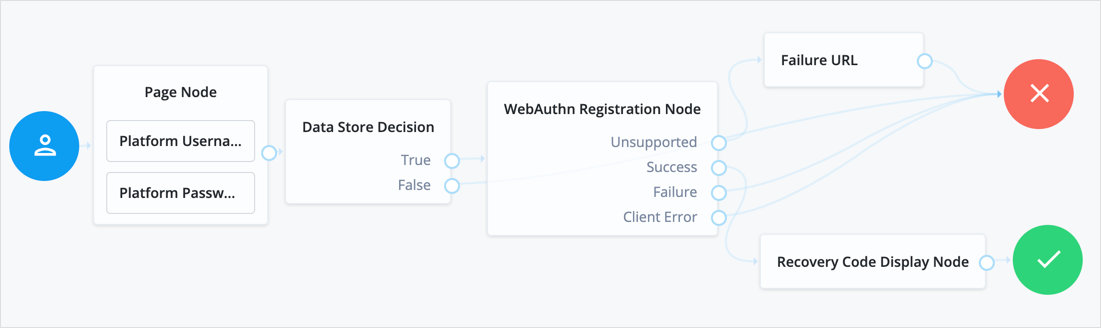
If the user's client does not support WebAuthn, the failure URL is altered, for example to redirect the user to a page explaining which clients and operating systems support WebAuthn.
If the user's client does support WebAuthn, and the connection is secured with TLS, AM prompts the user to register an authenticator:

The user's browser may present a consent pop-up to allow access to the authenticators available on the client. When consent has been granted, the browser activates the relevant authenticators, ready for registration.
| | |
| - | ------------------------------------------------------------------------------------------------------------------------------------------------ |
| | The relying party details configured in the node are often included in the consent message to help the user verify the entity requesting access. |
The authenticators the client activates for registration depend on the value of the properties in the node. For example, if the User verification requirement property is set to `REQUIRED`, the client would not activate a USB hardware security key for registration.
When the user completes an [authorization gesture](https://www.w3.org/TR/webauthn/#authorization-gesture), for example, by scanning a fingerprint or entering a PIN, the evaluation continues along the `Success` outcome path, and in this example will be taken to their profile page.
The registered authenticator appears on the user's dashboard page, with the label *New Security Key*. To rename the authenticator, click its vertical ellipsis context icon, [icon: ellipsis-v, set=fa], and click Rename.
Any problems encountered during the registration, including a timeout, results in the evaluation continuing to the `Failure` outcome.
## Risk management nodes
### Account Active Decision node
Checks whether the current account is active.
This node relies on the shared node state to determine which account to check.
Use this node, for example, in login flows where an account may already be created but not enabled until a later date.
Find more information in [Account lockout for journeys](https://docs.pingidentity.com/pingam/7.4/am-authentication/about-authentication-trees.html#account-lockout-trees).
#### Compatibility
| Product | Compatible? |
| ------------------------------------------ | --------------------- |
| PingOne Advanced Identity Cloud | [icon: check, set=fa] |
| ForgeRock Access Management (self-managed) | [icon: check, set=fa] |
| Ping Identity Platform (self-managed) | [icon: check, set=fa] |
#### Outcomes
* `True`
* `False`
#### Properties
This node has no configurable properties.
### Account Lockout node
Locks or unlocks the authenticating user's account profile.
For more information, refer to [Account lockout for journeys](https://docs.pingidentity.com/pingam/7.4/am-authentication/about-authentication-trees.html#account-lockout-trees).
#### Compatibility
| Product | Compatible? |
| ------------------------------------------ | --------------------- |
| PingOne Advanced Identity Cloud | [icon: check, set=fa] |
| ForgeRock Access Management (self-managed) | [icon: check, set=fa] |
| Ping Identity Platform (self-managed) | [icon: check, set=fa] |
#### Outcomes
Single outcome path.
#### Properties
| Property | Usage |
| ----------- | ----------------------------------------------------------------------------------------------------------------------------------------------------------------------------- |
| Lock Action | Choose whether to `LOCK` or `UNLOCK` the authenticating user's account profile.The [Data Store Decision node](data-store-decision.html) checks whether the account is locked. |
#### Example
The following example uses this node with the [Retry Limit Decision node](retry-limit-decision.html) to lock an account after a number of invalid attempts:
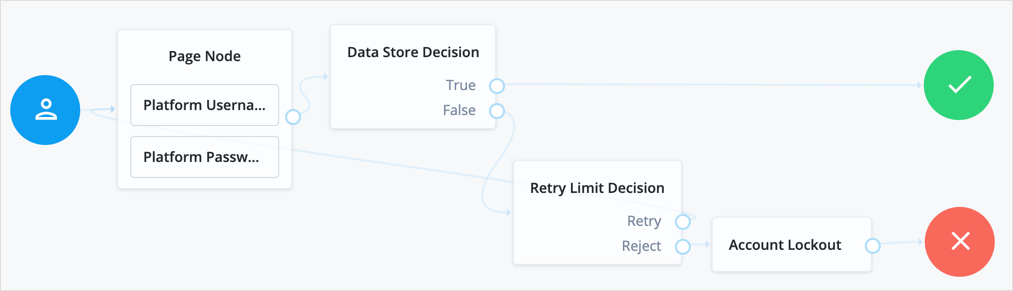
### Auth Level Decision node
Compares the current authentication level value against a configured value.
#### Compatibility
| Product | Compatible? |
| ------------------------------------------ | --------------------- |
| PingOne Advanced Identity Cloud | [icon: check, set=fa] |
| ForgeRock Access Management (self-managed) | [icon: check, set=fa] |
| Ping Identity Platform (self-managed) | [icon: check, set=fa] |
#### Outcomes
* `True`
* `False`
#### Properties
| Property | Usage |
| ------------------------------- | ------------------------------------------------------------------------------------------------------------------------------------------------------------------------------------ |
| Sufficient Authentication Level | Evaluation continues along the `True` path if the current authentication level is equal to or greater than this integer; otherwise, the evaluation continues along the `False` path. |
### CAPTCHA node
Adds CAPTCHA support.
This node verifies the response token received from the CAPTCHA provider and creates a CAPTCHA callback for the UI to interact with.
By default, the node is configured for Google's reCAPTCHA v2.
#### Compatibility
| Product | Compatible? |
| ------------------------------------------ | --------------------- |
| PingOne Advanced Identity Cloud | [icon: check, set=fa] |
| ForgeRock Access Management (self-managed) | [icon: check, set=fa] |
| Ping Identity Platform (self-managed) | [icon: check, set=fa] |
#### Outcomes
* `True` *(success)*
* `False` *(failure)*
#### Properties
| Property | Usage |
| ------------------------------------- | -------------------------------------------------------------------------------------------------------------------------------------------------------------------------------------------------------------------------------------------------------------------------------------------------------------------------------------------------------------------------------------------------------------------------------------------------------------------------------------------------------------------------------------------------------------------------------------------------------------------------------------------------------------------------------------------------------------------------------------------------------------------- |
| CAPTCHA Site Key *(required)* | The CAPTCHA site key supplied by the CAPTCHA provider when you sign up for access to the API. |
| CAPTCHA Secret Key *(required)* | The CAPTCHA secret key supplied by the CAPTCHA provider when you sign up for access to the API. |
| CAPTCHA Verification URL *(required)* | The URL used to verify the CAPTCHA submission.Possible values are:- Google: `https://www.google.com/recaptcha/api/siteverify`
- hCaptcha: `https://hcaptcha.com/siteverify` |
| CAPTCHA API URL *(required)* | The URL of the JavaScript that loads the CAPTCHA widget.Possible values are:- Google: `https://www.google.com/recaptcha/api.js`
- hCaptcha: `https://hcaptcha.com/1/api.js` |
| Class of CAPTCHA HTML Element | The class of the HTML element required by the CAPTCHA widget.Possible values are:- Google: `g-recaptcha`
- hCaptcha: `h-captcha` |
| ReCaptcha V3 node | If you're using Google reCAPTCHA, specify whether it's v2 or v3. Turn on for v3. |
| Score Threshold | If you're using Google reCAPTCHA v3, or hCaptcha, enter a score threshold.The CAPTCHA provider returns a score for each user request, based on observed interaction with your site. CAPTCHA "learns" by observing real site traffic, so scores in a staging environment or in a production deployment that has just been implemented might not be very accurate.A score of 1.0 is likely a good user interaction, while 0.0 is likely to be a bot.The threshold you set here determines whether to allow or deny access, based on the score returned by the CAPTCHA provider.Start with a threshold of 0.5.For more information about score thresholds, refer to the [Google documentation](https://developers.google.com/recaptcha/docs/v3#interpreting_the_score). |
#### Example
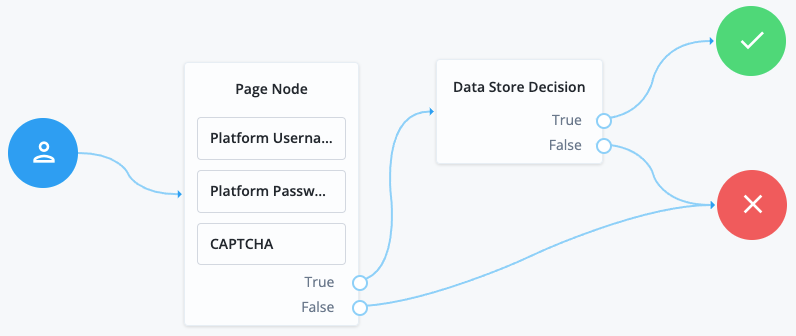
### Legacy CAPTCHA node
Verifies the response token received from the CAPTCHA verifier, and creates a CAPTCHA callback for the UI to interact with. Default values are for Google ReCAPTCHA.
| | |
| - | ----------------------------------------------------------------------------------------- |
| | This node has been superseded by the [CAPTCHA node](captcha.html). Use that node instead. |
#### Compatibility
| Product | Compatible? |
| ------------------------------------------ | --------------------- |
| PingOne Advanced Identity Cloud | [icon: check, set=fa] |
| ForgeRock Access Management (self-managed) | [icon: check, set=fa] |
| Ping Identity Platform (self-managed) | [icon: check, set=fa] |
#### Outcomes
* `True` *(success)*
* `False` *(failure)*
#### Properties
| Property | Usage |
| ------------------------------------- | ---------------------------------------------------------------------------------------------------------------------------------------------------------------------------- |
| CAPTCHA Site Key *(required)* | The CAPTCHA site key supplied by the CAPTCHA provider when you sign up for access to the API. |
| CAPTCHA Secret Key *(required)* | The CAPTCHA secret key supplied by the CAPTCHA provider when you sign up for access to the API. |
| CAPTCHA Verification URL *(required)* | The URL used to verify the CAPTCHA submission.Possible values are:- Google: `https://www.google.com/recaptcha/api/siteverify`
- hCaptcha: `https://hcaptcha.com/siteverify` |
| CAPTCHA API URL *(required)* | The URL of the JavaScript that loads the CAPTCHA widget.Possible values are:- Google: `https://www.google.com/recaptcha/api.js`
- hCaptcha: `https://hcaptcha.com/1/api.js` |
| Class of CAPTCHA HTML Element | The class of the HTML element required by the CAPTCHA widget.Possible values are:- Google: `g-recaptcha`
- hCaptcha: `h-captcha` |
### Modify Auth Level node
Increases or decreases the current authentication level value.
#### Compatibility
| Product | Compatible? |
| ------------------------------------------ | --------------------- |
| PingOne Advanced Identity Cloud | [icon: check, set=fa] |
| ForgeRock Access Management (self-managed) | [icon: check, set=fa] |
| Ping Identity Platform (self-managed) | [icon: check, set=fa] |
#### Outcomes
Single outcome path.
#### Properties
| Property | Usage |
| ------------ | ----------------------------------------------------------------------------------------------------------------------------------------------------------------- |
| Value To Add | Enter a positive integer to increase the current authentication level, or a negative integer to decrease the current authentication level by the specified value. |
## Behavioral nodes
### Increment Login Count node
Increments the successful login count property of a managed object in IDM.
Use this node with the [Login Count Decision node](login-count-decision.html). To track the number of logins, include this node in the login authentication flows.
#### Compatibility
| Product | Compatible? |
| ----------------------------------------------------------------------------------------------------------------------------------------------------- | --------------------- |
| PingOne Advanced Identity Cloud | [icon: check, set=fa] |
| ForgeRock Access Management (self-managed)
This functionality requires that you configure AM as part of a Ping Identity Platform deployment. | [icon: check, set=fa] |
| Ping Identity Platform (self-managed) | [icon: check, set=fa] |
#### Properties
| Property | Usage |
| ------------------ | ------------------------------------------------- |
| Identity Attribute | The attribute used to identify the object in IDM. |
### Login Count Decision node
Triggers an action when a user's successful login count property reaches a specified number.
Add the [Increment Login Count node](increment-login-count.html) to your login flows, so this node has the data to trigger a decision.
#### Compatibility
| Product | Compatible? |
| ----------------------------------------------------------------------------------------------------------------------------------------------------- | --------------------- |
| PingOne Advanced Identity Cloud | [icon: check, set=fa] |
| ForgeRock Access Management (self-managed)
This functionality requires that you configure AM as part of a Ping Identity Platform deployment. | [icon: check, set=fa] |
| Ping Identity Platform (self-managed) | [icon: check, set=fa] |
#### Properties
| Property | Usage |
| ------------------ | -------------------------------------------------------------------------------------------------------------------------------------------------------------------------------------------------------------------------------------------------------------------------------------------------------- |
| Interval | The type of interval the decision should trigger on.To trigger the action once when the user reaches the number of successful login attempts, set Interval to `AT`.To trigger the action on every login attempt after the user reaches the number of successful login attempts, set Interval to `EVERY`. |
| Amount | The amount (count) of logins the interval should trigger on. |
| Identity Attribute | The attribute used to identify the object in IDM. |
## Contextual nodes
### Certificate Collector node
Collects an X.509 digital certificate from the request to use the certificate as authentication credentials.
To validate the certificate, use a [Certificate Validation node](self-managed/certificate-validation.html).
#### Compatibility
| Product | Compatible? |
| ------------------------------------------ | --------------------- |
| PingOne Advanced Identity Cloud | [icon: times, set=fa] |
| ForgeRock Access Management (self-managed) | [icon: check, set=fa] |
| Ping Identity Platform (self-managed) | [icon: check, set=fa] |
#### Outcomes
* `Collected`
* `Not Collected`
Evaluation continues through the `Collected` path if certificate collection is successful; otherwise, evaluation continues on the `Not Collected` path.
#### Properties
| Property | Usage |
| ------------------------------------------- | --------------------------------------------------------------------------------------------------------------------------------------------------------------------------------------------------------------------------------------------------------------------------------------------------------------------------------------------------------------------------------------------------------------------------------------------------------------------------------------------------------------------------------------------------------------------------------------------------------------------------------------------------------------------------------------------------------- |
| Certificate Collection Method | Specifies how to collect the certificate from the request. Possible values are:- `Request`
Look for the certificate in the request. Use this value if TLS termination happens at the container where AM runs.
- `Header`
Looks for the certificate in the HTTP header name specified in the HTTP Header Name for the Client Certificate property. Use this value if TLS termination happens in a proxy or load balancer outside the container where AM runs.
- `Either`
Looks for the certificate in the request; if AM cannot find it in the request, AM looks for the certificate in the HTTP header specified in the HTTP Header Name for the Client Certificate property.Default: `Either` |
| HTTP Header Name for the Client Certificate | Specifies the name of the HTTP header containing the certificate when the Certificate Collection Method property is configured to `Header` or `Either`.Default: No value specified. |
| Trusted Remote Hosts | Specifies a list of IP addresses trusted to supply certificates on behalf of the authenticating client, such as load balancers doing TLS termination.If no value is specified, AM rejects certificates supplied by remote hosts. If you specify the `any` value, AM trusts certificates on behalf of the authenticating client supplied by any remote host.Default: No value specified. |
### Certificate User Extractor node
Extracts a value from the certificate collected by the [Certificate Collector node](self-managed/certificate-collector.html), and searches for it in the identity store. The goal is to match the certificate with a user in the identity store.
The extracted value is stored in the `username` key in the shared node state.
#### Compatibility
| Product | Compatible? |
| ------------------------------------------ | --------------------- |
| PingOne Advanced Identity Cloud | [icon: times, set=fa] |
| ForgeRock Access Management (self-managed) | [icon: check, set=fa] |
| Ping Identity Platform (self-managed) | [icon: check, set=fa] |
#### Outcomes
* `Extracted`
* `Not Extracted`
Evaluation continues through the `Extracted` path if AM finds a match for the certificate in the identity store; otherwise, evaluation continues on the `Not Extracted` path.
#### Properties
| Property | Usage |
| --------------------------------------------------- | ---------------------------------------------------------------------------------------------------------------------------------------------------------------------------------------------------------------------------------------------------------------------------------------------------------------------------------------------------------------------------------------------------------------------------------------------------------------------------------------------------------------- |
| Certificate Field Used to Access User Profile | Specifies the field in the certificate that AM uses to search for the user in the identity store. Possible values are:- `Subject DN`
- `Subject CN`
- `Subject UID`
- `Email Address`
- `Other`
- `None`If you select `Other`, provide an attribute name in the Other Certificate Field Used to Access User Profile property.Select `None` if you want to specify an alternate way of looking up the user profile in the SubjectAltNameExt Value Type to Access User Profile property.Default: `Subject CN` |
| Other Certificate Field Used to Access User Profile | Specifies a custom certificate field to use as the base of the user search. |
| SubjectAltNameExt Value Type to Access User Profile | Specifies how to look up the user profile:- `None`
AM uses the value specified in the Certificate Field Used to Access User Profile or the Other Certificate Field Used to Access User Profile properties when looking up the user profile.
- `RFC822Name`
AM looks up the user profile using the value of the `RFC822Name` field.
- `UPN`
AM looks up the user profile as the User Principal Name attribute used in Active Directory.Default: `None` |
### Certificate Validation node
Validates a digital X.509 certificate collected by the [Certificate Collector node](self-managed/certificate-collector.html).
#### Compatibility
| Product | Compatible? |
| ------------------------------------------ | --------------------- |
| PingOne Advanced Identity Cloud | [icon: times, set=fa] |
| ForgeRock Access Management (self-managed) | [icon: check, set=fa] |
| Ping Identity Platform (self-managed) | [icon: check, set=fa] |
#### Outcomes
* `True`
The node could validate the certificate.
When the outcome is `True`, add a [Certificate User Extractor node](self-managed/certificate-user-extractor.html) to extract the values of the certificate.
* `False`
The node could not validate the certificate. The node will use this path when it cannot validate the certificate, and no more specific outcome is available.
* `Not found`
The Match Certificate in LDAP property is enabled, but the certificate was not found in the LDAP store.
* `Expired`
The Check Certificate Expiration property is enabled, and the certificate has expired.
* `Path Validation Failed`
The Match Certificate to CRL property is enabled, and the certificate path is invalid.
* `Revoked`
The OCSP Validation property is enabled, and the certificate has been revoked.
#### Properties
| Property | Usage |
| --------------------------------------------------------- | ----------------------------------------------------------------------------------------------------------------------------------------------------------------------------------------------------------------------------------------------------------------------------------------------------------------------------------------------------------------------------------------------------------------------------------------------------------------------------------------------------------------------------------------------------------------------------------------------------------------------------------------------------------------------------------------------------------------------------------------------------------------------------------------------------------------------------------------------------------------------------------------------------------------------------------------------------------------------------------------- |
| Match Certificate in LDAP | When enabled, AM matches the certificate collected with the one stored in an LDAP directory entry. This entry and additional security-related properties are defined later in the node.Default: Disabled |
| Check Certificate Expiration | When enabled, AM checks whether the certificate has expired.Default: Disabled |
| Subject DN Attribute Used to Search LDAP for Certificates | Specifies the attribute that AM uses to search the LDAP directory for the certificate. The search filter also uses the value of the Subject DN as it appears in the certificate.Default: `CN` |
| Match Certificate to CRL | When enabled, AM checks whether the certificate has been revoked according to a CRL in the LDAP directory. Related properties are defined later in the node.Default: Disabled. |
| Issuer DN Attribute(s) Used to Search LDAP for CRLs | Specifies which attribute and value in the certificate Issuer DN AM uses to find the CRL in the LDAP directory.If only one attribute is specified, the LDAP search filter used is `(attr-name=attr-value-in-subject-DN)`.For example, if the subject DN of the issuer certificate is `C=US, CN=Some CA, serialNumber=123456`, and the attribute specified is `CN`, then the LDAP search filter used to find the CRL is `(CN=Some CA)`.Specify several CLRs for the same CA issuer in a comma-separated list (`,`) where the names are in the same order as they occur in the subject DN.In this case, the LDAP search filter used is `(cn=attr1=attr1-value-in-subject-DN,attr2=attr2-value-in-subject-DN,…`, and so on.For example, if the subject DN of the issuer certificate is `C=US, CN=Some CA, serialNumber=123456`, and the attributes specified are `CN,serialNumber`, then the LDAP search filter used to find the CRL is `(cn=CN=Some CA,serialNumber=123456)`.Default: `CN` |
| HTTP Parameters for CRL Update | Specifies parameters that AM includes in any HTTP CRL call to the CA that issued the certificate.If the client or CA contains the Issuing Distribution Point Extension, AM uses this information to retrieve the CRL from the distribution point.Add the parameters as key pairs of values in a comma-separated list (`,`). For example, `param1=value1,param2=value2`. |
| Cache CRLs in Memory | (LDAP distribution points only) When enabled, AM caches CRLs.Default: Enabled |
| Update CA CRLs from CRLDistributionPoint | When enabled, AM updates the CRLs stored in the LDAP directory store if the CA certificate includes either the `IssuingDistributionPoint` or the `CRLDistributionPoint` extensions.Default: Enabled |
| OCSP Validation | When enabled, AM checks the revocation status of certificates using the Online Certificate Status Protocol (OCSP).The AM instance must have internet access, and you must configure OSCP for AM under Configure > Server Defaults > Security > Online Certificate Status Protocol Check.Default: Disabled |
| LDAP Server Where Certificates are Stored | Specifies the LDAP server that holds the certificates. Enter each server in the `ldap-server:port` format.AM servers can be associated with LDAP servers by writing multiple chains with the format `am_server\|ldapserver:port`. For example, `am.example.com\|ldap1.example.com:636`.To configure a secure connection, enable the Use SSL/TLS for LDAP Access property. |
| LDAP Search Start or Base DN | Valid base DN for the LDAP search, such as `dc=example,dc=com`. To associate AM servers with different search base DNs, use the format `am_server\|base_dn`. For example, `am.example.com\|dc=example,dc=com openam1.test.com\|dc=test,dc=com`. |
| LDAP Server Authentication User | Specifies the DN of the service account that AM uses to authenticate to the LDAP directory that holds the certificates. For example, `cn=LDAP User`.Default: `cn=Directory Manager` |
| LDAP Server Authentication Password | Specifies the password of the user configured in the LDAP Server Authentication User property. |
| Use SSL/TLS for LDAP Access | Specifies whether AM should use SSL/TLS to access the LDAP. When enabled, AM must be able to trust the LDAP server certificate.Default: Disabled |
#### Example
The following is an example of how to use the certificate nodes in a Ping Identity Platform authentication journey. Note that all the failure outcomes of the [Certificate Validation node](self-managed/certificate-validation.html) are linked so that the user provides a username and password, but you could choose different authentication methods for each outcome:
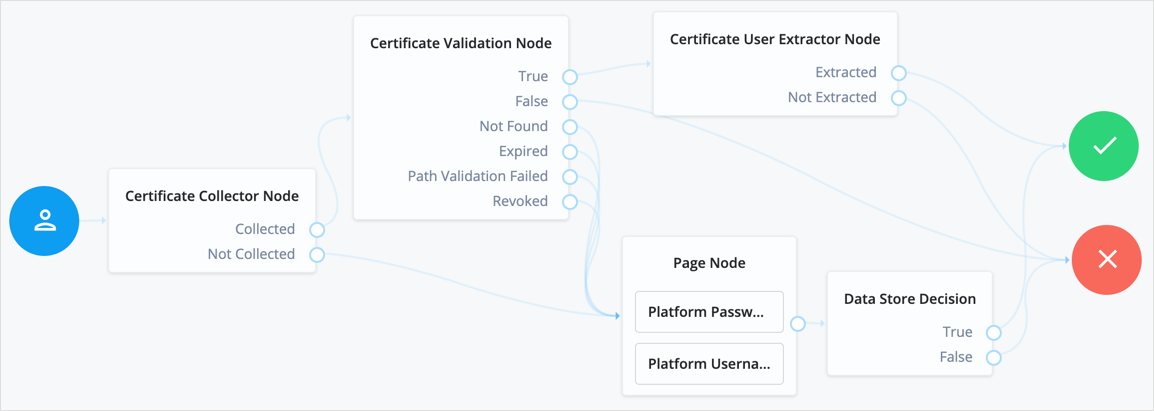
### Cookie Presence Decision node
Checks that a named cookie is present in the incoming authentication request.
This node does not check the value of the named cookie, only that it exists.
#### Compatibility
| Product | Compatible? |
| ------------------------------------------ | --------------------- |
| PingOne Advanced Identity Cloud | [icon: check, set=fa] |
| ForgeRock Access Management (self-managed) | [icon: check, set=fa] |
| Ping Identity Platform (self-managed) | [icon: check, set=fa] |
#### Outcomes
* `True`
* `False`
#### Properties
| Property | Usage |
| --------------------------- | ------------------------------------------------------------------------------------------------------------------------------------------------------------------------- |
| Name of Cookie *(required)* | Evaluation continues along the `True` path if the named cookie is present in the incoming authentication request; otherwise, evaluation continues along the `False` path. |
### Device Geofencing node
Compares any collected device location metadata with the trusted locations configured in the authentication node.
Use this node with the [Device Profile Collector node](device-profile-collector.html) to determine if the authenticating user's device is located within range of configured, trusted locations.
#### Compatibility
| Product | Compatible? |
| ------------------------------------------ | --------------------- |
| PingOne Advanced Identity Cloud | [icon: check, set=fa] |
| ForgeRock Access Management (self-managed) | [icon: check, set=fa] |
| Ping Identity Platform (self-managed) | [icon: check, set=fa] |
#### Outcomes
* `Inside`
* `Outside`
Evaluation continues along the `Inside` path if the collected location is within the specified range of a configured trusted location; otherwise, evaluation continues along the `Outside` path.
#### Properties
| Property | Usage |
| ------------------------------ | ------------------------------------------------------------------------------------------------------------------------------------------------- |
| Trusted Locations *(required)* | Specify the latitude and longitude of at least one trusted location. Separate the values with a comma; for example, `37.7910855,-122.3951663`. |
| Geofence Radius (km) | Specifies the maximum distance, in kilometers, that a device can be from a configured trusted location.The distance is calculated point-to-point. |
### Device Location Match node
Compares any collected device location metadata with that stored in the user's profile.
Use this node with the [Device Profile Collector node](device-profile-collector.html) to determine if the authenticating user's device is located within range of somewhere they have authenticated from, and saved, previously.
You must establish the identity of the user before attempting to match locations.
#### Compatibility
| Product | Compatible? |
| ------------------------------------------ | --------------------- |
| PingOne Advanced Identity Cloud | [icon: check, set=fa] |
| ForgeRock Access Management (self-managed) | [icon: check, set=fa] |
| Ping Identity Platform (self-managed) | [icon: check, set=fa] |
#### Outcomes
* `True`
* `False`
* `Unknown Device`
Evaluation continues along the `True` path if the collected location is within the specified range of saved location data; otherwise, evaluation continues along the `False` path.
If the user has no saved device profiles or the identity of the user has not been established, evaluation continues along the `Unknown Device` path.
#### Properties
| Property | Usage |
| ------------------- | ----------------------------------------------------------------------------------------------------------------------------------------------- |
| Maximum Radius (km) | Specifies the maximum distance, in kilometers, that a device can be from a previously saved location.The distance is calculated point-to-point. |
### Device Match node
Compares any collected device metadata with that stored in the user's profile.
Use this node with the [Device Profile Collector node](device-profile-collector.html) to determine if the authenticating user is on a previously saved, trusted device.
| | |
| - | ----------------------------------------------------------------------------------------------------------------------------------------------------------------------------------------------- |
| | Use this node with the [Device Location Match node](device-profile-location-match.html) or [Device Geofencing node](device-geofencing.html) to verify both the device and location of the user. |
The Device Match node supports the following methods of comparison:
1. Built-in Matching
The node handles the comparison and matching, and you can configure the acceptable variance, and specify a time frame that profiles are considered current.
When using built-in matching, the node compares all attributes from the device profile collected by the [Device Profile Collector node](device-profile-collector.html) against the attributes in the user's saved device profiles. Each differing attribute value adds to the variance count.
Examples of attributes compared include:
* Hardware details (manufacturer, model)
* Operating system information (OS version, build number)
* Browser environment (user-agent, screen resolution)
* Network information (IP address, MAC address)
This mode is ideal for matching devices that don't change frequently, such as point-of-sale machines. It's also simpler to implement because you don't have to write a script to handle and compare specific device attributes.
However, this method treats all attributes of a device equally, and each difference in attribute values counts towards the **Acceptable Variance** value you configure.
2. Custom Matching
Create a custom script to compare captured device data against trusted device profiles.
This mode is ideal if you issue specific hardware to your users, or you want to prioritize certain device attribute matches over others.
The script lets you control which device attributes are captured and how they're compared to the trusted device profile.
For example, you could ignore attributes that are known to change frequently, such as screen layouts or orientation.
To view a customizable template script for device matching, follow these steps:
1. In the AM admin UI, go to Realms > *realm name* > Scripts.
2. Click Device Profile Match Template - Decision Node Script.
| | |
| - | --------------------------------------------------------------------------------------------------------------------------------------------------------------------------------------------- |
| | There's also a comprehensive sample script (with usage instructions) and a development toolkit in the [GitHub sample repository](https://github.com/ForgeRock/forgerock-device-match-script). |
#### Compatibility
| Product | Compatible? |
| ------------------------------------------ | --------------------- |
| PingOne Advanced Identity Cloud | [icon: check, set=fa] |
| ForgeRock Access Management (self-managed) | [icon: check, set=fa] |
| Ping Identity Platform (self-managed) | [icon: check, set=fa] |
#### Outcomes
* `True`
* `False`
* `Unknown Device`
Evaluation continues along the `True` path if the collected device profile matches a saved profile, within the configured variance; otherwise, evaluation continues along the `False` path.
If the user has no trusted device profiles, or the identity of the user has not been established, evaluation continues along the `Unknown Device` path.
#### Properties
| Property | Usage |
| -------------------------- | ---------------------------------------------------------------------------------------------------------------------------------------------------------------------------------------------------------------------------------------------------------------------------------------------------------------------------------------------------------------------------------------------------------------------------- |
| Acceptable Variance | Specify the maximum amount of device attribute differences acceptable for a match. |
| Expiration | Specify the maximum age, in the number of days since being saved, that existing profiles can be considered for comparison. Device profiles saved to the user's profile before this time will not be compared to the collected metadata. |
| Use Custom Matching Script | Specifies whether to use a custom script to compare the collected metadata with saved device profiles.The script type must be Decision node script for authentication trees (standalone AM) or Journey Decision Node (Ping Identity Platform deployments).
When a custom matching script is used, the Acceptable Variance and Expiration properties are ignored.Default: `Authentication Tree Decision Node Script` |
| Custom Matching Script | Specifies the custom script to use if the Use Custom Matching Script property is enabled.Only scripts of type Decision node script for authentication trees (standalone AM) or Journey Decision Node (Ping Identity Platform deployments) appear in the list. |
### Device Profile Collector node
The Device Profile Collector node collects metadata about the user's device, and optionally the device location, by sending a `DeviceProfileCallback` to the client application. Learn more in [DeviceProfileCallback](https://docs.pingidentity.com/pingam/7.4/am-authentication/authn-interactive-callbacks.html#DeviceProfileCallback).
The amount and type of data collected depends on whether you're using the Ping SDKs or not.
* Without the SDKs (browser-only collection)
If you aren't using the Ping SDKs, the device details are limited to those collected by the web browser.
Examples of collected data include:
* User-agent string
* Screen resolution and color depth
* Browser language and timezone
* A unique identifier generated from HTML5 canvas fingerprinting
* With the SDKs
The [Ping SDKs](https://docs.pingidentity.com/sdks/latest/sdks/use-cases/how-to-device-info.html) have built-in support for device-profiling nodes, which lets you collect richer device information.
When the client application uses the Ping SDKs, the SDK intercepts the `DeviceProfileCallback` and collects additional device information.
In addition to the data available from the web browser, the SDKs can collect the following types of information:
* **Hardware:** Device manufacturer, model, CPU architecture, and memory.
* **Operating System:** OS version, build number, and kernel version.
* **Security:** Whether the device is rooted or jailbroken, and the status of disk encryption.
* **Network:** IP address and MAC address of network interfaces.
| | |
| - | ------------------------------------------------------------------------------------------------------------------------------------------------------------------------------------------------------------------------------------------------------------- |
| | It is up to you what information you collect from users and devices.Always use data responsibly and provide your users with appropriate control over data they share with you.You are responsible for complying with any regulations or data protection laws. |
Use this node with the [Device Profile Save node](device-profile-save.html) to create a trusted profile from the collected data. You can use the trusted device profile in subsequent authentication attempts; for example, with the [Device Match node](device-match.html) and [Device Location Match node](device-profile-location-match.html).
#### Compatibility
| Product | Compatible? |
| ------------------------------------------ | --------------------- |
| PingOne Advanced Identity Cloud | [icon: check, set=fa] |
| ForgeRock Access Management (self-managed) | [icon: check, set=fa] |
| Ping Identity Platform (self-managed) | [icon: check, set=fa] |
#### Outcomes
Single outcome path.
#### Properties
| Property | Usage |
| ------------------------- | ------------------------------------------------------------------------------------------------------------------------------------------------------------------------------------------------------------------------------------------------------------------------------------------------------------------------------------------------------------------------------- |
| Maximum Profile Size (KB) | Specifies the maximum accepted size, in kilobytes, of a device profile.If the collected profile data exceeds this size, authentication fails.Default: `3` |
| Collect Device Metadata | Specifies whether device metadata is requested. |
| Collect Device Location | Specifies whether device location is requested. |
| Message | Specifies an optional message to display to the user while the node collects the requested data.You can provide the message in multiple languages by specifying the locale in the `KEY` field; for example, `en-US`.The locale selected for display is based on the user's locale settings in their browser.Messages provided in the node override the defaults provided by AM. |
#### Outputs
The node writes the device metadata to the `forgeRock.device.profile` shared state object if the Collect Device Metadata option is selected.
The device metadata includes the device name. This is either obtained from the shared state if available or is derived from the platform being used. For example `Mac (Browser)` is the device name given when the device is a web browser on the Mac operating system.
If the Collect Device Location option is also selected and the user consents, the device location details are included in this object under the `location` attribute.
In addition to the collected metadata, the shared state includes an `identifier`, which uniquely identifies the device through the journey.
### Device Profile Save node
Persists collected device data to a user's profile in the identity store.
Use this node with the [Device Profile Collector node](device-profile-collector.html) to reuse the collected data in future authentications; for example, with the [Device Match node](device-match.html) and [Device Location Match node](device-profile-location-match.html).
You must establish the identity of the user before attempting to save to their profile.
A user profile can contain multiple device profiles. Use the Maximum Saved Profiles property to configure the maximum number of device profiles to persist per user. Saving a device profile with the same identifier as an existing entry overwrites the original record, and does not increment the device profile count.
In a Ping Identity Platform deployment, the end user UI displays saved device profiles to end users.
In an AM standalone deployment, the Access Management UI **does not** display saved device profiles to end users.
You can manage device profiles over REST, by using the `/json/users/user/devices/profile` endpoint for the realm.
Use the AM API Explorer for detailed information about the parameters supported by the `/devices/profile` endpoint and to test it against your deployed AM instance.
In the AM admin UI, select the Help icon, and then go to API Explorer > /users > /{user} > /devices > /profile.
#### Compatibility
| Product | Compatible? |
| ------------------------------------------ | --------------------- |
| PingOne Advanced Identity Cloud | [icon: check, set=fa] |
| ForgeRock Access Management (self-managed) | [icon: check, set=fa] |
| Ping Identity Platform (self-managed) | [icon: check, set=fa] |
#### Outcomes
Single outcome path.
#### Properties
| Property | Usage |
| ---------------------- | --------------------------------------------------------------------------------------------------------------------------------------------------------------------- |
| Device Name Variable | Specifies the name of a variable in the shared node state that contains an alias label for the device profile. |
| Maximum Saved Profiles | Specify the maximum number of device profiles to save in a user's profile.When the maximum is reached, saving a new profile replaces the least-recently used profile. |
| Save Device Metadata | Specifies whether device metadata is saved to the user's profile. |
| Save Device Location | Specifies whether device location metadata is saved to the user's profile. |
### Device Tampering Verification node
Specifies a threshold for deciding if the device has been tampered with; for example, if it has been rooted or jailbroken.
The device scores between zero and one, based on the likelihood that is has been tampered with or may pose a security risk. For example, an emulator scores the maximum of `1`.
Use this node with the [Device Profile Collector node](device-profile-collector.html) to retrieve the tampering score from the device.
#### Compatibility
| Product | Compatible? |
| ------------------------------------------ | --------------------- |
| PingOne Advanced Identity Cloud | [icon: check, set=fa] |
| ForgeRock Access Management (self-managed) | [icon: check, set=fa] |
| Ping Identity Platform (self-managed) | [icon: check, set=fa] |
#### Outcomes
* `Not Tampered`
* `Tampered`
Evaluation continues along the `Not Tampered` path if the device scores less than or equal to the configured threshold; otherwise, evaluation continues along the `Tampered` path.
#### Properties
| Property | Usage |
| --------------- | ----------------------------------------------------------------------------------------------------------------------------------------------------------------------------------------------------------------------------------------------------------------------------------------------------------------------- |
| Score Threshold | Specifies the score threshold for determining if a device has been tampered with. Enter a decimal fraction, between `0` and `1`; for example, `0.75`.The higher the score returned from the device, the more likely the device is jailbroken, rooted, or is a potential security risk.Emulators score the maximum; `1`. |
### Persistent Cookie Decision node
Checks for the existence of a specified persistent cookie, the default being `session-jwt`.
If the cookie is present, the node verifies the signature of the JWT stored in the cookie with the signing key specified in the HMAC signing key property.
If the signature is valid, the node decrypts the payload of the JWT. It uses the key pair specified in the Persistent Cookie Encryption Certificate Alias property, found in the AM admin UI under Realms > *Realm Name* > Authentication > Settings > Security. The global level is found under Configure > Authentication > Core Attributes > Security.
The decrypted JSON payload includes information, such as the UID of the identity and the client IP address. Enable Enforce Client IP to verify that the current IP address and the client IP address in the cookie are identical.
| | |
| - | ------------------------------------------------------------------------------------------------------------------------------------------------------------------------------------------------------------------------------------------- |
| | This node recreates the received persistent cookie, updating the value for the idle time property.Cookie creation properties for the [Set Persistent Cookie node](set-persistent-cookie.html) are therefore available in this node as well. |
#### Compatibility
| Product | Compatible? |
| ------------------------------------------ | --------------------- |
| PingOne Advanced Identity Cloud | [icon: check, set=fa] |
| ForgeRock Access Management (self-managed) | [icon: check, set=fa] |
| Ping Identity Platform (self-managed) | [icon: check, set=fa] |
#### Outcomes
* `True`
* `False`
Evaluation continues along the `True` outcome path if the persistent cookie is present and all the verification checks above are satisfied; otherwise, evaluation continues along the `False` outcome path.
#### Properties
| Property | Usage |
| ----------------------------- | ------------------------------------------------------------------------------------------------------------------------------------------------------------------------------------------------------------------------------------------------------------------------------------------------------------------------------------------------------------------------------------------------------------------------------------------------------------------------------------- |
| Idle Timeout | Specifies the maximum amount of idle time allowed before the persistent cookie is invalidated, in hours. If no requests are received and the time is exceeded, the cookie is no longer valid. |
| Enforce Client IP | When enabled, ensures that the persistent cookie is only used from the same client IP to which the cookie was issued. |
| Use Secure Cookie | When enabled, adds the `Secure` flag to the persistent cookie.If the `Secure` flag is included, the cookie can only be transferred over HTTPS. When a request is made over HTTP, the cookie is not made available to the application. |
| Use HTTP Only Cookie | When enabled, adds the `HttpOnly` flag to the persistent cookie.When the `HttpOnly` flag is included, that cookie will not be accessible through JavaScript. According to [RFC 6265](https://www.rfc-editor.org/info/rfc6265#section-4.1.2.6), the `HttpOnly` flag, "instructs the user agent to omit the cookie when providing access to cookies via 'non-HTTP' APIs (for example, a web browser API that exposes cookies to scripts)." |
| HMAC Signing Key *(required)* | Specifies a key to use for HMAC signing of the persistent cookie. Values must be base64-encoded and at least 256 bits (32 bytes) long.
To consume the persistent cookies generated by the Set Persistent Cookie node, ensure they are using the same HMAC signing key.To generate an HMAC signing key, run one of the following commands:```bash
$ openssl rand -base64 32
```or```bash
$ cat /dev/urandom | LC_ALL=C tr -dc 'a-zA-Z0-9' | fold -w 32 | head -n 1|base64
``` |
| Persistent cookie name | Specifies the name of the persistent cookie to check. |
#### Example
The following example authenticates the user based on a persistent cookie, if possible:
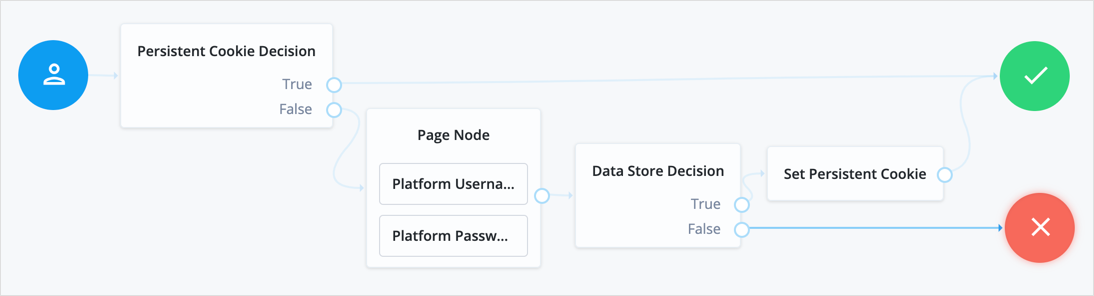
### Set Custom Cookie node
The Set Custom Cookie node lets you store a custom cookie on the client in addition to the session cookie.
The node uses the specified properties to create a cookie with a custom name and value. It can also set attributes, such as the cookie path, domain, expiry, and security flags.
Use this node with the [Configuration Provider node](config-provider.html) to extend custom capabilities. For example, create a `Config Provider` script to set custom static values or access values from the shared node state.
Include all the attributes in the configuration provider script's `config` map. The following example sets the attributes of the custom cookie to static values:
```javascript
config = {
"name": "testname",
"value": "testvalue",
"maxAge": "60",
"domain": "am.example.com",
"path": "/",
"useSecureCookie": false,
"useHttpOnlyCookie": false,
"sameSite": "LAX"
};
```
Reference the script when you create a [Configuration Provider node](config-provider.html), and set the Node Type to `Set Custom Cookie`:
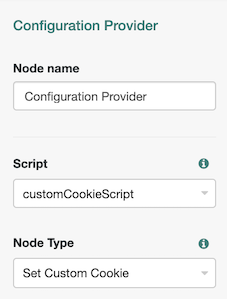
#### Compatibility
| Product | Compatible? |
| ------------------------------------------ | --------------------- |
| PingOne Advanced Identity Cloud | [icon: check, set=fa] |
| ForgeRock Access Management (self-managed) | [icon: check, set=fa] |
| Ping Identity Platform (self-managed) | [icon: check, set=fa] |
#### Inputs
This node reads the user data from the shared node state.
It requires a predecessor node that gathers the user data.
#### Dependencies
Make sure the user can successfully authenticate and get a session.
If the `noSession` query parameter is used during authentication, the journey will fail.
#### Configuration
| Property | Usage |
| -------------------------------- | --------------------------------------------------------------------------------------------------------------------------------------------------------------------------------------------------------------------------------------------------------------------------------------------------------------------------------------------------------------------------------------------------------------------------------------------------------------------------------------------------------------------------------- |
| Custom Cookie Name *(required)* | The name of the custom cookie.The cookie name can contain any US-ASCII characters except for: space, tab, control, or a separator character (`()<>@,;:"/[]?=\{}`). |
| Custom Cookie Value *(required)* | The value of the custom cookie. |
| Max Age | The length of time the custom cookie remains valid, in seconds. If that time is exceeded, the cookie is no longer valid.AM sets the `Max-Age` and `Expires` attributes in the cookie to increase compatibility with different browsers.If omitted, the cookie expires at the end of the current session. The precise implementation of this is determined by the specific browser. Refer to [RFC 6265](https://www.rfc-editor.org/rfc/rfc6265#section-4.1.2.2) for details. |
| Custom Cookie Domain | The domain the custom cookie will be sent to. If you specify a value here, AM sets a domain cookie. For example, if you set this property to `am.example.com`, AM sets a cookie on `.am.example.com`. Note the leading `.` indicating a domain cookie rather than a host cookie.If you don't set a value here, AM sets a host level cookie on the FQDN on which the client accessed AM. For example, if the client accesses AM at `https://am.example.com` and this property is empty, AM sets a host cookie on `am.example.com`. |
| Custom Cookie Path | The path of the custom cookie. |
| Use Secure Cookie | When enabled, adds the `Secure` flag to the custom cookie.If you include the `Secure` flag, the cookie can only be transferred over HTTPS. When a request is made over HTTP, the cookie isn't made available to the application. |
| Use HTTP Only Cookie | When enabled, adds the `HttpOnly` flag to the custom cookie.If you include the `HttpOnly` flag, the cookie isn't accessible to scripts. |
| Custom Cookie SameSite attribute | Sets the `SameSite` attribute of the custom cookie.The default value is `LAX`, to align with most modern browsers.Learn more in [SameSite cookie rules](https://docs.pingidentity.com/pingam/7.4/security/enable-samesite-cookies.html). |
#### Outcomes
Single outcome path.
The cookie is created when AM next returns to the client.
#### Example
This example uses this node in a login flow. The node sets the custom cookie in the client browser after the user has successfully authenticated:
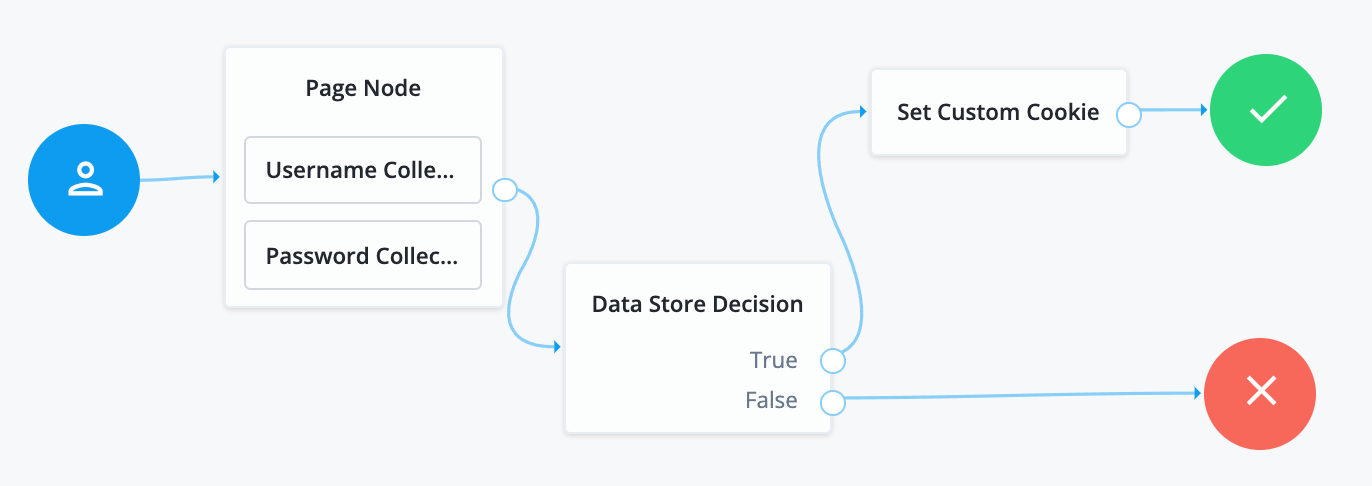
### Set Persistent Cookie node
The Set Persistent Cookie node creates the specified persistent cookie on successful authentication. The default persistent cookie is `session-jwt`.
The cookie contains a JWT with a JSON payload including information such as the UID of the identity, and the client IP address.
The node encrypts the payload of the JWT. It uses the key pair specified in the Persistent Cookie Encryption Certificate Alias property, found in the AM admin UI under Realms > *Realm Name* > Authentication > Settings > Security. The global level is found under Configure > Authentication > Core Attributes > Security.
The node signs the cookie with the signing key specified in the HMAC signing key property. Any node that reads the persistent cookie must be configured with the same HMAC signing key.
#### Compatibility
| Product | Compatible? |
| ------------------------------------------ | --------------------- |
| PingOne Advanced Identity Cloud | [icon: check, set=fa] |
| ForgeRock Access Management (self-managed) | [icon: check, set=fa] |
| Ping Identity Platform (self-managed) | [icon: check, set=fa] |
#### Dependencies
Make sure the user can successfully authenticate and get a session.
If the `noSession` query parameter is used during authentication, the journey will fail.
#### Configuration
| Property | Usage |
| ----------------------------- | ------------------------------------------------------------------------------------------------------------------------------------------------------------------------------------------------------------------------------------------------------------------------------------------------------------------------------------------------------------------------------------------------------------------------------------------------------------ |
| Idle Timeout | Specifies the maximum amount of idle time allowed before the persistent cookie is invalidated, in hours. If no requests are received before the timeout, the cookie is no longer valid. |
| Max life | Specifies the length of time the persistent cookie remains valid, in hours. After this time has passed, the cookie is no longer valid. |
| Use Secure Cookie | When enabled, adds the `Secure` flag to the persistent cookie.If the `Secure` flag is included, the cookie can only be transferred over HTTPS. When a request is made over HTTP, the cookie is not made available to the application. |
| Use HTTP Only Cookie | When enabled, adds the `HttpOnly` flag to the persistent cookie.When the `HttpOnly` flag is included, that cookie will not be accessible through JavaScript. According to [RFC 6265](https://www.rfc-editor.org/rfc/rfc6265.html#section-4.1.2.6), the `HttpOnly` flag, "instructs the user agent to omit the cookie when providing access to cookies via 'non-HTTP' APIs (for example, a web browser API that exposes cookies to scripts)." |
| HMAC Signing Key *(required)* | Specifies a key to use for HMAC signing of the persistent cookie. Values must be base64-encoded and at least 256 bits (32 bytes) long.
To consume the persistent cookies this node generates, ensure the nodes use the same HMAC signing key.To generate an HMAC signing key, run one of the following commands:```bash
$ openssl rand -base64 32
```or```bash
$ cat /dev/urandom | LC_ALL=C tr -dc 'a-zA-Z0-9' | fold -w 32 | head -n 1|base64
``` |
| Persistent Cookie Name | Specifies the name used for the persistent cookie. |
#### Outcomes
Single outcome path.
## Federation nodes
### OAuth 2.0 node
Lets AM authenticate users of OAuth 2.0-compliant resource servers.
References in this section are to RFC 6749, [The OAuth 2.0 Authorization Framework](https://www.rfc-editor.org/info/rfc6749).
| | |
| - | ----------------------------------------------------------------------------------------------------------------------------------------------------------------------------------------------------------------------------------------------------- |
| | This node and its related services are deprecated.You can find information on the new methods for implementing social authentication in [Social authentication](https://docs.pingidentity.com/pingam/7.4/am-authentication/social-registration.html). |
#### Compatibility
| Product | Compatible? |
| ------------------------------------------ | --------------------- |
| PingOne Advanced Identity Cloud | [icon: times, set=fa] |
| ForgeRock Access Management (self-managed) | [icon: check, set=fa] |
| Ping Identity Platform (self-managed) | [icon: times, set=fa] |
#### Outcomes
* `Account Exists`
* `No account Exists`
Evaluation continues along the `Account Exists` path if an account matching the attributes retrieved from the social identity provider is found in the user data store; otherwise, evaluation continues along the `No account exists` path.
#### Properties
| Property | Usage |
| ---------------------------------------- | --------------------------------------------------------------------------------------------------------------------------------------------------------------------------------------------------------------------------------------------------------------------------------------------------------------------------------------------------------------------------------------------------------------------------------------------------------------------------------------------------------------------------------------------------------------------------------------------------------------------------------------------------------------------------------------------------------------------------------------------------------------------------------------------------------------------------------------------------------------------------------------------------------------------------------------------------------------------------------------------------------------------------------------------------------------------------------------- |
| Client ID *(required)* | Specifies the `client_id` parameter as described in [section 2.2 of The OAuth 2.0 Authorization Framework (RFC 6749)](https://www.rfc-editor.org/rfc/rfc6749.html#section-2.2). |
| Client Secret *(required)* | Specifies the `client_secret` parameter as described in [section 2.3 of The OAuth 2.0 Authorization Framework (RFC 6749)](https://www.rfc-editor.org/rfc/rfc6749.html#section-2.3). |
| Authentication Endpoint URL *(required)* | Specifies the URL to the social provider's endpoint handling authentication as described in [section 3.1 of The OAuth 2.0 Authorization Framework (RFC 6749)](https://www.rfc-editor.org/rfc/rfc6749#section-3.1).Example: `https://accounts.google.com/o/oauth2/v2/auth` |
| Access Token Endpoint URL *(required)* | Specifies the URL to the endpoint handling access tokens as described in [section 3.2 of The OAuth 2.0 Authorization Framework (RFC 6749)](https://www.rfc-editor.org/rfc/rfc6749.html#section-3.2).Example: `https://www.googleapis.com/oauth2/v4/token` |
| User Profile Service URL *(required)* | Specifies the user profile URL that returns profile information.Example: `https://www.googleapis.com/oauth2/v3/userinfo` |
| OAuth Scope *(required)* | Specifies a list of user profile attributes that the client application requires, according to [The OAuth 2.0 Authorization Framework (RFC 6749)](https://www.rfc-editor.org/info/rfc6749).Ensure you use the correct scope delimiter required by the identity provider, including commas or spaces.The list depends on the permissions that the resource owner, such as the end user, grants to the client application. |
| Scope Delimiter *(required)* | Specifies the delimiter used to separate scope values.Some authorization servers use non-standard separators for scopes, for example commas. |
| Redirect URL *(required)* | Specifies the URL the user is redirected to by the social identity provider after authenticating.For authentication trees in AM, set this property to the URL of the UI. For example, `https://openam.example.com:8443/openam/XUI/`. |
| Social Provider *(required)* | Specifies the name of the social provider for which this module is being set up.Example: `Google` |
| Auth ID Key *(required)* | Specifies the attribute the social identity provider uses to identify an authenticated individual.Example: `id` |
| Use Basic Auth | Specifies that the client uses HTTP Basic authentication when authenticating to the social provider.Default: `true` |
| Account Provider *(required)* | Specifies the name of the class that implements the account provider.Default: `org.forgerock.openam.authentication.modules.common.mapping.DefaultAccountProvider` |
| Account Mapper *(required)* | Specifies the name of the class that implements the method of locating local accounts based on the attributes returned from the social identity provider.Provided implementations are:`org.forgerock.openam.authentication.modules.common.mapping.JsonAttributeMapper`The Account Mapper classes can take two constructor parameters:1) A comma-separated list of attributes
2) A prefix to apply to their values.For example, to prefix all received property values with `facebook-` before searching, specify:```
org.forgerock.openam.authentication.modules.common.mapping.JsonAttributeMapper|*|facebook-
``` |
| Attribute Mapper *(required)* | Specifies the list of fully qualified class names for implementations that map attributes from the OAuth 2.0 authorization server to AM profile attributes.Provided implementations are:`org.forgerock.openam.authentication.modules.common.mapping.JsonAttributeMapper`The Attribute Mapper classes can take two constructor parameters to help differentiate between the providers:1) A comma-separated list of attributes
2) A prefix to apply to their values.For example, to prefix all incoming values with `facebook-`, specify:```
org.forgerock.openam.authentication.modules.common.mapping.JsonAttributeMapper|*|facebook-
```To prefix all incoming values use an asterisk (`*`) as the attribute list. This prefixes all values, including email addresses, postal addresses, and so on. |
| Account Mapper Configuration | Specifies the attribute configuration used to map the account of the user authenticated in the OAuth 2.0 provider to the local data store in AM.Valid values are in the form `provider-attr=local-attr`.Examples:```
email=mail
id=facebook-id
```
When using the org.forgerock.openam.authentication.modules.common.mapping.JsonAttributeMapper class, you can parse JSON objects in mappings using dot notation.
For example, given a JSON payload of:
{
"sub" : "12345",
"name" : {
"first_name" : "Demo",
"last_name" : "User"
}
}
You can create a mapper, such as name.first_name=cn. |
| Attribute Mapper Configuration | Map of OAuth 2.0 provider user account attributes to local user profile attributes, with values in the form `provider-attr=local-attr`.Examples:```
first_name=givenname
last_name=sn
name=cn
email=mail
id=facebook-id
first_name=facebook-fname
last_name=facebook-lname
email=facebook-email
```
When using the org.forgerock.openam.authentication.modules.common.mapping.JsonAttributeMapper class, you can parse JSON objects in mappings using dot notation.
For example, given a JSON payload of:
{
"sub" : "12345",
"name" : {
"first_name" : "Demo",
"last_name" : "User"
}
}
You can create a mapper, such as name.first_name=cn. |
| Save attributes in the session | When enabled, saves the attributes in the Attribute Mapper Configuration field to the AM session. |
| OAuth 2.0 Mix-Up Mitigation Enabled | Controls whether the OAuth 2.0 authentication node carries out additional verification steps when it receives the authorization code from the authorization server.Specifies that the client must compare the issuer identifier of the authorization server upon registration with the issuer value returned as the `iss` response parameter. If they do not match, the client must abort the authorization process. The client must also confirm that the authorization server's response is intended for the client by comparing the client's client identifier to the value of the `client_id` response parameter.When this is enabled, set the Token Issuer property so that the validation can succeed. The authorization code response contains an issuer value (`iss`) for the client to validate.
Refer to the authorization server's documentation for the value it uses for the issuer field.For more information, refer to [section 4 of OAuth 2.0 Mix-Up Mitigation Draft](https://datatracker.ietf.org/doc/html/draft-ietf-oauth-mix-up-mitigation-01#section-4). |
| Token Issuer | Corresponds to the expected issuer identifier value in the `iss` field of the ID token.Example: `https://accounts.google.com` |
### OpenID Connect node
Lets AM authenticate users of OpenID Connect-compliant resource servers.
As OpenID Connect is an additional layer on top of OAuth 2.0, described in RFC 6749, [The OAuth 2.0 Authorization Framework](https://www.rfc-editor.org/info/rfc6749). OpenID Connect is described in the [OpenID Connect Core 1.0 incorporating errata set 1](https://openid.net/specs/openid-connect-core-1_0.html) specification.
| | |
| - | ----------------------------------------------------------------------------------------------------------------------------------------------------------------------------------------------------------------------------------------------------- |
| | This node and its related services are deprecated.You can find information on the new methods for implementing social authentication in [Social authentication](https://docs.pingidentity.com/pingam/7.4/am-authentication/social-registration.html). |
The OpenID Connect node implements the [Authorization code grant](https://docs.pingidentity.com/pingam/7.4/am-oauth2/oauth2-authz-grant.html).
#### Compatibility
| Product | Compatible? |
| ------------------------------------------ | --------------------- |
| PingOne Advanced Identity Cloud | [icon: times, set=fa] |
| ForgeRock Access Management (self-managed) | [icon: check, set=fa] |
| Ping Identity Platform (self-managed) | [icon: times, set=fa] |
#### Outcomes
* `Account Exists`
* `No account Exists`
Evaluation continues along the `Account Exists` path if an account matching the attributes retrieved from the OpenID Connect identity provider is found in the identity store; otherwise, evaluation continues along the `No account exists` path.
#### Properties
| Property | Usage |
| ------------------------------------------- | ----------------------------------------------------------------------------------------------------------------------------------------------------------------------------------------------------------------------------------------------------------------------------------------------------------------------------------------------------------------------------------------------------------------------------------------------------------------------------------------------------------------------------------------------------------------------------------------------------------------------------------------------------------------------------------------------------------------------------------------------------------------------------------------------------------------------------------------------------------------------------------------------------------------------------------------------------------------------------------------------------------------------------------------------------------------------------- |
| Client ID *(required)* | Specifies the `client_id` parameter as described in [section 2.2 of The OAuth 2.0 Authorization Framework (RFC 6749)](https://www.rfc-editor.org/rfc/rfc6749.html#section-2.2). |
| Client Secret *(required)* | Specifies the `client_secret` parameter as described in [section 2.3 of The OAuth 2.0 Authorization Framework (RFC 6749)](https://www.rfc-editor.org/rfc/rfc6749.html#section-2.3). |
| Authentication Endpoint URL *(required)* | Specifies the URL to the social provider's endpoint handling authentication as described in [section 3.1 of The OAuth 2.0 Authorization Framework (RFC 6749)](https://www.rfc-editor.org/info/rfc6749#section-3.1).Example: `https://accounts.google.com/o/oauth2/v2/auth` |
| Access Token Endpoint URL *(required)* | Specifies the URL to the endpoint handling access tokens as described in [section 3.2 of The OAuth 2.0 Authorization Framework (RFC 6749)](https://www.rfc-editor.org/rfc/rfc6749.html#section-3.2).Example: `https://www.googleapis.com/oauth2/v4/token` |
| User Profile Service URL *(required)* | Specifies the user profile URL that returns profile information.If not specified, attributes are mapped from the claims returned by the `id_token`, and no call to a user profile endpoint is made.Example: `https://www.googleapis.com/oauth2/v3/userinfo` |
| OAuth Scope | Specifies a list of user profile attributes that the client application requires, according to [The OAuth 2.0 Authorization Framework (RFC 6749)](https://www.rfc-editor.org/info/rfc6749).Ensure you use the correct scope delimiter required by the identity provider, including commas or spaces.The list depends on the permissions that the resource owner, such as the end user, grants to the client application. |
| Redirect URL | Specifies the URL the user is redirected to by the social identity provider after authenticating.For authentication trees in AM, set this property to the URL of the UI. For example, `https://openam.example.com:8443/openam/XUI/`. |
| Social Provider *(required)* | Specifies the name of the OpenID Connect provider for which this node is being set up.Example: `Google` |
| Auth ID Key | Specifies the attribute the social identity provider uses to identify an authenticated individual.Example: `sub` |
| Use Basic Auth | Specifies that the client uses HTTP Basic authentication when authenticating to the social provider.Default: `true` |
| Account Provider | Specifies the name of the class that implements the account provider.Default: `org.forgerock.openam.authentication.modules.common.mapping.DefaultAccountProvider` |
| Account Mapper | Specifies the name of the class that implements the method of locating local accounts based on the attributes returned from the social identity provider.The provided implementations is `org.forgerock.openam.authentication.modules.oidc.JwtAttributeMapper`.The Account Mapper classes can take two constructor parameters:1) A comma-separated list of attributes
2) A prefix to apply to their values.For example, to prefix all received property values with `openid-` before searching, specify:```
org.forgerock.openam.authentication.modules.oidc.JwtAttributeMapper|*|openid-
``` |
| Attribute Mapper | Specifies the list of fully qualified class names for implementations that map attributes from the authorization server to AM profile attributes.The provided implementations is `org.forgerock.openam.authentication.modules.oidc.JwtAttributeMapper`.The Attribute Mapper classes can take two constructor parameters to help differentiate between the providers:1) A comma-separated list of attributes
2) A prefix to apply to their values.For example, to prefix incoming `iplanet-am-user-alias-list` values with `openid-`, specify:```
org.forgerock.openam.authentication.modules.oidc.JwtAttributeMapper
``` |
| iplanet-am-user-alias-list | openid-To prefix all incoming values use an asterisk (`*`) as the attribute list. This prefixes all values, including email addresses, postal addresses, and so on. |
| Account Mapper Configuration | Specifies the attribute configuration used to map the account of the user authenticated in the provider to the local identity store in AM.To add a mapping, specify the name of the provider attribute as the key, and the local attribute to map to as the value.For example, click Add, then specify `sub` in the Key field and `iplanet-am-user-alias-list` in the Value field, and click [icon: plus, set=fa]. |
| Attribute Mapper Configuration | Specifies how to map provider user attributes to local user profile attributes.To add a mapping, specify the name of the provider attribute as the Key, and the local attribute to map to as the Value.For example, click Add, then specify `id` in the Key field and `facebook-id` in the Value field, and click [icon: plus, set=fa].Examples:```
first_name=givenname
last_name=sn
name=cn
email=mail
id=facebook-id
first_name=facebook-fname
last_name=facebook-lname
email=facebook-email
``` |
| Save attributes in the session | When enabled, saves the attributes in the Attribute Mapper Configuration field to the AM session. |
| OAuth 2.0 Mix-Up Mitigation Enabled | Controls whether the authentication node carries out additional verification steps when it receives the authorization code from the authorization server.Specifies that the client must compare the issuer identifier of the authorization server upon registration with the issuer value returned as the `iss` response parameter. If they do not match, the client must abort the authorization process. The client must also confirm that the authorization server's response is intended for the client by comparing the client's client identifier to the value of the `client_id` response parameter.When this is enabled, set the Token Issuer property so that the validation can succeed. The authorization code response contains an issuer value (`iss`) for the client to validate.
Refer to the authorization server's documentation for the value it uses for the issuer field.For more information, refer to [section 4 of OAuth 2.0 Mix-Up Mitigation Draft](https://datatracker.ietf.org/doc/html/draft-ietf-oauth-mix-up-mitigation-01#section-4). |
| Token Issuer *(required)* | Corresponds to the expected issuer identifier value in the `iss` field of the ID token.Example: `https://accounts.google.com` |
| OpenID Connect Validation Type *(required)* | Specifies how to validate the ID token received from the OpenID Connect provider.This ignores keys specified in JWT headers, such as `jku` and `jwe`.The following options are available to validate an incoming OpenID Connect ID token:- `Well Known URL` (Default)
Retrieves the provider's keys based on the information provided in its OpenID Connect configuration URL.
Specify the provider's configuration URL in the OpenID Connect Validation Value field; for example, `https://accounts.google.com/.well-known/openid-configuration`.
- `Client Secret`
Validates the ID token signature with a specified client secret key.
Specify the key to use in the OpenID Connect Validation Value field.
- `JWK URL`
Retrieve the necessary JSON web key from the URL that you specify.
Specify the provider's JWK URI in the OpenID Connect Validation Value field; for example, `https://www.googleapis.com/oauth2/v3/certs`. |
| OpenID Connect Validation Value | Provide the URL or secret key used to verify an incoming ID token, depending on the value selected in the OpenID Connect Validation Type property. |
### Provision Dynamic Account node
Provision an account following successful authentication by a SAML2 authentication node or the [Social Provider Handler node](social-provider-handler.html).
Accounts are provisioned using properties defined in the attribute mapper configuration of a social authentication or SAML2 authentication node earlier in the flow.
If a password has been acquired from the user, for example, by using the [Password Collector node](am-only/password-collector.html), it is used when provisioning the account; otherwise, a 20 character random string is used.
In addition to retrieving the password from the node state, the [Provision Dynamic Account node](am-only/provision-dynamic-account.html) gets the `realm` value, and `attributes` and `userNames` from `userInfo` in the shared state. It sets the `username` attribute in the node's shared state.
#### Compatibility
| Product | Compatible? |
| ------------------------------------------ | --------------------- |
| PingOne Advanced Identity Cloud | [icon: times, set=fa] |
| ForgeRock Access Management (self-managed) | [icon: check, set=fa] |
| Ping Identity Platform (self-managed) | [icon: times, set=fa] |
#### Outcomes
Single outcome path.
#### Properties
| Property | Usage |
| ---------------- | ----------------------------------------------------------------------------------------------------------------------------------------------------------------- |
| Account Provider | Specifies the name of the class that implements the account provider.Default: `org.forgerock.openam.authentication.modules.common.mapping.DefaultAccountProvider` |
#### Example
The following example uses this node to let users who have performed social authentication using Google provide a password and provision an account if they do not have a matching existing profile. They must enter a one-time password to verify they are the owner of the Google account.
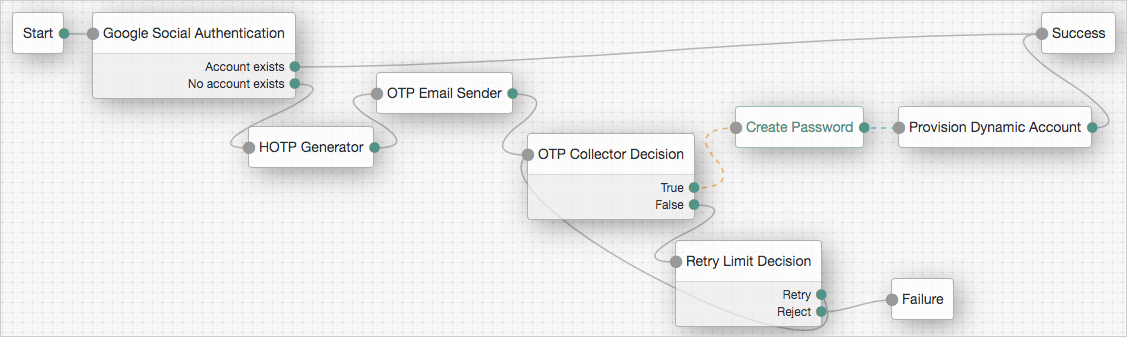
### Provision IDM Account node
Redirects users to an IDM instance to provision an account.
| | |
| - | ----------------------------------------------------------------------------------------------------------------------------------------------------------------------------------------------------------------------------------------------------- |
| | This node and its related services are deprecated.You can find information on the new methods for implementing social authentication in [Social authentication](https://docs.pingidentity.com/pingam/7.4/am-authentication/social-registration.html). |
Ensure you configured the details of the IDM instance in AM, by navigating to Configure > Global Services > IDM Provisioning.
#### Compatibility
| Product | Compatible? |
| ------------------------------------------ | --------------------- |
| PingOne Advanced Identity Cloud | [icon: times, set=fa] |
| ForgeRock Access Management (self-managed) | [icon: check, set=fa] |
| Ping Identity Platform (self-managed) | [icon: times, set=fa] |
#### Outcomes
Single outcome path.
#### Properties
| Property | Usage |
| ---------------- | ----------------------------------------------------------------------------------------------------------------------------------------------------------------- |
| Account Provider | Specifies the name of the class that implements the account provider.Default: `org.forgerock.openam.authentication.modules.common.mapping.DefaultAccountProvider` |
#### Example
The following example uses this node to let users who have performed social authentication using Facebook provide a password and provision an account if they do not have a matching existing profile:
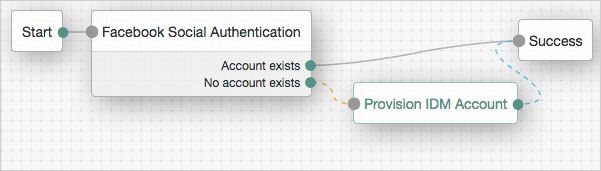
### SAML2 Authentication node
Integrates SAML v2.0 SSO into an AM authentication flow.
Use this node when deploying SAML v2.0 single sign-on in integrated mode (SP-initiated SSO only).
Regardless of the outcome, `Account exists` or `No account exists`, if this node completes without failure, it sets the `successURL` parameter in the shared node state to the value of the `RelayState` parameter in the request. If the request does not provide a value for this parameter, the node uses the default `RelayState` value configured in the service provider (SP).
You can dynamically provision an account on the SP if it does not exist, or you can link the remote account to a local account using the [Write Federation Information node](write-federation-information.html).
Before attempting to configure a SAML2 authentication node, ensure that:
* You have configured a remote identity provider (IdP) and a hosted SP in a circle of trust in the same realm where the authentication node is configured.
* The service provider is configured for integrated mode.
Refer to [SSO and SLO in integrated mode](https://docs.pingidentity.com/pingam/7.4/am-saml2/saml2-integrated-mode.html).
#### Compatibility
| Product | Compatible? |
| ------------------------------------------ | --------------------- |
| PingOne Advanced Identity Cloud | [icon: check, set=fa] |
| ForgeRock Access Management (self-managed) | [icon: check, set=fa] |
| Ping Identity Platform (self-managed) | [icon: check, set=fa] |
#### Outcomes
* `Account exists`
* `No account exists`
If a user account is found that matches the federated account, evaluation continues along the `Account exists` outcome; otherwise, evaluation continues along the `No account exists` outcome.
#### Properties
| Property | Usage |
| -------------------------------------------- | -------------------------------------------------------------------------------------------------------------------------------------------------------------------------------------------------------------------------------------------------------------------------------------------------------------------------------------------------------------------------------------------------------------------------------------------------------------------------------------------------------------------------------------------------------------------------------------------------------------------------------------------------------------------------------------------------------------------------------------------------------------------------------------------------------------------------------------------------------------------------------------------------------------------------------------------------------------------------------------------------------------------------------------------------------------------------------------------------------------------------------------------------------------------------------------------- |
| IdP Entity ID | Specifies the name of the remote IdP. |
| SP MetaAlias | Specifies the local alias for the SP, in the format `/Realm Name/SP Name`. |
| Allow IdP to Create NameID | Specifies whether the IdP should create a new identifier for the authenticating user if none exists.For detailed information, refer to the section on the `AllowCreate` property in [SAML Version 2.0 Errata 05](http://docs.oasis-open.org/security/saml/v2.0/sstc-saml-approved-errata-2.0.html).Default: `Enabled` |
| Comparison Type | Specifies a comparison method to evaluate authentication context classes or statements.The value specified in this property overrides the value set in the SP configuration in AM admin UI under Realms > *Realm Name* > Applications > Federation > Entity Providers > *Service Provider Name* > Assertion Content > Authentication Context > Comparison Type.Valid comparison methods are `exact`, `minimum`, `maximum`, or `better`.For more information about the comparison methods, refer to the section on the `` element in [Assertions and Protocols for the OASIS Security Assertion Markup Language (SAML) V2.0](https://docs.oasis-open.org/security/saml/v2.0/saml-core-2.0-os.pdf).Default: `minimum` |
| Authentication Context Class Reference | (Optional) Specifies one or more URIs for authentication context classes to be included in the SAML request.Authentication Context Classes are unique identifiers for an authentication mechanism. The SAML v2.0 protocol supports a standard set of authentication context classes, defined in [Authentication Context for the OASIS Security Assertion Markup Language (SAML) V2.0](https://docs.oasis-open.org/security/saml/v2.0/saml-authn-context-2.0-os.pdf). In addition to the standard authentication context classes, you can specify customized authentication context classes.Any authentication context class you specify in this field must be supported for the service provider. In the AM admin UI, go to Realms > *Realm Name* > Applications > Federation > Entity Providers > *Service Provider Name* > Assertion Content > Authentication Context.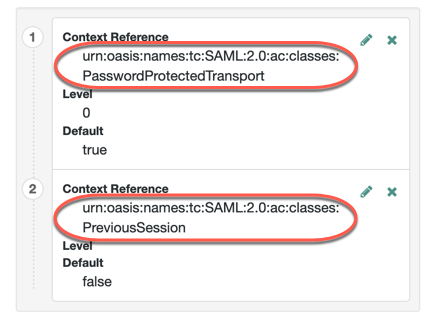When specifying multiple authentication context classes, use the `\|` character to separate the classes. For example:```
urn:oasis:names:tc:SAML:2.0:ac:classes:Password|urn:oasis:names:tc:SAML:2.0:ac:classes:TimesyncToken
``` |
| Authentication Context Declaration Reference | (Optional) Specifies one or more URIs that identify authentication context declarations.When specifying multiple URIs, use the `\|` character to separate the URIs.For more information, refer to the section on the `` element in [Assertions and Protocols for the OASIS Security Assertion Markup Language (SAML) V2.0](https://docs.oasis-open.org/security/saml/v2.0/saml-core-2.0-os.pdf). |
| Request Binding | Specifies the format the SP will use to send the authentication request to the IdP.Valid values are `HTTP-Redirect` and `HTTP-POST`.Default: `HTTP-Redirect` |
| Response Binding | Specifies the format the IdP will use to send the response to the SP.Valid values are `HTTP-POST` and `HTTP-Artifact`.Default: `HTTP-Artifact` |
| Force IdP Authentication | Specifies whether the IdP forces authentication or if it can reuse existing security contexts.Default: Disabled |
| Passive Authentication | Specifies whether the IdP uses passive authentication or not.Passive authentication requires the IDP to only use authentication methods that do not require user interaction; for example, authenticating using an X.509 certificate.Default: Disabled |
| NameID Format | Specifies the SAML name ID format that will be requested in the SAML authentication request. For example:```
urn:oasis:names:tc:SAML:2.0:nameid-format:persistent
urn:oasis:names:tc:SAML:2.0:nameid-format:transient
urn:oasis:names:tc:SAML:1.1:nameid-format:unspecified
```Default: `urn:oasis:names:tc:SAML:2.0:nameid-format:persistent` |
For examples, refer to [SSO and SLO in integrated mode](https://docs.pingidentity.com/pingam/7.4/am-saml2/saml2-integrated-mode.html).
### Social Facebook node
Duplicates [OAuth 2.0 node](am-only/oauth2.html) but is preconfigured to work with Facebook. You specify only the `Client ID` and `Client Secret`.
| | |
| - | ----------------------------------------------------------------------------------------------------------------------------------------------------------------------------------------------------------------------------------------------------- |
| | This node and its related services are deprecated.You can find information on the new methods for implementing social authentication in [Social authentication](https://docs.pingidentity.com/pingam/7.4/am-authentication/social-registration.html). |
#### Compatibility
| Product | Compatible? |
| ------------------------------------------ | --------------------- |
| PingOne Advanced Identity Cloud | [icon: times, set=fa] |
| ForgeRock Access Management (self-managed) | [icon: check, set=fa] |
| Ping Identity Platform (self-managed) | [icon: times, set=fa] |
#### Outcomes
* `Account exists`
* `No account exists`
Evaluation continues along the `Account Exists` path if an account matching the attributes retrieved from Facebook are found in the user data store; otherwise, evaluation continues along the `No account exists` path.
#### Properties
| Property | Usage |
| ----------------------------------- | --------------------------------------------------------------------------------------------------------------------------------------------------------------------------------------------------------------------------------------------------------------------------------------------------------------------------------------------------------------------------------------------------------------------------------------------------------------------------------------------------------------------------------------------------------------------------------------------------------------------------------------------------------------------------------------------------------------------------------------------------------------------------------------------------------------------------------------------------------------------------------------------------------------------------------------------------------------------------------------------------------------------- |
| Client ID | Specifies the `client_id` parameter as provided by Facebook. |
| Client Secret | Specifies the `client_secret` parameter as provided by Facebook. |
| Authentication Endpoint URL | Specifies the URL to the social provider's endpoint handling authentication as described in [section 3.1 of The OAuth 2.0 Authorization Framework (RFC 6749)](https://www.rfc-editor.org/rfc/rfc6749.html#section-3.1).Default: `https://www.facebook.com/dialog/oauth` |
| Access Token Endpoint URL | Specifies the URL to the endpoint handling access tokens as described in [section 3.2 of The OAuth 2.0 Authorization Framework (RFC 6749)](https://www.rfc-editor.org/rfc/rfc6749.html#section-3.2).Default: `https://graph.facebook.com/v2.12/oauth/access_token` |
| User Profile Service URL | Specifies the user profile URL that returns profile information.Default: `https://graph.facebook.com/v2.6/me?fields=name%2Cemail%2Cfirst_name%2Clast_name` |
| OAuth Scope | Specifies a comma-separated list of user profile attributes the client application requires, according to [The OAuth 2.0 Authorization Framework (RFC 6749)](https://www.rfc-editor.org/info/rfc6749). The list depends on the permissions the resource owner, such as the end user, grants to the client application. |
| Redirect URL | Specifies the URL the user is redirected to by Facebook after authenticating to continue the flow\.Set this property to the URL of the AM UI. For example, `https://openam.example.com:8443/openam/XUI/`.
If the tree is not in the Top Level Realm, you can specify the realm in the redirect URL. Use a DNS alias for the realm, or add the realm as a query parameter, for example, https\://openam.example.com:8443/openam/XUI/?realm=/mySubRealm.
For more information, refer to Configure DNS aliases to access a realm. |
| Social Provider | Specifies the name of the social provider for which this node is being set up.Default: `facebook` |
| Auth ID Key | Specifies the attribute the social identity provider uses to identify an authenticated individual.Default: `id` |
| Use Basic Auth | Specifies that the client uses HTTP Basic authentication when authenticating to the social provider.Default: `true` |
| Account Provider | Specifies the name of the class that implements the account provider.Default: `org.forgerock.openam.authentication.modules.common.mapping.DefaultAccountProvider` |
| Account Mapper | Specifies the name of the class that implements the method of locating local accounts based on the attributes returned from Facebook.Default: `org.forgerock.openam.authentication.modules.common.mapping.JsonAttributeMapper` |
| Attribute Mapper | Specifies the list of fully qualified class names for implementations that map attributes from Facebook to AM profile attributes.Default: `org.forgerock.openam.authentication.modules.common.mapping.JsonAttributeMapper\|uid\|facebook-` |
| Account Mapper Configuration | Specifies the attribute configuration used to map the account of the user authenticated in the Social Facebook provider to the local data store in AM. Valid values are in the form `provider-attr=local-attr`.Default: `id=uid`.
When using the org.forgerock.openam.authentication.modules.common.mapping.JsonAttributeMapper class, you can parse JSON objects in mappings using dot notation.
For example, given a JSON payload of:
{
"sub" : "12345",
"name" : {
"first_name" : "Demo",
"last_name" : "User"
}
}
You can create a mapper, such as name.first_name=cn. |
| Attribute Mapper Configuration | Map of Facebook user account attributes to local user profile attributes, with values in the form `provider-attr=local-attr`.Default: `name=cn`, `last_name=sn`, `id=uid`, `first_name=givenname`, `email=mail`.
When using the org.forgerock.openam.authentication.modules.common.mapping.JsonAttributeMapper class, you can parse JSON objects in mappings using dot notation.
For example, given a JSON payload of:
{
"sub" : "12345",
"name" : {
"first_name" : "Demo",
"last_name" : "User"
}
}
You can create a mapper, such as name.first_name=cn. |
| Save attributes in the session | When enabled, saves the attributes in the Attribute Mapper Configuration field to the AM session.Default: `true`. |
| OAuth 2.0 Mix-Up Mitigation Enabled | Controls whether the authentication node carries out additional verification steps when it receives the authorization code from the authorization server.Specifies that the client must compare the issuer identifier of the authorization server upon registration with the issuer value returned as the `iss` response parameter. If they do not match, the client must abort the authorization process. The client must also confirm that the authorization server's response is intended for the client by comparing the client's client identifier to the value of the `client_id` response parameter.The Token Issuer property must be entered when the OAuth 2.0 Mix-Up Mitigation feature is enabled, so that the validation can succeed. The authorization code response contains an issuer value (`iss`) for the client to validate.For more information, refer to [section 4 of OAuth 2.0 Mix-Up Mitigation Draft](https://datatracker.ietf.org/doc/html/draft-ietf-oauth-mix-up-mitigation-01#section-4). |
| Token Issuer | Corresponds to the expected issuer identifier value in the `iss` field of the ID token.Example: `https://graph.facebook.com` |
#### Example
The following example shows the node in context:

### Social Google node
Duplicates [OAuth 2.0 node](am-only/oauth2.html), but is preconfigured to work with Google. You specify only the `Client ID` and `Client Secret`.
| | |
| - | ----------------------------------------------------------------------------------------------------------------------------------------------------------------------------------------------------------------------------------------------------- |
| | This node and its related services are deprecated.You can find information on the new methods for implementing social authentication in [Social authentication](https://docs.pingidentity.com/pingam/7.4/am-authentication/social-registration.html). |
#### Compatibility
| Product | Compatible? |
| ------------------------------------------ | --------------------- |
| PingOne Advanced Identity Cloud | [icon: times, set=fa] |
| ForgeRock Access Management (self-managed) | [icon: check, set=fa] |
| Ping Identity Platform (self-managed) | [icon: times, set=fa] |
#### Outcomes
* `Account exists`
* `No account exists`
Evaluation continues along the `Account Exists` path if an account matching the attributes retrieved from Google are found in the user data store; otherwise, evaluation continues along the `No account exists` path.
#### Properties
| Property | Usage |
| ----------------------------------- | --------------------------------------------------------------------------------------------------------------------------------------------------------------------------------------------------------------------------------------------------------------------------------------------------------------------------------------------------------------------------------------------------------------------------------------------------------------------------------------------------------------------------------------------------------------------------------------------------------------------------------------------------------------------------------------------------------------------------------------------------------------------------------------------------------------------------------------------------------------------------------------------------------------------------------------------------------------------------------------------------------------------- |
| Client ID *(required)* | Specifies the `client_id` parameter as provided by Google. |
| Client Secret *(required)* | Specifies the `client_secret` parameter as provided by Google. |
| Authentication Endpoint URL | Specifies the URL to the social provider's endpoint handling authentication as described in [section 3.1 of The OAuth 2.0 Authorization Framework (RFC 6749)](https://www.rfc-editor.org/rfc/rfc6749.html#section-3.1).Default: `https://accounts.google.com/o/oauth2/v2/auth` |
| Access Token Endpoint URL | Specifies the URL to the endpoint handling access tokens as described in [section 3.2 of The OAuth 2.0 Authorization Framework (RFC 6749)](https://www.rfc-editor.org/rfc/rfc6749.html#section-3.2).Default: `https://www.googleapis.com/oauth2/v4/token` |
| User Profile Service URL | Specifies the user profile URL that returns profile information.Default: `https://www.googleapis.com/oauth2/v3/userinfo` |
| OAuth Scope | Specifies a space-separated list of user profile attributes the client application requires, according to [The OAuth 2.0 Authorization Framework (RFC 6749)](https://www.rfc-editor.org/info/rfc6749). The list depends on the permissions the resource owner, such as the end user, grants to the client application.Default: `profile email`. |
| Redirect URL | Specifies the URL the user is redirected to by Google after authenticating to continue the flow\.Set this property to the URL of the AM UI. For example, `https://openam.example.com:8443/openam/XUI/`.
If the tree is not in the Top Level Realm, you can specify the realm in the redirect URL. Use a DNS alias for the realm, or add the realm as a query parameter; for example, https\://openam.example.com:8443/openam/XUI/?realm=/mySubRealm.
For more information, refer to Configure DNS aliases to access a realm. |
| Social Provider | Specifies the name of the social provider for which this node is being set up.Default: `google` |
| Auth ID Key | Specifies the attribute the social identity provider uses to identify an authenticated individual.Default: `sub` |
| Use Basic Auth | Specifies that the client uses HTTP Basic authentication when authenticating to Google.Default: `true` |
| Account Provider | Specifies the name of the class that implements the account provider.Default: `org.forgerock.openam.authentication.modules.common.mapping.DefaultAccountProvider` |
| Account Mapper | Specifies the name of the class that implements the method of locating local accounts based on the attributes returned from Google.Default: `org.forgerock.openam.authentication.modules.common.mapping.JsonAttributeMapper` |
| Attribute Mapper | Specifies the list of fully qualified class names for implementations that map attributes from Google to AM profile attributes.Default: `org.forgerock.openam.authentication.modules.common.mapping.JsonAttributeMapper\|iplanet-am-user-alias-list\|google-` |
| Account Mapper Configuration | Specifies the attribute configuration used to map the account of the user authenticated in the Social Google provider to the local data store in AM. Valid values are in the form `provider-attr=local-attr`.Default: `sub=uid`.
When using the org.forgerock.openam.authentication.modules.common.mapping.JsonAttributeMapper class, you can parse JSON objects in mappings using dot notation.
For example, given a JSON payload of:
{
"sub" : "12345",
"name" : {
"first_name" : "Demo",
"last_name" : "User"
}
}
You can create a mapper, such as name.first_name=cn. |
| Attribute Mapper Configuration | Map of Google user account attributes to local user profile attributes, with values in the form `provider-attr=local-attr`.Default: `sub=uid`, `name=cn`, `given_name=givenName`, `family_name=sn`, `email=mail`.
When using the org.forgerock.openam.authentication.modules.common.mapping.JsonAttributeMapper class, you can parse JSON objects in mappings using dot notation.
For example, given a JSON payload of:
{
"sub" : "12345",
"name" : {
"first_name" : "Demo",
"last_name" : "User"
}
}
You can create a mapper, such as name.first_name=cn. |
| Save attributes in the session | When enabled, saves the attributes in the Attribute Mapper Configuration field to the AM session.Default: `true`. |
| OAuth 2.0 Mix-Up Mitigation Enabled | Controls whether the authentication node carries out additional verification steps when it receives the authorization code from the authorization server.Specifies that the client must compare the issuer identifier of the authorization server upon registration with the issuer value returned as the `iss` response parameter. If they do not match, the client must abort the authorization process. The client must also confirm that the authorization server's response is intended for the client by comparing the client's client identifier to the value of the `client_id` response parameter.The Token Issuer property must be entered when the OAuth 2.0 Mix-Up Mitigation feature is enabled, so that the validation can succeed. The authorization code response contains an issuer value (`iss`) for the client to validate.For more information, refer to [section 4 of OAuth 2.0 Mix-Up Mitigation Draft](https://datatracker.ietf.org/doc/html/draft-ietf-oauth-mix-up-mitigation-01#section-4). |
| Token Issuer | Corresponds to the expected issuer identifier value in the `iss` field of the ID token.Example: `https://accounts.google.com` |
#### Example
The following example shows the node in context:
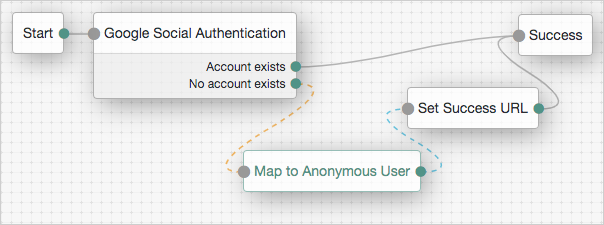
### Social Ignore Profile node
Specifies whether to ignore a local user profile.
If evaluation flows through this node after successful social authentication, AM issues an SSO token regardless of whether a user profile exists in the data store. AM does not check for whether a user profile is present.
| | |
| - | ----------------------------------------------------------------------------------------------------------------------------------------------------------------------------------------------------------------------------------------------------- |
| | This node and its related services are deprecated.You can find information on the new methods for implementing social authentication in [Social authentication](https://docs.pingidentity.com/pingam/7.4/am-authentication/social-registration.html). |
#### Compatibility
| Product | Compatible? |
| ------------------------------------------ | --------------------- |
| PingOne Advanced Identity Cloud | [icon: times, set=fa] |
| ForgeRock Access Management (self-managed) | [icon: check, set=fa] |
| Ping Identity Platform (self-managed) | [icon: times, set=fa] |
#### Outcomes
Single outcome path.
#### Properties
This node has no configurable properties.
### Social Provider Handler node
The Social Provider Handler node attempts to authenticate a user with the social identity provider selected in the [Select Identity Provider node](select-identity-provider.html).
The node performs the following actions:
* Validates the `id_token` returned by the provider to ensure its integrity, verifying the token's signature and checking that claims such as `iss` (issuer) and `aud` (audience) match the values defined in the [social provider configuration](https://docs.pingidentity.com/pingam/7.4/am-authentication/social-idp-client-reference.html).
* Collects relevant user profile information from the provider.
* Transforms the profile information using the script specified in the [social provider configuration](https://docs.pingidentity.com/pingam/7.4/am-authentication/social-idp-client-reference.html).
* Searches for a matching user account in AM.
It does this by retrieving the claim name from the Auth ID Key field in the [social provider configuration](https://docs.pingidentity.com/pingam/7.4/am-authentication/social-idp-client-reference.html), which defaults to `sub` (subject). It then compares the value of that claim from the `id_token` against the values stored in the `iplanet-am-user-alias-list` attribute (standalone AM) or the `aliasList` attribute (Ping Identity Platform deployments) of existing user accounts.
#### Compatibility
| Product | Compatible? |
| ------------------------------------------ | --------------------- |
| PingOne Advanced Identity Cloud | [icon: check, set=fa] |
| ForgeRock Access Management (self-managed) | [icon: check, set=fa] |
| Ping Identity Platform (self-managed) | [icon: check, set=fa] |
#### Inputs
This node reads the user's selected social identity provider from shared state.
Implement the [Select Identity Provider node](select-identity-provider.html) before this node to capture the social provider name.
#### Dependencies
* The Social Identity Provider service must be configured with the details of at least one social identity provider.
* The user must have selected a social identity provider in a previous node in the journey.
#### Configuration
| Property | Usage |
| ---------------------------------- | -------------------------------------------------------------------------------------------------------------------------------------------------------------------------------------------------------------------------------------------------------------------------------------------------------------------------------------------------------------------------------------------------------------------------------------------------------------------------------------------------------------------------------------------------------------------------------------------------------------------------------------------------------------------------------------------------------------------------------------------------------------------------------------------------------------------------------------------------------------------------------------------------------------------------------------------------------------------------------------------------------------------------------------------------------------------------------------------------------------------------------------------------------------- |
| Transformation Script *(required)* | This script is used after the configured provider's *normalization* script has mapped the social identity provider's attributes to a profile format compatible with AM. The *transformation* script then transforms a normalized social profile to an identity (standalone AM) or a managed object (Ping Identity Platform deployment).In standalone AM deployments, select `Normalized Profile to Identity` or a custom script that transforms the profile to an identity object.To view the scripts and bindings, refer to [normalized-profile-to-identity.js](https://docs.pingidentity.com/pingam/7.4/am-scripting/sample-scripts.html#normalized-profile-to-identity-js).In Ping Identity Platform deployments, select `Normalized Profile to Managed User` (default) or a custom script to transform the profile to a managed object.Review the sample script ([normalized-profile-to-managed-user.js](https://docs.pingidentity.com/pingam/7.4/am-scripting/sample-scripts.html#normalized-profile-to-managed-user-js)) for a list of bindings.Normalization scripts (`-profile-normalization.*`) are not suitable for this purpose. |
| Username Attribute | (Ping Identity Platform deployments only.)The attribute in IDM that contains the username for this object. |
| Client Type | Specify the client type you are using to authenticate to the provider.Use the default, `BROWSER`, with ForgeRock-provided user interfaces or the ForgeRock SDK for JavaScript. This causes the node to return the [RedirectCallback](https://docs.pingidentity.com/pingam/7.4/am-authentication/authn-supported-callbacks.html#RedirectCallback).Select `NATIVE` with the ForgeRock SDKs for Android or iOS. This causes the node to return the [IdPCallback](https://docs.pingidentity.com/pingam/7.4/am-authentication/authn-supported-callbacks.html#IdPCallback). |
#### Outputs
* If no profile information is returned from the social provider, the journey follows the `Social auth interrupted` outcome.
* If the node retrieves profile information from the social identity provider, it transforms a normalized version of the profile and stores it in `objectAttributes` in transient state.
* To link existing users, the `iplanet-am-user-alias-list` attribute (standalone AM) or the `aliasList` attribute (Ping Identity Platform deployments) is updated and saved to `objectAttributes` in transient state.
* The node stores the social identity subject as the `username` both directly in shared state and in its `objectAttributes`.
* The node also updates `socialOAuthData` in transient state with all existing node state, social provider data, and associated tokens.
| | |
| - | --------------------------------------------------------------------------------------------------------------------------------------------------------------------- |
| | Make sure you copy required transient data to shared state because all transient data is removed if the node is followed by an interactive page later in the journey. |
#### Outcomes
* `Account exists`
Social authentication succeeded, and a matching user account exists.
* `No account exists`
Social authentication succeeded, but no matching user account exists.
| | |
| - | ----------------------------------------------------------------------------------------------------------------------------------------------------------------------------------------------------------------------------------------------------------------------------------------------------------------------------------------------------------------------------------------------------------------------------------------------------------------------------------------------------------------------------------------------------------------------------------------------------------------------------------------------------------------------------------------------------------------------------------------------------------------------------------------------------------------------------------------------------------------------------------------------------------------------------------------------------------------------------------------------------------------------------------------------------------------------------------------------------------- |
| | To ensure existing users are dynamically linked, complete these additional steps:*In a standalone AM deployment*:1) Connect the `No account exists` outcome to a [Scripted Decision node](scripted-decision.html).
2) Write a Scripted Decision node script and use the `idRepository` binding's `get-` and `setAttribute` methods to check for an existing account and add a link by updating the account-linking attribute, `iplanet-am-user-alias-list`.
For multiple OIDC providers, add links to the existing list. For example:
```
"iplanet-am-user-alias-list": [
"google_IDP-123456789",
"amazon_IDP-987654321"
],
```
3) Connect the Scripted Decision node to a [Provision Dynamic Account node](am-only/provision-dynamic-account.html) to update the account.*In a Ping Identity Platform deployment*:1) Connect the `No account exists` outcome to an [Identify Existing User node](identify-existing-user.html).
2) Connect the [Identify Existing User node](identify-existing-user.html) to a [Patch Object node](patch-object.html) to create the link. |
* `Social auth interrupted`
The user interrupted the social authentication journey after the node requested profile information from the social identity provider. This can happen in the following situations:
* The user clicks the Back button in their browser from the social identity provider's login page
* The user clicks the Cancel button on the social identity provider's login page
* The user re-enters the journey URL in the same browser window
In this case, the node routes the user back to the [Select Identity Provider node](select-identity-provider.html) to select a social identity provider again.
#### Example
This example shows the Social Provider Handler node in a social authentication journey.
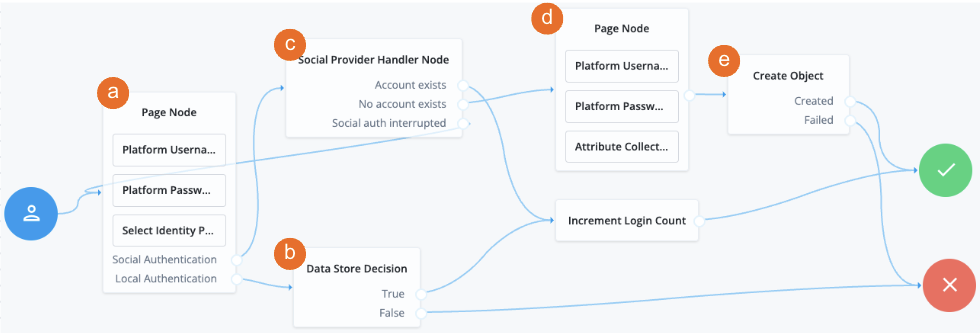
a A [Page node](page.html) contains the [Select Identity Provider node](select-identity-provider.html) node that prompts the user to select a social identity provider or to authenticate with a username and password.
b If the user selects local authentication, the [Data Store Decision node](data-store-decision.html) takes care of the authentication.
c If the user selects social authentication, the Social Provider Handler node does the following:
* Routes the user to the selected social provider to authenticate there
* Retrieves the user's profile information, and transforms it into a format that AM can use
* Assesses whether the user has an existing identity in AM
* If the user has an existing identity, authenticates that identity
* If the user doesn't have an identity, routes the user to another page node
* If the user interrupts the social authentication, routes the user back to the [Select Identity Provider node](select-identity-provider.html)
d The nodes on the page node request the information required to *register* a new identity.
e The [Create Object node](create-object.html) creates the new identity in AM.
### Write Federation Information node
Creates a persistent link between a remote IdP account and a local account in the SP, if none exists yet. If a transient link exists, it is persisted. Existing account links with different IdPs are not lost.
Use this node with the [SAML2 Authentication node](saml2.html), and ensure that the NameID Format is `persistent`.
#### Compatibility
| Product | Compatible? |
| ------------------------------------------ | --------------------- |
| PingOne Advanced Identity Cloud | [icon: check, set=fa] |
| ForgeRock Access Management (self-managed) | [icon: check, set=fa] |
| Ping Identity Platform (self-managed) | [icon: check, set=fa] |
#### Outcomes
Single outcome path.
#### Properties
This node has no configurable properties.
For examples, refer to [SSO and SLO in integrated mode](https://docs.pingidentity.com/pingam/7.4/am-saml2/saml2-integrated-mode.html).
## Identity management nodes
### Accept Terms and Conditions node
Prompts the user to accept the currently active terms and conditions.
You set terms and conditions in the Ping Identity Platform admin UI. Find more information in [Terms and conditions](https://docs.pingidentity.com/pingoneaic/latest/self-service/self-registration.html#terms-conditions).
Use this node for registration, or combined with the [Terms and Conditions Decision node](terms-and-conditions-decision.html) for progressive profiling or log in.
#### Compatibility
| Product | Compatible? |
| ----------------------------------------------------------------------------------------------------------------------------------------------------- | --------------------- |
| PingOne Advanced Identity Cloud | [icon: check, set=fa] |
| ForgeRock Access Management (self-managed)
This functionality requires that you configure AM as part of a Ping Identity Platform deployment. | [icon: check, set=fa] |
| Ping Identity Platform (self-managed) | [icon: check, set=fa] |
#### Outcomes
Single outcome path.
The user must accept the terms and conditions in order to proceed.
#### Properties
This node has no configurable properties.
#### Example
For progressive profiling, include this node after a [Terms and Conditions Decision node](terms-and-conditions-decision.html). If the user has not accepted the latest version of the terms and conditions, evaluation takes them to a page that requires them to accept the current terms and conditions.
If the user accepts, the acceptance response is stored in IDM:
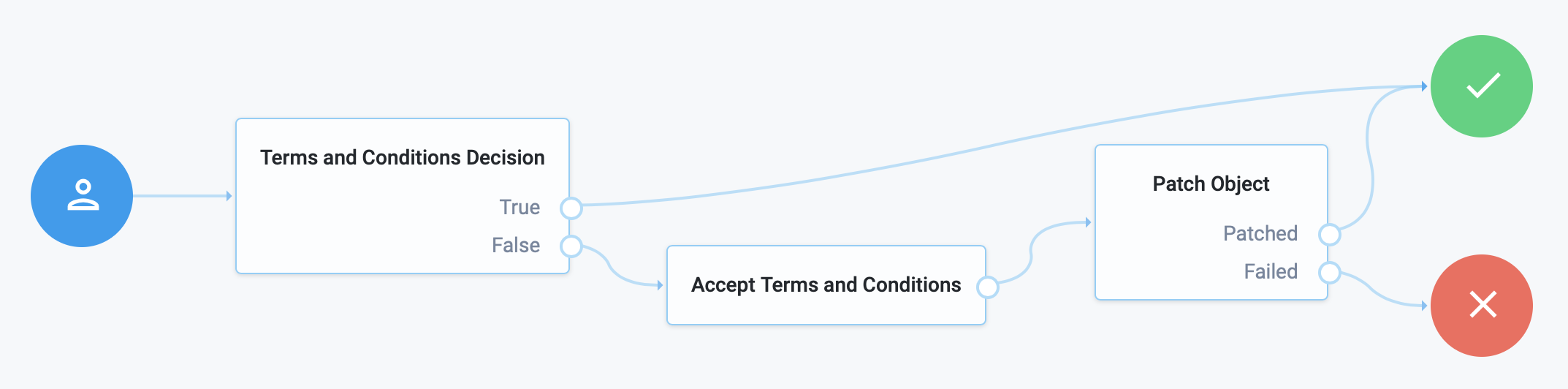
### Attribute Collector node
Collects the values of attributes for use later in the flow; for example, to populate a new account during registration.
This node supports three types of attributes:\
`string`\
`boolean`\
`number`
To request a value, the attribute must be present and viewable in the identity schema (IDM schema) of the current identity object.
The node lets you configure whether the attributes are required to continue and whether to validate them through IDM's policy filter.
Use the node alone or within a [Page node](page.html).
#### Compatibility
| Product | Compatible? |
| ----------------------------------------------------------------------------------------------------------------------------------------------------- | --------------------- |
| PingOne Advanced Identity Cloud | [icon: check, set=fa] |
| ForgeRock Access Management (self-managed)
This functionality requires that you configure AM as part of a Ping Identity Platform deployment. | [icon: check, set=fa] |
| Ping Identity Platform (self-managed) | [icon: check, set=fa] |
#### Outcomes
Single outcome path.
#### Properties
| Property | Usage |
| ----------------------- | ------------------------------------------------------------------------------------------------------------------------------------------------------------------------------------------------------------------------------------------------------------------------------------------------------------------------------------------------------------------------------------------------------------------------------------------------------------------------------------------------------------------------------------------------------------------------------------------------------------------------------------------------------------------------------------------------------------------------------------------------------------------------------------------------------------------------------------------------------------------------- |
| Attributes to Collect | A list of the attributes to collect based on those in the IDM schema for the current identity object. |
| All Attributes Required | When enabled, all attributes collected in this node are required in order to continue. |
| Validate Input | When enabled, validate the content against any policies specified in the IDM schema for each collected attribute.Find more information in [Use policies to validate data](https://docs.pingidentity.com/pingidm/7.4/objects-guide/policies.html#managed-object-property-config-properties) in the IDM documentation.If you enable this property, the collected attributes must be *User Editable* in IDM. To make an attribute user-editable in the IDM admin UI:1) Go to Configure > Managed Objects > *object-name*.
2) Click the pencil ([icon: pencil-alt, set=fa]) icon, then click Show advanced options.
3) Select the User Editable toggle.For details, refer to [Property Configuration Properties](https://docs.pingidentity.com/pingidm/7.4/objects-guide/appendix-managed-objects.html#managed-object-property-config-properties) in the IDM documentation. |
| Identity Attribute | The attribute used to identify the object in IDM. |
### Attribute Present Decision node
Checks whether an attribute is present on an object, including private attributes. There is no need to specify the value of the attribute.
Use this node during an update password flow to check whether the local account has a password, for example.
This node is similar to the [Attribute Value Decision node](attribute-value-decision.html) when that node is set to use the `PRESENT` operator, except it cannot return the value of the attribute, but can work with private attributes.
#### Compatibility
| Product | Compatible? |
| ----------------------------------------------------------------------------------------------------------------------------------------------------- | --------------------- |
| PingOne Advanced Identity Cloud | [icon: check, set=fa] |
| ForgeRock Access Management (self-managed)
This functionality requires that you configure AM as part of a Ping Identity Platform deployment. | [icon: check, set=fa] |
| Ping Identity Platform (self-managed) | [icon: check, set=fa] |
#### Outcomes
* `True`
* `False`
#### Properties
| Property | Usage |
| ------------------ | ---------------------------------------------------------------------------------------------------------------------------- |
| Present Attribute | The object attribute to verify is present in the IDM object. This can be an otherwise private attribute, such as `password`. |
| Identity Attribute | The attribute used to identify the object in IDM. |
### Attribute Value Decision node
Verifies that the specified attribute satisfies a specific condition.
Use this node to check whether an attribute's expected value is equal to a collected attribute value, or to validate that the specified attribute was collected.
Examples:
* To validate that a user provided the country attribute during registration, set the comparison operation to `PRESENT`, and the comparison attribute to `country`.
* To validate that the country attribute is set to the United States, set the comparison operation to `EQUALS`, the comparison attribute to `country`, and the comparison value to `United States`.
Use [Attribute Present Decision node](attribute-present-decision.html) instead when you need to check for the presence of a private attribute, such as `password`.
#### Compatibility
| Product | Compatible? |
| ----------------------------------------------------------------------------------------------------------------------------------------------------- | --------------------- |
| PingOne Advanced Identity Cloud | [icon: check, set=fa] |
| ForgeRock Access Management (self-managed)
This functionality requires that you configure AM as part of a Ping Identity Platform deployment. | [icon: check, set=fa] |
| Ping Identity Platform (self-managed) | [icon: check, set=fa] |
#### Properties
| Property | Usage |
| -------------------- | --------------------------------------------------------------------------------------------------------------------------------------------------------------------------------------------------------------------------- |
| Comparison Operation | The operation to perform on the object attribute:- `PRESENT`
Checks the existence of an attribute regardless of its value.
- `EQUALS`
Checks if the object's attribute value equals the configured comparison value. |
| Comparison Attribute | The object attribute to compare. |
| Comparison Value | When Comparison Operation is `EQUALS`, compare this value to the provided attribute value. |
| Identity Attribute | The attribute used to identify the object in IDM. |
### Consent Collector node
Prompts the user for consent to share their profile data.
A consent notice is listed for each IDM mapping that has consent enabled. If an IDM mapping is not created, or the mappings do not have privacy and consent enabled, AM does not show a consent message to the user.
This node is primarily used in progressive profile and registration flows.
#### Compatibility
| Product | Compatible? |
| ----------------------------------------------------------------------------------------------------------------------------------------------------- | --------------------- |
| PingOne Advanced Identity Cloud | [icon: check, set=fa] |
| ForgeRock Access Management (self-managed)
This functionality requires that you configure AM as part of a Ping Identity Platform deployment. | [icon: check, set=fa] |
| Ping Identity Platform (self-managed) | [icon: check, set=fa] |
#### Properties
| Property | Usage |
| ------------------------- | --------------------------------------------------------------------------------------------------------------------------------------------------- |
| All Mappings Required | If enabled, all mappings listed by this node require consent in order to move forward. |
| Privacy & Consent Message | Localized message providing the privacy and consent notice. The key is the language, such as `en` or `fr`, and the value is the message to display. |
### Create Object node
Creates a new object in IDM based on information collected during authentication, such as user registration.
Any managed object attributes that are marked as required in IDM must be collected during authentication in order to create the new object.
#### Compatibility
| Product | Compatible? |
| ----------------------------------------------------------------------------------------------------------------------------------------------------- | --------------------- |
| PingOne Advanced Identity Cloud | [icon: check, set=fa] |
| ForgeRock Access Management (self-managed)
This functionality requires that you configure AM as part of a Ping Identity Platform deployment. | [icon: check, set=fa] |
| Ping Identity Platform (self-managed) | [icon: check, set=fa] |
#### Properties
| Property | Usage |
| ----------------- | --------------------------------------------------------------------------------------------------------------------------------------------------------------------------------------------------------------------------------------------------------------------------------------------------------------------------------------------------------------------------------- |
| Identity Resource | The type of IDM managed identity resource object that this node creates. It must match the identity resource type for the current flow.
To check for the available managed identity resource types, go to the IDM admin UI, and open the Manage drop-down list in the upper right corner of the screen.
Identity managed object types are preceded by the icon. |
### Create Password node
Lets users create a password when provisioning an account.
| | |
| - | ----------------------------------------------------------------------------------------------------------------------------------------------------------------------------------------------------------------------------------------------------- |
| | This node and its related services are deprecated.You can find information on the new methods for implementing social authentication in [Social authentication](https://docs.pingidentity.com/pingam/7.4/am-authentication/social-registration.html). |
Social identity providers do not provide a user's password. Use this node to provide a password to complete the user's credentials before provisioning an account.
| | |
| - | -------------------------------------------------------------------------------------------------------------------------------------------------------------------------------------------------------------------------------------------------------------------------------------------------------------------------------------------------------------------------------------------------- |
| | The flow must provision an account after prompting the user for a password, for example, by using the [Provision Dynamic Account node](am-only/provision-dynamic-account.html). If no account is provisioned, the flow does not save the password.Do not place any nodes that request additional input from the user between this node and the provisioning node; otherwise, the password is lost. |
#### Compatibility
| Product | Compatible? |
| ------------------------------------------ | --------------------- |
| PingOne Advanced Identity Cloud | [icon: times, set=fa] |
| ForgeRock Access Management (self-managed) | [icon: check, set=fa] |
| Ping Identity Platform (self-managed) | [icon: times, set=fa] |
#### Outcomes
Single outcome path.
#### Properties
| Property | Usage |
| ----------------- | --------------------------------------------------------------------- |
| minPasswordLength | Specifies the minimum number of characters the password must contain. |
#### Example
The following example lets users who have performed social authentication using Google provide a password and provision an account when they don't have one. They must enter a one-time password to verify they are the owner of the Google account.

### Display Username node
Fetches a username based on a different identifying attribute, such as an email address, then displays it.
To email the username to the user instead, use the [Identify Existing User node](identify-existing-user.html) combined with a [Email Suspend node](email-suspend.html) or [Email Template node](email-template.html).
#### Compatibility
| Product | Compatible? |
| ----------------------------------------------------------------------------------------------------------------------------------------------------- | --------------------- |
| PingOne Advanced Identity Cloud | [icon: check, set=fa] |
| ForgeRock Access Management (self-managed)
This functionality requires that you configure AM as part of a Ping Identity Platform deployment. | [icon: check, set=fa] |
| Ping Identity Platform (self-managed) | [icon: check, set=fa] |
#### Properties
| Property | Usage |
| ------------------ | ----------------------------------------------------------------------------------------------------------------------------------------------------------------------------------------------------------------------------------------------------------------------------------------------------------------------------------------------------------------------------- |
| User Name | The attribute used to identify the username in an IDM object. |
| Identity Attribute | The attribute used to identify the object in IDM.When this node serves to recover a username, the identity attribute should be some other attribute that is unique to a user object, such as the email address.The node raises an exception when more than one value exists for this attribute. Make sure the value of whatever attribute you select is unique for each user. |
### Identify Existing User node
Verifies a user exists based on an identifying attribute, such as an email address, then makes the value of a specified attribute available in the shared node state.
Use this node in a forgotten password flow to fetch a username to email to the user. To display the username on the screen, use the [Display Username node](display-username.html) instead.
#### Compatibility
| Product | Compatible? |
| ----------------------------------------------------------------------------------------------------------------------------------------------------- | --------------------- |
| PingOne Advanced Identity Cloud | [icon: check, set=fa] |
| ForgeRock Access Management (self-managed)
This functionality requires that you configure AM as part of a Ping Identity Platform deployment. | [icon: check, set=fa] |
| Ping Identity Platform (self-managed) | [icon: check, set=fa] |
#### Properties
| Property | Usage |
| ------------------ | --------------------------------------------------------------------------------------------------------------------------------------------------------------------------------------------------------------- |
| Identifier | The attribute to collect from an IDM object. |
| Identity Attribute | The attribute used to identify the object in IDM.When this node serves to recover a username, the identity attribute should be some other attribute that is unique to a user object, such as the email address. |
#### Example
The following is an example of a forgotten password flow. The user enters information that the [Identify Existing User node](identify-existing-user.html) uses to try to identify them. Next, AM uses the [Email Suspend node](email-suspend.html) to send an email to the user and suspend authentication. Once authentication resumes, AM sends the user to a different flow to reset their password:
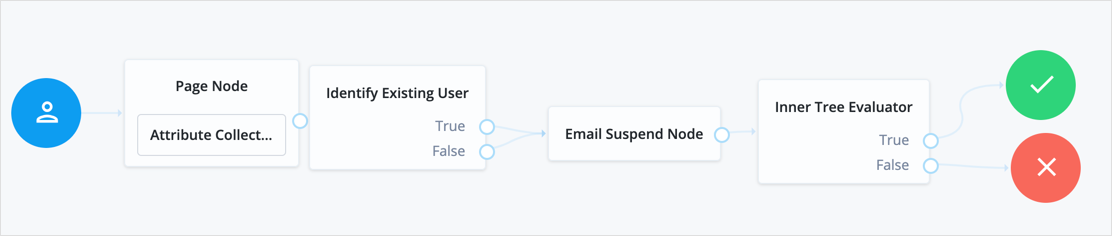
### KBA Decision node
Checks whether the user account has the required minimum number of KBA questions.
To set the number of KBA questions, edit Configure > Security Questions > Questions > Number in the IDM admin UI.
#### Compatibility
| Product | Compatible? |
| ----------------------------------------------------------------------------------------------------------------------------------------------------- | --------------------- |
| PingOne Advanced Identity Cloud | [icon: check, set=fa] |
| ForgeRock Access Management (self-managed)
This functionality requires that you configure AM as part of a Ping Identity Platform deployment. | [icon: check, set=fa] |
| Ping Identity Platform (self-managed) | [icon: check, set=fa] |
#### Outcomes
* `True`
* `False`
Evaluation continues along the `True` path if the user profile holds at least the minimum number of KBA questions; otherwise, evaluation continues along the `False` path.
#### Properties
| Property | Usage |
| ------------------ | ------------------------------------------------- |
| Identity Attribute | The attribute used to identify the object in IDM. |
### KBA Definition node
Collects KBA questions and answers and saves them to the user profile.
Use this node when creating or updating a user with Knowledge-Based Authentication enabled. For more information, refer to [Security questions](https://docs.pingidentity.com/pingoneaic/latest/self-service/self-registration.html#security-questions).
#### Compatibility
| Product | Compatible? |
| ----------------------------------------------------------------------------------------------------------------------------------------------------- | --------------------- |
| PingOne Advanced Identity Cloud | [icon: check, set=fa] |
| ForgeRock Access Management (self-managed)
This functionality requires that you configure AM as part of a Ping Identity Platform deployment. | [icon: check, set=fa] |
| Ping Identity Platform (self-managed) | [icon: check, set=fa] |
#### Properties
| Property | Usage |
| ---------------------------- | ---------------------------------------------------------------------------------------------------------------------------------------------------------------------------------------------------------------------------------------------------------------------------------------------------------------------------------------------------------------------------------------------------------------------------------------------------------------------------------------------------------------------- |
| Purpose Message | A localized message describing the purpose of the data requested from the user. |
| Allow User-Defined Questions | When enabled, users can create their own KBA questions. Disable this setting to restrict users to select from predefined questions only.Default: Enabled |
| Questions | Create or modify custom localized questions that the user can choose from when defining security questions.To add a localized security question:1) Click + to open the Add a Security Question form.
2) Select from the list of existing locales or add a new locale, type a question into the text field, and click Done.
3) Repeat to add further questions, and click Save when complete.To edit an existing security question, click the edit icon [icon: pencil-alt, set=fa],make your changes, and click Save. |
### KBA Verification node
Presents KBA questions to the user, collects answers to those questions, and verifies the input against the user's stored answers.
Use this node for additional authentication when resetting a forgotten password or username.
To set the number of KBA questions, edit Configure > Security Questions > Questions > Number in the IDM admin UI.
#### Compatibility
| Product | Compatible? |
| ----------------------------------------------------------------------------------------------------------------------------------------------------- | --------------------- |
| PingOne Advanced Identity Cloud | [icon: check, set=fa] |
| ForgeRock Access Management (self-managed)
This functionality requires that you configure AM as part of a Ping Identity Platform deployment. | [icon: check, set=fa] |
| Ping Identity Platform (self-managed) | [icon: check, set=fa] |
#### Properties
| Property | Usage |
| ------------------ | ----------------------------------------------------------------------- |
| KBA Attribute | The IDM object attribute in which KBA questions and answers are stored. |
| Identity Attribute | The attribute used to identify the object in IDM. |
### Pass-through Authentication node
Authenticates an identity through a connector to a third-party service.
This lets you migrate user profiles without forcing users to reset their passwords, or retain a third-party service indefinitely as the canonical store for authentication credentials.
Before you use the node:
* Configure the connector to the third-party service.
For details, refer to the [OpenICF documentation](https://docs.pingidentity.com/openicf/connector-reference/).
* If you plan to collect credentials in the identity repository for users, synchronize accounts from the third-party service.
For details, refer to [Synchronization](https://docs.pingidentity.com/pingidm/7.4/synchronization-guide/) in the IDM documentation.
Use this node after collecting the authentication credentials. For example, use the [Username Collector node](am-only/username-collector.html) and the [Password Collector node](am-only/password-collector.html) (standalone AM) or the [Platform Username node](platform-username.html) and the [Platform Password node](platform-password.html) (Ping Identity Platform deployment) to collect the username and password.
Pass the credentials to this node to authenticate the identity against the service.
#### Compatibility
| Product | Compatible? |
| ----------------------------------------------------------------------------------------------------------------------------------------------------- | --------------------- |
| PingOne Advanced Identity Cloud | [icon: check, set=fa] |
| ForgeRock Access Management (self-managed)
This functionality requires that you configure AM as part of a Ping Identity Platform deployment. | [icon: check, set=fa] |
| Ping Identity Platform (self-managed) | [icon: check, set=fa] |
#### Connectors that support pass-through authentication
The following connectors support pass-through authentication using the [`AuthenticateOp` interface](https://docs.pingidentity.com/openicf/connector-dev-guide/operations/operation-authenticate.html) by default:
* [LDAP connector](https://docs.pingidentity.com/openicf/connector-reference/ldap.html)
* [CSV file connector](https://docs.pingidentity.com/openicf/connector-reference/csv.html)
* [Database Table connector](https://docs.pingidentity.com/openicf/connector-reference/dbtable.html)
* [Microsoft Graph API Java connector](https://docs.pingidentity.com/openicf/connector-reference/ms-graph-api.html)
* [Scripted SQL connector](https://docs.pingidentity.com/openicf/connector-reference/scripted-sql.html)
| | |
| - | --------------------------------------------------------------------------------------------------------------------------------------------------------------------------------------------------------------------------------------------------------------------------------------------------------------------------------------------------------------------------------------------------------------------------------------------------------------------------------------------------------------------------------------------------------------------- |
| | All [Scripted Groovy](https://docs.pingidentity.com/openicf/connector-reference/groovy.html)-based connectors are capable of pass-through authentication if the `AuthenticateScript.groovy` script is implemented, but the only default implementation is the ScriptedSQL connector. For more information, refer to [Authenticate script](https://docs.pingidentity.com/openicf/connector-dev-guide/scripts/script-authenticate.html) and [Authenticate operation](https://docs.pingidentity.com/openicf/connector-dev-guide/operations/operation-authenticate.html). |
#### Outcomes
* `Authenticated`
* `Missing Input`
* `Failed`
#### Properties
| Property | Usage |
| ------------------ | ---------------------------------------------------------------------------------------- |
| System Endpoint | Required. Name of the connector to the third-party service that performs authentication. |
| Object Type | The OpenICF object type for the object being authenticated.Default: `account` |
| Identity Attribute | The username attribute for authentication.Default: `userName` |
| Password Attribute | The password attribute for authentication.Default: `password` |
#### Example
**The following example requires a Ping Identity Platform deployment.**
Before trying this example, synchronize accounts from the third-party service. The example shows a login flow that tries pass-through authentication when local authentication fails, and stores the user password when authentication with the third-party service succeeds.
In this example, the user enters their credentials with the [Platform Username node](platform-username.html) and [Platform Password node](platform-password.html). The [Data Store Decision node](data-store-decision.html) authenticates against the platform directory service. On failure, authentication passes through to the third-party service. If authentication with the third-party service is successful, the [Identify Existing User node](identify-existing-user.html) and [Required Attributes Present node](required-attributes-present.html) check for a valid user profile. The [Patch Object node](patch-object.html) updates the user's profile with the successful password:
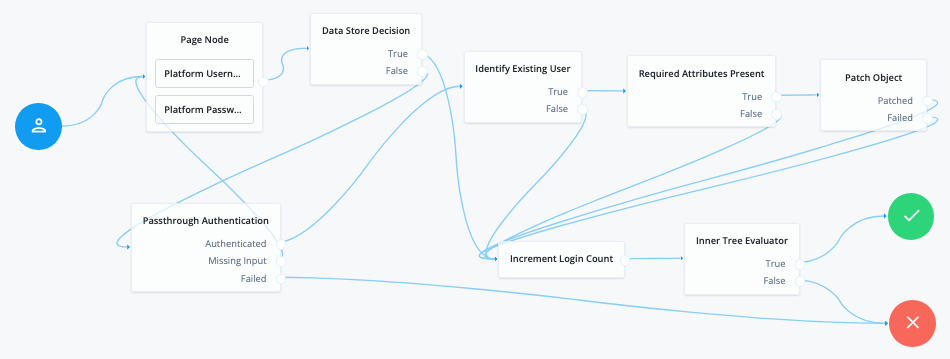
> **Collapse: Node connections**
>
> **List of node connections**
>
> | Source node | Outcome path | Target node |
> | ------------------------------------------------------------- | ------------- | --------------------------- |
> | Page Node containing:- Platform Username
>
> - Platform Password | → | Data Store Decision |
> | Data Store Decision | True | Increment Login Count |
> | | False | Pass-through Authentication |
> | Pass-through Authentication | Authenticated | Identify Existing User |
> | | Missing Input | Page Node |
> | | Failed | Failure |
> | Identify Existing User | True | Required Attributes Present |
> | | False | Increment Login Count |
> | Required Attributes Present | True | Patch Object |
> | | False | Increment Login Count |
> | Patch Object | Patched | Increment Login Count |
> | | Failed | Increment Login Count |
> | Increment Login Count | → | Inner Tree Evaluator |
> | Inner Tree Evaluator | True | Success |
> | | False | Failure |
### Patch Object node
Patches the attributes in an existing managed object in IDM.
Use this node for progressive profile completion to collect additional profile data from a user after they have logged in several times.
#### Compatibility
| Product | Compatible? |
| ----------------------------------------------------------------------------------------------------------------------------------------------------- | --------------------- |
| PingOne Advanced Identity Cloud | [icon: check, set=fa] |
| ForgeRock Access Management (self-managed)
This functionality requires that you configure AM as part of a Ping Identity Platform deployment. | [icon: check, set=fa] |
| Ping Identity Platform (self-managed) | [icon: check, set=fa] |
#### Properties
| Property | Usage |
| ------------------ | -------------------------------------------------------------------------------------------------------------------------------------------------------------------------------------------------------------------------------------------------------------------------------------------------------------------------------------------------------------------------------- |
| Patch as Object | Allows patching as the object being updated.Enable this property to patch a user object as part of the user's current session, for example, when updating their password. |
| Ignored Fields | Fields from the shared node state that should be ignored as part of patch.Use this to patch only the fields you want to update. If this is empty, the node attempts to update all the node shared state fields as part of the patch. |
| Identity Resource | The type of IDM managed identity resource object that this node creates.It must match the identity resource type for the current flow.
To check for the available managed identity resource types, go to the IDM admin UI, and open the Manage drop-down list in the upper right corner of the screen.
Identity managed object types are preceded by the icon. |
| Identity Attribute | The attribute used to identify the object to update in IDM. |
### Platform Password node
Prompts the user to enter their password and stores the input in a configurable state attribute.
This node uses the `_id` of the object for policy evaluation.
For existing users, the user's `_id` must be in the shared state to evaluate user-specific policies, such as password history, cannot-contain-others, and so on. No `_id` is available for new users.
#### Compatibility
| Product | Compatible? |
| ----------------------------------------------------------------------------------------------------------------------------------------------------- | --------------------- |
| PingOne Advanced Identity Cloud | [icon: check, set=fa] |
| ForgeRock Access Management (self-managed)
This functionality requires that you configure AM as part of a Ping Identity Platform deployment. | [icon: check, set=fa] |
| Ping Identity Platform (self-managed) | [icon: check, set=fa] |
#### Outcomes
Single outcome path.
#### Properties
| Property | Usage |
| ------------------ | ------------------------------------------------------------------------------------------------------------------------------------------------------------------------------------------------------------------------------------------------------------------------------------------------------------------------------------------------------------------------------------------------------------------------------------------------------------------------------------------------------------------------------------------------------------------------------------------------------------------------------ |
| Validate Password | When enabled, this node checks the user's input against IDM's password policies, and returns any policy failures as errors.For example, if you submitted an invalid password on registration, the response from this node would include a list of failed policies:```json
{
"name": "failedPolicies",
"value": [
"{ \"params\": { \"minLength\": 8 }, \"policyRequirement\": \"MIN_LENGTH\" }",
"{ \"params\": { \"numCaps\": 1 }, \"policyRequirement\": \"AT_LEAST_X_CAPITAL_LETTERS\" }",
"{ \"params\": { \"numNums\": 1 }, \"policyRequirement\": \"AT_LEAST_X_NUMBERS\" }"
]
}
``` |
| Password Attribute | The attribute used to store a password in the IDM object.Default: `password` |
| Confirm Password | Enable this option to require the user to enter the password identically in a second field. This property only displays when the node is placed within a Page node in a Ping Identity Platform deployment.Default: disabled |
### Platform Username node
Prompts the user to enter their username and stores it in a configurable state attribute.
#### Compatibility
| Product | Compatible? |
| ----------------------------------------------------------------------------------------------------------------------------------------------------- | --------------------- |
| PingOne Advanced Identity Cloud | [icon: check, set=fa] |
| ForgeRock Access Management (self-managed)
This functionality requires that you configure AM as part of a Ping Identity Platform deployment. | [icon: check, set=fa] |
| Ping Identity Platform (self-managed) | [icon: check, set=fa] |
#### Outcomes
Single outcome path.
#### Properties
| Property | Usage |
| ------------------ | ------------------------------------------------------------------------------------------------------------------------------------------------------------------------------------------------------------------------------------------------------------------------------------------------------------------------------------------------------------------------------ |
| Validate Username | When enabled, this node checks the user's input against IDM's username policies, and returns any policy failures as errors. Only enable this field if you're using this node as part of a registration journey. Don't enable this field in an authentication journey because the validation includes verifying that the provided username doesn't exist in the identity store. |
| Username Attribute | The attribute used to store a username in the IDM object. |
### Profile Completeness Decision node
Use progressive profile flows to check how much of a user's profile has been completed, where the completeness of a profile is expressed as a percentage of user-viewable, and user-editable fields that are not `null`.
#### Compatibility
| Product | Compatible? |
| ----------------------------------------------------------------------------------------------------------------------------------------------------- | --------------------- |
| PingOne Advanced Identity Cloud | [icon: check, set=fa] |
| ForgeRock Access Management (self-managed)
This functionality requires that you configure AM as part of a Ping Identity Platform deployment. | [icon: check, set=fa] |
| Ping Identity Platform (self-managed) | [icon: check, set=fa] |
#### Outcomes
* `True`
* `False`
#### Properties
| Property | Usage |
| ------------------------------ | ------------------------------------------------------------------------------------------------------------------------------------------------------- |
| Profile Completeness Threshold | Percentage of user-viewable and user-editable fields in a profile that must be filled for the node to pass. Express this as a number between 0 and 100. |
| Identity Attribute | The attribute used to identify the object in IDM. |
### Query Filter Decision node
Checks if the contents of a user's profile matches a specified query filter.
Use this node to verify whether a particular field has been filled, or that the contents of a field match a specific pattern. For instance, use this in progressive profile flows to check if marketing preferences are set on a user's profile.
For more information on constructing effective query filters, refer to [Construct queries](https://docs.pingidentity.com/pingidm/7.4/objects-guide/queries.html#constructing-queries) in the IDM documentation.
#### Compatibility
| Product | Compatible? |
| ----------------------------------------------------------------------------------------------------------------------------------------------------- | --------------------- |
| PingOne Advanced Identity Cloud | [icon: check, set=fa] |
| ForgeRock Access Management (self-managed)
This functionality requires that you configure AM as part of a Ping Identity Platform deployment. | [icon: check, set=fa] |
| Ping Identity Platform (self-managed) | [icon: check, set=fa] |
#### Outcomes
* `True`
* `False`
#### Properties
| Property | Usage |
| ------------------ | --------------------------------------------------------- |
| Query Filter | A query filter used to check the contents of an object. |
| Identity Attribute | The attribute used to identify the object queried in IDM. |
### Required Attributes Present node
Checks the specified identity resource in IDM, by default, `managed/user`, and determines if all attributes required to create the specified object exist within the shared node state.
#### Compatibility
| Product | Compatible? |
| ----------------------------------------------------------------------------------------------------------------------------------------------------- | --------------------- |
| PingOne Advanced Identity Cloud | [icon: check, set=fa] |
| ForgeRock Access Management (self-managed)
This functionality requires that you configure AM as part of a Ping Identity Platform deployment. | [icon: check, set=fa] |
| Ping Identity Platform (self-managed) | [icon: check, set=fa] |
#### Outcomes
* `True`
* `False`
#### Properties
| Property | Usage |
| ----------------- | ---------------------------------------------------------------------------------------------------------------------------------------------------------------------------------------------------------------------------------------------------------------------------------------------------------------------------------------------------------------------------- |
| Identity Resource | The type of IDM managed identity resource object this node creates. It must match the identity resource type for the current flow.
To check for the available managed identity resource types, go to the IDM admin UI, and open the Manage drop-down list in the upper right corner of the screen.
Identity managed object types are preceded by the icon. |
### Select Identity Provider node
Presents the user with a list of configured, enabled, social identity providers to use for authentication.
Use this node with the [Social Provider Handler node](social-provider-handler.html) to use the Social Identity Provider Service.
In a platform deployment, this node can be configured to only show identity providers the user has already associated with their account, such as in account claiming flows, where a user wishes to associate a new social identity provider with an account that is being authenticated with social authentication.
The node has two possible outputs: social authentication and local authentication. Local authentication can be turned off by disabling Include local authentication.
In cases such as account claiming (platform deployment), where the user has already authenticated once and is associating a new identity provider, the node only displays a local sign in option if it detects that the user's account has a `password` attribute.
This node returns the [SelectIdPCallback](https://docs.pingidentity.com/pingam/7.4/am-authentication/authn-supported-callbacks.html#SelectIdPCallback) when more than one social identity provider is enabled, or a single provider is enabled as well as the Local Authentication option, It then requires a choice from the user. If no choice from the user is required, authentication proceeds to the next node in the flow.
#### Compatibility
| Product | Compatible? |
| ------------------------------------------ | --------------------- |
| PingOne Advanced Identity Cloud | [icon: check, set=fa] |
| ForgeRock Access Management (self-managed) | [icon: check, set=fa] |
| Ping Identity Platform (self-managed) | [icon: check, set=fa] |
#### Outcomes
* `Social Authentication`
* `Local Authentication`
To turn off local authentication, disable Include local authentication.
#### Properties
| Property | Usage |
| ----------------------------- | ------------------------------------------------------------------------------------------------------------------------------------------------------------------------------------------------------------------------------------------------------------------------------------------------------------------------------------------------------------------------------------------------------------------------------------------------------------------------------------------------------------------------------------------------------------------------------------ |
| Include local authentication | Whether local authentication is included as a method for authenticating. |
| Offer only existing providers | Ping Identity Platform deployments only.Enable this when the social identity provider choices offered should be limited to those already associated with a user object. Use this when a user is authenticating using a new social identity provider, and an account associated with that user already exists (also known as "account claiming"). |
| Password attribute | Ping Identity Platform deployments only.The attribute in the user object that stores a user's password for use during local authentication. |
| Identity Attribute | Ping Identity Platform deployments only.The attribute used to identify an existing user. Required to support the offer of only existing providers. |
| Filter Enabled Providers | By default, the node displays all identity providers marked as Enabled in the Social Identity Provider Service as a selectable option. Specify the name of one of more providers to filter the list.
View the names of your configured social identity providers in AM admin UI under Realms > Realm name > Services > Social Identity Provider Service > Secondary Configurations.If this field is not empty, providers must be in the list and must be enabled in the Social Identity Provider service to appear. If left blank, the node displays all enabled providers. |
### Terms and Conditions Decision node
Verifies the user has accepted the active set of terms and conditions.
You set up terms and conditions in the Ping Identity Platform admin UI. For more information, refer to [Terms and conditions](https://docs.pingidentity.com/pingoneaic/latest/self-service/self-registration.html#terms-conditions).
Use this node to verify the user has accepted terms and conditions before proceeding, for example, during login or progressive profile data collection.
You can use this node with the [Accept Terms and Conditions node](accept-terms-and-conditions.html).
#### Compatibility
| Product | Compatible? |
| ----------------------------------------------------------------------------------------------------------------------------------------------------- | --------------------- |
| PingOne Advanced Identity Cloud | [icon: check, set=fa] |
| ForgeRock Access Management (self-managed)
This functionality requires that you configure AM as part of a Ping Identity Platform deployment. | [icon: check, set=fa] |
| Ping Identity Platform (self-managed) | [icon: check, set=fa] |
#### Outcomes
* `True`
* `False`
#### Properties
| Property | Usage |
| ------------------ | ---------------------------------------------------------- |
| Identity Attribute | The attribute used to identify the object to check in IDM. |
### Time Since Decision node
Checks if a specified amount of time has passed since the user was registered.
For example, to prompt users to review your terms and conditions after the account is a week old, set the Elapsed Time property to `1 week`. After that time has elapsed, the next time the user logs in, they are prompted to review your terms and conditions.
Use this node for progressive profile completion.
#### Compatibility
| Product | Compatible? |
| ----------------------------------------------------------------------------------------------------------------------------------------------------- | --------------------- |
| PingOne Advanced Identity Cloud | [icon: check, set=fa] |
| ForgeRock Access Management (self-managed)
This functionality requires that you configure AM as part of a Ping Identity Platform deployment. | [icon: check, set=fa] |
| Ping Identity Platform (self-managed) | [icon: check, set=fa] |
#### Outcomes
* `True`
* `False`
#### Properties
| Property | Usage |
| ------------------ | -------------------------------------------------------------------------------------------------------------------------------------------------------------------------------------------------------------------------------------------------------------------------- |
| Elapsed Time | The amount of time since the user was created, in minutes, that needs to elapse before this node is triggered.This property also supports specifying basic time units. For example, when setting the property to `10080` minutes, writing `7 days` or `1 week` also works. |
| Identity Attribute | The attribute used to identify the object to update in IDM. |
## Utility nodes
### Agent Data Store Decision node
Verifies that a provided agent ID and password match a web agent or Java agent profile configured in AM. Obtain the web or Java agent ID and password with a [Zero Page Login Collector node](zero-page-login-collector.html).
| | |
| - | ------------------------------------------------------------------------------------------------------------------------------------------------------------------------------------------- |
| | Non-agent identities, such as users stored in configured identity repositories, cannot be verified by using this node.Use the [Data Store Decision node](data-store-decision.html) instead. |
#### Compatibility
| Product | Compatible? |
| ------------------------------------------ | --------------------- |
| PingOne Advanced Identity Cloud | [icon: check, set=fa] |
| ForgeRock Access Management (self-managed) | [icon: check, set=fa] |
| Ping Identity Platform (self-managed) | [icon: check, set=fa] |
#### Outcomes
* `True`
* `False`
Evaluation continues along the `True` path if the credentials match those of a configured agent profile; otherwise, the evaluation continues along the `False` path.
#### Properties
This node has no configurable properties.
### Anonymous Session Upgrade node
Upgrades an anonymous session to a non-anonymous session.
Use this as the first node in the flow.
#### Compatibility
| Product | Compatible? |
| ------------------------------------------ | --------------------- |
| PingOne Advanced Identity Cloud | [icon: check, set=fa] |
| ForgeRock Access Management (self-managed) | [icon: check, set=fa] |
| Ping Identity Platform (self-managed) | [icon: check, set=fa] |
#### Outcomes
Single outcome path.
#### Properties
This node has no configurable properties.
#### Example
After using the [Anonymous User Mapping node](anonymous-user-mapping.html) to access AM as an anonymous user, this node lets users upgrade their session to a non-anonymous one:
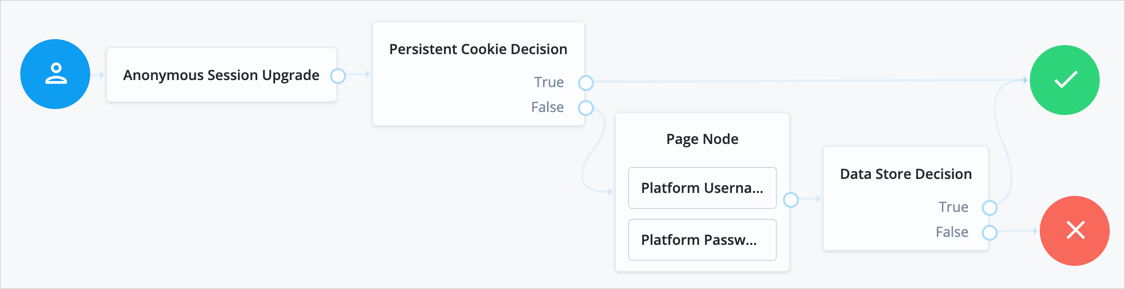
### Anonymous User Mapping node
Lets users log in to an application or website without providing credentials, by assuming the identity of a specified existing user account. The default user for this purpose is named `anonymous`.
Take care to limit access for such users. For example, grant anonymous users access to public downloads on your site.
#### Compatibility
| Product | Compatible? |
| ------------------------------------------ | --------------------- |
| PingOne Advanced Identity Cloud | [icon: check, set=fa] |
| ForgeRock Access Management (self-managed) | [icon: check, set=fa] |
| Ping Identity Platform (self-managed) | [icon: check, set=fa] |
#### Outcomes
Single outcome path.
#### Properties
| Property | Usage |
| ------------------- | ------------------------------------------------------------------------------------------------------------------------------------------------------ |
| Anonymous User Name | Specifies the username of an account that represents anonymous users. This user must already exist in the realm, and its user status must be `active`. |
#### Example
The following example uses this node to grant access as an anonymous user to users who have performed social authentication access and do not have an existing profile:
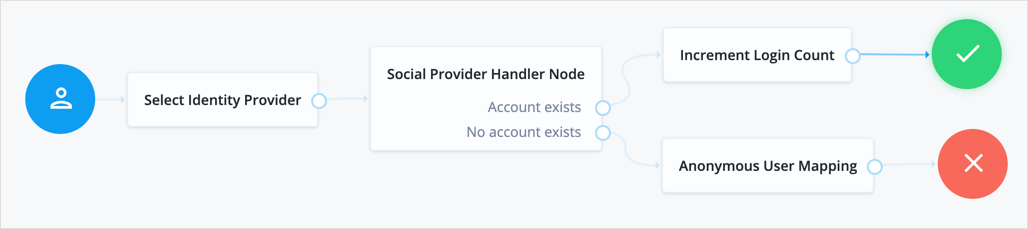
### Choice Collector node
Define two or more options to present to the user when authenticating.
#### Compatibility
| Product | Compatible? |
| ------------------------------------------ | --------------------- |
| PingOne Advanced Identity Cloud | [icon: check, set=fa] |
| ForgeRock Access Management (self-managed) | [icon: check, set=fa] |
| Ping Identity Platform (self-managed) | [icon: check, set=fa] |
#### Outcomes
* *Choice 1*
…
* *Choice n*
#### Properties
| Property | Usage |
| --------------------------- | ------------------------------------------------------------------------------------------------------------------------------------------------------------------------------------------------------------------------------------------------------------------------------------------------------------------------- |
| Choices | Enter two or more choice strings to display to the user.To remove a choice, select its Delete icon [icon: times, set=fa].To delete all choices, select the Clear all button in the Choices field. |
| Default Choice *(required)* | Enter the value of the choice to be selected by default. If you do not specify a default choice, the first choice in the list becomes the default. |
| Prompt *(required)* | Enter the prompt string to display to the user when presenting the choices. |
| Field Display Type | Specifies the format of the options presented to the user. This property only appears when the node is placed within a Page node.Possible values are:- `select`
Lets the user select one or more options from a selection (default).
- `radio`
Lets the user select a single option from a group of radio buttons. |
### Configuration Provider node
The Configuration Provider node is a scripted node that dynamically imitates another node and replaces it in the journey.
The script builds a map of configuration properties matching settings for the imitated node. The Configuration Provider node uses the settings to imitate the other node.
#### Compatibility
| Product | Compatible? |
| ------------------------------------------ | --------------------- |
| PingOne Advanced Identity Cloud | [icon: check, set=fa] |
| ForgeRock Access Management (self-managed) | [icon: check, set=fa] |
| Ping Identity Platform (self-managed) | [icon: check, set=fa] |
#### Inputs
The specific shared state inputs depend on your script and the configuration it builds. The shared state data must include all required Script Inputs properties.
In other words, shared state data must include whatever the Script requires to prepare configuration data for the imitated node.
#### Dependencies
To prepare to use this node:
1. Decide what type of node to imitate.
The imitated node must have a fixed set of outcomes. You can't use a node type whose outcomes change based on the node configuration.
2. Create an appropriate Config Provider script.
Base your script on the `config-provider-node.js` sample.
3. Obtain the list of required configuration properties for the imitated node.
In the Ping Identity Platform admin UI for a Ping Identity Platform deployment:
1. Create a journey with the imitated node.
2. Configure the imitated node.
3. Open your browser's developer tools panel.
4. Select the Network tab.
5. Save the journey and examine the body of the REST request JSON to find the configuration of the imitated node.
For example, you find a [Message node](message.html) has these configuration properties:
* `message`
* `messageYes`
* `messageNo`
In AM admin UI for a standalone AM deployment, use the [API explorer](https://docs.pingidentity.com/pingam/7.4/am-rest/about-api-explorer.html) endpoint `/realm-config/authentication/authenticationtrees/nodes/NodeType#_action_template`.
The following request returns the configuration properties for a [Message node](message.html):
```bash
$ curl \
--request POST \
--header ": " \
"https://openam.example.com:8443/openam/json/realm-config/authentication/authenticationtrees/nodes/MessageNode?_action=template"
{
"messageYes": {},
"message": {},
"messageNo": {}
}
```
Your script builds a `config` object, a map of configuration properties matching the settings of the imitated node. The following example consumes the `username` shared state property to build the [Message node](message.html) configuration:
```javascript
config = {
"message": {"en-GB": `Hi ${nodeState.get("username")}. Please confirm you are over 18.`},
"messageYes": {"en-GB": "Confirm"},
"messageNo": {"en-GB": "Deny"},
}
```
#### Configuration
| Property | Usage |
| ------------- | ----------------------------------------------------------------------------------------------------------------------------------------------------- |
| Script | Select the script you created for this node. |
| Node Type | Select the type of node to imitate. |
| Script Inputs | Optionally limit the shared state data properties in the shared state input to the selected Script.Default: `*` (Any available shared state property) |
#### Outputs
The outputs match those of the imitated node.
#### Outcomes
The Configuration Provider node inherits all the outcomes of its configured Node Type. Connect these as you would the outcomes of the imitated node.
This node also has a Configuration failure outcome. The Configuration failure outcome arises when:
* The Configuration Provider node failed to build the configuration map.
* The configuration map is missing required values.
* The configuration map is invalid.
#### Errors
In addition to the messages from the imitated node, this node can log the following:
* Warnings
* `Failed to collect inputs of contained node: node-type`
A required input property was missing.
* `Failed to get outcome provider for node type.`
The Node Type outcomes were missing.
* Errors
* `Failed to configure node: node-type`
This corresponds to the Configuration failure outcome.
To troubleshoot HTTP errors this node causes, refer to the *Errors* section of the imitated node.
#### Examples
In the following example, the Configuration Provider node imitates a [Message node](message.html).
The Configuration Provider settings are the following:
* Script
A script to configure a [Message node](message.html) dynamically.
The script accesses the `username` from shared state data to set the message:
```javascript
config = {
"message": {"en-GB": `Hi ${nodeState.get("username")}. Please confirm you are over 18.`},
"messageYes": {"en-GB": "Confirm"},
"messageNo": {"en-GB": "Deny"},
}
```
* Node Type
`Message Node`
* Script Inputs
`username`
The default, `*`, also works because `username` is one of the available shared state properties.
The Configuration Provider node is part of a journey where the user enters their username and password before getting the message screen, so their username is in the shared state data. Notice the outcomes of the node include those of the [Message node](message.html) (True, False):
![Journey with a \[.label\]#Configuration Provider# node](_images/auth-node-config-provider-journey.png)
When the journey reaches the Configuration Provider node, the script for the node retrieves the `username` and dynamically configures the node. The Configuration Provider node, imitating a [Message node](message.html), prompts the user with the message:
![A \[.label\]#Configuration Provider# node imitating a \[.label\]#Message# node](_images/auth-node-config-provider-example.png)
* When the user clicks Confirm, the journey continues to the [Increment Login Count node](increment-login-count.html).
* When the user clicks Deny, the journey continues to the [Failure node](failure.html).
* If the configuration process fails, the node triggers the Configuration failure outcome and the journey continues to the [Failure node](failure.html). In this case, you can find the reason for the failure in the logs.
### Email Suspend node
The Email Suspend node generates and sends an email, such as an address verification email based on an email template. It relies on the email service configured in IDM] to send the email.
This node generates a unique link and passes it as the `resumeURI` property for the template.
> **Collapse: How is derived?**
>
> The External Login Page URL is used as the base of the `resumeURI` if it's been configured. Otherwise, the Base URL Source service is used to construct the base of the `resumeURI`.
>
> Find more information in [Core authentication attributes > General](https://docs.pingidentity.com/pingam/7.4/am-authentication/authn-core-settings.html#authn-core-general) and [Configure the Base URL source service](https://docs.pingidentity.com/pingam/7.4/security/reverse-proxy.html#configure-base-url-source).
Authentication is suspended until the end user clicks the link in the email to resume the flow. Make sure the authentication session is long enough for the end user to complete the flow, so it doesn't time out. Learn more in [Configure suspended authentication](https://docs.pingidentity.com/pingam/7.4/am-authentication/authn-suspended.html#configure-suspended-auth).
If you don't need to suspend authentication and wait for a reply, use the [Email Template node](email-template.html) instead.
#### Compatibility
| Product | Compatible? |
| ----------------------------------------------------------------------------------------------------------------------------------------------------- | --------------------- |
| PingOne Advanced Identity Cloud | [icon: check, set=fa] |
| ForgeRock Access Management (self-managed)
This functionality requires that you configure AM as part of a Ping Identity Platform deployment. | [icon: check, set=fa] |
| Ping Identity Platform (self-managed) | [icon: check, set=fa] |
#### Inputs
The Email Suspend node either uses the identity profile in the shared state data or looks up the user profile. In either case, the node uses any applicable profile properties to populate the email template, omitting missing values from the populated template.
If Object Lookup is *not* enabled for the node (default), the shared state data must hold the Email Attribute with the recipient's email address and any properties the email template uses.
If Object Lookup is enabled for the node, the shared state data must hold the profile value to match the configured Identity Attribute. The Email Suspend node uses the Identity Attribute to look up the profile, and its Email Attribute to get the recipient's email address from the profile.
#### Dependencies
Before you use the Email Suspend node:
* [Configure IDM integration](https://docs.pingidentity.com/pingam/7.4/reference/global-services-configuration.html#global-idm-integration) in AM.
* [Configure outbound email](https://docs.pingidentity.com/pingidm/7.4/external-services-guide/email.html) in IDM.
* [Prepare an email template](https://docs.pingidentity.com/pingidm/7.4/self-service-reference/email-notification.html) in IDM.
Record the email template name for use when configuring the Email Suspend node.
| | |
| - | --------------------------------------------------------------------------------------------------------------------------------------------------------------------------------------------------------------------------------------------------------------------------------------- |
| | You can find the email template name in the required format in the URL when you're configuring the template.For example, the Forgotten Username email template's name is `forgottenUsername`:```none
https:///?realm=alpha#/email/templates/edit/forgottenUsername
``` |
#### Configuration
| Property | Usage |
| --------------------- | --------------------------------------------------------------------------------------------------------------------------------------------------------------------------------------------------------------------------------------------------------------------------------------------------------------------------------------------------------------------------------------------------------------------------------------------------------------------------------------------------- |
| Email Template Name | The name of the email template prepared as a [dependency](#email-suspend-dependencies).Default: `registration` |
| Email Attribute | The shared state data property or profile attribute for the recipient's email address.Default: `mail` |
| Email Suspend Message | The localized message to display when the node suspends authentication.According to [OWASP authentication recommendations](https://cheatsheetseries.owasp.org/cheatsheets/Authentication_Cheat_Sheet.html#authentication-and-error-messages), the message should be the same regardless of the validity of the recipient's email address.You can use plain text or HTML code in this message.Default: `An email has been sent to the address you entered. Click the link in that email to proceed.` |
| Object Lookup | Whether to look up the managed identity profile.Default: disabled |
| Identity Attribute | The IDM property to match in the managed identity profile when Object Lookup is enabled.Default: `userName` |
#### Outputs
This node doesn't add to the shared state data.
#### Outcomes
The Email Suspend node has a single outcome path.
Evaluation continues when the end user clicks the link in the email to resume the flow.
#### Errors
This node doesn't log any error or warning messages of its own.
#### Examples
The following default journeys use the Email Suspend node:
* `ForgottenUsername`
* `ResetPassword`
* `UpdatePassword`
##### Forgotten username
In the default journey for recovering a forgotten username, the end user enters their email address to recover their username.
###### Before you start
* Configure the email service.
* Optionally use the email template editor to modify the `forgottenUsername` template.
###### The journey
![Forgotten username journey with an \[.label\]#Email Suspend# node](_images/forgotten-username-journey.png)
a The [Page node](page.html) with an [Attribute Collector node](attribute-collector.html) prompts for the end user's email address.
b The [Identify Existing User node](identify-existing-user.html) attempts to look up the username by matching the email address to the email address in an identity profile.
The lookup fails if more than one user profile uses the same email address.
c The Email Suspend node reads the user profile, generates a unique `resumeURI` link to resume the journey, and populates the `forgottenUsername` email template. On success, the node makes a request to the email service to send the email. In any case, it displays the suspend message:
![Message from an \[.label\]#Email Suspend# node](_images/email-suspend-message.png)
The node's settings are:
| | |
| --------------------- | ------------------------------------------------------------------------------------------------------- |
| Email Template Name | `forgottenUsername` |
| Email Attribute | `mail` (default) |
| Email Suspend Message | `An email has been sent to the address you entered. Click the link in that email to proceed.` (default) |
| Object Lookup | Enabled |
| Identity Attribute | `mail` |
d When the end user clicks the link to resume the journey, the [Inner Tree Evaluator node](inner-tree-evaluator.html) starts the `Login` journey.
###### Try the journey
Use the journey to recover the username for an account whose email you have access to. For example, if Babs Jensen's account has your email address, the Email Suspend node sends you a message such as the following:
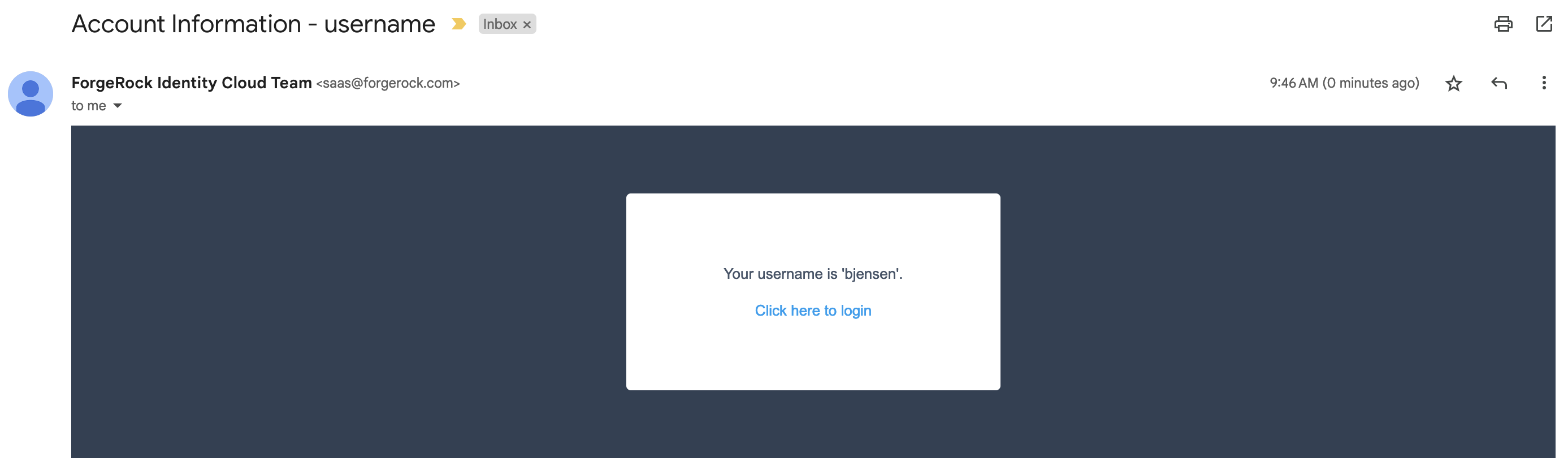
Follow the link to continue the journey and log in as Babs Jensen.
##### Registration
For an example registration journey showing how to use the Email Suspend node and the [Email Template node](email-template.html), refer to the [Email Template node examples](email-template.html#email-template-examples).
### Email Template node
The Email Template node generates and sends an email, such as a welcome email based on an email template. It relies on the email service configured in IDM to send an email.
This node doesn't wait for a reply. If authentication should pause and wait for a reply to the email, use the [Email Suspend node](email-suspend.html) instead.
#### Compatibility
| Product | Compatible? |
| ----------------------------------------------------------------------------------------------------------------------------------------------------- | --------------------- |
| PingOne Advanced Identity Cloud | [icon: check, set=fa] |
| ForgeRock Access Management (self-managed)
This functionality requires that you configure AM as part of a Ping Identity Platform deployment. | [icon: check, set=fa] |
| Ping Identity Platform (self-managed) | [icon: check, set=fa] |
#### Inputs
The Email Template node uses the identity in the shared state data to get the profile, meaning the journey must have successfully authenticated or at least identified the recipient. When the journey reaches this node, the shared state must hold the profile value to match the configured Identity Attribute. The value can be in the `username` property or in a property having the same name as the Identity Attribute.
The Email Template node uses its Identity Attribute to look up the profile, and its Email Attribute to get the recipient's email address from the profile. In other words, the node finds the recipient's address and other properties in the *profile*, not the shared state data.
For example, if the node uses default configuration settings and Babs Jensen authenticated to the journey, the shared state includes `"username": "bjensen"`. The node looks for a profile with `"userName": "bjensen"`. It gets the recipient address from the profile's `mail` attribute, such as `"mail": "bjensen@example.com"`. The node uses any applicable profile attributes to populate the email template, omitting missing values from the populated template.
#### Dependencies
Before you use the Email Template node:
* [Configure IDM integration](https://docs.pingidentity.com/pingam/7.4/reference/global-services-configuration.html#global-idm-integration) in AM.
* [Configure outbound email](https://docs.pingidentity.com/pingidm/7.4/external-services-guide/email.html) in IDM.
* [Prepare an email template](https://docs.pingidentity.com/pingidm/7.4/self-service-reference/email-notification.html) in IDM.
Record the email template name for use when configuring the Email Template node.
| | |
| - | --------------------------------------------------------------------------------------------------------------------------------------------------------------------------------------------------------------------------------------------------------------------------------------- |
| | You can find the email template name in the required format in the URL when you're configuring the template.For example, the Forgotten Username email template's name is `forgottenUsername`:```none
https:///?realm=alpha#/email/templates/edit/forgottenUsername
``` |
#### Configuration
| Property | Usage |
| ------------------- | ---------------------------------------------------------------------------------------------------------- |
| Email Template Name | The name of the email template prepared as a [dependency](#email-template-dependencies).Default: `welcome` |
| Email Attribute | The profile attribute for the recipient's email address.Default: `mail` |
| Identity Attribute | The IDM property to match in the managed identity profile.Default: `userName` |
#### Outputs
This node doesn't add to the shared state data.
If the outcome is `Email Sent`, this node has sent the templated message to the recipient through the email service.
#### Outcomes
* `Email Sent`
The node completed a request to send the message to the recipient.
If the message doesn't reach its destination, the problem is with the delivery, not with the node.
* `Email Not Sent`
The node failed to complete a request to send the message.
This outcome arises, for example, when one of the following happens:
* The node can't get the user profile.
* The template doesn't match the user profile.
* The specified Email Attribute doesn't contain an address.
According to [OWASP authentication recommendations](https://cheatsheetseries.owasp.org/cheatsheets/Authentication_Cheat_Sheet.html#authentication-and-error-messages), any messages displayed in the journey should be the same in both cases.
#### Errors
This node doesn't log any error or warning messages of its own.
#### Examples
Use the Email Template node to send an email message when the journey doesn't depend on a reply. For example, send a welcome message when a user completes registration.
This example augments the default Registration journey and sends a welcome email.
Before setting up the journey:
* Configure the email service.
* Create an email template for the Email Template node.
Use the platform email template editor to duplicate the `Welcome` template and customize your copy:
The journey is as follows:
![Registration journey with an \[.label\]#Email Template# node](_images/email-registration-journey.png)
1. The [Page node](page.html) prompts for the same information as the default Registration journey.
2. The [Email Suspend node](email-suspend.html) sends a message to the registered email address with a link for the user to click.
The journey proceeds when the user clicks the link, confirming their email address.
It has default settings and uses the default `Registration` email template:
3. The [Create Object node](create-object.html) stores the newly registered user's profile.
4. The Email Template node reads the user profile and populates the template from profile attribute values. It makes a request to the email service to send the message.
Its settings are:
| | |
| ------------------- | --------------------------------------- |
| Email Template Name | The name of your welcome email template |
| Email Attribute | `mail` (default) |
| Identity Attribute | `userName` (default) |
5. The [Increment Login Count node](increment-login-count.html) updates the count on successful authentication.
Use the journey to register an account for Babs Jensen with your email as the address. You receive two messages:

* The `Register new account` message has a link to click to continue the journey, confirming you can access the registered email account.
* The `Your account has been created` welcomes you on successful registration.
This demonstrates you have successfully used the Email Template node in a journey.
### Failure URL node
Sets the redirect URL when authentication fails.
| | |
| - | ---------------------------------------------------------------------------- |
| | Specifying a failure URL overrides any `gotoOnFail` query string parameters. |
For more information on how AM determines the redirection URL, and to configure the Validation Service to trust redirection URLs, refer to [Configure success and failure redirection URLs](https://docs.pingidentity.com/pingam/7.4/am-authentication/redirection-url-precedence.html).
| | |
| - | ------------------------------------------------------------------------------------------------------------------------------------------------------------------------------------------------------------------------------------------------------------------ |
| | The URL is also saved in the shared `nodeState` object on the `failureUrl` key.For more information, refer to [Customize authentication trees](https://docs.pingidentity.com/pingam/7.4/am-authentication/about-authentication-trees.html#customizing-auth-trees). |
#### Compatibility
| Product | Compatible? |
| ------------------------------------------ | --------------------- |
| PingOne Advanced Identity Cloud | [icon: check, set=fa] |
| ForgeRock Access Management (self-managed) | [icon: check, set=fa] |
| Ping Identity Platform (self-managed) | [icon: check, set=fa] |
#### Outcomes
Single outcome path.
#### Properties
| Property | Usage |
| ------------------------ | -------------------------------------------------------------- |
| Failure URL *(required)* | Specify the full URL to redirect to when authentication fails. |
### Get Session Data node
Retrieves the value of a specified key from a user's session data, and stores it in the specified key in the shared `nodeState` object.
This node is only used during session upgrade—when the user has already successfully authenticated previously—and is now upgrading their session for additional access. Find more information on upgrading a session in [Session upgrade](https://docs.pingidentity.com/pingam/7.4/am-sessions/session-upgrade.html).
This node fails with an error if you attempt to get a property when the user does not have an existing session. Use a [Scripted Decision node](scripted-decision.html) with a script that determines if an existing session is present:
```javascript
if (typeof existingSession !== 'undefined') {
outcome = "hasSession";
} else {
outcome = "noSession";
}
```
#### Compatibility
| Product | Compatible? |
| ------------------------------------------ | --------------------- |
| PingOne Advanced Identity Cloud | [icon: check, set=fa] |
| ForgeRock Access Management (self-managed) | [icon: check, set=fa] |
| Ping Identity Platform (self-managed) | [icon: check, set=fa] |
#### Outcomes
Single outcome path.
#### Properties
| Property | Usage |
| ----------------------------- | -------------------------------------------------------------------------------------- |
| Session Data Key *(required)* | Specify the name of a key in the user's session data used to retrieve the value. |
| Shared State Key *(required)* | Specify the name of a key in the `nodeState` object used to store the retrieved value. |
#### Example
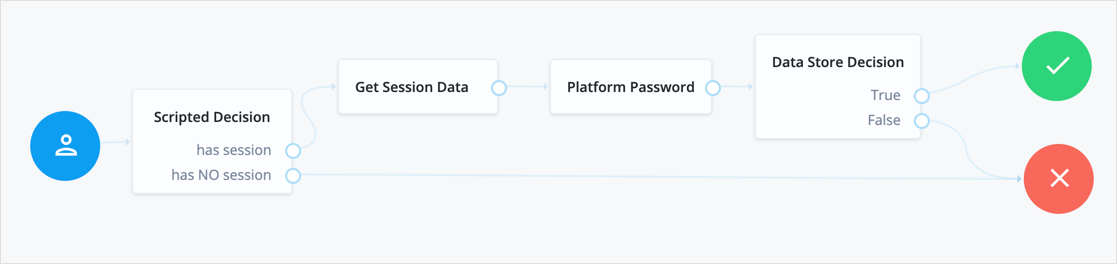
The following table includes example keys that may be available in an existing session and the corresponding sample values:
| Key | Sample value |
| ---------------------------- | ----------------------------------------------------- |
| `AMCtxId` | `e370cca2-02d6-41f9-a244-2b107206bd2a-122934` |
| `amlbcookie` | `01` |
| `authInstant` | `2023-04-04T09:19:05Z` |
| `AuthLevel` | `0` |
| `CharSet` | `UTF-8` |
| `clientType` | `genericHTML` |
| `FullLoginURL` | `/am/XUI/?realm=alpha#login/` |
| `Host` | `34.117.172.39` |
| `HostName` | `am.forgeblocks.com` |
| `Locale` | `en_US` |
| `Organization` | `dc=openam,dc=forgerock,dc=org` |
| `Principal` | `uid=amAdmin,ou=People,dc=openam,dc=forgerock,dc=org` |
| `Principals` | `amAdmin` |
| `Service` | `ldapService` |
| `successURL` | `/openam/console` |
| `sun.am.UniversalIdentifier` | `uid=amAdmin,ou=People,dc=openam,dc=forgerock,dc=org` |
| `UserId` | `amAdmin` |
| `UserProfile` | `Required` |
| `UserToken` | `amAdmin` |
| `webhooks` | `myWebHook` |
### Inner Tree Evaluator node
Lets you nest authentication journeys as children within a parent. There is no limit to the depth of nesting.
Any information collected or set by the parent journey, such as a username or the authentication level, is available in the child journeys.
Shared node state data collected by child journeys is available to the parent when evaluation of the child is complete, but data stored in transient and secure state is not. For instance, if a child journey collects and stores the user's password in transient state, it cannot be retrieved by a node in the parent journey when evaluation continues.
Find more information on shared state data in [Access shared state data](https://docs.pingidentity.com/pingam/7.4/am-scripting/scripting-api-node.html#scripting-api-node-nodeState).
#### Compatibility
| Product | Compatible? |
| ------------------------------------------ | --------------------- |
| PingOne Advanced Identity Cloud | [icon: check, set=fa] |
| ForgeRock Access Management (self-managed) | [icon: check, set=fa] |
| Ping Identity Platform (self-managed) | [icon: check, set=fa] |
#### Outcomes
* `True`
* `False`
Evaluation continues along the `True` path if the child reached the `Success` exit point; otherwise, evaluation continues along the `False` path.
#### Properties
| Property | Usage |
| ---------------------- | --------------------------------------------------------- |
| Tree name *(required)* | Enter the name of the authentication journey to evaluate. |
### Message node
The Message node presents a custom, localized message to the user with customizable, localized positive and negative answer buttons the user must click to proceed.
#### Compatibility
| Product | Compatible? |
| ------------------------------------------ | --------------------- |
| PingOne Advanced Identity Cloud | [icon: check, set=fa] |
| ForgeRock Access Management (self-managed) | [icon: check, set=fa] |
| Ping Identity Platform (self-managed) | [icon: check, set=fa] |
#### Inputs
This node reads preferred locales from the incoming request context.
It doesn't read from the shared node state.
This node has no required predecessor nodes.
#### Dependencies
None.
#### Configuration
| Property | Usage |
| -------------------------- | ---------------------------------------------------------------------------------------------------------------------------------------------------------------------------------------------------------------------------------------------------------------------------------------------------------------------------------------------------------------------------------------------------------------------------------------------------------------------------------------------------------------------------------------------------------------------------------------------------------------------------------------------------------------------------------------------------------------------------------------------------------------------------------------------------------------------------------------------------------------------------------------------------------------------------------------------------------------------------------------------------------------------- |
| Message | Add a custom, localized message per locale:1) Click Add.
2) In the Key field, enter the locale.[1](#message-locale-footnote)
The incoming HTTP request can include an `Accept-Language` header indicating the user's preferred locales. If the incoming HTTP request doesn't include the header or the preferred locales don't match any configured locales, the node uses default settings. It uses the Realms > *Realm Name* > Authentication > Settings > General > Default Authentication Locale setting from the AM admin UI.If there is no default authentication locale, the node uses Deployment > Servers > *Server Name* > General > System > Default Locale.1) In the Value field, enter the message to display to the user.
If you leave this blank, the message node displays a localized version of `Default message` to the user.To edit an entry, click the \[.label]#Pencil# icon ([icon: pencil-alt, set=fa]).To remove an entry, click the \[.label]#Delete# icon ([icon: trash, set=fa]). |
| Positive answer | Add the text per locale for the positive answer button that triggers a True outcome:1) Click Add.
2) In the Key field, enter the locale.[1](#message-locale-footnote)
If the incoming HTTP request doesn't include the header or the preferred locales don't match any configured locales, the node uses the first text in the list.
3) In the Value field, enter the text to display to the user.
If you leave this blank, the button displays a localized version of `Yes`.To edit an entry, click the \[.label]#Pencil# icon ([icon: pencil-alt, set=fa]).To remove an entry, click the \[.label]#Delete# icon ([icon: trash, set=fa]). |
| Negative answer | Add the text per locale for the negative answer button that triggers a False outcome:1) Click Add.
2) In the Key field, enter the locale.[1](#message-locale-footnote)
If the incoming HTTP request doesn't include the header or the preferred locales don't match any configured locales, the node uses the first text in the list.
3) In the Value field, enter the text to display to the user.
If you leave this blank, the button displays a localized version of `No`.To edit an entry, click the \[.label]#Pencil# icon ([icon: pencil-alt, set=fa]).To remove an entry, click the \[.label]#Delete# icon ([icon: trash, set=fa]). |
| Shared State Property Name | The name of the node state property.If set, the node adds the property to shared node state, setting its value to the numeric value of the outcome:- 0
The user clicked the positive answer button.
- 1
The user clicked the negative answer button.For example, if you set this to `messageNodeOutcome` and the user clicks the positive answer button, the node adds `"messageNodeOutcome": 0` as a shared node state property. |
| Only Positive Answer | When enabled, the node displays only the positive answer button.This property is available only in the Ping Identity Platform admin UI. This property only displays when the node is placed within a Page node in a Ping Identity Platform deployment. |
| Show buttons as links | When enabled, the node shows the buttons as links instead.This property is available only in the Ping Identity Platform admin UI. This property only displays when the node is placed within a Page node in a Ping Identity Platform deployment. |
1 Specify a [locale that Java supports](https://docs.oracle.com/en/java/javase/17/docs/api/java.base/java/util/Locale.html), such as `en-gb`; otherwise, the node throws a configuration exception with an `Invalid locale provided` message.
#### Outputs
When the Shared State Property Name setting has a value, the node adds the property to the shared node state. The property's value is the numeric value of the outcome:
* `0`
The user clicked the positive answer button.
* `1`
The user clicked the negative answer button.
#### Outcomes
Returns a boolean outcome:
* True
The user clicked the positive answer button.
* False
The user clicked the negative answer button.
#### Errors
This node doesn't cause authentication to fail unless you connect one of the outcomes to a [Failure node](failure.html).
If the message or answer button settings specify a locale Java doesn't support, the node throws a configuration exception with an `Invalid locale provided` message. If this happens, fix the locale setting.
If this node encounters an internal configuration issue, it logs a warning message `Error attempting to retrieve the realm/global default locale`. If the warning persists, contact Ping Identity Support.
#### Examples
Use a Message node to:
* Communicate an important message for the user to acknowledge.
* Ask a question with a yes/no answer.
The following journey uses the `Join VIPs Message Node` to prompt the user to join the VIP program:
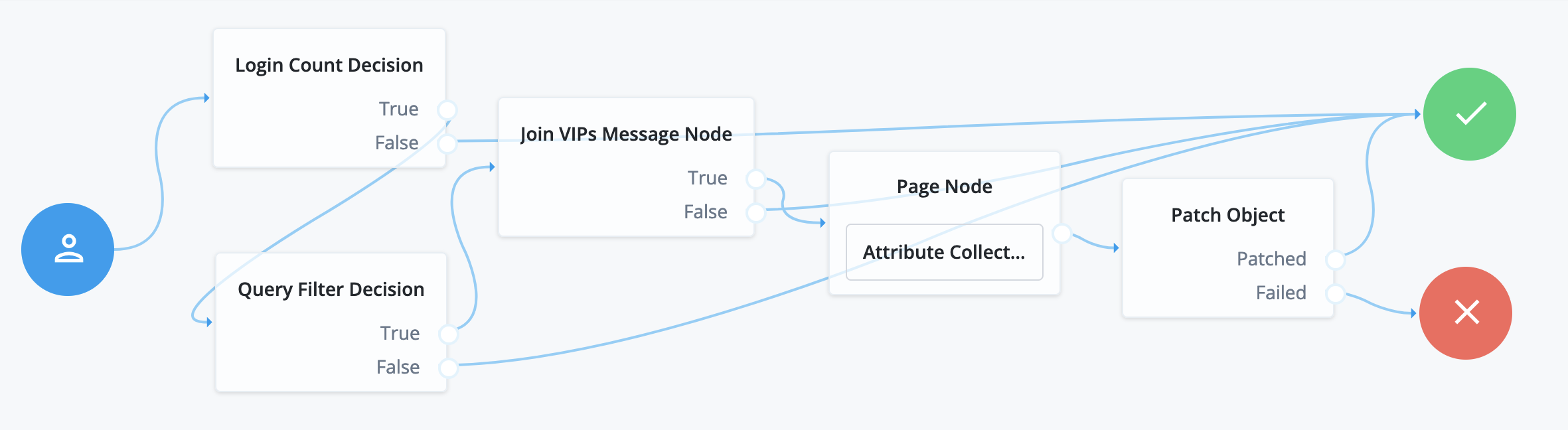
* The [Login Count Decision node](login-count-decision.html) triggers the [Query Filter Decision node](query-filter-decision.html) after every tenth authentication.
* The [Query Filter Decision node](query-filter-decision.html) queries the user profile to determine whether they have signed up for the VIP program.
If the user hasn't signed up yet, the True outcome triggers the `Join VIPs Message Node`, which prompts the user to join the program:
Node property settings:
* Message
`en-gb`; `Do you want to join our VIP program?`
* Positive answer
`en-gb`; `Yes, please!`
* Negative answer
`en-gb`; `No, thanks!`
* If the user clicks Yes, please! the [Page node](page.html) with an embedded [Attribute Collector node](attribute-collector.html) collects opt-in choices to store in user profile attributes.
* The [Patch Object node](patch-object.html) updates the user profile with the attributes collected.
Call the journey using an [Inner Tree Evaluator node](inner-tree-evaluator.html) from another authentication journey directly after an [Increment Login Count node](increment-login-count.html) note:
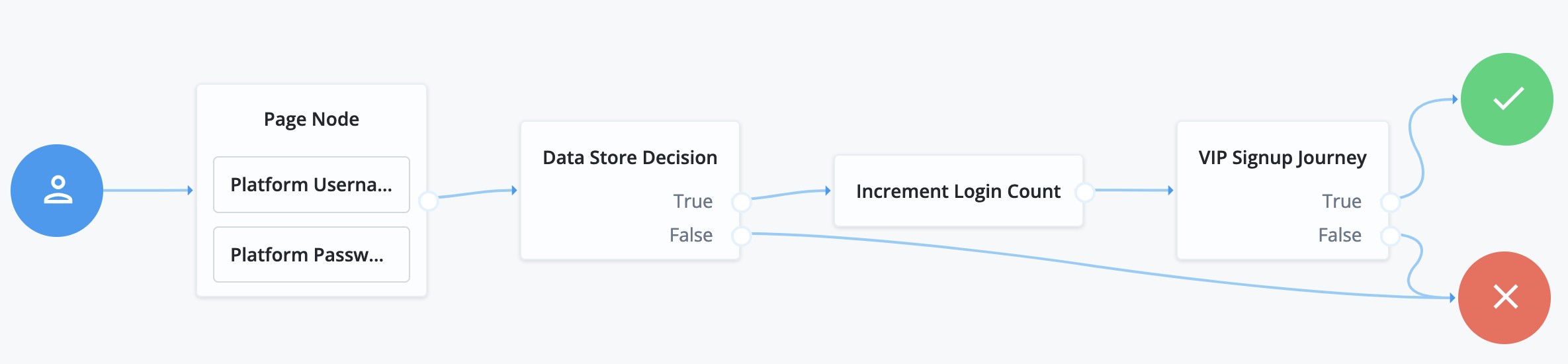
The `VIP Signup Journey` uses the login count from the [Increment Login Count node](increment-login-count.html) in the [Login Count Decision node](login-count-decision.html) to decide whether to prompt the user to join the VIP program.
### Meter node
Increments a specified metric key each time evaluation passes through the node.
For information on the `Meter` metric type, refer to [Monitoring metric types](https://docs.pingidentity.com/pingam/7.4/maintenance/monitoring-metric-types.html). The metric is exposed in all available interfaces, as described in [Monitor AM instances](https://docs.pingidentity.com/pingam/7.4/maintenance/monitoring-am.html).
#### Compatibility
| Product | Compatible? |
| ------------------------------------------ | --------------------- |
| PingOne Advanced Identity Cloud | [icon: check, set=fa] |
| ForgeRock Access Management (self-managed) | [icon: check, set=fa] |
| Ping Identity Platform (self-managed) | [icon: check, set=fa] |
#### Outcomes
Single outcome path.
#### Properties
| Property | Usage |
| ----------------------- | ---------------------------------------------------------------------------------- |
| Metric Key *(required)* | Specify the name of a metric to increment when evaluation passes through the node. |
### Page node
The Page node lets you combine multiple nodes that request input onto a single page for display to the user. For example, you can use it to create a single login page that requests a username and password.
| | |
| - | ------------------------------------------------------------------------- |
| | The Page node can only include nodes that use callbacks to request input. |
To use it, drag and drop compatible nodes onto the Page node in the journey editor.
When designing a journey that includes a Page node, consider the following points:
* A Page node must contain at least one node.
* Page nodes can't be nested inside each other. Similarly, you can't include an [Inner Tree Evaluator node](inner-tree-evaluator.html) in a Page node.
* Page nodes are designed to group nodes together that require user input. Non-interactive nodes, such as the [Data Store Decision node](data-store-decision.html) or [Push Sender node](push-sender.html), should be placed outside of Page nodes.
* Scripted Decision nodes can be included in Page nodes but only if they handle callbacks.
Scripts that use the `Action` class to set outcomes (using the `goTo` method), or set messages (using fields such as `lockoutMessage` or `errorMessage`), aren't supported within a Page node.
* Only the final node can have multiple outcomes. All preceding nodes must have a single outcome path.
#### Compatibility
| Product | Compatible? |
| ------------------------------------------ | --------------------- |
| PingOne Advanced Identity Cloud | [icon: check, set=fa] |
| ForgeRock Access Management (self-managed) | [icon: check, set=fa] |
| Ping Identity Platform (self-managed) | [icon: check, set=fa] |
#### Outcomes
The outcomes are determined by the last node in the Page node. Only the last node in the page can have more than one outcome path.
#### Properties
| Property | Usage |
| ------------------ | ---------------------------------------------------------------------------------------------------------------------------------------------------------------------------------------------------------------------------------------- |
| Page Header | Optional localized title for the page node and the nodes contained within it. Use this when components of an authentication flow need a title, such as breaking a registration into labeled sections. |
| Page Description | Optional localized description for the page node and the nodes contained within it. Use this when additional descriptive text is needed in an authentication flow. |
| Stage | An optional stage name to pass to the client to aid in rendering. |
| Submit Button Text | Optional. Use the Key and Value fields to set the text of the Submit button.This property is available only in the Ping Identity Platform admin UI. |
| Page Footer | Optional. A localized footer for the page node and the nodes contained within it. Use this when additional descriptive text is needed in an authentication flow\.This property is available only in the Ping Identity Platform admin UI. |
| Theme | Optional. If using hosted pages, specify a theme to override this journey's UI theme.This property is available only in the Ping Identity Platform admin UI. |
| | |
| - | -------------------------------------------------------------------------------------------------------------------------------------------------------------- |
| | This node's optional properties are passed in the response, but a self-hosted or custom UI must support these properties to make them visible to the end user. |
#### Example
The following example uses a page node containing a username collector, a password collector, and a choice collector:
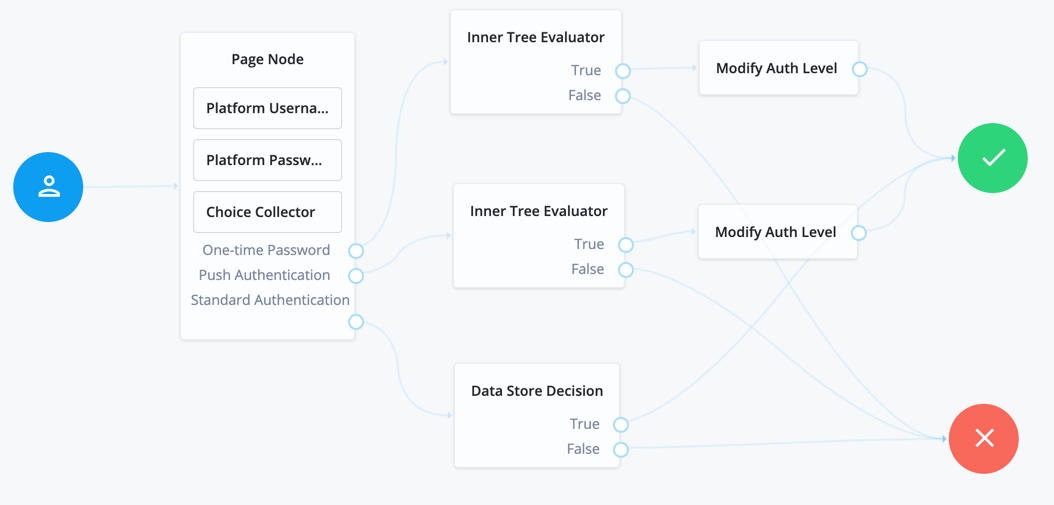
The flow prompts the user for all input on a single page:
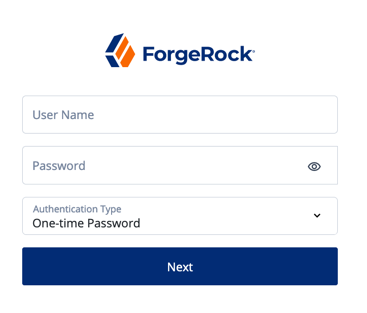
### Polling Wait node
Pauses authentication progress for a specified number of seconds, for example, to wait for a response to a one-time password email or push notification.
Requests made during the wait period are sent a `PollingWaitCallback` callback and an authentication ID. For example, the following callback indicates a wait time of 10 seconds:
```json
{
"authId": "eyJ0eXAiOiJK...u4WvZmiI",
"callbacks": [
{
"type": "PollingWaitCallback",
"output": [
{
"name": "waitTime",
"value": "10000"
},
{
"name": "message",
"value": "Waiting for response..."
}
]
}
]
}
```
The client must wait 10 seconds before returning the callback data, including the `authId`:
```bash
$ curl \
--request POST \
--header "Accept-API-Version: resource=2.0, protocol=1.0" \
--header "Content-Type: application/json" \
--data '{
"authId": "eyJ0eXAiOiJK…u4WvZmiI",
"callbacks": [
{
"type": "PollingWaitCallback",
"output": [
{
"name": "waitTime",
"value": "10000"
},
{
"name": "message",
"value": "Waiting for response…"
}
]
}
]
}' \
'https://am.example.com:8443/am/json/realms/root/realms/alpha/authenticate?authIndexType=service&authIndexValue=Example'
```
The end user UI automatically waits for the required amount of time and resubmits the page to continue evaluation. The message displayed during the wait is configurable with the Waiting Message property.
#### Compatibility
| Product | Compatible? |
| ------------------------------------------ | --------------------- |
| PingOne Advanced Identity Cloud | [icon: check, set=fa] |
| ForgeRock Access Management (self-managed) | [icon: check, set=fa] |
| Ping Identity Platform (self-managed) | [icon: check, set=fa] |
#### Outcomes
* `Done`
* `Exited` (configurable)
* `Spam` (configurable)
Evaluation continues along the `Done` outcome path when the next request is received after the wait time has passed.
Enabling Spam detection adds a `Spam` outcome path to the node. Evaluation continues along the `Spam` outcome path if more than the specified number of requests are received during the wait time.
Enabling the user to exit without waiting adds an `Exited` outcome path to the node. Evaluation continues along the `Exited` outcome path if the user clicks the button that appears when the option is enabled. The message displayed on the exit button is configurable by using the Exit Message property.
#### Properties
| Property | Usage |
| --------------------- | ----------------------------------------------------------------------------------------------------------------------------------------------------------------------------------------------------------------------------------------------------------------------------------------------------------------------------------------------------------------------------------------------------------------------------------------------------------------------------------------------------------------------------------------------------------------------------------------------------------------------------------------------------------------------------------------------------------------------------------------------------------------------------------------------------------------------------------------------------------------------------- |
| Seconds To Wait | Specify the number of seconds to pause authentication.Default: `8` |
| Enable Spam Detection | Specify whether to track the number of responses received during the wait time, and continue evaluation along the `Spam` outcome path if the number specified in the Spam Tolerance property is exceeded.Default: Disabled |
| Spam Tolerance | Specify the number of responses to allow during the wait time before continuing evaluation along the `Spam` outcome path. This property only applies if spam detection is enabled.Default: `3` |
| Waiting Message | Specifies the optional message to display to the user.Provide the message in multiple languages by specifying the locale in the KEY field, for example, `en-US`. For information on valid locale strings, refer to [JDK 11 Supported Locales](https://www.oracle.com/java/technologies/javase/jdk11-suported-locales.html#modules). The locale selected for display is based on the user's locale settings in their browser.Messages provided in the node override the defaults provided by AM.For information about customizing and translating the default messages, refer to [Internationalization](https://docs.pingidentity.com/pingam/7.4/auth-nodes/i18n-nodes.html). |
| Exitable | Whether the user can exit the node during the wait period.Enabling this option adds a button with a configurable message to the page. Clicking the button causes evaluation to continue along the `Exited` outcome path.Default: Disabled |
| Exit Message | Specifies the optional message to display to the user on the button used to exit the node before the wait period has elapsed. For example, `Cancel` or `Lost phone? Use Recovery Code`. This property only applies if the Exitable property is enabled.Provide the message in multiple languages by specifying the locale in the KEY field, for example, `en-US`. For information on valid locale strings, refer to [JDK 11 Supported Locales](https://www.oracle.com/java/technologies/javase/jdk11-suported-locales.html#modules). The locale selected for display is based on the user's locale settings in their browser.Messages provided in the node override the defaults provided by AM.For information about customizing and translating the default messages, refer to [Internationalization](https://docs.pingidentity.com/pingam/7.4/auth-nodes/i18n-nodes.html). |
### Register Logout Webhook node
Registers the specified webhook to trigger when a user's session ends. The webhook triggers when a user explicitly logs out or the maximum idle time or expiry time of the session is reached.
The webhook is only registered if evaluation passes through this node. You can register multiple webhooks during the authentication process, but they must be unique.
For more information on webhooks, refer to [Configure authentication webhooks](https://docs.pingidentity.com/pingam/7.4/am-authentication/about-authentication-trees.html#auth-tree-webhooks).
#### Compatibility
| Product | Compatible? |
| ------------------------------------------ | --------------------- |
| PingOne Advanced Identity Cloud | [icon: check, set=fa] |
| ForgeRock Access Management (self-managed) | [icon: check, set=fa] |
| Ping Identity Platform (self-managed) | [icon: check, set=fa] |
#### Outcomes
Single outcome path.
#### Properties
| Property | Usage |
| ------------ | -------------------------------------------- |
| Webhook name | Specify the name of the webhook to register. |
### Remove Session Properties node
Removes properties from the session. The session properties may have been set by a [Set Session Properties node](set-session-properties.html) elsewhere in the flow.
If a specified key is not found in the list of session properties it is added to the session upon successful authentication, no error is thrown, and evaluation continues along the single outcome path.
If a specified key is found, the evaluation continues along the single outcome path after setting the value of the property to `null`.
#### Compatibility
| Product | Compatible? |
| ------------------------------------------ | --------------------- |
| PingOne Advanced Identity Cloud | [icon: check, set=fa] |
| ForgeRock Access Management (self-managed) | [icon: check, set=fa] |
| Ping Identity Platform (self-managed) | [icon: check, set=fa] |
#### Outcomes
Single outcome path.
#### Properties
| Property | Usage |
| --------------------------- | --------------------------------------------------------------------- |
| Property Names *(required)* | Enter one or more key names of properties to remove from the session. |
### Retry Limit Decision node
Permits the specified number of passes through to the `Retry` outcome path before continuing evaluation along the `Reject` outcome path.
#### Compatibility
| Product | Compatible? |
| ------------------------------------------ | --------------------- |
| PingOne Advanced Identity Cloud | [icon: check, set=fa] |
| ForgeRock Access Management (self-managed) | [icon: check, set=fa] |
| Ping Identity Platform (self-managed) | [icon: check, set=fa] |
#### Outcomes
* `Retry`
* `Reject`
#### Properties
| Property | Usage |
| ------------------------ | ---------------------------------------------------------------------------------------------------------------------------------------------------------------------------------------------------------------------------------------------------------------------------------------------------------------------------------------------------------------------------------------------------------------------------------------------------------------------------------------------------------------------------------------------------------------------------------------------------------------------------------------------------------------------------------------------------------------------------------------------------------------------------- |
| Retry limit | Specify the number of retries to allow\.Default: `3` |
| Save Retry Limit to User | Specify whether the number of failed login attempts persists between successful authentications. Possible values are:- Enabled
The node saves the number of failed login attempts to the user's profile. New flows using this node start with the stored value and continue to the retry limit.
AM resets the count after the user authenticates successfully with an authentication journey that contains this node.
If AM cannot find the user's profile, authentication ends with an error.
- Disabled
The node saves the number of failed login attempt in the `nodeRetryLimitKey` shared state property, which is discarded when the authentication session ends.For security reasons, ForgeRock recommends that you enable this setting.Default: Enabled. |
#### Example

### Scripted Decision node
The Scripted Decision node lets you run a server-side script in an authentication journey. It exists to let you connect the script to other nodes with the journey editor.
The script makes a decision to set the outcome for the node.
#### Compatibility
| Product | Compatible? |
| ------------------------------------------ | --------------------- |
| PingOne Advanced Identity Cloud | [icon: check, set=fa] |
| ForgeRock Access Management (self-managed) | [icon: check, set=fa] |
| Ping Identity Platform (self-managed) | [icon: check, set=fa] |
#### Inputs
Scripted Decision node inputs depend entirely on the node's server-side script.
The script has access to the authentication context including:
* Headers from the request
* Query string parameters from the request
* Secrets configured for the realm
* Shared state data
* User profile data
The script can use callbacks to prompt the user for information.
For details about the inputs available to the script, refer to [Scripted decision node API](https://docs.pingidentity.com/pingam/7.4/am-scripting/scripting-api-node.html).
You can restrict available inputs using the Script Inputs field when configuring the node.
#### Dependencies
Before you configure this node, you must create a script with the script type set to Decision node script for authentication trees (standalone AM) or Journey Decision Node (Ping Identity Platform deployments).
#### Configuration
| Property | Usage |
| -------------- | ---------------------------------------------------------------------------------------------------------------------------------------------------------------------------------------------------------------------------------------------------------------------------------------------------------------------------------------------------------------------------------------------------------------------------------------------------------------------------------------------------------------------------------------------------------------------------------------------------------------------------------------------------------------------------------------------------------------------------------------------------------------------------------------------------------------------------------------------------------------------------------------------------------------------------------------------------------------------------------------------------------------------------------------------------------------------------------------------------------------------------------------------------------------------------------------------------------------------------------------------------------------------------------------------------------------------------------------------------------------------------------- |
| Script | Select the script to run from the drop-down list. |
| Outcomes | Enter one string for each `outcome` the script can set.The node shows only the outcomes you configure. If you omit an `outcome` string, you can't connect it in the journey editor.When the script sets an `outcome` you omitted in the configuration, it [logs a warning](#scripted-decision-warnings). This can prevent the journey from completing successfully. |
| Script Inputs | Optionally, list the shared state data properties required by the script.If you change the setting, you must declare each property or `null` for no properties.Default: `*`. The script has access to all shared and transient state data.
Sensitive data in transient state upgrades to secure state if:
The node sends a callback to the user.
The node detects a downstream node requesting the transient state data as input.
Unless the downstream node explicitly requests the secure state data by name, the authentication journey removes it from the node state after processing the next callback.
For example, a node in a registration journey stores a user's password in transient state. The node sends a callback to the user before an inner tree node, downstream in the journey, consumes that password. As part of the callback, the journey assesses what to add to the secure state. It does this by checking the state inputs that downstream nodes in the journey require. Nodes that only request \* are ignored, as this would result in putting everything in transient state into secure state, and retaining sensitive information longer than necessary.
If a downstream node requires the password, it must explicitly request it as state input, even if it lists the \* wildcard as input. |
| Script Outputs | Optionally, list the shared state data properties the node expects the script to set.If you change the setting, you must declare each property or `null` for no properties.Default: `*`. The node doesn't validate the script outputs at all. |
#### Outputs
Scripted Decision node outputs, such as updates to shared state data, depend entirely on the node's server-side script.
You can restrict available outputs using the Script Outputs field when configuring the node.
#### Outcomes
The script defines the outcomes by setting its `outcome` variable to an outcome string before returning.
You include all possible `outcome` strings from the script in the Outcome field when configuring the node.
The authentication journey continues along the outcome path from the script.
#### Errors
The server-side script can log messages.
The node logs the following warning messages:
Warnings:
* `Found an action result from scripted node, but it was not an Action object`: An action in a legacy script didn't return an object with type `Action`.
* `Found an action result from scripted node, but it was not an ActionWrapper object`: An action in a next generation script didn't return an object with type `ActionWrapper`.
* `invalid script outcome `: The \ is missing in the Outcome field of the node configuration.
* `invalid script outcome in action`: The \ is missing in the Outcome field of the node configuration.
* `script outcome error`: The script set an outcome not found in the Outcome field of the node configuration.
#### Examples
You use a Scripted Decision node when no other available node does what you need.
In this example, the node depends on the Decision node script for authentication trees (standalone AM) or the Journey Decision Node script (Ping Identity Platform deployments).
The script gets the user's names from their profile and stores a message in a shared state property:
```javascript
var goTo = org.forgerock.openam.auth.node.api.Action.goTo
// Get the username from shared state data:
var username = nodeState.get('username').asString()
// Get the given name(s) and surname(s) from the user profile:
var profile = idRepository.getIdentity(username)
var givenname = profile.getAttributeValues('givenName')
var surname = profile.getAttributeValues('sn')
if (!(givenname && surname)) {
var error = `Failed to get names for ${username}: ${givenname} ${surname}`
action = goTo('Failure').withErrorMessage(error).build()
} else {
// Record who authenticated in the shared state data:
var firstGivenName = givenname[0]
var firstSurname = surname[0]
var now = new Date().toLocaleString()
var message = `${firstGivenName} ${firstSurname} logged in at ${now}.`
nodeState.putShared('message', message)
action = goTo('Success').build()
}
```
Notice the script sets the outcomes using the `Action.goTo(outcome)` function.
The journey is as follows:
![Journey with a \[.label\]#Scripted Decision# node](_images/scripted-decision-example.png)
1. The [Page node](page.html) prompts the user for their username and password.
2. Replace the Identity Store Decision node with a [Data Store Decision node](data-store-decision.html) to check the username and password.
3. The Scripted Decision node runs the script and has the following settings:
| | |
| -------------- | ---------------------- |
| Script | The name of the script |
| Outcomes | `Success`, `Failure` |
| Script Inputs | `username` |
| Script Outputs | `*` |
Notice the Outcomes setting lists all outcome strings from the script.
4. The [Increment Login Count node](increment-login-count.html) updates the count on successful authentication.
5. The [Inner Tree Evaluator node](inner-tree-evaluator.html) refers to another journey to perform more steps.
This node is optional.
If you activate debug mode for the journey and select Enable Debug Popup, you find the message in the debug popup window when authenticating:
```json
{
"universalId": "id=<_id>,ou=user,o=alpha,ou=services,ou=am-config",
"transactionId": "",
"password": "",
"pageNodeCallbacks": {
"0": 0,
"1": 1
},
"realm": "/alpha",
"message": "Babs Jensen logged in at August 16, 2023 9:55:33 AM UTC.",
"authLevel": 0,
"objectAttributes": {
"password": ""
},
"username": "id=<_id>"
}
```
### Set Session Properties node
Add `key:value` properties to the user's session if authentication is successful.
| | |
| - | --------------------------------------------------------------------------------------------------------------------------------------------------------------------------------------------------------------------------------------------------- |
| | You can access session properties using a variable in a webhook. For more information, refer to [Configure authentication webhooks](https://docs.pingidentity.com/pingam/7.4/am-authentication/about-authentication-trees.html#auth-tree-webhooks). |
#### Compatibility
| Product | Compatible? |
| ------------------------------------------ | --------------------- |
| PingOne Advanced Identity Cloud | [icon: check, set=fa] |
| ForgeRock Access Management (self-managed) | [icon: check, set=fa] |
| Ping Identity Platform (self-managed) | [icon: check, set=fa] |
#### Dependencies
Make sure the user can successfully authenticate and get a session.
If the `noSession` query parameter is used during authentication, the journey will fail.
#### Configuration
| Property | Usage |
| ---------- | ----------------------------------------------------------------------------------------------------------------------------------------------------- |
| Properties | To add a session property, click Add, enter a key name and a value, and then click [icon: plus, set=fa]. Repeat the steps to add multiple properties. |
#### Outcomes
Single outcome path.
Evaluation continues after setting the specified properties in the session.
### State Metadata node
Returns selected attributes from the shared node state as metadata.
This node sends a `MetaDataCallback` to retrieve shared state values, which it adds to the JSON response from the `/authenticate` endpoint. This example shows how a shared state attribute, `mail`, is returned:
```javascript
"callbacks": [
{
"type": "MetadataCallback",
"output": [
{
"name": "data",
"value": {
"mail": "bjensen@example.com"
}
}
]
}
]
```
Use this node to display custom information that includes user attributes without having to alter the existing flow.
For example, for OTP authentication with a choice of email or SMS, use this node to return the user's email address or phone number. You can use the attributes with an [OTP Collector Decision node](otp-collector-decision.html), and optionally, a [Scripted Decision node](scripted-decision.html), to customize the data for display later.
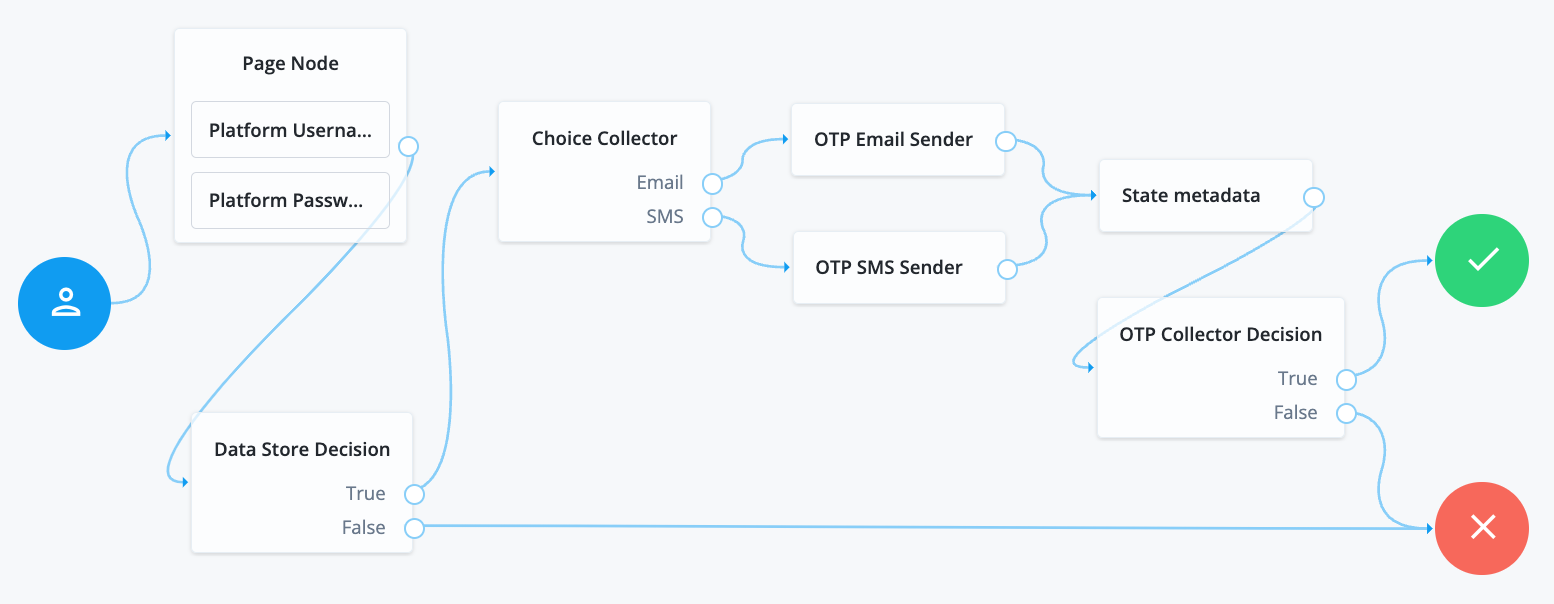
#### Compatibility
| Product | Compatible? |
| ------------------------------------------ | --------------------- |
| PingOne Advanced Identity Cloud | [icon: check, set=fa] |
| ForgeRock Access Management (self-managed) | [icon: check, set=fa] |
| Ping Identity Platform (self-managed) | [icon: check, set=fa] |
#### Outcomes
Single outcome path.
Evaluation continues after the callback.
#### Properties
| Property | Usage |
| ---------- | ------------------------------------------------------------ |
| Attributes | Specify one or more shared state attribute names for return. |
### Success URL node
Sets the redirect URL when authentication succeeds.
| | |
| - | ---------------------------------------------------------------------- |
| | Specifying a success URL overrides any `goto` query string parameters. |
For more information on how AM determines the redirection URL, and to configure the Validation Service to trust redirection URLs, refer to [Configure success and failure redirection URLs](https://docs.pingidentity.com/pingam/7.4/am-authentication/redirection-url-precedence.html).
| | |
| - | ----------------------------------------------------------------------------------------------------------------------------------------------------------------------------------------------------------------------------------------------------------- |
| | The URL is also saved in the `nodeState` object on the `successUrl` key.For more information, refer to [Customize authentication trees](https://docs.pingidentity.com/pingam/7.4/am-authentication/about-authentication-trees.html#customizing-auth-trees). |
#### Compatibility
| Product | Compatible? |
| ------------------------------------------ | --------------------- |
| PingOne Advanced Identity Cloud | [icon: check, set=fa] |
| ForgeRock Access Management (self-managed) | [icon: check, set=fa] |
| Ping Identity Platform (self-managed) | [icon: check, set=fa] |
#### Properties
| Property | Usage |
| ------------------------ | --------------------------------------------------------------------- |
| Success URL *(required)* | Specify the full URL to redirect to when the authentication succeeds. |
### Timer Start node
Starts a named timer metric, which you can stop with a [Timer Stop node](timer-stop.html).
#### Compatibility
| Product | Compatible? |
| ------------------------------------------ | --------------------- |
| PingOne Advanced Identity Cloud | [icon: check, set=fa] |
| ForgeRock Access Management (self-managed) | [icon: check, set=fa] |
| Ping Identity Platform (self-managed) | [icon: check, set=fa] |
#### Outcomes
Single outcome path.
#### Properties
| Property | Usage |
| ------------------- | ----------------------------------------------------------------------------------------------------------------------------------------------------------------------------------------------------------------------- |
| Start Time Property | Specify a property name into which to store the current time.Specify the same value in any instances of the [Timer Stop node](timer-stop.html) that measure the time elapsed since evaluation passed through this node. |
### Timer Stop node
Records the time elapsed since evaluation passed through the [Timer Start node](timer-start.html) in the specified metric name.
For information on the `Timer` metric type, refer to [Monitoring metric types](https://docs.pingidentity.com/pingam/7.4/maintenance/monitoring-metric-types.html).
Note that this node does not reset the time stored in the specified Start Time Property property. Other Timer Stop nodes can also calculate the time elapsed since evaluation passed through the same [Timer Start node](timer-start.html).
The metric is exposed in all available interfaces, as described in [Monitor AM instances](https://docs.pingidentity.com/pingam/7.4/maintenance/monitoring-am.html).
#### Compatibility
| Product | Compatible? |
| ------------------------------------------ | --------------------- |
| PingOne Advanced Identity Cloud | [icon: check, set=fa] |
| ForgeRock Access Management (self-managed) | [icon: check, set=fa] |
| Ping Identity Platform (self-managed) | [icon: check, set=fa] |
#### Outcomes
Single outcome path.
#### Properties
| Property | Usage |
| ----------------------- | ---------------------------------------------------------------------------------------------------------------------------------------------------------------------------------------------------------------------------------------------------------------------------------------------------------------------------------------------------------------------------------------------------------------------------------------------------------------------------------------------------------------------------------------------------------------------------------------------------------------------------------------------------------------------------------------------------------------------------------------------------------------------------------------------------------------------------------------------------------------- |
| Start Time Property | Specify the property name containing the time from which to calculate the elapsed time. |
| Metric Key *(required)* | Enter the name for a new metric that stores the calculated elapsed time.The name that you select is used to identify the metric that exposes the data collected by this node. For example, if you enter `calculated.time`, AM exposes a new metric with this name to the Common REST, JMX, or Graphite interfaces. If you use Prometheus, the name is prefixed with `am_` and appended with `_seconds` to become `am_calculated_time_seconds`.]
Metrics collate data from multiple invocations of a journey. To record the time it takes for a particular journey to complete, use a Scripted Decision node to store the start time in shared state. Use a script at the end of the journey to capture the end time and output the calculated journey time to the authentication audit logs.
For more information, refer to Audit information. |
## Thing nodes
### Authenticate Thing node
This node authenticates a *thing*. A thing represents an IoT device, service, or the [IoT Gateway](https://backstage.forgerock.com/docs/iot/7.4/evaluation-guide/about-iot.html#about-fr-things).
Before you configure this node, configure the [IoT Service](https://docs.pingidentity.com/pingam/7.4/reference/global-services-configuration.html#global-iot) for the realm.
| | |
| - | ------------------------------------------------------------------------------------------------------------------------------------------------- |
| | Support for this node is provided by the [IoT SDK](https://backstage.forgerock.com/docs/iot/7.4/evaluation-guide/about-iot.html#about-fr-things). |
The node supports two methods of authentication:
1. Proof of Possession JWT
The node collects a proof-of-possession JWT from the request and does the following:
* Checks that the claims are valid.
* Checks that an identity with the same ID as the name of the JWT subject exists.
* Checks that the identity contains a confirmation key that matches the JWT `kid`.
* Validates the JWT signature, using the confirmation key stored in the identity.
2. Client Assertion
The node collects a JWT Bearer token from the request for authentication and validates the request according to the [JWT Profile for OAuth 2.0 Client Authentication and Authorization Grants](https://www.rfc-editor.org/rfc/rfc7523.html#section-3).
#### Compatibility
| Product | Compatible? |
| ------------------------------------------ | --------------------- |
| PingOne Advanced Identity Cloud | [icon: times, set=fa] |
| ForgeRock Access Management (self-managed) | [icon: check, set=fa] |
| Ping Identity Platform (self-managed) | [icon: check, set=fa] |
#### Outcomes
* `Success`
* `Failure`
* `Requires Registration`
If all checks are successful, evaluation continues through the `Success` path, and adds the username and the verified claims to the shared node state.
If the identity does not exist, or AM cannot match the identity with the confirmation key, evaluation continues through the `Requires Registration` outcome.
If any other check fails, evaluation continues through the `Failure` outcome.
#### Properties
| Property | Usage |
| -------------------------- | ----------------------------------------------------------------------------------------------------------------------------------------------------------------------------------------------------------------------------------------------------------------------------------------------------------------------------------------------------------------------------------------------------------------------------------------------------------------------------------------------------------------------------------------- |
| JWT Authentication Method | Choose the required JWT authentication method:- Proof of Possession
Prove that the signer of the JWT is the owner of the key by including a challenge nonce in the JWT. Validation is according to the [JWT Proof of Possession specification](https://tools.ietf.org/html/rfc7800).
- Client Assertion
Present a JWT Bearer token for authentication and validate the request according to the [JWT Profile for OAuth 2.0 Client Authentication and Authorization Grants](https://www.rfc-editor.org/rfc/rfc7523.html#section-3). |
| Issue Restricted Token | If this setting is enabled, the node adds a Proof of Possession restriction to the session token issued on successful authentication.Any requests accompanied by the token must be signed with the key that was used to sign the authentication JWT. |
| Additional Audience Values | Specify any additional audience values that will be permitted when verifying JWTs.These audience values are in addition to the AM base, issuer and token endpoint URIs for the Client Assertion authentication method or the realm path for Proof of Possession. |
#### Examples
The following example shows how to authenticate a thing when the identity already exists in the identity store and when its profile contains a confirmation key:
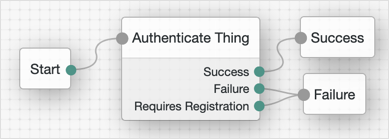
The following example shows how to authenticate a thing when the identity does not exist, or when it needs to refresh its confirmation key:
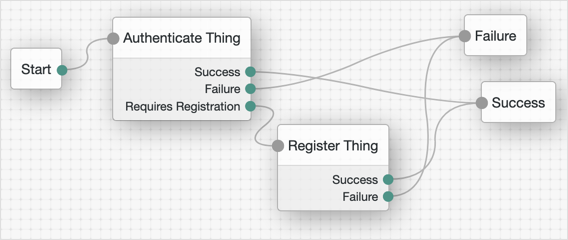
### Register Thing node
This node authenticates a *thing*. A thing represents an IoT device, service, or the [IoT Gateway](https://backstage.forgerock.com/docs/iot/7.4/evaluation-guide/about-iot.html#about-fr-things).
Before you configure this node, configure the [IoT Service](https://docs.pingidentity.com/pingam/7.4/reference/global-services-configuration.html#global-iot) for the realm.
| | |
| - | ------------------------------------------------------------------------------------------------------------------------------------------------- |
| | Support for this node is provided by the [IoT SDK](https://backstage.forgerock.com/docs/iot/7.4/evaluation-guide/about-iot.html#about-fr-things). |
The node collects a JWT from the request and validates the JWT according to the configured [JWT registration method](#jwt-registration-method).
If the JWT is valid, the node uses the claims in the JWT to create an identity for the thing and register (or rotate) a confirmation key for it. Then, evaluation continues through the `Success` outcome.
If the node cannot validate the JWT, evaluation continues through the `Failure` outcome.
For an example on how to use this node, refer to [Authenticate Thing node](self-managed/authenticate-thing.html).
#### Compatibility
| Product | Compatible? |
| ------------------------------------------ | --------------------- |
| PingOne Advanced Identity Cloud | [icon: times, set=fa] |
| ForgeRock Access Management (self-managed) | [icon: check, set=fa] |
| Ping Identity Platform (self-managed) | [icon: check, set=fa] |
#### Outcomes
* `Success`
* `Failure`
#### Properties
| Property | Usage |
| --------------------------- | -------------------------------------------------------------------------------------------------------------------------------------------------------------------------------------------------------------------------------------------------------------------------------------------------------------------------------------------------------------------------------------------------------------------------------------------------------------------------------------------------------------------------------------------------------------------------------------------------------------------------------------------------------------------------------------------------------------------------------------------------------------------------------------------------------------------------------------------------------------------------------------------------------------------------------------------------------------------------------------------------------------------------------------------------------------------------------------------- |
| []()JWT Registration Method | Choose the method to validate the JWT:- Proof of Possession & Certificate
Register using a Proof of Possession JWT that includes an X.509 certificate for providing trust. A challenge nonce is presented in the callback and must be included in the signed JWT.
- Proof of Possession & Software Statement
Register using a Proof of Possession JWT and a Software Statement for providing trust. A challenge nonce is presented in the callback and must be included in the signed Proof of Possession JWT. The claims in the Software Statement take precedence over the claims in the Proof of Possession JWT.
- Proof of Possession
Register using a Proof of Possession JWT without using a trusted third party. A challenge nonce is presented in the callback and must be included in the signed JWT.
- Software Statement
Register using a Software Statement, without doing proof of possession. If you select this registration method, the resultant session token will not include a proof of possession restriction.Default: Proof of Possession & Certificate |
| Verify Certificate Subject | If the configured JWT registration method is `Proof of Possession & Certificate`, this option verifies that the subject provided in the JWT is the same as the X.509 certificate subject CN or UID.Default: Enabled |
| Create Identity | Specifies whether AM will create an ID for the thing if one does not exist.Default: Disabled |
| Rotate Confirmation Key | Specifies whether multiple confirmation keys can be registered for a thing. Disable this setting to allow only one key per thing.Default: Disabled |
| Default Attribute Values | Lets you set default values for the thing's attributes, where KEY is the name of the attribute in the data store, and VALUE is the default value of the attribute. |
| Claim to Attribute Mapping | If Create Identity is enabled, this property lets you map verified claims in the JWT to attributes in the thing identity. KEY is the claim name and VALUE is the name of the attribute in the data store. |
| Overwrite Attributes | Specifies whether the node overwrites the value for an existing profile attribute when a claim with a different value is provided in the JWT.Default: Disabled |
## Uncategorized nodes
### Debug node
Displays debug information about the current authentication tree.
This node collects information, such as the shared node state, the identity object's `universalId`, and the transaction ID, which are useful for reference in log messages.
#### Compatibility
| Product | Compatible? |
| ------------------------------------------ | --------------------- |
| PingOne Advanced Identity Cloud | [icon: times, set=fa] |
| ForgeRock Access Management (self-managed) | [icon: check, set=fa] |
| Ping Identity Platform (self-managed) | [icon: times, set=fa] |
#### Outcomes
Single outcome path.
#### Properties
| Property | Usage |
| ------------------ | ----------------------------------------------------------------------------------------- |
| Enable Debug Popup | If enabled, a popup window displays debug logs as you step through the flow in a browser. |