---
title: SAML2 Authentication node
description: The SAML2 Authentication node integrates SAML 2.0 single sign-on into an authentication flow.
component: auth-node-ref
version: latest
page_id: auth-node-ref::saml2
canonical_url: https://docs.pingidentity.com/auth-node-ref/latest/saml2.html
keywords: ["Nodes &amp; Trees", "Journeys", "Authentication", "SAML 2.0", "Single Sign-on (SSO)"]
page_aliases: ["auth-node-saml2.adoc"]
superseded_by: https://docs.pingidentity.com/auth-node-ref/latest/saml2.html
section_ids:
  example: Example
  availability: Availability
  inputs: Inputs
  dependencies: Dependencies
  configuration: Configuration
  outputs: Outputs
  outcomes: Outcomes
  errors: Errors
---

# SAML2 Authentication node

The SAML2 Authentication node integrates SAML 2.0 single sign-on into an authentication flow.

Use this node when deploying SAML 2.0 SSO in integrated mode (SP-initiated SSO only). This node doesn't support single logout (SLO).

Implement the [Write Federation Information node](write-federation-information.html) after this node in the journey to link the remote account to a local account.

## Example

You can find examples that show this node in a SAML 2.0 authentication journey in [SSO in integrated mode](https://docs.pingidentity.com/pingoneaic/am-saml2/saml2-integrated-mode.html).

## Availability

| Product                               | Available? |
| ------------------------------------- | ---------- |
| PingOne Advanced Identity Cloud       | Yes        |
| PingAM (self-managed)                 | Yes        |
| Ping Identity Platform (self-managed) | Yes        |

## Inputs

This node sends a SAML request and processes the incoming SAML assertion.

## Dependencies

This node requires the following SAML 2.0 configuration:

* A remote identity provider (IdP) and a hosted service provider (SP) in a circle of trust in the same realm where you're configuring the journey.

* You must configure the service provider for integrated mode.

  Find more information in [Configure Advanced Identity Cloud for integrated mode](https://docs.pingidentity.com/pingoneaic/am-saml2/saml2-integrated-mode.html#saml2-integrated-mode-sso-trees-procedure).

## Configuration

| Property                                     | Usage                                                                                                                                                                                                                                                                                                                                                                                                                                                                                                                                                                                                                                                                                                                                                                                                                                                                                                                                                                                                                                                                                                                                                                                                                              |
| -------------------------------------------- | ---------------------------------------------------------------------------------------------------------------------------------------------------------------------------------------------------------------------------------------------------------------------------------------------------------------------------------------------------------------------------------------------------------------------------------------------------------------------------------------------------------------------------------------------------------------------------------------------------------------------------------------------------------------------------------------------------------------------------------------------------------------------------------------------------------------------------------------------------------------------------------------------------------------------------------------------------------------------------------------------------------------------------------------------------------------------------------------------------------------------------------------------------------------------------------------------------------------------------------- |
| IdP Entity ID                                | The name of the remote IdP.                                                                                                                                                                                                                                                                                                                                                                                                                                                                                                                                                                                                                                                                                                                                                                                                                                                                                                                                                                                                                                                                                                                                                                                                        |
| Validate IdP Entity ID                       | Select this option to check that the IdP entity ID in the incoming SAML assertion matches the IdP entity ID configured for this node.If they don't match, the journey proceeds to the `Error` outcome.The `Error` outcome is only available when this option is selected.Default: `Enabled`                                                                                                                                                                                                                                                                                                                                                                                                                                                                                                                                                                                                                                                                                                                                                                                                                                                                                                                                        |
| SP MetaAlias                                 | The local alias for the SP in the format `/Realm Name/SP Name`.                                                                                                                                                                                                                                                                                                                                                                                                                                                                                                                                                                                                                                                                                                                                                                                                                                                                                                                                                                                                                                                                                                                                                                    |
| Allow IdP to Create NameID                   | Select this option if you want the IdP to create a new identifier for the authenticating user if none exists.Learn more in [AllowCreate](https://docs.oasis-open.org/security/saml/v2.0/errata05/os/saml-v2.0-errata05-os.html#<em>RefHeading</em>8058_1983180497) in the SAML Version 2.0 specification.Default: `Enabled`                                                                                                                                                                                                                                                                                                                                                                                                                                                                                                                                                                                                                                                                                                                                                                                                                                                                                                        |
| Comparison Type                              | The comparison method to evaluate authentication context classes or statements.This value overrides the value in the SP configuration:Find this value under Native Consoles > Access Management > Realms > *Realm Name* > Applications > Federation > Entity Providers > *Service Provider Name* > Assertion Content > Authentication Context > Comparison Type.Valid comparison methods are `exact`, `minimum`, `maximum`, or `better`.Learn more about comparison methods in `Element <RequestedAuthnContext>` in [Assertions and Protocols for the OASIS Security Assertion Markup Language (SAML) V2.0](https://docs.oasis-open.org/security/saml/v2.0/saml-core-2.0-os.pdf).Default: `minimum`                                                                                                                                                                                                                                                                                                                                                                                                                                                                                                                                |
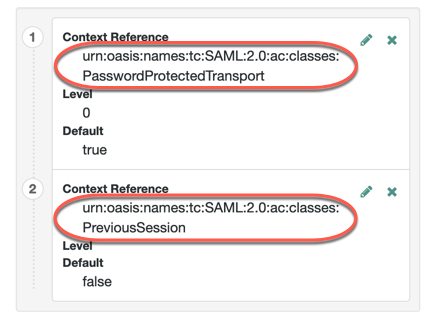
| Authentication Context Class Reference       | (Optional) Set one or more URIs for authentication context classes to be included in the SAML request.Authentication context classes are unique identifiers for an authentication mechanism. The SAML 2.0 protocol supports a standard set of authentication context classes, defined in [Authentication Context for the OASIS Security Assertion Markup Language (SAML) V2.0](https://docs.oasis-open.org/security/saml/v2.0/saml-authn-context-2.0-os.pdf).You can specify your own authentication context classes in addition to the standard ones.Any authentication context class you specify here must be supported for the SP. To add authentication context classes to the SP:1) Go to Native Consoles > Access Management > Realms > *Realm Name* > Applications > Federation > Entity Providers > *Service Provider Name* > Assertion Content.

2) In the Authentication Context section, add the authentication context classes.![Authentication Context Supported by the SP](_images/trees-node-saml2-context.png)Use the `\|` character to separate multiple authentication context classes, for example:```
urn:oasis:names:tc:SAML:2.0:ac:classes:Password|urn:oasis:names:tc:SAML:2.0:ac:classes:TimesyncToken
``` |
| Authentication Context Declaration Reference | (Optional) One or more URIs that identify authentication context declarations.Use the `\|` character to separate multiple URIs.Learn more in the section on the `<RequestedAuthnContext>` element in [Assertions and Protocols for the OASIS Security Assertion Markup Language (SAML) V2.0](https://docs.oasis-open.org/security/saml/v2.0/saml-core-2.0-os.pdf).                                                                                                                                                                                                                                                                                                                                                                                                                                                                                                                                                                                                                                                                                                                                                                                                                                                                 |
| Request Binding                              | The format of the authentication request that the SP sends to the IdP.Valid values are `HTTP-Redirect` and `HTTP-POST`.Default: `HTTP-Redirect`                                                                                                                                                                                                                                                                                                                                                                                                                                                                                                                                                                                                                                                                                                                                                                                                                                                                                                                                                                                                                                                                                    |
| Response Binding                             | The format of the response that the IdP sends to the SP.Valid values are `HTTP-POST` and `HTTP-Artifact`.Default: `HTTP-Artifact`                                                                                                                                                                                                                                                                                                                                                                                                                                                                                                                                                                                                                                                                                                                                                                                                                                                                                                                                                                                                                                                                                                  |
| Force IdP Authentication                     | Indicate whether the IdP should force authentication or if it can reuse existing security contexts.Default: Disabled                                                                                                                                                                                                                                                                                                                                                                                                                                                                                                                                                                                                                                                                                                                                                                                                                                                                                                                                                                                                                                                                                                               |
| Passive Authentication                       | Indicate whether the IdP should use passive authentication.When this setting is enabled, the IdP can only use authentication methods that don't require user interaction, such as authenticating with an X.509 certificate.Default: Disabled                                                                                                                                                                                                                                                                                                                                                                                                                                                                                                                                                                                                                                                                                                                                                                                                                                                                                                                                                                                       |
| NameID Format                                | The SAML name ID format that's requested in the SAML authentication request. Valid values are:```
urn:oasis:names:tc:SAML:2.0:nameid-format:persistent
urn:oasis:names:tc:SAML:2.0:nameid-format:transient
urn:oasis:names:tc:SAML:1.1:nameid-format:unspecified
```Default: `urn:oasis:names:tc:SAML:2.0:nameid-format:persistent`                                                                                                                                                                                                                                                                                                                                                                                                                                                                                                                                                                                                                                                                                                                                                                                                                                                                                                |

## Outputs

This node updates the shared state with the SAML 2.0 assertion data as follows:

* It adds a `userInfo` key with two child keys: `attributes` and `userNames`.

* The `attributes` object contains a map of SAML 2.0 attributes, each of which is stored as an array.

* The `attributes` object also stores the SAML 2.0 identity attributes `sun-fm-saml2-nameid-info` and `sun-fm-saml2-nameid-infokey`.

  These attributes are required by the [Write Federation Information node](write-federation-information.html).

* The `userNames` object contains the user's UUID.

> **Collapse: Example node state after node processing**
>
> ```javascript
> {
>     "realm" : "/",
>     "authLevel" : 0,
>     "username" : "22fe07c3-ac8b-4e84-9016-b55f1c009924",
>     "userInfo" : {
>       "attributes" : {
>         "uid" : [ "bjensen" ],
>         "mail" : [ "bjensen@example.com" ],
>         "sun-fm-saml2-nameid-info" : [ "serviceprovider2|identityprovider1|sAdI2i7LT2YL0rbJC/QqsRt5SABV|identityprovider1|urn:oasis:names:tc:SAML:2.0:nameid-format:persistent|null|serviceprovider2|SPRole|false" ],
>         "sun-fm-saml2-nameid-infokey" : [ "serviceprovider2|identityprovider1|sAdI2i7LT2YL0rbJC/QqsRt5SABV" ]
>       },
>       "userNames" : {
>         "username" : [ "22fe07c3-ac8b-4e84-9016-b55f1c009924" ],
>         "uid" : [ "22fe07c3-ac8b-4e84-9016-b55f1c009924" ]
>       }
>     },
>     "emailAddress" : "bjensen@example.com"
>   }
> ```

|   |                                                                                                                                                   |
| - | ------------------------------------------------------------------------------------------------------------------------------------------------- |
|   | You can use a script to read the SAML 2.0 attributes, for example:```javascript
nodeState.get("userInfo").get("attributes").get("uid").get(0)
``` |

The updated shared state depends on the node [outcome](#_outcomes):

* If the outcome is `Account exists`, the shared state is updated with `nodeState.userNames` as follows:

  ```javascript
  userNames={username=[bjensen], uid=[bjensen]}}
  ```

* If the outcome is `No account exists`, the shared state is updated with `nodeState.userNames` as follows:

  ```javascript
  userNames={username=[null], uid=[null]}}
  ```

* If the `mail` attribute exists in the `attributes` map, the shared state is updated with `nodeState.emailAddress`.

* If the `RelayState` attribute exists in the `attributes` map, the shared state is updated with `nodeState.successUrl`.

* The `username` is added to the shared state, regardless of outcome.

The node also sets the following session properties:

* `SessionIndex`: the session index

* `NameID`: the NameID of the Assertion XML

* `isTransient`: if the NameId is `urn:oasis:names:tc:SAML:2.0:nameid-format:transient`

* `cacheKey`: for internal use only

## Outcomes

* `Account exists`

  The node found a user account that matches the federated account.

* `No account exists`

  The node didn't find a matching user account.

* `Error`

  The IdP entity ID in the incoming SAML assertion doesn't match the IdP entity ID configured for this node.

## Errors

This node can log the following errors:

| Message                                                                                    | Notes                                                                                                      |
| ------------------------------------------------------------------------------------------ | ---------------------------------------------------------------------------------------------------------- |
| `Unable to complete SAML2 authentication, IDP descriptor not found for entity with id: ID` | The node was unable to find the remote IdP descriptor.                                                     |
| `Unable to complete SAML2 authentication, SP descriptor not found for entity with id: ID`  | The node was unable to find the SP descriptor.                                                             |
| `Unable to retrieve SAML2 state from SFO`                                                  | The node was unable to retrieve the SAML 2.0 state from the second-factor authentication.                  |
| `Unable to complete SAML2 authentication, response data not found`                         | The node was unable to read the SAML 2.0 response data.                                                    |
| `Failed to remove data for responseKey starting with keyname`                              | The node was unable to remove the SAML 2.0 response data.                                                  |
| `AuthConsumer endpoint reported error code: code`                                          | The `AuthConsumer` endpoint (Assertion Consumer Service URL) on the SP reported an error.                  |
| `Configured IDP entity ID does not match IDP from the assertion entity ID`                 | The IdP entity ID in the incoming SAML assertion doesn't match the IdP entity ID configured for this node. |
