---
title: Authentication
description: Learn how you can use authentication challenge policies and authentication requirements in PingAccess to manage how users authenticate.
component: pingaccess
version: 9.1
page_id: pingaccess:pingaccess_user_interface_reference_guide:pa_authentication
canonical_url: https://docs.pingidentity.com/pingaccess/9.1/pingaccess_user_interface_reference_guide/pa_authentication.html
revdate: June 9, 2026
section_ids:
  acps: Authentication challenge policies
  system-provided-acps: System-provided ACPs
  authn-reqs: Authentication requirements
---

# Authentication

Use [authentication challenge policies](#acps) (ACPs) and [authentication requirements](#authn-reqs) to control how the system authenticates users.

## Authentication challenge policies

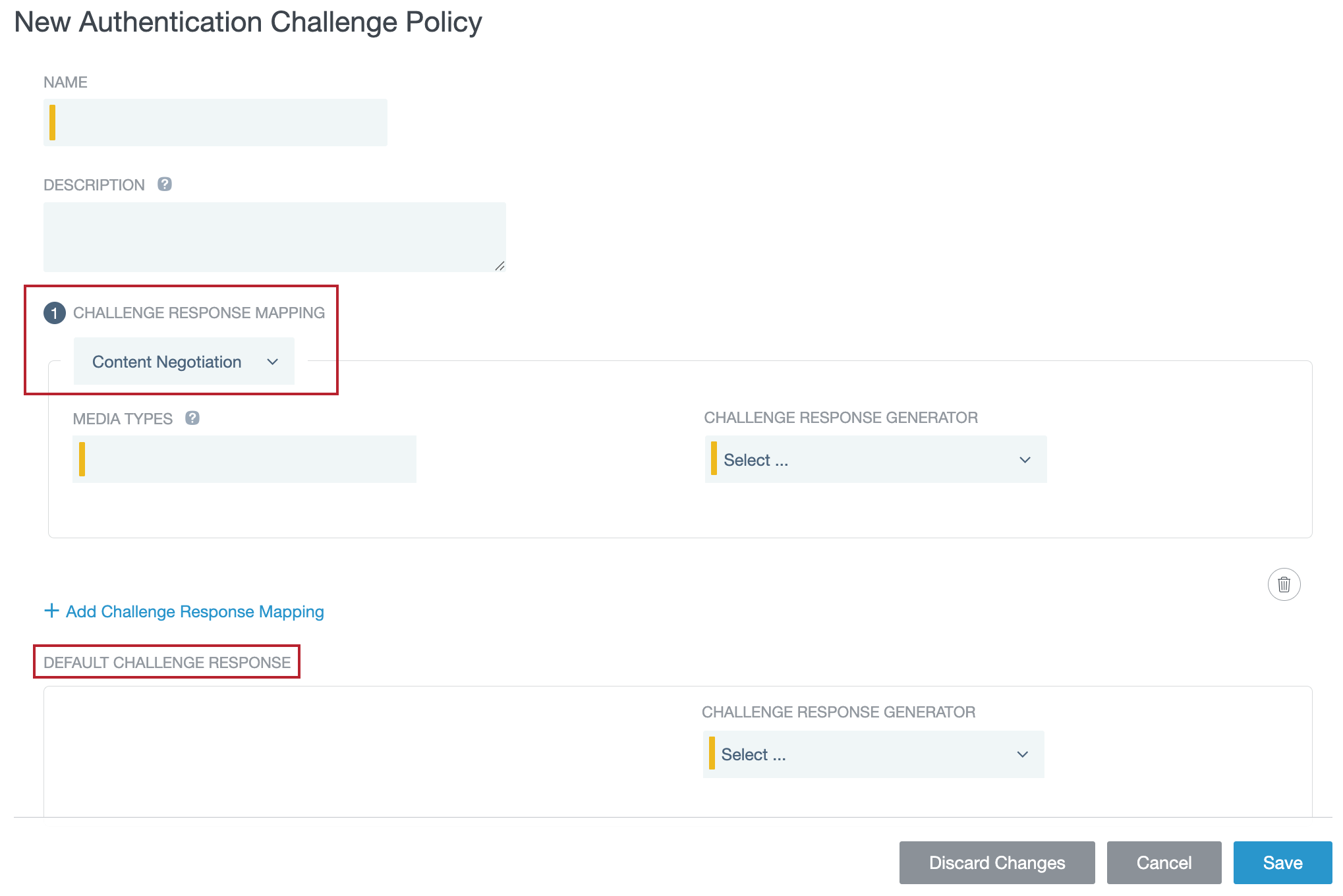
ACPs set the response PingAccess sends after an unauthenticated user makes an access request for a protected resource associated with a **Web** or **Web + API** application.

You can configure one ACP per application or application resource. Each ACP consists of zero or more *challenge response mappings* and one *default mapping*.
![Screen capture of the New Authentication Challenge Policy page, showing the challenge response mapping and default challenge response sections.](_images/acp_default_vs_mapping.png)

PingAccess uses the response specified in the given challenge response mapping when both:

* The characteristics of the unauthenticated user's access request match the characteristics specified in the mapping.

* A PingAccess web session hasn't been established yet.

Otherwise, PingAccess uses the default mapping.

Learn more in [Managing authentication challenge policies](pa-managing-acps.html) and [Authentication challenge responses](pa_authentication_challenge_responses.html).

### System-provided ACPs

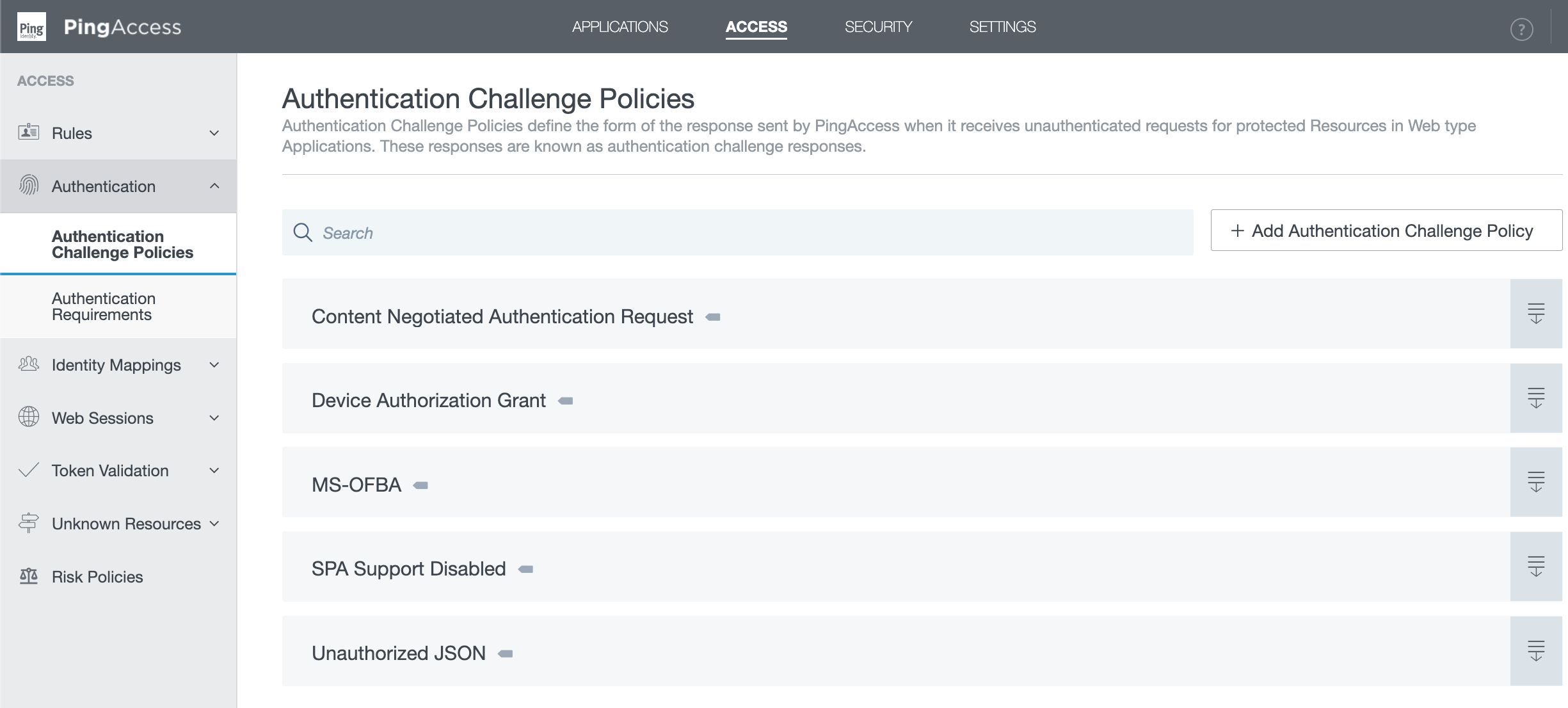
PingAccess deploys several *system-provided ACPs* that are automatically enabled on initial startup. To identify these policies in the admin console, review the **Authentication Challenge Policies** page. If there's a gray flag to the right of a policy's name, it's a system-provided ACP.

You can view system-provided ACP configurations, but you can't edit or delete them. Learn how to create your own custom ACPs in [Managing authentication challenge policies](pa-managing-acps.html).
![Screen capture of the Authentication Challenge Policies page. The system-provided authentication challenge policies are marked with a grey flag.](_images/system-provided-acps.png)

You can learn more about these ACPs in the following section.

> **Collapse: System-provided ACP types:**
>
> * **Content Negotiated Authentication Request**
>
>   Allows the user agent to negotiate the form of the authentication challenge response with an Accept header field in the request.
>
>   If the user agent requests HTML, a `401` response returns with an HTML body that automatically initiates an OpenID Connect (OIDC) *(tooltip: \<div class="paragraph">
>   \<p>An authentication protocol built on top of OAuth that authenticates users and enables clients (relying parties) of all types to request and receive information about authenticated sessions and users. OIDC is extensible, allowing clients to use optional features such as encryption of identity data, discovery of OpenID Providers (OAuth authorization servers), and session management.\</p>
>   \</div>)* login flow via a JavaScript redirect. Otherwise, the user agent receives a JavaScript Object Notation (JSON) *(tooltip: \<div class="paragraph">
>   \<p>An open, lightweight data-interchange format that uses human-readable text to store and transmit data.\</p>
>   \</div>)* response.
>
> - **Device Authorization Grant**
>
>   Enables device authorization grant support, which allows users to sign on by entering a code after visiting a verification URI on a secondary device. This makes it easier to authenticate when using a device without a keyboard, reducing friction and potential typos.
>
>   Learn more in [**Device Authorization Challenge**](pa_acr_generator_descriptions.html#device).
>
> * **MS-OFBA**
>
>   Provides MS-OFBA support, enabling you to open Microsoft Office (MS Office) documents protected by PingAccess in an in-app browser that redirects to the OpenID Provider (OP) *(tooltip: \<div class="paragraph">
>   \<p>In OAuth terms, an authorization server (AS). The OP/AS issues access tokens to protected resources for approved clients (relying parties). The clients use the access token to access the protected resources hosted by the OAuth resource server.\</p>
>   \</div>)* for user authentication. If the user authenticates successfully, PingAccess establishes a web session and redirects the user to the MS Office application that matches the document type (spreadsheets open in Microsoft Excel, for example).
>
>   Web sessions aren't shared between different MS Office apps, but users don't have to reauthenticate for apps they've already opened. For example, if you authenticate after opening an Excel sheet, you can open other Excel sheets without reauthenticating, but not a Word document.
>
>   Limitations:
>
>   * The system-provided **MS-OFBA** ACP doesn't work with MS Office applications running on macOS. The macOS in-app browser is much more restrictive than the one in Windows. It can't set the nonce cookie PingAccess requires to redirect a user to the OP.
>
>   * In some environments, Internet Explorer configurations can dictate the behavior of the in-app browser in MS Office products. If the document you requested fails to download, go to **Internet Explorer > Internet Options > Advanced > Settings > Security** and ensure that **Do not save encrypted pages to disk** is disabled.
>
>     |   |                                                                                                                                                                                                                                                                                                                                                                                                                                                                                                                                                                                                                                                                                                                                                                                                      |
>     | - | ---------------------------------------------------------------------------------------------------------------------------------------------------------------------------------------------------------------------------------------------------------------------------------------------------------------------------------------------------------------------------------------------------------------------------------------------------------------------------------------------------------------------------------------------------------------------------------------------------------------------------------------------------------------------------------------------------------------------------------------------------------------------------------------------------- |
>     |   | You can configure MS-OFBA challenge response mappings and challenge response generators individually in a custom authentication challenge policy, but a custom creation like this is best used to address unusual circumstances as they come up.For example, if Microsoft includes a new entry on the list of user agents approved for MS-OFBA, you could create a branching challenge response mapping for the new user agent and set it to trigger the **MS-OFBA Authentication Request Redirect** response generator.Alternately, you could set the MS-OFBA header `X-FORMS_BASED_AUTH_DIALOG_SIZE` using the **Append Header Fields** challenge response filter. Learn more about configuring challenge response filters in [Managing authentication challenge policies](pa-managing-acps.html). |
>
> * **SPA Support Disabled**
>
>   Disables single-page application (SPA) support on a global scale so admins don't have to turn it off on each individual application.
>
>   If you want to use SPA support, you should re-enable it on a per-application basis, as described in [Application field descriptions](pa_application_field_descriptions.html). You can find more information on the benefits of SPA support in [SPA support](pa_applications_operations.html#about).
>
> * **Unauthorized JSON**
>
>   Unconditionally returns a `401` JSON response.

## Authentication requirements

Authentication requirements are a list of authentication methods, ordered by preference. For example:

* You configure a PingAccess **Web** application with an authentication requirement list containing the values password and certificate.

* When a user attempts to access the application, PingAccess redirects the user to PingFederate requesting either password or certificate user authentication.

* PingFederate authenticates the user based on the password and issues an OIDC ID token to PingAccess, containing the authentication method that was used.

* PingAccess ensures that the authentication method matches the requirements and redirects the user to the application with the PingAccess cookie set.

* When the user attempts to access a second, more sensitive application (configured with an authentication requirement list containing the value certificate), they're redirected to PingFederate to authenticate with a certificate.

You can configure applications with authentication requirement lists that have no overlap. For example, if one list has a password and another list has a certificate, a user navigating between applications might be required to authenticate each time they visit an application.

|   |                                                                                                                                                                                                         |
| - | ------------------------------------------------------------------------------------------------------------------------------------------------------------------------------------------------------- |
|   | When configuring authentication requirement lists to protect higher value applications with step-up authentication, include stronger forms of authentication when configuring lower value applications. |

Learn more in [Configuring authentication requirements lists](pa_configuring_authn_reqs_lists.html).
