---
title: Prepare for development
description: Set up your development environment and create a Maven project to build custom authentication nodes for PingAM
component: pingam
version: 7.5
page_id: pingam:auth-nodes:preparing-for-nodes
canonical_url: https://docs.pingidentity.com/pingam/8.1/auth-nodes/preparing-for-nodes.html
llms_txt: https://docs.pingidentity.com/pingam/llms.txt
docs_for_agents: https://developer.pingidentity.com/build-with-ai/docs-for-agents.md
keywords: ["Extensibility", "Integration", "Nodes & Trees", "Setup & Configuration"]
superseded_by: https://docs.pingidentity.com/pingam/8.1/auth-nodes/preparing-for-nodes.html
section_ids:
proc-custom-auth-nodes-prerequisites: Prepare an environment for building custom authentication nodes
proc-custom-auth-nodes-project: Set up a Maven project to build custom authentication nodes
maven-custom-auth-nodes: Tips for custom authentication node projects
---
# Prepare for development
This page explains the prerequisites for building custom authentication nodes, and shows how to use either a Maven archetype, or the samples provided with AM, to set up a project for building nodes.
| | |
| - | ---------------------------------------------------------------------------------------------------------------------------------------------------------------------------------------------------------------- |
| | For information about customizing post-authentication hooks for a tree, refer to [Create post-authentication hooks for trees](../am-authentication/about-authentication-trees.html#post-authn-plugins-treehook). |
## Prepare an environment for building custom authentication nodes
1. Make sure your Backstage account is part of a subscription:
* In a browser, go to the [Backstage](https://backstage.pingidentity.com) website and sign on or register for an account.
* Confirm or request your account is added to a subscription. Learn more in [Getting access to product support](https://support.pingidentity.com/s/article/Getting-access-to-product-support) in the *Knowledge Base*.
2. Install Apache Maven 3.2.5 or later, and Oracle JDK or OpenJDK version 11 or later.
| | |
| - | --------------------------------------------------------------------------------------------------------------------------------------------------------------------------------------------------------------------------------------------------------------------------------------------------------------------------------------------------------------------------------------------- |
| | To verify the installed versions, run the `mvn --version` command:```bash
$ mvn --version
Maven home: /usr/local/Cellar/maven/3.6.0/libexec
Java version: 11.0.4, vendor: AdoptOpenJDK, runtime: /Library/Java/JavaVirtualMachines/adoptopenjdk-11.jdk/Contents/Home
Default locale: en_US, platform encoding: UTF-8
OS name: "mac os x", version: "10.16", arch: "x86_64", family: "mac"
``` |
3. Configure Maven to be able to access the proprietary repositories by adding your Backstage credentials to the Maven `settings.xml` file. Learn more in [How do I access the proprietary protected Maven repositories?](https://support.pingidentity.com/s/article/How-do-I-access-the-proprietary-Maven-repositories).
If you want to use the archetype to create a project for custom authentication nodes, you also need access to the `forgerock-private-releases` repository. Ensure your `settings.xml` file contains a profile similar to the following:
```xml
forgerock
forgerock-private-releases
https://maven.forgerock.org:443/artifactory/private-releases
true
fail
false
warn
forgerock
```
## Set up a Maven project to build custom authentication nodes
Ping Identity provides a Maven archetype that creates a starter project, suitable for building an authentication node. You can also download the projects used to build the authentication nodes included with AM and modify those to match your requirements.
| | |
| - | ------------------------------------------------------------------------------------------------------------------------------------------------- |
| | Complete the steps in [Prepare an environment for building custom authentication nodes](#proc-custom-auth-nodes-prerequisites) before proceeding. |
Complete either of the following steps to set up or download a Maven project to build custom authentication nodes:
1. To use the `auth-tree-node-archetype` archetype to generate a starter Maven project:
* In a terminal window, go to a folder where you'll create the new Maven project. For example:
```bash
$ cd ~/Repositories
```
* Run the `mvn archetype:generate` command, providing the following information:
* `groupId`
A domain name that you control, used for identifying the project.
* `artifactId`
The name of the JAR created by the project, without version information. Also the name of the folder created to store the project.
* `version`
The version assigned to the project.
* `package`
The package name in which your custom authentication node classes are generated.
* `authNodeName`
The name of the custom authentication node, also used in the generated `README.md` file and for class file names.
| | |
| - | ------------------------------------------------------------------------------------------------------------------------------------------------------------------------------------------------------------------------------------------------------------------------------------------------------------------------------------------------------------------------------------------------------------------------------------------------------------------------------------------------------------------------------------------------------------- |
| | AM stores installed nodes with a reference generated from the node's class name. An installed node registered through a plugin is stored with the name returned as a result of calling `Class.getSimpleName()`.AM doesn't protect installed node names. The most recently installed node with a specific name will overwrite any previous installation of that node (including the nodes that are provided with AM by default). You must therefore choose a unique name for your custom node, and make sure the name isn't already used for an existing node. |
For example:
```bash
$ mvn archetype:generate \
-DgroupId=com.example \
-DartifactId=customAuthNode \
-Dversion=1.0.0-SNAPSHOT \
-Dpackage=com.example.customAuthNode \
-DauthNodeName=myCustomAuthNode \
-DarchetypeGroupId=org.forgerock.am \
-DarchetypeArtifactId=auth-tree-node-archetype \
-DarchetypeVersion=7.5.2 \
-DinteractiveMode=false
[INFO] Project created from Archetype in dir: /Users/ForgeRock/Repositories/customAuthNode
[INFO] ------------------------------------------------------------------------
[INFO] BUILD SUCCESS
[INFO] ------------------------------------------------------------------------
[INFO] Total time: 1.397 s
[INFO] Finished at: 2018-01-18T15:45:06+00:00
[INFO] Final Memory: 16M/491M
[INFO] ------------------------------------------------------------------------
```
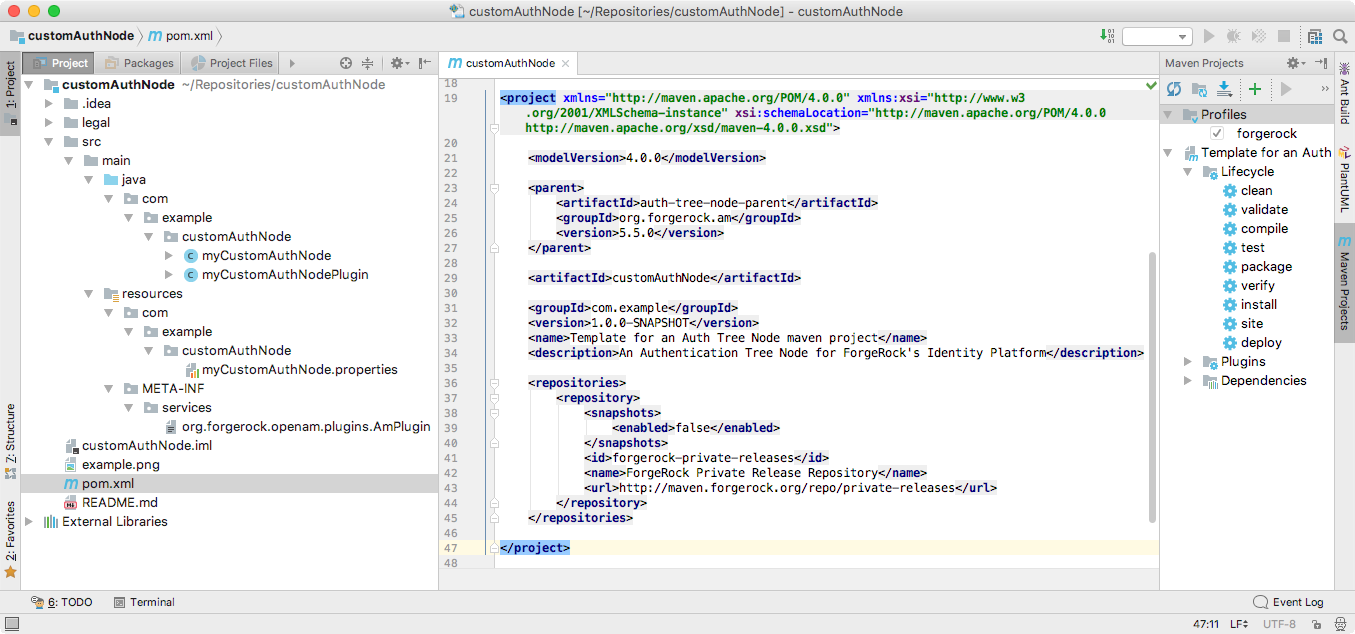
A new custom authentication node project is created; for example, in the `/Users/ForgeRock/Repositories/customAuthNode` folder.
> **Collapse: Example**
>
> 
>
> Figure 1. Node project created by using the archetype
2. To download the project containing the default AM authentication nodes from the `am-external` repository:
* Clone the `am-external` repository:
```bash
$ git clone https://github.com/ForgeRock/am-external.git
```
* Check out the `release/7.5.2` branch:
```bash
$ cd am-external
$ git checkout releases/7.5.2
```
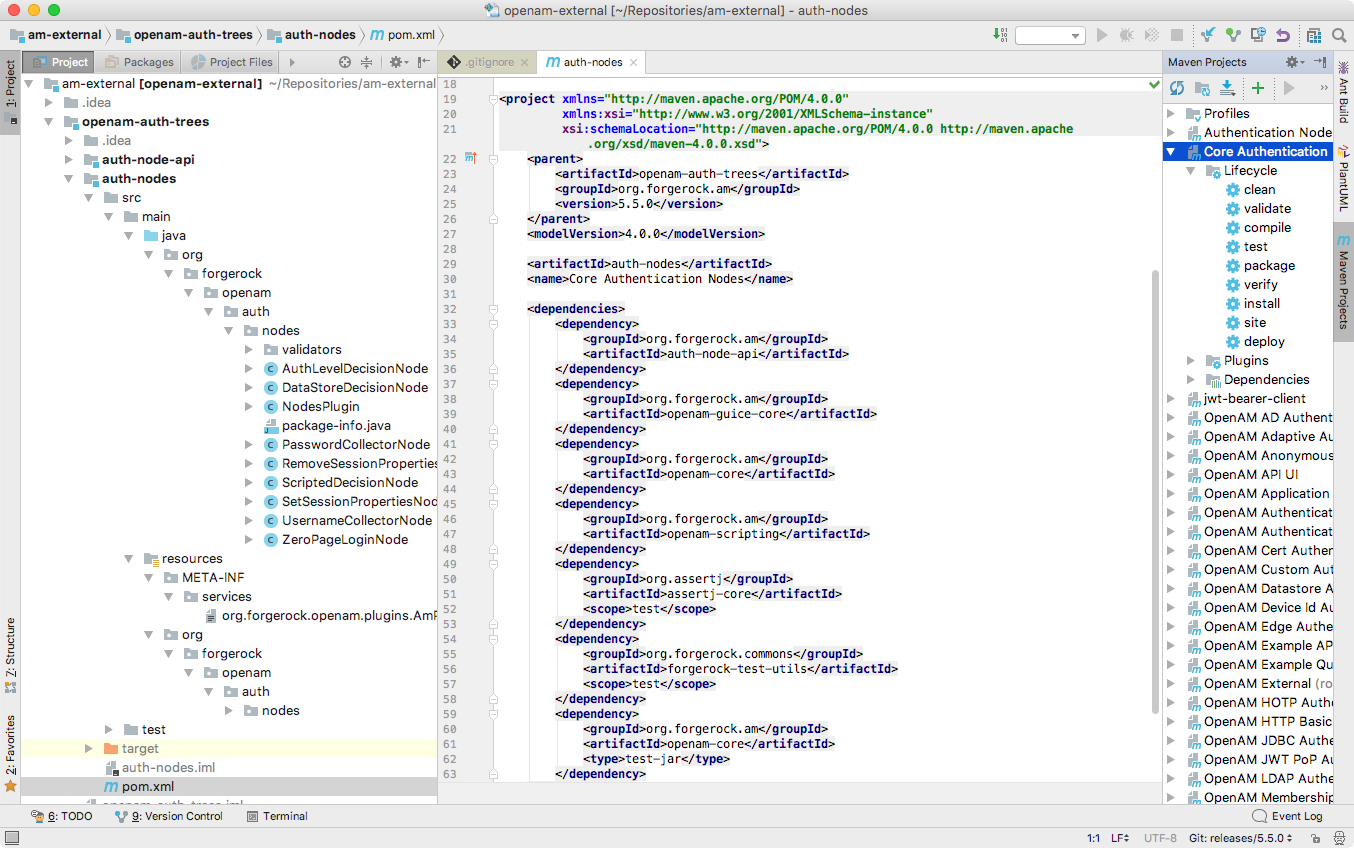
The AM authentication nodes project is located in the `am-external/openam-auth-trees/auth-nodes/` folder.
> **Collapse: Example**
>
> 
>
> Figure 2. Node Project Cloned from the
>
> `am-external`
>
> repository
## Tips for custom authentication node projects
When you configure a project for creating custom nodes, consider the following points:
* Your node may be deployed into a different AM version to that which you compiled against.
Nodes from previous product versions should be compatible with subsequent product versions; so a node built against AM 6 APIs may be deployed in an AM 7.5 instance.
* Other custom nodes may depend on your node, which may be being built against a different version of the AM APIs.
* Other custom nodes, or AM itself, may be using the same libraries as your node; for example, Guava or Apache Commons, and so on. This may cause version conflicts.
To help protect against some of these issues, consider the following recommendations:
* Mark all product dependencies as `provided` in your build system configuration.
* Repackage all non-internal, non-proprietory dependencies inside your own `.jar` file. Repackaged dependencies will not clash with a different version of the same library from another source.
| | |
| - | ------------------------------------------------------------------------------------------------------------------------------------- |
| | If you are using Maven, use the [maven-shade-plugin](https://maven.apache.org/plugins/maven-shade-plugin/) to repackage dependencies. |
> **Collapse: Files contained in the Maven project**
>
> * `pom.xml`
>
> Apache Maven project file for the custom authentication node.
>
> This file specifies how to build the custom authentication node, and also specifies its dependencies on AM components.
>
> The following is an example `pom.xml` file from a node project:
>
> ```xml
>
> 4.0.0
>
> com.example
> example-node-plugin
> 1.0.0
>
>
>
>
> org.forgerock.am
> openam-bom
> 7.2.0-SNAPSHOT
> import
>
>
>
>
>
>
> org.forgerock.am
> auth-node-api
> provided
>
>
> org.forgerock.am
> openam-annotations
> provided
>
>
> com.google.guava
> guava
> 26.0-jre
>
>
>
>
>
>
> org.apache.maven.plugins
> maven-shade-plugin
>
> false
> true
>
>
> com.google
> com.example.node.guava
>
>
>
>
> com.google.guava:guava
>
> META-INF/**
>
>
>
>
>
>
> javax.annotation;resolution:=optional,sun.misc;resolution:=optional
>
>
>
>
>
>
>
>
> ```
>
> * `authNodeName.java`
>
> Core class for the custom authentication node. See [Node class](core-class.html).
>
> * `authNodeNamePlugin.java`
>
> Plugin class for the custom authentication node. See [Plugin class](plugin-class.html).
>
> * `authNodeName.properties`
>
> Properties file containing the localized strings displayed by the custom authentication node. See [Internationalization](i18n-nodes.html).
>
> You must include a `nodeDescription` property in your node to ensure that it appears in the authentication tree designer. AM uses the `nodeDescription` property value as the name of your node.
>
> The authNodeName reflects the name of your authentication node. For example, the `auth-tree-node-archetype` for Maven uses `myCustomAuthNode` as the *authNodeName*.