---
title: Prepare for development
description: This page explains the prerequisites for building custom authentication nodes, and shows how to use either a Maven archetype, or the samples provided with AM, to set up a project for building nodes.
component: pingam
version: 8.1
page_id: pingam:auth-nodes:preparing-for-nodes
canonical_url: https://docs.pingidentity.com/pingam/8.1/auth-nodes/preparing-for-nodes.html
keywords: ["Extensibility", "Integration", "Nodes & Trees", "Setup & Configuration"]
section_ids:
proc-custom-auth-nodes-prerequisites: Prepare an environment for building custom authentication nodes
proc-custom-auth-nodes-project: Set up a Maven project to build custom authentication nodes
files-in-maven-project: Files contained in the Maven project
maven-custom-auth-nodes: Tips for custom authentication node projects
---
# Prepare for development
This page explains the prerequisites for building custom authentication nodes, and shows how to use either a Maven archetype, or the samples provided with AM, to set up a project for building nodes.
| | |
| - | ------------------------------------------------------------------------------------------------------------------------------------------------------------------------------------------------------------------------------------------------------------------ |
| | You can find information about customizing post-authentication hooks for a tree in [Create tree hooks](../am-authentication/post-authn-plugins-treehook.html) and customizing logout hooks in [Create logout hooks](../am-authentication/create-logout-hook.html). |
## Prepare an environment for building custom authentication nodes
1. Make sure your Backstage account is part of a subscription:
* In a browser, go to the [Backstage](https://backstage.pingidentity.com) website and sign on or register for an account.
* Confirm or request your account is added to a subscription. Learn more in [Getting access to product support](https://support.pingidentity.com/s/article/Getting-access-to-product-support) in the *Knowledge Base*.
2. Install Apache Maven 3.6.3 or later, and Oracle JDK or OpenJDK version 17 or later.
| | |
| - | ---------------------------------------------------------------------------------------------------------------------------------------------------------------------------------------------------------------------------------------------------------------------------------------------------------------------------------------------------------------------------------------------------------------------------------------------------------------- |
| | To verify the installed versions, run the `mvn --version` command:```bash
$ mvn --version
Apache Maven 3.9.11 (bc0240f3c744dd6b6ec2920b3cd08dcc295161ae)
Maven home: /opt/homebrew/Cellar/maven/3.9.11/libexec
Java version: 25.0.1, vendor: Homebrew, runtime: /opt/homebrew/Cellar/openjdk/25.0.1/libexec/openjdk.jdk/Contents/Home
Default locale: en_GB, platform encoding: UTF-8
OS name: "mac os x", version: "15.7.1", arch: "aarch64", family: "mac"
``` |
3. Configure Maven to be able to access the proprietary repositories by adding your Backstage credentials to the Maven `settings.xml` file. Learn more in [How do I access the proprietary protected Maven repositories?](https://support.pingidentity.com/s/article/How-do-I-access-the-proprietary-Maven-repositories).
If you want to use the archetype to create a project for custom authentication nodes, you also need access to the `forgerock-private-releases` repository. Make sure your `settings.xml` file contains a profile similar to the following:
```xml
forgerock
forgerock-private-releases
https://maven.forgerock.org/artifactory/private-releases
true
fail
false
warn
forgerock
```
## Set up a Maven project to build custom authentication nodes
Ping Identity provides a Maven archetype that creates a starter project, suitable for building an authentication node. You can also download the projects used to build the authentication nodes included with AM and modify those to match your requirements.
| | |
| - | ------------------------------------------------------------------------------------------------------------------------------------------------- |
| | Complete the steps in [Prepare an environment for building custom authentication nodes](#proc-custom-auth-nodes-prerequisites) before proceeding. |
Complete either of the following steps to set up or download a Maven project to build custom authentication nodes:
1. To use the `auth-tree-node-archetype` archetype to generate a starter Maven project:
* In a terminal window, go to a folder where you'll create the new Maven project. For example:
```bash
$ cd ~/Repositories
```
* Run the `mvn archetype:generate` command, providing the following information:
* `groupId`
A domain name you control, used for identifying the project.
* `artifactId`
The name of the JAR created by the project, without version information. Also the name of the folder created to store the project.
* `version`
The version assigned to the project.
* `package`
The package name in which your custom authentication node classes are generated.
* `authNodeName`
The name of the custom authentication node, also used in the generated `README.md` file and for class file names.
| | |
| - | ------------------------------------------------------------------------------------------------------------------------------------------------------------------------------------------------------------------------------------------------------------------------------------------------------------------------------------------------------------------------------------------------------------------------------------------------------------------------------------------------------------------------------------------------------------- |
| | AM stores installed nodes with a reference generated from the node's class name. An installed node registered through a plugin is stored with the name returned as a result of calling `Class.getSimpleName()`.AM doesn't protect installed node names. The most recently installed node with a specific name will overwrite any previous installation of that node (including the nodes that are provided with AM by default). You must therefore choose a unique name for your custom node, and make sure the name isn't already used for an existing node. |
For example:
```bash
$ mvn archetype:generate \
-DgroupId=com.example \
-DartifactId=custom-auth-node \
-Dversion=1.0.0-SNAPSHOT \
-Dpackage=com.example.custom \
-DauthNodeName=MyCustomAuthNode \
-DarchetypeGroupId=org.forgerock.am \
-DarchetypeArtifactId=auth-tree-node-archetype \
-DarchetypeVersion=8.1.0 \
-DinteractiveMode=false
[INFO] Project created from Archetype in dir: /Users/Ping/Repositories/custom-auth-node
[INFO] ------------------------------------------------------------------------
[INFO] BUILD SUCCESS
[INFO] ------------------------------------------------------------------------
[INFO] Total time: 11.397 s
[INFO] Finished at: 2024-09-25T15:45:06+00:00
[INFO] ------------------------------------------------------------------------
```
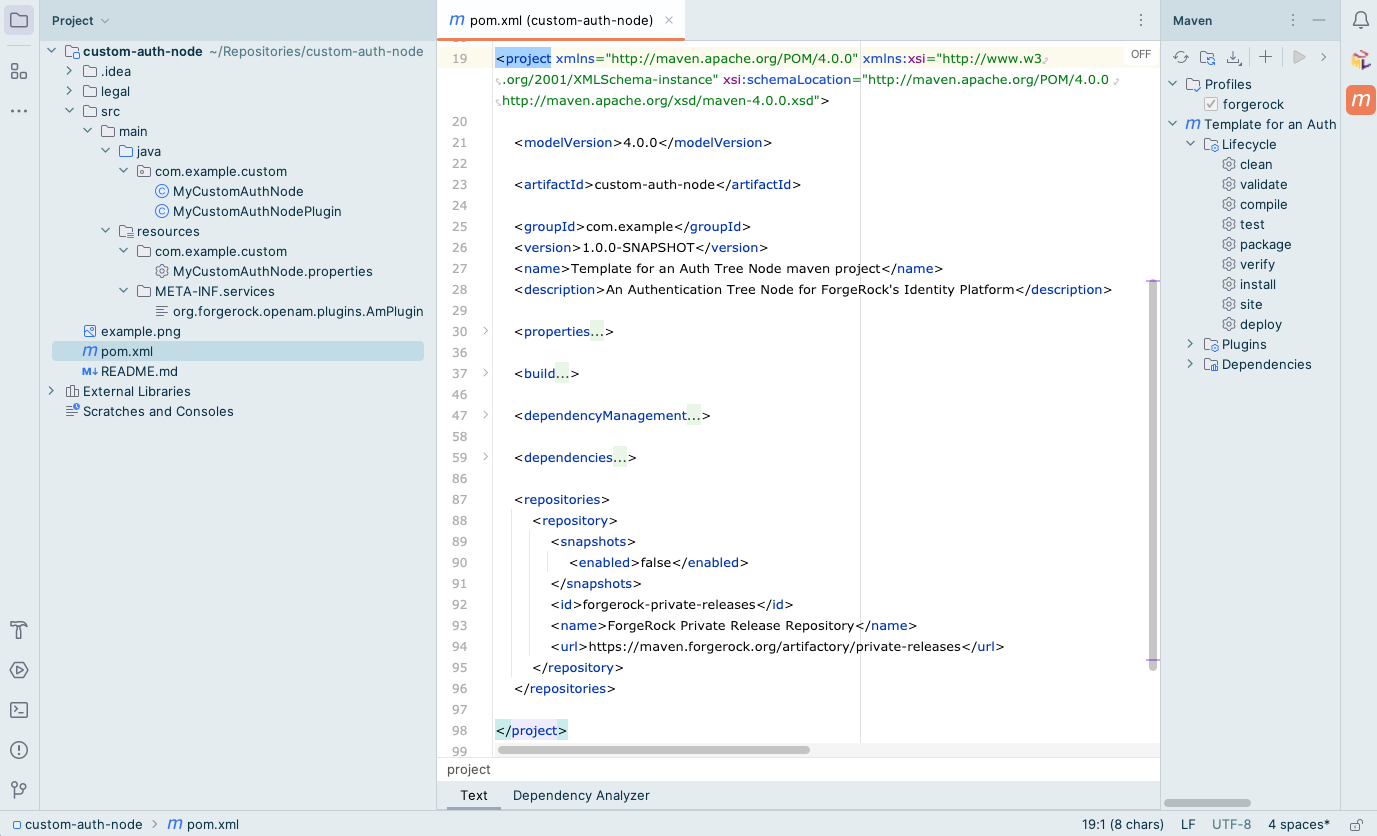
A new custom authentication node project is created. For example, in the `/Users/Ping/Repositories/custom-auth-node` folder.
> **Collapse: Example**
>
> 
>
> Figure 1. Node project created by using the archetype
2. To download the project containing the default AM authentication nodes from the `am-external` repository:
* Clone the `am-external` repository:
```bash
$ git clone https://github.com/ForgeRock/am-external.git
```
* Check out the `release/8.1.0` branch:
```bash
$ cd am-external
$ git checkout releases/8.1.0
```
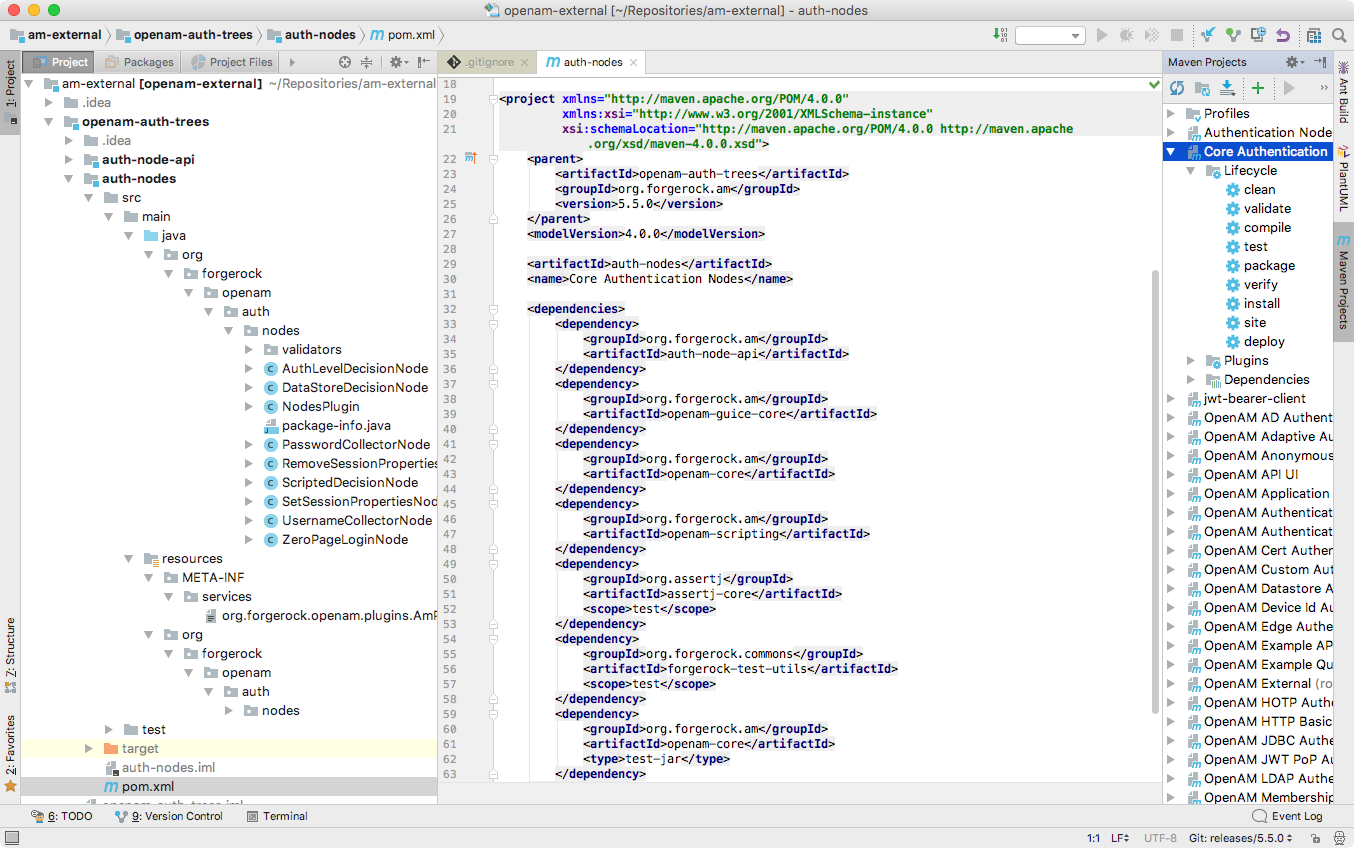
The AM authentication nodes project is located in the `am-external/openam-auth-trees/auth-nodes/` folder.
> **Collapse: Example**
>
> 
>
> Figure 2. Node Project Cloned from the
>
> `am-external`
>
> repository
### Files contained in the Maven project
* `pom.xml`
Apache Maven project file for the custom authentication node.
This file specifies how to build the custom authentication node, and also specifies its dependencies on AM components.
> **Collapse: Example**
>
> The following is an example `pom.xml` file from a node project:
>
> ```xml
>
> 4.0.0
>
> com.example
> example-node-plugin
> 1.0.0
>
>
>
>
> org.forgerock.am
> openam-bom
> 7.2.0-SNAPSHOT
> import
>
>
>
>
>
>
> org.forgerock.am
> auth-node-api
> provided
>
>
> org.forgerock.am
> openam-annotations
> provided
>
>
> com.google.guava
> guava
> 26.0-jre
>
>
>
>
>
>
> org.apache.maven.plugins
> maven-shade-plugin
>
> false
> true
>
>
> com.google
> com.example.node.guava
>
>
>
>
> com.google.guava:guava
>
> META-INF/**
>
>
>
>
>
>
> javax.annotation;resolution:=optional,sun.misc;resolution:=optional
>
>
>
>
>
>
>
>
> ```
* `authNodeName.java`
Core class for the custom authentication node. Learn more in [Node class](core-class.html).
* `authNodeNamePlugin.java`
Plugin class for the custom authentication node. Learn more in [Plugin class](plugin-class.html).
* `authNodeName.properties`
Properties file containing the properties and strings displayed by the custom authentication node to the user.
You must include a `nodeDescription` property in this file to include your node in the authentication tree designer. AM uses the `nodeDescription` property value as the name of your node.
You can also create locale specific versions of this file to provide translated text to users. Learn more in [Internationalize nodes](i18n-nodes.html).
The *authNodeName* reflects the name of your authentication node. For example, the `auth-tree-node-archetype` for Maven uses `MyCustomAuthNode` as the *authNodeName*.
## Tips for custom authentication node projects
When you configure a project for creating custom nodes, consider the following points:
* Your node may be deployed into a different AM version to the one you compiled against.
Nodes from previous product versions *should* be compatible with subsequent product versions if you have only used `@Supported` APIs. Learn more in the [PingAM Java API Specification](../_attachments/apidocs/index.html).
For example, a node built against AM 7.5 APIs can be deployed in an AM 8.1 instance.
* Other custom nodes may depend on your node, which may be being built against a different version of the AM APIs.
* Other custom nodes, or AM itself, may be using the same libraries as your node. For example, Guava or Apache Commons, and so on. This may cause version conflicts.
To help protect against some of these issues, consider the following recommendations:
* Mark all product dependencies as `provided` in your build system configuration.
* Repackage all external, non-proprietary dependencies inside your own `.jar` file. Repackaged dependencies won't clash with a different version of the same library from another source.
| | |
| - | ------------------------------------------------------------------------------------------------------------------------------------ |
| | If you're using Maven, use the [maven-shade-plugin](https://maven.apache.org/plugins/maven-shade-plugin/) to repackage dependencies. |