---
title: Customize identity stores
description: Your deployment might require additional functionality than that offered by the default AM identity store. Use these sections to create custom attributes to store additional information in identity stores, or to create identity repository plugins to customize how AM maps users and groups to a realm:
component: pingam
version: 8.1
page_id: pingam:setup:customizing-data-stores
canonical_url: https://docs.pingidentity.com/pingam/8.1/setup/customizing-data-stores.html
keywords: ["Setup & Configuration", "Customization", "Identity Store", "LDAP"]
page_aliases: ["setup-guide:customizing-data-stores.adoc"]
section_ids:
sec-maint-datastore-customattr: Add custom user profile attributes
add-attr-to-identity-repository: Update the identity store for a custom attribute
allow-users-to-update-attr: Use an LDAP browser to let users update custom attributes
allow-users-to-update-attr-command-line: Use the command line to let users update custom attributes
updating-XUI: Add custom attributes to the end-user UI
sec-maint-datastore-plugin: Customize identity data storage with an IdRepo plugin
idrepo-plugin-inheritance: IdRepo plugin inheritance
idrepo-plugin-lifecycle: IdRepo plugin lifecycle
idrepo-plugin-capabilities: IdRepo plugin capabilities
getsupportedtypes: getSupportedTypes()
getsupportedoperations: getSupportedOperations()
supportsauthentication: supportsAuthentication()
idrepo-plugin-implementation: IdRepo plugin implementation
idrepo-plugin-deployment: IdRepo plugin deployment
identity-repository-plugin-annotation: Register your plugin with AM
use_your_new_idrepo_plugin: Use your new IdRepo plugin
---
# Customize identity stores
Your deployment might require additional functionality than that offered by the default AM identity store. Use these sections to create custom attributes to store additional information in identity stores, or to create identity repository plugins to customize how AM maps users and groups to a realm:
* [Add custom user profile attributes](#sec-maint-datastore-customattr)
* [Customize identity data storage with an IdRepo plugin](#sec-maint-datastore-plugin)
## Add custom user profile attributes
You can extend user profiles by adding custom attributes. This section shows how to add a custom attribute to user profiles stored in the LDAP directory.
Adding a custom attribute involves updating the identity store schema to hold the new attribute, and updating the UI. To give users write permissions to the custom attribute, you must also update the AM configuration store.
This section includes the following procedures:
* [Update the identity store for a custom attribute](#add-attr-to-identity-repository)
* [Use an LDAP browser to let users update custom attributes](#allow-users-to-update-attr)
* [Use the command line to let users update custom attributes](#allow-users-to-update-attr-command-line)
* [Add custom attributes to the end-user UI](#updating-XUI)
### Update the identity store for a custom attribute
These steps update the identity store schema for the custom attribute, then update AM to use the custom attribute and object class.
If you intend to use an existing attribute that is already allowed in user profile entries, you can skip these steps.
1. Prepare the attribute type object class definitions in LDIF format. For example:
```bash
$ cat custom-attr.ldif
dn: cn=schema
changetype: modify
add: attributeTypes
attributeTypes: ( temp-custom-attr-oid NAME 'customAttribute' EQUALITY case
IgnoreMatch ORDERING caseIgnoreOrderingMatch SUBSTR caseIgnoreSubstrings
Match SYNTAX 1.3.6.1.4.1.1466.115.121.1.15 USAGE userApplications )
-
add: objectClasses
objectClasses: ( temp-custom-oc-oid NAME 'customObjectclass' SUP top AUXILIARY
MAY customAttribute )
```
In this example, the attribute type is called `customAttribute` and the object class is called `customObjectclass`.
2. Add the schema definitions to the directory.
```
$ /path/to/opendj/bin/ldapmodify \
--hostname 'ds.example.com' \
--port 1636 \
--useSsl \
--usePkcs12TrustStore /path/to/opendj/config/keystore \
--truststorepassword:file /path/to/opendj/config/keystore.pin \
--bindDN uid=admin \
--bindPassword str0ngAdm1nPa55word \
/path/to/custom-attr.ldif
Processing MODIFY request for cn=schema
MODIFY operation successful for DN cn=schema
```
3. In the AM admin UI, go to Realms > *realm name* > Identity Stores > *identity store name* > User Configuration.
4. Add the object class, for example `customObjectclass`, to the LDAP User Object Class list.
5. Add the attribute type, for example `customAttribute`, to the LDAP User Attributes list.
6. Save your work.
7. Add the attribute type to the profile attribute allowlist.
The profile attribute allowlist controls the information returned to non-administrative users when they send requests to `json/user` endpoints. For example, the allowlist controls the attributes shown in the user profile page.
Common profile attributes are allowlisted by default. You must add any custom attributes that you want non-administrative users to see.
The allowlist can be set globally, or per realm, in the user self-service service. To modify the list:
* Globally
Go to Configure > Global Services > User Self-Service > Profile Management, and edit the Self readable attributes field.
* By realm
Go to Realms > *realm name* > Services > User Self-Service > Profile Management, and edit the Self readable attributes field.
| | |
| - | ----------------------------------------------------------------------------------------------------------------------------------------------------------- |
| | You must add the user self-service service to the realm if you have not done so already, but you don't need to configure anything other than the allowlist. |
### Use an LDAP browser to let users update custom attributes
Update the AM configuration store to give users write permission to the custom attribute.
This procedure assumes that you use an LDAP browser, for example, [Apache Directory Studio](http://directory.apache.org/studio/). If you use the command line, follow [Use the command line to let users update custom attributes](#allow-users-to-update-attr-command-line).
1. Connect to the AM configuration store.
You can see the configuration store details at Deployment > Servers > Directory Configuration > Server.
2. Search for `ou=SelfWriteAttributes`.
You should find DNs similar to the following. The DNs have been folded for legibility:
* `dn:ou=SelfWriteAttributes,ou=Policies,ou=default,ou=OrganizationConfig,ou=1.0, ou=iPlanetAMPolicyService,ou=services,o=sunamhiddenrealmdelegationservicepermissions, ou=services,dc=am,dc=example,dc=com`
* `dn:ou=SelfWriteAttributes,ou=default,ou=default,ou=OrganizationConfig,ou=1.0, ou=sunEntitlementIndexes,ou=services,o=sunamhiddenrealmdelegationservicepermissions, ou=services,dc=am,dc=example,dc=com`
3. In the entry under `iPlanetAMPolicyService`, edit the `sunKeyValue` attribute to add the custom attribute to the list of self-writable attributes.
For example, `customAttribute`.
4. In the entry under `sunEntitlementIndexes`, edit the `sunKeyValue` attribute to add the custom attribute to the list of self-writable attributes.
This example shows a custom attribute as the first element of the list:
`\"attributes\": [\n \"customAttribute\",\n …`.
5. Restart AM or the web container where it runs.
### Use the command line to let users update custom attributes
Update the AM configuration store to give users write permission to the custom attribute.
This procedure assumes that you use the command line. Follow [Use an LDAP browser to let users update custom attributes](#allow-users-to-update-attr) if you use an LDAP browser. Adapt the file paths to your configuration store.
1. Search for the value of `sunKeyValue` in `ou=SelfWriteAttributes` by running the following command:
```bash
$ /path/to/opendj/bin/ldapsearch \
--hostname am.example.com \
--port 1636 \
--useSSL \
--usePkcs12TrustStore /path/to/opendj/config/keystore \
--truststorepassword:file /path/to/opendj/config/keystore.pin \
--bindDn uid=admin \
--bindPassword myPassword \
--baseDn "dc=am,dc=example,dc=com" "(ou=SelfWriteAttributes)" \
sunKeyValue
dn: ou=SelfWriteAttributes,ou=Policies,ou=default,ou=OrganizationConfig,ou=1.0,ou=iPlanetAMPolicyService,ou=services,
o=sunamhiddenrealmdelegationservicepermissions,ou=services,dc=am,dc=example,dc=com
sunKeyValue:: eG1scG9saWN5PTw……..
dn: ou=SelfWriteAttributes,ou=default,ou=default,ou=OrganizationConfig,ou=1.0,ou=sunEntitlementIndexes,ou=services,
o=sunamhiddenrealmdelegationservicepermissions,ou=services,dc=am,dc=example,dc=com
sunKeyValue: serializable={"eCondition":{"className":"com.sun…..
```
Note that the command returns two DNs, and the value of `sunKeyValue` in the first one is base64-encoded.
2. Decode the base64 string of the `iPlanetAMPolicyService` DN.
For example:
```bash
$ ./base64 decode --encodedData eG1scG9saWN5PTw……..
xmlpolicy=
allow
givenname
sn
cn
userpassword
mail
telephonenumber
postaladdress
preferredlocale
iplanet-am-user-password-reset-options
iplanet-am-user-password-reset-question-answer
description
oath2faEnabled
sunIdentityServerDeviceKeyValue
sunIdentityServerDeviceStatus
```
3. Create a file with the decoded string, then add the custom attribute to the `` list. For example:
```bash
$ vi to-encode.xml
…
customAttributegivenname…
…
```
4. Base64-encode the content of the file.
For example:
```bash
$ ./base64 encode -f to-encode.xml
EG1scG9saWN5PTw22…..
```
5. Create an LDIF file, for example, `change.ldif`.
The following excerpt is an example of the LDIF file:
```ldif
dn: ou=SelfWriteAttributes,ou=Policies,ou=default,ou=OrganizationConfig,ou=1.0,ou=iPlanetAMPolicyService,
ou=services,o=sunamhiddenrealmdelegationservicepermissions,ou=services,dc=am,dc=example,dc=com
changetype: modify
replace: sunKeyValue
sunKeyValue: EG1scG9saWN5PTw22.....
dn: ou=SelfWriteAttributes,ou=default,ou=default,ou=OrganizationConfig,ou=1.0,ou=sunEntitlementIndexes,
ou=services,o=sunamhiddenrealmdelegationservicepermissions,ou=services,dc=am,dc=example,dc=com
changetype: modify
replace: sunKeyValue
sunKeyValue: serializable={"eCondition":{"className": ... \"properties\":
{\"attributes\": [\n \"customAttribute\",\n \"givenname\",\n \"sn\",\n ... \"values\": []\n}"}
}
```
The file must contain the following:
* The LDIF properties and rules required to modify the value of the `sunKeyValue` attribute for both DNs.
* The base64-encoded string as the value of the `sunKeyValue` attribute of the `iPlanetAMPolicyService` DN. The string already contains the custom attribute.
* The value of the `sunKeyValue` attribute of the `sunEntitlementIndexes` DN. You must add the custom attribute inside the `attributes` list.
6. Apply the changes in the LDIF file to the LDAP configuration store, as follows:
```
$ /path/to/opendj/bin/ldapmodify \
--hostname 'ds.example.com' \
--port 1636 \
--useSsl \
--usePkcs12TrustStore /path/to/opendj/config/keystore \
--truststorepassword:file /path/to/opendj/config/keystore.pin \
--bindDn uid=admin \
--bindPassword str0ngAdm1nPa55word \
--filename change.ldif
# MODIFY operation successful for DN ou=SelfWriteAttributes,ou=Policies,ou=default,ou=OrganizationConfig,ou=1.0,
ou=iPlanetAMPolicyService,ou=services,o=sunamhiddenrealmdelegationservicepermissions,ou=services,dc=am,dc=example,dc=com
# MODIFY operation successful for DN ou=SelfWriteAttributes,ou=default,ou=default,ou=OrganizationConfig,ou=1.0,
ou=sunEntitlementIndexes,ou=services,o=sunamhiddenrealmdelegationservicepermissions,ou=services,dc=am,dc=example,dc=com
```
7. Restart AM or the web container where it runs.
### Add custom attributes to the end-user UI
To ensure the new attribute shows up in the user profile, you must download the UI source code, edit it, then rebuild the UI.
1. [Download the UI source](../ui-customization/downloading-ui.html).
2. Modify the UI as follows:
* Edit the `openam-ui-user/src/resources/locales/en/translation.json` file and add a new line with the description for the custom attribute. This description will show in the UI user's profile page. For example:
```json
{
"profile": "Profile",
"username" : "Username",
"emailAddress" : "Email address",
"givenName" : "First Name",
"customAttribute" : "My Custom Attribute",
"sn" : "Last Name",
"changePassword" : "Change password"
}
```
Note that the example adds the custom attribute under the `common.user` JSON path.
| | |
| - | ------------------------------------------------------------------------------------------------------------ |
| | If you have translated the UI pages, remember to edit all the `translation.json` files in your installation. |
* Edit the `openam-ui-user/src/resources/themes/default/templates/user/UserProfileTemplate.html` file and add a new line for the custom attribute. Consider the following points:
* `property` must contain the name of the custom attribute created in the LDAP. For example, `customAttribute`.
* `label` must contain the path to the label created in the `translation.json` file. In this case, `common.user.customAttribute`.
For example:
```none
{{#user}}
{{> form/_basicInput property="username" label="common.user.username" readonly=true}}
{{> form/_basicInput property="givenName" label="common.user.givenName"}}
{{> form/_basicInput property="sn" label="common.user.sn" required="true"}}
{{> form/_basicInput type="email" property="mail" label="common.user.emailAddress"
extraAttributes='data-validator="validEmailAddressFormat" data-validator-event="keyup"' }}
{{> form/_basicInput type="tel" property="telephoneNumber" label="common.user.phoneNumber"
extraAttributes='data-validator="validPhoneFormat" data-validator-event="keyup"'}}
{{> form/_basicInput property="customAttribute" label="common.user.customAttribute"}}
{{/user}}
```
* Edit the `openam-ui-user/src/js/org/forgerock/openam/ui/user/UserModel.js` file and add the custom attribute on the `ServiceInvoker.restCall` function.
Consider the following constraints when modifying this file:
* The file does not support tab indentation. You must use space indentation.
* The file does not support lines longer than 120 characters. If the line you are modifying exceeds this limit, break it into multiple lines.
For example:
```js
return ServiceInvoker.restCall(_.extend(
{
type: "PUT",
data: JSON.stringify(
_.chain(this.toJSON())
.pick(["givenName", "sn", "mail", "postalAddress", "telephoneNumber", "customAttribute"])
.mapValues((val) => {
...
}
```
3. Rebuild the UI by running the `yarn build` command.
4. Test the UI pages by following the steps detailed in [Test and deploy the UI](../ui-customization/ui-testing-deploying.html).
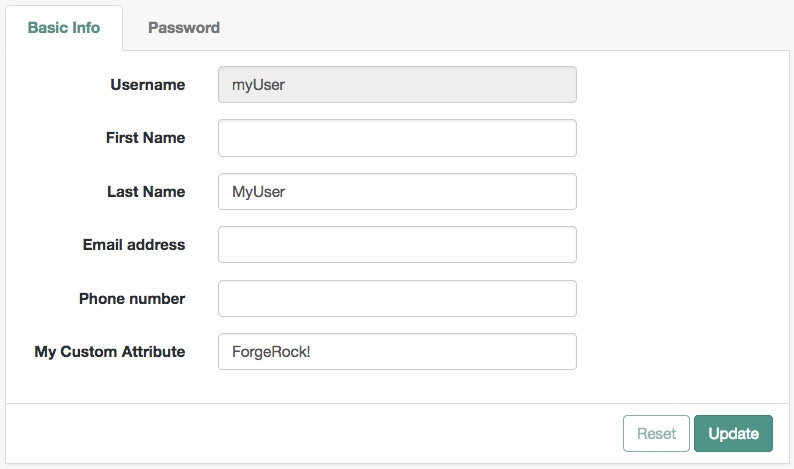
The UI user profile page now shows the custom attribute, and users are able to read and write its values:
5. Once you are satisfied with the changes, deploy the output in the `build` directory to the `/path/to/tomcat/webapps/am/XUI/` directory of your AM instances.
You don't need to restart the AM instance. Subsequent visits to the UI pages will use the rebuilt files.
## Customize identity data storage with an IdRepo plugin
AM maps user and group identities to realms using datastores. Datastores rely on a Java identity repository (`IdRepo`) plugin to interact with the identity store that stores the users and groups.
This section describes how to create a custom IdRepo plugin. AM includes built-in support for LDAP identity stores. For most deployments, you don't need to create your own IdRepo plugin. Only create custom IdRepo plugins for deployments with particular requirements that aren't met by the built-in AM functionality.
### IdRepo plugin inheritance
Your IdRepo plugin class must extend the `com.sun.identity.idm.IdRepo` abstract class, and must include a constructor method that takes no arguments.
### IdRepo plugin lifecycle
When AM instantiates your IdRepo plugin, it calls the `initialize()` method.
```java
public void initialize(Map configParams)
```
`configParams` are service configuration parameters for the realm where the IdRepo plugin is configured. They set up communication with the underlying identity store. AM calls the `initialize()` method once, and considers the identity store ready for use.
If you encounter errors or exceptions during initialization, catch and store them in your plugin for use later when AM calls other plugin methods.
After initialization, AM calls the `addListener()` and `removeListener()` methods to register listeners that inform AM client code of changes to identities managed by your IdRepo.
```none
public int addListener(SSOToken token, IdRepoListener listener)
public void removeListener()
```
Your IdRepo plugin must handle listener registration, and return events to AM through the `IdRepoListener`.
When stopping, AM calls your IdRepo plugin `shutdown()` method.
```none
public void shutdown()
```
You don't need to implement the `shutdown()` method, unless your IdRepo plugin has shutdown work of its own to do, such as closing connections to the underlying identity store.
### IdRepo plugin capabilities
Your IdRepo plugin provides AM with a generic means to manage identities, and to create, read, update, delete, and search identities. *Identities* include users and groups, and special identity types such as roles, realms, and agents. In order for AM to determine your plugin's capabilities, it calls the methods described in this section.
#### getSupportedTypes()
```none
public Set getSupportedTypes()
```
The `getSupportedTypes()` method returns a set of `IdType` objects, such as `IdType.USER` and `IdType.GROUP`. You can either hard-code the supported types in your plugin, or make them configurable through the IdRepo service.
#### getSupportedOperations()
```none
public Set getSupportedOperations(IdType type)
```
The `getSupportedOperations()` method returns a set of `IdOperation` objects, such as `IdOperation.CREATE` and `IdOperation.EDIT`. You can either hard-code these operations, or make them configurable.
#### supportsAuthentication()
```none
public boolean supportsAuthentication()
```
The `supportsAuthentication()` method returns `true` if your plugin supports the `authenticate()` method.
### IdRepo plugin implementation
Your IdRepo plugin implements operational methods, depending on what you support. These methods perform the operations in your datastore.
* Create
AM calls `create()` to provision a new identity in the repository, where `name` is the new identity's name, and `attrMap` holds the attributes names and values.
```none
public String create(SSOToken token, IdType type, String name, Map attrMap)
throws IdRepoException, SSOException
```
* Read
AM calls the following methods to retrieve identities in the identity store, and to check account activity. If your datastore doesn't support binary attributes, return an empty `Map` for `getBinaryAttributes()`.
```none
public boolean isExists(
SSOToken token,
IdType type,
String name
) throws IdRepoException, SSOException
public boolean isActive(
SSOToken token,
IdType type,
String name
) throws IdRepoException, SSOException
public Map getAttributes(
SSOToken token,
IdType type,
String name
) throws IdRepoException, SSOException
public Map getAttributes(
SSOToken token,
IdType type,
String name,
Set attrNames
) throws IdRepoException, SSOException
public Map getBinaryAttributes(
SSOToken token,
IdType type,
String name,
Set attrNames
) throws IdRepoException, SSOException
public RepoSearchResults search(
SSOToken token,
IdType type,
String pattern,
Map avPairs,
boolean recursive,
int maxResults,
int maxTime,
Set returnAttrs
) throws IdRepoException, SSOException
public RepoSearchResults search(
SSOToken token,
IdType type,
String pattern,
int maxTime,
int maxResults,
Set returnAttrs,
boolean returnAllAttrs,
int filterOp,
Map avPairs,
boolean recursive
) throws IdRepoException, SSOException
```
* Edit
AM calls the following methods to update a subject in the identity store.
```none
public void setAttributes(
SSOToken token,
IdType type,
String name,
Map attributes,
boolean isAdd
) throws IdRepoException, SSOException
public void setBinaryAttributes(
SSOToken token,
IdType type,
String name,
Map attributes,
boolean isAdd
) throws IdRepoException, SSOException
public void removeAttributes(
SSOToken token,
IdType type,
String name,
Set attrNames
) throws IdRepoException, SSOException
public void modifyMemberShip(
SSOToken token,
IdType type,
String name,
Set members,
IdType membersType,
int operation
) throws IdRepoException, SSOException
public void setActiveStatus(
SSOToken token,
IdType type,
String name,
boolean active
)
```
* Authenticate
AM calls the `authenticate()` method with the credentials provided.
```none
public boolean authenticate(Callback[] credentials)
throws IdRepoException, AuthLoginException
```
* Delete
The `delete()` method removes the subject from the identity store. The `name` specifies the subject.
```none
public void delete(SSOToken token, IdType type, String name)
throws IdRepoException, SSOException
```
* Service
The `IdOperation.SERVICE` operation is rarely used in recent AM deployments.
### IdRepo plugin deployment
When you build your IdRepo plugin, include `openam-core-8.1.0.jar` in the classpath. This file is found under `WEB-INF/lib/` where AM is deployed.
You can either package your plugin as a `.jar` file, and add it to `WEB-INF/lib/`, or add the classes under `WEB-INF/classes/`.
#### Register your plugin with AM
The steps in this procedure use a number of AM API interfaces and annotations. Click the following links to view the *AM Public API JavaDoc*:
* [PluginTools](../_attachments/apidocs/org/forgerock/openam/plugins/PluginTools.html)
* [AmPlugin](../_attachments/apidocs/org/forgerock/openam/plugins/AmPlugin.html)
* [IdRepoConfig](../_attachments/apidocs/org/forgerock/openam/annotations/sm/IdRepoConfig.html)
Register your custom IdRepo plugin with the `PluginTools` interface as follows:
1. Use the `@IdRepoConfig` annotation on your configuration interface, as shown below:
```java
package com.example.custom;
import java.util.Optional;
import org.forgerock.openam.annotations.sm.Attribute;
import org.forgerock.openam.annotations.sm.IdRepoConfig;
/**
* Custom IdRepo config.
*/
@IdRepoConfig(name = "MyIdRepo")
public interface CustomIdRepoConfig {
/**
* The IdRepo implementation fully qualified class name.
*
* @return The implementation class name.
*/
@Attribute(order = 10, requiredValue = true)
default String sunIdRepoClass() {
return CustomIdRepo.class.getCanonicalName();
}
/**
* Sets the connection pool minimum size.
*
* @return The connection pool minimum size.
*/
@Attribute(order = 20)
default Optional connectionPoolMinSize() {
return Optional.of(1);
}
/**
* Sets the connection pool max size.
*
* @return The connection pool max size.
*/
@Attribute(order = 30)
default Optional connectionPoolMaxSize() {
return Optional.of(10);
}
}
```
2. Create a `.properties` file based on the name you provided in the configuration interface; for example, `MyIdRepo.properties`.
The contents of the file might resemble the following:
```properties
CustomIdRepoConfig=Custom IdRepo
sunIdRepoClass=LDAPv3 Repository Plug-in Class Name
connectionPoolMinSize=LDAP Connection Pool Minimum Size
connectionPoolMaxSize=LDAP Connection Pool Maximum Size
```
3. Create a class that implements `AmPlugin`, and uses the `PluginTools` interface to handle the following events:
* `onInstall()`
Call the `pluginTools.installIdRepo` function with your configuration class as the parameter.
* `onStartup()`
Call the `pluginTools.startService` function with your configuration class as the parameter.
* `upgrade()`
Call the `pluginTools.upgradeIdRepo` function with your configuration class as the parameter.
A sample custom plugin class follows:
```java
package com.example.custom;
import javax.inject.Inject;
import org.forgerock.openam.plugins.AmPlugin;
import org.forgerock.openam.plugins.PluginException;
import org.forgerock.openam.plugins.PluginTools;
import org.forgerock.openam.plugins.StartupType;
/**
* A custom IdRepo plugin. This uses the plugin framework to install the custom identity store.
*/
public class CustomIdRepoPlugin implements AmPlugin {
private static final String CURRENT_VERSION = "1.0.0";
private PluginTools pluginTools;
/**
* The constructor.
*
* @param pluginTools The PluginTools instance.
*/
@Inject
public CustomIdRepoPlugin(PluginTools pluginTools) {
this.pluginTools = pluginTools;
}
@Override
public String getPluginVersion() {
return CustomIdRepoPlugin.CURRENT_VERSION;
}
@Override
public void onInstall() throws PluginException {
pluginTools.installIdRepo(CustomIdRepoConfig.class);
}
@Override
public void onStartup(StartupType startupType) throws PluginException {
pluginTools.startService(CustomIdRepoConfig.class);
}
@Override
public void upgrade(String fromVersion) throws PluginException {
pluginTools.upgradeIdRepo(CustomIdRepoConfig.class);
}
}
```
4. Create a file at the path `META-INF/services/org.forgerock.openam.plugins.AmPlugin` with the following contents:
`com.example.custom.CustomIdRepoPlugin`
| | |
| - | ---------------------------------------------------------------------- |
| | If you don't create this file, AM won't pick up the custom repository. |
#### Use your new IdRepo plugin
1. Restart AM or the container in which it runs.
2. Configure a new ID repo in AM using your plugin:
* In the AM admin UI, go to Realms > *realm name* > Identity Stores.
* Select Add Identity Store, enter an ID, and select the type of identity store corresponding to your custom IdRepo plugin.
* You can now add values to any custom properties you configured to be visible in the UI.
3. Go to Realms > *realm name* > Identities, and create a new identity.
If your plugin supports authentication, users can authenticate using a URL similar to the following:
```none
https://am.example.com:8443/am/XUI/?realm=/myRealm&service=myTree#login
```