---
title: Resource owner password credentials grant with PingAM
description: This example shows how a client service accesses an OAuth 2.0-protected resource by using resource owner password credentials.
component: pinggateway
version: 2026
page_id: pinggateway:gateway-guide:oauth2-resourceowner
canonical_url: https://docs.pingidentity.com/pinggateway/2026/gateway-guide/oauth2-resourceowner.html
revdate: 2025-04-01T17:53:34Z
---
# Resource owner password credentials grant with PingAM
This example shows how a client service accesses an OAuth 2.0-protected resource by using resource owner password credentials.
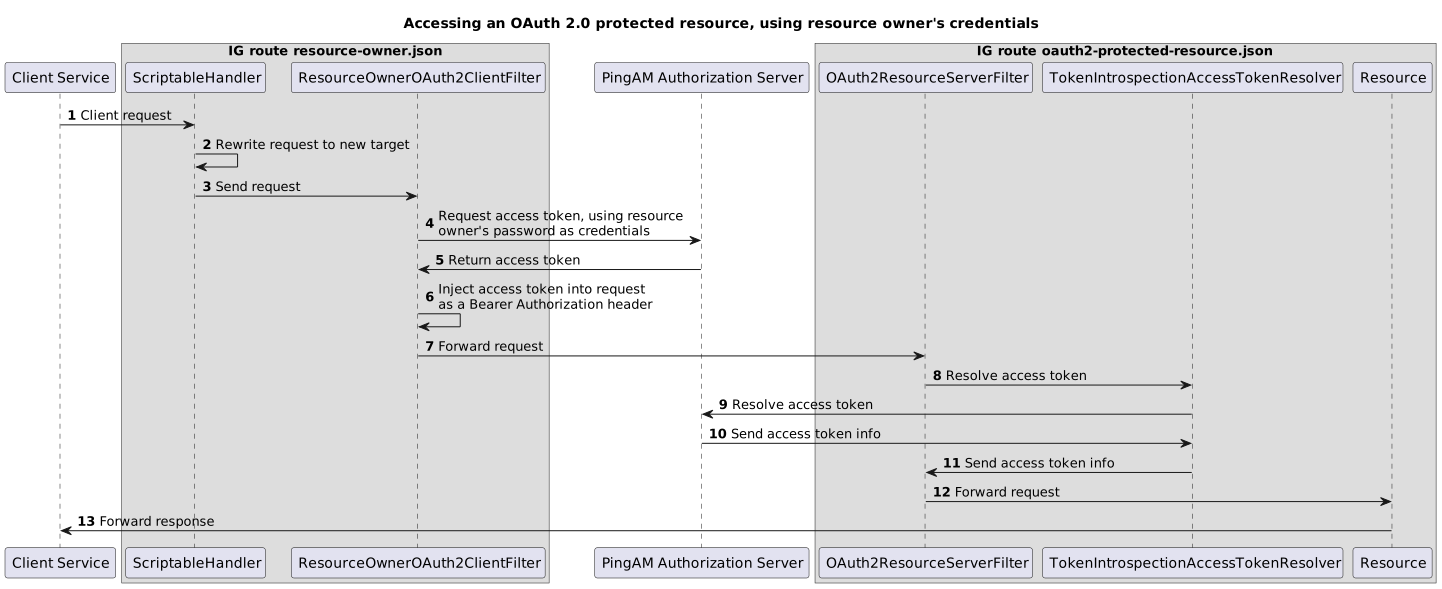
| | |
| - | --------------------------------------------------------------------------------------------------------------------------------------------------------------------------------------------------------------------------------------- |
| | This procedure uses the *Resource Owner Password Credentials* grant type. As suggested in [The OAuth 2.0 Authorization Framework](https://datatracker.ietf.org/doc/html/rfc6749#section-10.7), use other grant types whenever possible. |
1. Set up the AM as an Authorization Server:
1. Register a PingGateway agent with the following values, as described in [Register a PingGateway agent in AM](preface.html#register-agent-am):
* Agent ID: `ig_agent`
* Password: `password`
* Token Introspection: `Realm Only`
| | |
| - | ----------------------------------------------------------------------------------------------------------------- |
| | Use secure passwords in a production environment. Consider using a password manager to generate secure passwords. |
2. Create an OAuth 2.0 Authorization Server:
1. Select Services > Add a Service > OAuth2 Provider.
2. Add a service with the default values.
3. Create an OAuth 2.0 client to request access tokens, using the resource owner's password for authentication:
1. Select Applications > OAuth 2.0 > Clients, and add a client with the following values:
* Client ID : `resource-owner-client`
* Client secret : `password`
* Scope(s) : `client-scope`
2. (Optional) On the Core tab, switch to using a client secret associated with a secret label by setting a Secret Label Identifier and mapping the label to a secret.
To learn more, read [Create a client profile](https://docs.pingidentity.com/pingam/8.1/am-oauth2/oauth2-register-client.html#client-secret-label-identifier) and [Map and rotate secrets](https://docs.pingidentity.com/pingam/8.1/security/secret-mapping.html) in the AM documentation.
3. On the Advanced tab, select the following value:
* Grant Types : `Resource Owner Password Credentials`
2. Set up PingGateway:
1. Set up PingGateway for HTTPS, as described in [Configure PingGateway for TLS (server-side)](../installation-guide/securing-connections.html#server-side-tls).
2. Set an environment variable for the PingGateway agent password, and then restart PingGateway:
```console
$ export AGENT_SECRET_ID='cGFzc3dvcmQ='
```
The password is retrieved by a SystemAndEnvSecretStore, and must be base64-encoded.
3. Add the following route to PingGateway:
* Linux
`$HOME/.openig/config/routes/oauth2-protected-resource.json`
* Windows
`%appdata%\OpenIG\config\routes\oauth2-protected-resource.json`
```json
{
"name": "oauth2-protected-resource",
"condition": "${find(request.uri.path, '^/oauth2-protected-resource')}",
"heap": [
{
"name": "SystemAndEnvSecretStore-1",
"type": "SystemAndEnvSecretStore"
},
{
"name": "AmService-1",
"type": "AmService",
"config": {
"agent": {
"username": "ig_agent",
"passwordSecretId": "agent.secret.id"
},
"secretsProvider": "SystemAndEnvSecretStore-1",
"url": "http://am.example.com:8088/openam/"
}
}
],
"handler": {
"type": "Chain",
"config": {
"filters": [
{
"name": "OAuth2ResourceServerFilter-1",
"type": "OAuth2ResourceServerFilter",
"config": {
"scopes": [ "client-scope" ],
"requireHttps": false,
"accessTokenResolver": {
"name": "TokenIntrospectionAccessTokenResolver-1",
"type": "TokenIntrospectionAccessTokenResolver",
"config": {
"amService": "AmService-1",
"providerHandler": {
"type": "Chain",
"config": {
"filters": [
{
"type": "HttpBasicAuthenticationClientFilter",
"config": {
"username": "ig_agent",
"passwordSecretId": "agent.secret.id",
"secretsProvider": "SystemAndEnvSecretStore-1"
}
}
],
"handler": "ForgeRockClientHandler"
}
}
}
}
}
}
],
"handler": {
"type": "StaticResponseHandler",
"config": {
"status": 200,
"headers": {
"Content-Type": [ "text/html; charset=UTF-8" ]
},
"entity": "Access Granted
"
}
}
}
}
}
```
Source: [oauth2-protected-resource.json](../_attachments/config/routes/oauth2-protected-resource.json)
Notice the following features of the route:
* The route matches requests to `/oauth2-protected-resource`.
* The `OAuth2ResourceServerFilter` expects an OAuth 2.0 access token in the header of the incoming request, with the scope `client-scope`.
* The filter uses a TokenIntrospectionAccessTokenResolver to resolve the access token. The introspect endpoint is protected with HTTP Basic Authentication, and the `providerHandler` uses an HttpBasicAuthenticationClientFilter to provide the resource server credentials.
* For convenience in this test, `"requireHttps"` is false. In production environments, set it to true.
* After the filter successfully validates the access token, it creates a new context from the Authorization Server response, containing information about the access token.
* The StaticResponseHandler returns a message that access is granted.
4. Add the following route to PingGateway:
* Linux
`$HOME/.openig/config/routes/resource-owner.json`
* Windows
`%appdata%\OpenIG\config\routes\resource-owner.json`
```json
{
"name": "resource-owner",
"baseURI": "http://ig.example.com:8080",
"condition" : "${find(request.uri.path, '^/resource-owner')}",
"heap" : [ {
"name" : "clientSecretAccessTokenExchangeHandler",
"type" : "Chain",
"capture" : "all",
"config" : {
"filters" : [ {
"type" : "ClientSecretBasicAuthenticationFilter",
"config" : {
"clientId" : "resource-owner-client",
"clientSecretId" : "client.secret.id",
"secretsProvider" : {
"type" : "Base64EncodedSecretStore",
"config" : {
"secrets" : {
"client.secret.id" : "cGFzc3dvcmQ="
}
}
}
}
} ],
"handler" : "ForgeRockClientHandler"
}
}, {
"name" : "oauth2EnabledClientHandler",
"type" : "Chain",
"capture" : "all",
"config" : {
"filters" : [ {
"type" : "ResourceOwnerOAuth2ClientFilter",
"config" : {
"tokenEndpoint" : "http://am.example.com:8088/openam/oauth2/access_token",
"endpointHandler": "clientSecretAccessTokenExchangeHandler",
"scopes" : [ "client-scope" ],
"username" : "demo",
"passwordSecretId" : "user.password.secret.id",
"secretsProvider" : {
"type" : "Base64EncodedSecretStore",
"config" : {
"secrets" : {
"user.password.secret.id" : "Q2g0bmczMXQ="
}
}
}
}
} ],
"handler" : "ForgeRockClientHandler"
}
} ],
"handler" : {
"type" : "ScriptableHandler",
"config" : {
"type" : "application/x-groovy",
"clientHandler" : "oauth2EnabledClientHandler",
"source" : [ "request.uri.path = '/oauth2-protected-resource'", "return http.send(context, request);" ]
}
}
}
```
Source: [resource-owner.json](../_attachments/config/routes/resource-owner.json)
Note the following features of the route:
* The route matches requests to `/resource-owner`.
* The ScriptableHandler rewrites the request to target it to `/oauth2-protected-resource`, and then calls the HTTP client, that has been redefined to use the oauth2EnabledClientHandler.
* The oauth2EnabledClientHandler calls the ResourceOwnerOAuth2ClientFilter to obtain an access token from AM.
* The ResourceOwnerOAuth2ClientFilter calls the clientSecretAccessTokenExchangeHandler to exchange tokens on the authorization endpoint. The demo user authenticates with their username and password.
* The clientSecretAccessTokenExchangeHandler calls a ClientSecretBasicAuthenticationFilter to authenticate the client through the HTTP basic access authentication scheme, and a ForgeRockClientHandler to propagate the request.
* The route `oauth2-protected-resource.json` uses the AM introspection endpoint to resolve the access token and display its contents.
3. Test the setup:
1. In your browser's privacy or incognito mode, go to to .
2. If you see warnings that the site isn't secure, respond to the warnings to access the site.
A message shows that access is granted.