---
title: JWT validation with PingAM
description: The following examples show how to use the JwtValidationFilter to validate signed and encrypted JWT.
component: pinggateway
version: 2026
page_id: pinggateway:gateway-guide:validate-jwt
canonical_url: https://docs.pingidentity.com/pinggateway/2026/gateway-guide/validate-jwt.html
revdate: 2025-10-15T18:45:22Z
keywords: ["Configuration", "JSON"]
---
# JWT validation with PingAM
The following examples show how to use the [JwtValidationFilter](../reference/JwtValidationFilter.html) to validate signed and encrypted JWT.
The JwtValidationFilter can access JWTs in the request, provided in a header, query parameter, form parameter, cookie, or other way. If an upstream filter makes the JWT available in the request's attributes context, the JwtValidationFilter can access the JWT through the context, for example, at `${attributes.jwtToValidate}`.
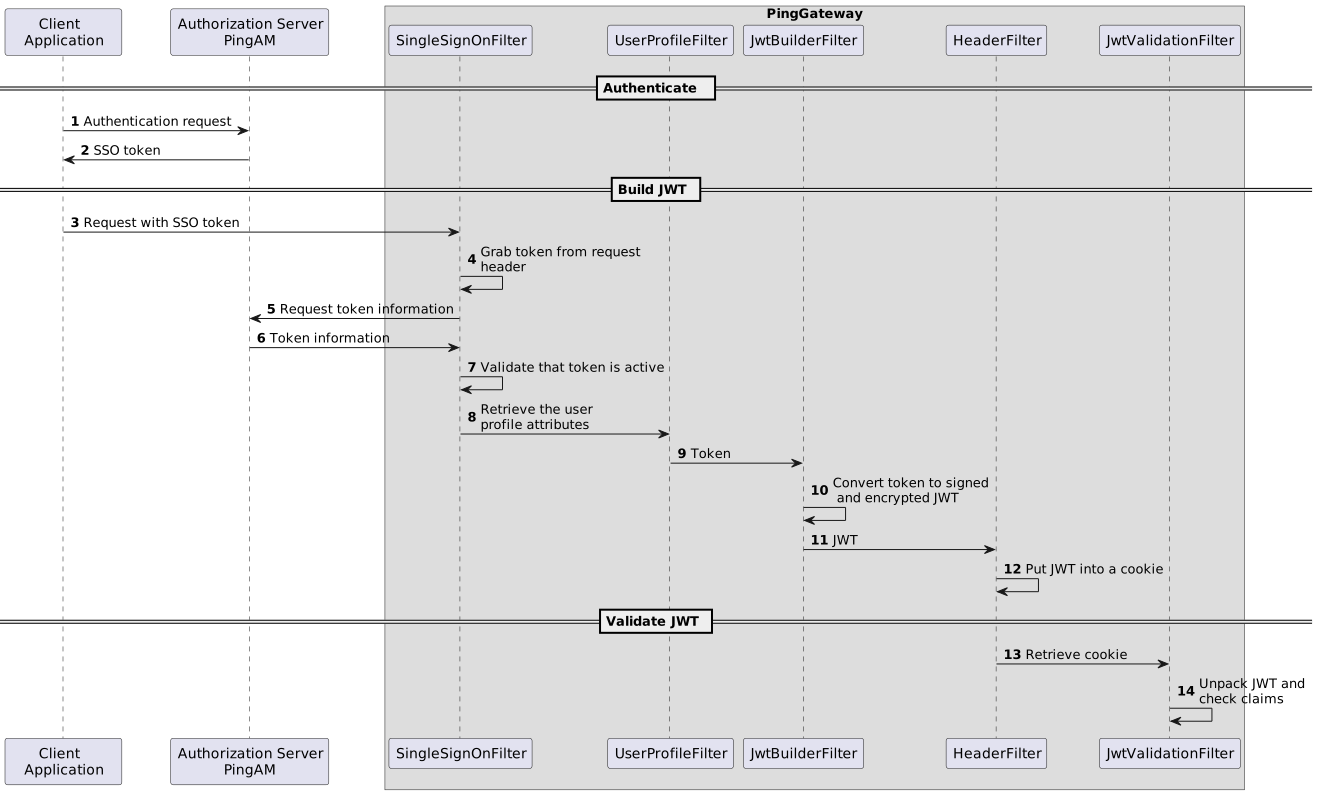
For convenience, the JWT in this example is provided by the JwtBuilderFilter, and passed to the JwtValidationFilter in a cookie.
The following figure shows the flow of information in the example:
Before you begin, set up and test the example in [Pass runtime data in a JWT signed with PEM then encrypted with a symmetric key](data-downstream.html#runtime-sign-then-encrypt).
1. Add a second route to PingGateway, replacing value of the property `secretsDir` with the directory for the PEM files:
* Linux
`$HOME/.openig/config/routes/jwt-validate.json`
* Windows
`%appdata%\OpenIG\config\routes\jwt-validate.json`
```json
{
"name": "jwt-validate",
"condition": "${find(request.uri.path, '^/jwt-validate')}",
"properties": {
"secretsDir": "path/to/secrets"
},
"capture": "all",
"heap": [
{
"name": "SystemAndEnvSecretStore",
"type": "SystemAndEnvSecretStore",
"config": {
"mappings": [{
"secretId": "id.decrypted.key.for.signing.jwt",
"format": "BASE64"
}]
}
},
{
"name": "pemPropertyFormat",
"type": "PemPropertyFormat",
"config": {
"decryptionSecretId": "id.decrypted.key.for.signing.jwt",
"secretsProvider": "SystemAndEnvSecretStore"
}
},
{
"name": "FileSystemSecretStore-1",
"type": "FileSystemSecretStore",
"config": {
"format": "PLAIN",
"directory": "&{secretsDir}",
"mappings": [{
"secretId": "id.encrypted.key.for.signing.jwt.pem",
"format": "pemPropertyFormat"
}, {
"secretId": "symmetric.key.for.encrypting.jwt",
"format": {
"type": "SecretKeyPropertyFormat",
"config": {
"format": "BASE64",
"algorithm": "AES"
}
}
}]
}
}
],
"handler": {
"type": "Chain",
"config": {
"filters": [{
"type": "JwtValidationFilter",
"config": {
"jwt": "${request.cookies['my-jwt'][0].value}",
"secretsProvider": "FileSystemSecretStore-1",
"decryptionSecretId": "symmetric.key.for.encrypting.jwt",
"customizer": {
"type": "ScriptableJwtValidatorCustomizer",
"config": {
"type": "application/x-groovy",
"source": [
"builder.claim('name', JsonValue::asString, isEqualTo('demo'))",
"builder.claim('email', JsonValue::asString, isEqualTo('demo@example.com'));"
]
}
},
"failureHandler": {
"type": "ScriptableHandler",
"config": {
"type": "application/x-groovy",
"source": [
"def response = new Response(Status.FORBIDDEN)",
"response.headers['Content-Type'] = 'text/html; charset=utf-8'",
"def errors = contexts.jwtValidationError.violations.collect{it.description}",
"def display = \"Can't validate JWT:
${contexts.jwtValidationError.jwt} \"",
"display <<=\"
For the following errors:
${errors.join(\"
\")}\"",
"response.entity=display as String",
"return response"
]
}
}
}
}],
"handler": {
"type": "StaticResponseHandler",
"config": {
"status": 200,
"headers": {
"Content-Type": [ "text/html; charset=UTF-8" ]
},
"entity": [
"",
" Validated JWT:
",
" ${contexts.jwtValidation.value}
",
" JWT payload:
",
" ${contexts.jwtValidation.info}
",
""
]
}
}
}
}
}
```
Source: [jwt-validate.json](../_attachments/config/routes/jwt-validate.json)
Notice the following features of the route:
* The route matches requests to `/jwt-validate`.
* The JwtValidationFilter takes the value of the JWT from `my-jwt`.
* The SystemAndEnvSecretStore, PemPropertyFormat, and FileSystemSecretStore objects in the heap are the same as those in the route to create the JWT. The JwtValidationFilter uses the same objects to validate the JWT.
* The JwtBuilderFilter `customizer` requires that the JWT claims match `name:demo` and `email:demo@example.com`.
* If the JWT is validated, the StaticResponseHandler displays the validated value. Otherwise, the FailureHandler displays the reason for the failed validation.
2. Test the setup:
1. In your browser's privacy or incognito mode, go to and accept the server certificate to build a JWT.
2. Sign on to AM as user `demo`, password `Ch4ng31t`. The sample application displays the signed JWT.
3. Go to to validate the JWT. The validated JWT and its payload are displayed.
4. Test the setup again, but sign on to AM as a different user, or change the email address of the demo user in AM. The JWT isn't validated, and an error is displayed.