---
title: Choose audit event handlers
description: An audit event handler manages audit events, sends audit output to a defined location, and controls the output format. IDM provides a number of default audit event handlers, and audit event handlers for third-party log management tools.
component: pingidm
version: 7.3
page_id: pingidm:audit-guide:configuring-topic-handlers
canonical_url: https://docs.pingidentity.com/pingidm/8.1/audit-guide/configuring-topic-handlers.html
llms_txt: https://docs.pingidentity.com/pingidm/llms.txt
docs_for_agents: https://developer.pingidentity.com/build-with-ai/docs-for-agents.md
keywords: ["Audit", "Logs", "Configuration", "Topics", "Events", "Handlers"]
superseded_by: https://docs.pingidentity.com/pingidm/8.1/audit-guide/configuring-topic-handlers.html
section_ids:
audit-json-handler: JSON audit event handler
audit-json-stdout-handler: JSON standard output audit event handler
audit-csv-handler: CSV audit event handler
audit-csv-min: Restrictions on configuring the CSV audit handler in the admin UI
audit-csv-tamper: Configure Tamper Protection for CSV Audit Logs
audit-router-handler: Router Audit Event Handler
audit-repo-handler: Repository Audit Event Handler
audit-jms-handler: JMS audit event handler
dependencies_for_jms_messaging: Dependencies for JMS messaging
audit-jms-config: Configure the JMS audit event handler
configure_ssl_for_apache_activemq_artemis: Configure SSL for Apache ActiveMQ Artemis
audit-jms-message: JMS message format
audit-jms-tibco-ssl: JMS, TIBCO, and SSL
audit-syslog-handler: Syslog audit event handler
---
# Choose audit event handlers
An audit event handler manages audit events, sends audit output to a defined location, and controls the output format. IDM provides a number of default audit event handlers, and audit event handlers for third-party log management tools.
Each audit event handler has a set of [Common audit event handler properties](audit-event-prop.html). Specific audit event handlers have [additional configuration properties](event-handler-config.html).
The standard configuration for a new install includes the following handlers:
* `JsonAuditEventHandler`
Default state: Enabled
Property: `openidm.audit.handler.json.enabled`
* `JsonStdoutAuditEventHandler`
Default state: Disabled
Property: `openidm.audit.handler.stdout.enabled`
* `RepositoryAuditEventHandler`
Default state: Disabled
Property: `openidm.audit.handler.repo.enabled`
| | |
| - | ----------------------------------------------------------------------------------------------------------------------------------------- |
| | To change the enable state for any of these handlers, use [Property value substitution](../setup-guide/using-property-substitution.html). |
| | |
| - | --------------------------------------------------------------------------------------------------------------------------------------------------------------------------------------------------------------------------------------------------------- |
| | ForgeRock recommends that you *DO NOT* configure an audit event handler that points to the same repo IDM uses (`RepositoryAuditEventHandler`), as this causes audit records to compete with IDM for resources on the database, which impacts performance. |
> **Collapse: List the Active Audit Event Handlers**
>
> This command returns the available audit event handlers, along with the audit configuration (in the `conf/audit.json` file):
>
> ```
> curl \
> --header "X-OpenIDM-Username: openidm-admin" \
> --header "X-OpenIDM-Password: openidm-admin" \
> --header "Accept-API-Version: resource=1.0" \
> --request POST \
> "http://localhost:8080/openidm/audit?_action=availableHandlers"
> ```
>
> The output includes the configured options for each audit event handler.
>
> To view the audit configuration in the admin UI, click Configure > System Preferences > Audit.
The following sections show how to configure the standard audit event handlers. For additional audit event handlers, refer to [Audit event handler configuration](event-handler-config.html).
## JSON audit event handler
The JSON audit event handler logs events as JSON objects to a set of JSON files. This is the default handler for queries on the audit logs.
| | |
| - | --------------------------------------------------------------------------------------------------------------------------------------------------------------------------------------------------------------------------------------------------------------------------------------------------------------------- |
| | Result paging can improve responsiveness when scanning large numbers of audit records through the IDM REST API. The default JSON audit handler does not support paging. If you need to page audit results, use a handler that does support paging, such as the [Repository Audit Event Handler](#audit-repo-handler). |
The following excerpt of an `audit.json` file shows a sample JSON audit event handler configuration:
```json
"eventHandlers" : [
{
"class" : "org.forgerock.audit.handlers.json.JsonAuditEventHandler",
"config" : {
"name" : "json",
"enabled" : {
"$bool" : "&{openidm.audit.handler.json.enabled|true}"
},
"logDirectory" : "&{idm.data.dir}/audit",
"buffering" : {
"maxSize" : 100000,
"writeInterval" : "100 millis"
},
"topics" : [
"access",
"activity",
"sync",
"authentication",
"config"
]
}
},
```
A JSON audit event handler configuration includes the following mandatory properties:
* `name`
The audit event handler name (`json`).
* `logDirectory`
The name of the directory in which the JSON log files should be written, relative to the *working location*. For more information on the working location, refer to [Startup configuration](../install-guide/startup-configuration.html).
You can use property value substitution to direct log files to another location on the filesystem. For more information, refer to [Property value substitution](../setup-guide/using-property-substitution.html).
* `buffering` - `maxSize`
The maximum number of events that can be buffered. The default (and minimum) number of buffered events is 100000.
* `buffering` - `writeInterval`
The delay after which the file-writer thread is scheduled to run after encountering an empty event buffer. The default delay is 100 milliseconds.
* `topics`
The list of topics for which audit events are logged.
One JSON file is created for each audit topic that is included in this list:
`access.audit.json`\
`activity.audit.json`\
`authentication.audit.json`\
`config.audit.json`\
`sync.audit.json`
| | |
| - | -------------------------------------------------------------------------------------------------------------------------------------------------------------------------------------------------------------------------- |
| | Reconciliations are available as an audit topic, but are not enabled by default. To enable auditing on reconciliations, add `recon` to the list of topics. This will add a `recon.audit.json` file to the audit directory. |
If you want to get information about a reconciliation without enabling the audit topic, you can get similar details from the `recon/assoc` endpoint. For more information about recon association data, refer to [Viewing Reconciliation Association Details](../synchronization-guide/manage-recon.html#recon-assoc).
For a description of all the configurable properties of the JSON audit event handler, refer to [JSON Audit Event Handler Properties](event-handler-config.html#audit-config-prop-json).
The following excerpt of an `authentication.audit.json` file shows the log message format for authentication events:
```json
{
"context": {
"ipAddress": "0:0:0:0:0:0:0:1"
},
"entries": [{
"moduleId": "JwtSession",
"result": "FAILED",
"reason": {},
"info": {}
},
...
{
"moduleId": "INTERNAL_USER",
"result": "SUCCESSFUL",
"info": {
"org.forgerock.authentication.principal": "openidm-admin"
}
}],
"principal": ["openidm-admin"],
"result": "SUCCESSFUL",
"userId": "openidm-admin",
"transactionId": "94b9b85f-fbf1-4c4c-8198-ab1ff52ed0c3-24",
"timestamp": "2016-10-11T12:12:03.115Z",
"eventName": "authentication",
"trackingIds": ["5855a363-a1e0-4894-a2dc-fd5270fb99d1"],
"_id": "94b9b85f-fbf1-4c4c-8198-ab1ff52ed0c3-30"
} {
"context": {
"component": "internal/user",
"roles": ["internal/role/openidm-admin", "internal/role/openidm-authorized"],
"ipAddress": "0:0:0:0:0:0:0:1",
"id": "openidm-admin",
"moduleId": "INTERNAL_USER"
}...
```
## JSON standard output audit event handler
Standard output is also known as `stdout`. A JSON stdout handler sends messages to standard output. The following code is an excerpt of the `audit.json` file, which depicts a sample JSON stdout audit event handler configuration:
```json
{
"class" : "org.forgerock.audit.handlers.json.stdout.JsonStdoutAuditEventHandler",
"config" : {
"name" : "stdout",
"enabled" : {
"$bool" : "&{openidm.audit.handler.stdout.enabled|false}"
},
"topics" : [
"access",
"activity",
"sync",
"authentication",
"config"
]
}
}...
```
## CSV audit event handler
The CSV audit event handler logs events to a comma-separated value (CSV) file.
| | |
| - | ------------------------------------------------------------------------------------------------------------------------------------------------------------- |
| | The CSV handler does not sanitize messages when writing to CSV log files.Do not open CSV logs in spreadsheets and other applications that treat data as code. |
The following excerpt of the `audit.json` file shows a sample CSV handler configuration:
```json
"eventHandlers" : [
{
"class" : "org.forgerock.audit.events.handlers.csv.CSVAuditEventHandler",
"config" : {
"name" : "csv",
"logDirectory" : "&{idm.data.dir}/audit",
"topics" : [ "access", "activity", "sync", "authentication", "config" ]
}
}
```
The `logDirectory` indicates the name of the directory in which log files should be written, relative to the *working location*. For more information on the working location, refer to [Startup configuration](../install-guide/startup-configuration.html).
You can use property value substitution to direct logs to another location on the filesystem. For more information, refer to [Property Value Substitution](../setup-guide/chap-configuration.html#using-property-substitution).
If you set up a custom CSV handler, you may configure over 20 different properties, as described in [Common Audit Event Handler Properties](event-handler-config.html#audit-event-prop).
Audit file names are fixed and correspond to the event being audited:
`access.csv`\
`activity.csv`\
`authentication.csv`\
`config.csv`\
`recon.csv`\
`sync.csv`
### Restrictions on configuring the CSV audit handler in the admin UI
If you configure the CSV handler in the admin UI, set at least the following properties:
* The `logDirectory`, the full path to the directory with audit logs, such as `/path/to/openidm/audit` . You can substitute &{idm.install.dir} for `/path/to/openidm` .
* Differing entries for the quote character, `quoteChar` and delimiter character, `delimiterChar`.
After you have set these options, *do not change them* in the admin UI. Rather, rotate any CSV audit files and edit the configuration properties directly in `conf/audit.json`. Changing the properties in the admin UI generates an error in the console.
* If you enable the CSV tamper-evident configuration, include the `keystoreHandlerName`, *or* a `filename` and `password`. Do not include all three options.
Before including tamper-evident features in the audit configuration, set up the keys as described in [Configure Keys to Protect Audit Logs](#tamper-evident-operation).
| | |
| - | --------------------------------------------------------------------------------------------------------------------------------------------------------------------------------------------------------------------------------------------------------------------------------------------------------------- |
| | The `signatureInterval` property supports time settings in a human-readable format (default = 1 hour). Examples of allowable `signatureInterval` settings are:- 3 days, 4 m
- 1 hour, 3 secAllowable time units include:- days, day, d
- hours, hour, h
- minutes, minute, min, m
- seconds, second, sec, s |
### Configure Tamper Protection for CSV Audit Logs
Tamper protection can ensure the integrity of audit logs written to CSV files. You can activate tamper protection in the `audit.json` file directly, or by editing the CSV Audit Event Handler in the admin UI.
Before you change the audit configuration for tamper protection, move or delete any current audit CSV files:
```
mv /path/to/openidm/audit/*.csv /tmp
```
Tamper protection requires keys in the default IDM keystore. If you have not already done so, import a certificate into the keystore, or create your own self-signed certificate:
> **Collapse: Configure Keys to Protect Audit Logs**
>
> IDM includes a Java Cryptography Extension Keystore (JCEKS), `keystore.jceks`, in the `/path/to/openidm/security` directory.
>
> Initialize a key pair using the RSA encryption algorithm, using the SHA256 hashing mechanism:
>
> ```
> keytool \
> -genkeypair \
> -alias "Signature" \
> -dname CN=openidm \
> -keystore /path/to/openidm/security/keystore.jceks \
> -storepass changeit \
> -storetype JCEKS \
> -keypass changeit \
> -keyalg RSA \
> -sigalg SHA256withRSA
> ```
>
> You can now set up a secret key, in Hash-based message authentication code, using the SHA256 hash function (`HmacSHA256`):
>
> ```
> keytool \
> -genseckey \
> -alias "Password" \
> -keystore /path/to/openidm/security/keystore.jceks \
> -storepass changeit \
> -storetype JCEKS \
> -keypass changeit \
> -keyalg HmacSHA256 \
> -keysize 256
> ```
To configure tamper protection, add a `security` property to the CSV audit handler configuration in your `conf/audit.conf` file:
```json
{
"class" : "org.forgerock.audit.handlers.csv.CsvAuditEventHandler",
"config" : {
...
"security" : {
"enabled" : true,
"filename" : "",
"password" : "",
"keyStoreHandlerName" : "openidm",
"signatureInterval" : "10 minutes"
},
...
```
This excerpt shows a tamper-evident configuration where a signature is written to a new line in each CSV file, every 10 minutes. The signature uses the default keystore, configured in the `install-dir/resolver/boot.properties` file. The properties are described in [Common audit event handler properties](audit-event-prop.html).
To configure tamper protection in the admin UI:
1. Click Configure > System Preferences > Audit, and select an existing CSV audit handler, or add a new one.
2. Scroll down to Security, and set the keystore options.
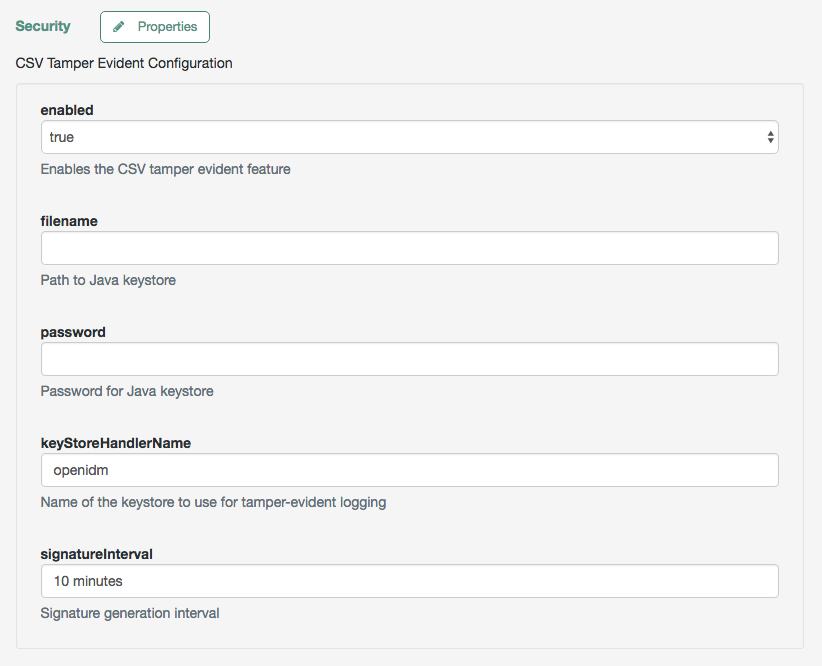
When you have saved the configuration changes, you should see the following files in the `/path/to/openidm/audit` directory:
```
tamper-evident-access.csv
tamper-evident-access.csv.keystore
tamper-evident-activity.csv
tamper-evident-activity.csv.keystore
tamper-evident-authentication.csv
tamper-evident-authentication.csv.keystore
tamper-evident-config.csv
tamper-evident-config.csv.keystore
tamper-evident-recon.csv
tamper-evident-recon.csv.keystore
tamper-evident-sync.csv
tamper-evident-sync.csv.keystore
```
When you have configured tamper protection, you can periodically check the integrity of your log files:
> **Collapse: Check Log File Integrity**
>
> The following command verifies audit files in the `--archive` directory (`audit/`), that belong to the access `--topic`, verified with the `keystore.jceks` keystore, using the CSV audit handler bundle, `forgerock-audit-handler-csv-version.jar`:
>
> ```
> java -jar \
> bundle/forgerock-audit-handler-csv-version.jar \
> --archive audit/ \
> --topic access \
> --keystore security/keystore.jceks \
> --password changeit
> ```
>
> If there are changes to your `tamper-evident-access.csv` file, a message similar to the following displays:
>
> ```
> FAIL tamper-evident-access.csv-2016.05.10-11.05.43 The HMac at row 3 is not correct.
> ```
>
> | | |
> | - | -------------------------------------------------------------------------------------------------------------------------------------------------------------------------------------------------------------------------------------------------------------------------------------------------------------------------------------------------------------------------------------------------------------------------------------------------------------------------------------------------------------------------------------------------------------------------------------------------------------------------------------------------------------------------- |
> | | Note the following restrictions on verifying CSV audit files:- You can only verify audit files that have already been rotated. You cannot verify an audit file that is currently being written to.
>
> - Verification of tampering is supported only for CSV audit files with the following format:
>
> ```json
> "formatting" : {
> "quoteChar" : "\"",
> "delimiterChar" : ",",
> "endOfLineSymbols" : "\n"
> },
> ```
>
> - A tamper-evident audit configuration rotates files automatically and pairs the rotated file with the required keystore file. Files that are rotated manually cannot be verified, as the required keystore information is not appended. |
## Router Audit Event Handler
The router audit event handler logs events to any external or custom endpoint, such as `system/scriptedsql` or `custom-endpoint/myhandler`. It uses target-assigned values of `_id`.
A sample configuration for a `router` event handler is provided in the `audit.json` file in the `openidm/samples/audit-jdbc/conf` directory, and described in [About the Configuration Files](../samples-guide/audit-jdbc.html#audit-config-files). This sample directs log output to a JDBC repository. The audit configuration file (`conf/audit.json`) for the sample shows the following event handler configuration:
```json
{
"class": "org.forgerock.openidm.audit.impl.RouterAuditEventHandler",
"config": {
"name": "router",
"topics" : [ "access", "activity", "sync", "authentication", "config" ],
"resourcePath" : "system/auditdb"
}
},
```
The `resourcePath` property in the configuration indicates that logs should be directed to the `system/auditdb` endpoint. This endpoint, and the JDBC connection properties, are defined in the connector configuration file (`conf/provisioner.openicf-auditdb.json`), as follows:
```json
{
"configurationProperties" : {
"username" : "root",
"password" : "password",
"driverClassName" : "com.mysql.cj.jdbc.Driver",
"url" : "jdbc:mysql://&{openidm.repo.host}:&{openidm.repo.port}/audit",
"autoCommit" : true,
"jdbcDriver" : "com.mysql.cj.jdbc.Driver",
"scriptRoots" : ["&{idm.instance.dir}/tools"],
"createScriptFileName" : "CreateScript.groovy",
"testScriptFileName" : "TestScript.groovy",
"searchScriptFileName" : "SearchScript.groovy"
},
...
```
Include the correct URL or IP address of your remote JDBC repository in the `boot.properties` file for your project.
When JSON information is sent to the router audit event handler, the value of `_id` is replaced with `eventId`.
## Repository Audit Event Handler
The repository audit event handler sends information to a JDBC repository. If you are using ForgeRock Directory Services (DS) as the repository, you cannot enable this audit event handler, because audit data cannot be stored in DS.
| | |
| - | ---------------------------------------------------------------------------------------------------------------------------------------------------------------------------------------- |
| | ForgeRock recommends that you *DO NOT* use the `RepositoryAuditEventHandler`, as this causes audit records to compete with IDM for resources on the database, which impacts performance. |
Log entries are stored in the following tables of a JDBC repository:
* `auditaccess`
* `auditactivity`
* `auditauthentication`
* `auditconfig`
* `auditrecon`
* `auditsync`
You can use the repository audit event handler to generate reports that combine information from multiple tables.
Each of these JDBC tables maps to an object in the database table configuration file (`repo.jdbc.json`). The following excerpt of that file illustrates the mappings for the `auditauthentication` table:
```json
"audit/authentication" : {
"table" : "auditauthentication",
"objectToColumn" : {
"_id" : "objectid",
"transactionId" : "transactionid",
"timestamp" : "activitydate",
"userId" : "userid",
"eventName" : "eventname",
"result" : "result",
"principal" : {"column" : "principals", "type" : "JSON_LIST"},
"context" : {"column" : "context", "type" : "JSON_MAP"},
"entries" : {"column" : "entries", "type" : "JSON_LIST"},
"trackingIds" : {"column" : "trackingids", "type" : "JSON_LIST"},
}
},
```
The tables correspond to the `topics` listed in the `audit.json` file. For example:
```json
{
"class": "org.forgerock.openidm.audit.impl.RepositoryAuditEventHandler",
"config": {
"name": "repo",
"topics" : [ "access", "activity", "sync", "authentication", "config" ]
}
},
```
## JMS audit event handler
The Java Message Service (JMS) is a Java API for sending asynchronous messages between clients. IDM audit information can be handled by the JMS audit event handler, which sends information to message brokers. The message brokers can then forward that information to external log analysis systems.
The JMS audit event handler works with the following message brokers:
* [Apache ActiveMQ Artemis](http://activemq.apache.org/).
For a demonstration, refer to [Direct audit information to a JMS broker](../samples-guide/audit-jms.html).
* [TIBCO Enterprise Message Service](https://tap.tibco.com/storefront/trialware/tibco-enterprise-message-service/prod15032.html), as described in this chapter.
This implementation supports the *publish/subscribe* model. For more information, refer to [Basic JMS API Concepts.](http://docs.oracle.com/javaee/6/tutorial/doc/bncdx.html)
| | |
| - | --------------------------------------------------------------------------------------------------------------------------------------------------------------------------------------------------------------------------------------------------------------------------------------------------------------------- |
| | The JMS audit event handler does not support queries. If you enable JMS, and need to query audit events, you must enable a second audit handler that supports queries. Specify that audit handler in the `audit.json` file with the `handlerForQueries` property, or in the admin UI with the Use For Queries option. |
The JMS audit event handler supports JMS communication, based on the following components:
* A JMS message broker that provides clients with connectivity, along with message storage and message delivery functionality.
* JMS messages that follow a specific format, described in [JMS Message Format](#audit-jms-message).
* Destinations external to IDM and the message broker. IDM (including the audit service) is a *producer* and not a destination. IDM sends messages to a topic in a message broker. Consumers (clients) subscribe to the message broker.
| | |
| - | --------------------------------------------------------------------------------------------------------------------------------------------------------------------------------------------------------------------------------------------------------------------------------------------------------------------------------------------------------------------------------------------------------------------------------------------------------------------------------------------------------- |
| | *JMS Topics* are not the same as the ForgeRock audit event `topics` listed in your project's `audit.json` file. For more information about JMS topics, refer to the documentation on the [publish/subscribe model](http://docs.oracle.com/javaee/6/tutorial/doc/bncdx.html#bnced). ForgeRock audit event topics specify categories of events (including access, activity, authentication, configuration, reconciliation, and synchronization). These event topics are published via the audit handler(s). |
### Dependencies for JMS messaging
The JMS audit event handler requires Apache ActiveMQ Artemis and additional dependencies bundled with the ActiveMQ Artemis delivery. This section lists the dependencies, and where they must be installed in the IDM instance. If you use a different ActiveMQ version, you may need to download the corresponding dependencies separately.
1. Download the following files:
* [Apache ActiveMQ Artemis](https://activemq.apache.org/components/artemis/download/).
| | |
| - | ------------------------------------------- |
| | This sample was tested with version 2.20.0. |
* The most recent `bnd` JAR file from .
| | |
| - | ----------------------------------------------------------------------------------------------------------------- |
| | The [bnd](https://bnd.bndtools.org/) utility lets you create OSGi bundles for libraries that do not support OSGi. |
2. Unpack the ActiveMQ Artemis archive. For example:
```
tar -zxvf ~/Downloads/apache-artemis-2.20.0-bin.tar.gz
```
3. Create a temporary directory, and then change to that directory:
```
mkdir ~/Downloads/tmp
cd ~/Downloads/tmp/
```
4. Move the ActiveMQ Artemis Client and `bnd` JAR files to the temporary directory.
```
mv ~/Downloads/apache-artemis-2.20.0/lib/client/artemis-jms-client-all-2.20.0.jar ~/Downloads/tmp/
mv ~/Downloads/biz.aQute.bnd-version.jar ~/Downloads/tmp/
```
5. Create an OSGi bundle:
1. In a text editor, create a BND file named `activemq.bnd` with the following contents, and save it to the current directory:
```
version=2.20.0
Export-Package: *;version=${version}
Import-Package: !org.apache.log4j.*,!org.apache.log.*,!org.apache.avalon.framework.logger.*,!org.apache.avalon.framework.logger.*,!org.glassfish.json.*,!org.conscrypt.*,!org.apache.logging.*,!org.bouncycastle.jsse.*,!org.eclipse.*,!sun.security.*,!reactor.*,!org.apache.activemq.artemis.shaded.*,!com.aayushatharva.*,!com.github.luben.zstd,!com.jcraft.jzlib,!com.ning.compress,!com.ning.compress.lzf,!com.ning.compress.lzf.util,!com.oracle.svm.core.annotate,!lzma.*,!net.jpountz.*,*
Bundle-Name: ActiveMQArtemis :: Client
Bundle-SymbolicName: org.apache.activemq
Bundle-Version: ${version}
```
Your `tmp/` directory should now contain the following files:
```
ls -1 ~/Downloads/tmp/
activemq.bnd
artemis-jms-client-all-2.20.0.jar
biz.aQute.bnd-version.jar
```
2. In the same directory, create the OSGi bundle archive file. For example:
```
java -jar biz.aQute.bnd-version.jar wrap \
--properties activemq.bnd \
--output artemis-jms-client-all-2.20.0-osgi.jar \
artemis-jms-client-all-2.20.0.jar
```
6. Copy the resulting `artemis-jms-client-all-2.20.0-osgi.jar` file to the `openidm/bundle` directory:
```
cp artemis-jms-client-all-2.20.0-osgi.jar /path/to/openidm/bundle/
```
### Configure the JMS audit event handler
You can configure the JMS audit event handler in the admin UI, or in your `conf/audit.json` file.
To configure the JMS audit event handler in the admin UI:
1. Select Configure > System Preferences > Audit.
2. Under Event Handlers, select JmsAuditEventHandler > Add Event Handler.
The event handler configuration properties are discussed in this section. For a complete list of configuration options, refer to [JMS Audit Event Handler Properties](audit-config-prop-jms.html).
To configure the audit event handler in the `conf/audit.json` file, refer to the sample configuration provided in `/path/to/openidm/samples/audit-jms/conf/audit.json`. The following excerpt of that file shows the JMS audit event handler configuration:
```json
{
"class" : "org.forgerock.audit.handlers.jms.JmsAuditEventHandler",
"config" : {
"name": "jms",
"enabled" : true,
"topics": [
"access",
"activity",
"config",
"authentication",
"sync",
"recon"
],
"deliveryMode": "NON_PERSISTENT",
"sessionMode": "AUTO",
"batch": {
"writeInterval": "1 second",
"capacity": 1000,
"maxBatchedEvents": 100
},
"jndi": {
"contextProperties": {
"java.naming.factory.initial" : "org.apache.activemq.artemis.jndi.ActiveMQInitialContextFactory",
"java.naming.provider.url" : "tcp://127.0.0.1:61616?daemon=true",
"topic.forgerock.idm.audit" : "forgerock.idm.audit"
},
"topicName": "forgerock.idm.audit",
"connectionFactoryName": "ConnectionFactory"
}
}
}
```
In this sample configuration, the JMS audit event handler is `enabled`, with `NON_PERSISTENT` delivery of audit events in batches. The handler is configured to use the Apache ActiveMQ Artemis Java Naming and Directory Interface (JNDI) message broker, on port 61616.
For an example of how to configure Apache ActiveMQ Artemis, refer to [Direct audit information to a JMS broker](../samples-guide/audit-jms.html).
If you substitute a different JNDI message broker, change the `jndi.contextProperties` accordingly. If you configure the JNDI message broker on a remote system, substitute the corresponding IP address.
#### Configure SSL for Apache ActiveMQ Artemis
For information on configuring Apache ActiveMQ Artemis security features, including SSL, refer to the ActiveMQ Artemis Documentation:
* [Security](https://activemq.apache.org/components/artemis/documentation/2.2.0/security.html)
* [Configuring the Transport](https://activemq.apache.org/components/artemis/documentation/2.2.0/configuring-transports.html)
### JMS message format
The following JMS message reflects the authentication of the `openidm-admin` user, logging into the admin UI from a remote location, IP address 172.16.209.49.
```json
{
"event": {
"_id": "134ee773-c081-436b-ae61-a41e8158c712-565",
"trackingIds": [
"4dd1f9de-69ac-4721-b01e-666df388fb17",
"185b9120-406e-47fe-ba8f-e95fd5e0abd8"
],
"context": {
"id": "openidm-admin",
"ipAddress": "172.16.209.49",
"roles": [
"internal/role/openidm-admin",
"internal/role/openidm-authorized"
],
"component": "internal/user"
},
"entries": [
{
"info": {
"org.forgerock.authentication.principal": "openidm-admin"
},
"result": "SUCCESSFUL",
"moduleId": "JwtSession"
}
],
"principal": [
"openidm-admin"
],
"result": "SUCCESSFUL",
"userId": "openidm-admin",
"transactionId": "134ee773-c081-436b-ae61-a41e8158c712-562",
"timestamp": "2016-04-15T14:57:53.114Z",
"eventName": "authentication"
},
"auditTopic": "authentication"
}
```
### JMS, TIBCO, and SSL
You can integrate the JMS audit event handler with the [TIBCO Enterprise Message Service](http://www.tibco.com/products/automation/enterprise-messaging/enterprise-message-service).
You'll need to use two bundles from your TIBCO installation: `tibjms.jar`, and if you're setting up a secure connection, `tibcrypt.jar`. With the following procedure, you'll process `tibjms.jar` into an OSGi bundle:
1. Download the most recent `bnd` JAR file from . The [bnd](http://bnd.bndtools.org/) utility lets you create OSGi bundles for libraries that do not yet support OSGi. If you have previously set up the ActiveMQ Artemis server, you may have already downloaded this file.
2. In the same directory, create a file named `tibco.bnd` , and add the following lines to that file:
```none
version=8.3.0
Export-Package: *;version=${version}
Bundle-Name: TIBCO Enterprise Message Service
Bundle-SymbolicName: com/tibco/tibjms
Bundle-Version: ${version}
```
3. Add the `tibco.jar` file to the same directory.
4. Run the following command to create the bundle:
```
java \
-jar biz.aQute.bnd-version.jar wrap \
-properties tibco.bnd tibjms.jar
```
5. Rename the newly created `tibjms.bar` file to `tibjms-osgi.jar` , and copy it to the `/path/to/openidm/bundle` directory.
6. If you're configuring SSL, copy the `tibcrypt.jar` file from your TIBCO installation to the `/path/to/openidm/bundle` directory.
You also need to configure your project's `audit.conf` configuration file. The options are similar to those listed earlier in [Configure the JMS Audit Event Handler](audit.html#audit-jms-config), except for the following `jndi` code block:
```json
"jndi": {
"contextProperties": {
"java.naming.factory.initial" : "com.tibco.tibjms.naming.TibjmsInitialContextFactory",
"java.naming.provider.url" : "tibjmsnaming://localhost:7222"
},
"topicName": "audit",
"connectionFactoryName": "ConnectionFactory"
}
```
If your TIBCO server is on a remote system, substitute appropriately for `localhost`. If you're configuring a secure TIBCO installation, you'll want to configure a different code block:
```json
"jndi": {
"contextProperties": {
"java.naming.factory.initial" : "com.tibco.tibjms.naming.TibjmsInitialContextFactory",
"java.naming.provider.url" : "ssl://localhost:7243",
"com.tibco.tibjms.naming.security_protocol" : "ssl",
"com.tibco.tibjms.naming.ssl_trusted_certs" : "/path/to/tibco/server/certificate/cert.pem",
"com.tibco.tibjms.naming.ssl_enable_verify_hostname" : "false"
},
"topicName": "audit",
"connectionFactoryName": "SSLConnectionFactory"
}
```
Do not add the TIBCO certificate to the IDM `truststore`. The formats are not compatible.
When this configuration work is complete, don't forget to start your TIBCO server before starting IDM. For more information, refer to the [TIBCO Enterprise Message Service Users's Guide](https://docs.tibco.com/pub/ems/8.3.0/doc/pdf/TIB_ems_8.3_users_guide.pdf).
## Syslog audit event handler
The Syslog audit event handler lets you log messages to a Syslog server, based on the [Syslog Protocol](https://www.rfc-editor.org/rfc/rfc5424.html).
You can configure the Syslog audit event handler in the admin UI, or in your project's `conf/audit.json` file. The following excerpt from this file shows a possible Syslog configuration:
```json
{
"class" : "org.forgerock.audit.handlers.syslog.SyslogAuditEventHandler",
"config" : {
"protocol" : "UDP",
"host" : "172.16.206.5",
"port" : 514,
"connectTimeout" : 5,
"facility" : "KERN",
"severityFieldMappings" : [
{
"topic" : "recon",
"field" : "exception",
"valueMappings" : {
"SEVERE" : "EMERGENCY",
"INFO" : "INFORMATIONAL"
}
}
],
"buffering" : {
"enabled" : false
},
"name" : "syslog1",
"topics" : [
"config",
"activity",
"authentication",
"access",
"recon",
"sync"
],
"enabled" : true
}
}
```
The `name`, `topics`, and `enabled` options in the last part of the excerpt are common to all audit event handlers. For detailed information on the remaining properties, refer to [Syslog Audit Event Handler Properties](event-handler-config.html#audit-config-prop-syslog).