---
title: Email templates
description: "IDM provides preconfigured email templates for common events, such as \"Welcome\" and \"Forgot Password\"."
component: pingidm
version: 8.1
page_id: pingidm:external-services-guide:email-templates
canonical_url: https://docs.pingidentity.com/pingidm/8.1/external-services-guide/email-templates.html
section_ids:
  email-templates-example: Example email template
  email-templates-manage: Manage email templates
---

# Email templates

IDM provides preconfigured email templates for common events, such as "Welcome" and "Forgot Password".

|   |                                                                                                                                                                                                              |
| - | ------------------------------------------------------------------------------------------------------------------------------------------------------------------------------------------------------------ |
|   | Email templates utilize [Handlebar expressions](https://handlebarsjs.com/guide/) to reference object data dynamically. For example, to reference the `userName` of an object:```html
{{object.userName}}
``` |

## Example email template

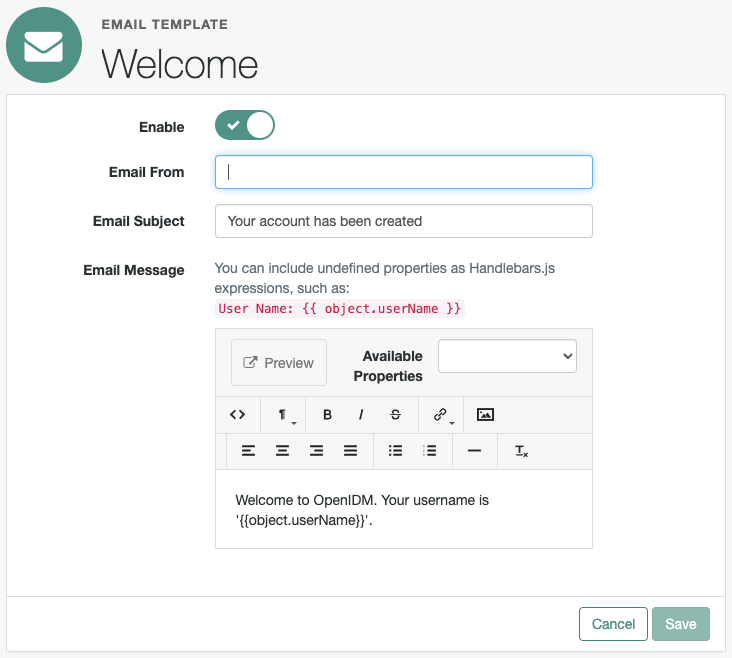
The following example displays a default "Welcome" message template:

```json
{
    "enabled" : true,
    "from" : "", (1)
    "subject" : {
        "en" : "Your account has been created",
        "fr" : "Votre compte vient d'être créé !"
    },
    "message" : {
        "en" : "<html><body><p>Welcome to OpenIDM. Your username is '{{object.userName}}'.</p></body></html>",
        "fr" : "<html><body><p>Bienvenue sur OpenIDM. Votre nom d'utilisateur est '{{object.userName}}'.</p></body></html>"
    },
    "defaultLocale" : "en", (2)
    "mimeType" : "text/html"
}
```

|       |                                                                                                                                                                                                                                                                                                                                                                                                                                                                                                                                                                                                                                                  |
| ----- | ------------------------------------------------------------------------------------------------------------------------------------------------------------------------------------------------------------------------------------------------------------------------------------------------------------------------------------------------------------------------------------------------------------------------------------------------------------------------------------------------------------------------------------------------------------------------------------------------------------------------------------------------ |
| **1** | Each email template can specify a `from` email address. If this field is left blank, IDM defaults to the address specified in the [email configuration](email.html#configure_outbound_email).                                                                                                                                                                                                                                                                                                                                                                                                                                                    |
| **2** | Specify locale(s) in the `defaultLocale` property using [ISO 639-1 language codes](https://en.wikipedia.org/wiki/List_of_ISO_639_language_codes).&#xA;&#xA;preferredLocales specified in the Accept-Language header take precedence over the defaultLocale.&#xA;&#xA;The \_locale parameter takes precedence over the defaultLocale.&#xA;&#xA;Some email providers, such as Google, override the from address you specify in the templates and instead use the address used to authenticate with the SMTP server. The template email address can still be present but in an email header hidden from most users, such as X-Google-Original-From. |

## Manage email templates

Customize and edit email templates using the admin UI or save a `emailTemplate-name.json` file to the `conf/` directory:

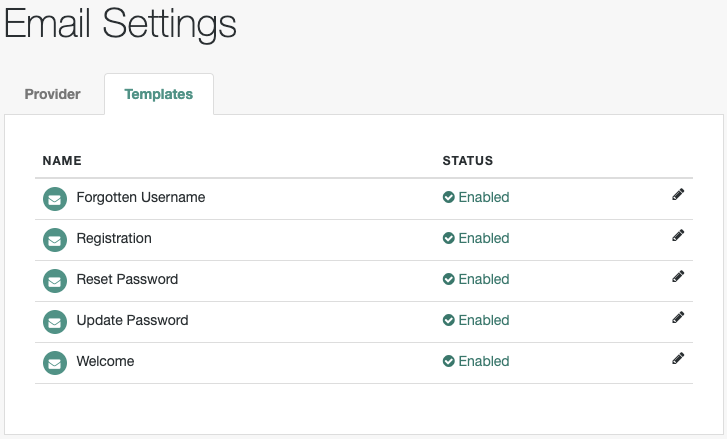
1. From the navigation bar, click Configure > Email Settings, and select the Templates tab.

   IDM displays a list of email templates.
   ![Email Settings > Templates](_images/emailSettingsTemplates.png)

2. To customize or edit an email template, click the adjacent edit [icon: pencil-alt, set=fas]button.

3. On the Email Template templateName page, make changes, and click Save.
   ![Email Settings > Templates > Welcome](_images/emailTemplateWelcome.png)
