---
title: Subscribe to JMS messages
description: IDM can subscribe to Java Messaging Service (JMS) messages using the Messaging Service's JMS Subscriber. In an event-driven architecture, also known as a message-driven architecture, there are publishers and subscribers. When a publisher sends a message over JMS, that message is broadcast. All active and subscribed clients receive that message. This sample shows how IDM can act as a JMS message subscriber, using the ActiveMQ Artemis JMS message broker.
component: pingidm
version: 8.1
page_id: pingidm:samples-guide:scripted-jms-subscriber
canonical_url: https://docs.pingidentity.com/pingidm/8.1/samples-guide/scripted-jms-subscriber.html
keywords: ["Samples", "Subscriptions", "JMS"]
section_ids:
scripted-jms-overview: Sample overview
dependencies_for_jms_messaging: Dependencies for JMS messaging
configure_ssl_for_apache_activemq_artemis: Configure SSL for Apache ActiveMQ Artemis
jms-scripted-sample-secure: Configure a secure port for JMS messages
jms-scripted-sample-start: Start the ActiveMQ Artemis broker and IDM
scripted-artemis-start-messages: Use the ActiveMQ Artemis UI to access the REST interface
customizing-jms-scripted: Customize the scripted JMS sample
---
# Subscribe to JMS messages
| | |
| - | ------------------------------------------------------------------------------------------------------------------------------------------------------------------------------------------------------------------------------------------------------------------------------------------------------------------------------------------------------------------------------------------------------------------------------------------------------------------------------------------------------------------------------------------------------------------------------------------------------------------------------------------------------------------------------------------------------------------------------------------- |
| | The [JMS](../audit-guide/configuring-topic-handlers.html#audit-jms-handler), [Repository](../audit-guide/configuring-topic-handlers.html#audit-repo-handler), [Router](../audit-guide/configuring-topic-handlers.html#audit-router-handler), and [Syslog](../audit-guide/configuring-topic-handlers.html#audit-syslog-handler) audit event handlers are [deprecated](../release-notes/deprecated-functionality.html#deprecation-audit-event-handlers) and will be removed in a future release of IDM. Use the [JSON audit event handler](../audit-guide/configuring-topic-handlers.html#audit-json-handler) or similar to export your data to a third-party audit framework, such as [Elastic Stack](https://www.elastic.co/elastic-stack). |
IDM can subscribe to Java Messaging Service (JMS) messages using the Messaging Service's JMS Subscriber. In an event-driven architecture, also known as a message-driven architecture, there are publishers and subscribers. When a publisher sends a message over JMS, that message is broadcast. All active and subscribed clients receive that message. This sample shows how IDM can act as a JMS message subscriber, using the ActiveMQ Artemis JMS message broker.
| | |
| - | --------------------------------------------------------------------------------------------------------------------------------------------------------------- |
| | For more information on how IDM can publish JMS messages using the JMS Audit Event Handler, refer to [Direct audit information to a JMS broker](audit-jms.html) |
## Sample overview
With the scripted message handler shown in this sample, you can configure scripts to parse the contents of JMS messages, and act on that content.
The script in this sample, `crudpaqTextMessageHandler.js`, shows how JMS can handle Ping REST operations. If you customize a script to manage JMS messages, you must also modify the `conf/messaging.json` file.
This sample uses ActiveMQ Artemis, a JMS message broker. With the ActiveMQ Artemis UI, you can act as the JMS message provider. This sample demonstrates how you can input REST payloads using the Artemis UI.
## Dependencies for JMS messaging
The JMS audit event handler requires Apache ActiveMQ Artemis and additional dependencies bundled with the ActiveMQ Artemis delivery. This section lists the dependencies, and where they must be installed in the IDM instance. If you use a different ActiveMQ version, you may need to download the corresponding dependencies separately.
1. Download the following files:
* [Apache ActiveMQ Artemis](https://activemq.apache.org/components/artemis/download/).
| | |
| - | ------------------------------------------- |
| | This sample was tested with version 2.20.0. |
* The most recent `bnd` JAR file from .
| | |
| - | ----------------------------------------------------------------------------------------------------------------- |
| | The [bnd](https://bnd.bndtools.org/) utility lets you create OSGi bundles for libraries that do not support OSGi. |
2. Unpack the ActiveMQ Artemis archive. For example:
```
tar -xvf ~/Downloads/apache-artemis-2.20.0-bin.tar.gz
```
3. Create a temporary directory, and then change to that directory:
```
mkdir ~/Downloads/tmp
cd ~/Downloads/tmp/
```
4. Move the ActiveMQ Artemis Client and `bnd` JAR files to the temporary directory.
```
mv ~/Downloads/apache-artemis-2.20.0/lib/client/artemis-jms-client-all-2.20.0.jar ~/Downloads/tmp/
mv ~/Downloads/biz.aQute.bnd-version.jar ~/Downloads/tmp/
```
5. Create an OSGi bundle:
1. In a text editor, create a BND file named `activemq.bnd` with the following contents, and save it to the current directory:
```
version=2.20.0
Export-Package: *;version=${version}
Import-Package: !org.apache.log4j.*,!org.apache.log.*,!org.apache.avalon.framework.logger.*,!org.apache.avalon.framework.logger.*,!org.glassfish.json.*,!org.conscrypt.*,!org.apache.logging.*,!org.bouncycastle.jsse.*,!org.eclipse.*,!sun.security.*,!reactor.*,!org.apache.activemq.artemis.shaded.*,!com.aayushatharva.*,!com.github.luben.zstd,!com.jcraft.jzlib,!com.ning.compress,!com.ning.compress.lzf,!com.ning.compress.lzf.util,!com.oracle.svm.core.annotate,!lzma.*,!net.jpountz.*,*
Bundle-Name: ActiveMQArtemis :: Client
Bundle-SymbolicName: org.apache.activemq
Bundle-Version: ${version}
```
Your `tmp/` directory should now contain the following files:
```
ls -1 ~/Downloads/tmp/
activemq.bnd
artemis-jms-client-all-2.20.0.jar
biz.aQute.bnd-version.jar
```
2. In the same directory, create the OSGi bundle archive file. For example:
```
java -jar biz.aQute.bnd-version.jar wrap \
--properties activemq.bnd \
--output artemis-jms-client-all-2.20.0-osgi.jar \
artemis-jms-client-all-2.20.0.jar
```
6. Copy the resulting `artemis-jms-client-all-2.20.0-osgi.jar` file to the `openidm/bundle` directory:
```
cp artemis-jms-client-all-2.20.0-osgi.jar /path/to/openidm/bundle/
```
## Configure SSL for Apache ActiveMQ Artemis
For information on configuring Apache ActiveMQ Artemis security features, including SSL, download [ActiveMQ Artemis 2.2.0](https://archive.apache.org/dist/activemq/activemq-artemis/2.2.0/) and view the included documentation.
| | |
| - | --------------------------------------------------------------------------------------------------------------------------------------------------------------------------------------------------------------------- |
| | You can also view the [latest Apache Artemis documentation](https://artemis.apache.org/components/artemis/documentation/latest/index.html), but the features described might differ from the version tested with IDM. |
### Configure a secure port for JMS messages
If you configured SSL for ActiveMQ Artemis, edit `/path/to/openidm/samples/scripted-jms-subscriber/conf/messaging.json`, and replace the `java.naming.provider.url`:
```json
"java.naming.provider.url" : "ssl://localhost:61617?daemon=true"
```
## Start the ActiveMQ Artemis broker and IDM
With the appropriate bundles in the `/path/to/openidm/bundles` directory, you're ready to start the ActiveMQ Artemis message broker, as well as IDM with the JMS Audit Sample.
| | |
| - | ----------------------------------------------------------------------------------------------------------------------------------------------------------------------------------------------------- |
| | For a full list of ActiveMQ Artemis setup options, refer to [Using the Server](https://activemq.apache.org/components/artemis/documentation/latest/using-server.html) in the *Artemis Documentation*. |
1. Navigate to the directory where you unpacked the ActiveMQ Artemis binary and run the following command to create the Artemis broker:
```
cd ~/Downloads/apache-artemis-2.20.0/bin
./artemis create fr-scripted-jms
Creating ActiveMQ Artemis instance at: /path/to/Downloads/apache-artemis-2.20.0/bin/fr-scripted-jms
...
```
2. Start the newly created ActiveMQ Artemis broker:
```
./fr-scripted-jms/bin/artemis run
```
3. [Set up DS](start-here.html#ldap-server-config) without importing any LDIF file or [select another repository](../install-guide/chap-repository.html) for the sample.
4. Start IDM, with the configuration for this sample:
```
cd /path/to/openidm/
./startup.sh -p samples/scripted-jms-subscriber
```
5. Verify you can access the [Artemis management console](https://activemq.apache.org/components/artemis/documentation/latest/management-console.html) at `http://localhost:8161/console`.
## Use the ActiveMQ Artemis UI to access the REST interface
In this section, you will use the ActiveMQ Artemis UI to send REST requests.
1. Log in to the Artemis management console (`http://localhost:8161/console`).
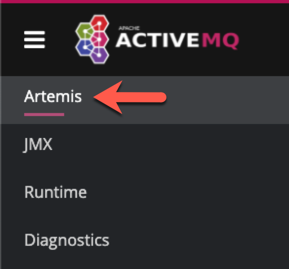
2. From the navigation menu, click Artemis.
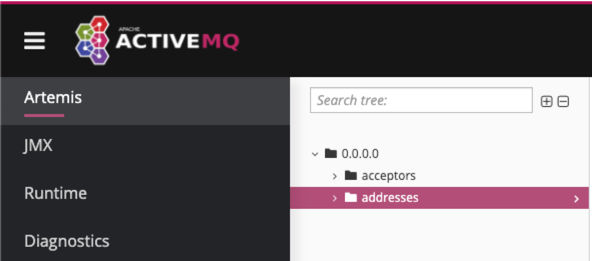
3. From the tree view, select the addresses node.
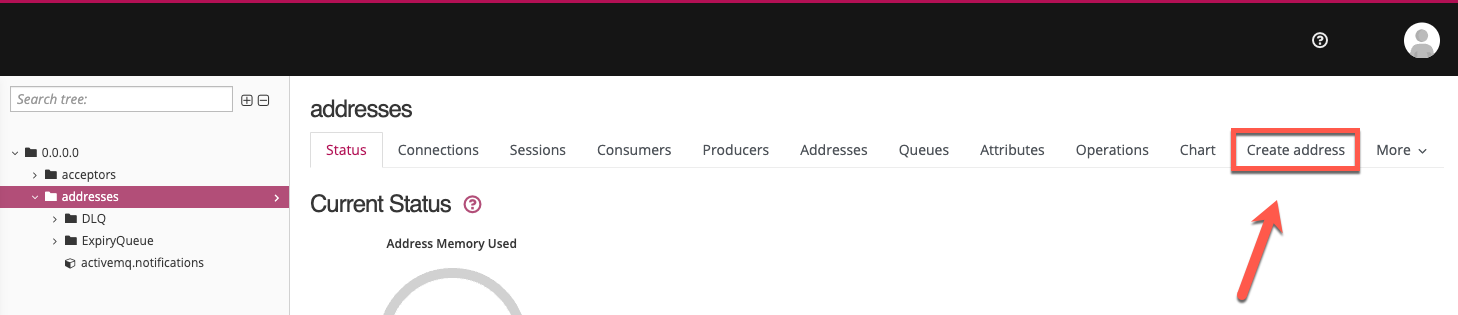
4. On the addresses page, click the Create address tab.
| | |
| - | -------------------------------------------------------------------------------------------------------------------- |
| | Depending on your window size, the Create address tab may be located under the More [icon: angle-down, set=fas]menu. |
5. Fill out the Create Address form, and then click Create Address:
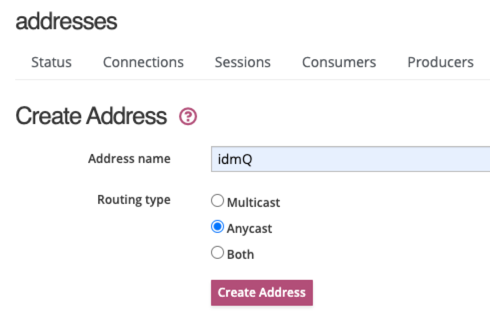
* Address name: `idmQ`
* Routing type: `Anycast`
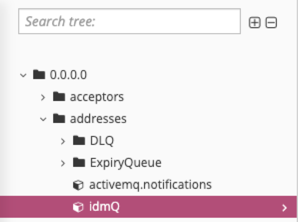
6. From the tree view, expand the addresses node, and click idmQ.
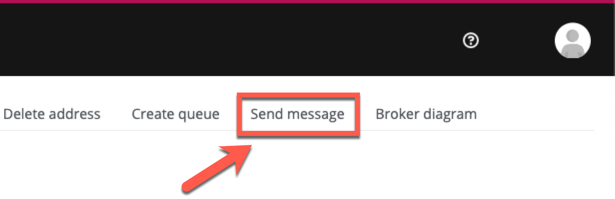
7. On the idmQ page, click the Send message tab.
| | |
| - | ------------------------------------------------------------------------------------------------------------------ |
| | Depending on your window size, the Send message tab may be located under the More [icon: angle-down, set=fas]menu. |
8. On the Send Message page, paste the following text into the Body field. This request creates a new user with a user ID of `mgr1`:
```json
{
"operation" : "CREATE",
"resourceName" : "/managed/user",
"newResourceId" : "mgr1",
"content" : {
"mail" : "mgr1@example.com",
"sn" : "Sanchez",
"givenName" : "Jane",
"password" : "Password1",
"employeenumber" : 100,
"accountStatus" : "active",
"roles" : [ ],
"userName" : "mgr1"
},
"params" : {},
"fields" : [ ]
}
```
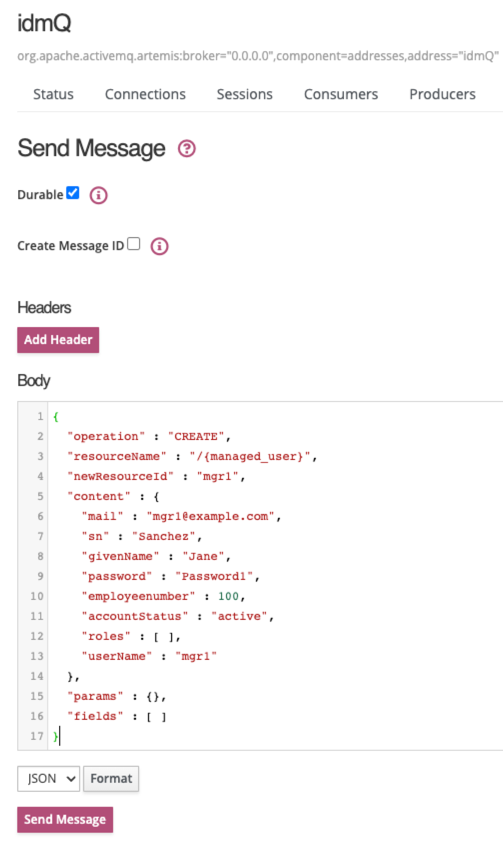
For comparison, the following equivalent REST call would create the same user:
```
curl \
--header "X-OpenIDM-Username: openidm-admin" \
--header "X-OpenIDM-Password: openidm-admin" \
--header "Accept-API-Version: resource=1.0" \
--header "Content-Type: application/json" \
--request POST \
--data '{
"mail" : "mgr1@example.com",
"sn" : "Sanchez",
"givenName" : "Jane",
"password" : "Password1",
"employeenumber" : 100,
"accountStatus" : "active",
"roles" : [ ],
"userName" : "mgr1",
"params" : {},
"fields" : [ ]
}' \
"http://localhost:8080/openidm/managed/user?_action=create"
```
9. Click Send Message.
The OSGi console displays the message request and response:
```json
**************request received*************
Parsed JMS JSON =
{
"operation": "CREATE",
"resourceName": "/managed/user",
"newResourceId": "mgr1",
"content": {
"mail": "mgr1@example.com",
"sn": "Sanchez",
"givenName": "Jane",
"password": "Password1",
"employeenumber": 100,
"accountStatus": "active",
"roles": [],
"userName": "mgr1"
},
"params": {},
"fields": []
}
Message response is...
{
"accountStatus": "active",
"password": {
"$crypto": {
"type": "x-simple-encryption",
"value": { }
}
},
"mail": "mgr1@example.com",
"employeenumber": 100,
"givenName": "Jane",
"sn": "Sanchez",
"userName": "mgr1",
"effectiveRoles": [],
"memberOfOrgIDs": [],
"effectiveAssignments": [],
"_rev": "17273eca-d14b-4647-b850-1e3733ba1830-116",
"_id": "mgr1"
}
**************END MESSAGE*************
```
10. Confirm the user details:
```json
curl \
--header "X-OpenIDM-Username: openidm-admin" \
--header "X-OpenIDM-Password: openidm-admin" \
--header "Accept-API-Version: resource=1.0" \
--request GET \
"http://localhost:8080/openidm/managed/user/mgr1"
{
"_id": "mgr1",
"_rev": "17273eca-d14b-4647-b850-1e3733ba1830-116",
"accountStatus": "active",
"mail": "mgr1@example.com",
"employeenumber": 100,
"givenName": "Jane",
"sn": "Sanchez",
"userName": "mgr1",
"effectiveRoles": [],
"memberOfOrgIDs": [],
"effectiveAssignments": []
}
```
11. You can repeat the process using different REST operations in the Artemis UI. For example, enter the following payload on the Send Message page to change the first name (`givenName`) of the `mgr1` user to `Donna`:
```json
{
"operation": "PATCH",
"resourceName": "/managed/user/mgr1",
"value": [
{
"operation": "replace",
"field": "/givenName",
"value": "Donna"
}
]
}
```
12. Confirm the updated `givenName` for `mgr1`:
```json
curl \
--header "X-OpenIDM-Username: openidm-admin" \
--header "X-OpenIDM-Password: openidm-admin" \
--header "Accept-API-Version: resource=1.0" \
--request GET \
"http://localhost:8080/openidm/managed/user/mgr1"
{
"_id": "mgr1",
"_rev": "17273eca-d14b-4647-b850-1e3733ba1830-315",
"accountStatus": "active",
"mail": "mgr1@example.com",
"employeenumber": 100,
"givenName": "Donna",
"sn": "Sanchez",
"userName": "mgr1",
"effectiveRoles": [],
"memberOfOrgIDs": [],
"effectiveAssignments": []
}
```
## Customize the scripted JMS sample
If you set up a custom script to parse and process JMS messages, store that script in the `script/` subdirectory. Assume the script is named `myCustomScript.js`.
Edit the `messaging.json` file in the `conf/` subdirectory, and point it to the custom file:
```json
{
"subscribers" : [
{
"name" : "IDM CREST Queue Subscriber",
"instanceCount": 3,
"enabled" : true,
"type" : "JMS",
"handler" : {
"type" : "SCRIPTED",
"properties" : {
"script" : {
"type" : "text/javascript",
"file" : "myCustomScript.js"
}
}
},
"properties" : {
"sessionMode" : "CLIENT",
"jndi" : {
"contextProperties" : {
"java.naming.factory.initial" : "org.apache.activemq.artemis.jndi.ActiveMQInitialContextFactory",
"java.naming.provider.url" : "tcp://127.0.0.1:61616?daemon=true",
"queue.idmQ" : "idmQ"
},
"destinationName" : "idmQ",
"connectionFactoryName" : "ConnectionFactory"
}
}
}
]
}
```
You'll find some of these properties in [JMS audit event handler properties](../audit-guide/audit-config-prop-jms.html). Despite the name of the table and the different configuration file, the properties are the same.
Other `messaging.json` notable properties:
**JMS messaging.json Configuration Properties**
| `messaging.json` Property | Description |
| ------------------------- | ------------------------------------------------------------------------------------------------------------------------------------------------------------------------------------------------------------------------------------------------------------------------------------------------------- |
| `subscribers` | Needed to subscribe to incoming JMS message requests. |
| `name` | Arbitrary name for the subscriber. |
| `instanceCount` | Each `instanceCount` manages a single connection between IDM and the messaging channel. Supports multithreading throughput. If subscribing to a queue, such as `queue.idmQ`, the message is handled by a single instance. If subscribing to a topic, all instances receive and handle the same message. |
| `handler` | Parses the JMS message, then processes it, possibly through a script. |
| `queue.idmQ` | One of the JNDI context properties. Name of the JMS queue in the Artemis UI. |
| `destinationName` | JNDI lookup name for message delivery. |