---
title: Extract username from custom header in inline mode
description: This topic discusses the extraction of a username from a custom header when API Security Enforcer (ASE) is in inline mode.
component: pingintelligence
version: 5.1
page_id: pingintelligence:api_security_enforcer:pingintelligence_extract_username_header_inline_mode
canonical_url: https://docs.pingidentity.com/pingintelligence/5.1/api_security_enforcer/pingintelligence_extract_username_header_inline_mode.html
revdate: April 3, 2024
section_ids:
  api-json-configuration-in-inline-mode: API JSON configuration in inline mode
---

# Extract username from custom header in inline mode

This topic discusses the extraction of a username from a custom header when API Security Enforcer (ASE) is in inline mode.

ASE supports capturing usernames from custom headers in a request. It extracts the username and logs it in ASE access logs. ASE sends these access log files to API Behavioral Security (ABS) AI Engine to detect attacks. The following is an example of username information logged in the ASE access log:

```
[Tue Dec 15 09:13:45:044 2020] [thread:999] [info] [connectionid:1801979802] [connectinfo:127.0.0.0:80] [type:connection] connection received
[Tue Dec 15 09:13:45:044 2020] [thread:999] [info] [connectionid:1801979802] [seq:1] [connectinfo:127.0.0.0:80] [type:request] [api_id:api1] GET /abcd HTTP/1.1
x-username-header: 12n4uf9ckls

host: http://pi-api-mngmnt.azr-api.net/
accept: /
content-type: text/plain;charset=UTF-8

[Tue Dec 15 09:13:45:044 2020] [thread:999] [info] [connectionid:1801979802] [seq:1] [connectinfo:127.0.0.0:80] [type:backend_info] [backend_type:nonssl] [0] [api_id:api1] [hostname:not available] backend selected
[Tue Dec 15 09:13:45:044 2020] [thread:999] [info] [connectionid:1801979802] [seq:1] [connectinfo:127.0.0.0:80] [type:req_payload] [api_id:api1] [size:0]
[Tue Dec 15 09:13:45:044 2020] [thread:999] [info] [connectionid:1801979802] [seq:1] [connectinfo:127.0.0.0:80] [type:user_info] [api_id:api1] username: 12n4uf9ckls
```

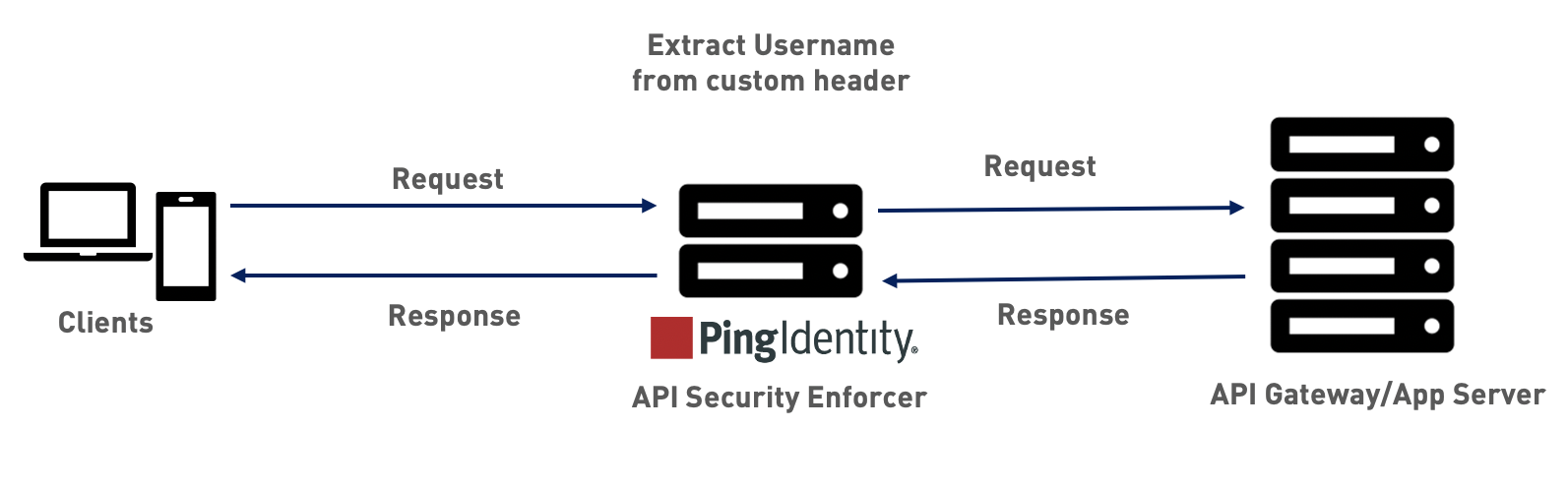
The following diagram shows the traffic flow when ASE is in inline mode.
![Diagram of traffic flow when ASE is in inline mode](../../5.2/_images/iaa1607220065406.png)

When deployed in inline mode, ASE extracts the username from either JSON Web Token (JWT) *(tooltip: \<div class="paragraph">
\<p>An IETF standard container format for a JSON object used for the secure exchange of content, such as identity or entitlement information. You can find the industry standard in \<a href="https\://datatracker.ietf.org/doc/html/rfc7519">RFC 7519\</a>.\</p>
\</div>)* or a custom header. It checks the configuration of application programming interface (API) *(tooltip: \<div class="paragraph">
\<p>A specification of interactions available for building software to access an application or service.\</p>
\</div>)* JavaScript Object Notation (JSON) *(tooltip: \<div class="paragraph">
\<p>An open, lightweight data-interchange format that uses human-readable text to store and transmit data.\</p>
\</div>)* file. It first checks the `JWT` object. If it is configured, then ASE will capture the username from a JWT in the incoming request. Otherwise, ASE checks the `username_header` parameter in API JSON. If it is set, ASE extracts the username from the custom header that comes as part of an incoming request. For more information, see the Configure API JSON section below.

![Flowchart for processing username in inline mode](../../5.2/_images/nup1608215812289.png)

|   |                                                                                                                                                                                                                                                                                                                                                           |
| - | --------------------------------------------------------------------------------------------------------------------------------------------------------------------------------------------------------------------------------------------------------------------------------------------------------------------------------------------------------- |
|   | ASE supports extracting username from either JWTs or a custom headers. You can configure API JSON to capture username from either custom header or JWT, but not both for a given API. For more information on extracting usernames from JWTs, see [Extract user information from JWT in inline mode](pingintelligence_extract_user_info_jwt_inline.html). |

## API JSON configuration in inline mode

The behavior and properties of your API are defined in an API JSON file in the ASE. To enable username capture from a custom header, set the value of the `username_header` parameter to the custom header name containing the username. The following is an example of an API JSON file.

```json
{
  "api_metadata": {
    "protocol": "http",
    "url": "/rest",
    "hostname": "*",
    "cookie": "",
    "cookie_idle_timeout": "200m",
    "logout_api_enabled": false,
    "cookie_persistence_enabled": false,
    "oauth2_access_token": false,
    "apikey_qs": "",
    "apikey_header": "",
    "login_url": "",
    "enable_blocking": true,

    "api_mapping": {
      "internal_url": ""
    },
    "api_pattern_enforcement": {
      "protocol_allowed": "",
      "http_redirect": {
        "response_code": "",
        "response_def": "",
        "https_url": ""
      },
      "methods_allowed": [],
      "content_type_allowed": "",
      "error_code": "401",
      "error_def": "Unauthorized",
      "error_message_body": "401 Unauthorized"
    },
    "flow_control": {
      "client_spike_threshold": "0/second",
      "server_connection_queueing": false
    },
    "api_memory_size": "128mb",
    "health_check": false,
    "health_check_interval": 60,
    "health_retry_count": 4,
    "health_url": "/health",
    "health_check_headers": {},
    "server_ssl": false,
    "servers": [
      {
        "host": "127.0.0.1",
        "port": 8080,
        "server_spike_threshold": "0/second",
        "server_connection_quota": 0
      },
      {
        "host": "127.0.0.1",
        "port": 8081,
        "server_spike_threshold": "0/second",
        "server_connection_quota": 0
      }
    ],
    "decoy_config": {
      "decoy_enabled": false,
      "response_code": 200,
      "response_def": "",
      "response_message": "",
      "decoy_subpaths": []
    },
    "username_header": "x-username-header",
    "jwt": {
      "location": "",
      "username": "",
      "clientid": ""
    }
  }
}
```

For more information, see [Defining an API using API JSON configuration file in inline mode](pingintelligence_defining_api_json_configuration_inline.html).

You can optionally block a client. When `enable_blocking` is set to `true`, ASE checks the username against the list of usernames in the allow list and deny list. If the username is in the deny list, the client using the username is blocked.

|   |                                                                                                                                                                                                          |
| - | -------------------------------------------------------------------------------------------------------------------------------------------------------------------------------------------------------- |
|   | The API JSON file shipped with ASE is compatible with earlier versions of API JSON files. ASE automatically adds an optional `username_header` parameter to the API JSON file to maintain compatibility. |
