---
title: JWK-based proof-of-possession
description: With proof-of-possession, the OAuth 2.0 client uses a known cryptographic key to prove its identity to the resource server.
component: pingoneaic
page_id: pingoneaic:am-oauth2:oauth2-PoP-JWK
canonical_url: https://docs.pingidentity.com/pingoneaic/am-oauth2/oauth2-PoP-JWK.html
keywords: ["OAuth 2.0", "JWK", "Authorization", "Grant Flow", "Endpoints"]
page_aliases: ["oauth2-guide:oauth2-PoP-JWK.adoc"]
section_ids:
how_it_works: How it works
demonstrate_proof_of_possession: Demonstrate proof-of-possession
pop-oauth2-client: Create an OAuth 2.0 client
get-access-token-pop: Get an access token
use-access-token-pop: Use the access token
---
# JWK-based proof-of-possession
With proof-of-possession, the OAuth 2.0 client uses a known cryptographic key to prove its identity to the resource server.
## How it works
Proof-of-possession has the OAuth 2.0 client include a JSON Web Key (JWK) with the client's public key in a request for an access token:
* The client presents the access token to a resource server.
* The resource server gets the client's public key from the access token.
* The resource server uses the public key from the JWK to issue and validate a challenge-response with the client.
* The client uses the private key to respond to the challenge.
Successfully solving the challenge cryptographically confirms proof-of-possession of the access token.
For details, refer to RFC 7800, [Proof-of-Possession Key Semantics for JSON Web Tokens (JWTs)](https://www.rfc-editor.org/info/rfc7800). Advanced Identity Cloud does not support `jwe` and `jku` format keys; the public key must be represented in `jwk` format.
This sequence diagram displays the flow:
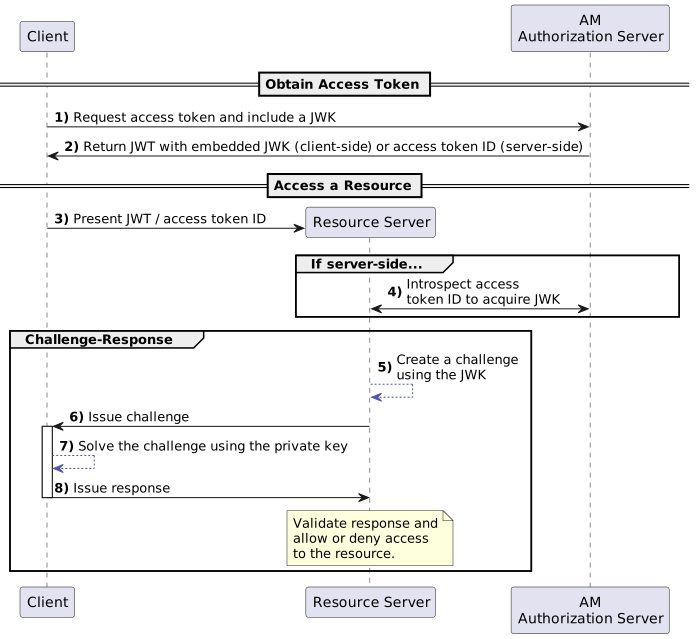Figure 1. OAuth 2.0 JWK-based proof-of-possession flow
1. The client requests an access token using an OAuth 2.0 grant flow with the JWK in the request.
Before using the flow, the client gets a public-private key pair and prepares the JWK to hold the public key.
2. The authorization server returns the access token to the client:
* When Advanced Identity Cloud uses server-side OAuth 2.0 token storage, it keeps the JWK with the access token in the CTS token store and provides the client with the access token ID.
* When Advanced Identity Cloud uses client-side OAuth 2.0 token storage, the access token is a JWT with the JWK embedded.
3. The client requests access to the protected resources from the resource server.
4. The resource server recovers the JWK associated with the access token:
* When Advanced Identity Cloud uses server-side OAuth 2.0 token storage, the resource server introspects the access token to get the JWK.
* When Advanced Identity Cloud uses client-side OAuth 2.0 token storage, the access token is a JWT with the JWK embedded.
5. The resource server creates a challenge using the public key from the JWK.
For example, the challenge could be a message or a nonce encrypted with the public key.
6. The resource server sends the challenge to the client.
7. The client solves the challenge using its private key.
8. The client sends the response to the challenge to the resource server.
The resource server validates the response, confirming the client's proof-of-possession, and grants access.
## Demonstrate proof-of-possession
Demonstrate the process with an OAuth 2.0 client that uses the [client credentials grant](oauth2-client-cred-grant.html):
* [Create an OAuth 2.0 client](#pop-oauth2-client)
* [Get an access token](#get-access-token-pop)
* [Use the access token](#use-access-token-pop)
### Create an OAuth 2.0 client
1. Create a confidential OAuth 2.0 client account.
In the Advanced Identity Cloud admin console, select Applications > + Add Application, and create a new Service client with the following credentials:
* Client ID
`myClient`
* Client Secret
`mySecret`
2. Under Sign On > General Settings > Scopes, add `access` and save your work.
### Get an access token
1. Generate a public-private key pair for the OAuth 2.0 client.
Advanced Identity Cloud supports both RSA and elliptic curve (EC) key types.
To demonstrate the process, use an online JWK generator, such as .
For production deployments, store the key pair with the private key in a secure location. The OAuth 2.0 client must never reveal the private key. It uses the private key to solve the challenge from the resource server.
2. Represent the public key as a JWK.
Adapt the output to use the [JWK format](https://openid.net/specs/draft-jones-json-web-key-03.html#anchor4) fields.
Proof-of-possession requires a JWK where the key fields depend on the key type and the body is a single public key object, *not an array*, as in the following example:
```json
{
"jwk": {
"kty": "EC",
"use": "enc",
"crv": "P-256",
"kid": "myPublicJsonWebKey",
"x": "D5kNqoGZbLZa77xdh4HSlSZIJcHxNw4UP0pgd5wbXvU",
"y": "tX3SnRZgUOy48FV0XTCtaQNLG_DxXGbcVk94KvpyXrk"
}
}
```
3. Base64-encode your JWK, as in the following example:
```none
ewogICJqd2siOiB7CiAgICAia3R5IjogIkVDIiwKICAgICJ1c2UiOiAiZW5jIiwKICAgICJjc
nYiOiAiUC0yNTYiLAogICAgImtpZCI6ICJteVB1YmxpY0pzb25XZWJLZXkiLAogICAgIngiOi
AiRDVrTnFvR1piTFphNzd4ZGg0SFNsU1pJSmNIeE53NFVQMHBnZDV3Ylh2VSIsCiAgICAieSI
6ICJ0WDNTblJaZ1VPeTQ4RlYwWFRDdGFRTkxHX0R4WEdiY1ZrOTRLdnB5WHJrIgogIH0KfQ==
```
4. Include the base64-encoded JWK as the value of the `cnf_key` parameter to request an access token:
```bash
$ curl \
--request POST \
--user 'myClient:mySecret' \
--data 'grant_type=client_credentials' \
--data 'scope=access' \
--data 'cnf_key=eyJqd2siOnsia3R5IjoiRUMiLCJ1c2UiOiJlbmMiLCJjcnYiOiJQLTI1NiIsImtpZCI6Im15UHVibGljSnNvbldlYktleSIsIngiOiJENWtOcW9HWmJMWmE3N3hkaDRIU2xTWklKY0h4Tnc0VVAwcGdkNXdiWHZVIiwieSI6InRYM1NuUlpnVU95NDhGVjBYVEN0YVFOTEdfRHhYR2JjVms5NEt2cHlYcmsifX0=' \
'https:///am/oauth2/realms/root/realms/alpha/access_token'
{"access_token":"nhFC8RBEA6Zm672ir9GlWOMdJYc","scope":"access","token_type":"Bearer","expires_in":3599}
```
By default, Advanced Identity Cloud uses *server-side* OAuth 2.0 tokens. The response includes the access token ID.
If Advanced Identity Cloud used *client-side* OAuth 2.0 tokens, the `access_token` field would contain the embedded JWK.
### Use the access token
1. The client uses the access token to request a protected resource on the resource server.
This step is not shown in the demonstration.
2. The resource server uses the access token to get the public key.
In this demonstration where Advanced Identity Cloud uses *server-side* OAuth 2.0 tokens, use the OAuth 2.0 client credentials to [introspect](oauth2-introspect-endpoint.html) the token on behalf of the resource server.
The `cnf` field contains the JWK:
```bash
$ curl \
--request POST \
--user 'myClient:mySecret' \
--data 'token=nhFC8RBEA6Zm672ir9GlWOMdJYc' \
'https:///am/oauth2/realms/root/realms/alpha/introspect'
{
"active": true,
"scope": "access",
"realm": "/alpha",
"client_id": "myClient",
"user_id": "myClient",
"username": "myClient",
"token_type": "Bearer",
"exp": 1671126270,
"sub": "myClient",
"subname": "myClient",
"iss": "https:///am/oauth2/realms/root/realms/alpha",
"cnf": {
"jwk": {
"kty": "EC",
"use": "enc",
"crv": "P-256",
"kid": "myPublicJsonWebKey",
"x": "D5kNqoGZbLZa77xdh4HSlSZIJcHxNw4UP0pgd5wbXvU",
"y": "tX3SnRZgUOy48FV0XTCtaQNLG_DxXGbcVk94KvpyXrk"
}
},
"authGrantId": "CBmKDJ1Ei8V7HhyXcKAyHaNR42I",
"auditTrackingId": "3c47dc23-a35f-4a34-9f73-daf709d42400-385803"
}
```
3. The resource server uses the public key to confirm proof-of-possession with a challenge-response interaction.
This step is not shown in the demonstration.
By successfully responding to the challenge, the client proves it has the private key for the public key it presented to get the access token.
4. The resource server grants access to the resource.