---
title: User self-registration
description: User self-registration lets your users create their own accounts. To configure registration, your registration journey requires at least the following nodes:
component: platform
version: 7.5
page_id: platform:platform-self-service:self-registration
canonical_url: https://docs.pingidentity.com/platform/7.5/platform-self-service/self-registration.html
llms_txt: https://docs.pingidentity.com/platform/llms.txt
docs_for_agents: https://developer.pingidentity.com/build-with-ai/docs-for-agents.md
keywords: ["Accounts", "Journeys", "Nodes & Trees", "Social Authentication", "CAPTCHA", "Security Questions", "Terms & Conditions"]
section_ids:
captcha: CAPTCHA services
security-questions: Security questions
configuration: Configuration
associated_nodes: Associated nodes
terms-conditions: Terms and conditions
configuration_2: Configuration
associated_nodes_2: Associated nodes
terms_and_conditions_content_formatting: Terms and conditions content formatting
link_to_terms_and_conditions_content: Link to terms and conditions content
privacy-consent: Privacy and consent
configuration_3: Configuration
associated_nodes_3: Associated nodes
registration-rest-sample: Example registration REST output
---
# User self-registration
User self-registration lets your users create their own accounts. To configure registration, your registration journey requires at least the following nodes:
* [Platform Username node](../auth-node-ref/platform-username.html)
If you have changed the `userName` attribute to something else, you must configure this node to use the new attribute; for example, if you changed your configuration to use the `mail` attribute instead.
* [Attribute Collector node](../auth-node-ref/attribute-collector.html)
This collects information from the user for any attributes that are required to create the user profile.
By default, required attributes include `userName`, `givenName`, `sn` (surname), and `mail` (email). The node can collect optional attributes as well, as long as any required attributes are collected.
* [Create Object node](../auth-node-ref/create-object.html)
This creates the user in IDM.
All other nodes are technically optional. Some are strongly encouraged; for example, if you don't include a [Platform Password node](../auth-node-ref/platform-password.html), the user won't have a password to sign in. The [Platform Password node](../auth-node-ref/platform-password.html) isn't necessary, however, when you provide some other authentication method, such as social identity providers, or you generate a password for the user.
Nodes that present or collect information each display on their own page by default. To collect multiple nodes into one page, place these nodes in a [Page node](../auth-node-ref/page.html). There are some limitations to consider when adding nodes to a [Page node](../auth-node-ref/page.html):
* Only add nodes that require interaction with the user to a [Page node](../auth-node-ref/page.html).
* At most, add one node with multiple possible outcomes in a [Page node](../auth-node-ref/page.html).
* Do not add the [Email Suspend node](../auth-node-ref/email-suspend.html) or the [Social Provider Handler node](../auth-node-ref/social-provider-handler.html) to a [Page node](../auth-node-ref/page.html).
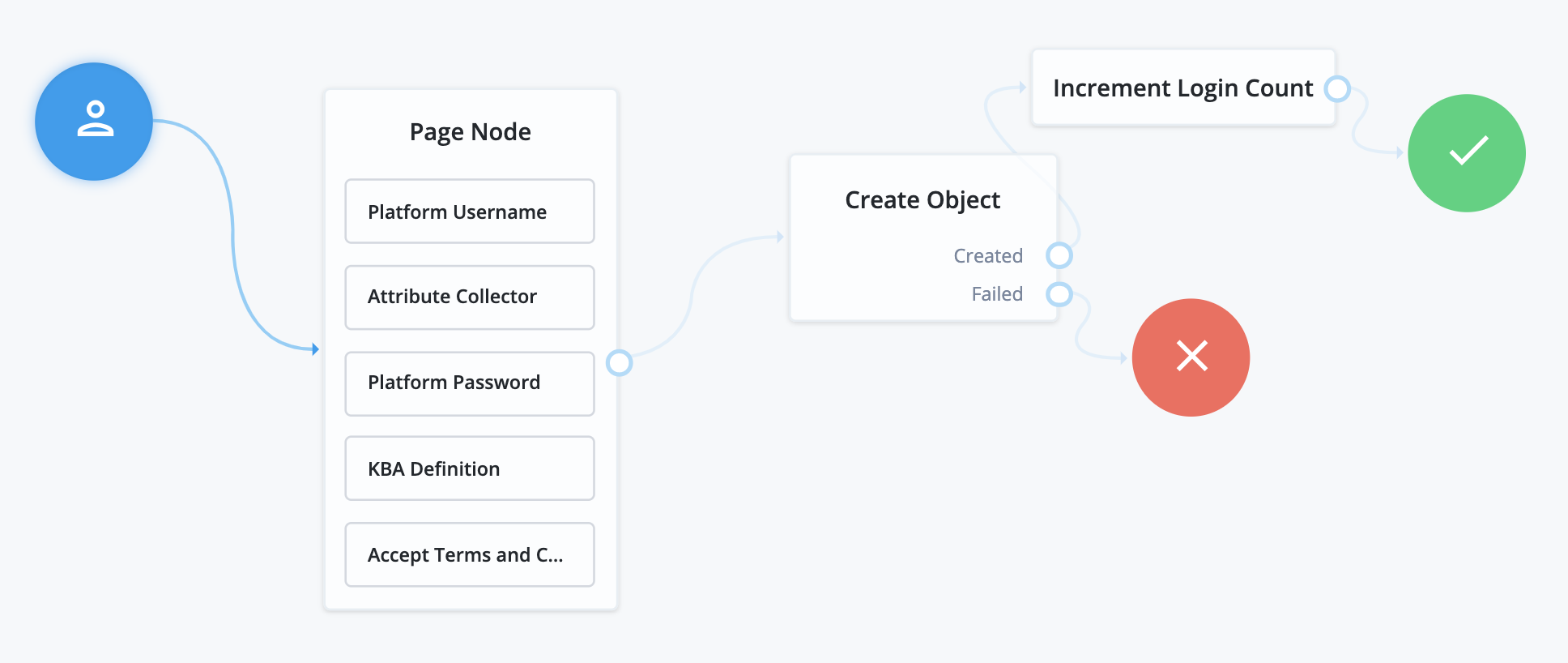
Common nodes in a registration journey include:
* The [CAPTCHA node](../auth-node-ref/captcha.html), discussed in [CAPTCHA services](#captcha).
* The [KBA Definition node](../auth-node-ref/kba-definition.html), discussed in [Security questions](#security-questions).
* The [Accept Terms and Conditions node](../auth-node-ref/accept-terms-and-conditions.html), discussed in [Terms and conditions](#terms-conditions).
* The [Consent Collector node](../auth-node-ref/consent-collector.html), discussed in [Privacy and consent](#privacy-consent).
## CAPTCHA services
CAPTCHA is a way to challenge a user to verify that they are human, and includes a number of different services. Choose the CAPTCHA service that best suits your requirements. The default configuration in the [CAPTCHA node](../auth-node-ref/captcha.html) is for Google's reCAPTCHA service. The node has been tested for use with reCAPTCHA v2 and hCaptcha v1. Other services should work, as long as they follow a similar configuration pattern.
You will need to provide a CAPTCHA Site Key and CAPTCHA Secret Key. The rest of CAPTCHA configuration is done through the service that you are using.
## Security questions
Security questions let a user provide answers to questions that can later be used to verify their identity. This process is also called Knowledge-Based Authentication (KBA).
### Configuration
To configure security questions, select Security > Security Questions. From here, you can configure the questions that are presented to users, and how they should be handled.
1. Click Add Question to set additional questions for the user.
On the Add a Security Question form, select a locale, and provide the question text for that locale. When you have added the localized text for your question, click Add, then repeat for each locale. When you have completed the new question, click Done.
2. On the Settings tab, set the following:
* Must define refers to the minimum number of security questions the user must set up during registration.
* Must answer refers to the minimum number of questions the user must answer to satisfy a security prompt.
* Lockout specifies the number of failed attempts to answer a security question before the user is unable to try again.
3. If you are using an explicit mapping for managed user objects, you must add the property name you set to your database schema *and* to the `objectToColumn` mapping in your repository configuration file.
Also, create a new column in the `openidm.managed_user` table with the name of your new property, and a datatype of `VARCHAR`.
| | |
| - | ------------------------------------------------------------------------------------------------------------------------------------------------------------------------------------- |
| | Once you deploy these security questions, never remove or change existing security questions, as users might have included those questions during the user self-registration process. |
### Associated nodes
There are three nodes associated with KBA:
* [KBA Definition node](../auth-node-ref/kba-definition.html)
The [KBA Definition node](../auth-node-ref/kba-definition.html) is used during registration. It prompts the user to choose security questions, and define answers to these questions for use during identity verification. The questions are selectable from a list. The list also includes an option to define their own question, if they want.
* [KBA Verification node](../auth-node-ref/kba-verification.html)
The [KBA Verification node](../auth-node-ref/kba-verification.html) is used to verify a user's identity using security questions, such as during a Reset Password journey. It displays the number of questions set in the Must Answer field in the Security Questions settings. If the user has defined answers for more questions than is required, which questions will be displayed are randomized.
* [KBA Decision node](../auth-node-ref/kba-decision.html)
The [KBA Decision node](../auth-node-ref/kba-decision.html) is primarily used in cases of a Progressive Profile journey, where you ensure a user has defined answers to the minimum number of questions required by the system. This can be useful if the number of questions changes, so the user can be prompted to fill out any necessary additional questions when they next log in. In this case, the [KBA Decision node](../auth-node-ref/kba-decision.html) would be used together with the [KBA Definition node](../auth-node-ref/kba-definition.html); if the [KBA Decision node](../auth-node-ref/kba-decision.html) evaluates false, the user would then be taken to the [KBA Definition node](../auth-node-ref/kba-definition.html).
## Terms and conditions
Terms and conditions display the terms and conditions for using your service. Terms and conditions are not considered optional; users must accept the terms before they are able to progress in the account creation process.
### Configuration
To set up terms and conditions:
1. Select Terms & Conditions and click + New Version.
2. Enter a version number for the new terms and conditions, then click Next.
Terms and conditions are tracked using versioning. The default placeholder set of terms and conditions has a version of `0.0`, but the versioning can follow other patterns, such as dates.
3. Enter the locale for which these terms and conditions apply, expressed as its [ISO 639-1](https://www.loc.gov/standards/iso639-2/php/code_list.php) code (for example, `en` or `fr`), then click Add.
4. Enter the text of your terms and conditions:
* Terms and conditions content is formatted using Markdown. You can also use HTML formatting, which is converted into Markdown when you save or publish. Refer to [Terms and conditions content formatting](#terms_and_conditions_content_formatting).
| | |
| - | ------------------------------------------------------------------------------------------------------------------------------------------------------------------------------------------------------------------------------------------------------------------------------------------------------------------------------------------------------------------------------------------------------------------------------------------------------------------------------------------------------------------------------------------ |
| | When using HTML formatting, `id` and `style` attributes are stripped out when PingOne Advanced Identity Cloud converts the HTML formatting to Markdown. However, you can use the following techniques to emulate `id` and `style` attributes:- To link to different parts of the terms and conditions content, use the formatted header IDs in the HTML output. Refer to [Link to terms and conditions content](#link_to_terms_and_conditions_content).
- To apply CSS styles to the terms and conditions content, use the styles editor. |
* Click Styles to switch to the styles editor. Then, enter additional CSS styles to apply to the HTML that is rendered from the Markdown.
* The text supports localization. When you have added the terms and conditions for this locale, click Locale: locale-name, then click + Add locale to add the text for another locale.
* Click Try it out to check how your terms and conditions appear to users.
5. Save or publish the new version.
| | |
| - | ------------------------------------------------------------------------------------------------------------------------------- |
| | When you have published a version, the terms and conditions cannot be edited. Be sure to proofread your text before publishing. |
* Click Save as Draft to save this version for future publication. You can edit a draft version.
* Click Publish to publish this version.
Select Set as Active Version to make this the active version of your terms and conditions. Only one version of terms and conditions can be active at a time, for each locale. Selecting this option will deactivate the currently active version, and make this version active instead.
### Associated nodes
There are two nodes associated with terms and conditions:
* [Accept Terms and Conditions node](../auth-node-ref/accept-terms-and-conditions.html)
The [Accept Terms and Conditions node](../auth-node-ref/accept-terms-and-conditions.html) presents the user with a notice that continuing means they agree with the terms and conditions you have set, along with a link to view the terms and conditions, and a button to continue. Because this node includes a button to continue by default, it should generally be the last node in a [Page node](../auth-node-ref/page.html), or on its own page. It will automatically make use of the terms and conditions version that is currently active; you do not need to specify the version in the node.
* [Terms and Conditions Decision node](../auth-node-ref/terms-and-conditions-decision.html)
The [Terms and Conditions Decision node](../auth-node-ref/terms-and-conditions-decision.html) is used in progressive profile journeys, where you want to confirm that the user has accepted the currently active terms and conditions. If the terms and conditions version has been updated, the decision will evaluate to `false`, which when connected to the [Accept Terms and Conditions node](../auth-node-ref/accept-terms-and-conditions.html), will present the user an opportunity to accept the new terms and conditions.
### Terms and conditions content formatting
The editor primarily uses Markdown to format the terms and conditions content.
You can also use HTML to add formatting to all or part of the content, but HTML is only a convenient input method, and the editor converts it to Markdown when you save or publish the content. This strips out any attributes in your HTML formatting, including `id` and `style` attributes.
| | |
| - | ------------------------------------------------------------------------------------------------------------------------------------------------------------------------------------------------------------------ |
| | Some HTML elements, such as definition lists, cannot be converted into Markdown, as there is no Markdown equivalent. These HTML elements are not converted and remain as HTML in the terms and conditions content. |
### Link to terms and conditions content
To display the terms and conditions content to the end user, the UI renders it from Markdown into HTML. When it renders the HTML output, it creates `id` attributes, but only on the header elements. To create a formatted value for each `id` attribute, it starts with the header element value, converts it to lower case, and then removes spaces and special characters (except underscores).
Here are some examples:
| Markdown | Formatted header ID | HTML output |
| --------------------------------- | ------------------- | ------------------------------------------------------------- |
| `# Example 123` | `example123` | `Example 123
` |
| `# Example!` | `example` | `Example!
` |
| `# Example -/=()%^&\*@£` | `example` | `Example -/=()%^&\*@£
` |
| `# Example_1` | `example_1` | `Example_1
` |
| `# Example -/=()%^&\*@£_ Example` | `example_example` | `Example -/=()%^&\*@£_ Example
` |
To link to different parts of the terms and conditions content, you must therefore find the formatted header IDs in the HTML output and use them in your HTML anchors.
## Privacy and consent
Privacy and consent, in the context of registration and self-service, refers to presenting users with information about which external resources their information may be shared with, such as sales and marketing services. The Ping Identity Platform manages these connections in IDM, where consent is configured per external connection, or mapping. A mapping refers to the user's information, mapped to related fields in an external service, which is then synchronized by IDM. For more information, refer to [Mapping data between resources](https://docs.pingidentity.com/pingidm/7.5/synchronization-guide/mappings.html).
### Configuration
To enable consent for a mapping:
1. Select Configure > Mappings, then select Edit on the mapping that you want to configure.
2. Select the Advanced tab, then enable Enable Privacy & Consent.
| | |
| - | --------------------------------------------------------------------------------------------------------------------------------------------------------------------------------------------------------------------------------------------------------------- |
| | The above steps assume you have already created at least one mapping. You can also enable privacy and consent when creating the mapping: the same Enable Privacy & Consent switch is present when you click Create Mapping during the mapping creation process. |
### Associated nodes
There is one node associated with privacy and consent:
* [Consent Collector node](../auth-node-ref/consent-collector.html)
The [Consent Collector node](../auth-node-ref/consent-collector.html) presents the user with a list of all the mappings the user is affected by that have privacy and consent enabled. Each mapping can be individually selected or disabled; if you require all mappings to be allowed, there is an option in the node to make all mappings required.
The node can be used during registration or during progressive profile journeys. If using this node in a progressive profile journey, you will need to use the [Query Filter Decision node](../auth-node-ref/query-filter-decision.html) to check for the presence of your desired mappings in the user's `consentedMappings` attribute.
## Example registration REST output
When calling a registration self-service endpoint, you will receive a JSON object back, containing callbacks for each of the nodes included in the registration journey.
> **Collapse: Sample JSON callbacks**
>
> ```json
> {
> "authId": "",
> "callbacks": [
> {
> "type": "ValidatedCreateUsernameCallback",
> "output": [
> {
> "name": "policies",
> "value": {
> "policyRequirements": [
> "REQUIRED",
> "MIN_LENGTH",
> "VALID_TYPE",
> "UNIQUE",
> "CANNOT_CONTAIN_CHARACTERS"
> ],
> "fallbackPolicies": null,
> "name": "userName",
> "policies": [
> {
> "policyRequirements": [
> "REQUIRED"
> ],
> "policyId": "required"
> },
> {
> "policyRequirements": [
> "REQUIRED"
> ],
> "policyId": "not-empty"
> },
> {
> "policyRequirements": [
> "MIN_LENGTH"
> ],
> "policyId": "minimum-length",
> "params": {
> "minLength": 1
> }
> },
> {
> "policyRequirements": [
> "VALID_TYPE"
> ],
> "policyId": "valid-type",
> "params": {
> "types": [
> "string"
> ]
> }
> },
> {
> "policyId": "unique",
> "policyRequirements": [
> "UNIQUE"
> ]
> },
> {
> "policyId": "no-internal-user-conflict",
> "policyRequirements": [
> "UNIQUE"
> ]
> },
> {
> "policyId": "cannot-contain-characters",
> "params": {
> "forbiddenChars": [
> "/"
> ]
> },
> "policyRequirements": [
> "CANNOT_CONTAIN_CHARACTERS"
> ]
> }
> ],
> "conditionalPolicies": null
> }
> },
> {
> "name": "failedPolicies",
> "value": []
> },
> {
> "name": "validateOnly",
> "value": false
> },
> {
> "name": "prompt",
> "value": "Username"
> }
> ],
> "input": [
> {
> "name": "IDToken1",
> "value": ""
> },
> {
> "name": "IDToken1validateOnly",
> "value": false
> }
> ],
> "_id": 0
> },
> {
> "type": "StringAttributeInputCallback",
> "output": [
> {
> "name": "name",
> "value": "givenName"
> },
> {
> "name": "prompt",
> "value": "First Name"
> },
> {
> "name": "required",
> "value": true
> },
> {
> "name": "policies",
> "value": {
> "policyRequirements": [
> "REQUIRED",
> "VALID_TYPE"
> ],
> "fallbackPolicies": null,
> "name": "givenName",
> "policies": [
> {
> "policyRequirements": [
> "REQUIRED"
> ],
> "policyId": "required"
> },
> {
> "policyRequirements": [
> "VALID_TYPE"
> ],
> "policyId": "valid-type",
> "params": {
> "types": [
> "string"
> ]
> }
> }
> ],
> "conditionalPolicies": null
> }
> },
> {
> "name": "failedPolicies",
> "value": []
> },
> {
> "name": "validateOnly",
> "value": false
> },
> {
> "name": "value",
> "value": ""
> }
> ],
> "input": [
> {
> "name": "IDToken2",
> "value": ""
> },
> {
> "name": "IDToken2validateOnly",
> "value": false
> }
> ],
> "_id": 1
> },
> {
> "type": "StringAttributeInputCallback",
> "output": [
> {
> "name": "name",
> "value": "sn"
> },
> {
> "name": "prompt",
> "value": "Last Name"
> },
> {
> "name": "required",
> "value": true
> },
> {
> "name": "policies",
> "value": {
> "policyRequirements": [
> "REQUIRED",
> "VALID_TYPE"
> ],
> "fallbackPolicies": null,
> "name": "sn",
> "policies": [
> {
> "policyRequirements": [
> "REQUIRED"
> ],
> "policyId": "required"
> },
> {
> "policyRequirements": [
> "VALID_TYPE"
> ],
> "policyId": "valid-type",
> "params": {
> "types": [
> "string"
> ]
> }
> }
> ],
> "conditionalPolicies": null
> }
> },
> {
> "name": "failedPolicies",
> "value": []
> },
> {
> "name": "validateOnly",
> "value": false
> },
> {
> "name": "value",
> "value": ""
> }
> ],
> "input": [
> {
> "name": "IDToken3",
> "value": ""
> },
> {
> "name": "IDToken3validateOnly",
> "value": false
> }
> ],
> "_id": 2
> },
> {
> "type": "StringAttributeInputCallback",
> "output": [
> {
> "name": "name",
> "value": "mail"
> },
> {
> "name": "prompt",
> "value": "Email Address"
> },
> {
> "name": "required",
> "value": true
> },
> {
> "name": "policies",
> "value": {
> "policyRequirements": [
> "REQUIRED",
> "VALID_TYPE",
> "VALID_EMAIL_ADDRESS_FORMAT"
> ],
> "fallbackPolicies": null,
> "name": "mail",
> "policies": [
> {
> "policyRequirements": [
> "REQUIRED"
> ],
> "policyId": "required"
> },
> {
> "policyRequirements": [
> "VALID_TYPE"
> ],
> "policyId": "valid-type",
> "params": {
> "types": [
> "string"
> ]
> }
> },
> {
> "policyId": "valid-email-address-format",
> "policyRequirements": [
> "VALID_EMAIL_ADDRESS_FORMAT"
> ]
> }
> ],
> "conditionalPolicies": null
> }
> },
> {
> "name": "failedPolicies",
> "value": []
> },
> {
> "name": "validateOnly",
> "value": false
> },
> {
> "name": "value",
> "value": ""
> }
> ],
> "input": [
> {
> "name": "IDToken4",
> "value": ""
> },
> {
> "name": "IDToken4validateOnly",
> "value": false
> }
> ],
> "_id": 3
> },
> {
> "type": "BooleanAttributeInputCallback",
> "output": [
> {
> "name": "name",
> "value": "preferences/marketing"
> },
> {
> "name": "prompt",
> "value": "Send me special offers and services"
> },
> {
> "name": "required",
> "value": true
> },
> {
> "name": "policies",
> "value": {}
> },
> {
> "name": "failedPolicies",
> "value": []
> },
> {
> "name": "validateOnly",
> "value": false
> },
> {
> "name": "value",
> "value": false
> }
> ],
> "input": [
> {
> "name": "IDToken5",
> "value": false
> },
> {
> "name": "IDToken5validateOnly",
> "value": false
> }
> ],
> "_id": 4
> },
> {
> "type": "BooleanAttributeInputCallback",
> "output": [
> {
> "name": "name",
> "value": "preferences/updates"
> },
> {
> "name": "prompt",
> "value": "Send me news and updates"
> },
> {
> "name": "required",
> "value": true
> },
> {
> "name": "policies",
> "value": {}
> },
> {
> "name": "failedPolicies",
> "value": []
> },
> {
> "name": "validateOnly",
> "value": false
> },
> {
> "name": "value",
> "value": false
> }
> ],
> "input": [
> {
> "name": "IDToken6",
> "value": false
> },
> {
> "name": "IDToken6validateOnly",
> "value": false
> }
> ],
> "_id": 5
> },
> {
> "type": "ValidatedCreatePasswordCallback",
> "output": [
> {
> "name": "echoOn",
> "value": false
> },
> {
> "name": "policies",
> "value": {
> "policyRequirements": [
> "REQUIRED",
> "MIN_LENGTH",
> "VALID_TYPE",
> "AT_LEAST_X_CAPITAL_LETTERS",
> "AT_LEAST_X_NUMBERS",
> "CANNOT_CONTAIN_OTHERS"
> ],
> "fallbackPolicies": null,
> "name": "password",
> "policies": [
> {
> "policyRequirements": [
> "REQUIRED"
> ],
> "policyId": "not-empty"
> },
> {
> "policyRequirements": [
> "MIN_LENGTH"
> ],
> "policyId": "minimum-length",
> "params": {
> "minLength": 8
> }
> },
> {
> "policyRequirements": [
> "VALID_TYPE"
> ],
> "policyId": "valid-type",
> "params": {
> "types": [
> "string"
> ]
> }
> },
> {
> "policyId": "at-least-X-capitals",
> "params": {
> "numCaps": 1
> },
> "policyRequirements": [
> "AT_LEAST_X_CAPITAL_LETTERS"
> ]
> },
> {
> "policyId": "at-least-X-numbers",
> "params": {
> "numNums": 1
> },
> "policyRequirements": [
> "AT_LEAST_X_NUMBERS"
> ]
> },
> {
> "policyId": "cannot-contain-others",
> "params": {
> "disallowedFields": [
> "userName",
> "givenName",
> "sn"
> ]
> },
> "policyRequirements": [
> "CANNOT_CONTAIN_OTHERS"
> ]
> }
> ],
> "conditionalPolicies": null
> }
> },
> {
> "name": "failedPolicies",
> "value": []
> },
> {
> "name": "validateOnly",
> "value": false
> },
> {
> "name": "prompt",
> "value": "Password"
> }
> ],
> "input": [
> {
> "name": "IDToken7",
> "value": ""
> },
> {
> "name": "IDToken7validateOnly",
> "value": false
> }
> ],
> "_id": 6
> },
> {
> "type": "KbaCreateCallback",
> "output": [
> {
> "name": "prompt",
> "value": "Select a security question"
> },
> {
> "name": "predefinedQuestions",
> "value": [
> "What's your favorite color?",
> "Who was your first employer?"
> ]
> }
> ],
> "input": [
> {
> "name": "IDToken8question",
> "value": ""
> },
> {
> "name": "IDToken8answer",
> "value": ""
> }
> ],
> "_id": 7
> },
> {
> "type": "KbaCreateCallback",
> "output": [
> {
> "name": "prompt",
> "value": "Select a security question"
> },
> {
> "name": "predefinedQuestions",
> "value": [
> "What's your favorite color?",
> "Who was your first employer?"
> ]
> }
> ],
> "input": [
> {
> "name": "IDToken9question",
> "value": ""
> },
> {
> "name": "IDToken9answer",
> "value": ""
> }
> ],
> "_id": 8
> },
> {
> "type": "TermsAndConditionsCallback",
> "output": [
> {
> "name": "version",
> "value": "0.0"
> },
> {
> "name": "terms",
> "value": "Example terms..."
> },
> {
> "name": "createDate",
> "value": "2019-10-28T04:20:11.320Z"
> }
> ],
> "input": [
> {
> "name": "IDToken10",
> "value": false
> }
> ],
> "_id": 9
> }
> ],
> "header": "Sign Up",
> "description": "Signing up is fast and easy.
Already have an account? Sign In"
> }
> ```