---
title: Configure Apache or IBM HTTP Web Agents
description: The examples in this section are for Apache agent on Linux, but you can adapt them to your configuration.
component: web-agents
version: 2023.11
page_id: web-agents:installation-guide:configure-apache
canonical_url: https://docs.pingidentity.com/web-agents/2023.11/installation-guide/configure-apache.html
section_ids:
apache-amagent: AmAgent directive to switch the agent on or off
example_where_amagent_is_on_globally_and_off_for_specific_directories: Example where AmAgent is On globally and Off for specific directories
amagent_is_off_globally_and_on_for_specific_server_locations: AmAgent is Off globally and On for specific server locations
apache-amauthprovider: AmAuthProvider directive to use Apache as the enforcement point
when_amauthprovider_is_on_and_the_request_doesnt_match_a_not_enforced_rule: When AmAuthProvider is On and the request doesn't match a not-enforced rule
when_amauthprovider_is_on_and_the_request_matches_a_not_enforced_rule: When AmAuthProvider is On and the request matches a not-enforced rule
when_amauthprovider_is_on_and_require_amauth_is_not_specified: When AmAuthProvider is On and Require AmAuth is not specified
example_where_amauthprovider_is_off_globally_and_on_for_specific_directories: Example where AmAuthProvider is Off globally and On for specific directories
configure-apache-server: Apache as a reverse proxy
---
# Configure Apache or IBM HTTP Web Agents
The examples in this section are for Apache agent on Linux, but you can adapt them to your configuration.
| | |
| - | --------------------------------------------------------------------------- |
| | IBM HTTP server 9 supports Apache directives; IBM HTTP server 8,5 does not. |
## `AmAgent` directive to switch the agent on or off
Switch the agent on or off globally or independently for different server locations. Server locations include the global environment, a virtual host, a specific location, or a set of directory blocks. Use the following settings:
* `AmAgent On`
The agent protects server locations. It allows or denies requests based on AM policy configuration and not-enforced rules.
* `AmAgent Off`
Apache or IBM HTTP server protects server locations; the agent plays no part in protecting the server locations.
Default: `AmAgent` is set to `On` at a global level in the `httpd.conf` configuration file as follows:
```
AmAgent On
AmAgentConf /opt/web_agents/apache24_agent/instances/agent_1/config/agent.conf
AmAuthProvider Off
```
The `AmAgent` configuration is hierarchical; when it is `On` or `Off` globally it is set for all server locations except those explicitly specified otherwise.
| | |
| - | ------------------------------------------------------------------------------------------------------------------------------------------------------------------------------------------------------------------------------------------------------------------------------------------------------------------------------------------------------------------------------------------------------------------- |
| | Consider setting `AmAgent` to `Off` for the following situations:- For server locations that need no AM authentication or policy, such as the public face of a website, or `/css` or `/images` directories.
- When Apache or IBM HTTP server is acting as a reverse proxy to AM or PingOne Advanced Identity Cloud, and you don't want the agent to take part in protecting AM or PingOne Advanced Identity Cloud. |
### Example where `AmAgent` is `On` globally and `Off` for specific directories
In the following example `httpd.conf`, the agent is `On` globally and `Off` for the `/var/www/transaction` directory:
```
Options Indexes FollowSymLinks
AllowOverride None
Require all granted
AmAgent Off
Options Indexes FollowSymLinks
AllowOverride None
Require all granted
AmAgent On
AmAgentConf /opt/web_agents/apache24_agent/instances/agent_1/config/agent.conf
AmAuthProvider Off
```
* Accessing a resource in `/var/www/`
The agent protects the resource, and overrides the `Require all granted` directive.
To access the resource, the request must match a not-enforced rule in the agent configuration or be allowed by an AM policy evaluation.
* Accessing a resource in `/var/www/transaction`
Apache or IBM HTTP server manages the access and applies the `Require all granted` directive. The agent plays no part in protecting the resource.
### `AmAgent` is `Off` globally and `On` for specific server locations
| | |
| - | ------------------------------------------------------------------------------------------------------------------------------------------------------------------------- |
| | When `AmAgent` configuration is `Off`, configure the server location `/agent` as `On`. This allows AM to redirect requests to the `/agent` endpoint after authentication. |
In the following example `httpd.conf`, the agent is `Off` globally but `On` for the `/var/www/transaction` and `/agent` locations:
```
Options Indexes FollowSymLinks
AllowOverride None
Require all granted
AmAgent On
Options Indexes FollowSymLinks
AllowOverride None
Require all granted
AmAgent On
AmAgent Off
AmAgentConf /opt/web_agents/apache24_agent/instances/agent_1/config/agent.conf
AmAuthProvider Off
```
* Accessing a resource in `/var/www/`
Apache or IBM HTTP server manages the access and applies the `Require all granted` directive.The agent plays no part in protecting the resource.
* Accessing a resource in `/var/www/transaction`
The agent protects the resource, and overrides the `Require all granted` directive.
To access the resource, the request must match a not-enforced rule in the agent configuration or be allowed by an AM policy evaluation.
## `AmAuthProvider` directive to use Apache as the enforcement point
When `AmAgent` is `On`, combine AM policy with Apache `Require` directives to control access globally or independently for different server locations. Server locations include the global environment, a virtual host, a specific location, or a set of directory blocks.
| | |
| - | ----------------------------------------------------------------------------------------------------------------------------------------------------- |
| | Using multiple authorization sources increases complexity. To reduce the risk of an invalid security configuration, test and validate the directives. |
Use the following settings:
* `AmAuthProvider Off`
The agent acts as the enforcement point, allowing or denying requests based on not-enforced rules and AM policies.
* `AmAuthProvider On`
Apache or IBM HTTP server acts as the enforcement point, allowing or denying requests based on AM policy and Apache `Require` directives
For information about `Require` directives, refer to [Require Directive](https://httpd.apache.org/docs/2.4/mod/mod_authz_core.html#require) on the Apache website. `Require AmAuth` is a directive specifically for Web Agents. When the directive is specified, users must be authenticated with AM. Otherwise, the agent redirects them to AM for authentication.
Default: `AmAuthProvider` is `Off`
The `AmAuthProvider` configuration is hierarchical; when it is `On` or `Off` globally it is set for all server locations except those explicitly specified otherwise.
For simplicity, it is recommended to leave `AmAuthProvider` as `Off` globally and set it to `On` for specific locations where you want Apache to act as the enforcement point.
### When `AmAuthProvider` is `On` and the request doesn't match a not-enforced rule
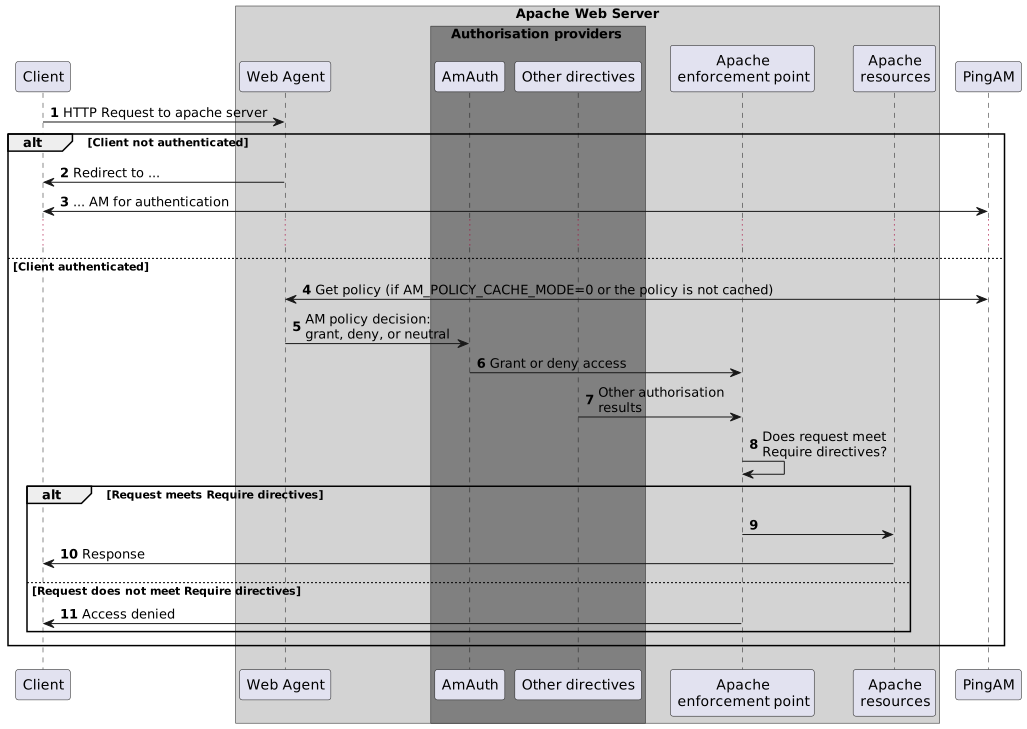
When a request doesn't match a not-enforced rule, the agent does the following:
* Checks that the user is authenticated with AM, and redirects the user for authentication if not.
* Requests policy information from AM for the request.
* Relays the policy information to the Apache `Require AmAuth` directive.
Apache or IBM HTTP server uses the `Require AmAuth` directive and other `Require` directives to allow or deny access to resources.
The following image shows the flow of requests:
### When `AmAuthProvider` is `On` and the request matches a not-enforced rule
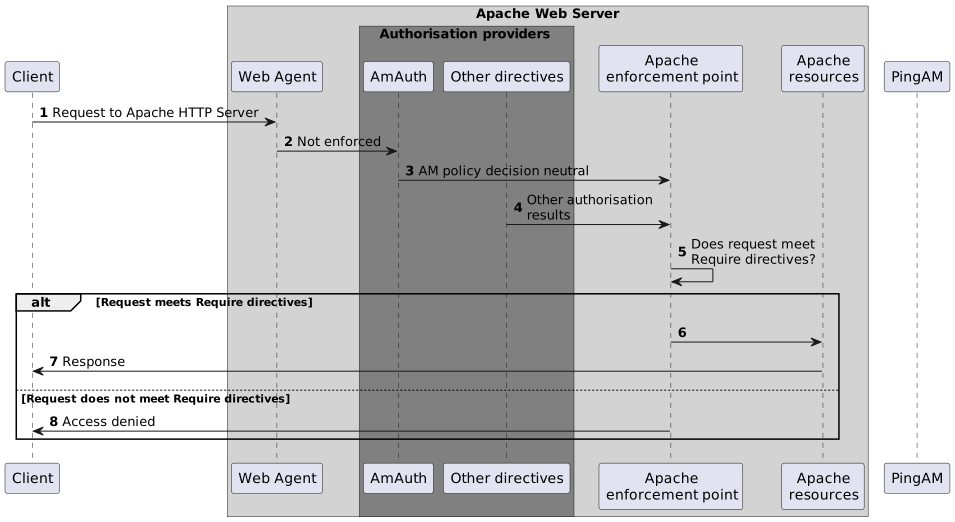
When a request matches a not-enforced rule, the agent does not require the user to be authenticated with AM or request policy information from AM. The `Require AmAuth` directive returns a neutral value.
Apache or IBM HTTP server uses the other `Require` directives to allow or deny access to resources.
The following image shows the flow of requests:
Consider the following points for using not-enforced rules when `AmAuthProvider` is `On`:
* Instead of using not-enforced rules to provide caveats to AM policy enforcement, use Apache `Require` directives.
* In server locations where the agent is configured with not-enforced rules, set `AmAuthProvider` to `Off` to let the agent do the enforcement.
* If you use not-enforced rules when `AmAuthProvider` is `On`, remember that the agent drops out of authorisation decisions for requests that match a rule. Apache `Require` directives are used to allow or deny requests.
### When `AmAuthProvider` is `On` and `Require AmAuth` is not specified
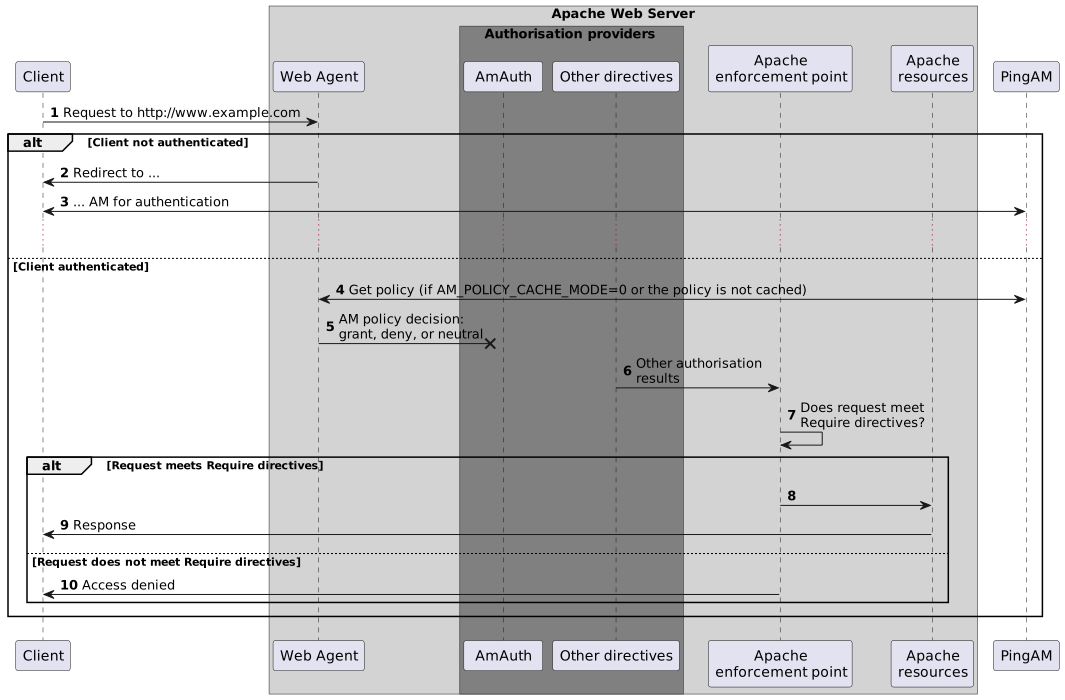
When `AmAuthProvider` is `On`, the `Require AmAuth` directive should always be specified. If `AmAuthProvider` is `On` but the `Require AmAuth` directive is not specified, users are still required to authenticate with AM but Apache does not use policy information from AM in its decision.
The following image shows the flow of requests:
The following example has this configuration:
* The request doesn't match a not-enforced rule.
* `AmAuthProvider` is `On` for the `/var/www/transaction` directory.
* `Require AmAuth` is not specified
```
//Not a recommended configuration
Options Indexes FollowSymLinks
AllowOverride None
Require all granted
AmAuthProvider On
Options Indexes FollowSymLinks
AllowOverride None
Require ip 19.168.2
AmAgent On
AmAgentConf /opt/web_agents/apache24_agent/instances/agent_1/config/agent.conf
AmAuthProvider Off
```
* Accessing a resource in `/var/www/transaction`
Apache or IBM HTTP server uses the `Require ip` directive to allow or deny the request. The user must be authenticated with AM and a valid user must be set, but AM policy information is ignored.
### Example where `AmAuthProvider` is `Off` globally and `On` for specific directories
The example is configured as follows:
* The request doesn't match a not-enforced rule
* `AmAuthProvider` is `Off` globally
* `AmAuthProvider` is `On` for the `/var/www/transaction` directory:
* `Require AmAuth` is specified
```
Options Indexes FollowSymLinks
AllowOverride None
Require all granted
AmAuthProvider On
Options Indexes FollowSymLinks
AllowOverride None
Require AmAuth
Require ip 19.168.2
AmAgent On
AmAgentConf /opt/web_agents/apache24_agent/instances/agent_1/config/agent.conf
AmAuthProvider Off
```
* Accessing a resource in `/var/www/`
The agent acts as the enforcement point, allowing or denying requests based on not-enforced rules and AM policies.
* Accessing a resource in `/var/www/transaction`
The agent provides AM policy information to the `Require AmAuth` directive. Apache uses that and the `Require ip` directive to allow or deny the request.
To access the resource, the user must be authenticated with AM, and the request must meet AM policy requirements and come from the specified IP address.
## Apache as a reverse proxy
This section has an example configuration of Apache HTTP Server as a reverse proxy between AM and Web Agents. You can use any reverse proxy that supports the WebSocket protocol.
For information about how to configure Apache for load balancing, and other requirements for your environment, refer to the Apache documentation.
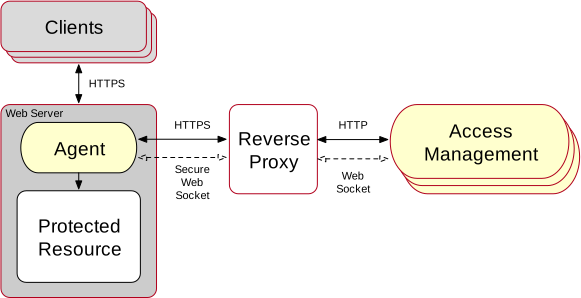Figure 1. Apache HTTP Server reverse proxy configured between the agent and AM
1. Locate the `httpd.conf` file in your deployed reverse proxy instance.
2. Add the modules required for a proxy configuration, as follows:
```bash
# Modules required for proxy
LoadModule proxy_module modules/mod_proxy.so
LoadModule proxy_http_module modules/mod_proxy_http.so
LoadModule proxy_wstunnel_module modules/mod_proxy_wstunnel.so
```
The `mod_proxy_wstunnel.so` module is required to support the WebSocket protocol used for communication between AM and the agents.
3. Add the proxy configuration inside the `VirtualHost` context. Consider the following directives:
```bash
...
# Proxy Config
RequestHeader set X-Forwarded-Proto "https" (1)
ProxyPass "/openam/notifications" "ws://am.example.com:8080/am/notifications" Upgrade=websocket (2)
ProxyPass "/openam" "http://am.example.com:8080/am" (3)
ProxyPassReverseCookieDomain "openam.internal.example.com" "proxy.example.com" (4)
ProxyPassReverse "/openam" "http://am.example.com:8080/am" (5)
...
```
(1) RequestHeader: Set to `https` or `http`, depending on the proxy configuration. If the proxy is configured for https, as in the above example, set to `https`. Otherwise, set `http`. In a later step, you configure AM to recognize the forwarded header and use it in the `goto` parameter for redirecting back to the agent after authentication.
(2) ProxyPass: Set to allow WebSocket traffic between AM and the agent. If HTTPS is configured between the proxy and AM, set to use the `wss` protocol instead of `ws`.
(3) ProxyPass: Set to allow HTTP traffic between AM and the agent.
(4) ProxyPassReverseCookieDomain: Set to rewrite the domain string in \`Set-Cookie\`headers in the format internal domain (AM's domain) public domain (proxy's domain).
(5) ProxyPassReverse: Set to the same value configured for the `ProxyPass` directive.
For more information about configuring Apache HTTP Server as a reverse proxy, refer to the [Apache documentation](https://httpd.apache.org/docs/2.4/howto/reverse_proxy.html).
4. Restart the reverse proxy instance.
5. Configure AM to recover the forwarded header you configured in the reverse proxy. Also, review other configurations that may be required in an environment that uses reverse proxies. For more information, refer to [Agent connection to AM through a load balancer/reverse proxy](../user-guide/load-balancers-proxies.html#comms-am-agents)