Network and connectivity guide
Ping Government Identity Cloud provides you with your own virtual private cloud (VPC) network that you define. This virtual network can connect to any data source and resembles the network you operate in your data centers, but in a scalable, secure, cloud environment with data and resource isolation.
You can share architecture and network diagrams, and SSP documentation, however, a FedRAMP non-disclosure agreement must be signed by those who are requesting this information. The network options available are listed and described here. The network you choose will depend on where your data currently resides and your requirements.
If you already have an AWS GovCloud account, you’ll use the AWS Transit Gateway network. If your infrastructure resides in an on-premise data center, you’ll use either AWS Direct Connect or an IPSec site-to-site VPN, depending on your needs.
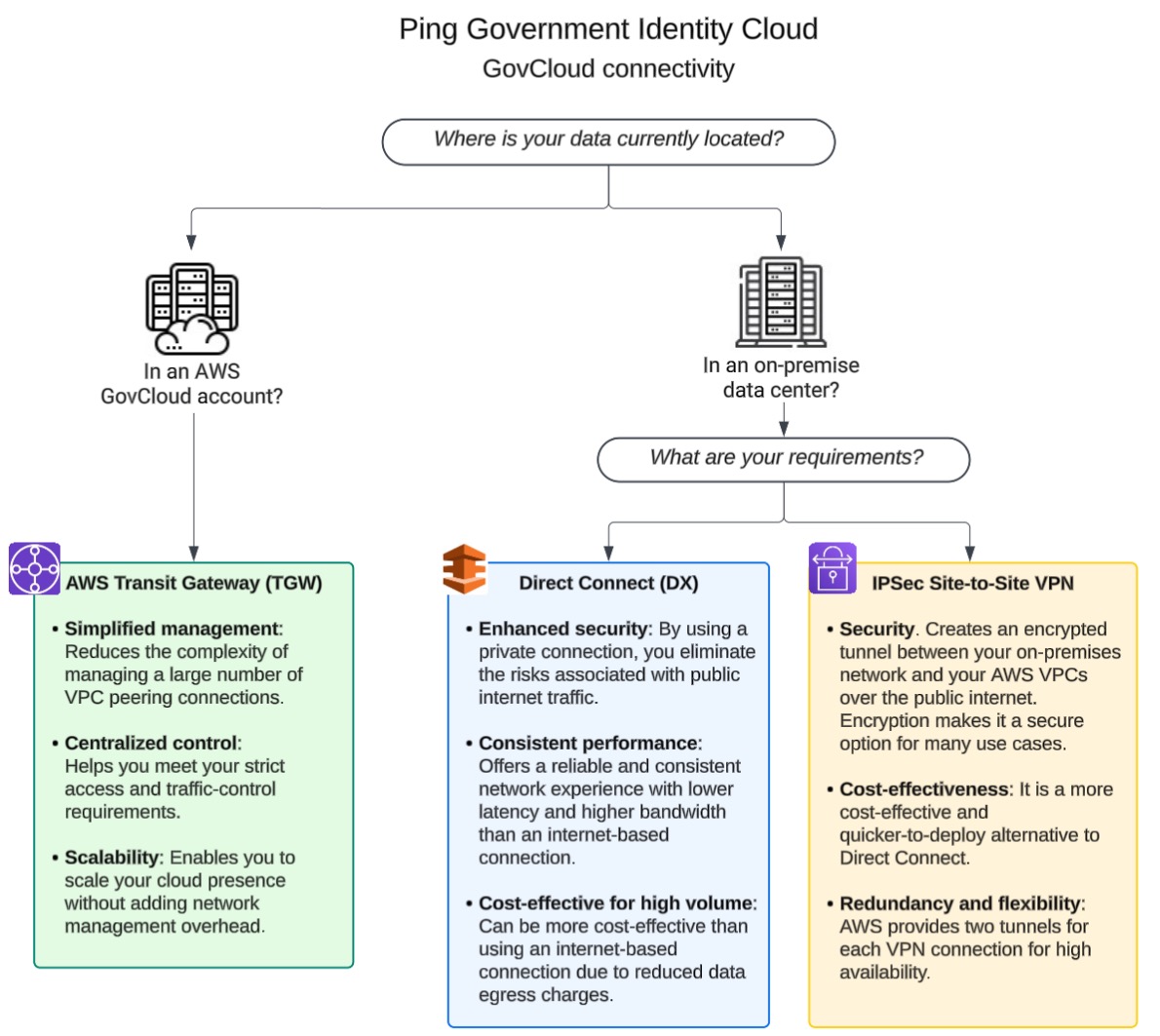
Learn more about each of these networks and how they compare:
AWS Transit Gateway network
AWS Transit Gateway (TGW) simplifies network architecture for complex cloud and hybrid environments. For FedRAMP, this is highly beneficial because it centralizes network connectivity. Instead of creating numerous point-to-point connections between VPCs and on-premises networks, all connections go through a single, highly scalable gateway.
Advantages of using this type of network include:
-
Simplified management: It reduces the complexity of managing a large number of VPC peering connections, which is crucial for maintaining a clear and auditable network topology.
-
Centralized control: It allows for centralized routing and security policies, making it easier to enforce a consistent security posture across the entire environment. Having this control also helps meet FedRAMP’s strict access and traffic-control requirements.
-
Scalability: It’s designed to connect thousands of VPCs, which enables organizations to scale their cloud presence without adding network management overhead.
Initial setup
When you begin your journey with Ping Government Identity Cloud, you’ll work with our Professional Services and Support teams to plan, provision, establish connectivity, and validate that the system is working correctly before it’s handed over to you.
-
Planning: During this phase, we’ll work together to design your network architecture.
-
You provide us with information about your current infrastructure, including subnet associations, IP address ranges, and contact information for your implementation team members.
-
Our teams will review this information and create a diagram of your new network. We’ll provide you with route table guidance and work closely with you to ensure your network needs are met.
Result:
Integration designs documents are created and approved by both you and our support teams.
-
-
Provisioning: During this phase, we’ll create the TGW and configure it, and you’ll ensure that it’s configured correctly.
-
Our support teams will create the TGW, attach the VPCs (often multi-AZ for resilience), and configure TGW route table associations (which VPC or attachment goes where) and propagations (dynamically learning routes from VPN/DX).
-
You’ll validate the CIDR ranges and confirm attachment eligibility.
Result:
TGW is deployed and ready for your TGW attachments.
-
-
VPC attachment: During this phase, you’ll create TGW attachments and configure them to meet your needs, and we’ll accept the attachments.
-
You create TGW attachments in your VPC, update the route tables, configure your Security Group (SG) and your Network ACL (NACL).
-
We’ll approve the attachments using AWS Resource Access Manager (AWS RAM). First, we’ll accept the AWS RAM Resource Share invitation, if applicable, and then accept the attachment.
Result:
Your VPCs are correctly configured and connected.
-
-
Connectivity validation: During this phase, we’ll work together to test the connections.
-
You run ping and traceroute commands to test latency validation, and validate throughput to test data transfer speeds.
-
We’ll test traffic flows and troubleshoot issues.
Result:
When we’re ready, we’ll generate a connectivity validation report, which will prove that everything’s configured correctly.
-
-
Operational handoff: During this phase, we’ll hand the network over to you.
-
We conduct an operational handoff, answer questions, provide documentation, and explain how and when it’s appropriate for you to escalate issues.
-
You’ll take over monitoring your applications and continue to update your contact list when changes occur.
Result:
Your system is live.
-
AWS Direct Connect network
AWS Direct Connect (DX) provides a dedicated, private network connection from your on-premises data center to the AWS cloud. It bypasses the public internet, which is a major security and performance benefit for a FedRAMP environment.
Advantages of using this type of network include:
-
Enhanced security: By using a private connection, you eliminate the risks associated with public internet traffic, such as man-in-the-middle attacks and data interception. This helps satisfy FedRAMP’s requirements for secure data transmission.
-
Consistent performance: It offers a more reliable and consistent network experience with lower latency and higher bandwidth than an internet-based connection, which is critical for mission-critical applications and large data transfers.
-
Cost-effective for high volume: For workloads with large data transfer needs, AWS Direct Connect can be more cost-effective than using an internet-based connection due to reduced data egress charges.
Initial setup
When you begin your journey with Ping Government Identity Cloud, you’ll work with our Professional Services and Support teams to plan, provision, configure routing and security policies, and validate that the system is working correctly before it is handed over to you.
-
Planning: During this phase, we’ll work together to design your network architecture.
-
You provide us with information about your on-premise locations, required bandwidth, and connectivity paths.
-
Our teams will review this information and create a diagram of your new network. We’ll provide you with system requirements and bandwidth recommendations and will work closely with you to ensure your network needs are met.
Result:
Integration designs documents are created and approved by both you and our support teams.
-
-
Provisioning: During this phase, we’ll work together to connect to an AWS Direct Connect Gateway (DXGW).
-
You request a dedicated or hosted DX, coordinate with your carriers, and configure the DX link.
-
We’ll validate the DX requests and configure the DXGW.
Result:
The DXGW is attached.
-
-
Configure routing and security policies: During this phase, we’ll work together to ensure DX connectivity is established.
-
You configure BGP sessions, propagate routes, and configure security policies.
-
We’ll configure the TGW route tables and propagate routes, if needed.
Result:
DX is connected and operational.
-
-
Redundancy: During this phase, we’ll work together to set up your system with redundancy, load balancing, and automatic failover.
-
You provision secondary DX or failover circuits.
-
We’ll implement dual-circuit, active/active BGB for load balancing.
Result:
High Availability (HA) DX deployment.
-
-
Connectivity validation. During this phase, we’ll work together to test the connections..
-
You test connectivity, failover, and application traffic.
-
We’ll confirm throughput, latency, and failover.
Result:
DX connectivity is validated.
-
-
Operational handoff: During this phase, we’ll hand the network over to you.
-
We conduct an operational handoff, answer questions, provide documentation, and explain how and when it’s appropriate for you to escalate issues.
-
You’ll implement your own monitoring and maintenance processes.
Result:
Your system is live.
-
IPSec Site-to-Site VPN network
AWS Site-to-Site VPN creates an encrypted tunnel between your on-premises network and your AWS VPCs over the public internet. While it uses the internet, the encryption makes it a secure option for many use cases.
Advantages of using this type of network include:
-
Security: It secures data in transit using IPSec encryption, protecting sensitive information from being viewed or altered.
-
Cost-effectiveness: It’s a more cost-effective and quicker-to-deploy alternative to Direct Connect, especially for scenarios where you don’t need dedicated, high-speed bandwidth.
-
Redundancy and flexibility: AWS provides two tunnels for each VPN connection for high-availability. It can also be used as a backup option for a Direct Connect connection to ensure business continuity.
Initial setup
When you begin your journey with Ping Government Identity Cloud, you’ll work with our Professional Services and Support teams to plan, provision, establish connectivity, and validate that the system is working correctly before it is handed over to you.
-
Planning: During this phase, we’ll work together to design your network architecture.
-
You provide us with information about your VPN devices, IP addresses, and network ranges.
-
Our teams will review this information and create a diagram of your new network. We’ll provide VPN endpoint details using recommended encryption standards (AES-256, SHA-2).
Result:
VPN designs documents are created and approved by both you and our support teams.
-
-
VPN provisioning: During this phase, we’ll work together to establish a VPN tunnel.
-
We configure TGW or VGW VPN endpoints and provide you with configuration templates.
-
You use these templates and static or dynamic Border Gateway Protocol (BGP) to configure your VPN devices.
Result:
A VPN tunnel is established.
-
-
Redundancy: During this phase, we’ll work together to enable and configure VPN tunnel and failover.
-
You configure a secondary tunnel and BGP failover.
-
We’ll enable dual tunnels and configure failover.
Result:
High-availability (HA) VPN.
-
-
Connectivity validation: During this phase, we’ll work together to test the connections.
-
You test connectivity, failover, and check encryption.
-
We’ll test encrypted connectivity and verify traffic flow.
Result:
When we’re all ready, we’ll generate a VPN validation report, which will prove that everything is configured correctly.
-
-
Operational handoff: During this phase, we’ll hand the network over to you.
-
We conduct an operational handoff, answer questions, provide documentation, and explain how and when it’s appropriate for you to escalate issues.
-
You’ll implement your own monitoring processes. VPN log statuses, and your own system for escalating issues.
Result:
Your system is live.
-
Connectivity comparisons
The following table contains connectivity comparison information for AWS Transit Gateway (TGW), Direct Connect (DX), and IPSec Site-to-Site VPN.
| AWS Transit Gateway (TGW) | Direct Connect (DX) | IPSec Site-to-Site VPN | |
|---|---|---|---|
Transport medium |
Private AWS backbone (VPC to VPC) |
Dedicated physical circuit to AWS GovCloud using DXGW |
Public internet (encrypted IPSec tunnel) |
Typical use cases |
Secure, private VPC-to-VPC connection to AWS GovCloud |
High-bandwidth, low-latency private link from your datacenter to AWS GovCloud |
Fast, cost-effective connection from your datacenter to AWS GovCloud over the internet |
Performance |
High throughput (up to VPC limits, multi-Gbps) |
1 Gbps, 10 Gbps, 100 Gbps dedicated links (predictable) |
Up to 1.25 Gbps per VPN tunnel (internet-dependent) |
Latency |
Low, intra-AWS backbone |
Very low, predictable (bypasses internet) |
Variable, depends on internet speeds |
Encryption |
Not encrypted (AWS backbone is private); can add IPSec overlay if required |
Not encrypted by default (VPN over DX possible for FIPS compliance) |
Encrypted end-to-end (AES-256, SHA-2, IKEv1/v2) |
High Availability (HA) |
Multi-AZ TGW design, supports failover |
Redundant DX links at different DX sites for HA |
Two tunnels per VPN connection (AWS standard), can add redundant CPE |
Routing |
TGW route tables (isolation per customer or app), supports BGP with peering |
BGP dynamic routing with DXGW and TGW or static routes |
Static routes or dynamic routing with BGP |
Isolation |
Strong (per-attachment route tables, SGs, NACLs) |
Strong (BGP route filtering and TGW route tables) |
Strong (dedicated tunnel and TGW or VGW route controls) |
Scalability |
Thousands of attachments, hub-and-spoke model |
Scales with DXGW and TGW (per-port capacity) |
Limited by tunnel throughput and the number of tunnels |
Compliance fit (GovCloud) |
Fully supported in GovCloud |
Supported (must use DXGW to bridge commercial DX location into GovCloud) |
Fully supported in GovCloud |