Setting the administrative console session timeout window
About this task
The default session timeout for the administrative console is 24 hours. You can adjust your session length to suit your organization’s needs.
|
When the session duration is exceeded, all inactive users are logged off automatically. |
To change the default session timeout value:
Steps
-
To configure the
server.sessionTimeoutapplication parameter, which specifies the timeout duration in seconds, set the value as aninitparameter either in the console or on the command line:Choose from:
-
Use the administrative console:
-
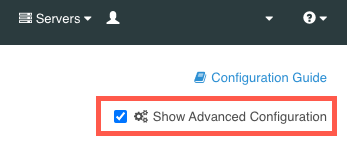
Ensure that the Show Advanced Configuration check box is selected.
-
In the Web Services and Applications list, select Web Application Extensions.
-
In the Web Application Extension list, select Console.
-
In the Init Parameter field, enter the desired timeout duration value in seconds.
-
Click Save.
-
-
Use the command line to run the following:
dsconfig set-web-application-extension-prop --no-prompt \
	--extension-name Console \
	--add init-parameter:server.sessionTimeout=<value in seconds>
-
-
To save your changes, restart the HTTP Connection Handler or the server:
Choose from:
-
Restart the HTTP Connection Handler:
dsconfig set-connection-handler-prop \ --handler-name "<HTTPS Connection Handler>" \ --set enabled:false dsconfig set-connection-handler-prop \ --handler-name "<HTTPS Connection Handler>" \ --set enabled:true -
Restart the server using
bin/stop-serverwith the-Ror--restartoption:bin/stop-server --restart
-