Configuring Trust Framework attribute caching for production
For higher environments, including testing and production, you can define an external attribute cache for the Trust Framework.
With the Policy Decision Service set to embedded policy decision point (PDP) mode, the PingAuthorize Server is configured by default to cache attribute values in memory (for any attributes with a defined caching strategy). Alternatively, you can define an external attribute cache using the following Redis modes:
-
Single Redis instance
-
Single Redis instance using TLS
-
Replicated Redis
-
Redis Sentinel
-
Amazon Web Services (AWS) ElastiCache Redis
AWS IAM authentication for ElastiCache Redis
When AWS Identity and Access Management (IAM) authentication is configured, the PDP obtains short-lived authentication tokens from AWS through SigV4 signing and uses them as the Redis AUTH password on every connection.
-
The authentication tokens refresh automatically before they expire.
-
TLS is enforced whenever credentials are configured. This is because ElastiCache rejects unencrypted
AUTHrequests. -
AWS credentials are resolved from the standard AWS SDK provider chain, for example: environment variables, a shared credentials file, AWS IAM roles for service accounts (IRSA), or AWS Instance Metadata Service (IMDS).
To configure IAM authentication for ElastiCache, make sure the IAM principal running the PDP has the following permissions:
-
elasticache:Connectscoped to the user and replication group Amazon Resource Names (ARNs) -
elasticache:DescribeCacheClustersto enable node discovery.Learn more in Using identity-based policies for ElastiCache in the AWS documentation.
Example IAM policy
{
  "Version": "2012-10-17",
  "Statement": [
    {
      "Effect": "Allow",
      "Action": "elasticache:Connect",
      "Resource": [
        "arn:aws:elasticache:us-east-1:123456789012:replicationgroup:my-replication-group-id",
        "arn:aws:elasticache:us-east-1:123456789012:user:my-elasticache-iam-user"
      ]
    },
    {
      "Effect": "Allow",
      "Action": "elasticache:DescribeCacheClusters",
      "Resource": "*"
    }
  ]
}
|
IAM authentication failures can reveal service or attribute cache errors. Learn more about how to resolve these in Troubleshooting AWS IAM authentication issues. |
You can configure the external attribute cache using the admin console or dsconfig.
-
Admin console
-
dsconfig
Before you begin
To successfully assign an external Redis attribute cache to the Policy Decision Service, you must set PDP Mode to Embedded.
Steps
-
In the PingAuthorize admin console, go to Configuration > Authorization and Policies > External Attribute Caches.
-
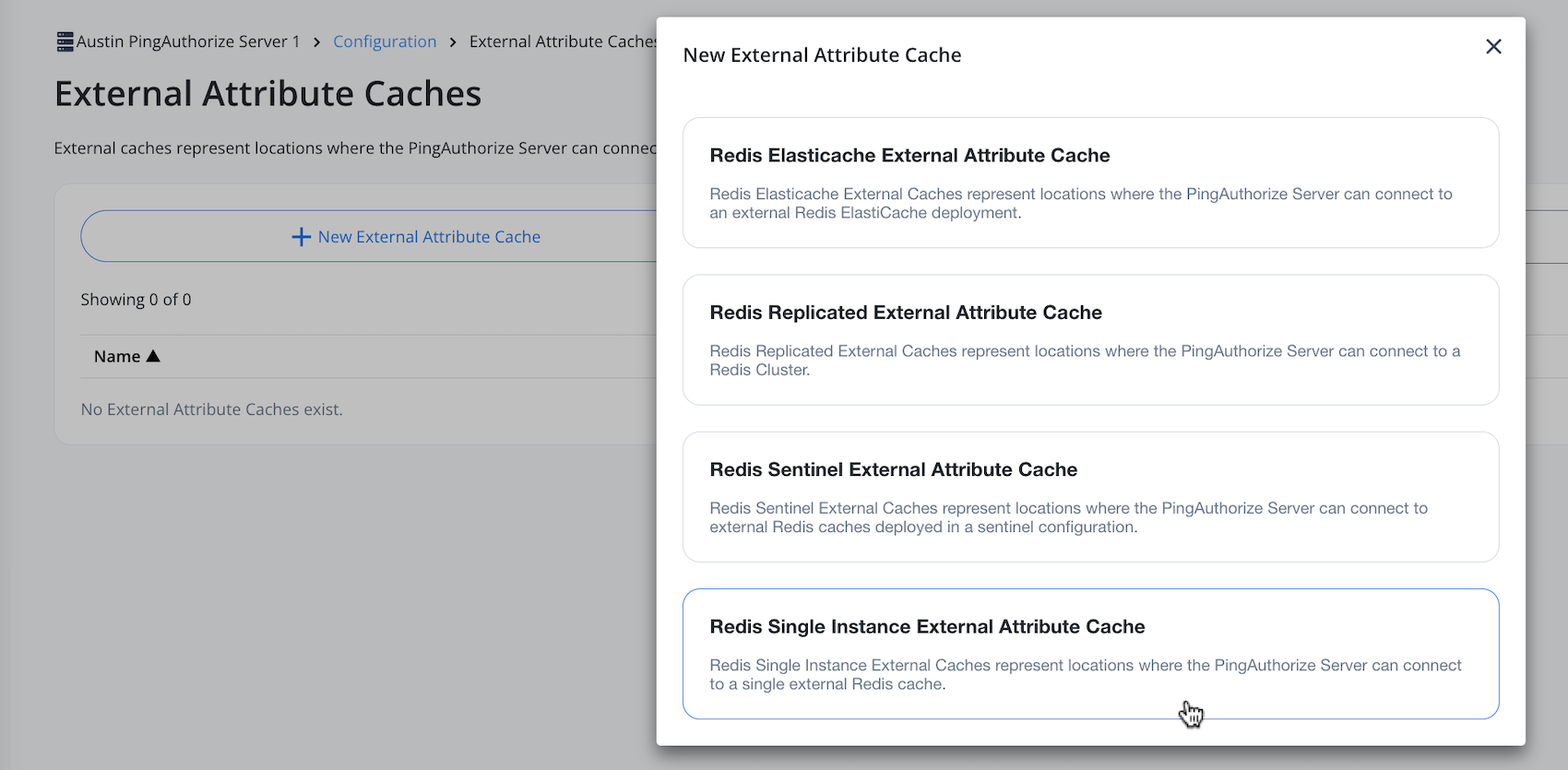
Click New External Attribute Cache and select your desired Redis mode from the list.
-
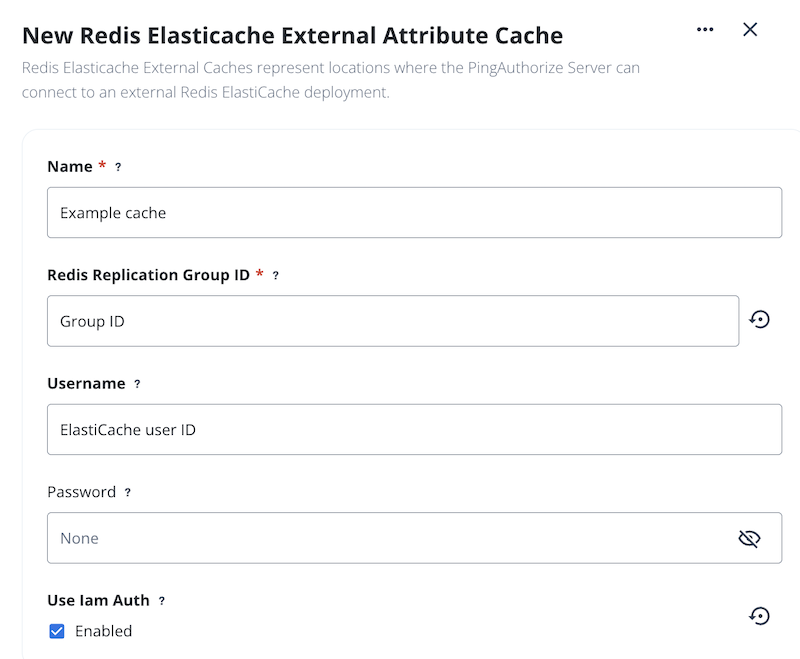
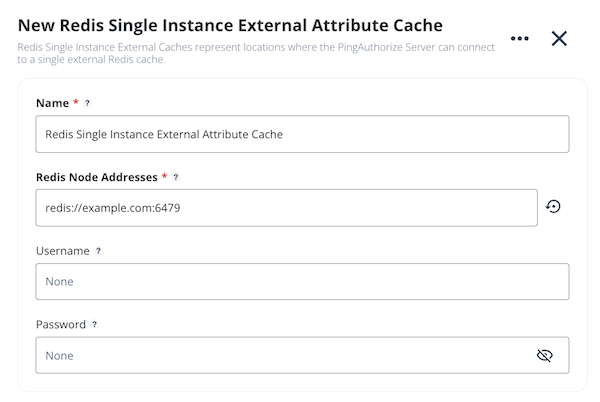
Enter the required values, as indicated by a red asterisk.
-
(Optional) To configure IAM authentication for Redis ElastiCache, select the Use Iam Auth checkbox.
-
In the Username field, enter the ElastiCache User ID. AWS requires an exact match between these values when IAM authentication is enabled.
Don’t enter a value in the Password field. IAM mode replaces the static Redis password with a short-lived SigV4-signed token that is used as the Redis
AUTHpassword on each connection.
-
-
Click Save.
Hover over the question mark icon for more information on a field.
-
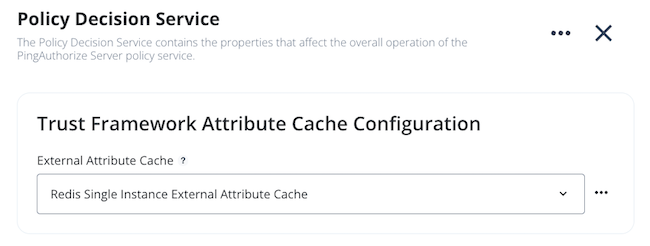
Go to Configuration > Authorization and Policies > Policy Decision Service.
-
In the Trust Framework Attribute Cache Configuration section, in the External Attribute Cache list, select the Redis cache you created in step 3.
-
Click Save
Result
The external attribute cache is now configured and attached to the Policy Decision Service. No server restart is required.
To create a Redis external attribute cache using dsconfig, run the dsconfig create-external-attribute-cache command with the --type flag to specify the cache type:
-
redis-single-instance -
redis-replicated -
redis-elasticache -
redis-sentinel
The following --set properties are available. Required properties vary by cache type.
Available --set properties
| Option | Required | Description | ||
|---|---|---|---|---|
|
Required when |
A comma-separated list of Redis node addresses. |
||
|
Required when |
A comma-separated list of Redis sentinel node addresses. |
||
|
Required when |
The AWS ElastiCache replication group ID. |
||
|
Required when |
The name of the master node. |
||
|
Optional when |
The database index for the Redis connection. Default value is |
||
|
Optional when |
The Redis cluster scan interval in milliseconds. Default value is |
||
|
Optional when |
Enables the sentinels list check during startup. Default value is |
||
|
Optional |
The username for AUTH token authentication. Only applicable when AUTH token authentication is enabled in the Redis provider.
|
||
|
Optional |
The password for AUTH token authentication. Only applicable when AUTH token authentication is enabled in the Redis provider.
|
||
|
Optional when |
Set to |
Before you begin
Before assigning the cache to the Policy Decision Service in step 2, make sure that:
-
The
pdp-modeproperty is set toembedded. -
The
deployment-package-source-typeproperty is set tostoreorstatic-file.-
If the
deployment-package-source-typeproperty is set tostore, thedeployment-package-storeproperty must resolve to a valid deployment package store. -
If the
deployment-package-source-typeproperty is set tostatic-file, thedeployment-package-storeproperty must resolve to a valid deployment package.
-
Steps
-
Create the external attribute cache with the
dsconfig create-external-attribute-cachecommand, using one of the following authentication methods:-
Static password: Set the
usernameandpasswordproperties to the appropriate values.$ dsconfig create-external-attribute-cache \ --cache-name 'Single Instance' \ --type redis-single-instance \ --set redis-node-addresses:redis://localhost:6379 \ --set username:<your-redis-username> \ --set password:<your-redis-password> -
IAM authentication (ElastiCache only): To configure IAM authentication:
-
Set the
usernameproperty to the ElastiCache User ID. AWS requires an exact match between these values when IAM authentication is enabled.Don’t set a value for the
passwordproperty. IAM mode replaces the static Redis password with a short-lived SigV4-signed token that is used as the RedisAUTHpassword on each connection. -
Set the
use-iam-authproperty totrue.$ dsconfig create-external-attribute-cache \ --cache-name 'ElastiCache IAM' \ --type redis-elasticache \ --set redis-replication-group-id:<your-replication-group-id> \ --set username:<your-elasticache-iam-user> \ --set use-iam-auth:true
-
-
-
Assign the defined external attribute cache to the Policy Decision Service:
$ dsconfig set-policy-decision-service-prop \
  --set 'external-attribute-cache:<cache-name>'
Result
The external attribute cache is now configured and attached to the Policy Decision Service. No server restart is required.
Migrating from static to IAM authentication
PDPs that target the same replication group can mix static and IAM authentication because each PDP resolves its own configuration independently. This supports a phased migration approach:
-
In AWS, create a new ElastiCache user with authentication type set to IAM, and add it to the same user group as the existing static user.
-
Migrate PDPs from static authentication to IAM authentication one at a time.
-
After updating each PDP, confirm it’s connecting successfully before migrating the next one. Check for
pdp-unavailablealerts orWRONGPASSerrors in the logs. Learn more in Troubleshooting AWS IAM authentication issues. -
After confirming that all PDPs are using IAM authentication, remove the static user from the user group.