Components
The diagrams below show how the PingOne Recognize SDK, which runs within your mobile app on the user’s device, interacts with your application server and with the PingOne Recognize network.
Enrollment
During enrollment, your mobile app invokes the enroll method from the PingOne Recognize SDK, and then:
-
Guides the user through capturing a biometric signal with the device camera.
-
Interacts with PingOne Recognize to generate a new user identifier (PingOne Recognize ID), which is then returned to your mobile app.
Authentication
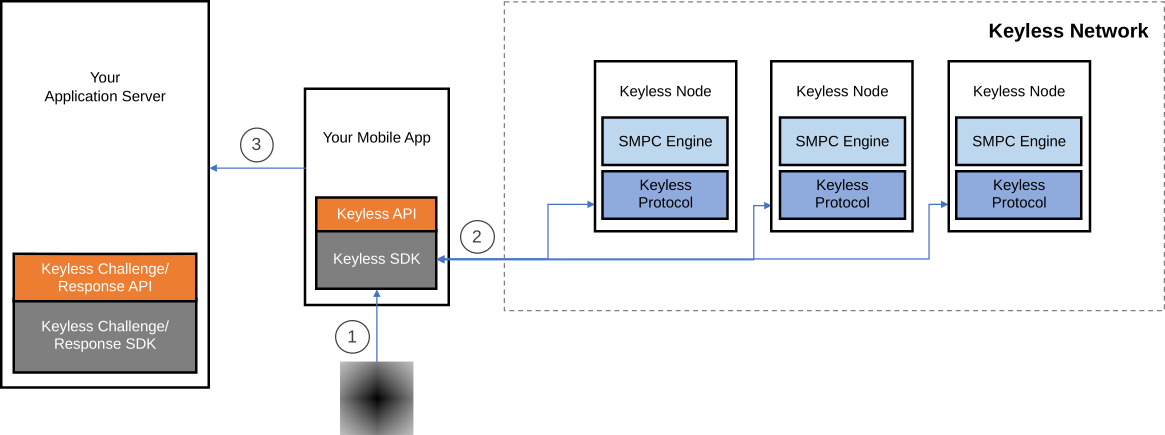
Authentication involves your application server, your mobile app, and the PingOne Recognize network, as depicted in Figure 2:
-
This process starts when the user performs an action that requires authentication using your mobile app.
-
The app provides the details of this action to your application server, which generates a challenge. The challenge is sent to the mobile app, which uses the PingOne Recognize SDK to compute the corresponding authentication token using the
authenticatemethod. -
The PingOne Recognize SDK authenticates the user by capturing the user’s biometrics using the mobile device’s camera.
-
The PingOne Recognize SDK connects to the PingOne Recognize network and runs a secure multi-party computation protocol that authenticates the user and generates the authentication token in response to the challenge provided in Step 2. The PingOne Recognize SDK returns the authentication token to the mobile app.
-
The app sends the token to your application server, which verifies it.
-
If the authentication token is valid, the application server completes the transaction and notifies your mobile app.
-(1).svg)
Account removal
Account removal is similar to authentication. First, your mobile app performs authentication steps 1 - 6, then it notifies your application server that the user wants to delete the account. Next, your mobile app invokes the deEnroll method from the PingOne Recognize SDK. This method issues a deletion request to the PingOne Recognize network (Step 7). The request removes all data associated with the user from the PingOne Recognize network.
.svg)