Components
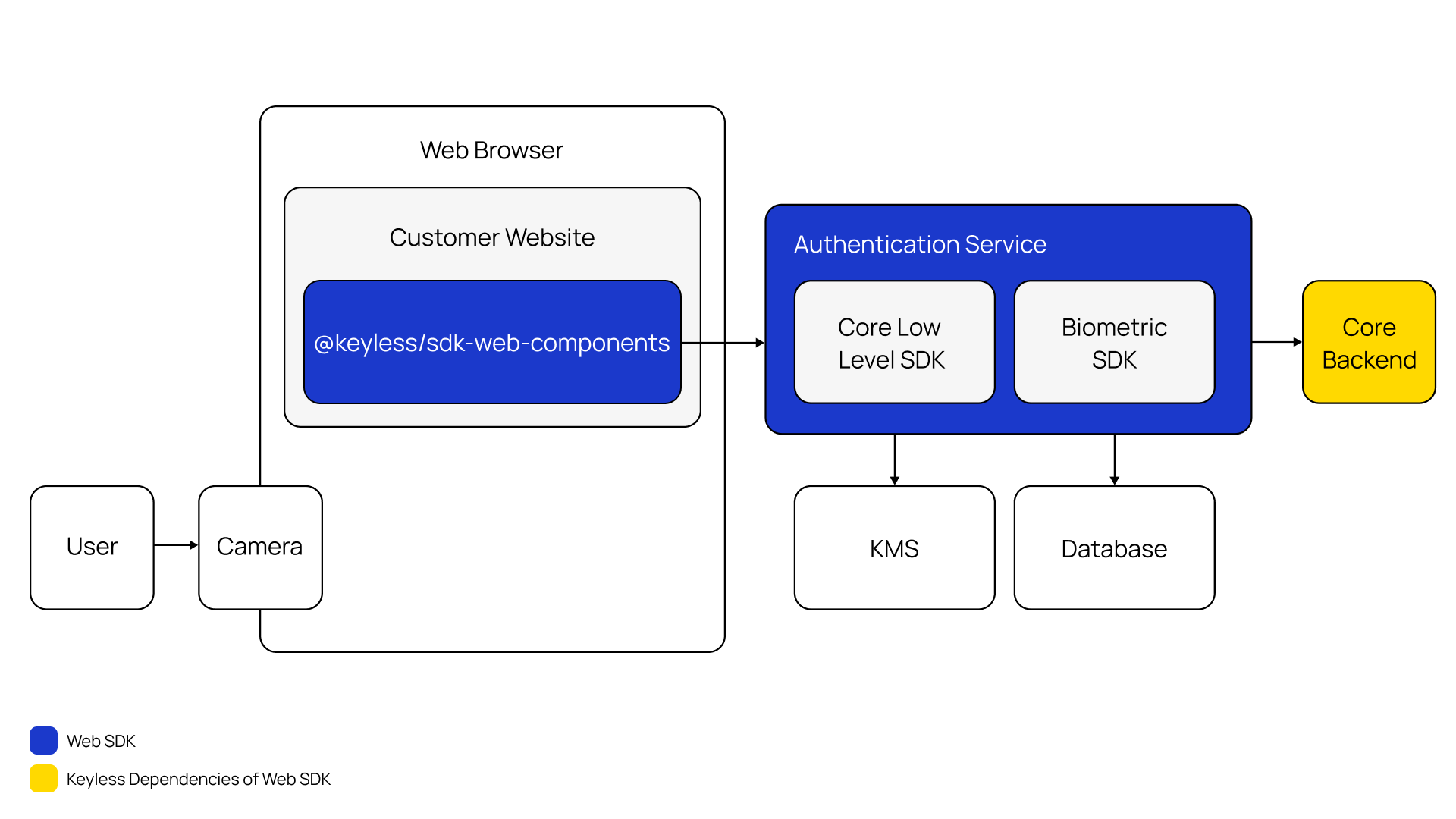
The following diagrams show how the PingOne Recognize Web SDK, which runs within your web app on the user’s browser, interacts with your application server and with the PingOne Recognize network.
Headless enrollment
Headless enrollment occurs when you register a user or device without a user experience; that is, without using any additional interaction or UI controls.
To do this with the PingOne Recognize Web SDK, use client-side JavaScript in your web application.
During enrollment, your web app creates a PingOne Recognize enroll symbol and establishes a connection to the PingOne Recognize Authentication Service. It then:
-
Waits for the "begin-stream" event and sends the first face frame.
-
Waits for the "frame-results" event and sends one more face frame.
-
The wait will continue in a loop until either:
-
The
errorevent is fired which means that most likely the biometric pipeline failed, or another error stopped the process. -
The
stop-streamevent is fired which means that the biometric pipeline succeeded.
-
-
Now the PingOne Recognize Authentication Service will extract the vectors of the last frame sent and perform the recognition process.
-
Waits for the "finished" event.
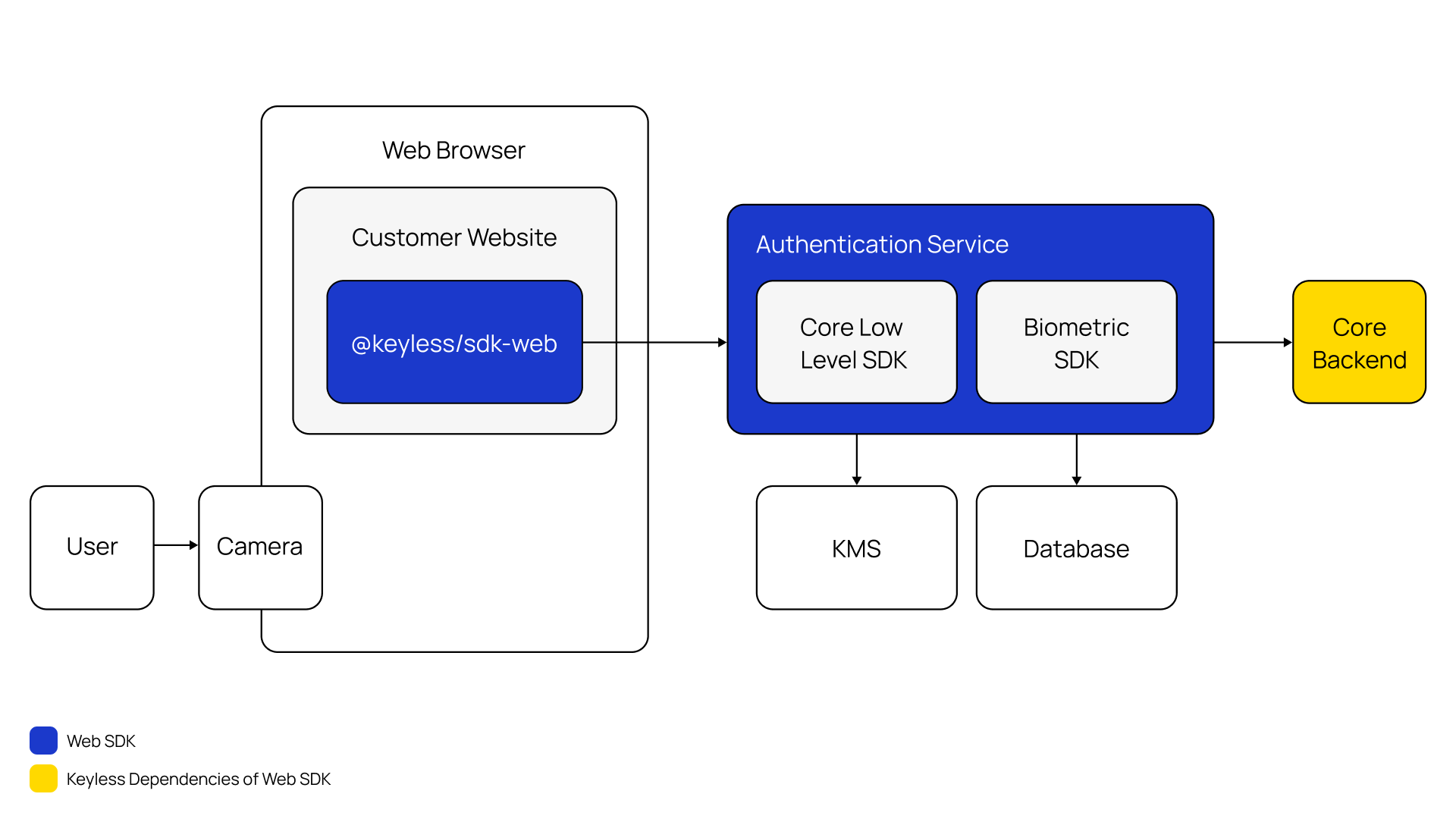
Web component enrollment
|
PingOne Recognize uses Web Components to be framework agnostic. These custom elements should work in any environment that supports this standard. |
During enrollment, your web app loads and renders the kl-enroll web component, the component will establish a connection to the PingOne Recognize Authentication Service as soon as it is mounted, then it:
-
Checks if the user has consented to the usage of their camera, the permission must be granted to proceed.
-
Checks if the user is on a desktop device and has multiple cameras.
If so, the user is asked to pick one to avoid using the wrong camera by default.
This doesn’t work on mobile devices, which prefer the selfie camera by default.
-
Starts sending face frames to the PingOne Recognize Authentication Service at a set framerate.
-
Waits for the "finished" event.
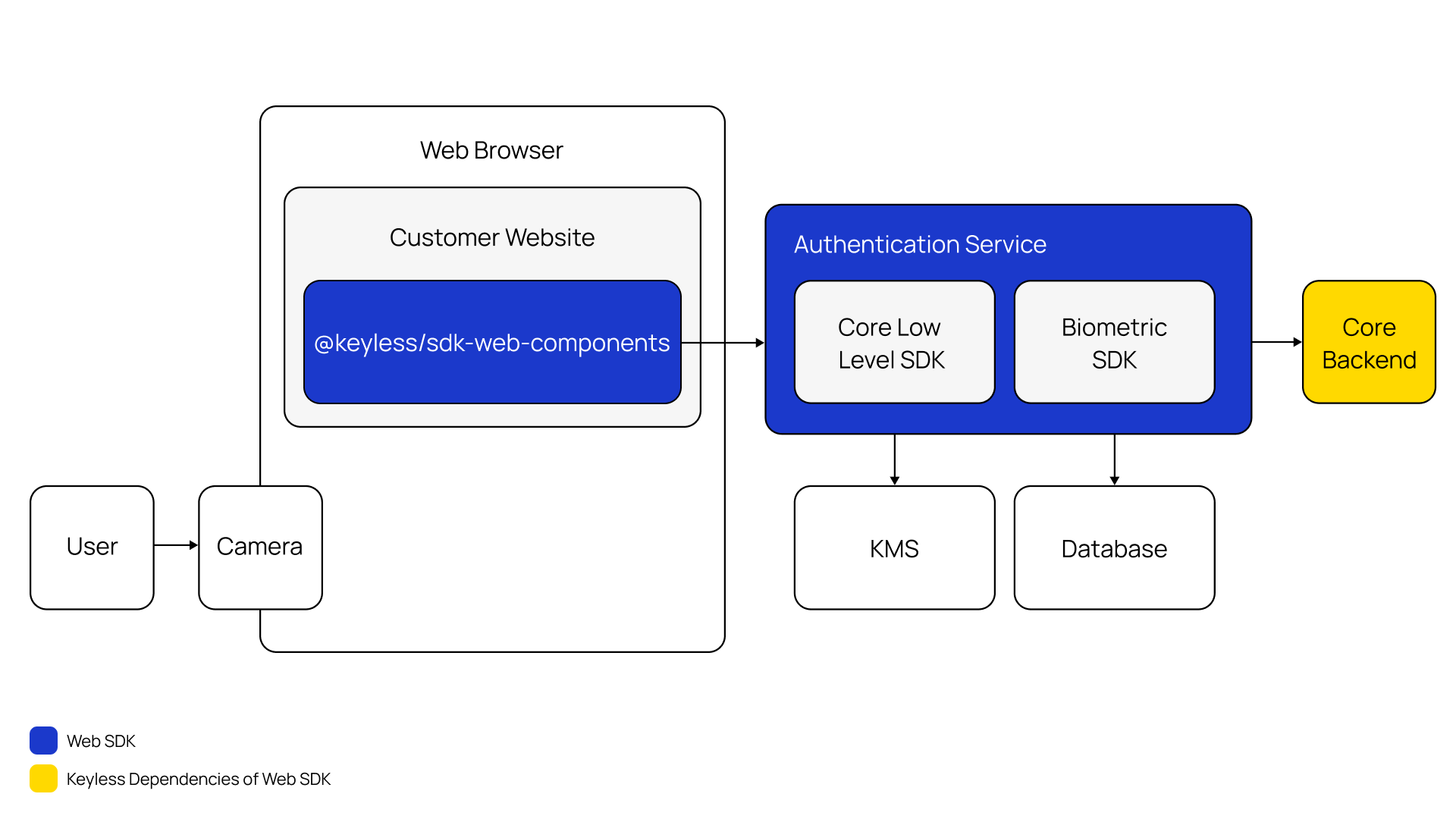
IDV Bridge SaaS enrollment
|
In this context the enrollment happens on the server-side, requiring no interaction from the user unless manually implemented by the integrator on their client. Head to IDV Bridge for more information about this solution. |
During enrollment, your back-end service will perform a POST request to the PingOne Recognize Authentication Service following these steps:
-
Generates a new
AES-GCMorAES-GCM-SIVkey. -
Encrypts the face image with the
AES-GCMorAES-GCM-SIVkey. -
Encrypts the
AES-GCMorAES-GCM-SIVkey with theRSAES-OAEP-SHA-256public key also known asIMAGE_ENCRYPTION_PUBLIC_KEY. -
Performs the POST request and waits for a 201 response status code.
Headless authentication
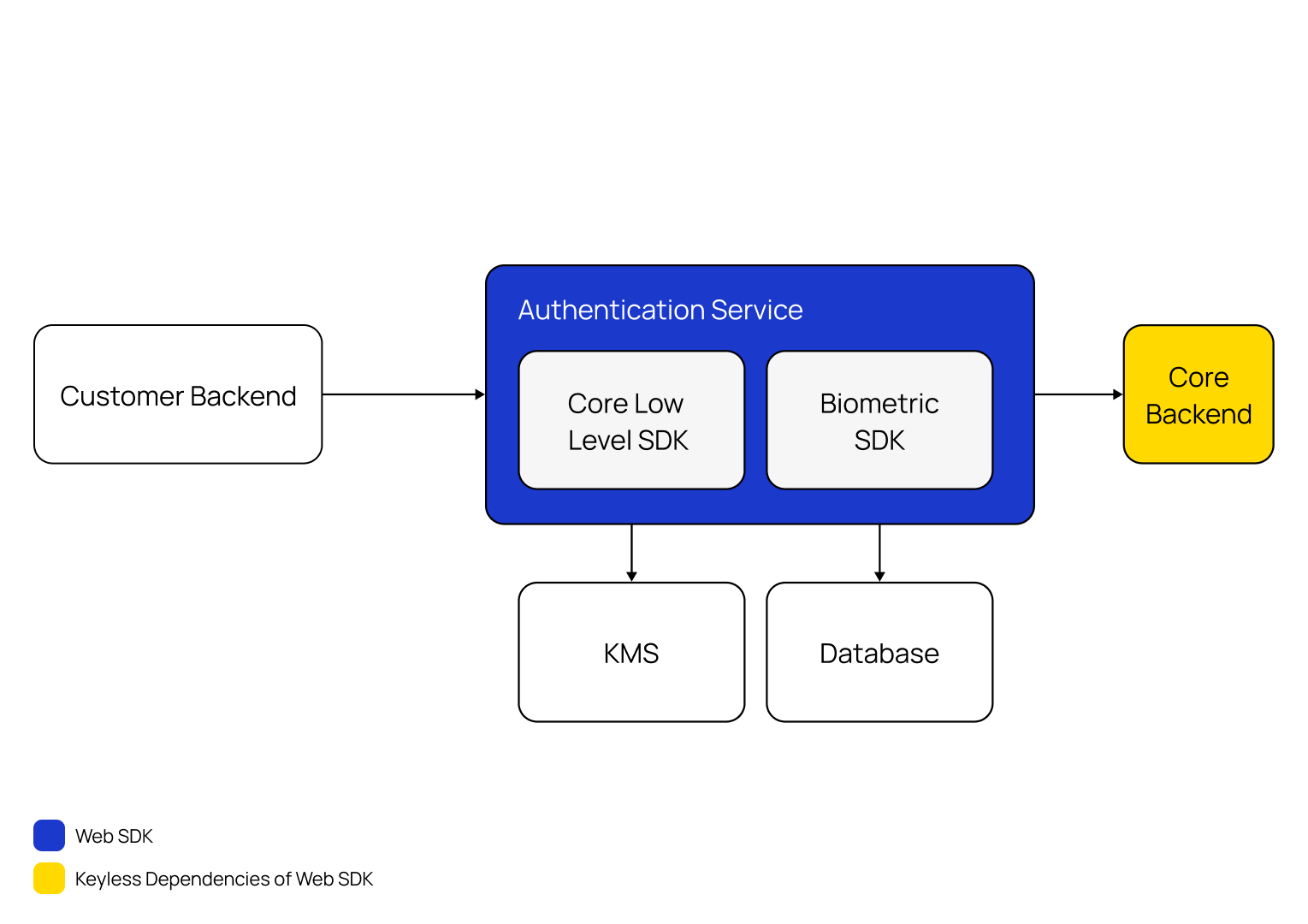
Headless authentication doesn’t use a user interface. It uses client-side JavaScript to authenticate the user.
Your web app creates a PingOne Recognize auth symbol and establishes a connection to the PingOne Recognize Authentication Service, then:
-
Waits for the "begin-stream" event and sends the first face frame.
-
Waits for the "frame-results" event and sends one more face frame.
-
The wait will continue in a loop until either of:
-
The "error" event is fired which means that most likely the biometric pipeline failed, or another error stopped the process.
-
The "stop-stream" event is fired which means that the biometric pipeline succeeded.
-
-
Now the PingOne Recognize Authentication Service will extract the vectors of the last frame sent and perform the recognition process.
-
Waits for the "finished" event.
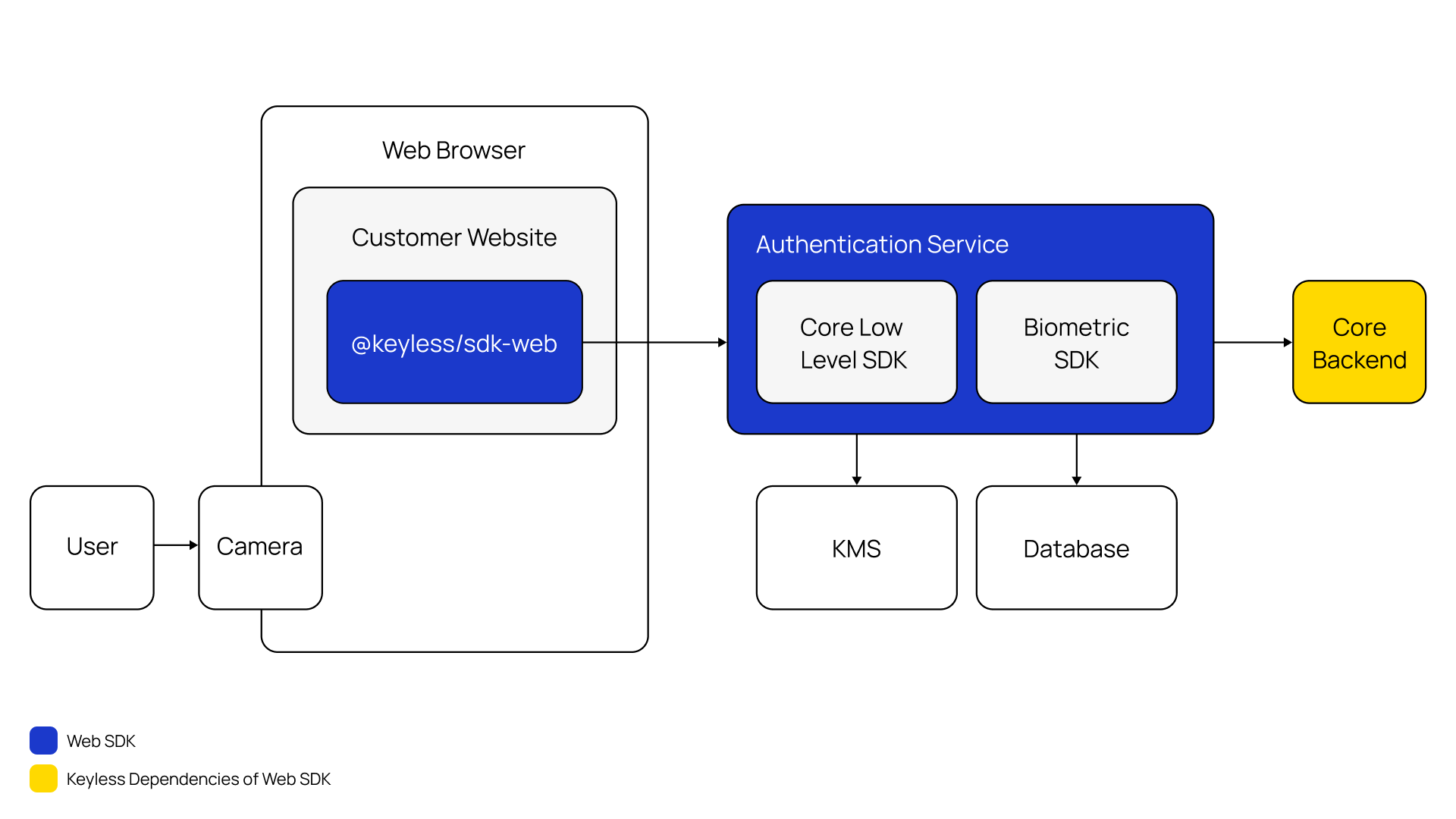
Web component authentication
|
PingOne Recognize uses Web Components to be framework agnostic. Custom elements should work in any environment that supports this standard. |
During authentication, your web app loads and renders the kl-auth web component, the component will establish a connection to the PingOne Recognize Authentication Service as soon as it is mounted, then it:
-
Checks if the user has consented to the usage of their camera, the permission must be granted to proceed.
-
Checks if the user is on a desktop device and has multiple cameras.
If so, the user is asked to pick one to avoid using the wrong camera.
This doesn’t happen on mobile devices, which prefer the selfie camera by default.
-
Starts sending face frames to the PingOne Recognize Authentication Service at a set framerate.
-
Waits for the "finished" event.