On-premise deployment
Kubernetes deployment
Components
The method PingOne Recognize adopts to ship its infrastructure components is Helm chart deployment.
The following diagram illustrates a general overview of the infrastructure components.
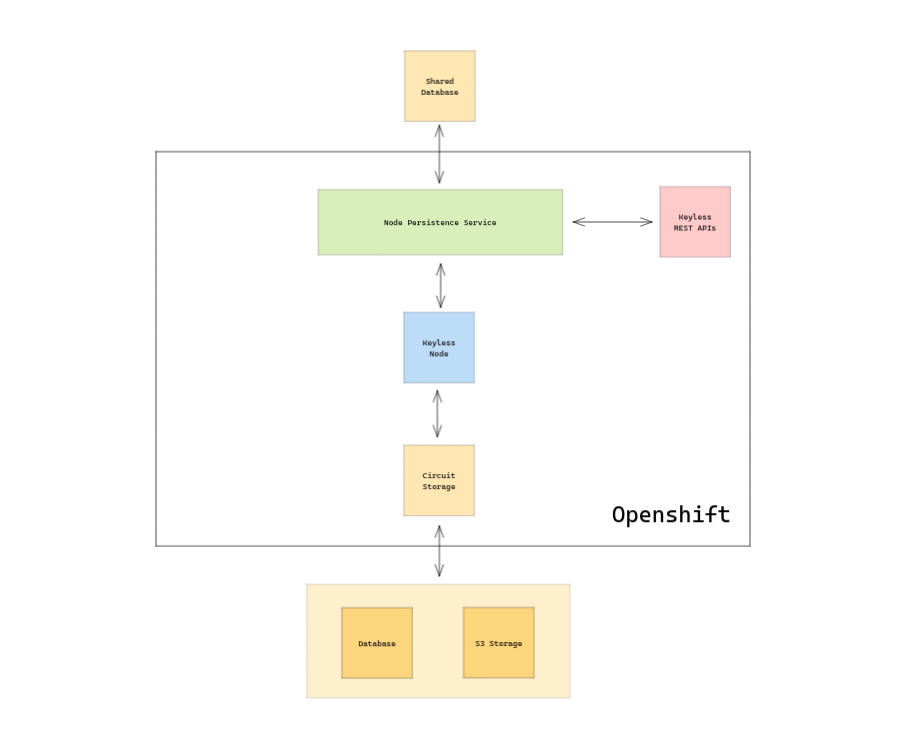
The PingOne Recognize infrastructure is composed of the following components:
PingOne Recognize Node: responsible for implementing the distributed privacy-preserving protocol for PingOne Recognize zero-proof biometric authentication
Node Persistence Service: service implementing a database abstraction layer (Postgres and OracleDB currently supported)
Database: database used by PingOne Recognize to store user data
Circuit Storage Service: service offering internal-use REST APIs to allow PingOne Recognize node to store circuits needed to authenticate users
Database + S3 Storage: used by Circuit Storage Service to store circuits and metadata
PingOne Recognize REST API (Operations API): offers REST APIs for transaction confirmation and other backend services.
Each of the PingOne Recognize components has its own chart and can be deployed standalone, but we strongly suggest using our main Keylessd Helm chart to deploy all needed components together. For more information, see Deployment Steps.
Access the repositories
The customer is going to use two repositories:
A Docker Image Registry: quay.io/keyless.technologies
A Helm Chart Registry: keylesstech.github.io
To access the Docker repository the following command needs to be executed:
docker login quay.io -u < username > -p < password >There is no need for authentication against the Helm Chart Registry.
Deployment steps
-
Add the PingOne Recognize helm repository to your helm repository list with the following command:
helm repo add keyless https://keylesstech.github.io -
List the charts:
helm search repo keyless
-
Get the
values.yamlfrom the globalkeylessdchart.helm show values keyless/keylessd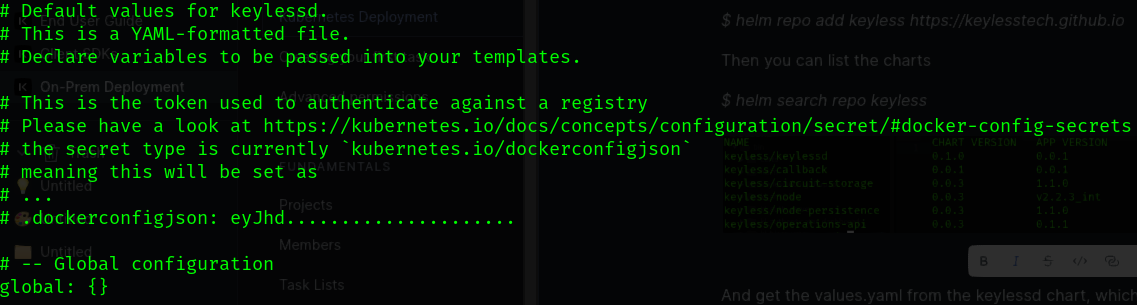
To manage secrets and dependencies, include the PingOne Recognize Helm chart,
keylessd, as a dependency of your own chart. This increases your control and opportunities. By doing so, you could deploy custom monitoring agents alongsidekeylessd. -
After you’re satisfied with your configuration, you can apply it with:
helm upgrade --install \<release-name (for example keylessd)> keyless/keylessd
Configuration
The deployment configuration is customizable using the Helm values.yaml file which is divided into the following sections:
global: {}

keylessd:

  circuit-storage:
    ...
  node:
    ...
  operations-api:
    ...
  node-persistence:
    ...
global : global values such as :
-
namespace: namespace name where to deploy the resources ( optional ), defaults to
default -
token: to authenticate to the registry ( optional )
-
createNamespace: to create the namespace if it doesn’t already exists
circuit-storage: configuration specific to Circuit Storage Service
node: configuration specific to PingOne Recognize Node
operations-api: configuration for the Operation API component
node-persistence: configuration for the Node Persistence API component
Global
As stated above, the global section is optional and it is used if you do not desire to deploy each component into its own namespace but prefer to have all in a single namespace. You will then need to provide the name of the namespace and to set createNamespace variable to true as shown below
global:
  token: # eyJhd.....................
  namespace: keyless
  createNamespace: true
global.token variable is used if you want PingOne Recognize chart to create the imagePullSecret secret used by the deployment to access the Docker registry. This is typical when you want to deploy each service into a separate namespace.
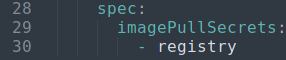
Secrets must be created within each namespace to pull the associated Docker image.
You can also create a secret registry of type kubernetes.io/dockerconfigjson to hold secrets accessed by the deployment.
|
To know more about the format of the secret registry please refer to the Kubernetes documentation. |
|
The token variable isn’t needed if the registry doesn’t require authentication. |
Circuit storage service
This service reads from and writes to s3-compatible storage. It requires an access key, a secret key, and a database to store metadata.
Skip this section to if you plan to supply the corresponding Secret to hold the credentials.
Expose circuit storage service
keylessd:
  circuit-storage:
    publicRoute: true
    createRoute: true
    createIngress: false
    host: circuit-storage
    domain: keyless.local
Use the publicRoute variable to expose the circuit storage service outside the cluster.
You can also specify if Kubernetes should create an Ingress or a Route, depending if you’re running on a generic cluster or an OpenShift cluster.
The circuit storage service is a backend service, so the default values are false.
If these values are set to true, the following values are also required:
-
host
-
domain
The corresponding ingress or route object should be configured to receive traffic from <host>.<domain>.
Custom certificate to access the database or the S3-compatible backend
keylessd:
  circuit-storage:
    customCA: true
    certificates:
      - name: storage-cert
        mountPath: "/etc/ssl/custom-ca/storage-cert.pem"
        subPath: "storage-cert.pem"
        readOnly: true
      - name: db-cert
        mountPath: "/etc/ssl/custom-ca/db-cert.pem"
        subPath: "db-cert.pem"
        readOnly: true
Custom CA certificates are supported. Set the customCA variable to true and then add a ConfigMap object to your chart:
---
kind: ConfigMap
apiVersion: v1
metadata:
  name: storage-cert
  namespace: my-namespace-name
data:
  storage-cert.pem: |
    -----BEGIN CERTIFICATE-----
    ...
    -----END CERTIFICATE-----
---
kind: ConfigMap
apiVersion: v1
metadata:
  name: db-cert
  namespace: my-namespace-name
data:
  db-cert.pem: |
    -----BEGIN CERTIFICATE-----
    ...
    -----END CERTIFICATE-----
This can be used when the s3-compatible backend exposes a secure connection that requires a certificate or if the database has additional authentication requirements.
The certificates are mounted to a specific location in the pod and added at runtime to the internal application key store.
|
The mountPath must always be in the format |
Exposed Java SpringBoot endpoints
The endpoints section of the values.yaml file, lets you customize the endpoints exposed by circuit storage. By default, the following env variables are exposed: metrics and health-check. (Passwords aren’t displayed.)
keylessd:
  circuit-storage:
    configMap:
      endpoints:
        web: health,env,metrics
        metrics: true
        health: true
        env: true
        # ...
Datadog integration
We support Datadog integration for circuit storage by setting up the datadogApiKey in the secrets section and the datadog.uri, which can vary depending according to your DataDog URI server.
keylessd:
  circuit-storage:
    configMap:
      datadog:
        uri: https://api.datadoghq.eu
    secrets:
datadogApiKey: "..."|
Leave blank if you don’t want to use this integration. |
Adding Java options to circuit storage
The javaOpts variable customizes java options which might need to be adjusted to meet individual requirements.
keylessd:
  circuit-storage:
    configMap:
      javaOpts: >-
        -XX:MaxRAMPercentage=75.0
        -Dspring.profiles.active=oracle,onprem
        -Dlogging.level.com.amazonaws=DEBUG
Database Connection
configMap.springDatasource.url variable holds the jdbc-formatted string to allow Circuit Storage to connect to its own database. The Instance needs a dedicated schema to be available ( default "circuit-storage")
keylessd:
  circuit-storage:
    configMap:
      springDatasource:
        # Oracle
        url: jdbc:oracle:thin:@//<hostname>:1521/<service>
        # Or use Postgres instead:
        # url: jdbc:postgresql://<hostname>:5432/<dbName>
Database Initialization
To manage the database schema Circuit Storage makes use of the Flyway library.
keylessd:
  circuit-storage:
    configMap:
      springFlyway:
        enabled: true
        locations: oracle
configMap.springFlyway.enabled variable allows you to enable or disable database initialization scripts to be run at start time.
configMap.springFlyway.locations variable allows you to set "oracle" or "postgres" location depending on which database you’re using ( currently only the two mentioned are supported).
|
Disabling Flyway means that you’ll need to initialize the database yourself, so please, if that’s the case, reach out to us so that we can provide you the database initialization script to you |
Mutual TLS Support for Oracle Database
Starting with release 0.1.4 it is possible to connect to Oracle Database using mutual TLS authentication.
To achieve this the Oracle Wallet archive is needed.
To configure Circuit Storage to use Oracle Wallet follow this procedure:
-
Unzip the Oracle Wallet
unzip wallet.zip -d mywallet
Archive:  wallet.zip
  inflating: mywallet/ewallet.pem
  inflating: mywallet/README
  inflating: mywallet/cwallet.sso
  inflating: mywallet/tnsnames.ora
  inflating: mywallet/truststore.jks
  inflating: mywallet/ojdbc.properties
  inflating: mywallet/sqlnet.ora
  inflating: mywallet/ewallet.p12
inflating: mywallet/keystore.jks-
Execute the following command to create a Secret containing all files inside the wallet.
In the example below the name of the secret will be "`wallet`"
$ kubectl create secret generic wallet --from-file=./mywallet/ -n <namespace-name>
secret/wallet created-
Modify
values.yaml, given the following tnsnames.ora example file
tnsnames.ora
circuitstoragetest_high = (description= (address=(protocol=...)(port=...)(host=...))(connect_data=(service_name=...))(security=(ssl_server_cert_dn="CN=..., OU=..., O..., L..., ST=..., C=..")))
circuitstoragetest_low = (description= (address=(protocol=...)(port=...)(host=...))(connect_data=(service_name=...))(security=(ssl_server_cert_dn="CN=..., OU=..., O..., L..., ST=..., C=..")))
circuitstoragetest_medium = (description= (address=(protocol=...)(port=...)(host=...))(connect_data=(service_name=...))(security=(ssl_server_cert_dn="CN=..., OU=..., O..., L..., ST=..., C=..")))
circuitstoragetest_tp = (description= (address=(protocol=...)(port=...)(host=...))(connect_data=(service_name=...))(security=(ssl_server_cert_dn="CN=..., OU=..., O..., L..., ST=..., C=..")))
circuitstoragetest_tpurgent = (description= (address=(protocol=...)(port=...)(host=...))(connect_data=(service_name=...))(security=(ssl_server_cert_dn="CN=..., OU=..., O..., L..., ST=..., C=..")))
and TNS_ADMIN=/network/admin as the directory which the wallet secret will be mounted into, as such:
keylessd:
  circuit-storage:
    mtls:
      secretName: wallet
    configMap:
      springDatasource:
url: jdbc:oracle:thin:@circuitstoragetest_high?TNS_ADMIN=/network/admin|
Remember that you will still need to provide database username and password as the following secrets:
|
PingOne Recognize node
Expose PingOne Recognize node service
keylessd:
  node:
    publicRoute: true
    createRoute: false
    createIngress: true
    host: node
    domain: keyless.technology
To expose PingOne Recognize Node service outside the Cluster, publicRoute variable needs be used.
In addition to this, it is possible to specify if Kubernetes should create an Ingress or a Route , depending if you’re running on a vanilla cluster or on OpenShift.
As Keylessd Node needs to be exposed the default values for publicRoute, createRoute and createIngress are as shown above.
You will also need to set the following two variables:
-
host
-
domain
as shown above, so that the corresponding Ingress/Route object will be configured to get traffic from <host>.<domain>.
|
As there can be edge cases where you would prefer to manage Ingresses outside our Chart it is possible to set publicRoute to false In this case you’ll need to provide the Ingress/Route configuration, but keep in mind that the traffic needs to flow from the Ingress controller to the PingOne Recognize Node in passthrough mode as the TLS termination happens at the node level. |
As the PingOne Recognize node will use a certificate that will be mounted at runtime into the pod, to terminate the TLS connection, regardless of the value of publicRoute, it is required to specify the host and domain to be used, which need to corresponds to ones used to generate the certificate.
As an example, let’s say that our final endpoint is node.keyless.technology, and that we have a certificate generated using the correct CN (again node.keyless.technology) then in this case the host variable will correspond to "node", meanwhile domain will correspond to "keyless.technology".
keylessd:
  node:
    host: node
    domain: keyless.technology
certName variable is used to reference the secret name that hosts the certificate.
keylessd:
  node:
certName: node|
The expected format for the certificate is the one refecenced here: Kubernetes TLS secret documentation |
configMap.nodeConfig.storageUrl variable is used to reference Circuit Storage service in the format http://<service-name>.<namespace>.svc.cluster.local
configMap.nodeConfig.databaseUrl variable is used to reference Node Persistence service in the format http://<service-name>.<namespace>.svc.cluster.local
keylessd:
  node:
    configMap:
      nodeConfig:
        storageUrl: http://circuit-storage-keylessd.keyless.svc.cluster.local
databaseUrl: http://node-persistence-keylessd.keyless.svc.cluster.localOperations API
Expose Operations API service
keylessd:
  operations-api:
    publicRoute: true
    createRoute: false
    createIngress: true
    host: operations-api
    domain: keyless.local
To expose Operations API service outside the Cluster, publicRoute variable can be used.
In addition to this, it is possible to specify if Kubernetes should create an Ingress or a Route , depending if you’re running on a vanilla cluster or on OpenShift.
As Operations API needs to be exposed the default values for publicRoute, createRoute and createIngress are as shown above.
You will also need to set the following two variables:
-
host
-
domain
as shown above, so that the corresponding Ingress/Route object will be configured to get traffic from <host>.<domain>.
|
As there can be edge cases where you would prefer to manage Ingresses outside our Chart it is possible to set publicRoute to false In this case you’ll need to provide the Ingress/Route configuration, but keep in mind that the traffic needs to flow from the Ingress controller to Operations API in edge mode as the TLS termination happens at the cluster level. |
configMap.nodePersistenceApiUrl variable is used to reference Node Persistence service in the format http://<service-name>.<namespace>.svc.cluster.local
keylessd:
  operations-api:
    configMap:
nodePersistenceApiUrl: https://node-persistence.default.svc.cluster.local:8080Node persistence
Because this service reads fom and writes to a database, a secret is required for access.
Exposed Java SpringBoot endpoints
The endpoints section of the values.yaml file, allows you to customize the amount of endpoints exposed by Node Persistence, usually the defaults are set to expose env variables ( passwords are not shown), metrics and health-check.
keylessd:
  node-persistence:
    configMap:
      endpoints:
        web: health,env,metrics
        metrics: true
        health: true
        env: true
        # ...
Datadog integration
We support Datadog Integration for node persistence by setting up the datadogApiKey in the secrets section and the datadog.uri, which can vary depending on whether you use datadog.eu, datadog.com, or other servers.)
keylessd:
  node-persistence:
    configMap:
      datadog:
        uri: https://api.datadoghq.eu
    secrets:
datadogApiKey: "..."|
Leave blank if you don’t wish to use this integration. |
Adding Java options to node persistence
The javaOpts variable customizes java options which might need to be adjusted according to individual requirements.
keylessd:
  node-persistence:
    configMap:
      javaOpts: >-
        -XX:MaxRAMPercentage=75.0
        -Dlogging.level.com.amazonaws=DEBUG
Setting database type
At the moment of writing Node Persistence supports Oracle and Postgres databases
To set which database type Node Persistence will need to use, it is possible to set springProfile variable to either "oracle" or "postgres"
keylessd:
  node-persistence:
    configMap:
      springProfile: oracle
Database connection
configMap.springDatasource.url variable holds the jdbc-formatted string to allow Node Persistence to connect to its own database. The Instance needs a dedicated schema to be available ( default "keylessd")
keylessd:
  node-persistence:
    configMap:
      springDatasource:
        # Oracle
        url: jdbc:oracle:thin:@//<hostname>:1521/<service>
        # Or use Postgres instead:
        # url: jdbc:postgresql://<hostname>:5432/<dbName>
Database initialization
To manage the database schema Node Persistence makes use of the Flyway library.
keylessd:
  node-persistence:
    configMap:
      springFlyway:
        enabled: true
        locations: oracle
configMap.springFlyway.enabled variable allows you to enable or disable database initialization scripts to be run at start time.
configMap.springFlyway.locations variable allows you to set "oracle" or "postgres" location depending on which database you’re using ( currently only the two mentioned are supported).
|
Disabling Flyway means that you’ll need to initialize the database yourself, so please, if that’s the case, reach out to us so that we can provide you the database initialization script to you |
Mutual TLS support for Oracle database
Starting with release 0.1.4 it is possible to connect to Oracle Database using mutual TLS (mTLS) authentication.
To achieve this the Oracle Wallet archive is needed.
To configure Node Persistence to use Oracle Wallet follow this procedure:
-
Unzip the Oracle Wallet
unzip wallet.zip -d mywallet
Archive:  wallet.zip
  inflating: mywallet/ewallet.pem
  inflating: mywallet/README
  inflating: mywallet/cwallet.sso
  inflating: mywallet/tnsnames.ora
  inflating: mywallet/truststore.jks
  inflating: mywallet/ojdbc.properties
  inflating: mywallet/sqlnet.ora
  inflating: mywallet/ewallet.p12
inflating: mywallet/keystore.jks-
Execute the following command to create a Secret containing all files inside the wallet.
In the example below the name of the secret will be "`wallet`"
$ kubectl create secret generic wallet --from-file=./mywallet/ -n <namespace-name>
secret/wallet created-
Modify
values.yaml, given the following tnsnames.ora example file
tnsnames.ora
nodepersistencetest_high = (description= (address=(protocol=...)(port=...)(host=...))(connect_data=(service_name=...))(security=(ssl_server_cert_dn="CN=..., OU=..., O..., L..., ST=..., C=..")))
nodepersistencetest_low = (description= (address=(protocol=...)(port=...)(host=...))(connect_data=(service_name=...))(security=(ssl_server_cert_dn="CN=..., OU=..., O..., L..., ST=..., C=..")))
nodepersistencetest_medium = (description= (address=(protocol=...)(port=...)(host=...))(connect_data=(service_name=...))(security=(ssl_server_cert_dn="CN=..., OU=..., O..., L..., ST=..., C=..")))
nodepersistencetest_tp = (description= (address=(protocol=...)(port=...)(host=...))(connect_data=(service_name=...))(security=(ssl_server_cert_dn="CN=..., OU=..., O..., L..., ST=..., C=..")))
nodepersistencetest_tpurgent = (description= (address=(protocol=...)(port=...)(host=...))(connect_data=(service_name=...))(security=(ssl_server_cert_dn="CN=..., OU=..., O..., L..., ST=..., C=..")))
and TNS_ADMIN=/network/admin as the directory which the wallet secret will be mounted into, as such:
keylessd:
  node-persistence:
    mtls:
      secretName: wallet
    configMap:
      springDatasource:
url: jdbc:oracle:thin:@nodepersistencetest_high?TNS_ADMIN=/network/admin|
Remember that you will still need to provide database username and password as the following secrets:
|
Logging
Log levels are configurable for all applications except keylessd.
Operations API:
The log level is configurable over the "configMap.logLevel" configuration key in the helm chart which by default is set to "info", the following values are valid (debug, info, warning, error, critical)
Node Persistence / Circuit Storage:
The log level is configurable over the "configMap.loggingLevel.root" configuration key in the helm chart which by default is set to "info", the following values are valid (trace, debug, info, warn, error)
Infrastructure testing
Testing the correct deployment of PingOne Recognize service can be done with the following methods.
Testing service manually
Circuit storage
To test the correct configuration of Circuit Storage it is possible to use the following commands to upload a file from your local environment to the storage.
If Circuit Storage is exposed outside the cluster ( meaning it has been deployed with publicRoute: true ) you can issue the following command to test the service
$ curl --location --request POST '<host>.<domain>:<port which the ingress controller is listening on>/api/v1/circuits/qqF0FC59D87AA45dC15DA1F8A3377A17E423E1F0833343A5865D5E365133090A/qqqB155F07FA55A74FDB3C244B600D5E727EC0982392B89EEDF72DB37A346235/ad000008374B155F07FA55A7000000106F54E35F5FC8C87BF8E4691E9AA98CB8/a4aqa107D779ABDEA0CC5DEF5623F1BB2691D49AFD0A7DDBB6FB0FF3CF0B00101D75AE93C21C3' --form 'pipelineId="pipeline_1"' --form 'blob=@"/home/$USER/<a test file>.txt"'If Circuit Storage is not exposed with an Ingress object or it is not possible to reach it directly from outside the cluster you can issue a port-forward command so that the Circuit Storage service is exposed on localhost:
$ kubectl port-forward service/circuit-storage-keylessd -n <namespace> 8080:8080Then it is possible to issue the following command from your local machine to upload a test file
$ curl --location --request POST 'localhost:8080/api/v1/circuits/qqF0FC59D87AA45dC15DA1F8A3377A17E423E1F0833343A5865D5E365133090A/qqqB155F07FA55A74FDB3C244B600D5E727EC0982392B89EEDF72DB37A346235/ad000008374B155F07FA55A7000000106F54E35F5FC8C87BF8E4691E9AA98CB8/a4aqa107D779ABDEA0CC5DEF5623F1BB2691D49AFD0A7DDBB6FB0FF3CF0B00101D75AE93C21C3' --form 'pipelineId="pipeline_1"' --form 'blob=@"/home/$USER/<a test file>.txt"'PingOne Recognize node
It is possible to test PingOne Recognize Node, running a dedicated containerized test tool as shown below:
docker run -it -e KL_API_KEY="<your_sdk_key>" -e KL_HOSTNAME_PORT="<fqdn_of_node>:<port>" quay.io/keyless_technologies/kl-node-test:v2.2.3_intAs the docker is hosted on our quay.io registry make sure to be authenticated to it before running the command.
Operations API
To test the correct configuration of Operations API it is possible to use the following commands to upload a file from your local environment to the storage.
If Operations API is exposed outside the cluster ( meaning it has been deployed with publicRoute: true ) you can issue the following command to test the service:
curl -H "X-Api-Key:<you-sdk-key>" -vv http://<host>.<domain>:<port which the ingress controller is listening on>/v2/operations/<operation-id>If Operations API is not exposed with an Ingress object or it is not possible to reach it directly from outside the cluster you can issue a port-forward command so that the Circuit Storage service is exposed on localhost:
kubectl port-forward service/operations-api-keylessd -n <namespace> 8080:8080Then it is possible to issue the following command to read an operation-id, given that it is available in the database:
curl -H "X-Api-Key:<you-sdk-key>" -vv http://localhost:8080/v2/operations/<operation-id>Testing services automatically
Starting from release 0.1.3 it is possible to test PingOne Recognize deployment automatically, using helm testing feature as show below
After deploying the PingOne Recognize service stack successfully ( please refer to this page to know how to do so) it is sufficient to invoke the following command
# with 'keylessd' as the release name
helm test keylessd --logs
The above command will trigger individual test pods, one per each service.
It is also possible to adjust test configurations to fit customer’s needs, in the test section of each service in values.yaml, as shown below:
keylessd:
  circuit-storage:
    # ...
    test:
      image: postman/newman
      resources: {}
  operations-api:
    # ...
    test:
      image: postman/newman
      resources: {}
  node-persistence:
    # ...
    test:
      image: postman/newman
      resources: {}
  node:
    # ...
    # The following variables are used to test the deployment
    # running `helm test <release-name>`
    test:
      # -- Name of the docker containing the test tool
      image: quay.io/keyless_technologies/kl-node-test:v2.2.3_int
      # -- Hostname endpoint of the Node (FQDN)
      hostname: ""
      # -- Test suit is shipped with 2 certificates
      # /ca/rootCA.crt is a test certificate for local development
      # keylessCA.crt is used for client testing purposes, please use this one if in doubt
      cert: "/ca/rootCA.crt"
      # -- Api key available in the database
      apiKey: ""
      # -- Port where the service is expected to be exposed
      # If test is executed with hostname = fqdn it is the port
      # the cluster exposes as part of the external endpoint
      # probably 443
      port: ""
      resources: {}
Configuring circuit storage, Operations API, and node persistence test
Circuit Storage, Operations API and Node Persistence services have a similar setup:
Tests for these services need a container with Postman so the default one from Docker Hub is set as default. It is still possible to change the image ( for example if you have an internal Postman image or if Docker Hub registry cannot be exposed internally )
In any case tests are executed from within the Kubernetes Cluster.
Configuring Keylessd node test
Node tests are instead conducted from a proprietary container image. This test simulates a client connecting to the node from outside the cluster.
hostname: It is possible to specify the FQDN of the node (that is, the DNS record the node will be exposed outside the cluster, given that the endpoint is reachable)
cert: make sure the value is set to keylessCA.crt as this certificate is generated and trusted by the internal CA of PingOne Recognize.
apiKey: this is the same API Key we release to customers.
port: if the service is exposed externally the traffic flows from the internet towards the Ingress Controller which usually exposes this services with an https endpoint, so in most cases this port is 443.