JSON PDP API request and response flow
The JSON policy decision point (PDP) API provides an HTTP REST API for attribute-based access control based on policies configured in the PingAuthorize Server Policy Decision Service.
Client applications can use this API to request authorization decisions in individual or batch modes. Each request type corresponds to a specific endpoint:
| Endpoint path | Method | Content-Type/Accept | Request body |
|---|---|---|---|
|
POST |
|
JSON |
|
POST |
|
JSON |
All requests must include valid JSON bodies in the expected format and specify the appropriate HTTP headers:
Content-Type: application/json
Accept: application/json
Request and response flow
A successful JSON PDP API request goes through the following flow:
-
The client sends a JSON decision request to one of the PDP API endpoints.
-
The JSON PDP API forwards the request to the Policy Decision Service.
-
The Policy Decision Service evaluates the request according to the configured policies and returns a decision.
-
The JSON PDP API sends the decision response back to the client.
-
The policy enforcement point (PEP) applies any obligations or statements returned in the response.
Learn more about making JSON PDP API requests in the JSON PDP API Reference documentation.
JSON PDP API request format
Individual requests
A valid JSON PDP API request is a simple JSON object that can be forwarded to the Policy Decision Service. Policies can match a decision request by service, domain, action, or other attributes.
The following table describes the values contained in a valid JSON PDP API request:
| Field | Type | Required | Trust Framework type | Example value |
|---|---|---|---|---|
|
String |
Optional |
Domain |
|
|
String |
Optional |
Action |
|
|
String |
Optional |
Service |
|
|
String |
Optional |
Identity Provider |
|
|
Map <String, String> |
Required |
Other Attributes |
|
|
The |
{
  "domain": "Sales.Asia Pacific",
  "action": "Retrieve",
  "service": "Mobile.Landing page",
  "identityProvider": "Social Networks.Spacebook",
  "attributes": {
    "Prospect name": "B. Vo"
  }
}
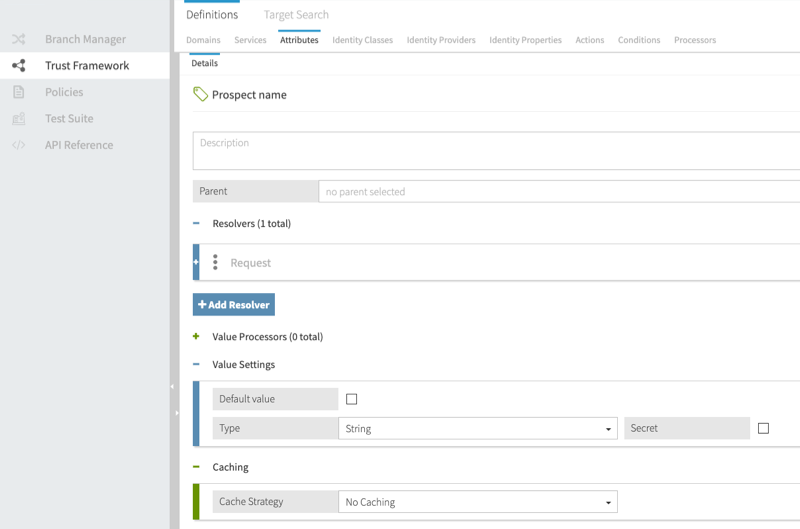
The following image shows how Prospect name is defined in the Policy Editor. In this example, the Prospect name attribute has a Request resolver and a Type of string.
|
The Trust Framework attribute name must match the key of the |
Batch requests
Batch requests consist of a requests array that contains individual JSON requests.
{
  "requests": [
    {
      "domain": "Sales.Asia Pacific",
      "action": "Retrieve",
      "service": "Mobile.Landing page",
      "identityProvider": "Social Networks.Spacebook",
      "attributes": {
        "Prospect name": "B. Vo"
      }
    },
    {
      "domain": "Sales.EMEA",
      "action": "Search",
      "service": "Mobile.Users search",
      "identityProvider": "Social Networks.Chirper",
      "attributes": {
        "Prospect name": "A. Mann"
      }
    }
  ]
}
JSON PDP API response format
After the Policy Decision Service determines a decision response, it hands the response back to the JSON PDP API to provide to the client. JSON PDP API responses include decisions, such as Permit or Deny, and any obligations or statements that matched during policy processing.
Individual responses
The following example shows a response to an individual JSON request:
{
  "id": "12345678-90ab-cdef-1234-567890abcdef",
  "deploymentPackageId": "12345678-90ab-cdef-1234-567890abcdef",
  "timestamp": "2021-06-11T03:12:19.720485Z",
  "elapsedTime": 184024,
  "decision": "PERMIT",
  "authorized": true,
  "statements": [
    {
      "id": "12345678-90ab-cdef-1234-567890abcdef",
      "name": "Statement Name",
      "code": "statement-code",
      "payload": "{\"data\": \"some data\"}",
      "obligatory": true,
      "fulfilled": false,
      "attributes": {}
    }
  ],
  "status": {
    "code": "OKAY",
    "messages": [],
    "errors": []
  }
}
The decision and authorized values identify whether the policies authorize the request, and the statements array contains statements to be applied by the PEP. The elapsedTime value shows evaluation duration in microseconds.
Batch responses
Batch responses are returned as a responses array that contains individual JSON responses. The order of the responses matches the order of the original requests, meaning the first response in the responses array corresponds to the first request in the batch, the second response to the second request, and so on.
The following example shows a response to a batch JSON request:
{
  "responses": [
    {
      "id": "12345678-90ab-cdef-1234-567890abcdef",
      "deploymentPackageId": "12345678-90ab-cdef-1234-567890abcdef",
      "timestamp": "2021-06-11T04:18:32.820482Z",
      "elapsedTime": 830492,
      "decision": "PERMIT",
      "authorized": true,
      "statements": [
        {
          "id": "12345678-90ab-cdef-1234-567890abcdef",
          "name": "Advice Name",
          "code": "advice-code",
          "payload": "{\"data\": \"some data\"}",
          "obligatory": true,
          "fulfilled": false,
          "attributes": {}
        }
      ],
      "status": {
        "code": "OKAY",
        "messages": [],
        "errors": []
      }
    },
    {
      "id": "fedcba09-8765-4321-fedcba098765",
      "deploymentPackageId": "fedcba09-8765-4321-fedcba098765",
      "timestamp": "2021-06-11T04:18:33.650974Z",
      "elapsedTime": 492048,
      "decision": "PERMIT",
      "authorized": true,
      "statements": [
        {
          "id": "fedcba09-8765-4321-fedcba098765",
          "name": "Different Advice",
          "code": "advice-code",
          "payload": "{\"data\": \"other data\"}",
          "obligatory": false,
          "fulfilled": false,
          "attributes": {}
        }
      ],
      "status": {
        "code": "OKAY",
		"messages": [],
		"errors": []
	  }
    }
  ]
}