Page node
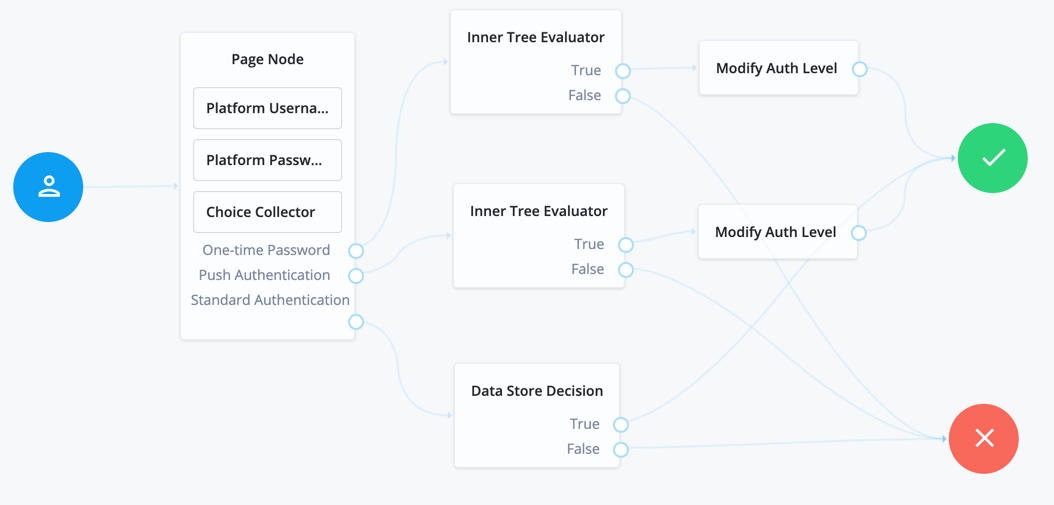
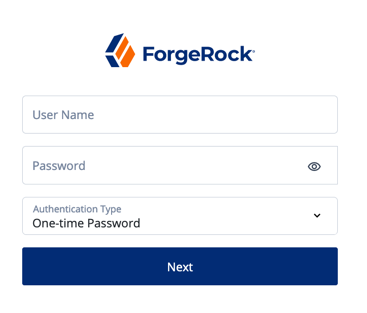
The Page node lets you combine multiple nodes that request input onto a single page for display to the user. For example, you can use it to create a single login page that requests a username and password.
| The Page node can only include nodes that use callbacks to request input. |
To use it, drag and drop compatible nodes onto the Page node in the journey editor.
When designing a journey that includes a Page node, consider the following points:
-
A Page node must contain at least one node.
-
Page nodes can’t be nested inside each other. Similarly, you can’t include an Inner Tree Evaluator node in a Page node.
-
Page nodes are designed to group nodes together that require user input. Non-interactive nodes, such as the Data Store Decision node or Push Sender node, should be placed outside of Page nodes.
-
Scripted Decision nodes can be included in Page nodes but only if they handle callbacks.
Scripts that use the
Actionclass to set outcomes (using thegoTomethod), or set messages (using fields such aslockoutMessageorerrorMessage), aren’t supported within a Page node. -
Only the final node can have multiple outcomes. All preceding nodes must have a single outcome path.
Compatibility
| Product | Compatible? |
|---|---|
PingOne Advanced Identity Cloud |
|
ForgeRock Access Management (self-managed) |
|
Ping Identity Platform (self-managed) |
Outcomes
The outcomes are determined by the last node in the Page node. Only the last node in the page can have more than one outcome path.
Properties
| Property | Usage |
|---|---|
Page Header |
Optional localized title for the page node and the nodes contained within it. Use this when components of an authentication flow need a title, such as breaking a registration into labeled sections. |
Page Description |
Optional localized description for the page node and the nodes contained within it. Use this when additional descriptive text is needed in an authentication flow. |
Stage |
An optional stage name to pass to the client to aid in rendering. |
Submit Button Text |
Optional. Use the Key and Value fields to set the text of the Submit button. This property is available only in the Ping Identity Platform admin UI. |
Page Footer |
Optional. A localized footer for the page node and the nodes contained within it. Use this when additional descriptive text is needed in an authentication flow. This property is available only in the Ping Identity Platform admin UI. |
Theme |
Optional. If using hosted pages, specify a theme to override this journey’s UI theme. This property is available only in the Ping Identity Platform admin UI. |
|
This node’s optional properties are passed in the response, but a self-hosted or custom UI must support these properties to make them visible to the end user. |