Device Match node
The Device Match node compares collected device metadata with that stored in the user’s profile.
Use this node with the Device Profile Collector node to check whether the user is authenticating with a previously saved, trusted device.
| Use this node with the Device Location Match node or Device Geofencing node to verify both the device and location of the user. |
The Device Match node supports the following methods of comparison:
-
Built-in matching
The node handles the comparison and matching. You configure the acceptable variance and the maximum age for device profiles.
When using built-in matching, the node compares all attributes from the device profile collected by the Device Profile Collector node against the attributes in the user’s saved device profiles. Each differing attribute value adds to the variance count.
Examples of attributes compared include:
-
Hardware details (manufacturer, model)
-
Operating system information (OS version, build number)
-
Browser environment (user-agent, screen resolution)
-
Network information (IP address, MAC address)
This mode is ideal for matching devices that don’t change frequently, such as point-of-sale machines. It’s also simpler to implement because you don’t have to write a script to handle and compare specific device attributes.
However, this method treats all attributes of a device equally, and each difference in attribute values counts towards the Acceptable Variance value you configure.
-
-
Custom matching
Create a custom script to compare captured device data against trusted device profiles.
This mode is ideal if you issue specific hardware to your users, or you want to prioritize certain device attribute matches over others.
The script lets you control which device attributes are captured and how they’re compared to the trusted device profile.
For example, you could ignore attributes that are known to change frequently, such as screen layouts or orientation.
To view a customizable template script for device matching, follow these steps:
-
In the AM admin UI, go to Realms > realm name > Scripts.
-
Click Device Profile Match Template - Decision Node Script.
There’s also a comprehensive sample script (with usage instructions) and a development toolkit in the GitHub sample repository. -
Availability
| Product | Available? |
|---|---|
PingOne Advanced Identity Cloud |
Yes |
PingAM (self-managed) |
Yes |
Ping Identity Platform (self-managed) |
Yes |
Inputs
The node reads the username from the shared state. Implement the following node before this node in the journey:
-
Username Collector node (standalone AM)
-
Platform Username node (Ping Identity Platform deployment)
This node also reads collected device metadata from the shared state. Implement a Device Profile Collector node earlier in the journey to collect metadata for the current device.
If Use Custom Matching Script is enabled, the inputs depend on the script.
Configuration
| Property | Usage |
|---|---|
Acceptable Variance |
The maximum number of acceptable device attribute differences for a match. Default: |
Expiration |
The maximum age, in days, that a saved profile can remain unused before it expires. AM calculates this period from the device profile’s When the node finds a saved device profile that hasn’t expired, it updates the profile’s For example, if the expiration is set to 30 days, and a saved profile was last used 29 days ago, the profile is still eligible for comparison.
If the node evaluates this saved profile, it updates the profile’s When Use Custom Matching Script is enabled, this setting is ignored and the custom script is responsible for any expiration behavior. Default: |
Use Custom Matching Script |
Enable this option to use a custom script instead of built-in matching to compare the collected metadata with saved device profiles. When enabled, the node ignores the Acceptable Variance and Expiration settings. The script type must be Decision node script for authentication trees (standalone AM) or Journey Decision Node (Ping Identity Platform deployments). Default: false |
Custom Matching Script |
Select the custom script to use when Use Custom Matching Script is enabled. Only scripts of type Decision node script for authentication trees (standalone AM) or Journey Decision Node (Ping Identity Platform deployments) appear in the list. Default: |
Outputs
This node does not change the shared state on its own.
If the node uses a Custom Matching Script, the output is determined by the script.
Outcomes
True-
The collected device metadata matches a saved profile within the configured variance.
False-
The collected device metadata doesn’t match a saved profile, or another error occurred.
Unknown Device-
The journey follows this outcome path in the following situations:
-
The user has no saved trusted device profiles.
-
The user identity hasn’t yet been established.
-
The acceptable device variance matches, but the device ID no longer matches.
The device ID is randomly generated and stored in the local browser cache. If the cache is cleared, the device ID can change.
-
Errors
This node logs the following warning messages:
script outcome error-
The script failed to set the
outcomefield to a string. error evaluating the script-
The script failed to complete. Refer to the logs for details.
Example
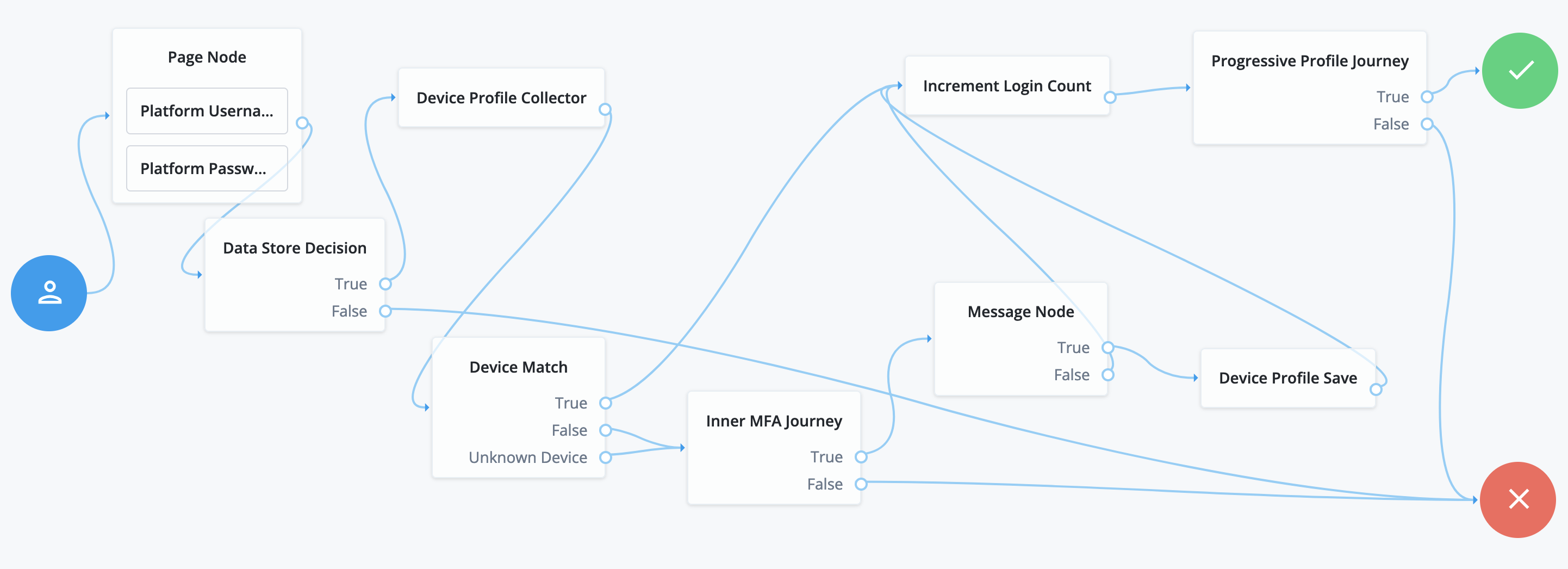
The following journey authenticates the user and checks whether the current device is trusted. If the device isn’t trusted yet, the journey requires an additional authentication factor and lets the user opt to trust the device:
-
The Page node with the Platform Username node and Platform Password node prompt the user for their credentials.
-
The Data Store Decision node confirms the user’s credentials.
-
The Device Profile Collector node collects metadata about the current device.
-
The Device Match node compares saved device profiles with the current device.
-
The Inner MFA Journey, an Inner Tree Evaluator node, requires an additional authentication factor.
-
The Message node prompts the user with an option to trust the current device.
-
The Device Profile Save node saves the current device profile.
-
The Increment Login Count node updates the number of successful authentications.
-
The Progressive Profile Journey, an Inner Tree Evaluator node, invokes a journey to collect additional profile data.