OTP Email Sender node
The OTP Email Sender node sends an email containing a generated one-time passcode (OTP) to the user.
Send mail requests time out after 10 seconds.
|
You can change the timeout in the following advanced AM server properties:
How do I configure advanced server properties?
If the property you want to add or edit is already configured, click the pencil () button to edit it, then click the checkmark () button. Save your changes. Learn more in advanced properties. |
Example
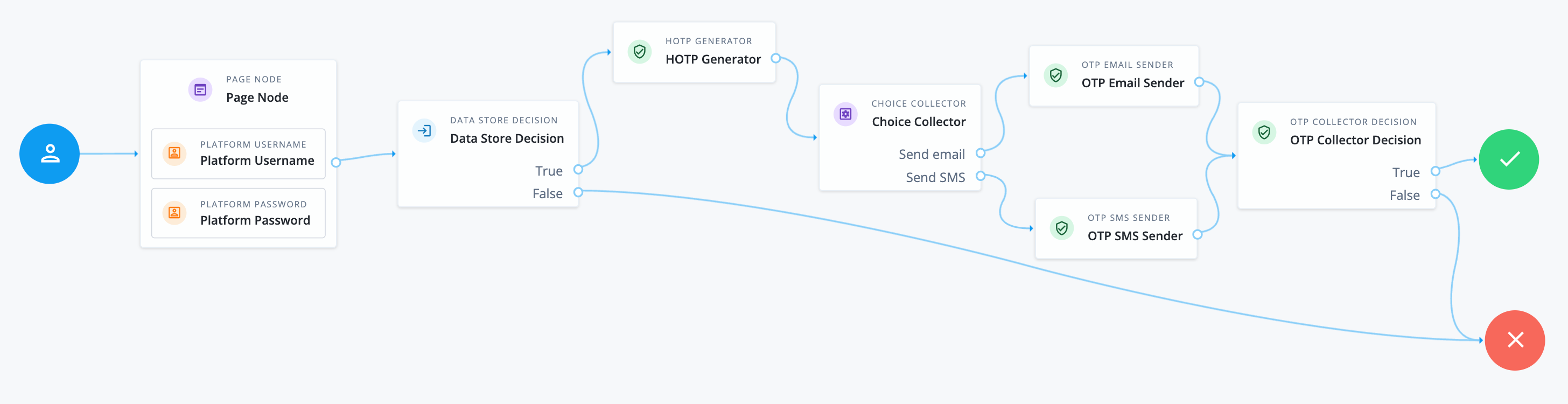
The following example demonstrates using an OTP in a multi-factor authentication journey:
-
The Page node containing the Platform Username node and Platform Password node prompts for credentials.
-
The Data Store Decision node validates the username-password credentials.
-
The HOTP Generator node generates an eight-digit OTP.
-
The Choice Collector node prompts the user to choose whether they want to receive the OTP via email or SMS.
-
If the user chooses email, the OTP Email Sender node sends the OTP to the user’s email address.
-
If the user chooses SMS, the OTP SMS Sender node sends the OTP to the user’s mobile number.
-
-
The OTP Collector Decision node prompts the user to enter the OTP they received and verifies it. If the OTP is correct, the user is authenticated.
Availability
| Product | Available? |
|---|---|
PingOne Advanced Identity Cloud |
Yes |
PingAM (self-managed) |
Yes |
Ping Identity Platform (self-managed) |
Yes |
Inputs
-
This node requires the
realmandusernameproperties in the incoming node state.Implement a Username Collector node (standalone AM) or Platform Username node (Ping Identity Platform deployments) earlier in the journey.
-
This node requires the
oneTimePasswordproperty in the incoming node state.Implement the HOTP Generator node earlier in the journey.
Dependencies
The node requires a configured email provider.
Additionally, the user’s profile must contain a valid email address.
Configuration
| Property | Usage | ||
|---|---|---|---|
Mail Server Host Name (required) |
The hostname of the SMTP email server. |
||
Mail Server Host Port |
The outgoing mail server port. Common ports are 25, 465 for SSL/TLS, or 587 for StartTLS. |
||
Mail Server Authentication Username |
The username AM uses to connect to the mail server. |
||
Mail Server Authentication Password |
The password AM uses to connect to the mail server.
|
||
Mail Server Secret Label Identifier |
An identifier used to create a secret label for mapping to a secret in a secret store. AM uses this identifier to create a specific secret label for this node. The secret label takes the form
If you set a Mail Server Secret Label Identifier and AM finds a matching secret in a secret store, the Mail Server Authentication Password is ignored. |
||
Email From Address (required) |
The email address from which the OTP will appear to have been sent. |
||
Email Attribute Name |
The attribute in the user profile that contains the email address to which the email with the OTP is sent. Default: |
||
The subject of the email |
Click Add to add a new email subject. Enter the locale, such as |
||
The content of the email |
Click Add to add the content of the email. Enter the locale, such as |
||
Mail Server Secure Connection |
Set the connection method to the mail server. If you set a secure method here, AM must trust the server certificate of the mail server. The possible values for this property are:
Default: |
||
Gateway Implementation Class |
The class the node uses to send SMS and email messages.
A custom class must implement the Default: |
Outcomes
Single outcome path.
Implement an OTP Collector Decision node after this node to continue the authentication journey.