Set Success Details node
The Set Success Details node adds additional details to the JSON response on successful authentication. You can add either or both of the following:
-
Success details: Lets you add static
key:valuefields to the JSON response. -
Session properties: Lets you add
key:valuefields to the JSON response, wherevaluecorresponds to the value of the specified session property.This lets you retrieve session properties in the journey without needing additional post-authentication processing.
You can’t override the tokenId, successUrl, and realm fields returned in the JSON response by default.
|
The success details are set when the node is processed, regardless of whether a session is created or not. This lets you set additional details in journeys where the noSession query parameter is used during authentication.
Examples
Example 1: Add static content and session properties
This example uses the Set Success Details node to add the following additional details to the JSON response:
-
A static
authMethod:passwordfield. -
A
universalIdsession property, which returns the corresponding value from the session when the user authenticates.
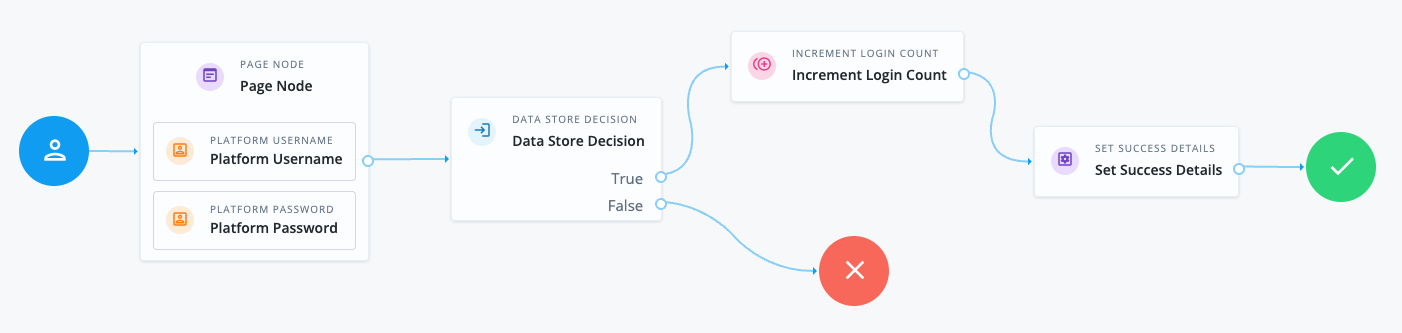
-
The Page node containing the Platform Username node and Platform Password node prompts for credentials.
-
The Data Store Decision node validates the username-password credentials.
-
The Increment Login Count node updates the number of successful authentications in the user profile.
-
The Set Success Details node adds the additional configured details to the JSON response upon successful authentication. This example uses the following configuration:
- Success Details
-
Key:
authMethodValue:
password - Session Properties
-
Key:
universalIdValue:
sun.am.UniversalIdentifier
When the user authenticates successfully using this journey, the JSON response includes the additional details you configured. For example:
{
"tokenId": "AQIC5wM…TU3OQ*",
"successUrl": "/enduser/?realm=/alpha",
"realm": "/alpha",
"universalId": "id=bjensen,ou=user,o=alpha,ou=services,ou=am-config",
"authMethod": "password"
}Example 2: Add dynamic content
This example uses the Configuration Provider node to imitate the Set Success Details node. Using the Configuration Provider node lets you add dynamic content to the JSON response, such as an API response, in addition to static content and session properties.
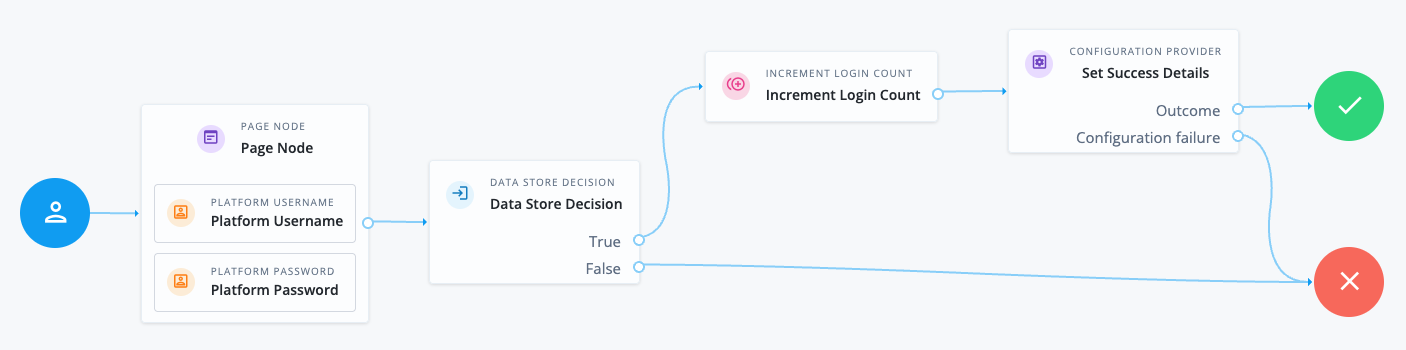
Find more information in Example 2: Imitate the Set Success Details node.
Example 3: Add a message to the success response in a no session journey
This example uses the Set Success Details node to add a message to the success response in a no session journey.
-
The Page node containing the Platform Username node and Platform Password node prompts for credentials.
-
The Data Store Decision node validates the username-password credentials.
-
The Increment Login Count node updates the number of successful authentications in the user profile.
-
The Set Success Details node adds the additional configured details to the JSON response upon successful authentication. This example uses the following configuration:
- Success Details
-
Key:
messageValue:
Authentication Successful
Follow these steps to try the example:
-
Create the example journey using the journey editor.
-
Authenticate a test user with the journey. Make sure you include the
noSessionquery parameter:$ curl \ --request POST \ --header 'X-OpenAM-Username: bjensen' \ --header 'X-OpenAM-Password: Ch4ng3it!' \ --header "Accept-API-Version: resource=2.1, protocol=1.0" \ "https://am.example.com:8443/am/json/realms/root/realms/alpha/authenticate?authIndexType=service&authIndexValue=myJourney&noSession=true" { "successUrl": "/enduser/?realm=/alpha", "realm": "/alpha", "message": "Authentication Successful" }
Availability
| Product | Available? |
|---|---|
PingOne Advanced Identity Cloud |
Yes |
PingAM (self-managed) |
Yes |
Ping Identity Platform (self-managed) |
Yes |
Dependencies
Make sure the user can successfully authenticate and get a session if you’ve configured the node to set session properties.
If this node is configured to set session properties and the noSession query parameter is used during authentication, the journey will fail.
Configuration
| Property | Usage | ||||||||||||
|---|---|---|---|---|---|---|---|---|---|---|---|---|---|
Success Details |
The success details to add:
When finished, click Save to keep your settings. |
||||||||||||
Session Properties |
The session properties to add.
You can find a list of the default session properties in Session properties.
When finished, click Save to keep your settings. |