Platform Password node
The Platform Password node prompts the user to enter their password and stores it in a configurable property of the shared node state.
Example
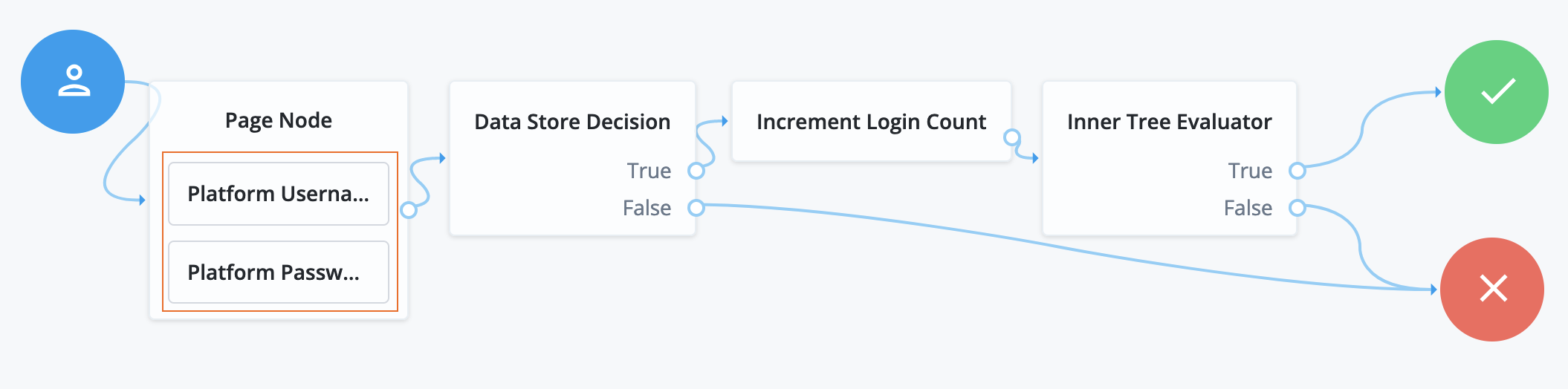
The following journey uses a Page node containing the Platform Username node and Platform Password node to collect the username and password and set their values in the shared node state:
-
The Page node presents a page with input fields to prompt for the username and password.
-
The Platform Username node collects and injects the
userNameinto the shared node state. -
The Platform Password node collects and injects the
passwordinto the shared node state.
-
-
The Data Store Decision node uses the username and password to determine whether authentication is successful.
-
The Increment Login Count node updates the login count on successful authentication.
-
The Inner Tree Evaluator node invokes a nested journey for progressive profiling.
Availability
| Product | Available? | ||
|---|---|---|---|
PingOne Advanced Identity Cloud |
Yes |
||
PingAM (self-managed)
|
Yes |
||
Ping Identity Platform (self-managed) |
Yes |
Inputs
This node uses the _id of the object for policy evaluation.
For existing users, the user’s _id must be in the shared state to evaluate user-specific policies,
such as password history, cannot-contain-others, and so on.
No _id is available for new users.
Implement the Identify Existing User node earlier in the journey.
Dependencies
If the Validate Password option is enabled, the node relies on PingIDM for password policies.
Configuration
| Property | Usage | ||
|---|---|---|---|
Validate Password |
When enabled, this node uses password policies to validate the user’s input. It returns any policy failures as errors. For example, if you submitted an invalid password on registration, the response from this node would include a list of failed policies: Default: Not enabled |
||
Password Attribute |
The attribute used to store a password in the managed identity object. Default: |
||
Confirm Password |
Enable this option to require the user to enter the password identically in a second field.
Default: Not enabled |
||
Checkmark Policy Display |
Enable this option to show a checkmark instead of faded bullet points on successful password validation.
Default: Not enabled |
Outputs
On success, this node updates the Password Attribute property in the shared node state with the password.
The captured password is transient, persisting only until the authentication flow reaches the next node requiring user interaction. It may be persisted to the secure state if required later in the journey.
Callbacks
The node sends the following callbacks:
PasswordCallback-
Prompts the user to enter their password.
ValidatedPasswordCallback-
Includes a list of failed policies if the Validate Password option is enabled and the password entered is invalid.
Learn more in Supported callbacks.