Discover and manage AI platform agents
AI discovery for AI platform agents finds the agents operating in your organization’s cloud platforms, inventories them, and reviews each agent’s configuration for risk. For each discovered agent, PingOne Privilege computes a risk score from the findings it collects, such as excessive permissions, missing owners, or unmonitored agents, and flags the agents that need review.
Before you begin
In order for Agent Privilege to discover and manage AI platform agents, you need to add the platform applications for those agents. Learn more in AI platform agent applications.
AI platform agents discovery
To review what discovery finds for AI platform agents:
-
In the PingOne Privilege admin console, go to AI Security > AI Platform Agents.
Your AI Platform Agents dashboard provides an overview of all AI platform agents detected across managed devices.
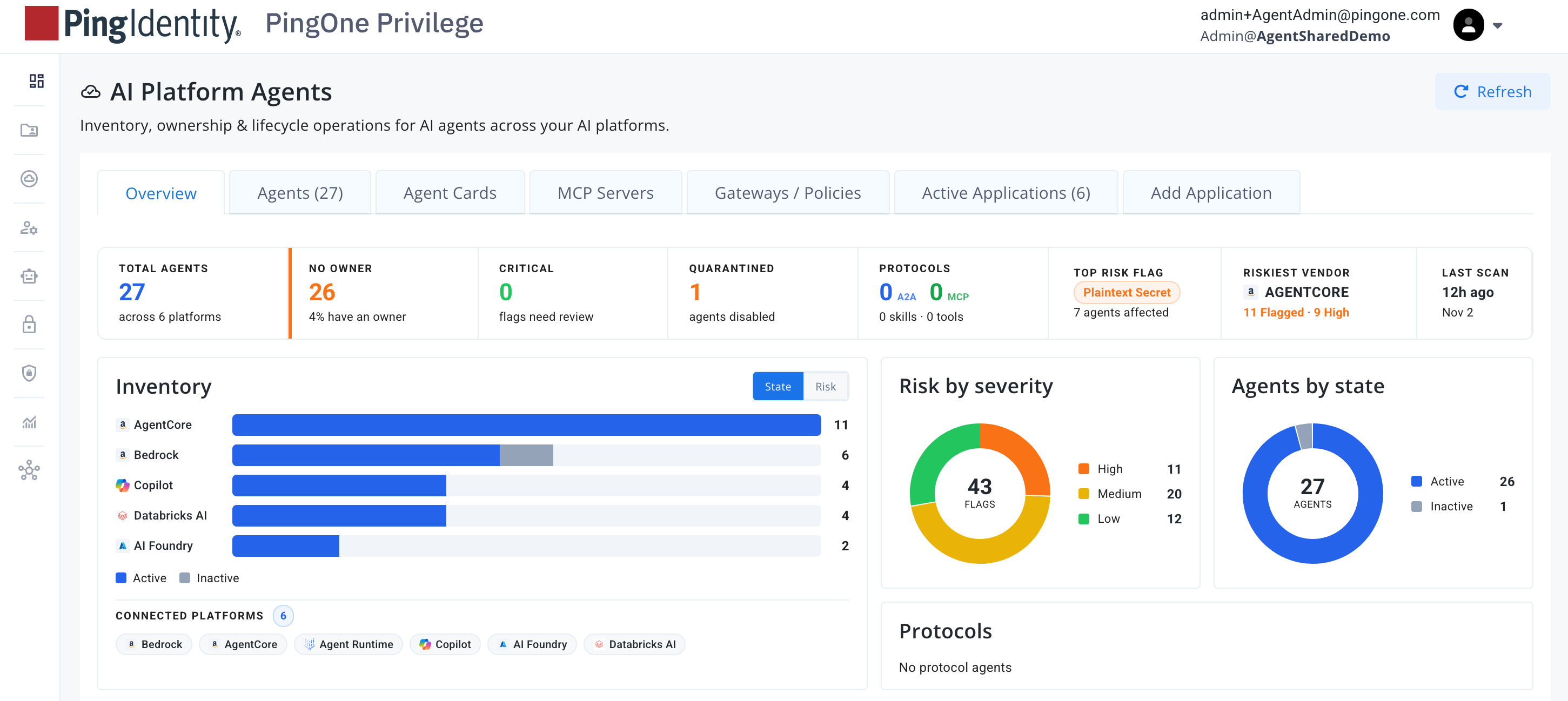
-
Click the tabs to review different findings including:
-
Agents: Discovered AI platform agents, including their model, risk, custodian, and the dates they were added and synced.
-
Agent Cards: Agent cards are captured when a crawler finds an A2A-enabled agent. You can run a sync or wait for the nightly crawl.
-
MCP Servers: MCP servers expose tools, prompts, and resources that agents can call.
-
Active Applications: Your active AI platform applications, configured in the Add Application tab.
-
-
Investigate findings to decide what policies to enforce.
AI platform agents management
-
In the PingOne Privilege admin console, go to AI Security > AI Platform Agents.
-
On the Agent tab, find the AI platform agent to manage in the list.
-
Click the agent to open its quick view.
Under Actions, the quick view highlights the recommended actions at the top.
-
For the complete view of remediation actions, click View full details, then click the Actions tab.
|
The remediation actions available depend on the application tied to the agent. There are additional capabilities for each integration. Not all agents have remediation actions outside the quick view. |
The following table contains a list of possible actions:
| Action | Result | ||
|---|---|---|---|
Edit Config |
Opens a window to edit the Foundation model and Instruction. |
||
Assign custodian |
Opens a window to assign a custodian, either by selecting from the list of available custodians or searching for one by name. |
||
Restart agent |
The agent is stopped and rebuilt. It is unavailable until the rebuild is complete. |
||
Edit tags |
Opens a window to add key-value pairs for tags. |
||
Quarantine |
The agent is quarantined and cannot be invoked. |
||
Fix IAM role |
Detaches overprivileged IAM policies from the execution role. |
||
Delete agent |
The agent is permanently removed. Any application, workflow, or user relying on it stops working immediately.
|