Accessing the PingOne Privilege admin console as an administrator
The PingOne Privilege admin console provides a centralized interface to configure settings, manage users, and monitor access activities.
Accessing the admin console in Endpoint Controller-based models
After completing the initial setup of your PingOne Privilege environment in PingOne, you can authenticate into the PingOne Privilege admin console.
To access the admin console:
-
In the PingOne admin console, go to Directory > Users.
-
Click the user you created with admin privileges.
-
In the Services list, select PingOne Privilege.
-
Click Generate Onboarding Link.
Result: A link is automatically sent through email if an email address is configured for the PingOne admin user.
-
Open the link sent to email or copy the generated onboarding link and open it in a new browser tab.
-
In the new tab, download the Endpoint Controller and complete the installation on your computer.
-
Click the Endpoint Controller icon in your system tray. Click Open Console.
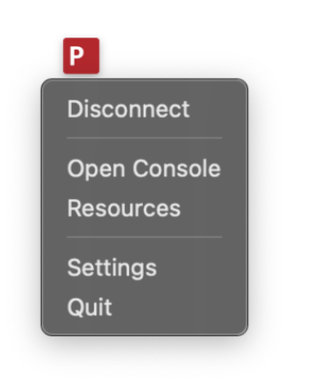
The PingOne Privilege admin console opens in a new browser tab.
-
Enter your admin Username and Password.
-
Click Sign On.
Result
You can now use the PingOne Privilege console to onboard users.
Accessing the admin console in No Endpoint Controller-based models
After completing the initial setup of your PingOne Privilege environment in PingOne, you can authenticate into the PingOne Privilege admin console.
-
In the PingOne admin console, go to Settings > Environment Properties.
-
In the URLs section, click the PingOne Privilege Console Url link.
Result: A new tab opens to provide credentials for the PingOne Privilege admin console.
-
Enter your admin Username and Password.
-
Click Sign On.
Result
You can now use the PingOne Privilege admin console to onboard users.