Uninstall Enterprise Connect Windows Workstation Authentication
To uninstall Enterprise Connect Windows Workstation Authentication, keep the following in mind:
-
If the Uninstall field of the Parameters tab was filled out during the configuration of the MSI Updater client, then the MSI is protected with an administrator password. If this is the case, then Admin permissions are required to uninstall. Learn more in Configure the MSI Updater client.
-
Uninstalling Enterprise Connect Windows Workstation Authentication can be done from the command line only. Uninstalling the application from the System Settings can result in an error as follows:
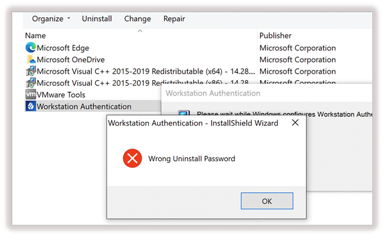
To uninstall workstation authentication, open the command prompt as an Admin and run:
C:\> msiexec /x \ {F04AB2CC-5585-4069-9B95-AABB3CD21DF0}
PASSWORD=”AdminPassword!!”
|
Replace "AdminPassword!!" with the password used during the MSI Updater client configuration. |