PingOne Multi-tenant SaaS
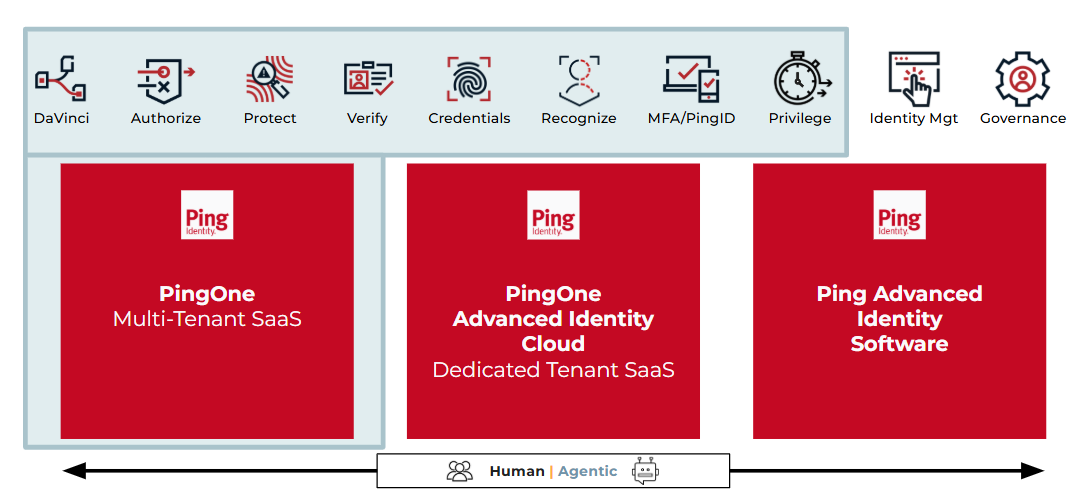
PingOne is Ping Identity’s multi-tenant cloud platform, where your environments run in a secure, shared infrastructure managed by Ping Identity. Information related to solution bundles appears later on this page.
-
By default, you receive one or more environments, such as sandbox and production, in a Ping Identity-hosted cloud.
-
There is a platform cap of 500 environments per organization.
-
Licenses and usage, such as identities, flows, and risk evaluations, are surfaced in the PingOne admin console.
PingOne licenses are records managed in the Licenses page of the admin console. You can use the Licenses page to view the details of your PingOne license and usage. PingOne license details include:
-
Organization
-
Admin License
-
Active Licenses
-
Future Licenses
-
Expired Licenses
You can find more information in Viewing your licenses and the License FAQ in the PingOne documentation.
Identity-based licensing
-
All PingOne multi-tenant licensed identities, transactions, and resources in all environments count fully against your contracted limits.
-
The following products use an Annual Active User (AAU) or Monthly Active User (MAU) identity-based unit of measure: PingOne Authorize, PingOne Credentials, PingOne DaVinci, PingOne Directory, PingOne MFA and PingID, PingOne Protect, PingOne Recognize, and PingOne SSO.
-
An Annual Active User (AAU) is a unique identity that is active at least once during a 365-day period starting at the license start date.
-
Active means at least one qualifying identity operation during the year, such as:
-
Sign-on or authentication.
-
Token issuance, validation, or refresh.
-
Password set or password change.
-
Other identity operations explicitly covered in the Product Terms.
-
-
Each identity is counted once per contract year, regardless of how many times it authenticates.
-
A Monthly Active User (MAU) is a unique identity that is active at least once in a given calendar month.
-
Active means the identity is processed at least once by the product during that month, such as sign-on, token issuance, token validation, or password change.
-
Admins can typically see licensed quantities and current usage, environment associations for each license, and high-level usage trends over time.
-
Each PingOne license includes a soft limit and a hard limit for the maximum number of stored identities.
-
The soft limit is usually 12× the licensed MAU or AAU of the subscription.
-
The hard limit is 10% above the soft limit, capped at 100M identities, whichever is lower.
-
When usage approaches or reaches the soft limit:
-
At 90% of the soft limit, the admin console displays a 90% of allowed users warning.
-
At 100% of the soft limit, another warning indicates the soft limit has been reached, but you can still add users.
-
When the hard limit is reached, PingOne blocks the creation of new users until the license is updated.
-
Packaging
PingOne Authorize
Central decision service for fine-grained, contextual authorization decisions on APIs and data, using identity and resource attributes.
-
PingOne Authorize is licensed by identities, and a fair-use transaction allowance is defined for each identity tier. The fair-use transaction allowance corresponds to the total number of licensed identities specified in your PingOne subscription.
-
For some authorization use cases (for example, when permissions are checked for every page access or operation), the volume of authorization events can be significantly higher than the volume of authentication events. The fair-use transaction allowance provides you and Ping Identity with a shared expectation about the volume of authorization traffic. If this limit isn’t sufficient, contact Ping Identity Sales about increasing the monthly allowance.
| Feature | Description |
|---|---|
Centralized, fine-grained authorization policies that leverage user, resource, and contextual attributes to allow, deny, or filter access. |
|
Protect APIs and data by externalizing authorization decisions from applications to a central decision service. |
|
REST-based decision endpoints that applications and gateways can call at runtime for authorization decisions. |
|
Tools to model, test, and troubleshoot authorization policies before rolling them into production. |
PingOne Credentials
Verifiable credentials platform to issue, manage, and verify digital identity credentials for users.
| Feature | Description |
|---|---|
Design credential types, attributes, and display format used when issuing digital credentials. |
|
Issue verifiable credentials to users using journeys, APIs, or administrator-driven actions. |
|
Verify credentials when users present them during access or onboarding flows. |
|
Revoke credentials when they are no longer valid and notify users where appropriate. |
PingOne DaVinci
No-code orchestration platform to design and run identity journeys (sign-up, sign-on, step-up, recovery, migrations) using a drag-and-drop flow canvas and connectors.
DaVinci can be sold in many ways: identity-based (AAU and MAU referenced above) and transaction-based through flows. Refer to the Product Specific Terms and Conditions for fair-use policies.
A flow is an executed DaVinci flow run triggered at the start of a journey that can internally call multiple APIs and services.
-
Examples include:
-
Registration journey.
-
Passwordless login journey.
-
Password recovery journey.
-
Device registration journey.
-
Adaptive authentication journey.
-
-
A flow invocation occurs each time a flow is initiated in DaVinci. If a flow launches one or more subflows, the subflows do not count as additional invocations. Only the initial invocation is counted.
-
The flow-based license comes with a fair-use transaction limit of 80 connector executions per flow. If the limit is not sufficient, contact Ping Identity Sales about increasing volume limits as your usage increases. Learn more in DaVinci Usage Terms.
| Feature | Description |
|---|---|
Drag-and-drop flow canvas for building identity and access management (IAM) journeys (registration, authentication, recovery, step-up, migrations) using nodes and logical operators. |
|
Hundreds of pre-built connectors (Ping Identity services and third-party apps) used as nodes in flows for multi-factor authentication (MFA), fraud, identity verification (IDV), software as a service (SaaS) apps, and more. |
|
Ready-made DaVinci flow templates for common use cases (passwordless, social login, account recovery, and so on) that can be cloned and customized. |
|
UI Studio and SK-components for building branded HTML forms and pages (sign-on, registration, MFA, agreements) directly into flows. |
|
Flow policies to control which flows run for which apps or users and support A/B-style routing for testing and optimizing journeys. |
|
Built-in flow analytics, validation, and best-practices tooling to monitor performance, errors, and outcomes for journeys. |
|
Multiple ways to launch flows: redirect, widget, API calls, and Ping Identity SDKs for embedding journeys into web and mobile apps. |
PingOne Directory
Cloud directory and user store for PingOne, managing users, groups, attributes, and basic sync and provisioning to external directories and apps.
| Feature | Description |
|---|---|
Cloud-hosted directory to store and manage users, groups, and identity data for PingOne solutions. |
|
Manage users, groups, and populations to control access, policy targeting, and delegated administration. |
|
Add and manage custom user attributes and control how attributes are exposed to applications. |
|
Use attribute access control rules to restrict which attributes admins and apps can read or write. |
|
Use LDAP gateways to authenticate against or provision to external directories such as Active Directory (AD) or PingDirectory. |
PingOne MFA and PingID
Strong, adaptive MFA and passwordless experiences across web and mobile, using methods like push, one-time passcode (OTP), and FIDO2 passkeys.
| Feature | Description |
|---|---|
Support for multiple MFA methods such as mobile app push, OTP, SMS and voice, email, and FIDO2 passkeys. |
|
Policies that define when and how MFA is required based on application, user, group, or other conditions. |
|
Build passwordless sign-on journeys combining PingOne MFA, PingOne SSO, and DaVinci flows. |
|
Dashboards that show MFA enrollments, authentications, and method usage across your environment. |
|
Integrate or migrate existing PingID tenants into PingOne while preserving MFA capabilities. |
PingOne Privilege
Just-in-time privileged access management for cloud resources (servers, databases, VMs, Kubernetes), with real-time monitoring and control.
| Feature | Description |
|---|---|
Grant time-bound elevated access to servers, databases, VMs, and Kubernetes clusters based on policy and approvals. |
|
Onboard cloud infrastructure to enable privileged access management for resources. |
|
Define who can access which resources, with what roles, and under what conditions, using centralized policies. |
|
Monitor and audit privileged sessions to understand who accessed what and when. |
| Monthly Active User (MAU) identity-based licensing is not applicable for PingOne Privilege. |
Enterprise Personal Agent Access
Governed access management for enterprise personal AI agents, coding assistants, LLMs, and MCP-connected tools, with real-time monitoring, attribution, and control.
| Feature | Description |
|---|---|
Continuous agent discovery |
Identify agent-access paths and discover unmanaged personal agents, LLMs, and MCP servers running on user devices. |
Just-in-time agent access |
Grant time-bound, least-privilege access for personal agents to reach MCP tools, Git operations, and backend services based on centralized policies and approvals. |
Credential protection |
Inject ephemeral credentials at the gateway and inspect requests to keep secrets away from agents and block AI-specific threats. |
Human-to-agent attribution |
Tie every agent action securely back to the owning human user, device, session, and approved business purpose. |
Session auditing |
Capture detailed session and activity logs so security and compliance teams can monitor what an agent accessed and why. |
| Monthly Active User (MAU) identity-based licensing is not applicable for Enterprise Personal Agent Access. |
PingOne Protect
Risk evaluation and threat protection that scores sign-on and other events using signals and predictors, driving adaptive policies.
PingOne Protect can be sold in many ways: identity-based (AAU and MAU referenced above) and transaction-based through risk evaluations.
A risk evaluation is a risk assessment event triggered by a business operation.
-
Common examples include:
-
User sign-on.
-
Registration or account creation.
-
Password recovery or high-risk account change.
-
Any other call to the risk engine for a risk score.
-
-
Each qualifying call to the risk service typically counts as one risk evaluation.
-
PingOne Protect is licensed with a fair-use allowance of risk evaluations per identity per year. The allowance depends on the identity type and usage tier. Reference Product terms and conditions for information about these fair-use limits.
| Feature | Description |
|---|---|
Define policies that evaluate risk at key events, such as sign-on or registration, and return risk levels and actions. |
|
Signals such as device, IP reputation, behavior, and velocity that feed into risk models. |
|
Per-event risk assessments used to drive adaptive responses such as allow, deny, or step-up authentication. |
|
Dashboard visualizing risk events, high-risk users, risky IPs, and model effectiveness over time. |
PingOne Recognize
Zero-knowledge biometric authentication that uses privacy-preserving facial recognition with liveness and anti-injection detection.
| Feature | Description |
|---|---|
Privacy-preserving facial biometric authentication that verifies the user in less than a second without storing reconstructable biometric data. |
|
Detects presentation and injection attacks (for example, deepfakes, replays) using certified liveness and anti-injection checks. |
|
Binds the user’s face to their account and device so each authentication checks both the enrolled face and context. |
|
Web and mobile SDKs |
SDKs for iOS, Android, and web to embed PingOne Recognize into existing applications and journeys. |
PingOne SSO
Standards-based single sign-on (OIDC, OAuth 2.0, and SAML) and app portal for secure, one-click access to SaaS and custom applications.
| Feature | Description |
|---|---|
Standards-based SSO (SAML, OIDC, OAuth 2.0) for SaaS and custom apps using PingOne as the identity provider. |
|
Pre-built application templates and catalog integrations to speed onboarding of common SaaS applications. |
|
Configurable sign-on policies that define how users authenticate to different applications and resources. |
|
User-facing portal that lists assigned applications and optional resource links for quick access. |
|
Use OAuth 2.0 resources and scopes to protect APIs and issue access tokens for API clients. |
PingOne Verify
Identity verification service for document plus selfie checks, liveness, and verification workflows during onboarding or high-risk events.
Identity-based (AAU and MAU referenced above) and transaction-based unit of measure through Verifications. Verifications count identity verification checks, such as:
-
Document plus selfie verification.
-
Liveness checks.
-
ID document lookups (for example, driver license, passport).
-
Utility bill or credit report checks (where applicable).
Each verification transaction (or bundled verification process, depending on configuration) counts toward the verification allowance.
| Feature | Description |
|---|---|
Allows for one verification data capture with quality assurance, one email possession verification, one mobile phone possession verification, and one basic biographic matching. |
|
Automated inspection of one sample image file set (image signal) captured from a supported government-issued ID with authenticity checks. Automated ID Inspection does not include live selfie-to-photo matching, issuer or commercial authoritative system-of-record check, or manual ID inspection. |
|
Match one live selfie against a reference photo for the purposes of identity verification. |
|
Manual inspection of one sample image file set (image signal) captured from a supported government-issued ID. Does not require Automated Inspection to occur in advance. |
|
Manual inspection of one sample image file set (image signal) captured from a supported government-issued ID after Automated ID Inspection if required. Service requires purchase of Automated Document Inspection. |
|
Compare data extracted from one supported government ID against the issuer’s, or an authoritative commercial, system of record upon completion of an automated document inspection. Service requires purchase of Automated Document Inspection. Not eligible for any uptime availability commitment. |
|
Connects to over 300 government, credit, consumer, and utility data sources worldwide to verify identity attributes. |
Identity Proofing with Biometric Reverification
Securely establishes a user’s identity during onboarding and uses zero-knowledge biometrics to ensure the exact same person is present during future sign-ons or high-risk events. For corporate workforce, frontline workers, and partners only (not available for consumer or citizen use cases).
| Feature | Description |
|---|---|
Includes phone and email verification, as well as physical document capture. |
|
Automated ID Inspection and Digital Credential Verifications |
Provides automated physical document validation, near-field communication (NFC) verification, mobile driver’s license (mDL) and electronic ID (eID) verification, and Aadhaar DigiLocker Verification. |
Matches the user’s selfie to their ID, incorporating liveness and injection detection. |
|
Proves the same verified user is present at sign-on or during high-risk reverification events without storing biometric data. |
|
Includes standard verification capabilities through PingID. |
PingOne Platform Agent IAM Core
PingOne Platform Agent IAM Core treats autonomous artificial intelligence (AI) agents as first-class, governed identities in PingOne, so they authenticate, get scoped tokens, and access APIs, data, and tools under the same least-privilege policies and audit controls as human users and applications.
It’s licensed based on the number of human identities (customer, workforce, or partner) that your AI agents act on behalf of, rather than by agent or transaction volume.
| Feature | Description |
|---|---|
Integrates AI agents into your IAM so they authenticate, authorize, and audit like users and apps. |
|
Defines agents as autonomous systems that use LLMs, tools, memory, and workflows to complete tasks. |
|
Classifies agents (personal, assistants, digital workers) and distinguishes managed vs unmanaged based on control. |
|
Treats tools as external APIs/functions agents call to access data or perform actions under IAM control. |
|
Uses MCP for secure agent-tool calls and A2A for agent-agent coordination in multi-agent workflows. |
|
Applies IAM principles like delegation (not impersonation), least privilege, and monitoring to agents. |
|
Implements these Identity for AI patterns in PingOne so AI agents get scoped tokens and policy-governed access. |
Solutions bundles
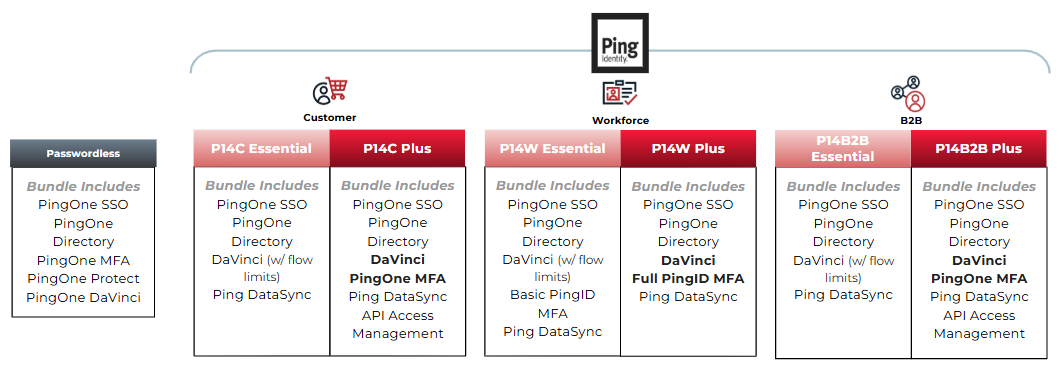
| You can find more information about the solutions bundles in Ping Identity Platform Pricing. |
| Bundle | Includes |
|---|---|
P14C Essential |
PingOne SSO; PingOne Directory; DaVinci (with flow limits); PingDataSync |
P14C Plus |
PingOne SSO; PingOne Directory; DaVinci; PingOne MFA; PingDataSync; API Access Management |
| Bundle | Includes |
|---|---|
P14W Essential |
PingOne SSO; PingOne Directory; DaVinci (with flow limits); basic PingID MFA; PingDataSync |
P14W Plus |
PingOne SSO; PingOne Directory; DaVinci; full PingID MFA; PingDataSync |
| Bundle | Includes |
|---|---|
P14B2B Essential |
PingOne SSO; PingOne Directory; DaVinci (with flow limits); PingDataSync |
P14B2B Plus |
PingOne SSO; PingOne Directory; DaVinci; PingOne MFA; PingDataSync; API Access Management |
| Refer to the fair-use policy in Product terms and conditions for Plus bundles. |
| Bundle | Includes |
|---|---|
Passwordless |
PingOne Protect; PingOne SSO; PingOne Directory; PingOne MFA; DaVinci |
PingOne for Customers Passwordless is a solution bundle licensed by transactions based on flow invocations. Learn more in the PingOne DaVinci section.
It includes PingOne Protect, PingOne SSO including Directory, and PingOne MFA in PingOne DaVinci. This solution bundle requires use of each product only through DaVinci flows.
|
You can review your current licenses and entitlements in the Ping Identity Support Portal. After signing on, go to the Licensing section. From this page, you can also access your support keys and open a support case if anything about your entitlements appears incorrect. You can find more information in Ping Identity’s legal Product terms and conditions. |