Anonymous User Mapping node
The Anonymous User Mapping node lets users log in to an application or website without providing credentials,
by assuming the identity of a specified existing user account.
The default user for this purpose is named anonymous.
Take care to limit access for such users. For example, grant anonymous users access to public downloads on your site.
Example
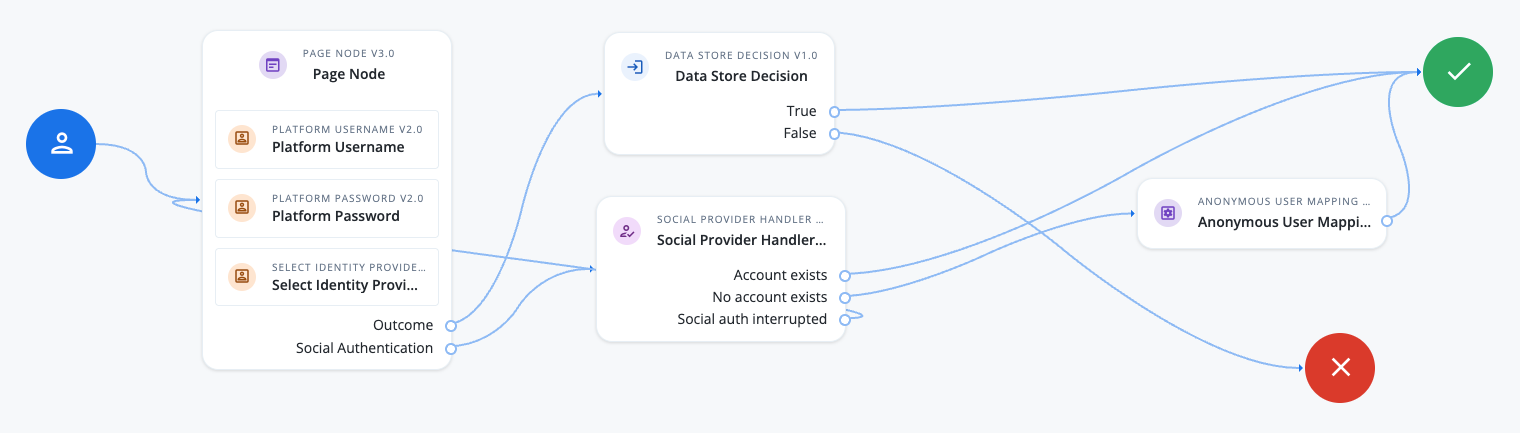
The following example uses this node to grant users access as an anonymous user if they’ve completed social authentication but don’t have an existing profile:
-
The Page node containing the Platform Username node, Platform Password node, and Select Identity Provider node prompts the user to authenticate with a username and password, or to select a social identity provider.
-
If the user enters their username and password, the Data Store Decision node validates the username-password credentials, and authentication succeeds if their credentials are valid.
-
If the user selects social authentication, the Social Provider Handler node does the following:
-
If the user has an existing user account, authenticates that user.
-
If the user doesn’t have a user account, the Anonymous User Mapping node provides limited access as an anonymous user.
-
If the user interrupts the social authentication, they are routed back to the Page node to try again.
-
Availability
| Product | Available? |
|---|---|
PingOne Advanced Identity Cloud |
Yes |
PingAM (self-managed) |
Yes |
Ping Identity Platform (self-managed) |
Yes |
Dependencies
The configured anonymous user must already exist in the realm, and its user status must be active.
Configuration
| Property | Usage |
|---|---|
Anonymous User Name |
The username of an account that represents anonymous users.
This user must already exist in the realm, and its user status must be |