Set Logout Details node
The Set Logout Details node adds details to the JSON response when a journey ends with the user logging out.
You can configure the node properties to return extra information in the form of static key:value fields.
Additionally, you can use these key:value fields to set a goto parameter that redirects the user to a specified URL on logout.
|
The logout response is returned when:
In Ping Identity Platform deployments, the response from logout isn’t returned to the browser in the default end user UI. However, the response is available to client applications that use REST to interact with AM. |
Examples
Example 1: Redirect the user on logout in a standalone AM deployment
This example uses the Set Logout Details node to redirect the user to https://www.pingidentity.com/ when they log out.
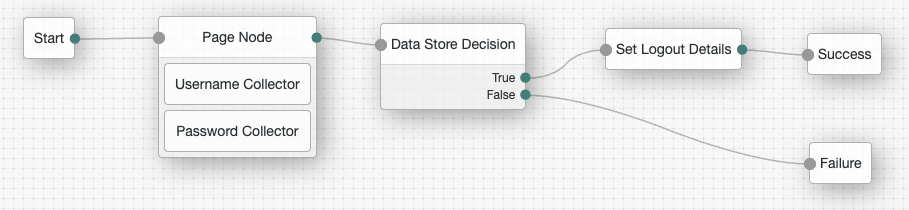
-
The Page node with the Username Collector node and Password Collector node prompt the user for their credentials.
-
The Data Store Decision node confirms the username-password credentials.
-
The Set Logout Details node redirects the user to the specified URL when they log out. This example uses the following configuration:
- Logout Details
-
-
Key:
goto -
Value:
https://www.pingidentity.com/
-
When the user clicks the Log Out link, they’re redirected to https://www.pingidentity.com/.
| You can view the logout response using developer tools in your browser or REST calls as described in Example 2 below. |
Example 2: Add details to the logout response in a Ping Identity Platform deployment
This example uses the Set Logout Details node to add a clear_all_caches:true field to the JSON response when the user logs out.
This field could be read by a client application to trigger an action such as clearing caches.
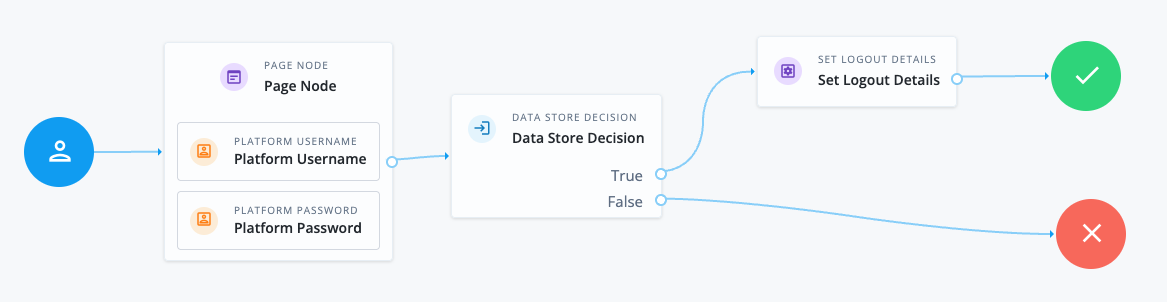
-
The Page node with the Platform Username node and Platform Password node prompt the user for their credentials.
-
The Data Store Decision node confirms the username-password credentials.
-
The Set Logout Details node adds the configured details to the JSON response when the user logs out. This example uses the following configuration:
- Logout Details
-
-
Key:
clear_all_caches -
Value:
true
-
Follow these steps to try the example:
-
Create the example journey using the journey editor.
-
Authenticate a test user with the journey to get a session:
$ curl \ --request POST \ --header 'X-OpenAM-Username: bjensen' \ --header 'X-OpenAM-Password: Ch4ng3it!' \ --header "Accept-API-Version: resource=2.1, protocol=1.0" \ "https://am.example.com:8443/am/json/realms/root/realms/alpha/authenticate?authIndexType=service&authIndexValue=myJourney" { "tokenId": "AQIC5w…NTcy*", "successUrl": "/am/console", "realm": "/alpha" } -
Log the user out and observe the additional logout details are shown in the response:
$ curl \ --request POST \ --header "Content-Type: application/json" \ --header "Accept-API-Version: resource=3.1, protocol=1.0" \ --header "<session-cookie-name>: AQIC5w…NTcy*" \ "https://am.example.com:8443/am/json/sessions/?_action=logout" { "result": "Successfully logged out", "clear_all_caches": "true" }
Availability
| Product | Available? |
|---|---|
PingOne Advanced Identity Cloud |
Yes |
PingAM (self-managed) |
Yes |
Ping Identity Platform (self-managed) |
Yes |
Dependencies
Make sure the user can successfully authenticate and get a session.
This node is ignored if it’s added to a no session journey or the noSession query parameter is used during authentication.
Configuration
| Property | Usage |
|---|---|
Logout Details |
The details to add to the JSON response when the user logs out:
|
Outputs
The node adds the SetResponseDetailsLogoutHook, which runs when the tree completes.
Learn more in Create logout hooks.