App Policy Decision node
The App Policy Decision node is a specialized version of the Policy Decision node designed to simplify the evaluation of application access policies within a journey.
For example, use the node to restrict access based on user attributes, such as ensuring only end users in a specific finance group can access a finance portal.
You don’t need to configure the node because it automatically identifies the policy set and resource from the journey context. However, the node assumes the following prerequisites:
-
The node is used within an OAuth 2.0/OIDC or SAML application journey.
-
The application ID (OAuth 2.0 client ID or SP entity ID) is specified as the resource when the journey is invoked.
-
A policy with that resource is defined within the
Customer Application Policy Set.
The outcome of the policy evaluation, to accept or reject access, maps to the node’s outcomes. It doesn’t handle advices or environment conditions.
|
Consider the following security risks when designing journeys that include policy evaluation:
|
Example
This example uses an App Policy Decision node to manage access to a finance portal application based on usernames.
Prerequisites
The following setup is assumed:
-
Standalone AM
-
Ping Identity Platform deployments
-
A test end user.
-
An OAuth 2.0 provider service with default settings.
-
A public OAuth 2.0 client, with the following settings:
- Client ID
-
finance-app - Scope(s)
-
openid - Tree Name
-
example journey
-
A policy that allows access based on a username. It must be defined in the
Customer Application Policy Set.- Resources
-
finance-app - Actions
-
ACCESS:Allowed - Subjects
-
- Type
-
OpenID Connect/JWT Claim - Claim Name
-
sub - Claim Value
-
username
Example policy
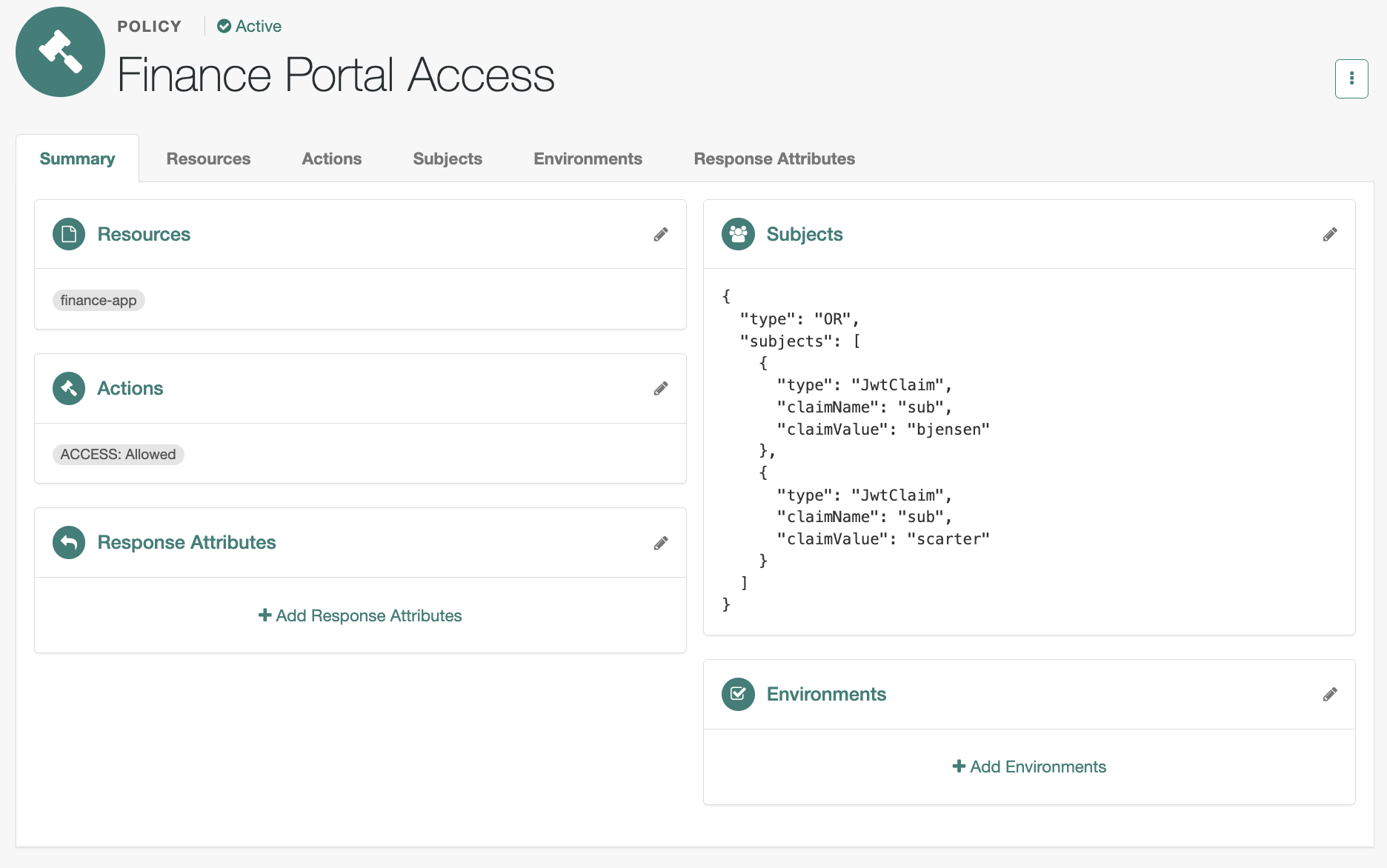
Learn about configuring policies in Policies in the UI.
-
A test end user, added to the
Financegroup. -
An OIDC application, with the following settings:
- Client ID
-
finance-app - Use a journey to authenticate users to this application
-
example journey
-
A policy that allows access to an end user in the Finance group.
- Resources
-
finance-app - Actions
-
ACCESS:Allowed - Subjects
-
{ "type": "NOT", "subject": { "type": "NONE" } } - Environments
-
{
  "type": "OR",
  "conditions": [
    {
      "type": "IdmUser",
      "identityResource": "managed/alpha_user",
      "queryField": "/_id",
      "decisionField": "/effectiveGroups/*/_refResourceId",
      "comparator": "EQUALS",
      "value": "Finance"
     }
  ]
}
How to create this policy
-
Go to Native Consoles > Access Management, go to Realms > Realm Name > Authorization > Policy Sets.
-
Click Customer Application Policy Set to add a policy.
You must use this policy set for app authorization.
-
Click + Add a Policy.
-
Provide a name and select Authentication as the resource type.
-
Select
*as the resource pattern and add the client application ID,finance-app, as the resource. -
Click Create.
-
Add an action of type
Accessand save your changes. -
Add a subject condition of type
Never Matchin aNotlogical block and save your changes. -
Add an environmental condition:
-
Click Add an Environment Condition, select
IDM User, and add the following values:- Identity Resource
-
managed/alpha_user - Query Field
-
/_id - Decision Field
-
/effectiveGroups/*/_refResourceId - Comparator
-
Equal to - Value
-
Finance
-
Click the checkmark () button to finish.
-
Click Add a Logical Operator, select
Any of.., and move the environment condition into the logical block. -
Save your changes.
-
Verify that the policy summary looks like this:
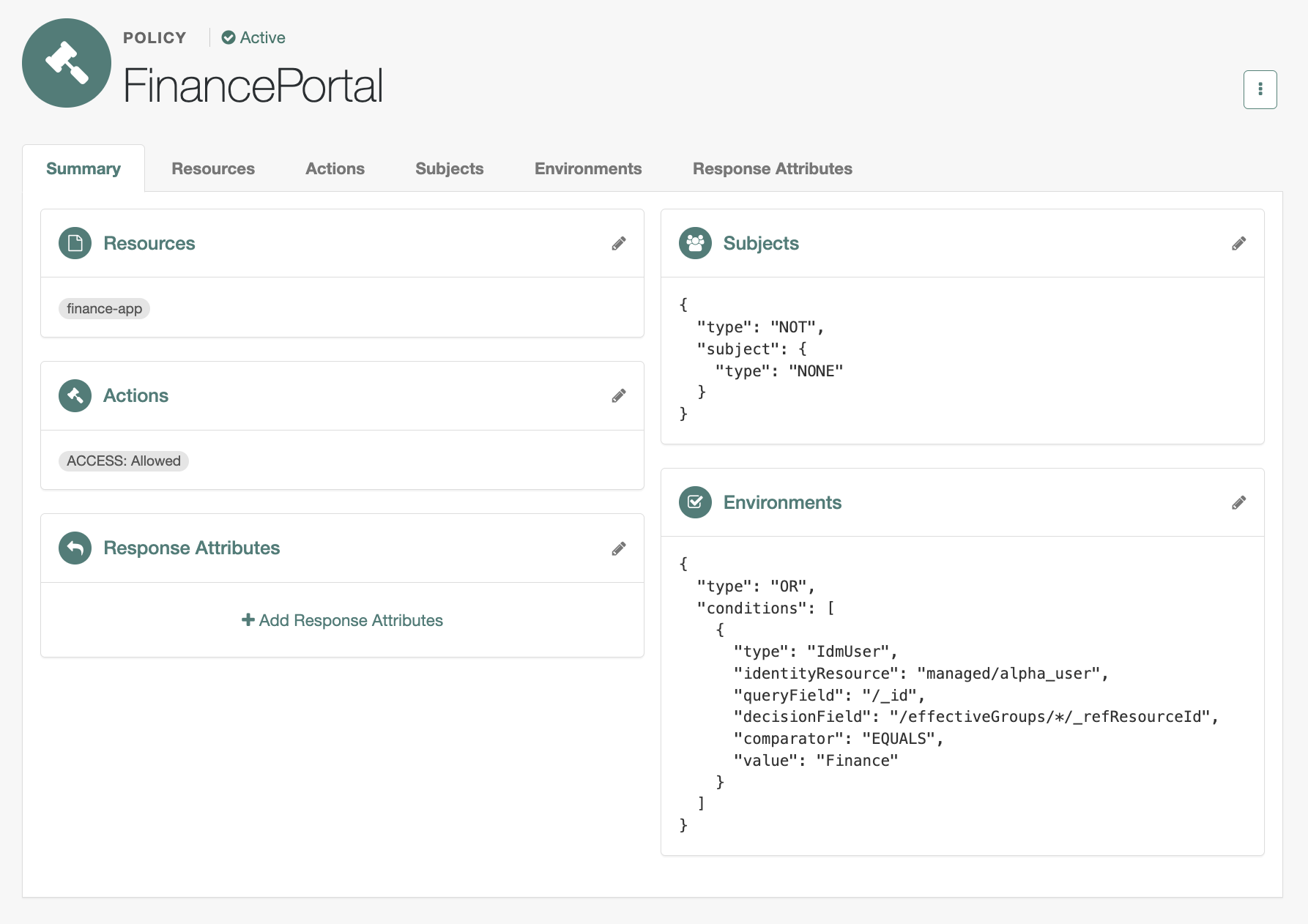
Learn about configuring policies in Policies in the UI.
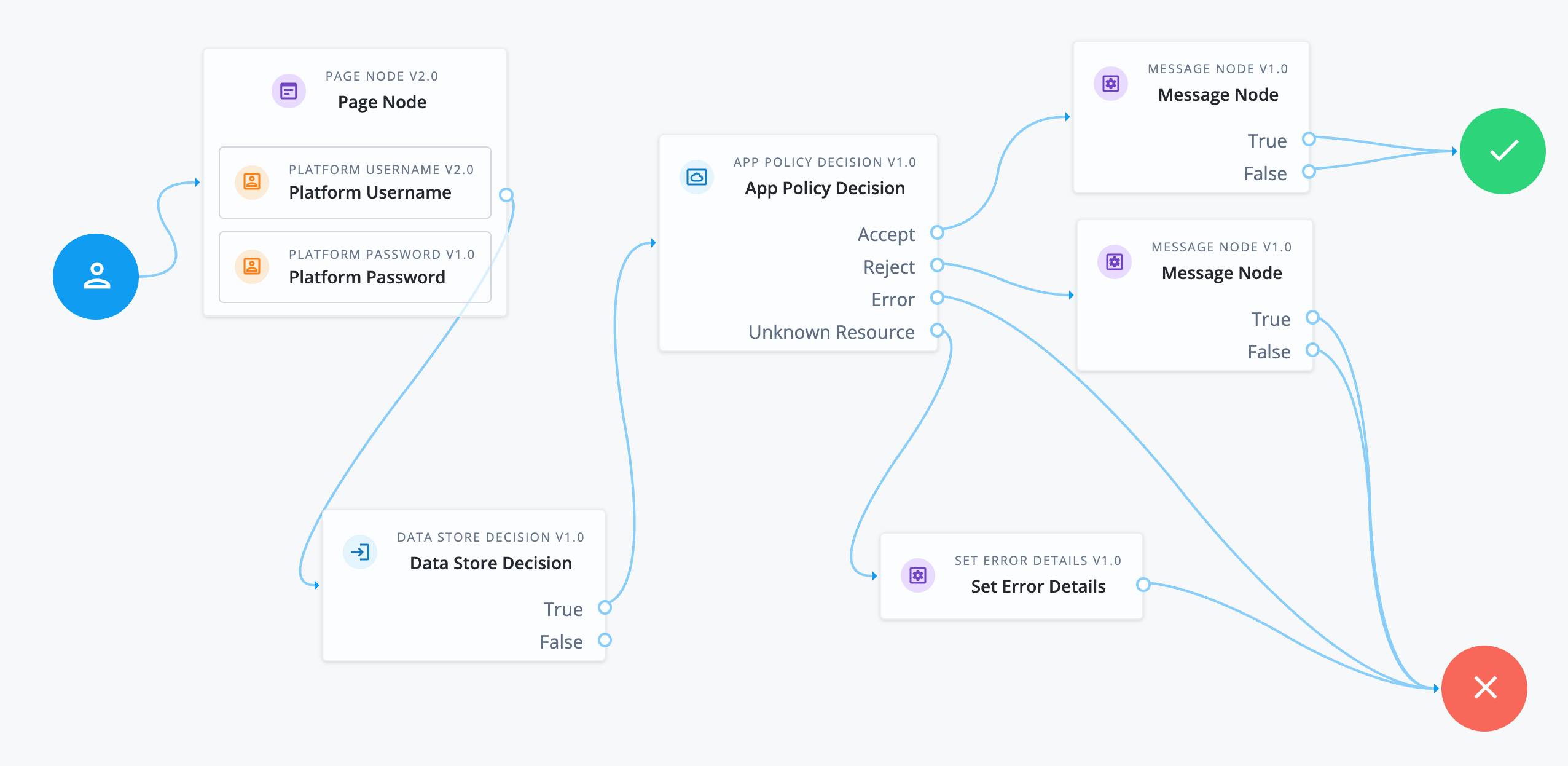
Example journey
-
The authorization journey is invoked specifying the OAuth 2.0 client ID as the resource, for example:
https://am.example.com:8443/am/oauth2/alpha/authorize?client_id=finance-app&redirectUri=http://www.example.com/signin&scope=openid&response_type=code
-
The Page node containing the Platform Username node and Platform Password node prompts for credentials.
-
The Data Store Decision node validates the username-password credentials.
-
A successful authentication routes the journey to the App Policy Decision node.
The node has no configuration, but relies on the journey context and prerequisite configuration to identify the OAuth 2.0 client ID resource (
finance-app). It can then locate the access policy to evaluate whether the end user is an authorized user for the finance app. -
The outcome of the policy evaluation determines the path of the journey:
- Accept
-
The policy grants access. The Message node informs the end user they’re authorized and the journey is successful.
- Reject
-
The policy rejects access. The Message node informs the end user they’re not authorized.
- Error
-
An error in policy evaluation leads to the failure outcome.
- Unknown Resource
-
The node failed to identify the resource and the journey continues to the Set Error Details node.
Inputs
If policy evaluation requires a subject, make sure the username is collected earlier in the journey.
Dependencies
This node requires the following configuration:
-
An application (OAuth 2.0 client or SAML SP entity) that uses a journey with an App Policy Decision node
-
The
Customer Application Policy Setmust have a policy with the client or entity ID set as the resource.