Kerberos node
The Kerberos node enables desktop single sign-on (SSO) to AM for users who have already authenticated with a Kerberos Key Distribution Center (KDC).
The user presents a Kerberos token to AM through the Simple and Protected GSS-API Negotiation Mechanism (SPNEGO) protocol. AM validates the token and identifies the user.
End users may need to set up Integrated Windows Authentication in Microsoft Edge to benefit from single sign-on when logged on to a Windows desktop.
Example
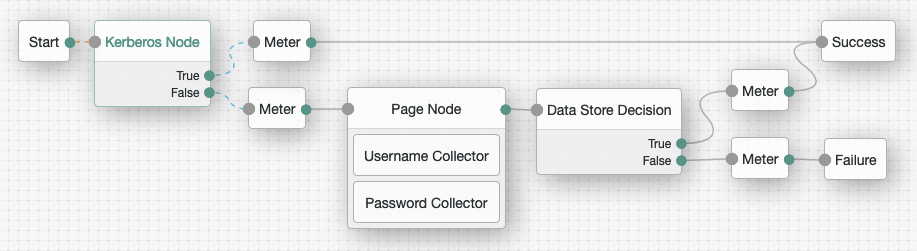
This flow attempts to authenticate the user with Windows Desktop SSO. If authentication is unsuccessful, AM requests the username and password for login. The Kerberos node routes evaluation along the True path when Windows Desktop SSO succeeds and along the False path otherwise. Meter nodes track metrics for the various paths through the flow without changing the path themselves:
Availability
| Product | Available? |
|---|---|
PingOne Advanced Identity Cloud |
No |
PingAM (self-managed) |
Yes |
Ping Identity Platform (self-managed) |
Yes |
Inputs
The node receives a Kerberos token through an HTTP request or an HttpCallback sent during SPNEGO negotiation.
Dependencies
The node requires a Kerberos keytab file, service principal, Kerberos realm, and Kerberos server. Configure these properties in the node configuration.
The client must support SPNEGO and be configured for Integrated Windows Authentication. If Lookup User In Realm is enabled, the user must exist and be active in the configured realm.
Configuration
| Property | Usage | ||
|---|---|---|---|
Service Principal |
The Kerberos principal for authentication in the format In multi-instance AM deployments, configure AM-DOMAIN as the FQDN or IP address of the load balancer in front of the AM instances. For example, |
||
Key Tab File Path |
The full, absolute path of the keytab file for the specified Service Principal.
|
||
Kerberos Realm |
The name of the Kerberos (Active Directory) realm used for authentication. Must be specified in ALL CAPS. |
||
Kerberos Server Name |
The fully qualified domain name, or IP address of the Kerberos (Active Directory) server. |
||
Trusted Kerberos realms |
A list of trusted Kerberos realms for user Kerberos tickets. If realms are configured, then Kerberos tickets are only accepted if the realm part of the user principal name of the user’s Kerberos ticket matches a realm from the list. Each trusted Kerberos realm must be specified in all caps. |
||
Return Principal with Domain Name |
When enabled, AM returns the fully qualified name of the authenticated user rather than just the username. |
||
Lookup User In Realm |
Validates the user against the configured data stores.
If the user from the Kerberos token is not found, evaluation continues along the This search uses the Find more information about this property in Core authentication attributes > User profile. |
||
Is Initiator |
When enabled, the node uses initiator credentials, which is the default. When not enabled, the node uses acceptor credentials. |
Outputs
On successful authentication, the node sets the username shared state property and identifies the authenticated user. If Lookup User In Realm is enabled, it also returns the user’s universal ID.
Callbacks
The node sends an HttpCallback containing a WWW-Authenticate: Negotiate challenge with HTTP status 401. This prompts the client to initiate SPNEGO negotiation and provide a Kerberos token.
Outcomes
True-
The node successfully authenticated the user with Windows Desktop SSO.
False-
The node failed to authenticate the user with Windows Desktop SSO.
Errors
The node can log the following:
- Warnings
-
-
Http Auth FailedThe browser didn’t complete HTTP authentication. Check the browser’s Integrated Windows Authentication settings.
-
SPNEGO token is not valid.The request or callback didn’t contain a valid SPNEGO token.
-
Kerberos token is not valid.The SPNEGO token didn’t contain a valid Kerberos token.
-
Kerberos authentication failedKerberos authentication failed while processing the user’s token. Check the Kerberos configuration and logs for the underlying cause.
-
- Errors
-
-
Exception thrown trying to authenticate the userAn exception occurred while AM was authenticating the user. Check the full exception in the logs.
-
Service subject is nullAM couldn’t create the service credentials needed to validate the Kerberos token. Check the service principal and keytab configuration.
-
#authenticateToken: Cannot establish context !AM couldn’t establish a security context with the Kerberos token. Check the token and Kerberos configuration.
-
Kerberos token for user principal is not trustedThe user’s Kerberos realm isn’t in the configured trusted realms.
-
Unable to find the user username in org realmLookup User In Realm is enabled, but the user doesn’t exist or isn’t active in the configured realm.
-
Error while performing service loginAM couldn’t sign on with the configured service principal and keytab file.
-