PingOne Create User node
The PingOne Create User node creates new users in the PingOne platform.
You can configure the node to create a user including their profile data or to create an anonymized user.
Example
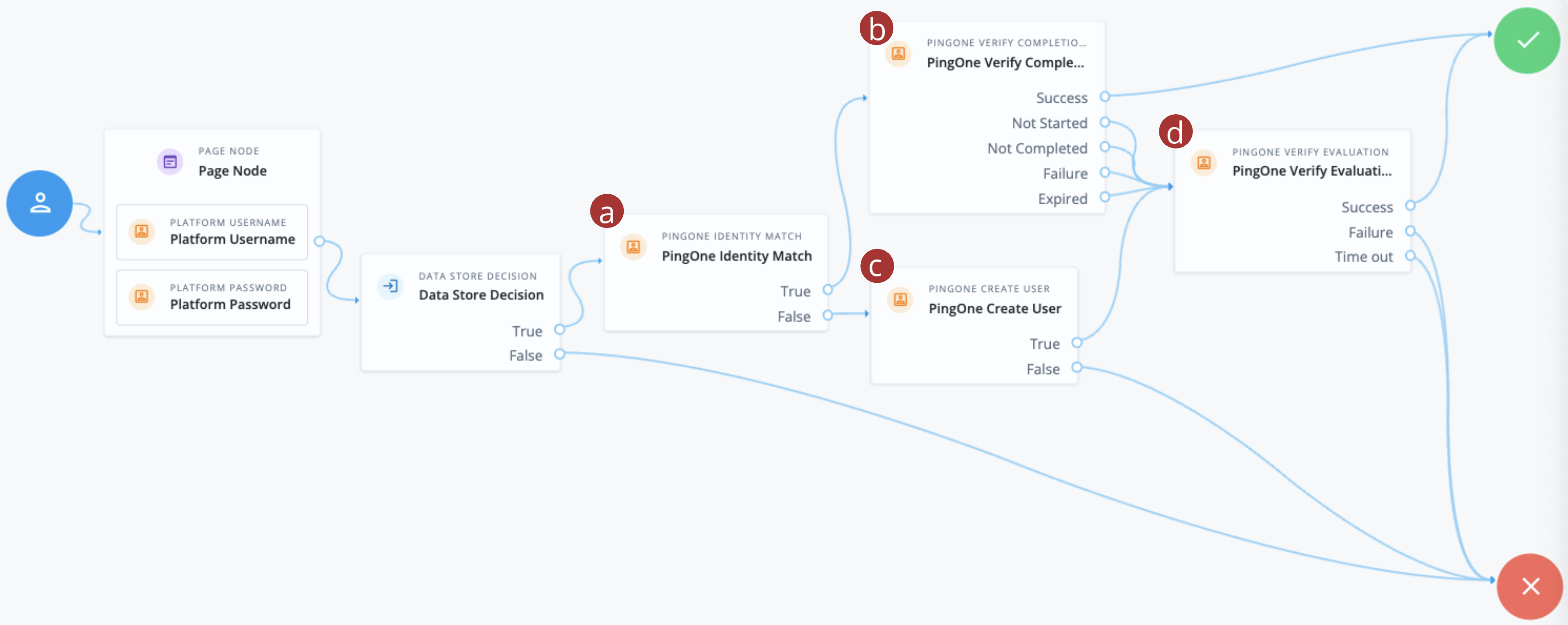
The following example journey integrates PingOne Verify to perform user identity verification.
-
The user enters their credentials and the Data Store Decision node matches them against the identity store.
-
a The PingOne Identity Match node checks PingOne for a matching user.
-
b If a user is found, the PingOne Verify Completion Decision node checks the user’s most recent verification transaction to determine the status:
- Success
-
The user successfully completed the most recent PingOne Verify transaction, so the journey progresses directly to the Success node and authentication is successful.
- Not Completed
-
The user has an existing PingOne Verify transaction in progress, so the journey resumes the existing verification transaction.
The node adds the user’s existing transaction ID to the shared node state in a variable named
pingOneVerifyTransactionId. - Not Started / Failure / Expired
-
-
The user doesn’t have an existing PingOne Verify transaction (
Not Started) -
The user hasn’t successfully completed the most recent PingOne Verify transaction
-
The most recent PingOne Verify transaction has expired
The journey continues to start a new verification transaction.
-
-
c If no matching user is found, the PingOne Create User node creates a new user in PingOne.
-
d The PingOne Verify Evaluation node starts a new PingOne Verify evaluation or continues an existing evaluation if
pingOneVerifyTransactionIdis present in the shared node state. The node either completes or fails the journey based on the result.
Availability
| Product | Available? |
|---|---|
PingOne Advanced Identity Cloud |
Yes |
PingAM (self-managed) |
Yes |
Ping Identity Platform (self-managed) |
Yes |
Inputs
This node reads the username field from the shared node state to access the user’s identity profile.
Implement a Username Collector node (standalone AM) or Platform Username node (Ping Identity Platform deployments) earlier in the journey.
Dependencies
This node requires a PingOne Worker Service configuration so that it can authenticate to your PingOne instance.
Find more information in Connect AM to PingOne.
Configuration
| Property | Usage | ||
|---|---|---|---|
PingOne Worker Service ID |
The ID of the PingOne worker service for connecting to PingOne. |
||
Population ID |
The ID of the population in PingOne to check for users or provision new ones. If not specified, the node uses the environment’s default population ID. |
||
Anonymized user |
When enabled, the node creates a user in PingOne with only a unique identifier and a language attribute. It does not add any other profile attributes, helping prevent any personally identifiable information (PII) from being shared. |
||
AM Identity Attribute |
The attribute from the user’s AM profile that the node uses as the username for the account created in PingOne.
Default: |
||
Capture failure |
Capture the details in shared state if a failure occurs. The node stores the details in a variable named Default: Example: |
Outputs
If the node was able to create a new user in PingOne it stores the PingOne user identifier in a state variable named pingOneUserId. For example a648aaac-ch15-b357-457b-8d2e714180ff.
If you select Capture failure, the node stores any error response in a shared state variable named pingOneCreateUserFailureReason.
Outcomes
True
The node created an account in PingOne.
False
The node didn’t create an account in PingOne.
The journey also uses this outcome if any error occurs. Enable Capture Failure to store the details in node state.
Errors
The node can log the following errors when it can’t create a user in PingOne:
-
Could not get the username from the context.The
usernameproperty isn’t available in the shared node state. Use a preceding node to collect or set the username. -
Unable to get access token for PingOne Worker.The node couldn’t obtain an access token for the configured PingOne Worker Service. Check the worker service configuration and permissions.
-
Could not get attribute from user profile.The configured AM Identity Attribute isn’t available in the user’s profile. Check the attribute name and ensure the profile contains a value.
-
Could not find the identity with username in the realm.The node couldn’t find the identity associated with the username in the realm. Check that the identity exists and that the username is correct.
-
Error communicating with PingOne.The node couldn’t communicate with PingOne. Check the network connection, worker service configuration, and PingOne availability.
-
An unexpected error occurred.An unexpected error prevented the node from creating the user. Check the exception details stored in
pingOneCreateUserFailureReasonwhen Capture failure is enabled.