Passthrough Authentication node
The Passthrough Authentication node authenticates users against a third-party service through a configured connector. This lets you migrate user profiles without forcing users to reset their passwords, or retain a third-party service indefinitely as the canonical store for authentication credentials.
Pass the credentials to this node to authenticate the identity against the service.
Example
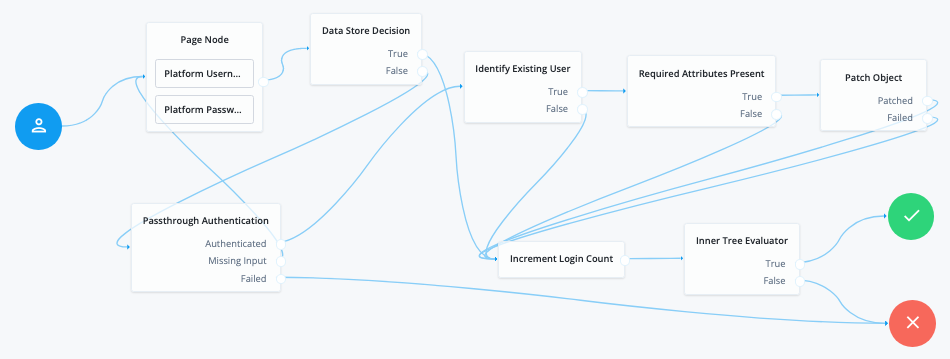
The following example shows a login flow that first attempts local authentication and then passes the credentials through to the third-party service if local authentication fails. After successful pass-through authentication, the flow verifies that the user’s profile contains the required attributes and stores the password in the local profile.
Before trying this example, synchronize accounts from the third-party service.
-
The Page node containing the Platform Username node and Platform Password node prompts for credentials.
-
The Data Store Decision node validates the username-password credentials.
-
If local authentication succeeds, the Increment Login Count node increments the login count and the journey continues to an inner tree evaluator.
-
If local authentication fails, the Passthrough Authentication node authenticates the credentials against the third-party service.
-
If third-party authentication succeeds, the Identify Existing User node checks for a matching user profile.
-
The Required Attributes Present node checks whether the user profile contains the required attributes.
-
The Patch Object node updates the user profile with the successful password.
Availability
| Product | Available? |
|---|---|
PingOne Advanced Identity Cloud |
Yes |
PingAM (self-managed) |
Yes 1 |
Ping Identity Platform (self-managed) |
Yes |
1 This functionality requires that you configure AM as part of a Ping Identity Platform deployment.
Inputs
The node reads the username and password from shared state. It uses the configured Identity Attribute and Password Attribute values, falling back to the default username and password properties when necessary.
For standalone AM deployments, implement a Username Collector node and a Password Collector node earlier in the journey.
For Ping Identity Platform deployments, implement a Platform Username node and a Platform Password node earlier in the journey.
Dependencies
Before you use the node:
-
Configure the connector to the third-party service. The connector must support pass-through authentication.
Learn more in the Connector reference.
-
If you plan to collect credentials in the identity repository for users, synchronize accounts from the third-party service.
Find more information in Synchronization.
Connectors that support pass-through authentication
The following connectors support pass-through authentication using the AuthenticateOp interface by default:
All Scripted Groovy-based connectors are capable of pass-through authentication if the AuthenticateScript.groovy script is implemented, but the only default implementation is the ScriptedSQL connector. Learn more in Authenticate script and Authenticate operation.
|
Configuration
| Property | Usage |
|---|---|
System Endpoint (required) |
The name of the connector to the third-party service that performs authentication. |
Object Type |
The OpenICF object type for the object being authenticated. Default: |
Identity Attribute |
The username attribute for authentication. Default: |
Password Attribute |
The password attribute for authentication. Default: |
Outputs
The node preserves the shared and transient state and authenticates the supplied identity against the configured connector.
Outcomes
Authenticated-
The connector successfully authenticated the supplied credentials.
Missing Input-
The username or password isn’t present in state, or the password is empty.
Failed-
The connector rejected the supplied credentials or couldn’t authenticate the identity. Check the connector configuration and service availability.