Backchannel Status node
The Backchannel Status node checks the status of an asynchronous (backchannel) user journey.
Together with the Backchannel Initialize node, this node lets you implement backchannel authentication from within a journey. Find more information in Backchannel authentication.
Example
This example uses the Backchannel Initialize and Backchannel Status nodes to implement backchannel authentication.
The example shows two journeys:
-
The main journey initializes a backchannel authentication journey.
-
The backchannel journey is a simple authentication journey.
Main journey
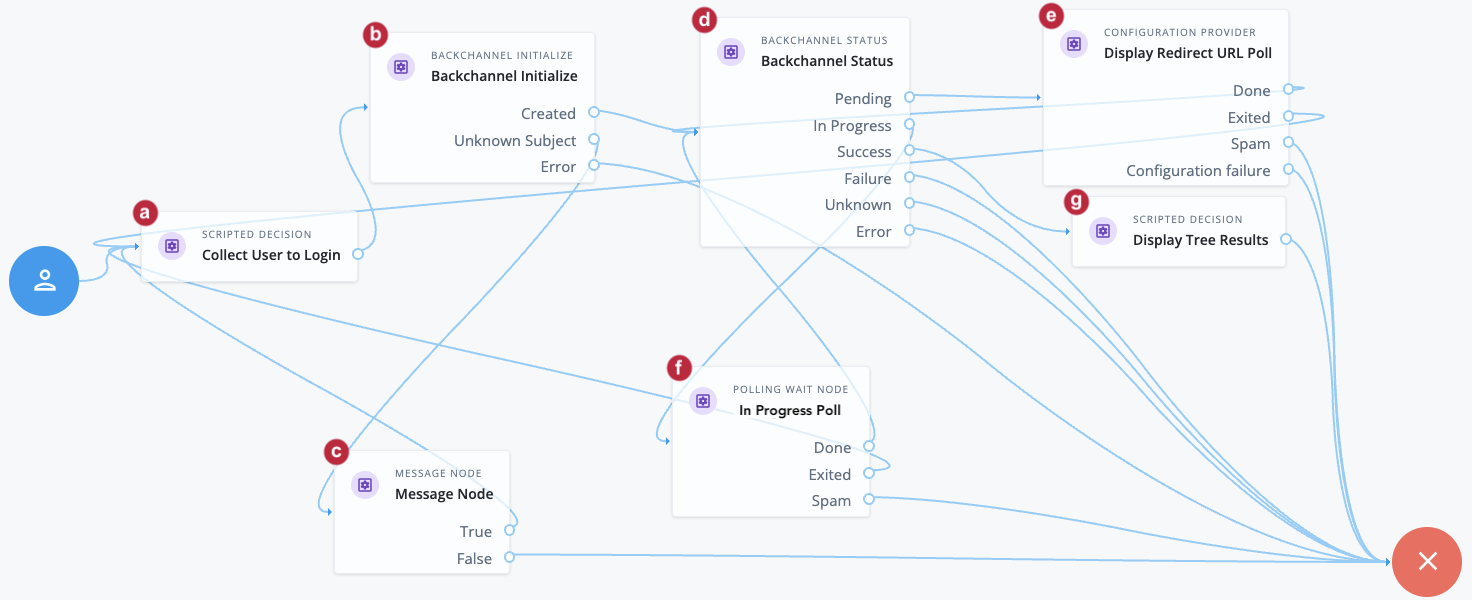
a The Collect User to Login node is a Scripted Decision node. The script writes the attributes required for the backchannel authentication into the shared state.
Sample Scripted Decision node script
The script queries the backend identity object to get the userId, then writes that and the attributes required for the backchannel authentication into the shared state.
if (callbacks.isEmpty()) {
    // Request callbacks
    callbacksBuilder.nameCallback("User to authenticate");
} else {
    // Callbacks returned from browser, save username and password
    var username = callbacks.getNameCallbacks().get(0);
    var queryRes = openidm.query("managed/alpha_user", {
        "_queryFilter": `/userName eq '${username}'`
    }, ["*", "_id"]);
    var userId = queryRes.result[0]._id
    var identity = idRepository.getIdentity(userId);
    nodeState.putShared("backchannel-user", identity.getName());
    nodeState.putShared("backchannel-data", {
        "username": username,
        "objectAttributes": {
            "userName": username,
            "_id": userId
        }
    });
    nodeState.putShared("_id", userId);
    outcome = "outcome";
}
b The Backchannel Initialize node reads the value of the backchannel-user key from the shared state. This key contains the userName:
-
If the
userNameis available and is valid, the node generates a redirect URI to start the backchannel authentication journey. The node writes the redirect URI and the transaction ID of the backchannel transaction to the shared state, and the journey proceeds to the Backchannel Status node. -
If the
userNamecan’t be read, the journey follows the Error outcome and fails. -
If the
userNamecan be read but the user or agent isn’t valid, the journey proceeds to a Message node (c) and redirects the user to the start of the journey to attempt gathering data again.
d The Backchannel Status node reads the transaction ID and provides status on the authentication request:
-
If the backchannel authentication request is
Pending, the journey proceeds to the Display Redirect URL Poll node (e), which is a Configuration Provider node. -
When the backchannel authentication is
In progress, the journey proceeds to the In Progress Poll node (f), which is a Polling Wait node. -
When the backchannel authentication completes successfully, the journey proceeds to the Display Tree Results node (g), which is a Scripted Decision node.
e
The Configuration Provider node imitates a Polling Wait node that uses a script to display the backchannel redirect URI as long as the backchannel authentication request is in a Pending state.
Sample Config Provider node script
var uri = nodeState.get("backchannel-redirectUri").asString();
config = {
    "spamDetectionTolerance": 3,
    "spamDetectionEnabled": true,
    "exitMessage": {},
    "waitingMessage": {
        "en": uri
    },
    "secondsToWait": 5,
    "exitable": true
};-
After 5 seconds, the journey returns to the Backchannel Status node.
-
If the journey exits before it returns to the Backchannel Status node, the user is redirected to the start of the main journey to attempt gathering data again.
-
If the Configuration Provider node detects spam or misconfiguration, the main journey follows the failure outcome path.
f The In Progress Poll node is a Polling Wait node that pauses the main journey until the Backchannel journey is complete.
-
After 8 seconds, the journey returns to the Backchannel Status node.
-
If the journey exits before it returns to the Backchannel Status node, the user is redirected to the start of the main journey to attempt gathering data again.
-
If the node detects spam, the main journey follows the failure outcome path.
g The Display Tree Results node is a Scripted Decision node that displays the outcome of the backchannel authentication journey.
Sample Scripted Decision node script
/*
- Data made available by nodes that have already executed are available in the sharedState variable.
- The script should set outcome to either "true" or "false".
*/
if (callbacks.isEmpty()) {
    var sessionProperties = nodeState.get("backchannel-sessionProperties");
    callbacksBuilder.textOutputCallback(0, sessionProperties);
} else {
    outcome = "outcome";
}| This journey always ends on the Failure node as it is not in itself an authentication journey. |
Backchannel authentication journey
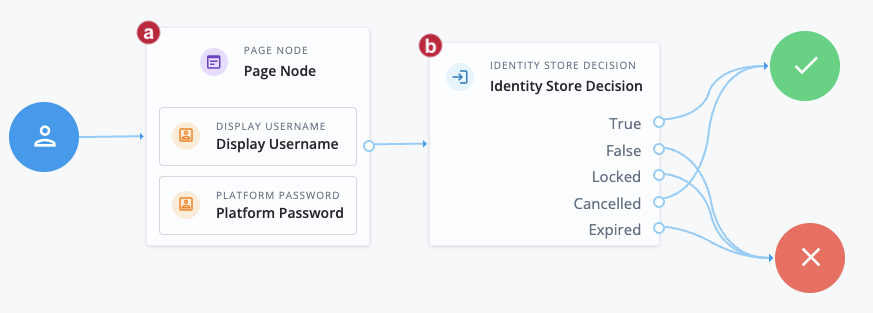
This is a basic authentication journey that takes credentials and authenticates the user based on their existence in the backend identity store.
a The Page node includes a Display Username node and a Platform Password node. The username has been supplied in the shared state from the main journey. The user needs to enter their password.
b The Identity Store Decision node assesses the user credentials. Find more information on this node and its outcomes in Identity Store Decision node.
The main journey polls for completion of this subjourney. When this journey completes, the main journey continues.
Availability
| Product | Available? |
|---|---|
PingOne Advanced Identity Cloud |
Yes |
PingAM (self-managed) |
Yes |
Ping Advanced Identity Software (self-managed) |
Yes |
Inputs
This node requires the transaction ID of the backchannel authentication request from the node state. Implement a Backchannel Initialize node before this node in the journey to provide this input.
Configuration
| Property | Usage |
|---|---|
Record Journey Session Info |
When enabled, the node records the session information returned from the journey in the transient state when the journey completes successfully. |
Record Transaction Data |
When enabled, the node writes the transaction data received from the Backchannel Notification node to the shared state for the following transaction states:
|
Transaction Data Key |
The key used to record the transaction data in shared state when Record Transaction Data is enabled. For example Leave blank to use the default |
Outputs
-
If Record Journey Session Info is enabled, the node writes the journey session properties to the transient state in the
backchannel-sessionPropertieskey. -
If Record Transaction Data is enabled, the node writes transaction data to the shared state in the key specified in Transaction Data Key. If no key is specified, data is written to the default
backchannel-transactionDatakey.This data includes anything added to the transaction by the Backchannel Notification node for real-time updates.
Outcomes
- Pending
-
The journey follows this outcome if the backchannel authentication journey has not yet started.
- In Progress
-
The journey follows this outcome if the backchannel authentication journey has been started but not yet completed.
- Success
-
The journey follows this outcome if the backchannel authentication journey has completed successfully.
- Failure
-
The journey follows this outcome if the backchannel authentication journey completed but failed.
- Unknown
-
The journey follows this outcome if the node is unable to assess the status of the backchannel authentication journey, usually because it timed out.
- Error
-
The journey follows this outcome in any other case.