Set Failure Details node
The Set Failure Details node adds details to the JSON response when a journey ends in failure. You can configure the node properties to:
-
Return a failure message.
-
Include extra information in the response body in the form of static
key:valuefields. -
Set custom response headers.
You can’t modify the protected HTTP headers, nor can you modify the session cookie or load balancer cookie using the
Set-Cookieheader.Protected HTTP headers
-
X-Frame-Options -
X-Content-Type-Options -
Cache-Control -
Content-API-Version -
Expires -
Pragma -
Content-Type -
Content-Length -
Date -
Keep-Alive -
Connection -
Transfer-Encoding -
Server -
Trailer -
Upgrade
-
Examples
Example 1: Add a failure message and details on account lockout
This example uses the Set Failure Details node and assumes the following configuration:
- Failure Message
-
-
Key:
en-gb -
Value:
Your account is locked
-
- Failure Details
-
-
Key:
Reason -
Value:
Exceeded max retries
-
-
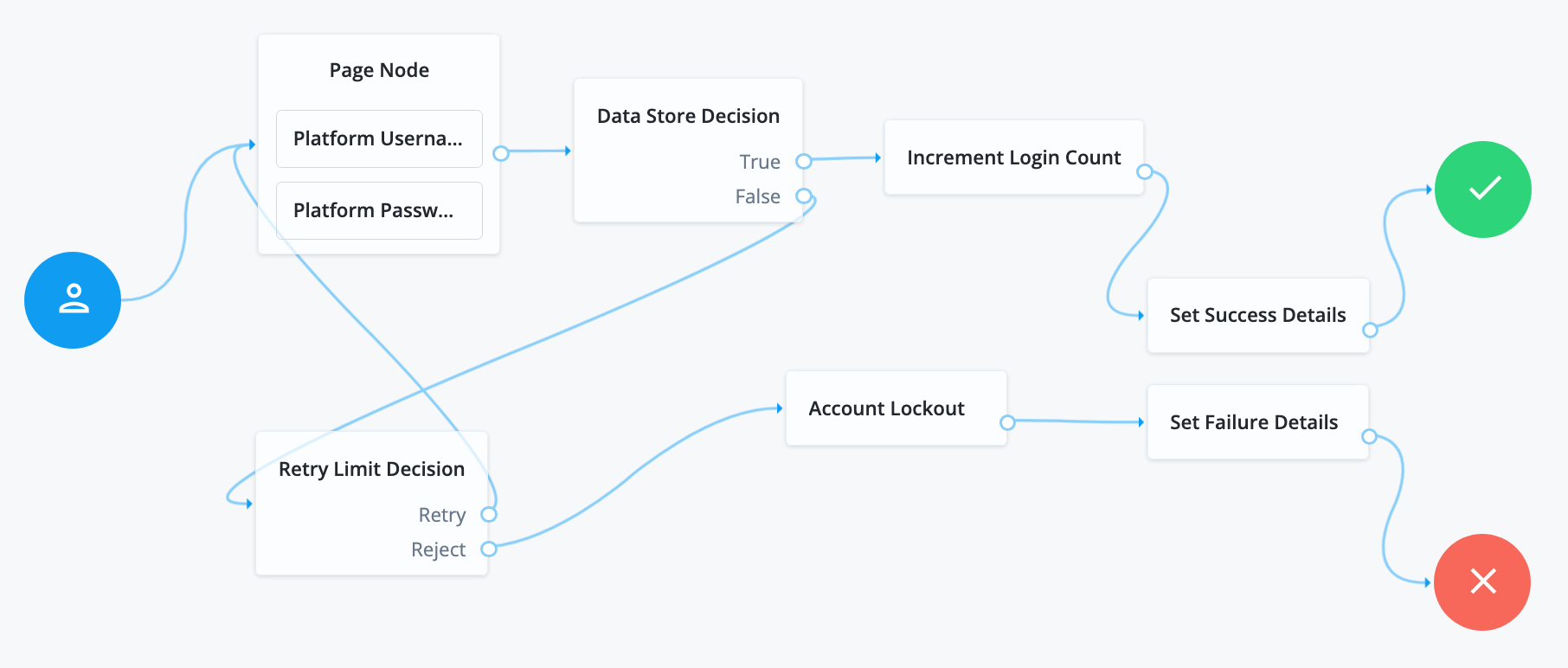
The Page node containing the Platform Username node and Platform Password node prompts for credentials.
-
The Data Store Decision node validates the username-password credentials.
-
If authentication is successful:
-
The Increment Login Count node updates the number of successful authentications in the user profile.
-
The Set Success Details node adds any configured details to the JSON response.
-
-
If authentication fails:
-
The Retry Limit Decision node checks the number of failed authentications against the configured limit. If the retry limit is reached, the journey continues on the
Rejectoutcome path. -
The Account Lockout node locks the account.
-
The Set Failure Details node displays the configured message to the user and adds both the message and the details to the JSON response.
For example:
{
  "code":401,
  "reason":"Unauthorized",
  "message":"Your account is locked",
  "detail":{
    "Reason":"Exceeded max retries"
  }
}
-
Example 2: Set custom response headers
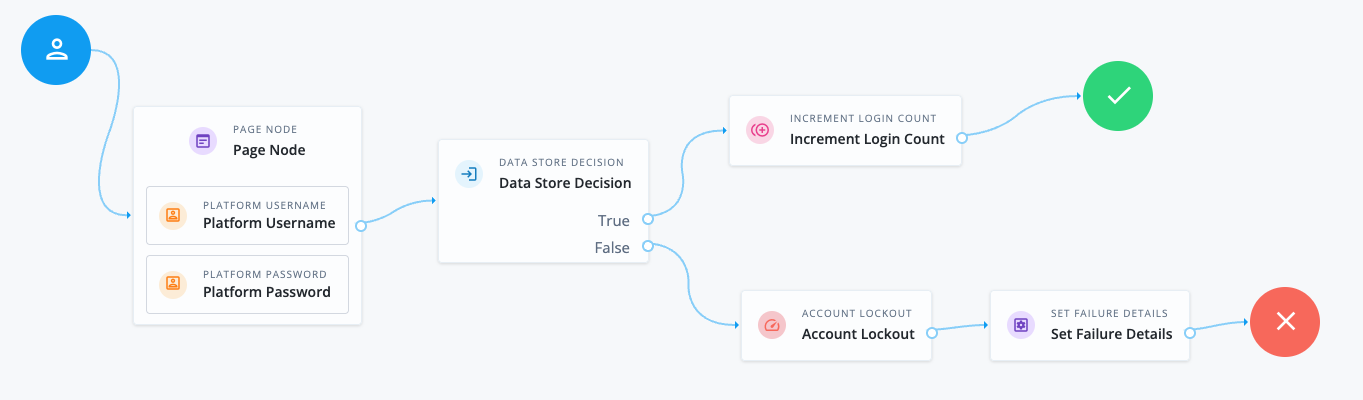
This example uses the Set Failure Details node to set a Custom-Fail response header when the journey ends in
failure after locking the user’s account. This header could be read by a custom UI to trigger a specific action when the user’s account is locked.
-
The Page node containing the Platform Username node and Platform Password node prompts for credentials.
-
The Data Store Decision node validates the username-password credentials.
-
If authentication is successful, the Increment Login Count node updates the number of successful authentications in the user profile.
-
If authentication fails:
-
The Account Lockout node locks the account.
-
The Set Failure Details node sets the response header. This example uses the following configuration:
- Response Headers
-
Key:
Custom-FailValue:
account-locked
-
Follow these steps to try the example:
-
Create the example journey using the journey editor.
-
Authenticate a test user with the journey using incorrect credentials. Make sure you include the
--show-headersoption (or--includein oldercurlversions) to return the response headers:$ curl --show-headers \ --request POST \ --header 'X-OpenAM-Username: bjensen' \ --header 'X-OpenAM-Password: wrong-password' \ --header "Accept-API-Version: resource=2.1, protocol=1.0" \ "https://tenant-env-fqdn/am/json/realms/root/realms/alpha/authenticate?authIndexType=service&authIndexValue=myJourney" HTTP/1.1 401 X-Frame-Options: SAMEORIGIN X-Content-Type-Options: nosniff ... Custom-Fail: account-locked ... { "code":401, "reason":"Unauthorized", "message":"Login failure" }
Availability
| Product | Available? |
|---|---|
PingOne Advanced Identity Cloud |
Yes |
PingAM (self-managed) |
Yes |
Ping Advanced Identity Software (self-managed) |
Yes |
Configuration
| Property | Usage | ||||||||||||
|---|---|---|---|---|---|---|---|---|---|---|---|---|---|
Failure Message |
The message to add to the JSON response when authentication fails: Add a custom, localized message per locale:
|
||||||||||||
Failure Details |
The details to add to the JSON response on journey failure:
|
||||||||||||
Response Headers |
The response headers to set:
When finished, click Save to keep your settings. |
(1) Specify a
locale that Java supports, such as en-gb. Otherwise, the node throws a configuration exception with an Invalid locale provided message.