CAPTCHA node
The CAPTCHA node adds CAPTCHA support by verifying the response token received from the CAPTCHA provider and creating a callback for the UI to interact with.
The node supports the following CAPTCHA providers:
-
Google reCAPTCHA v2 and v3
-
hCaptcha
-
FriendlyCaptcha v1 and v2 (available from v2.0 of the node)
By default, the node is configured for Google’s reCAPTCHA v2.
|
Example
The following journey uses a Page node and a Data Store Decision node to collect and verify the credentials and a CAPTCHA response:
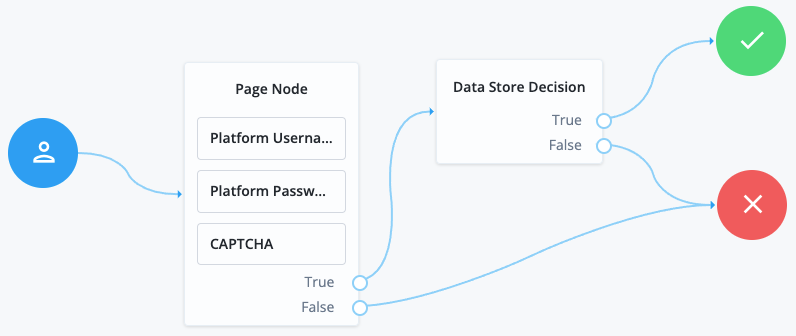
This example uses the following nodes:
-
The Page node prompts the user to input their username and password:
-
The Platform Username node collects the username and stores it in the shared state.
-
The Platform Password node collects the password and stores it in the shared state.
-
The CAPTCHA node collects and verifies the CAPTCHA response.
-
-
The Data Store Decision node uses the username and password to determine whether authentication is successful.
Availability
| Product | Available? |
|---|---|
PingOne Advanced Identity Cloud |
Yes |
PingAM (self-managed) |
Yes |
Ping Advanced Identity Software (self-managed) |
Yes |
Dependencies
The node requires the site key and secret key from your CAPTCHA provider to verify the CAPTCHA response.
Before configuring the node, sign up with your CAPTCHA provider to get these details:
Configuration
| Property | Usage | Availability | ||
|---|---|---|---|---|
CAPTCHA Site Key (required) |
The CAPTCHA site key supplied by the CAPTCHA provider when you sign up for access to the API. |
All node versions |
||
CAPTCHA Secret Key |
The CAPTCHA secret key supplied by the CAPTCHA provider when you sign up for access to the API.
|
All node versions |
||
CAPTCHA Secret Label Identifier |
An identifier used to create a secret label for mapping to the CAPTCHA secret key in a secret store. Advanced Identity Cloud uses this identifier to create a specific secret label for this node. The secret label takes the form
|
All node versions |
||
CAPTCHA Verification URL |
The URL used to verify the CAPTCHA submission. Possible values by provider depend on the node version:
Default: |
All node versions |
||
CAPTCHA API URL (required) |
The URL of the JavaScript script that loads the CAPTCHA widget. Possible values by provider depend on the node version:
Default: |
All node versions |
||
Class of CAPTCHA HTML Element |
The class of the HTML element required by the CAPTCHA widget. Possible values by provider depend on the node version:
Default: |
All node versions |
||
ReCaptcha V3 node |
This property only applies to Google reCAPTCHA. When enabled, all interactive v2 elements are removed from the page and replaced with the invisible v3 element. Only enable this property if you’re using Google reCAPTCHA v3. Default: Not enabled |
All node versions |
||
Score Threshold |
This property only applies to Google reCAPTCHA v3 and hCaptcha. These providers return a score for each request based on observed interaction with your site. The threshold you set here determines whether to allow or deny access based on that score. A score of Scores in a staging environment or a newly deployed production environment might not be accurate, because the CAPTCHA provider needs real site traffic to calibrate. Learn more about score thresholds in the Google documentation. Default: |
All node versions |
||
Disable submission until verified |
When selected, form submission is disabled until CAPTCHA verification succeeds. Default: Enabled |
All node versions |
||
Verification Request Parameter Name |
The name of the request parameter that contains the user’s CAPTCHA response. Possible values by provider are:
Default: |
|||
Use API Key Header |
Controls how the node sends the API key to the CAPTCHA verification endpoint. By default, the key is sent as a Enable this property to send the key in an Default: Not enabled |
|||
Load Widget Script As Module |
Controls how the CAPTCHA widget script is loaded. By default, the script is loaded as a classic JavaScript file. This method is used by Google reCAPTCHA v2 and v3, hCaptcha, and FriendlyCaptcha v1. Enable this property to load the script as an ES module ( Default: Not enabled |
Callbacks
The node sends a ReCaptchaCallback, which the client uses to render the CAPTCHA widget and collect the user’s response.
Outcomes
True-
The CAPTCHA response was successfully verified.
False-
The CAPTCHA response wasn’t verified or failed verification.