OATH Token Verifier node
The OATH Token Verifier node requests and verifies a one-time passcode (OTP) generated by a device such as a mobile phone.
The default configuration is time-based OTP (TOTP), but the node also supports HMAC (HOTP).
The node requires prior authentication and a device registered with an OATH Registration node.
|
You can use the OATH nodes in conjunction with an authenticator app to register your device, receive notifications, and generate one-time passwords. |
Example
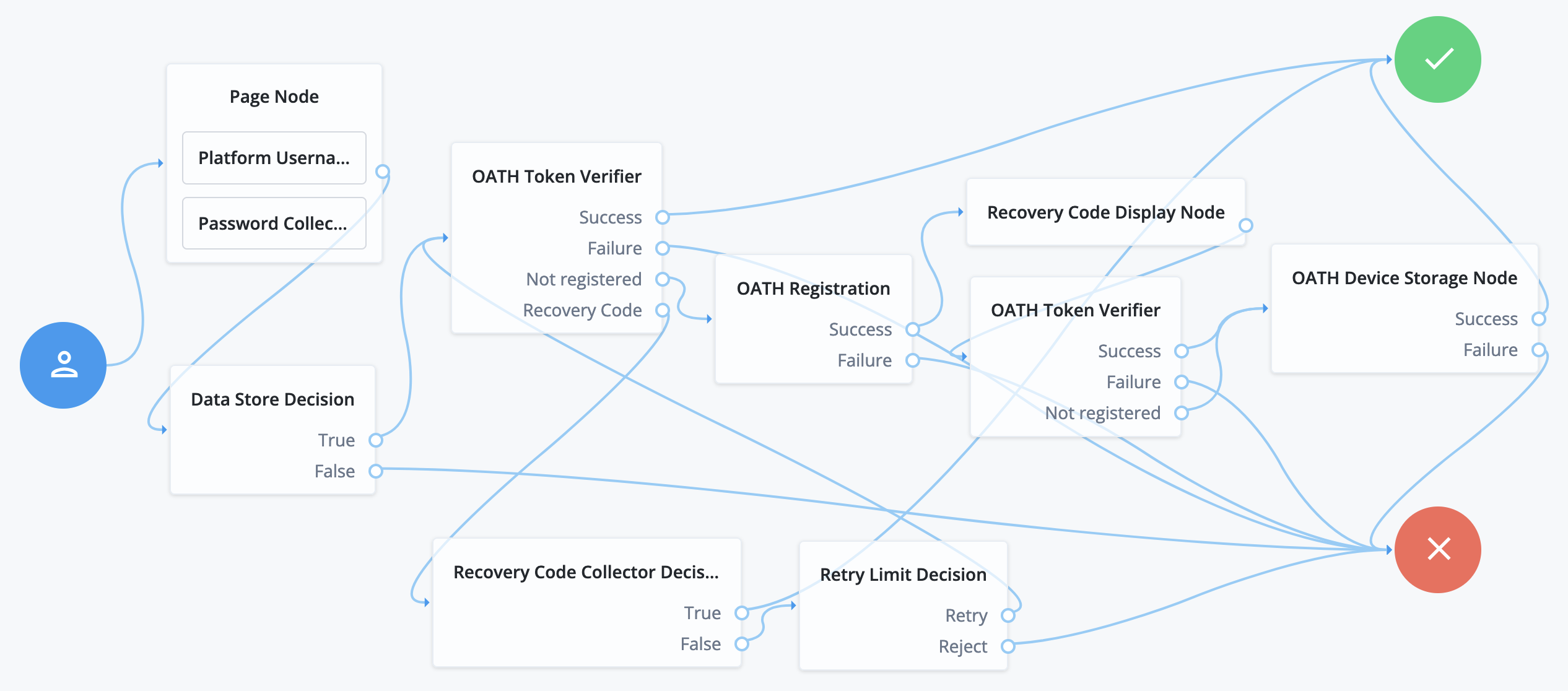
The following journey includes both username-password and one-time passcode authentication:
-
The Page node with the Platform Username node and the Platform Password node prompts for the user credentials.
-
The Data Store Decision node confirms the username-password credentials.
-
The first OATH Token Verifier node prompts for a one-time passcode with an option to use a recovery code.
-
The OATH Registration node prompts the user to register a device and includes its profile in the shared state.
-
The Recovery Code Display node shows the recovery codes and prompts the user to keep them safe.
-
The second OATH Token Verifier node prompts for a one-time passcode using the newly registered device.
-
The OATH Device Storage node writes the device profile to the user’s account.
-
The Recovery Code Collector Decision node prompts for a recovery code.
-
The Retry Limit Decision node lets the user retry another code if they enter one incorrectly.
Availability
Inputs
This node reads the username attribute from the shared state.
Implement a Platform Username node earlier in the journey.
Dependencies
Confirm the user credentials before letting them authenticate with a device.
Implement a Platform Username node and a Platform Password node earlier in the journey.
Also implement a Data Store Decision node
Configuration
| Property | Usage | ||
|---|---|---|---|
OATH Algorithm |
Select the algorithm the device uses to generate the OTP. Possible values are:
Default: |
||
HOTP Window Size |
The amount the OTP device and server counter can be out of sync. For example, if the window size is Default: |
||
TOTP Time Step Interval |
The length of time an OTP is valid in seconds. For example, if the time step interval is Default: |
||
TOTP Time Steps |
The number of time steps that the OTP can be out of sync. This applies to codes generated before or after the current code. For example, with a time step of Default: |
||
TOTP Hash Algorithm |
The HMAC hash algorithm used to generate the OTP codes. Possible values are:
Default: |
||
TOTP Maximum Allowed Clock Drift |
The number of time steps that the authenticator app can be out of sync with the server before manual resynchronization is required. Learn more about manual resynchronization in Recover after a device becomes out of sync. For example, with the default TOTP Time Steps of The drift for a user’s device is calculated each time they enter a new code.
If the drift exceeds this value, the outcome is Default: |
||
Allow recovery codes |
Select this option to let users provide a recovery code to authenticate. Default: |
Callbacks
The node sends the following callbacks:
ConfirmationCallback-
Lets the user submit their OTP or choose to provide a recovery code.
NameCallback-
Prompts the user to enter the OTP code generated by their device.
Learn more in Supported callbacks.
Outcomes
Success-
The user has a registered device and the token code was verified.
Failure-
The user wasn’t authenticated, or the collected token code can’t be verified.
Not registered-
The user account has no registered device profiles.
Recovery Code-
Allow recovery codes is enabled, and the user chose to provide a recovery code.