PingOne Protect Initialize node
The PingOne Protect Initialize node instructs the client to initialize a PingOne Signals (Protect) SDK so that it can start gathering device signals and contextual information:
-
If the client is a device or browser running a Ping SDK, this node initializes a PingOne Signals (Protect) SDK in the device or browser. This requires a Ping SDK v4.4.0 or later. Learn more in Integrate with PingOne Protect for risk evaluations.
-
If the client is a browser running Advanced Identity Cloud hosted pages, this node initializes the PingOne Signals (Protect) SDK for Web in the browser.
You should place this node as early as possible in your journey so that it can gather sufficient contextual information to make risk evaluations.
This node initializes the PingOne Signals (Protect) SDK in the client only once. If you include a second instance of the node in a journey, it won’t initialize the PingOne Signals (Protect) SDK again and won’t override the initial node configuration.
Learn more in Getting started with PingOne Protect.
Example
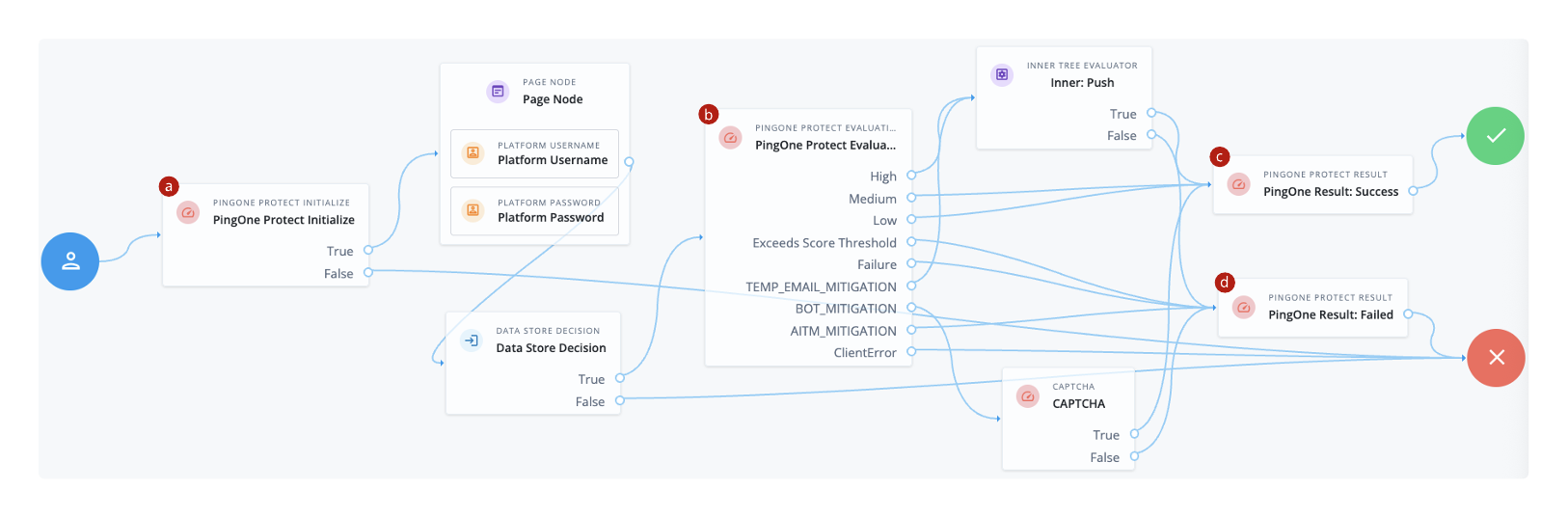
The following example journey leverages PingOne Protect functionality to perform a risk evaluation.
-
a The PingOne Protect Initialize node instructs the Ping SDK or Advanced Identity Cloud hosted pages to initialize a PingOne Signals (Protect) SDK with the configured properties.
Initialize a PingOne Signals (Protect) SDK as early in the journey as possible, before any user interaction.
This enables it to gather sufficient contextual data to make an informed risk evaluation.
In the subsequent nodes, the end user enters their credentials, which are verified against the identity store.
-
b The PingOne Protect Evaluation node performs a risk evaluation against a risk policy in PingOne.
The example journey continues depending on the outcome:
High-
The journey requests that the user respond to a push notification.
MediumorLow-
The risk isn’t significant, so no further authentication factors are required. The journey continues to a PingOne Protect Result node that returns the success result to PingOne.
Exceeds Score Threshold-
The score returned is higher than the configured threshold and is considered too risky to complete successfully. The journey continues to a PingOne Protect Result node that returns the failed result to PingOne.
Failure-
The risk evaluation could not be completed, so the authentication attempt continues to the Failure node.
TEMP_EMAIL_MITIGATION-
The risk evaluation returned a recommended action regarding the possibility of a temporary email address. The journey continues to an Inner Tree Evaluator node that requires the user to respond to a push notification.
BOT_MITIGATION-
The risk evaluation returned a recommended action to check for the presence of a human. The journey continues to a CAPTCHA node.
AITM_MITIGATION-
The risk evaluation returned a recommended action regarding the possible presence of an adversary-in-the-middle attack. The journey continues to a PingOne Protect Result node that returns the failed result to PingOne.
ClientError-
The client returned an error when attempting to capture the data to perform a risk evaluation. The journey continues to the Failure node.
-
c An instance of the PingOne Protect Result node returns the
Successresult to PingOne to help with analysis and risk policy tuning. -
d A second instance of the PingOne Protect Result node returns the
Failedresult to PingOne to help with analysis and risk policy tuning.You can broadly observe the risk evaluation results in the PingOne threat protection dashboard. You can also use an audit to review specific risk evaluation results, including the JSON response from the risk evaluation.
Availability
| Product | Available? |
|---|---|
PingOne Advanced Identity Cloud |
Yes |
PingAM (self-managed) |
Yes |
Ping Advanced Identity Software (self-managed) |
Yes |
| You can’t use this node inside a Page node. |
Dependencies
This node requires a PingOne Worker Service configuration so that it can connect to your PingOne instance and send it the necessary data to make risk evaluations as part of the journey.
Find more information in Set up PingOne product connections.
Only Ping SDKs v4.4.0 and later support this node.
Configuration
| Property | Usage | ||
|---|---|---|---|
PingOne Worker Service ID |
The ID of the PingOne worker service for connecting to PingOne. |
||
Collect Behavioral Data |
When selected, collect behavioral data. Otherwise, don’t collect behavioral data. Default: Selected |
||
Enable Universal Device Identification |
Tie the device payload to a non-extractable crypto key stored in the browser for content authenticity verification. Default: Not selected |
||
Disable Tags |
When selected, the client doesn’t collect tag data. Tags are used to record the pages the user visited, forming a browsing history. Default: Not selected (collect tag data) |
||
Enable Agent Identification |
When enabled, the PingOne Signals (Protect) SDK collects device attributes from the PingID Device Trust Agent.
Example response from PingOne with collected agent information |
||
Timeout for Agent |
The time, in milliseconds, for establishing a connection with the PingID Device Trust Agent. Must be a value between If you don’t specify a value, the Signals SDK sets a default value.
|
||
Port Number for Agent |
The port number to use when connecting to the PingID Device Trust Agent. If you don’t set a value, the connection goes through the default port:
|
||
Additional Signals SDK Initialization Options |
Lets you pass additional signals options (not included in the existing node configuration properties) when you initialize the PingOne Signals (Protect) SDK. Provide a map of keys and values where Key is the PingOne Protect signals parameter and Value is the parameter value. For example:
Read the SDKs documentation for the list of valid signals.
|
Callbacks
The node sends a PingOneProtectInitializeCallback to the client application. The callback includes the signalsInitializationOptions object with the options used to initialize the SDK. For example:
{
    "name": "signalsInitializationOptions",
    "value": {
        "agentIdentification": "true",
        "htmlGeoLocation": "true",
        "agentTimeout": "10000",
        "disableTags": "false",
        "behavioralDataCollection": "true",
        "agentPort": "8010",
        "enableTrust": "false"
    }
}
The client consumes this callback and initializes the PingOne Protect functionality so it can start gathering the data it needs to make risk evaluations.
Outcomes
True-
The client application confirmed successful receipt of the configuration.
False-
The client application didn’t confirm successful receipt of the configuration or returned a client error.
Errors
The node can log the following warnings:
-
Cannot find PingOne WorkerThe configured PingOne Worker Service couldn’t be found. Check the worker service ID and configuration.
-
PingOne Worker is missing Environment IDThe configured PingOne Worker Service doesn’t have an environment ID. Add an environment ID to the worker service configuration.