OATH Registration node
The OATH Registration node lets the user register a device for OATH-based multi-factor authentication (MFA). Learn more about OATH in the OATH documentation.
Based on the node settings, the user device displays a QR code that includes all the details required for registration.
If registration is successful, the node stores the device data and recovery codes (if enabled),
and sets the skippable attribute to prevent repeat registration at next login.
|
You can use the Combined MFA Registration node to register a device for both push notifications and one-time passcode (OATH) verification in a single step. |
Example
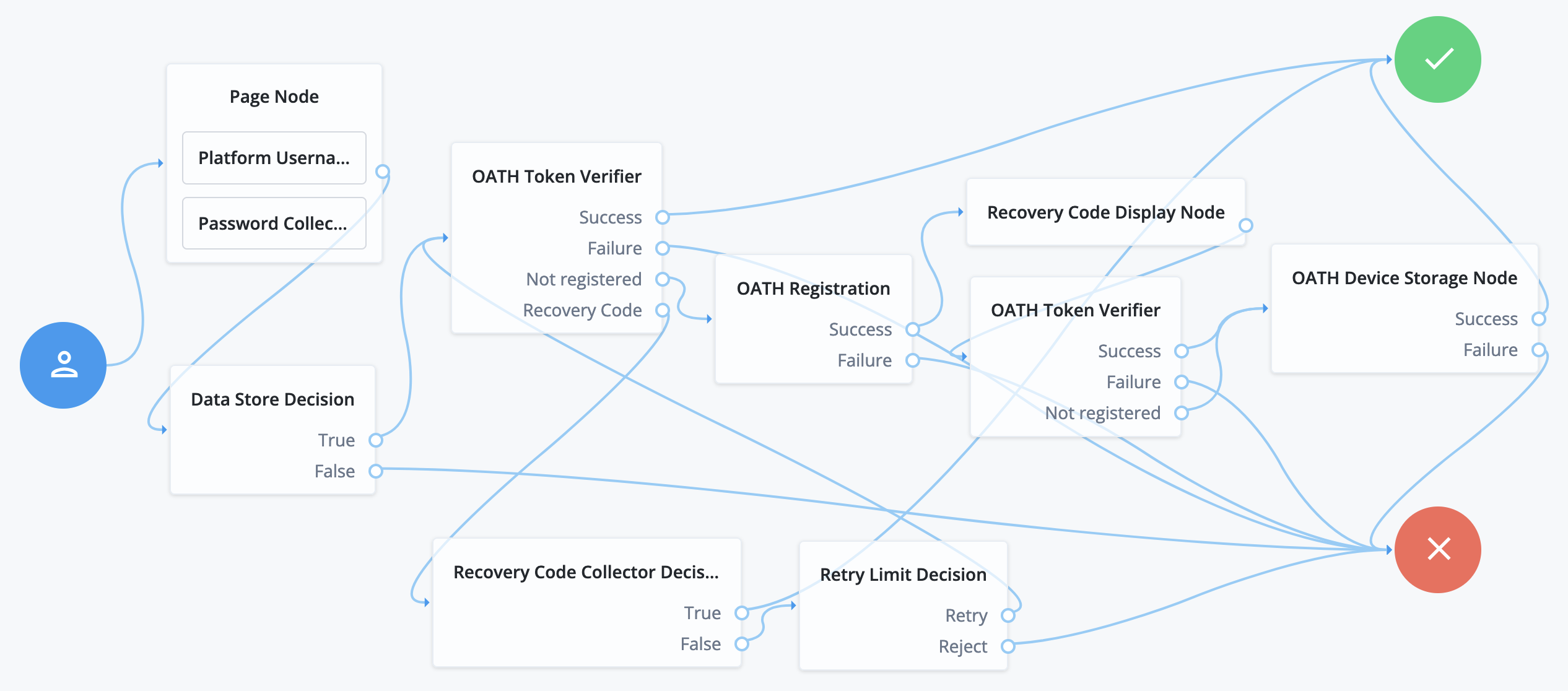
The following journey includes both username-password and one-time passcode authentication:
-
The Page node with the Platform Username node and the Platform Password node prompts for the user credentials.
-
The Data Store Decision node confirms the username-password credentials.
-
The first OATH Token Verifier node prompts for a one-time passcode with an option to use a recovery code.
-
The OATH Registration node prompts the user to register a device and includes its profile in the shared state.
-
The Recovery Code Display node shows the recovery codes and prompts the user to keep them safe.
-
The second OATH Token Verifier node prompts for a one-time passcode using the newly registered device.
-
The OATH Device Storage node writes the device profile to the user’s account.
-
The Recovery Code Collector Decision node prompts for a recovery code.
-
The Retry Limit Decision node lets the user retry another code if they enter one incorrectly.
Availability
Inputs
This node reads the username attribute and optionally the oathDeviceProfile attribute from the shared state.
Implement a Platform Username node earlier in the journey.
Dependencies
Confirm the user credentials before letting them register a device.
Implement a Platform Username node and a Platform Password node earlier in the journey.
Also implement a Data Store Decision node
Configuration
| Property | Usage | Availability | ||
|---|---|---|---|---|
Issuer |
The identifier that’s displayed on the user’s device, such as a company name, a website, or a realm. The authenticator app displays this value. Default: |
All node versions |
||
Account Name |
Select the profile attribute to display as the username in the authenticator app. v2.0 and later: If you require an attribute that isn’t listed, select If the selected profile attribute is empty or this option is not configured, the authenticator app uses the username. Default: |
All node versions |
||
Custom Account Name Attribute |
This property only displays when Account Name is set to If the selected profile attribute is empty or this option is not configured, the authenticator app uses the username. |
|||
Background Color |
The background color in hex notation that displays behind the issuer’s logo within the authenticator app. Default: |
All node versions |
||
Logo Image URL |
The location of an image to download and display as the issuer’s logo within the authenticator app.
Default: none |
All node versions |
||
Generate Recovery Codes |
Select this option to generate and store recovery codes in the successful outcome’s transient state. Use the Recovery Code Display node to display the codes to the user for safekeeping. Default: |
All node versions |
||
QR code message |
A custom, localized message with instructions to scan the QR code to register the device. Add instructions
Leave blank to use the default message. Default: none |
All node versions |
||
One Time Password Length |
The length of the generated OTP in digits. This value must be at least Default: |
All node versions |
||
Minimum Secret Key Length |
The minimum number of hexadecimal characters allowed for the secret key. Default: |
All node versions |
||
OATH Algorithm |
Select the algorithm the device uses to generate the OTP. Possible values are:
Default: |
All node versions |
||
TOTP Time Step Interval |
The length of time that an OTP is valid in seconds. For example, if the time step interval is Default: |
All node versions |
||
TOTP Hash Algorithm |
The HMAC hash algorithm used to generate the OTP codes. Possible values are:
Default: |
All node versions |
||
HOTP Checksum Digit |
Select this option to add a digit to the end of the generated OTP. This is used as a checksum to verify the OTP was generated correctly. This is in addition to the actual password length. Only set this if the user devices support it. Default: |
All node versions |
||
HOTP Truncation Offset |
This is an option used by the HOTP algorithm that not all devices support. Leave the default value unless you know user devices use an offset. Default: |
All node versions |
||
Store device data in shared state |
Select this option to store the device data in the shared node state instead of in the user profile.
When selected, the node adds the device data as a base64-encoded string to the In the shared node state: Decoded value: Use the OATH Device Storage node to store the device data in the user profile instead. Default: |
All node versions |
||
Use JavaScript for QR Code |
Use JavaScript in the node response to display the QR code. Default: Enabled Disable this option if your environment blocks scripts in HTTP requests and responses. When you disable this option, the frontend UI uses the URL in the HiddenValueCallback to render the QR code. |
All node versions |
(1) Specify a
locale that Java supports, such as en-gb. Otherwise, the node throws a configuration exception with an Invalid locale provided message.
Outputs
-
The node sets the
oathEnableRecoveryCodeattribute in shared state totrueif Generate Recovery Codes is enabled. Otherwise, it sets the attribute tofalse.The OATH Device Storage node reads this attribute when it stores the device data.
-
If Generate Recovery Codes is enabled, the node generates recovery codes on successful registration and stores them in the
recoveryCodestransient state attribute. It stores the registered device name in therecoveryCodeDeviceNametransient state attribute.The Recovery Code Display node displays these codes and device name when you place it after this node’s
Successoutcome. -
If Store device data in shared state is enabled, the node stores the device profile in the
oathDeviceProfileshared state attribute.
Callbacks
The node sends the following callbacks:
TextOutputCallback-
Contains the QR code message.
HiddenValueCallback-
Contains the registration URI used to generate the QR code.
QRCodeCallback-
Displays the QR code to the user.
ConfirmationCallback-
Lets the user continue after registering their device.
Learn more in Supported callbacks.
Errors
The node can log the following:
- Warnings
-
-
Custom account name attribute attribute name is not present on the user’s identity. Falling back to the username for the account name.The node failed to read the custom account name attribute from the user’s profile and is using the username instead.
-
- Errors
-
-
No username found.The node failed to read the username from the shared state.
-
No device profile found on shared stateThe node failed to read the device profile from the shared state.
-