Microsoft Defender for Endpoint Connector
The Microsoft Defender for Endpoint connector allows you to integrate endpoint detection and response capabilities into your PingOne DaVinci flows.
This connector provides capabilities to enforce device trust in real time:
-
Get Device: Retrieve health, risk, and identity information for a device identifier.
-
Get Device Alerts: Retrieve a list of security alerts associated with a device identifier.
-
Get Device Vulnerabilities: Retrieve a list of discovered vulnerabilities associated with a device identifier.
-
Get User Alerts: Retrieve a list of security alerts associated with a user identifier.
-
Isolate Device: Disconnect a device from the network to contain threats and prevent lateral movement.
-
Release Device: Restore network connectivity to a previously isolated device.
-
Restrict App Execution: Block all applications on the device except those signed by Microsoft.
-
Remove App Restriction: Lift app execution restrictions and allow all applications to run.
-
Offboard Device: Remove a device from active monitoring and management in Microsoft Defender for Endpoint.
Setup
Resources
You can find more information and setup help in the following:
-
PingOne DaVinci documentation:
Requirements
To use the connector, you’ll need:
-
A Microsoft 365 E5 license, or a standalone Microsoft Defender for Endpoint Plan 2 license.
-
A Microsoft Entra ID tenant with Global Administrator or Application Administrator permissions to create app registrations and grant admin consent.
-
At least one device is onboarded to Microsoft Defender for Endpoint. Devices can be onboarded using Microsoft Intune, Group Policy, or a local onboarding script.
Configuring the Microsoft Defender for Endpoint connector
Add the connector in PingOne DaVinci as shown in Adding a connector, then configure it as follows.
Connector configuration
To get the required credentials, you must create an app registration in Microsoft Entra ID with permissions to the Microsoft Defender for Endpoint API.
-
From the Microsoft Azure Portal, navigate to Microsoft Entra ID > App registrations.
-
Click New registration and create an app (e.g., "PingOne DaVinci - Defender Connector").
-
Navigate to Certificates & secrets > Client secrets and create a new secret. Copy the Value immediately (it won’t be shown again).
-
Navigate to API permissions > Add a permission > WindowsDefenderATP and add the required application permissions.
-
Click Grant admin consent to activate the permissions.
Learn more in Register an application with the Microsoft identity platform in the Microsoft documentation.
Base URL
The regional API endpoint for your tenant. Select the region matching your tenant location (US, EU, UK, and so on) or select Global.
Tenant ID
The Directory (tenant) ID from your Microsoft Entra ID tenant. Found on the app registration overview page.
Using the connector in a flow
Get Device
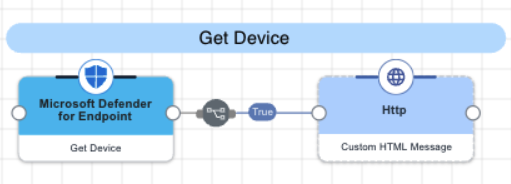
The connector queries the Machine API using a device identifier to retrieve detailed device information, including its risk score, exposure level, health status, and onboarding status. The device identifier can be the Microsoft Defender for Endpoint device ID, the Microsoft Entra device ID, or the computer DNS name.
Test the flow by clicking Save, Deploy, and Try Flow.
Get Device Alerts
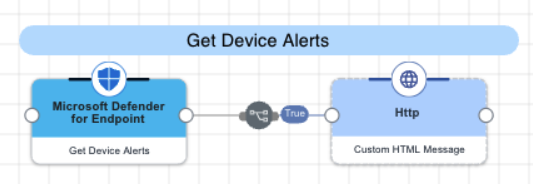
The connector queries the Machine API using a device identifier to retrieve all security alerts associated with the specified device, including severity, status, and evidence summaries. The device identifier can be the Microsoft Defender for Endpoint device ID, the Microsoft Entra device ID, or the computer DNS name.
Test the flow by clicking Save, Deploy, and Try Flow.
Get Device Vulnerabilities
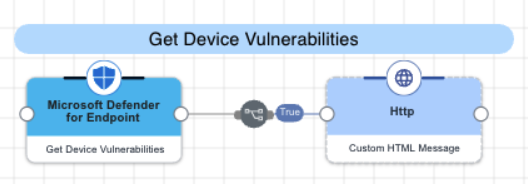
The connector queries the Machine API using a device identifier to retrieve all discovered vulnerabilities on the specified device, including CVE identifiers, severity ratings, CVSS scores, and exploit availability. The device identifier can be the Microsoft Defender for Endpoint device ID, the Microsoft Entra device ID, or the computer DNS name.
Test the flow by clicking Save, Deploy, and Try Flow.
Get User Alerts
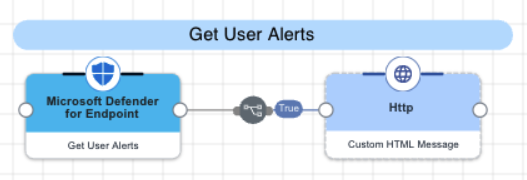
The connector queries the Alerts API using a username to retrieve all security alerts associated with the specified user across all of their devices, including severity, status, and evidence summaries. The username should be the sAMAccountName portion of the identity (e.g., "jsmith" for jsmith@contoso.com).
Test the flow by clicking Save, Deploy, and Try Flow.
Isolate Device
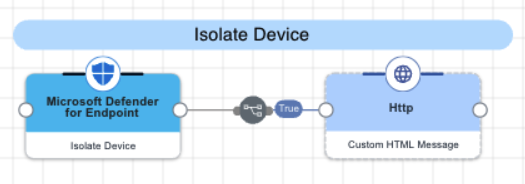
The connector submits an isolation request to the Machine Actions API to disconnect a device from the network. Full isolation blocks all network traffic except communication with the Defender service. Selective isolation allows limited connectivity for specific applications. The device identifier can be the Microsoft Defender for Endpoint device ID, the Microsoft Entra device ID, or the computer DNS name.
Test the flow by clicking Save, Deploy, and Try Flow.
Release Device
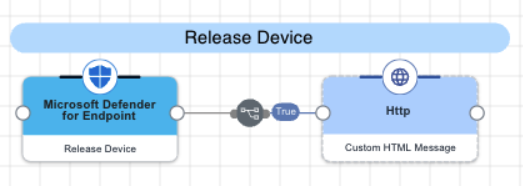
The connector submits a release request to the Machine Actions API to restore network connectivity to a previously isolated device. The device identifier can be the Microsoft Defender for Endpoint device ID, the Microsoft Entra device ID, or the computer DNS name.
Test the flow by clicking Save, Deploy, and Try Flow.
Restrict App Execution
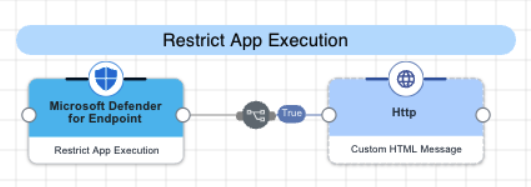
The connector submits a restriction request to the Machine Actions API to block all applications on a device except those signed by Microsoft. This containment action prevents potentially malicious code from executing during an active investigation. The device identifier can be the Microsoft Defender for Endpoint device ID, the Microsoft Entra device ID, or the computer DNS name.
Test the flow by clicking Save, Deploy, and Try Flow.
Remove App Restriction
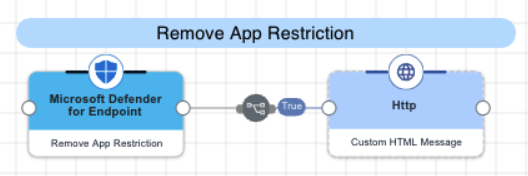
The connector submits a request to the Machine Actions API to lift app execution restrictions and allow all applications to run normally. This action is typically performed after a security investigation is complete. The device identifier can be the Microsoft Defender for Endpoint device ID, the Microsoft Entra device ID, or the computer DNS name.
Test the flow by clicking Save, Deploy, and Try Flow.
Offboard Device
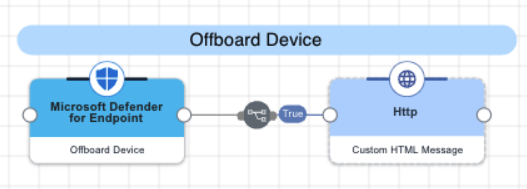
The connector submits a request to the Machine Actions API to remove a device from active monitoring and management in Microsoft Defender for Endpoint. This action is typically performed when a device is being decommissioned or reassigned. The device identifier can be the Microsoft Defender for Endpoint device ID, the Microsoft Entra device ID, or the computer DNS name.
Test the flow by clicking Save, Deploy, and Try Flow.
Capabilities
Get Device
Retrieve health, risk, and identity information for a device identifier
Show details
-
Properties
-
Input Schema
-
Output Schema
- Device ID textField required
-
The device identifier. Accepts the Microsoft Defender for Endpoint device ID, the Microsoft Entra device ID, or the computer DNS name.
-
default object
-
deviceId string
The unique device identifier in Microsoft Defender for Endpoint.
-
Input Example
{
  "properties": {
    "deviceId": "da637472900382838869_1364969609"
  }
}-
output object
-
rawResponse object
The full, unmodified JSON object returned directly from the external API call.
-
statusCode number
The HTTP status code returned by the API request.
-
id string
Device Identity in Microsoft Defender
-
name string
The DNS name of the device.
-
riskScore string
The current threat risk level assigned to the device.
-
exposureLevel string
The calculated vulnerability exposure level for the device.
-
healthStatus string
The operational health state of the device sensor.
-
onboardingStatus string
The management status of the device in Microsoft Defender.
-
aadDeviceId string
The unique device identifier in Microsoft Entra ID (when device is joined).
-
os string
The operating system platform and version information.
-
lastIp string
The most recent local IP address reported by the device.
-
isJoined boolean
Indicates if the device is currently joined to Microsoft Entra ID.
-
lastSeen string
The last time the device communicated with Microsoft Defender.
-
tags array
Custom tags associated with the device.
-
importance string
The business value assigned to the asset (e.g., High, Normal, Low).
-
Output Example
{
  "rawResponse": {
    "@odata.context": "https://api.security.microsoft.com/api/$metadata#Machines/$entity",
    "id": "da637472900382838869_1364969609",
    "mergedIntoMachineId": null,
    "isPotentialDuplication": false,
    "isExcluded": false,
    "exclusionReason": null,
    "computerDnsName": "johns-work-computer",
    "firstSeen": "2026-01-20T20:02:18.5451725Z",
    "lastSeen": "2026-01-20T20:07:42.6424861Z",
    "osPlatform": "Windows11",
    "osProcessor": "x64",
    "version": "22H2",
    "lastIpAddress": "192.168.51.128",
    "lastExternalIpAddress": "209.133.96.106",
    "agentVersion": "10.8750.22621.3527",
    "osBuild": 22621,
    "healthStatus": "Active",
    "deviceValue": "Normal",
    "rbacGroupId": 0,
    "rbacGroupName": null,
    "riskScore": "None",
    "exposureLevel": "High",
    "isAadJoined": true,
    "aadDeviceId": "da637472900382838869_1364969609",
    "machineTags": [],
    "onboardingStatus": "Onboarded",
    "osArchitecture": "64-bit",
    "managedBy": "Unknown",
    "managedByStatus": "Unknown",
    "ipAddresses": [
      {
        "ipAddress": "192.168.51.128",
        "macAddress": "000C29897942",
        "type": "Ethernet",
        "operationalStatus": "Up"
      },
      {
        "ipAddress": "fe80::b741:5419:51cb:1f6f",
        "macAddress": "000C29897942",
        "type": "Ethernet",
        "operationalStatus": "Up"
      },
      {
        "ipAddress": "127.0.0.1",
        "macAddress": null,
        "type": "SoftwareLoopback",
        "operationalStatus": "Up"
      },
      {
        "ipAddress": "::1",
        "macAddress": null,
        "type": "SoftwareLoopback",
        "operationalStatus": "Up"
      }
    ],
    "vmMetadata": null
  },
  "statusCode": 200,
  "id": "da637472900382838869_1364969609",
  "name": "johns-work-computer",
  "riskScore": "None",
  "exposureLevel": "High",
  "healthStatus": "Active",
  "onboardingStatus": "Onboarded",
  "aadDeviceId": "da637472900382838869_1364969609",
  "os": "Windows11 x64 22H2",
  "lastIp": "192.168.51.128",
  "isJoined": true,
  "lastSeen": "2026-01-20T20:07:42.6424861Z",
  "tags": [],
  "importance": "Normal"
}
Get Device Alerts
Retrieve a list of security alerts associated with a device identifier
Show details
-
Properties
-
Input Schema
-
Output Schema
- Device ID textField required
-
The device identifier. Accepts the Microsoft Defender for Endpoint device ID, the Microsoft Entra device ID, or the computer DNS name.
-
default object
-
deviceId string
The unique device identifier in Microsoft Defender for Endpoint.
-
Input Example
{
  "properties": {
    "deviceId": "da637472900382838869_1364969609"
  }
}-
output object
-
rawResponse object
The full, unmodified JSON object returned directly from the external API call.
-
statusCode number
The HTTP status code returned by the API request.
-
alertCount number
The total number of alerts found for the specified device.
-
alerts array
A list of alerts with detailed context including MITRE techniques and evidence.
-
Output Example
 { "rawResponse" :
  { "value" :
   [
    { "id" : "da637472900382838869_1364969609",
     "incidentId" : 1.126093E6,
     "investigationId" : null,
     "assignedTo" : null,
     "severity" : "Low",
     "status" : "New",
     "classification" : null,
     "determination" : null,
     "investigationState" : "Queued",
     "detectionSource" : "WindowsDefenderAtp",
     "detectorId" : "17e10bbc-3a68-474a-8aad-faef14d43952",
     "category" : "Execution",
     "threatFamilyName" : null,
     "title" : "Low-reputation arbitrary code executed by signed executable",
     "description" : "Binaries signed by Microsoft can be used to run low-reputation arbitrary code. This technique hides the execution of malicious code within a trusted process. As a result, the trusted process might exhibit suspicious behaviors, such as opening a listening port or connecting to a command-and-control (C&C) server.",
     "alertCreationTime" : "2021-01-26T20:33:57.7220239Z",
     "firstEventTime" : "2021-01-26T20:31:32.9562661Z",
     "lastEventTime" : "2021-01-26T20:31:33.0577322Z",
     "lastUpdateTime" : "2021-01-26T20:33:59.2Z",
     "resolvedTime" : null,
     "machineId" : "111e6dd8c833c8a052ea231ec1b19adaf497b625",
     "computerDnsName" : "temp123.middleeast.corp.microsoft.com",
     "rbacGroupName" : "A",
     "aadTenantId" : "a839b112-1253-6432-9bf6-94542403f21c",
     "threatName" : null,
     "mitreTechniques" :
     [ "T1064",
      "T1085",
      "T1220" ],
     "relatedUser" :
     { "userName" : "temp123",
      "domainName" : "DOMAIN" },
     "comments" :
     [
      { "comment" : "test comment for docs",
       "createdBy" : "secop123@contoso.com",
       "createdTime" : "2021-01-26T01:00:37.8404534Z" } ],
     "evidence" :
     [
      { "entityType" : "User",
       "evidenceCreationTime" : "2021-01-26T20:33:58.42Z",
       "sha1" : null,
       "sha256" : null,
       "fileName" : null,
       "filePath" : null,
       "processId" : null,
       "processCommandLine" : null,
       "processCreationTime" : null,
       "parentProcessId" : null,
       "parentProcessCreationTime" : null,
       "parentProcessFileName" : null,
       "parentProcessFilePath" : null,
       "ipAddress" : null,
       "url" : null,
       "registryKey" : null,
       "registryHive" : null,
       "registryValueType" : null,
       "registryValue" : null,
       "accountName" : "name",
       "domainName" : "DOMAIN",
       "userSid" : "S-1-5-21-11111607-1111760036-109187956-75141",
       "aadUserId" : "11118379-2a59-1111-ac3c-a51eb4a3c627",
       "userPrincipalName" : "temp123@microsoft.com",
       "detectionStatus" : null },

      { "entityType" : "Process",
       "evidenceCreationTime" : "2021-01-26T20:33:58.6133333Z",
       "sha1" : "ff836cfb1af40252bd2a2ea843032e99a5b262ed",
       "sha256" : "a4752c71d81afd3d5865d24ddb11a6b0c615062fcc448d24050c2172d2cbccd6",
       "fileName" : "rundll32.exe",
       "filePath" : "C:\\Windows\\SysWOW64",
       "processId" : 3276,
       "processCommandLine" : "rundll32.exe  c:\emp\\suspicious.dll,RepeatAfterMe",
       "processCreationTime" : "2021-01-26T20:31:32.9581596Z",
       "parentProcessId" : 8420,
       "parentProcessCreationTime" : "2021-01-26T20:31:32.9004163Z",
       "parentProcessFileName" : "rundll32.exe",
       "parentProcessFilePath" : "C:\\Windows\\System32",
       "ipAddress" : null,
       "url" : null,
       "registryKey" : null,
       "registryHive" : null,
       "registryValueType" : null,
       "registryValue" : null,
       "accountName" : null,
       "domainName" : null,
       "userSid" : null,
       "aadUserId" : null,
       "userPrincipalName" : null,
       "detectionStatus" : "Detected" },

      { "entityType" : "File",
       "evidenceCreationTime" : "2021-01-26T20:33:58.42Z",
       "sha1" : "8563f95b2f8a284fc99da44500cd51a77c1ff36c",
       "sha256" : "dc0ade0c95d6db98882bc8fa6707e64353cd6f7767ff48d6a81a6c2aef21c608",
       "fileName" : "suspicious.dll",
       "filePath" : "c:\emp",
       "processId" : null,
       "processCommandLine" : null,
       "processCreationTime" : null,
       "parentProcessId" : null,
       "parentProcessCreationTime" : null,
       "parentProcessFileName" : null,
       "parentProcessFilePath" : null,
       "ipAddress" : null,
       "url" : null,
       "registryKey" : null,
       "registryHive" : null,
       "registryValueType" : null,
       "registryValue" : null,
       "accountName" : null,
       "domainName" : null,
       "userSid" : null,
       "aadUserId" : null,
       "userPrincipalName" : null,
       "detectionStatus" : "Detected" } ] } ] },
  "statusCode" : 200,
  "alertCount" : 1,
  "alerts" :
  [
   { "id" : "da637472900382838869_1364969609",
    "incidentId" : 1.126093E6,
    "title" : "Low-reputation arbitrary code executed by signed executable",
    "severity" : "Low",
    "status" : "New",
    "category" : "Execution",
    "detectionSource" : "WindowsDefenderAtp",
    "description" : "Binaries signed by Microsoft can be used...",
    "relatedUser" : "temp123",
    "assignedTo" : null,
    "mitreTechniques" :
    [ "T1064",
     "T1085",
     "T1220" ],
    "creationTime" : "2021-01-26T20:33:57.7220239Z",
    "evidenceSummary" :
    [
     { "entityType" : "File",
      "fileName" : "suspicious.dll",
      "sha1" : "8563f95b2f8a284fc99da44500cd51a77c1ff36c",
      "ipAddress" : null } ] } ] }
Get Device Vulnerabilities
Retrieve a list of discovered vulnerabilities associated with a device identifier
Show details
-
Properties
-
Input Schema
-
Output Schema
- Device ID textField required
-
The device identifier. Accepts the Microsoft Defender for Endpoint device ID, the Microsoft Entra device ID, or the computer DNS name.
-
default object
-
deviceId string
The unique device identifier in Microsoft Defender for Endpoint.
-
Input Example
{
  "properties": {
    "deviceId": "da637472900382838869_1364969609"
  }
}-
output object
-
rawResponse object
The full, unmodified JSON object returned directly from the external API call.
-
statusCode number
The HTTP status code returned by the API request.
-
vulnerabilityCount number
The total number of vulnerabilities found for the specified device ID.
-
vulnerabilities array
A list of vulnerability objects containing severity, exploitability, and risk scores.
-
Output Example
{
  "rawResponse": {
    "value": [
      {
        "id": "CVE-2019-1348",
        "name": "CVE-2019-1348",
        "description": "Git could allow a remote attacker to bypass security restrictions, caused by a flaw in the --export-marks option of git fast-import. By persuading a victim to import specially-crafted content, an attacker could exploit this vulnerability to overwrite arbitrary paths.",
        "severity": "Medium",
        "cvssV3": 4.3,
        "exposedMachines": 1,
        "publishedOn": "2019-12-13T00:00:00Z",
        "updatedOn": "2019-12-13T00:00:00Z",
        "publicExploit": false,
        "exploitVerified": false,
        "exploitInKit": false,
        "exploitTypes": [],
        "exploitUris": []
      }
    ]
  },
  "statusCode": 200,
  "vulnerabilityCount": 1,
  "vulnerabilities": [
    {
      "id": "CVE-2019-1348",
      "name": "CVE-2019-1348",
      "severity": "Medium",
      "description": "Git could allow a remote attacker to bypass security restrictions, caused by a flaw in the --export-marks option of git fast-import. By persuading a victim to import specially-crafted content, an attacker could exploit this vulnerability to overwrite arbitrary paths.",
      "cvssV3": 4.3,
      "exposedMachines": 1,
      "publishedOn": "2019-12-13T00:00:00Z",
      "updatedOn": "2019-12-13T00:00:00Z",
      "hasPublicExploit": false,
      "isExploitVerified": false,
      "isInExploitKit": false,
      "exploitTypes": [],
      "epssScore": 0.0012
    }
  ]
}
Get User Alerts
Retrieve a list of security alerts associated with a user identifier
Show details
-
Properties
-
Input Schema
-
Output Schema
- User ID textField required
-
The sAMAccountName or username portion of the identity (e.g., jsmith from jsmith@contoso.com)
-
default object
-
userId string
The username portion of the identity in Microsoft Entra (e.g., use jsmith for jsmith@contoso.com).
-
Input Example
{
  "properties": {
    "userId": "jsmith"
  }
}-
output object
-
rawResponse object
The full, unmodified JSON object returned directly from the external API call.
-
statusCode number
The HTTP status code returned by the API request.
-
alertCount number
The total number of alerts found for the specified user ID.
-
alerts array
Detailed alert objects mapped from Microsoft Defender.
-
Output Example
 { "rawResponse" :
  { "value" :
   [
    { "id" : "da637472900382838869_1364969609",
     "incidentId" : 1.126093E6,
     "investigationId" : null,
     "assignedTo" : null,
     "severity" : "Low",
     "status" : "New",
     "classification" : null,
     "determination" : null,
     "investigationState" : "Queued",
     "detectionSource" : "WindowsDefenderAtp",
     "detectorId" : "17e10bbc-3a68-474a-8aad-faef14d43952",
     "category" : "Execution",
     "threatFamilyName" : null,
     "title" : "Low-reputation arbitrary code executed by signed executable",
     "description" : "Binaries signed by Microsoft can be used to run low-reputation arbitrary code. This technique hides the execution of malicious code within a trusted process. As a result, the trusted process might exhibit suspicious behaviors, such as opening a listening port or connecting to a command-and-control (C&C) server.",
     "alertCreationTime" : "2021-01-26T20:33:57.7220239Z",
     "firstEventTime" : "2021-01-26T20:31:32.9562661Z",
     "lastEventTime" : "2021-01-26T20:31:33.0577322Z",
     "lastUpdateTime" : "2021-01-26T20:33:59.2Z",
     "resolvedTime" : null,
     "machineId" : "111e6dd8c833c8a052ea231ec1b19adaf497b625",
     "computerDnsName" : "jsmith.middleeast.corp.microsoft.com",
     "rbacGroupName" : "A",
     "aadTenantId" : "a839b112-1253-6432-9bf6-94542403f21c",
     "threatName" : null,
     "mitreTechniques" :
     [ "T1064",
      "T1085",
      "T1220" ],
     "relatedUser" :
     { "userName" : "jsmith",
      "domainName" : "DOMAIN" },
     "comments" :
     [
      { "comment" : "test comment for docs",
       "createdBy" : "secop123@contoso.com",
       "createdTime" : "2021-01-26T01:00:37.8404534Z" } ],
     "evidence" :
     [
      { "entityType" : "User",
       "evidenceCreationTime" : "2021-01-26T20:33:58.42Z",
       "sha1" : null,
       "sha256" : null,
       "fileName" : null,
       "filePath" : null,
       "processId" : null,
       "processCommandLine" : null,
       "processCreationTime" : null,
       "parentProcessId" : null,
       "parentProcessCreationTime" : null,
       "parentProcessFileName" : null,
       "parentProcessFilePath" : null,
       "ipAddress" : null,
       "url" : null,
       "registryKey" : null,
       "registryHive" : null,
       "registryValueType" : null,
       "registryValue" : null,
       "accountName" : "name",
       "domainName" : "DOMAIN",
       "userSid" : "S-1-5-21-11111607-1111760036-109187956-75141",
       "aadUserId" : "11118379-2a59-1111-ac3c-a51eb4a3c627",
       "userPrincipalName" : "jsmith@microsoft.com",
       "detectionStatus" : null },

      { "entityType" : "Process",
       "evidenceCreationTime" : "2021-01-26T20:33:58.6133333Z",
       "sha1" : "ff836cfb1af40252bd2a2ea843032e99a5b262ed",
       "sha256" : "a4752c71d81afd3d5865d24ddb11a6b0c615062fcc448d24050c2172d2cbccd6",
       "fileName" : "rundll32.exe",
       "filePath" : "C:\\Windows\\SysWOW64",
       "processId" : 3276,
       "processCommandLine" : "rundll32.exe  c:\emp\\suspicious.dll,RepeatAfterMe",
       "processCreationTime" : "2021-01-26T20:31:32.9581596Z",
       "parentProcessId" : 8420,
       "parentProcessCreationTime" : "2021-01-26T20:31:32.9004163Z",
       "parentProcessFileName" : "rundll32.exe",
       "parentProcessFilePath" : "C:\\Windows\\System32",
       "ipAddress" : null,
       "url" : null,
       "registryKey" : null,
       "registryHive" : null,
       "registryValueType" : null,
       "registryValue" : null,
       "accountName" : null,
       "domainName" : null,
       "userSid" : null,
       "aadUserId" : null,
       "userPrincipalName" : null,
       "detectionStatus" : "Detected" },

      { "entityType" : "File",
       "evidenceCreationTime" : "2021-01-26T20:33:58.42Z",
       "sha1" : "8563f95b2f8a284fc99da44500cd51a77c1ff36c",
       "sha256" : "dc0ade0c95d6db98882bc8fa6707e64353cd6f7767ff48d6a81a6c2aef21c608",
       "fileName" : "suspicious.dll",
       "filePath" : "c:\emp",
       "processId" : null,
       "processCommandLine" : null,
       "processCreationTime" : null,
       "parentProcessId" : null,
       "parentProcessCreationTime" : null,
       "parentProcessFileName" : null,
       "parentProcessFilePath" : null,
       "ipAddress" : null,
       "url" : null,
       "registryKey" : null,
       "registryHive" : null,
       "registryValueType" : null,
       "registryValue" : null,
       "accountName" : null,
       "domainName" : null,
       "userSid" : null,
       "aadUserId" : null,
       "userPrincipalName" : null,
       "detectionStatus" : "Detected" } ] } ] },
  "statusCode" : 200,
  "alertCount" : 1,
  "alerts" :
  [
   { "id" : "da637472900382838869_1364969609",
    "title" : "Low-reputation arbitrary code executed by signed executable",
    "severity" : "Low",
    "status" : "New",
    "category" : "Execution",
    "description" : "Binaries signed by Microsoft can be used to run low-reputation arbitrary code. This technique hides the execution of malicious code within a trusted process. As a result, the trusted process might exhibit suspicious behaviors, such as opening a listening port or connecting to a command-and-control (C&C) server.",
    "relatedUser" : "jsmith",
    "creationTime" : "2021-01-26T20:33:57.7220239Z" } ] }
Isolate Device
Disconnect a device from the network to contain threats and prevent lateral movement
Show details
-
Properties
-
Input Schema
-
Output Schema
- Device ID textField required
-
The device identifier. Accepts the Microsoft Defender for Endpoint device ID, the Microsoft Entra device ID, or the computer DNS name.
- Isolation Type dropDown required
-
Specifies how the device is isolated from the network. Full isolation blocks all network access except to Defender. Selective isolation allows limited app connectivity. Unmanaged Device targets devices not enrolled in Defender.
-
Full (Default)
-
Selective
-
Unmanaged Device
-
- Comment textField required
-
The comment to associate with the action
-
default object
-
deviceId string
The unique device identifier in Microsoft Defender for Endpoint.
-
isolationType string
The type of isolation to perform.
-
comment string
The comment to associate with the action.
-
Input Example
{
  "properties": {
    "deviceId": "49e96a8dd67ac4f1ce9952ccedcde711f0ce28e9",
    "isolationType": "Full",
    "comment": "Isolate device due to alert 1234"
  }
}-
output object
-
rawResponse object
The full, unmodified JSON object returned directly from the external API call.
-
statusCode number
The HTTP status code returned by the API request.
-
actionId string
The unique identifier for the device action.
-
deviceId string
The unique identifier of the device on which the action was executed.
-
name string
The DNS name of the device.
-
type string
The type of action performed on the device.
-
status string
The current status of the command, such as Pending, Succeeded, or Failed.
-
requestor string
The identity of the person or app that executed the action.
-
creationDateTimeUtc string
The date and time in UTC when the action was initially created.
-
lastUpdateDateTimeUtc string
The last date and time in UTC when the action status was updated.
-
requestorComment string
The comment provided by the requestor when issuing the action.
-
Output Example
{
  "rawResponse": {
    "@odata.context": "https://api.security.microsoft.com/api/$metadata#Machines/$entity",
    "id": "8af71966-4671-4734-a777-a855875c0ec4",
    "type": "Isolate",
    "title": null,
    "requestor": "Defender for Endpoint API",
    "requestorComment": "Isolate device due to alert 1234",
    "status": "Pending",
    "machineId": "49e96a8dd67ac4f1ce9952ccedcde711f0ce28e9",
    "computerDnsName": "johns-work-computer",
    "creationDateTimeUtc": "2026-01-23T20:10:40.8785235Z",
    "lastUpdateDateTimeUtc": "2026-01-23T20:10:40.8785246Z",
    "cancellationRequestor": null,
    "cancellationComment": null,
    "cancellationDateTimeUtc": null,
    "errorHResult": 0,
    "scope": null,
    "externalId": null,
    "requestSource": "PublicApi",
    "relatedFileInfo": null,
    "commands": [],
    "troubleshootInfo": null
  },
  "statusCode": 201,
  "actionId": "8af71966-4671-4734-a777-a855875c0ec4",
  "deviceId": "49e96a8dd67ac4f1ce9952ccedcde711f0ce28e9",
  "name": "johns-work-computer",
  "type": "Isolate",
  "status": "Pending",
  "requestor": "Defender for Endpoint API",
  "creationDateTimeUtc": "2026-01-23T20:10:40.8785235Z",
  "lastUpdateDateTimeUtc": "2026-01-23T20:10:40.8785246Z",
  "requestorComment": "Isolate device due to alert 1234"
}
Release Device
Restore network connectivity to a previously isolated device
Show details
-
Properties
-
Input Schema
-
Output Schema
- Device ID textField required
-
The device identifier. Accepts the Microsoft Defender for Endpoint device ID, the Microsoft Entra device ID, or the computer DNS name.
- Comment textField required
-
The comment to associate with the action
-
default object
-
deviceId string
The unique device identifier in Microsoft Defender for Endpoint.
-
comment string
The comment to associate with the action.
-
Input Example
{
  "properties": {
    "deviceId": "49e96a8dd67ac4f1ce9952ccedcde711f0ce28e9",
    "comment": "Device cleared, releasing from isolation"
  }
}-
output object
-
rawResponse object
The full, unmodified JSON object returned directly from the external API call.
-
statusCode number
The HTTP status code returned by the API request.
-
actionId string
The unique identifier for the device action.
-
deviceId string
The unique identifier of the device on which the action was executed.
-
name string
The DNS name of the device.
-
type string
The type of action performed on the device.
-
status string
The current status of the command, such as Pending, Succeeded, or Failed.
-
requestor string
The identity of the person or app that executed the action.
-
creationDateTimeUtc string
The date and time in UTC when the action was initially created.
-
lastUpdateDateTimeUtc string
The last date and time in UTC when the action status was updated.
-
requestorComment string
The comment provided by the requestor when issuing the action.
-
Output Example
{
  "rawResponse": {
    "@odata.context": "https://api.security.microsoft.com/api/$metadata#MachineActions/$entity",
    "id": "6c4cc569-7d8c-4be0-9f24-327538949e7d",
    "type": "Unisolate",
    "title": null,
    "requestor": "Defender for Endpoint API",
    "requestorComment": "Device cleared, releasing from isolation",
    "status": "Pending",
    "machineId": "49e96a8dd67ac4f1ce9952ccedcde711f0ce28e9",
    "computerDnsName": "johns-work-computer",
    "creationDateTimeUtc": "2026-01-24T00:01:58.4314288Z",
    "lastUpdateDateTimeUtc": "2026-01-24T00:01:58.4314293Z",
    "cancellationRequestor": null,
    "cancellationComment": null,
    "cancellationDateTimeUtc": null,
    "errorHResult": 0,
    "scope": null,
    "externalId": null,
    "requestSource": "PublicApi",
    "relatedFileInfo": null,
    "commands": [],
    "troubleshootInfo": null
  },
  "statusCode": 201,
  "actionId": "6c4cc569-7d8c-4be0-9f24-327538949e7d",
  "deviceId": "49e96a8dd67ac4f1ce9952ccedcde711f0ce28e9",
  "name": "johns-work-computer",
  "type": "Unisolate",
  "status": "Pending",
  "requestor": "Defender for Endpoint API",
  "creationDateTimeUtc": "2026-01-24T00:01:58.4314288Z",
  "lastUpdateDateTimeUtc": "2026-01-24T00:01:58.4314293Z",
  "requestorComment": "Device cleared, releasing from isolation"
}
Restrict App Execution
Block all applications on the device except those signed by Microsoft
Show details
-
Properties
-
Input Schema
-
Output Schema
- Device ID textField required
-
The device identifier. Accepts the Microsoft Defender for Endpoint device ID, the Microsoft Entra device ID, or the computer DNS name.
- Comment textField required
-
The comment to associate with the action
-
default object
-
deviceId string
The unique device identifier in Microsoft Defender for Endpoint.
-
comment string
The comment to associate with the action.
-
Input Example
{
  "properties": {
    "deviceId": "49e96a8dd67ac4f1ce9952ccedcde711f0ce28e9",
    "comment": "Restrict app execution due to suspicious activity"
  }
}-
output object
-
rawResponse object
The full, unmodified JSON object returned directly from the external API call.
-
statusCode number
The HTTP status code returned by the API request.
-
actionId string
The unique identifier for the device action.
-
deviceId string
The unique identifier of the device on which the action was executed.
-
name string
The DNS name of the device.
-
type string
The type of action performed on the device.
-
status string
The current status of the command, such as Pending, Succeeded, or Failed.
-
requestor string
The identity of the person or app that executed the action.
-
creationDateTimeUtc string
The date and time in UTC when the action was initially created.
-
lastUpdateDateTimeUtc string
The last date and time in UTC when the action status was updated.
-
requestorComment string
The comment provided by the requestor when issuing the action.
-
Output Example
{
  "rawResponse": {
    "@odata.context": "https://api.security.microsoft.com/api/$metadata#MachineActions/$entity",
    "id": "7fd99be4-cb9b-42bb-b651-10736d67dd69",
    "type": "RestrictCodeExecution",
    "title": null,
    "requestor": "Defender for Endpoint API",
    "requestorComment": "Restrict app execution due to suspicious activity",
    "status": "Pending",
    "machineId": "49e96a8dd67ac4f1ce9952ccedcde711f0ce28e9",
    "computerDnsName": "johns-work-computer",
    "creationDateTimeUtc": "2026-01-24T22:17:02.3601426Z",
    "lastUpdateDateTimeUtc": "2026-01-24T22:17:02.3602286Z",
    "cancellationRequestor": null,
    "cancellationComment": null,
    "cancellationDateTimeUtc": null,
    "errorHResult": 0,
    "scope": null,
    "externalId": null,
    "requestSource": "PublicApi",
    "relatedFileInfo": null,
    "commands": [],
    "troubleshootInfo": null
  },
  "statusCode": 201,
  "actionId": "7fd99be4-cb9b-42bb-b651-10736d67dd69",
  "deviceId": "49e96a8dd67ac4f1ce9952ccedcde711f0ce28e9",
  "name": "johns-work-computer",
  "type": "RestrictCodeExecution",
  "status": "Pending",
  "requestor": "Defender for Endpoint API",
  "creationDateTimeUtc": "2026-01-24T22:17:02.3601426Z",
  "lastUpdateDateTimeUtc": "2026-01-24T22:17:02.3602286Z",
  "requestorComment": "Restrict app execution due to suspicious activity"
}
Remove App Restriction
Lift app execution restrictions and allow all applications to run
Show details
-
Properties
-
Input Schema
-
Output Schema
- Device ID textField required
-
The device identifier. Accepts the Microsoft Defender for Endpoint device ID, the Microsoft Entra device ID, or the computer DNS name.
- Comment textField required
-
The comment to associate with the action
-
default object
-
deviceId string
The unique device identifier in Microsoft Defender for Endpoint.
-
comment string
The comment to associate with the action.
-
Input Example
{
  "properties": {
    "deviceId": "49e96a8dd67ac4f1ce9952ccedcde711f0ce28e9",
    "comment": "Device cleared, removing app restriction"
  }
}-
output object
-
rawResponse object
The full, unmodified JSON object returned directly from the external API call.
-
statusCode number
The HTTP status code returned by the API request.
-
actionId string
The unique identifier for the device action.
-
deviceId string
The unique identifier of the device on which the action was executed.
-
name string
The DNS name of the device.
-
type string
The type of action performed on the device.
-
status string
The current status of the command, such as Pending, Succeeded, or Failed.
-
requestor string
The identity of the person or app that executed the action.
-
creationDateTimeUtc string
The date and time in UTC when the action was initially created.
-
lastUpdateDateTimeUtc string
The last date and time in UTC when the action status was updated.
-
requestorComment string
The comment provided by the requestor when issuing the action.
-
Output Example
{
  "rawResponse": {
    "@odata.context": "https://api.security.microsoft.com/api/$metadata#MachineActions/$entity",
    "id": "8a5c34dc-9ca9-4be4-b3c2-4c70e4bfb69a",
    "type": "UnrestrictCodeExecution",
    "title": null,
    "requestor": "Defender for Endpoint API",
    "requestorComment": "Device cleared, removing app restriction",
    "status": "Pending",
    "machineId": "49e96a8dd67ac4f1ce9952ccedcde711f0ce28e9",
    "computerDnsName": "johns-work-computer",
    "creationDateTimeUtc": "2026-01-30T21:11:22.8419303Z",
    "lastUpdateDateTimeUtc": "2026-01-30T21:11:22.8419314Z",
    "cancellationRequestor": null,
    "cancellationComment": null,
    "cancellationDateTimeUtc": null,
    "errorHResult": 0,
    "scope": null,
    "externalId": null,
    "requestSource": "PublicApi",
    "relatedFileInfo": null,
    "commands": [],
    "troubleshootInfo": null
  },
  "statusCode": 201,
  "actionId": "8a5c34dc-9ca9-4be4-b3c2-4c70e4bfb69a",
  "deviceId": "49e96a8dd67ac4f1ce9952ccedcde711f0ce28e9",
  "name": "johns-work-computer",
  "type": "UnrestrictCodeExecution",
  "status": "Pending",
  "requestor": "Defender for Endpoint API",
  "creationDateTimeUtc": "2026-01-30T21:11:22.8419303Z",
  "lastUpdateDateTimeUtc": "2026-01-30T21:11:22.8419314Z",
  "requestorComment": "Device cleared, removing app restriction"
}
Offboard Device
Remove a device from active monitoring and management in Microsoft Defender for Endpoint
Show details
-
Properties
-
Input Schema
-
Output Schema
- Device ID textField required
-
The device identifier. Accepts the Microsoft Defender for Endpoint device ID, the Microsoft Entra device ID, or the computer DNS name.
- Comment textField required
-
The comment to associate with the action
-
default object
-
deviceId string
The unique device identifier in Microsoft Defender for Endpoint.
-
comment string
The comment to associate with the action.
-
Input Example
{
  "properties": {
    "deviceId": "49e96a8dd67ac4f1ce9952ccedcde711f0ce28e9",
    "comment": "Device end of life"
  }
}-
output object
-
rawResponse object
The full, unmodified JSON object returned directly from the external API call.
-
statusCode number
The HTTP status code returned by the API request.
-
actionId string
The unique identifier for the device action.
-
deviceId string
The unique identifier of the device on which the action was executed.
-
name string
The DNS name of the device.
-
type string
The type of action performed on the device.
-
status string
The current status of the command, such as Pending, Succeeded, or Failed.
-
requestor string
The identity of the person or app that executed the action.
-
creationDateTimeUtc string
The date and time in UTC when the action was initially created.
-
lastUpdateDateTimeUtc string
The last date and time in UTC when the action status was updated.
-
requestorComment string
The comment provided by the requestor when issuing the action.
-
Output Example
{
  "rawResponse": {
    "@odata.context": "https://api.security.microsoft.com/api/$metadata#MachineActions/$entity",
    "id": "b2a3c4d5-e6f7-8901-abcd-234567890123",
    "type": "Offboard",
    "title": null,
    "requestor": "Defender for Endpoint API",
    "requestorComment": "Device end of life",
    "status": "Pending",
    "machineId": "49e96a8dd67ac4f1ce9952ccedcde711f0ce28e9",
    "computerDnsName": "johns-work-computer",
    "creationDateTimeUtc": "2026-01-24T00:01:58.4314288Z",
    "lastUpdateDateTimeUtc": "2026-01-24T00:01:58.4314293Z",
    "cancellationRequestor": null,
    "cancellationComment": null,
    "cancellationDateTimeUtc": null,
    "errorHResult": 0,
    "scope": null,
    "externalId": null,
    "requestSource": "PublicApi",
    "relatedFileInfo": null,
    "commands": [],
    "troubleshootInfo": null
  },
  "statusCode": 201,
  "actionId": "b2a3c4d5-e6f7-8901-abcd-234567890123",
  "deviceId": "49e96a8dd67ac4f1ce9952ccedcde711f0ce28e9",
  "name": "johns-work-computer",
  "type": "Offboard",
  "status": "Pending",
  "requestor": "Defender for Endpoint API",
  "creationDateTimeUtc": "2026-01-24T00:01:58.4314288Z",
  "lastUpdateDateTimeUtc": "2026-01-24T00:01:58.4314293Z",
  "requestorComment": "Device end of life"
}