Secret Double Octopus Connector
The Secret Double Octopus connector integrates passwordless authentication into your PingOne DaVinci flows.
Using this connector, you can trigger a push authentication request to a user’s enrolled device and poll for the result in real time, enabling strong authentication without relying on traditional passwords.
Setup
Resources
You can find more information and setup help in the following:
-
PingOne DaVinci documentation:
Requirements
To use the connector, you’ll need:
-
A Secret Double Octopus tenant with access to the Secret Double Octopus Management Console.
-
A REST service configured in your Secret Double Octopus tenant.
-
Users enrolled in Secret Double Octopus with the mobile app installed on their device.
Configuring the Secret Double Octopus connector
Add the connector in PingOne DaVinci as shown in Adding a connector, then configure it as follows.
Connector configuration
Before configuring the connector in PingOne DaVinci, create a REST service in the Secret Double Octopus Management Console with the following settings:
-
Under Directories, select Local to authenticate users stored directly in Secret Double Octopus.
-
Under Users, add the users who will authenticate using this service.
-
From the Sign-On tab, copy the API Token, X.509 Certificate, and REST Endpoint URL. These values are needed to configure the connector in PingOne DaVinci.
Base URL
The root URL of your Secret Double Octopus server, for example https://sdo.example.com.
Service ID
The UUID embedded in the REST Endpoint URL on the Sign-On tab of your REST service in the Secret Double Octopus Management Console.
Using the connector in a flow
Authenticating users with results via polling
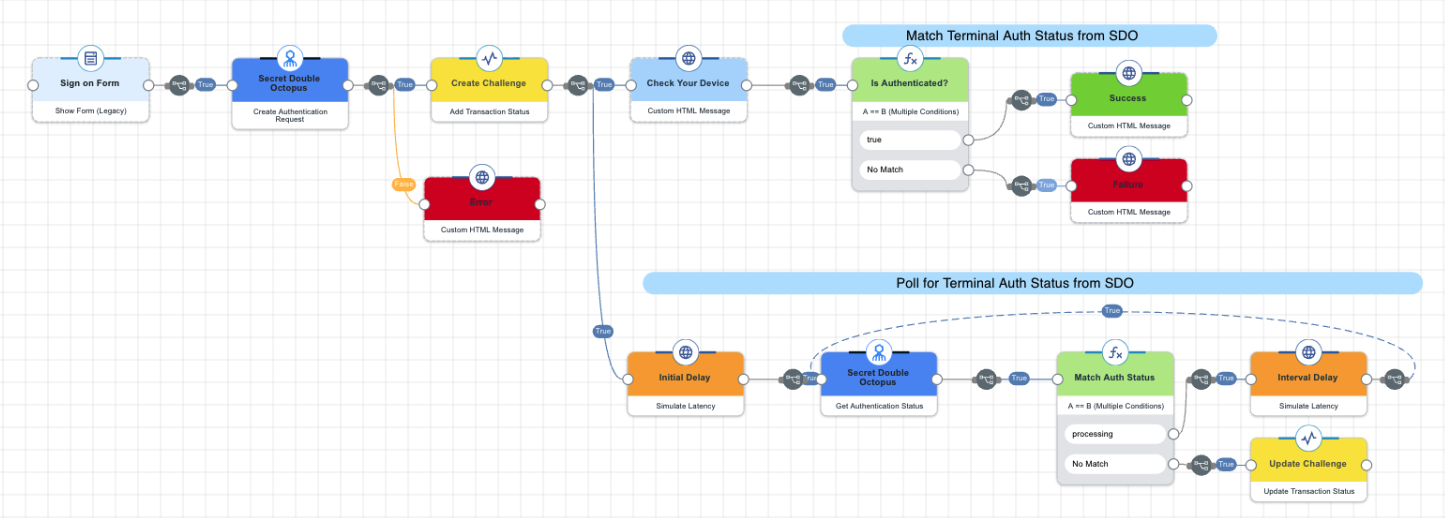
This flow asks the user to enter their username in an HTML form. The connector sends the username to Secret Double Octopus, which triggers a push authentication request on the user’s enrolled mobile device.
The user sees a "Check your device" message while the flow polls Secret Double Octopus for the authentication result. When the result is available, the flow updates the message to reflect whether authentication succeeded or failed.
Test the flow by clicking Save, Deploy, and Try Flow.
Capabilities
Create Authentication Request
Initiates a push authentication request. Returns authId and polling parameters.
Show details
-
Properties
-
Input Schema
-
Output Schema
- Username textField required
-
Username for authentication
- Password textField
-
Password for authentication
- Push Message textField
-
Custom message displayed to the user during authentication (optional)
-
default object
-
username string
Username for authentication in Secret Double Octopus.
-
password string
Password for authentication in Secret Double Octopus (Optional depending on authentication method).
-
message string
Optional custom text displayed to the user in the mobile app push notification.
-
Input Example
{
  "properties": {
    "username": "johndoe",
    "message": "Please approve this login request"
  }
}-
output object
-
authId string
The unique identifier for the authentication session, used for status polling.
-
pollDelay number
Initial delay in milliseconds before the first poll attempt.
-
pollInterval number
Interval in milliseconds between subsequent poll attempts.
-
statusCode number
The HTTP status code returned by the API request.
-
rawResponse object
The full, unmodified JSON object returned directly from the external API call.
-
Output Example
{
  "authId": "Kz5CrQ9Nu33+gGtPoj2TweZ6",
  "pollDelay": 5000,
  "pollInterval": 1000,
  "statusCode": 200,
  "rawResponse": {
    "payload": "eyJhdXRoSWQiOiJLejVDclE5TnUzMytnR3RQb2oyVHdlWjYiLCJ3YWl0Ijo1MDAwLCJpbnRlcnZhbCI6MTAwMH0=",
    "signature": "im4z9uPbTuVuLRqb7lrXT8i30uBrj1CWhql9CWZsUylFK+...",
    "algorithm": "sha256"
  }
}
Get Authentication Status
Checks if the user has responded to the push authentication request.
Show details
-
Properties
-
Input Schema
-
Output Schema
- Authentication ID textField required
-
The authId returned from Create Authentication Request, used to poll for status
-
default object
-
authId string
Authentication ID returned from the initial auth request.
-
Input Example
{
  "properties": {
    "authId": "Kz5CrQ9Nu33+gGtPoj2TweZ6"
  }
}-
output object
-
isAuthenticated boolean
True if the user approved the authentication request, false otherwise.
-
authStatus string
The definitive state of the authentication request. Supported values are: "processing" (request is pending user action), "accept" (authentication successful), "deny" (user denied the request), "reject" (authentication failed, e.g., user not found, invalid password, MFA failure), or "timeout" (the request expired).
-
reasonText string
A diagnostic message provided when authStatus is "reject", "deny", or "timeout", explaining why the request did not succeed.
-
statusCode number
The HTTP status code returned by the API request.
-
rawResponse object
The full, unmodified JSON object returned directly from the external API call.
-
Output Example
{
  "isAuthenticated": false,
  "authStatus": "timeout",
  "reasonText": "Push answered 'timeout'",
  "statusCode": 200,
  "rawResponse": {
    "payload": "eyJhdXRoU3RhdHVzIjoidGltZW91dCIsInJlYXNvbiI6eyJjb2RlIjozMDU3LCJhY3Rpb24iOjEsInRleHQiOiJQdXNoIGFuc3dlcmVkICd0aW1lb3V0JyJ9fQ==",
    "signature": "hY92NtGL/jlxcP8efsegbHPr/N8m+cOszjfZ7lce/lSQ6zdJLBB5HAWnh0tzW1hORqw+RfxkuiCxq5rBekLs+hExo6PkTm2t38OGkPEwsgxFRvjqm/FOIcAjyqvLDopA41Y3NaxoEBMVoXKPz5qVMsP7VMD3mb4B7i6ircFSXzywWwMHaoENknGtuv/3jUzAiKZNnvkvzvqTSA5O3AUXP6oL7suVXgF56yvOYhMTX/sCbU9eXeKVgquwEYKIbJPXfaTI7M5GFDvjMj4RovtaAB1A/Qu2/9PUpVq8uZPusQPe3CrP3NHyXsJ+YtXvNRpBFfVQHAcgT5BaK3GF40LKOw==",
    "algorithm": "sha256"
  }
}