AD Decision node
The AD Decision node verifies that the provided username and password exist in the specified Active Directory (AD) data store. The node also checks whether the user account is locked, disabled, or has expired.
The node is similar to the LDAP Decision node except for the following differences:
-
It doesn’t support the LDAP Behera password policy.
-
It can return a specific outcome for an expired account in addition to an expired password.
-
It makes a distinction between a disabled account and a locked account.
|
The node requires a direct connection to the AD data store, for example, through a secure communication channel such as Secure Connect. Find more information in Secure Connect. |
Example
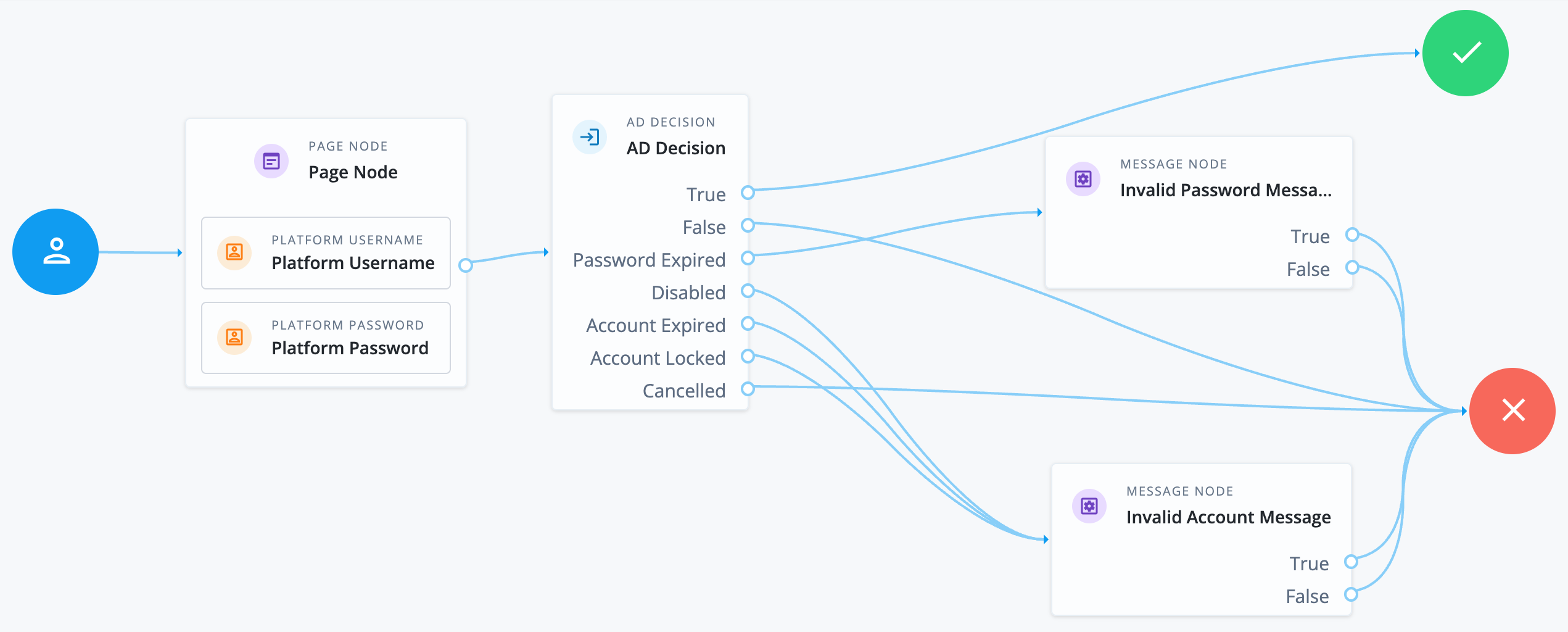
The following example journey collects the user credentials and checks them against the AD data store:
-
If they match, the journey continues to the success outcome.
-
If the password has expired, the journey ends in failure with a custom message node to inform the user.
-
If the account is locked, disabled, or has expired, the journey ends in failure with an invalid account message.
Availability
| Product | Available? |
|---|---|
PingOne Advanced Identity Cloud |
Yes |
PingAM (self-managed) |
Yes |
Ping Advanced Identity Software (self-managed) |
Yes |
Inputs
The node reads the username and password fields from node state.
Implement a Platform Username node and a Platform Password node earlier in the journey.
Alternatively, implement a Zero Page Login Collector node.
Configuration
| Property | Usage | ||
|---|---|---|---|
Primary LDAP Server (required) |
Specify one or more primary directory servers.
Specify each directory server in the following format: For example, |
||
Secondary LDAP Server |
Specify one or more secondary directory servers.
Specify each directory server in the following format: The journey uses the secondary servers when none of the primary servers are available. For example, |
||
DN to Start User Search (required) |
Specify the DN from which to start the user search.
More specific DNs, such as If multiple entries with the same attribute values exist in the directory server, make sure this property is specific enough to return only one entry. |
||
Bind User DN, Bind User Password |
The credentials used to connect to the directory server. |
||
Attribute Used to Retrieve User Profile (required) |
The attribute used to retrieve a user profile from the directory server. The user search will have already happened, as specified by the Attributes Used to Search for a User to be Authenticated and User Search Filter properties. |
||
Attributes Used to Search for a User to be Authenticated (required) |
The attributes the node uses to match the credentials provided by the user to an entry in the directory server. For example, a value of Multiple attribute values let the user authenticate with any one of the values.
For example, if you set both
|
||
User Search Filter |
A filter to append to user searches. For example, if your search attribute is |
||
Search Scope |
The extent of the search for users in the directory server:
Default: |
||
LDAP Connection Mode |
Whether to use SSL or StartTLS to connect to the directory server. The node must be able to trust the certificates used. Possible values: Default: |
||
mTLS Enabled |
Enables mTLS (mutual TLS) between Advanced Identity Cloud and the directory server. This setting applies to all configured LDAP servers; that is, Advanced Identity Cloud uses mTLS to authenticate to all LDAP servers configured for this node. When mTLS is enabled, Advanced Identity Cloud ignores the values for Bind User DN and Bind User Password. If you enable this property, you must:
Learn about mapping secrets in Map and rotate secrets. Default: Not enabled |
||
mTLS Secret Label Identifier |
Identifier used to create a secret label for mapping to the mTLS certificate in the secret store.
Advanced Identity Cloud uses this identifier to create a specific secret label for this node. The secret label takes the form
For more security, you should rotate certificates periodically. When you rotate a certificate, update the corresponding mapping in the realm secret store configuration to reflect this label. When you rotate a certificate, Advanced Identity Cloud closes any existing connections using the old certificate. A new connection is selected from the connection pool and no server restart is required. |
||
Return Account Locked Message |
If enabled, the node returns a specific Default: Not enabled |
||
Return User DN to DataStore |
When enabled, the node returns the DN rather than the User ID.
From the DN value, Advanced Identity Cloud uses the RDN to search for the user profile.
For example, if a returned DN value is Default: Enabled |
||
User Creation Attributes |
This list lets you map (external) attribute names from the LDAP directory server to (internal) attribute names used by Advanced Identity Cloud. |
||
Minimum Password Length |
The minimum acceptable password length. Default: |
||
Trust All Server Certificates |
When enabled, the server blindly trusts server certificates, including self-signed test certificates. Default: Not enabled |
||
LDAP Connection Heartbeat Interval |
Specifies how often Advanced Identity Cloud should send a heartbeat request to the directory server to ensure that the connection doesn’t remain idle. Some network administrators configure firewalls and load balancers to drop connections that are idle for too long.
Set the units for the interval in the
Default: |
||
LDAP Connection Heartbeat Time Unit |
The time unit for the Default: |
||
LDAP Operations Timeout |
The timeout, in seconds, that Advanced Identity Cloud should wait for a response from the directory server. Default: |
||
Use mixed case for password change messages |
Whether the server returns password reset messages in mixed case (sentence case) or transforms them to uppercase. By default, the server transforms password reset and password change messages to uppercase. Enable this setting to return messages in sentence case. Default: Not enabled |
||
LDAP Affinity Level |
Level of affinity used to balance requests across directory servers. Affinity-based load balancing means that each request for the same user entry goes to the same directory server. The directory server used for a specific operation is determined by the DN of the identity involved. List the directory server instances that form part of the affinity deployment in the Primary LDAP Server and Secondary LDAP Server properties. Options are:
Default: |
Outputs
If a password reset is required, the node adds a lastModuleState property with the value of changeAfterReset to shared state.
Callbacks
The node sends the following callbacks when a password change is required:
ConfirmationCallback-
Prompts the user to submit the password change or to cancel.
PasswordCallback-
Prompts the user for their current password, the new password, and a confirmation of the new password. The node sends three instances of this callback.
TextOutputCallback-
Displays a status message to the user, such as a warning that the password is expiring or an error that the new password doesn’t meet requirements.
Learn more in Supported callbacks.
Outcomes
True-
The provided credentials match those found in the AD user data store.
False-
The credentials don’t match those found in the AD user data store.
Password Expired-
The credentials are valid, but the password has expired. The journey doesn’t automatically initiate a password reset.
Disabled-
The credentials are valid, but the user account is disabled.
Account Expired-
The credentials are valid, but the user account has expired. This is different to the outcome where the password has expired.
Account Locked-
The username is valid, but the user account is locked..
Cancelled-
If the account requires a password reset, the journey prompts the user to change their password. The user then cancels the password reset.
Locked and disabled accounts
In AD, a locked account is a temporary, automated security measure to protect against suspicious login activity, and it often resolves itself.
In contrast, a disabled account is a deliberate, long-term administrative action to revoke access, which the administrator must reverse manually.
| Feature | Locked Account | Disabled Account |
|---|---|---|
Trigger |
Automatic system action, usually from too many failed login attempts. |
Manual action by an administrator or an automated de-provisioning process. |
Purpose |
A security measure to prevent brute-force password attacks. |
An administrative action to block access, often due to employment status changes. |
Duration |
Temporary. It can unlock automatically after a set time. |
Permanent, until it is manually re-enabled. |
Resolution |
The user can wait for the lockout to expire, or an admin can unlock it. |
An administrator must manually re-enable the account. |
|
The Account Lockout node performs an administrative account lockout, so be cautious when using this with the AD Decision node. If a user with such an account tries to authenticate, the AD Decision node interprets the account as disabled, not locked, which results in the |