RADIUS Decision node
The RADIUS Decision node performs authentication with the RADIUS (Remote Authentication Dial-In User Service) server, where Advanced Identity Cloud is acting as the RADIUS client.
The node performs the following actions:
-
Sends an
Access-Requestpacket to the RADIUS server to initiate the authentication request. -
Handles the RADIUS server’s response to determine the outcome of the authentication attempt.
-
Sends additional
Access-Requestpackets if the RADIUS server responds with anAccess-Challengepacket requesting more information from the user.
Learn more in RADIUS Authentication.
Example
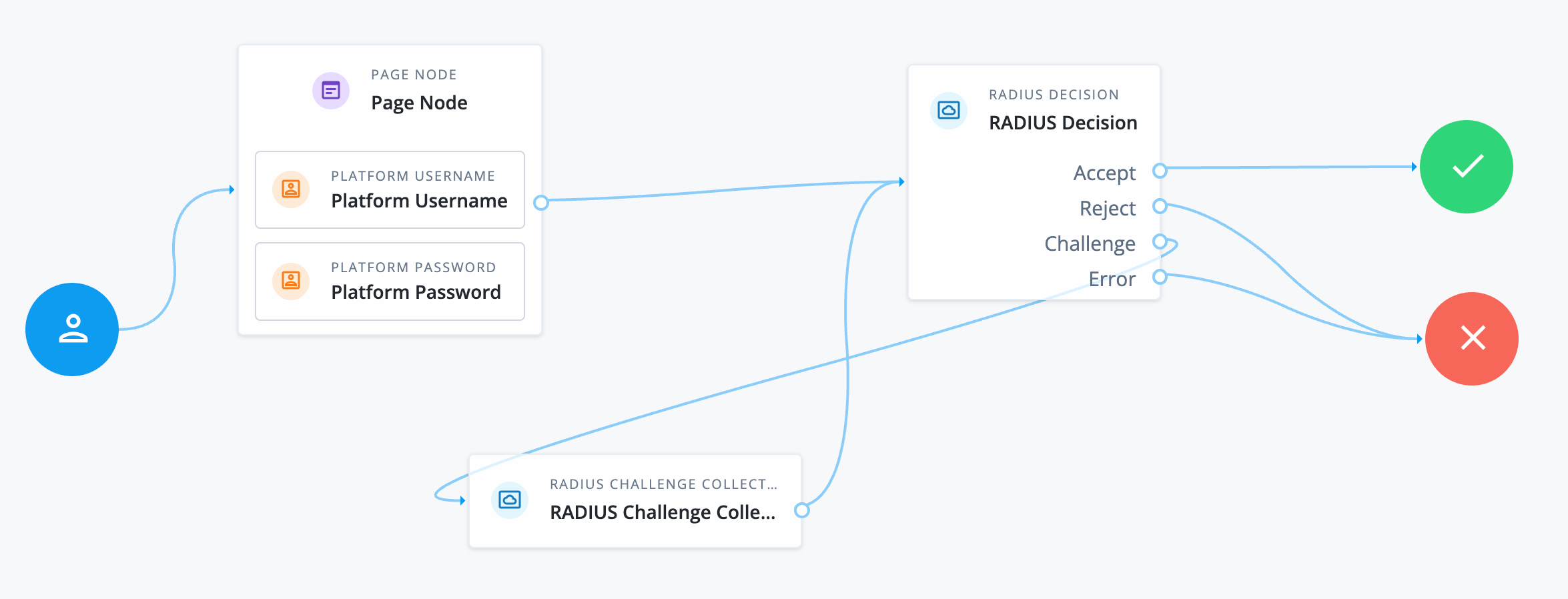
The following example shows how you can implement RADIUS authentication with Advanced Identity Cloud acting as the client:
-
The Page node with the Platform Username node and Platform Password node prompt the user for their credentials.
-
The RADIUS Decision node sends the user’s credentials in an
Access-Requestpacket to the configured RADIUS server.-
If the RADIUS server responds with an
Access-Acceptpacket, the user is successfully authenticated. -
If the RADIUS server responds with an
Access-Rejectpacket, authentication fails. -
If the RADIUS server responds with an
Access-Challengepacket, the RADIUS Challenge Collector node presents the challenge message to the user and collects their response.After the user has responded, the RADIUS Decision node sends another
Access-Requestpacket to the RADIUS server, including the user’s response.Depending on the RADIUS server’s response to the second
Access-Requestpacket, the user is either authenticated or denied access.
-
Availability
| Product | Available? |
|---|---|
PingOne Advanced Identity Cloud |
Yes |
PingAM (self-managed) |
Yes |
Ping Advanced Identity Software (self-managed) |
Yes |
Inputs
-
The node reads the
usernameandpasswordfrom the shared state.Implement a Platform Username node and a Platform Password node earlier in the journey.
-
The node reads the challenge response from the
radiusChallengeobject in the incoming node state if it exists.
Configuration
| Property | Usage |
|---|---|
Primary RADIUS Servers |
A list of primary RADIUS servers to use for authentication. Enter the fully qualified domain name or IP address of the RADIUS server and click Add.
You can optionally include the port number after the server name using a colon, for example, You can adjust the order of the servers by dragging and dropping them in the list. |
Secondary RADIUS Servers |
A list of secondary RADIUS servers to use for authentication if no primary servers are available. Enter the fully qualified domain name or IP address of the RADIUS server and click Add.
You can optionally include the port number after the server name using a colon, for example, You can adjust the order of the servers by dragging and dropping them in the list. |
RADIUS Shared Secret Label Identifier |
An identifier used to create a secret label for mapping to the shared secret in the secret store. The shared secret is used to secure communication between Advanced Identity Cloud and the RADIUS server. When you enter an identifier in this field, a secret label is automatically created with the format
When the journey processes the node, it retrieves the shared secret from the secret store using the generated secret label. The identifier can only contain alphanumeric characters ( Learn about mapping secrets in Map ESV secrets to secret labels. |
Timeout |
The number of seconds to wait for the RADIUS server to respond. Default: |
Health Check Interval |
The number of minutes between health checks to previously unavailable RADIUS servers. Default: |
Stop RADIUS binds after lockout |
Select this option to prevent the node from sending Default: Not enabled |
Require Message-Authenticator attribute |
To mitigate the risk of a Blast-RADIUS attack,
select this option to make the You can use this attribute (defined in RFC 3579) to verify incoming RADIUS responses to prevent spoofing. When this option is enabled:
Default: Enabled |
Outputs
The node has the following outputs depending on the RADIUS server’s response:
- Access-Accept
-
The node adds the
radiusAttributesobject to shared state if the RADIUS server responds with anAccess-Acceptpacket that includes Vendor-Specific Attributes (VSA) (Attribute 26).The
radiusAttributesobject includes the following information:{ "vendorId": "<vendor id>", "bytes": "<binary bytes that represent the VSA>" }Connect the
Acceptoutcome to a Scripted Decision node to read the VSA and make decisions based on the custom data provided by the RADIUS server.Sample script
The following sample script retrieves the
radiusAttributesobject from shared state. It then parses thebytesfield for specific details, obtains the value for a specific vendor ID, and validates the result against a custom value.This example assumes the following VSA structure:
-
Byte 0: Type
-
Byte 1: Length
-
Bytes 2-5: Vendor ID
-
Byte 6: Sub-type
-
Byte 7: Sub-length
-
Bytes 8-n: Value
Adjust the script to match the structure of your VSA.
var radiusAttrs = nodeState.get("radiusAttributes"); var attr = radiusAttrs.get(0); var bytes = attr.get("bytes"); var value = null; // parse the bytes value for the vendor ID (bytes 2-5) var b0 = bytes[2] & 0xFF; var b1 = bytes[3] & 0xFF; var b2 = bytes[4] & 0xFF; var b3 = bytes[5] & 0xFF; var vendorId = (b0 << 24) | (b1 << 16) | (b2 << 8) | b3; // parse sub-type (byte 6) var subType = bytes[6] & 0xFF; if (vendorId == vendor-id) { // replace vendor-id with a valid numeric vendor ID // decode the bytes value (bytes 8-n) value = new java.lang.String(bytes, 8, bytes.length - 8); } if (value === "custom-value") { // replace custom-value with the value to check outcome = "true"; } else { outcome = "false"; } -
- Access-Challenge
-
The node adds the
radiusChallengeobject to transient state if the RADIUS server responds with anAccess-Challengepacket.The
radiusChallengeobject includes the following information:{ "octets": "<binary bytes received from the RADIUS server that represent the state information>", "replyMessage": "<challenge message from the RADIUS server>", "response": null }
Outcomes
- Accept
-
The RADIUS server responds with an
Access-Acceptpacket and the user is successfully authenticated. - Reject
-
The RADIUS server responds with an
Access-Rejectpacket and authentication fails. - Challenge
-
The RADIUS server responds with an
Access-Challengepacket requesting additional information from the user.Connect this outcome to the RADIUS Challenge Collector node to present the challenge message to the user and collect their response.
- Error
-
The node encounters an error and authentication fails.
Errors
The node can log the following:
- Warnings
-
-
User account is locked: usernameThe user’s account in Advanced Identity Cloud is locked.
-
Could not find user identity for username: usernameThe node can’t find a user profile in Advanced Identity Cloud for the username.
-
- Errors
-
-
Error connecting to RADIUS serverThe node can’t connect to the RADIUS server.
-