JWT Password Replay node
The JWT Password Replay node stores the user’s password in an encrypted JSON Web Token (JWT). The node retrieves a secret from the secret store using a configured secret label identifier to encrypt the JWT. The encrypted JWT is then stored as a session property.
You can then configure PingGateway to extract this session property using the token returned by a successful authentication journey.
| This node is intended for use with legacy applications that require a password for authentication where delegation isn’t an option. |
Example
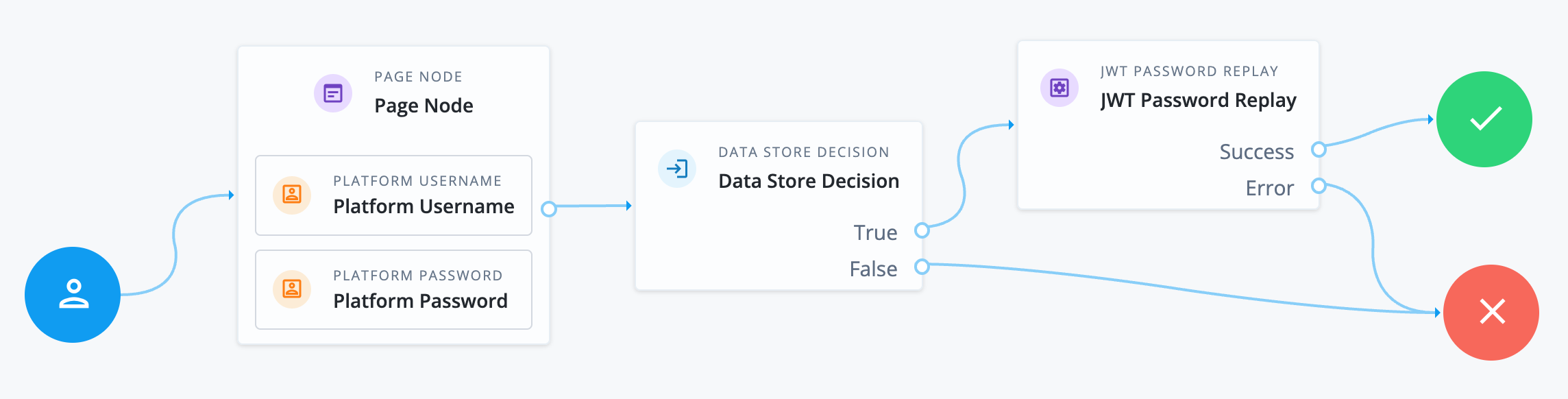
Use the JWT Password Replay node with PingGateway to capture and replay username-password credentials.
Place the node after successful user validation so that the computational expense of generating a JWT only occurs for authenticated users. For example:
Availability
| Product | Available? |
|---|---|
PingOne Advanced Identity Cloud |
Yes |
PingAM (self-managed) |
Yes |
Ping Advanced Identity Software (self-managed) |
Yes |
Configuration
| Property | Usage |
|---|---|
Encryption Key Secret Label Identifier |
Advanced Identity Cloud uses this identifier to create a specific secret label for this node. The secret label takes the form
The identifier can only contain alphanumeric characters ( |
JWT Session Property Name |
The session property that stores the JWT at the end of the journey. The default is For security reasons, don’t allowlist this session property. |
Outcomes
- Success
-
The node created and stored the JWT successfully.
- Error
-
The password was missing from state or the encryption secret couldn’t be retrieved.
Errors
The node can log the following errors:
-
No password found in state to create JWT for password replayThe password is missing from the shared state.
-
No active encryption key secret found for purpose secret labelThe node couldn’t find an active encryption key using the configured secret label identifier.