RSA SecurID node
The RSA SecurID node lets you perform multi-factor authentication (MFA) by integrating with RSA SecurID. End users can authenticate with their registered RSA authenticators using one of the following services:
The node supports the following RSA MFA methods:
-
Push Notifications (Approve)
-
QR Code
-
Biometrics
-
Authenticate OTP
-
SecurID OTP
-
SMS OTP
-
Voice OTP
-
Emergency Access Code
|
FIDO, LDAP Directory Password, and OATH OTP methods aren’t supported by this node. If you require these authentication methods, consider using alternative nodes instead. Alternative nodes
|
Example
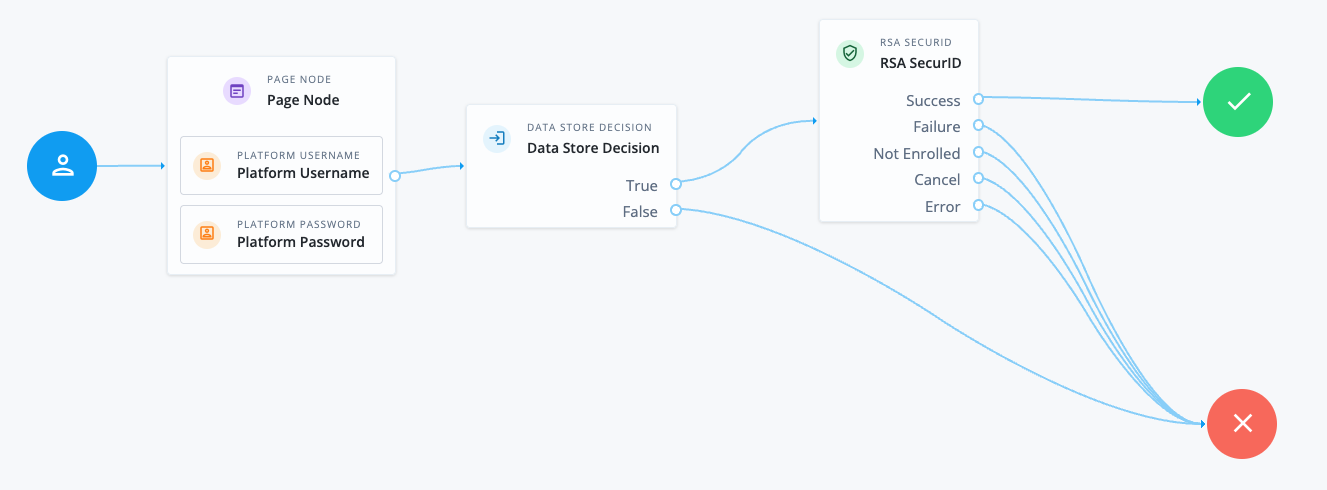
The following example journey validates the user’s credentials before they complete MFA with an RSA authenticator:
-
The Page node containing the Platform Username node and Platform Password node prompts for credentials.
-
The Data Store Decision node validates the username-password credentials.
-
The RSA SecurID node handles the MFA flow with RSA SecurID and attempts to authenticate the user using one of their registered RSA authenticators.
-
If the user hasn’t registered any RSA authenticators, authentication fails and evaluation continues along the
Not Enrolledoutcome path. -
If the user has a single authentication method available to them, they’re prompted to complete the MFA challenge using that method.
-
If the user has multiple authentication methods available to them, they can choose which one to use before being prompted to complete the MFA challenge using that method.
-
If the user completes the MFA challenge successfully, they’re authenticated and logged in.
-
If the user fails to complete the MFA challenge, authentication fails and evaluation continues along the
Failureoutcome path.
-
Availability
| Product | Available? |
|---|---|
PingOne Advanced Identity Cloud |
Yes |
PingAM (self-managed) |
Yes |
Ping Advanced Identity Software (self-managed) |
Yes |
Inputs
This node requires a username in the incoming node state to identify the user.
Implement a Platform Username node earlier in the journey.
Dependencies
You must complete the RSA SecurID setup before using this node to authenticate users.
If you want to use a custom HTTP Client for communicating with the RSA Authentication API, you must configure an Http Client service first.
Additionally, the username in the incoming node state must match one of the following:
-
The username, alternate username, or email address of the user in the RSA CAS.
-
The username in the Authentication Manager.
RSA SecurID setup
The setup required depends on whether you have integrated with CAS or Authentication Manager:
CAS
-
Configure the following using the Cloud Administration Console:
-
Assurance Levels: Find more information in Configure Assurance Levels in the RSA documentation.
-
Access Policies: Find more information in Manage Access Policies in the RSA documentation.
Make a note of the Access Policy name. You’ll need this to configure the RSA SecurID node.
-
Authentication API Keys: Find more information in Manage the RSA Authentication API Keys (Legacy Clients) in the RSA documentation.
Make a note of the RSA Authentication API REST URL and API key. You’ll need these to configure the RSA SecurID node.
-
-
Make sure end users have registered their RSA authenticators. Find more information in Manage My Page in the RSA documentation.
Authentication Manager
-
Configure the following using the Security Console:
-
Authentication Agents: Find more information in Add an Authentication Agent in the RSA documentation.
Make a note of the Authentication Agent name. You’ll need this to configure the RSA SecurID node.
-
Authentication API Keys: Find more information in Configure the RSA SecurID Authentication API for Authentication Agents in the RSA documentation.
Make a note of the API Key. You’ll need this to configure the RSA SecurID node.
-
-
Get the RSA Authentication API REST URL from your RSA Authentication Manager administrator. You’ll need this to configure the RSA SecurID node.
Configuration
| Property | Usage |
|---|---|
SecurID URL |
The RSA Authentication API REST URL. The URL format depends on whether you’re connecting to CAS or Authentication Manager:
|
Client ID |
The name used by this node as the client ID for connecting to the SecurID URL.
|
Assurance Policy |
This property only applies if you’re connecting to CAS or when the Authentication Manager is operating as a secure proxy server for the cloud. The name of the Access Policy to use. This value must match the name of an Access Policy configured in the CAS Cloud Administration Console. For example: |
Client Key Secret Label Identifier |
An identifier used to create a secret label for mapping to the RSA API key in a secret store.
Advanced Identity Cloud uses this identifier to create a specific secret label for this node. The secret label takes the form
|
Authentication Attempt Timeout |
This property only applies if you’re connecting to CAS. The number of seconds before the authentication request to RSA times out. |
HTTP Client |
The HTTP Client to use for communicating with the Authentication API. Leave blank to use the default HTTP Client. |
Prompt for MFA Choice |
Add a custom, localized message to display to the end user with the list of available MFA methods: Add instructions
Leave blank to use the default message. Default: |
Waiting Message |
Add a custom, localized message to display to the end user when a push notification has been sent to their registered device: Add instructions
Leave blank to use the default message. Default: |
(1) Specify a
locale that Java supports, such as en-gb. Otherwise, the node throws a configuration exception with an Invalid locale provided message.
Callbacks
The node sends the following callbacks:
ChoiceCallback-
Displays a list of available MFA methods to the user and contains the Prompt for MFA Choice.
ConfirmationCallback-
Lets the user choose to proceed or cancel.
PasswordCallback-
Prompts the user to enter the token code, PIN, or OTP as required by the selected MFA method.
PollingWaitCallback-
Waits for the user to respond to the push notification and contains the Waiting Message.
ScriptTextOutputCallback-
Executes a JavaScript script that renders the QR code when the QR Code method is selected.
Learn more in Supported callbacks.
Outcomes
Success-
The user successfully authenticated.
Failure-
The user failed to authenticate.
Not Enrolled-
The user isn’t enrolled in any of the available MFA methods.
Cancel-
The user pressed the Cancel button.
Error-
An error occurred during node execution.
Errors
The node can log the following errors:
-
username does not exist in node stateThe
usernameattribute is missing from the shared state. Make sure you implement a suitable node earlier in the journey to capture theusername. -
Expected response to contain methodResponseCodeThe verification response received from RSA is missing the response code.
-
Failed to initialize SecurID: HTTP responseThe node failed to connect to the SecurID URL. Check the SecurID URL, Client ID, and Client Key Secret Label Identifier properties.
-
Failed to verify SecurID: HTTP responseThe node received an unsuccessful response code from the RSA verify endpoint. Review the error message from RSA included in the HTTP response.