Role grant workflow example
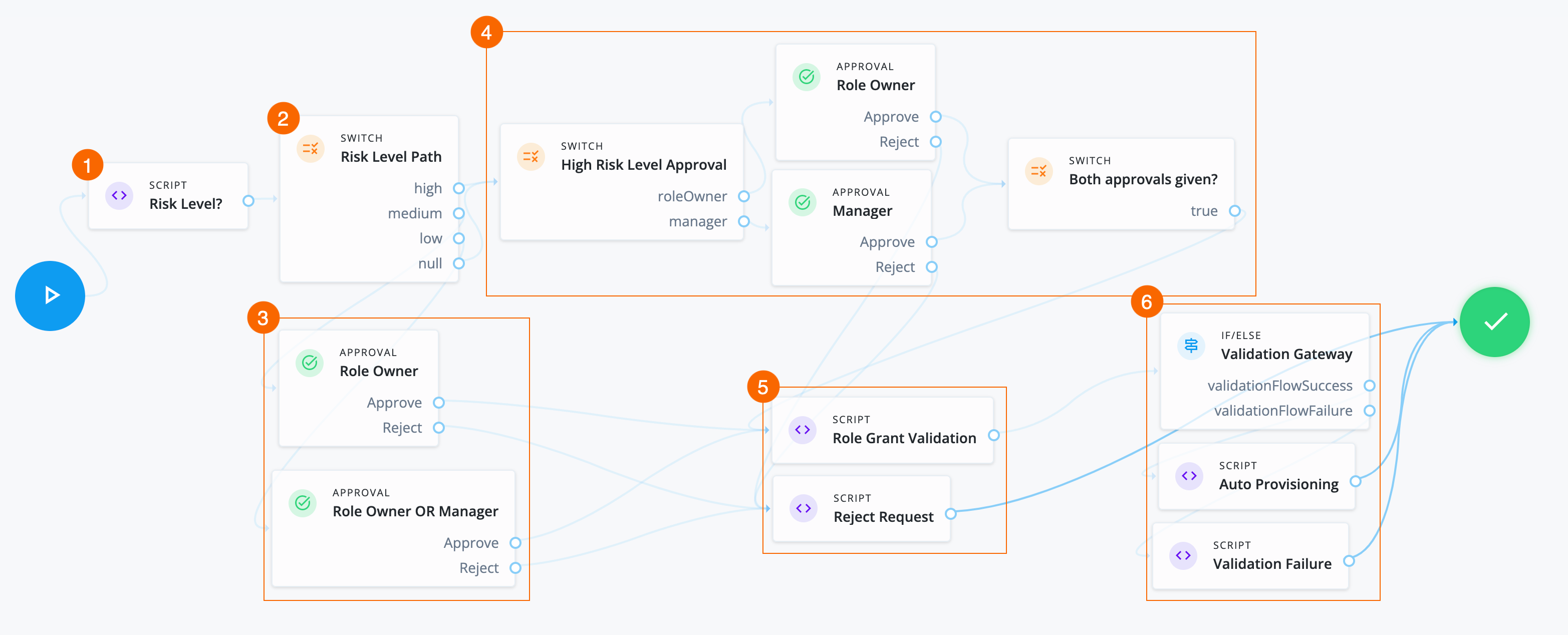
In this example, an administrator wants to create a role grant workflow that:
-
Checks the risk level of the role.
-
Separate approvals are required based on the risk level. Specifically, if the risk level is
high, send two approvals, in parallel, to the end user’s manager and the role owner.
Assumptions
-
Each role has a role owner. The role owner is a user identity designated to manage the role.
-
You create a role glossary attribute (string with enumerated value),
riskLevel, that has the following values:-
low -
medium -
highFor each role, this attribute is populated.
-
-
Your end users have a manager assigned to them. An administrator populates this property and isn’t modifiable by the end user.
Example
-
1 A Script node checks the value of the role glossary attribute
riskLeveland sets outcomes.Click to display risk level script
var content = execution.getVariables(); var requestId = content.get('id'); var requestObj = null; var roleId = null; var roleGlossary = null; var riskLevel = null; try { requestObj = openidm.action('iga/governance/requests/' + requestId, 'GET', {}, {}); riskId = requestObj.risk.id; } catch (e) { logger.info("Validation failed: Error reading role grant request with id " + requestId); } try { roleGlossary = openidm.action('iga/governance/role/' + roleId + '/glossary', 'GET', {}, {}); riskLevel = roleGlossary.riskLevel; execution.setVariable("riskLevel", riskLevel); } catch (e) { logger.info("Could not retrieve glossary with roleId " + roleId + " from role grant request ID " + requestId); } -
2 A Switch node determines the path to take based on the Script node.
-
3 If the risk level is:
-
low: An Approval node requires either the role owner or the end user’s manager to approve the request. -
medium: An Approval node requires the role owner to approve the request.
-
-
4 If the risk level is
highornullthen:-
A Switch node sends two approval tasks in parallel.
-
An Approval node requires the role owner to approve the request.
-
An Approval node requires the end user’s manager to approve the request.
-
A closing Switch node waits for both approvals before proceeding to provision the role.
-
-
5 If the required approvals are met, a Script node runs a validation check.
Click to display the Role Grant Validation script
logger.info("Running role grant request validation");

var content = execution.getVariables();
var requestId = content.get('id');
var failureReason = null;
var roleId = null;
var role = null;

try {
  var requestObj = openidm.action('iga/governance/requests/' + requestId, 'GET', {}, {});
  roleId = requestObj.role.id;
}
catch (e) {
  failureReason = "Validation failed: Error reading request with id " + requestId;
}

// Validation 1 - Check role exists
if (!failureReason) {
  try {
    role = openidm.read('managed/alpha_role/' + roleId);
    if (!role) {
      failureReason = "Validation failed: Cannot find role with id " + roleId;
    }
  }
  catch (e) {
    failureReason = "Validation failed: Error reading role with id " + roleId + ". Error message: " + e.message;
  }
}

if (failureReason) {
  logger.info("Validation failed: " + failureReason);
}
execution.setVariable("failureReason", failureReason);
If any Approval node has the
Rejectoutcome, a Script node denies the request.Click to display Reject Request script
logger.info("Rejecting request"); var content = execution.getVariables(); var requestId = content.get('id'); logger.info("Execution Content: " + content); var requestIndex = openidm.action('iga/governance/requests/' + requestId, 'GET', {}, {}); var decision = {'outcome': 'denied', 'status': 'complete', 'decision': 'rejected'}; var queryParams = { '_action': 'update'}; openidm.action('iga/governance/requests/' + requestId, 'POST', decision, queryParams); -
6 If the If/else node outcome is:
-
validationFlowSuccess: A Script node provisions the application to the end user.Click to display Auto Provisioning script
logger.info("Auto-Provisioning"); var content = execution.getVariables(); var requestId = content.get('id'); var failureReason = null; try { var requestObj = openidm.action('iga/governance/requests/' + requestId, 'GET', {}, {}); logger.info("requestObj: " + requestObj); } catch (e) { failureReason = "Provisioning failed: Error reading request with id " + requestId; } if(!failureReason) { try { var request = requestObj.request; var payload = { "roleId": request.common.roleId, "startDate": request.common.startDate, "endDate": request.common.endDate, "auditContext": {}, "grantType": "request" }; var queryParams = { "_action": "add" } var result = openidm.action('iga/governance/user/' + request.common.userId + '/roles' , 'POST', payload,queryParams); } catch (e) { failureReason = "Provisioning failed: Error provisioning role to user " + request.common.userId + " for role " + request.common.roleId + ". Error message: " + e.message; } var decision = {'status': 'complete', 'decision': 'approved'}; if (failureReason) { decision.outcome = 'not provisioned'; decision.comment = failureReason; decision.failure = true; } else { decision.outcome = 'provisioned'; } var queryParams = { '_action': 'update'}; openidm.action('iga/governance/requests/' + requestId, 'POST', decision, queryParams); logger.info("Request " + requestId + " completed."); } -
validationFlowFailure: A Script node doesn’t provision the application to the end user.Click to display Validation Failure script
var content = execution.getVariables();
var failureReason = content.get('failureReason');

var decision = {'outcome': 'not provisioned', 'status': 'complete', 'comment': failureReason, 'failure': true, 'decision': 'approved'};
var queryParams = { '_action': 'update'};
openidm.action('iga/governance/requests/' + requestId, 'POST', decision, queryParams);
-
|
Download the JSON file for this workflow here. Learn more about how to import or export workflows in workflow editor canvas. |